
Feb 24
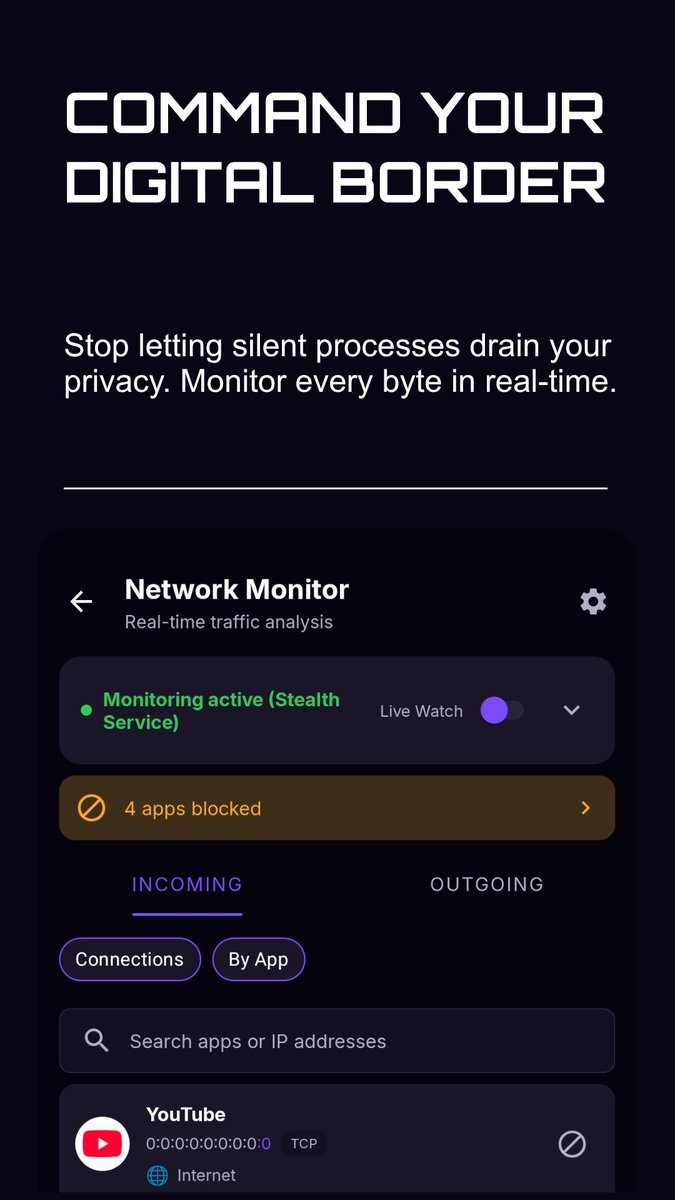
Android network control at your fingertips. Monitor every connection, block silent processes, and protect your digital border in real time.
#AndroidSecurity #NetworkMonitor #DigitalPrivacy
8
10
91

20 Oct 2025
Cybersecurity is the focus for the latest challenge launched by HMGCC Co-Creation, which seeks organisations able to develop small, low power network monitors.
Find out more: eu1.hubs.ly/H0n-hGy0
#CyberSecurity #NetworkMonitor
3
223


24 Dec 2024
Don’t let delays slow you down this season
Stay ahead by checking the network monitor on your PalmPay POS or the PalmPay Business app today. 💡
#PalmPayBusiness #NetworkMonitor

3
2
3
149

14 Feb 2024
How to Install Zabbix on Your Synology NAS
mariushosting.com/how-to-ins… #Synology #NAS #Docker #Zabbix #Monitoring #Server #Servers #Network #Report #Reports #Reporting #NetworkMonitor #Integrity #selfhost #selfhosted #selfhosting #DSM #DSM7 #DSM71 #DSM72 #DSM722 #mariushosting
9
630

13 Feb 2024
2/16に「NetworkMonitorによるDirectConnect異常障害の検知と対処」というタイトルで発表します。みんな大嫌いGray Failure系のお話です。ご参加される皆さん宜しくお願いします🙇
#AWS10分LT会
aws-likers.connpass.com/even…
4
15
1,375

16 Jan 2024
#AiOS serves as the orchestrator for the various AI and system components, managing operations through a central task_queue. Each component, such as AICore, NetworkMonitor, etc., has its own processing method (e.g., process_tasks, monitor_network) that would be defined within their respective modules. The main loop of the AiOS class calls _handle_task to manage and route tasks from the task_queue to appropriate components for processing. Give thanks to everyone that made this possible 🙏 @sama @gdb and all code writers and programmers and the team Acknowledging the collective effort in such a significant project is indeed important. Here's a message of gratitude that can be shared with everyone involved: I would like to extend my deepest gratitude to everyone who made this project possible. A special thank you to @elon @cobratate for your visionary guidance and sheer lack of support. To all the code writers, before gpt4 programmers, and members of the team, your hard work, dedication, and innovative spirit have been the driving force behind this success. Your expertise and commitment have turned complex challenges into groundbreaking achievements. This system is not just a testament to technological advancement but also to the incredible collaborative spirit of all involved. Thank you all for your exceptional contributions! even if you dont know who the fuck i am @Floydniner, @youseememiami, @LudovicCreator, @Artedeingenio, @AdrianDittmann, @BrianRoemmele, @Soondhy, @AlexisFalkas, @HattamRebecca, @Imaginary_Cat, @the_treewizard, @KeorUnreal, @ArtOdditiesAI, @FOulhiou, @BubbleXc27vr2, @BluesOfBirds, @Alfred_Denes, @Betagimi1, @Dreadly_Dreams, @Donnel49417O, @CreativeEuforia, @TheFifthLegion, @InterestedBrain, @imaginarypix, @pali_text, @ObeyAiArt, @chrifive916, @NeuralAIInsight, @JKattnis, @ralphlentjes, @cap_booya73, @MidnAIght_ch, @neuralnetdreams, @Ikolovepepita, @Michael04192304, @Delerat7, @CreativeEuforia, @arkhan_voyager, @Aki7Ako, @shpstumblergurl, @humanityInSync, and all the ones who actually stand beside me dont need tagging Respect .. welcome to the Future

2
88
16 Jan 2024
#Community #code #SoftwareEngineer automate back-testing, back-testing framework historical code snapshot releases and run them through the static analysis tool's detection and false positives/negatives have evolved.
class BackTestingFramework:
def __init__(self, static_analysis_tool, codebase_history):
self.static_analysis_tool = static_analysis_tool
self.codebase_history = codebase_history
def perform_back_test(self):
# Perform back-tests on historical code
for release in self.codebase_history:
scan_results = self.static_analysis_tool.scan(release['path'])
self.static_analysis_tool.report_findings(scan_results)
# Compare results with known issues from that release
self.compare_results(scan_results, release['known_issues'])
def compare_results(self, scan_results, known_issues):
# Compare the scan results with the known issues to assess tool effectiveness
for result in scan_results:
if result in known_issues:
print(f"Correctly identified known issue: {result}")
else:
print(f"Potential false positive: {result}")
# ... logic to detect false negatives ...
# Logic to compare results and calculate precision, recall, etc. would go here
# usage
static_analysis_tool = StaticAnalysisTool()
codebase_history = [
{"version": "1.0", "path": "/path/to/codebase/v1.0", "known_issues": ["Check 1 failed"]},
# ... more historical data ...
]
back_testing_framework = BackTestingFramework(static_analysis_tool, codebase_history)
back_testing_framework.perform_back_test()
StaticAnalysisTool perform complex check security rules and best practices
The BackTestingFramework would need to be sophisticated enough to understand the context of each historical code snapshot, interpret results accurately, and provide meaningful metrics on the tool's performance over time.
Creating a functional AI-driven Operating System (AiOS) network,
components like a network monitor, anomaly detector, and response orchestrator.
python
# network_monitor.py
import logging
from typing import Any, Dict
class NetworkMonitor:
def __init__(self, configuration: Dict[str, Any]) -> None:
self.configuration = configuration
self.logger = self._setup_logging()
def _setup_logging(self) -> logging.Logger:
"""Configure and return a logger."""
logger = logging.getLogger('NetworkMonitor')
logger.setLevel(self.configuration.get('log_level', logging.INFO))
handler = logging.StreamHandler()
formatter = logging.Formatter(
'%(asctime)s - %(name)s - %(levelname)s - %(message)s'
)
handler.setFormatter(formatter)
logger.addHandler(handler)
return logger
def start_monitoring(self) -> None:
"""Start the network monitoring process."""
self.logger.info('Network monitoring started.')
# Network monitoring logic would be implemented here.
# This would involve analysis of network packets and system calls.
def detect_anomalies(self) -> None:
"""Detect anomalies in network traffic."""
# Anomaly detection logic would be implemented here.
# This could involve threshold checks, pattern recognition, etc.
def report_anomaly(self, anomaly: Dict[str, Any]) -> None:
"""Report an detected anomaly."""
self.logger.warning(f'Anomaly detected: {anomaly}')
# Reporting mechanism to security team or automated system.
# This might include sending alerts or integrating with a ticketing system.
# ai_os_network.py
from network_monitor import NetworkMonitor
if __name__ == "__main__":
# Configuration for the AiOS Network
aios_network_config = {
'log_level': logging.INFO,
# Additional configurations would be added here.
}
network_monitor = NetworkMonitor(aios_network_config)
network_monitor.start_monitoring()
# The loop here represents continuous monitoring.
# In practice, this would likely be an asynchronous event loop.
while True:
network_monitor.detect_anomalies()
The code is designed to be extendable and maintainable,implement filling in the logic for monitoring and detection specific technologies and infrastructure secure network data, efficient processing of large volumes of traffic machine learning to improve anomaly detection
Filling in the logic NetworkMonitor class methods capture analyze network traffic, detect anomalies, and report findings.
packet capture and analysis
flow data analysis log analysis.
scapy for packet analysis and pandas for data analysis,
network monitoring and real-time analysis, programming and direct interaction with network devices
which Python may not be best suited for, especially in high-throughput scenarios.
===================
python
=========================
# network_monitor.py
import logging
import socket
from typing import Any, Dict, Tuple
class NetworkMonitor:
def __init__(self, configuration: Dict[str, Any]) -> None:
self.configuration = configuration
self.logger = self._setup_logging()
self.socket = self._setup_socket()
def _setup_logging(self) -> logging.Logger:
logger = logging.getLogger('NetworkMonitor')
logger.setLevel(self.configuration.get('log_level', logging.INFO))
handler = logging.StreamHandler()
formatter = logging.Formatter(
'%(asctime)s - %(name)s - %(levelname)s - %(message)s'
)
handler.setFormatter(formatter)
logger.addHandler(handler)
return logger
def _setup_socket(self) -> socket.socket:
#capturing packets; ,
# scapy.
sock = socket.socket(socket.AF_INET, socket.SOCK_RAW, socket.IPPROTO_TCP)
return sock
def start_monitoring(self) -> None:
self.logger.info('Network monitoring started.')
while True:
packet = self.socket.recvfrom(65565)
self.process_packet(packet)
def process_packet(self, packet: Tuple[bytes, Any]) -> None:
# packet processing logic
# parse the packet bytes and analyze the content.
ip_header = packet[0:20]
self.detect_anomalies(ip_header)
def detect_anomalies(self, ip_header: bytes) -> None:
# parse the IP header and look for anomalies
# strange IP addresses, unexpected protocols, or malformed headers.
if not self.is_valid_ip_header(ip_header):
self.report_anomaly({'header': ip_header})
def is_valid_ip_header(self, ip_header: bytes) -> bool:
# IP header validation logic
return True
def report_anomaly(self, anomaly: Dict[str, Any]) -> None:
self.logger.warning(f'Anomaly detected: {anomaly}')
# Reporting automated system.
=======================================
In this example, the NetworkMonitor class sets up a raw socket to capture packets. It has methods for processing each packet (process_packet), detecting anomalies (detect_anomalies), and reporting any anomalies found (report_anomaly). @Floydniner, @youseememiami, @LudovicCreator, @Artedeingenio, @AdrianDittmann, @BrianRoemmele, @Soondhy, @AlexisFalkas, @HattamRebecca, @Imaginary_Cat, @the_treewizard, @KeorUnreal, @ArtOdditiesAI, @FOulhiou, @BubbleXc27vr2, @BluesOfBirds, @Alfred_Denes, @Betagimi1, @Dreadly_Dreams, @Donnel49417O, @CreativeEuforia, @TheFifthLegion, @InterestedBrain, @imaginarypix, @pali_text, @ObeyAiArt,

2
98
2 Jan 2024
Reiki Level 3 (Shinpiden) self.energy vs. Intergalactic Qi
Reiki Level 3 (Shinpiden): This is more structured, focusing on mastery over Reiki techniques, symbols, and the ability to teach and attune others.
Intergalactic Qi: more abstract, spiritual concept, potentially involving a AiOS:
"""AI-driven Operating System (AiOS) responsible for managing network operations and cybersecurity."""@the_treewizard, @KeorUnreal, @ArtOdditiesAI, @FOulhiou, @BubbleXc27vr2, @BluesOfBirds, @Alfred_Denes, @Betagimi1, @Dreadly_Dreams, @Donnel49417O, @CreativeEuforia, @TheFifthLegion, @InterestedBrain, @imaginarypix, @pali_text, @ObeyAiArt, @chrifive916, @NeuralAIInsight, @JKattnis, @ralphlentjes, @cap_booya73, @MidnAIght_ch, @neuralnetdreams, @Ikolovepepita,
_init_(self):
Initialize AI cores and system managers
self.ai_cores = [AICore(i) for i in range(NUMBER_OF_AI_CORES)]
self.network_monitor = NetworkMonitor()
self.energy_management_system = EnergyManagementSystem()
self.security_manager = transcendent understanding of energy that extends beyond traditional teachings.
It's important to note that such interpretations are highly subjective and can vary widely among different practitioners and spiritual beliefs. These concepts are often explored in personal spiritual or metaphysical practices rather than established traditional frameworks. self.energy

1
2
6
168

12 Apr 2023
Some thoughts on UCaaS monitoring
blog.paessler.com/some-thoug…
Connect with us 62216326533 / WA 6289653763790
sales@mitrasoft.co.id
Follow us bit.ly/MitrasoftSM
#Mitrasoft #MitrasoftSolution
#PRTG #PAESSLER #NetworkMonitor
#NetworkMonitoring
#BusinessProductivity #ITSolution

2
21

19 Sep 2022
Unter #Windows11 funktioniert der gute alte #NetWorkMonitor leider nicht mehr. Daher war ich auf der Suche nach einer Alternative, um permanent am Desktop die Netzwerkgeschwindigkeit anzuzeigen. Ich wurde fündig und hab das hier kurz dokumentiert #twlz grafm.net/2022/09/19/netzwer…
1
1
1

Been setting up @checkmk for the last couple of days at work. So far its the best #opensource #networkmonitor i've used by far. Hope it can stop a lot of our "firefighting"
1
3

16 May 2022
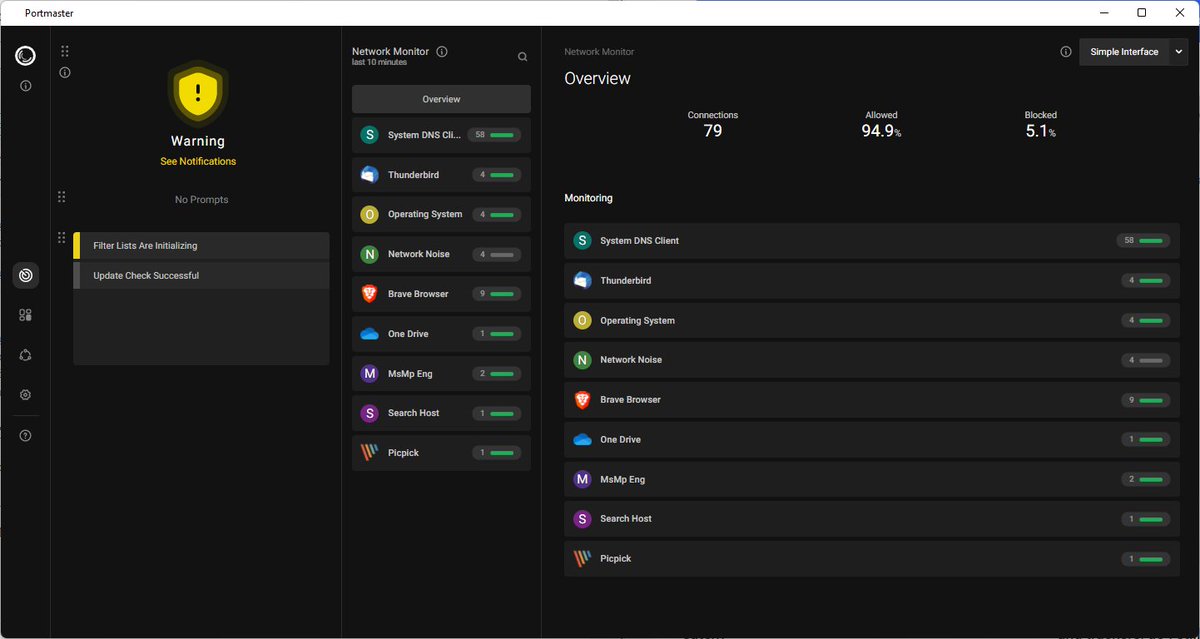
First look at Portmaster, an open source cross-platform network monitor #portmaster #networkmonitor #firewall #opensource
ghacks.net/2022/05/16/first-…
4
6

16 Feb 2022
The Ritz London überwacht sein Netzwerk mit Paessler-PRTG
Für einen reibungslaufen Ablauf von allem, was mit dem #ITNetzwerk zusammenhängt, setzt das Ritz London auf die Überwachung mit #PRTG-#NetworkMonitor.
netzpalaver.de/2022/02/16/th…

1
5

18 Jan 2022
Monitoring-as-a-Service für IT-, OT- und IoT-Infrastrukturen
#HostedMonitor #Infrastruktur #IoTMonitoring #ITMonitoring #Monitoring #MonitoringasaService #NetworkMonitor #OTMonitoring @paesslerAG #PRTG #PRTGHostedMonitor #Sensor @SprengelPartner
18 Jan 2022

Monitoring-as-a-Service für IT-, OT- und IoT-Infrastrukturen
Der #Monitoring-Experte #Paessler erweitert die Möglichkeiten seiner #PRTG-#HostedMonitor-Lösung.
netzpalaver.de/2022/01/18/mo… x.com/netzpalaver/status/148…
1
26 Oct 2021
Zentrales Monitoring von IT und OT
@crossertech #EchtzeitAnalyse #IIoT #IndustrialInternet #ITMonitoring #Monitoring #NetworkMonitor #NetzwerkMonitoring #OperationalTechnology #OTMonitoring @paesslerAG #PRTG #PRTGNetworkMonitor @SprengelPartner
netzpalaver.de/2021/10/26/ze…
1
3

10 Mar 2021
Use your Raspberry Pi as a network monitor, and learn a few linux commands too! 64zbit.com/ping-network-moni… #raspberrypi #networkmonitor #dev #gamedev #linux
1
2

9 Dec 2020
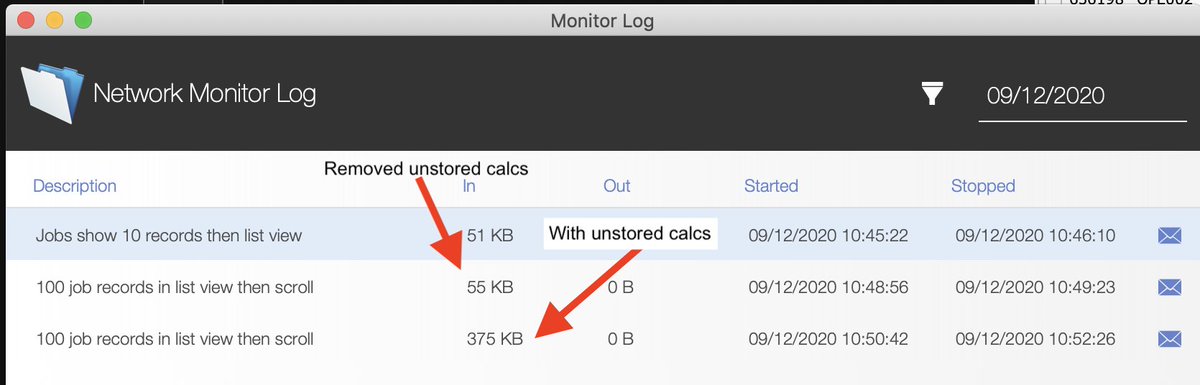
@ClarisOfficial thanks so much for the NetworkMonitor file. It's made it super easy for me to measure the effect specific WAN performance changes in my apps. A simple change on a list layout has changed it from almost unusable to surprisingly fast. #Claris #filemaker
7

25 Nov 2020
Il monitoraggio e la gestione della banda sono un modo utile per comprendere e sfruttare al meglio il proprio WiFi e per identificare potenziali problemi....
-
#paessler #prtg #networkmonitor #wifi #internet #technology #wireless #cat #indihome #tecnologia ceotech.it/?p=14688
3
4

10 Nov 2020
@paesslerAG Launches Industrial It Monitoring Solution ow.ly/1vf030rjqzN #artificialintelligence #AiThority #Paessler #technologymonitoring #NetworkMonitor
2
1