
Feb 25
#Cellframe Node (Node) Setup
🔗 Network Connection & Role
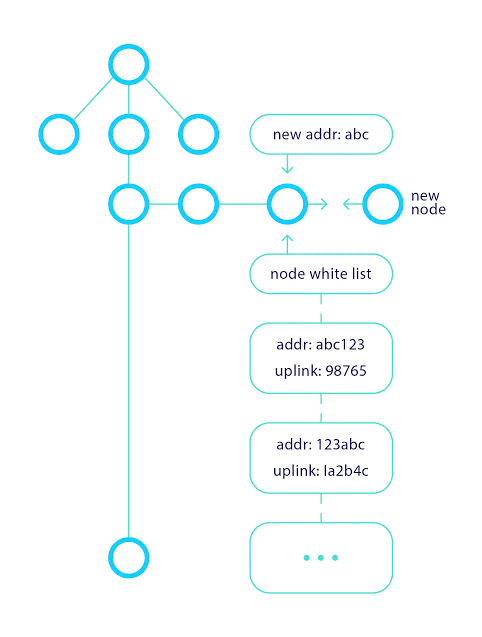
I define Cellframe Node, in the simplest terms, as a piece of software that connects my computer to the Cellframe network and makes me an active part of that ecosystem. Running a node is not just about installing a program; it means directly participating in the network, contributing to how the system operates, and supporting the sustainability of the entire infrastructure.
🌍 Accessibility & Installation
From my perspective, the strongest aspect of this process is its accessibility. The fact that it works on common operating systems such as Windows, macOS, and Linux makes the system reachable for almost anyone. The installation process is not complex; I download the appropriate version, install it, and the system automatically handles its own configuration. I don’t have to deal with technical configuration files, complex commands, or manual setup procedures.
⚙️ Smart Configuration Logic
During installation, the system follows a very intelligent approach. If there are already existing configurations on the computer, it does not interfere with them; if there are none, it automatically creates what is necessary. In other words, there is a safe automation logic that does not put the user at risk and does not break the system. This gives me the feeling that “I only install the node, and the technical burden is handled entirely by the system itself.”
💻 Hardware Requirements
On the hardware side, the situation is equally simple. There is no need for high-performance machines, dedicated servers, or powerful graphics cards. Even an average home or office computer is sufficient to run the system. This clearly shows that Cellframe aims to build a truly decentralized structure, because participation in the network is neither technically nor economically difficult.
🧩 Overall Perspective
In summary, for me, Cellframe Node is the technical equivalent of saying, “I have connected my computer to the Cellframe ecosystem and become an active part of this structure.” It is positioned as a system that is easy to install, simple to manage, strong in infrastructure, and designed not to burden the user. 🦉 wiki.cellframe.net/02. Learn…
$CELL #CELL @cellframenet
@CellframeSocial @IanSmith_HSA
#Cellframe
#Blockchain
#NodeSetup
#NodeInstallation
#DecentralizedNetwork
#CryptoInfrastructure
#TechForBeginners
#NetworkParticipation
#HardwareRequirements
#CryptoNode
6
16
34
381

7 Nov 2025
🌟 Join the Ritual Revolution! 🌟
Ritual is transforming the blockchain landscape with its innovative Layer 1 solution designed for AI integration. Ready to contribute? Here’s how to install your Ritual node:
### Node Installation Instructions:
1. Rent a VPS: Start by renting a Virtual Private Server (VPS) for optimal performance.
2. Access Your VPS: Log into your VPS using SSH.
3. Install Required Tools:
- Update your package list:
sudo apt update
- Install necessary dependencies:
sudo apt install -y build-essential git
4. Clone the Ritual Repository:
git clone github.com/ritual-net/infern…
5. Navigate to the Directory:
cd infernet-node
6. Build the Node:
make build
7. Activate Your Node:
- Follow the prompts to activate your node and confirm the transaction.
8. Stay Updated: Keep an eye on the community for updates and improvements!
Join us in shaping the future of AI and blockchain! 🚀
#Ritual #Blockchain #AI #Crypto #NodeInstallation
4
9
79

19 Jan 2025
📢 We’ve just published a new guide on our Cumulo Medium!
🚀 Learn how to install a @celestia Light Node on the Mocha Testnet with this step-by-step tutorial 🦣.
🔍 In this guide, you’ll learn:
✅ Hardware requirements:
- 500 MB RAM, Single-core CPU, 100 GB SSD
✅ Installing Golang and celestia-node
✅ Initializing and starting the Light Node
✅ Creating the wallet and configuring with SystemD
✅ Useful commands to monitor and manage your node 🖥️
📝 Full guide in English: medium.com/@cumulo.pro/celes…
📚 Guide in Spanish: medium.com/cumulo-pro/guía-…
⚡ Start participating in Mocha Testnet today!
#Celestia #Blockchain #MochaTestnet #Cumulo #NodeInstallation 🌐
2
3
196

Multiple Network. Installing a node
#Multiple is a Web3 DePIN project that uses SD-WAN technology to create a network layer for high-performance transfer of digital assets and data
• Invested: $2,000,000
• Investors: OKX Ventures, Youbi Capital and others
• Specifications: 1CPU/1–2GBRAM/200MSSD
I installed the application on my computer and sometimes open it to farm points
So here we go:
1. Follow the link, link the wallet
app.multiple.cc/#/signup?inv…
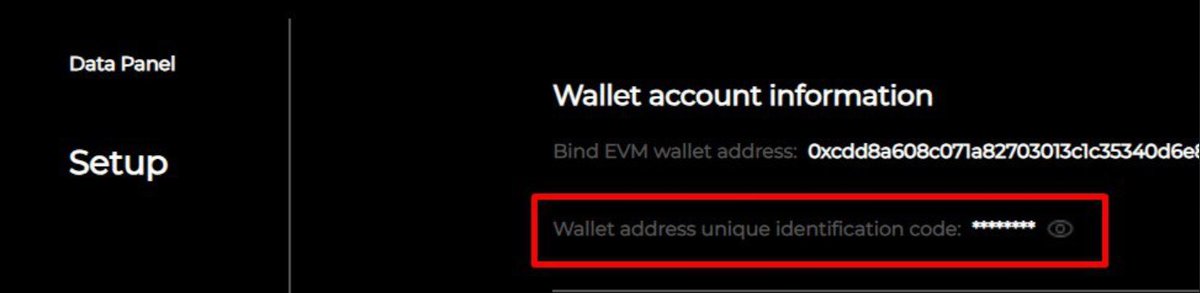
2. Setup section, find and save the code as on the screenshot, link the email.
3. Go to the main page, download the application, install, link the code and start farming points 😊👍
#MultipleNetwork #DePIN #Web3 #SDWAN #DigitalAssets #NodeInstallation #Blockchain #CryptoFarming #TechSetup #NetworkLayer #InvestInCrypto #OKXVentures #YoubiCapital #CryptoNode #EarnPoints
3
959

16 Jun 2023
🚀 Ready to run a node? Installation is easy! Choose the appropriate version for your operating system (Windows, Mac, Linux), create a secure PIN, and start contributing to the global network. Let's get started!
@KoiiNetwork #KoiiNode #NodeInstallation #ContributeToKoii
1
3
1,441