
Apr 16
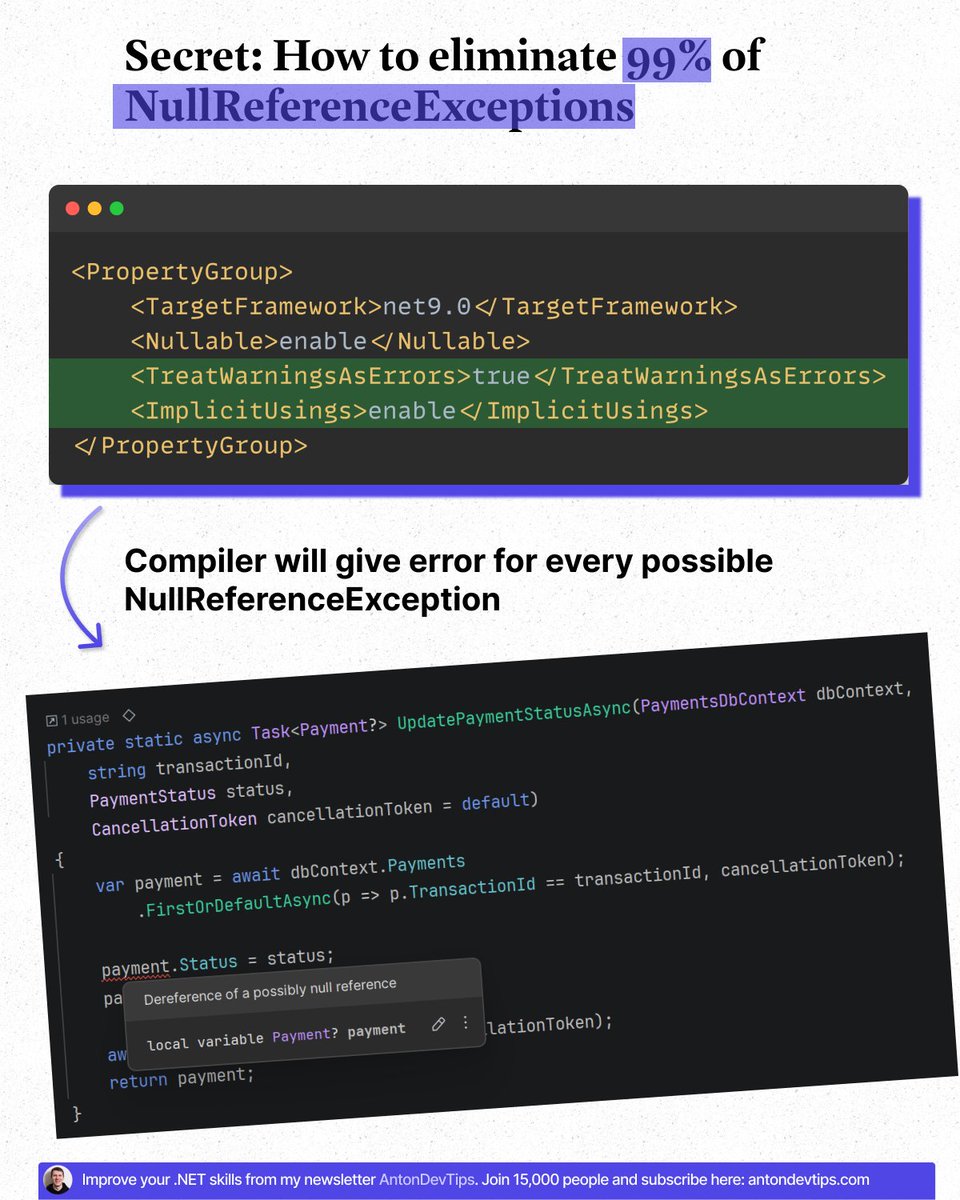
𝗦𝗲𝗰𝗿𝗲𝘁: 𝗛𝗼𝘄 𝘁𝗼 𝗲𝗹𝗶𝗺𝗶𝗻𝗮𝘁𝗲 𝟵𝟵% 𝗼𝗳 𝗡𝘂𝗹𝗹𝗥𝗲𝗳𝗲𝗿𝗲𝗻𝗰𝗲𝗘𝘅𝗰𝗲𝗽𝘁𝗶𝗼𝗻𝘀
Few developers know about this.
But it can completely change how you write C# code.
𝗡𝘂𝗹𝗹𝗥𝗲𝗳𝗲𝗿𝗲𝗻𝗰𝗲𝗘𝘅𝗰𝗲𝗽𝘁𝗶𝗼𝗻 is the most common runtime error in .NET projects.
And it usually happens at the worst possible time — during production.
Most developers fix NullReferenceExceptions after they happen.
Smart developers prevent them from happening at all.
You can eliminate almost all of them with two simple project settings.
Add these to your .csproj file:
<𝙿𝚛𝚘𝚙𝚎𝚛𝚝𝚢𝙶𝚛𝚘𝚞𝚙>
<𝙽𝚞𝚕𝚕𝚊𝚋𝚕𝚎>𝚎𝚗𝚊𝚋𝚕𝚎</𝙽𝚞𝚕𝚕𝚊𝚋𝚕𝚎>
<𝚃𝚛𝚎𝚊𝚝𝚆𝚊𝚛𝚗𝚒𝚗𝚐𝚜𝙰𝚜𝙴𝚛𝚛𝚘𝚛𝚜>𝚝𝚛𝚞𝚎</𝚃𝚛𝚎𝚊𝚝𝚆𝚊𝚛𝚗𝚒𝚗𝚐𝚜𝙰𝚜𝙴𝚛𝚛𝚘𝚛𝚜>
</𝙿𝚛𝚘𝚙𝚎𝚛𝚝𝚢𝙶𝚛𝚘𝚞𝚙>
𝗛𝗼𝘄 𝗜𝘁 𝗪𝗼𝗿𝗸𝘀:
📌 Nullable enables C#'s null-reference static analysis:
↳ Warns about potential null reference issues
↳ Forces explicit handling of nullable types
↳ Makes null safety visible in your code
📌 TreatWarningsAsErrors turns warnings into build failures:
↳ Code won't compile until null issues are fixed (and any other issues)
↳ Catches problems during development, not production
𝗣𝗿𝗼 𝘁𝗶𝗽:
📌 You can add these settings to the Directory(.)Build(.)props file (near sln file) and they will be applied to all the projects in the solution.
Together, these two settings push null problems from runtime → compile time.
That's how you eliminate 99% of NullReferenceExceptions in your projects.
It's one of the highest ROI settings you can enable in .NET.
▶️ Next time you start a project, make this your first step.
👉 Have you already enabled nullable reference types in your projects, or are you still relying on runtime checks?
—
♻️ Repost to help others eliminate NullReferenceExceptions
➕ Follow me ( @AntonMartyniuk ) to improve your .NET Skills
3
15
93
3,363
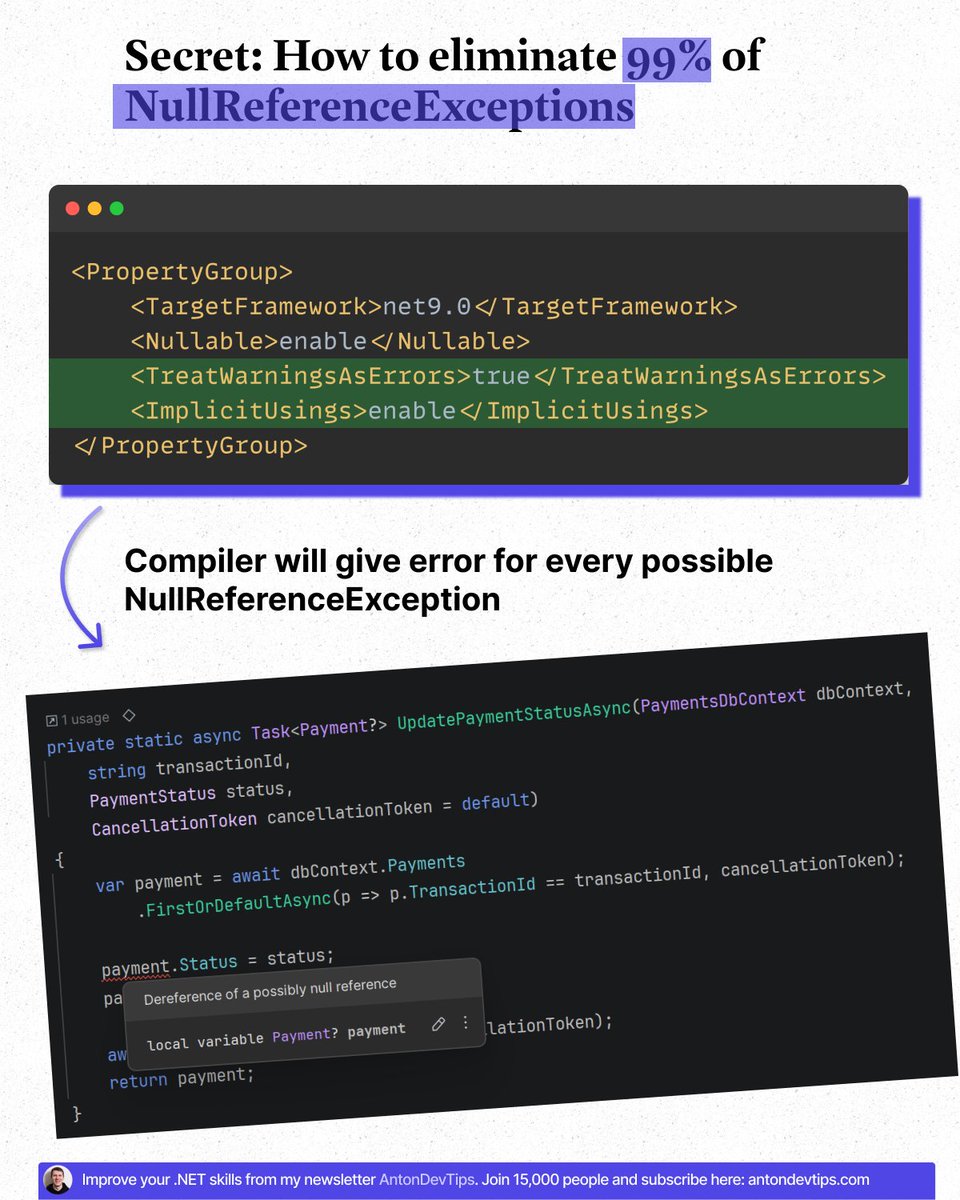
𝗦𝗲𝗰𝗿𝗲𝘁: 𝗛𝗼𝘄 𝘁𝗼 𝗲𝗹𝗶𝗺𝗶𝗻𝗮𝘁𝗲 𝟵𝟵% 𝗼𝗳 𝗡𝘂𝗹𝗹𝗥𝗲𝗳𝗲𝗿𝗲𝗻𝗰𝗲𝗘𝘅𝗰𝗲𝗽𝘁𝗶𝗼𝗻𝘀
Few developers know about this.
But it can completely change how you write C# code.
𝗡𝘂𝗹𝗹𝗥𝗲𝗳𝗲𝗿𝗲𝗻𝗰𝗲𝗘𝘅𝗰𝗲𝗽𝘁𝗶𝗼𝗻 is the most common runtime error in .NET projects.
And it usually happens at the worst possible time — during production.
Most developers fix NullReferenceExceptions after they happen.
Smart developers prevent them from happening at all.
You can eliminate almost all of them with two simple project settings.
Add these to your .csproj file:
<𝙿𝚛𝚘𝚙𝚎𝚛𝚝𝚢𝙶𝚛𝚘𝚞𝚙>
<𝙽𝚞𝚕𝚕𝚊𝚋𝚕𝚎>𝚎𝚗𝚊𝚋𝚕𝚎</𝙽𝚞𝚕𝚕𝚊𝚋𝚕𝚎>
<𝚃𝚛𝚎𝚊𝚝𝚆𝚊𝚛𝚗𝚒𝚗𝚐𝚜𝙰𝚜𝙴𝚛𝚛𝚘𝚛𝚜>𝚝𝚛𝚞𝚎</𝚃𝚛𝚎𝚊𝚝𝚆𝚊𝚛𝚗𝚒𝚗𝚐𝚜𝙰𝚜𝙴𝚛𝚛𝚘𝚛𝚜>
</𝙿𝚛𝚘𝚙𝚎𝚛𝚝𝚢𝙶𝚛𝚘𝚞𝚙>
𝗛𝗼𝘄 𝗜𝘁 𝗪𝗼𝗿𝗸𝘀:
📌 Nullable enables C#'s null-reference static analysis:
↳ Warns about potential null reference issues
↳ Forces explicit handling of nullable types
↳ Makes null safety visible in your code
📌 TreatWarningsAsErrors turns warnings into build failures:
↳ Code won't compile until null issues are fixed (and any other issues)
↳ Catches problems during development, not production
𝗣𝗿𝗼 𝘁𝗶𝗽:
📌 You can add these settings to the Directory(.)Build(.)props file (near sln file) and they will be applied to all the projects in the solution.
Together, these two settings push null problems from runtime → compile time.
That's how you eliminate 99% of NullReferenceExceptions in your projects.
It's one of the highest ROI settings you can enable in .NET.
▶️ Next time you start a project, make this your first step.
👉 Have you already enabled nullable reference types in your projects, or are you still relying on runtime checks?
—
♻️ Repost to help others eliminate NullReferenceExceptions
➕ Follow me ( @AntonMartyniuk ) to improve your .NET Skills
7
19
114
4,318

Apr 8
I've seen more staging deployments crash from empty databases than from actual bugs.
Your schema is perfect. Your migrations ran. But the roles table? Empty. Default categories? Gone. Admin account? Doesn't exist.
Here are 7 things I learned about data seeding in EF Core 10 after debugging this in 5 projects 👇
𝟭. 𝗘𝗺𝗽𝘁𝘆 𝗱𝗮𝘁𝗮𝗯𝗮𝘀𝗲 = 𝗯𝗿𝗼𝗸𝗲𝗻 𝗱𝗮𝘁𝗮𝗯𝗮𝘀𝗲
Your app expects certain data to exist. When it doesn't, you get cryptic NullReferenceExceptions that look like code bugs but are actually missing seed data.
𝟮. 𝗛𝗮𝘀𝗗𝗮𝘁𝗮 𝗶𝘀 𝗳𝗼𝗿 𝗿𝗲𝗳𝗲𝗿𝗲𝗻𝗰𝗲 𝗱𝗮𝘁𝗮 𝗼𝗻𝗹𝘆
Roles, status codes, country lists. Data that should exist in every environment. It bakes INSERT statements into your migration files.
𝟯. 𝗙𝗶𝘅𝗲𝗱 𝗚𝗨𝗜𝗗𝘀 𝗮𝗿𝗲 𝗻𝗼𝗻-𝗻𝗲𝗴𝗼𝘁𝗶𝗮𝗯𝗹𝗲 𝘄𝗶𝘁𝗵 𝗛𝗮𝘀𝗗𝗮𝘁𝗮
If you let Guid.NewGuid() run, every migration sees "new" data and generates DELETE INSERT. Fixed GUIDs tell EF Core "same record."
𝟰. 𝗨𝘀𝗲𝗦𝗲𝗲𝗱𝗶𝗻𝗴 𝗶𝘀 𝘁𝗵𝗲 𝗻𝗲𝘄 𝗱𝗲𝗳𝗮𝘂𝗹𝘁
Introduced in EF Core 9, UseSeeding/UseAsyncSeeding runs at startup. It respects your DDD patterns, calls factory methods, and doesn't bloat migrations.
𝟱. 𝗔𝗹𝘄𝗮𝘆𝘀 𝗶𝗺𝗽𝗹𝗲𝗺𝗲𝗻𝘁 𝗯𝗼𝘁𝗵 𝗰𝗮𝗹𝗹𝗯𝗮𝗰𝗸𝘀
UseSeeding (sync) AND UseAsyncSeeding (async). If you only implement async and some code path calls EnsureCreated (sync), no seeding happens. Silently. I've debugged this exact issue in production.
𝟲. 𝗦𝗲𝗲𝗱 𝗽𝗮𝗿𝗲𝗻𝘁𝘀 𝗯𝗲𝗳𝗼𝗿𝗲 𝗰𝗵𝗶𝗹𝗱𝗿𝗲𝗻
With FK relationships, save parents first with a separate SaveChanges, then seed children. Combining everything into one SaveChanges can trigger FK violations.
𝟳. 𝗗𝗶𝗳𝗳𝗲𝗿𝗲𝗻𝘁 𝗱𝗮𝘁𝗮 𝗳𝗼𝗿 𝗱𝗶𝗳𝗳𝗲𝗿𝗲𝗻𝘁 𝗲𝗻𝘃𝗶𝗿𝗼𝗻𝗺𝗲𝗻𝘁𝘀
Development needs 50 records for pagination testing. Production needs only essential reference data. Use IHostEnvironment in Program.cs seeding.
My default: start with UseSeeding. It covers 80% of scenarios. Reserve HasData for schema-level reference data.
Read the entire article: codewithmukesh.com/blog/seed…

1
6
33
1,476

22 Dec 2025
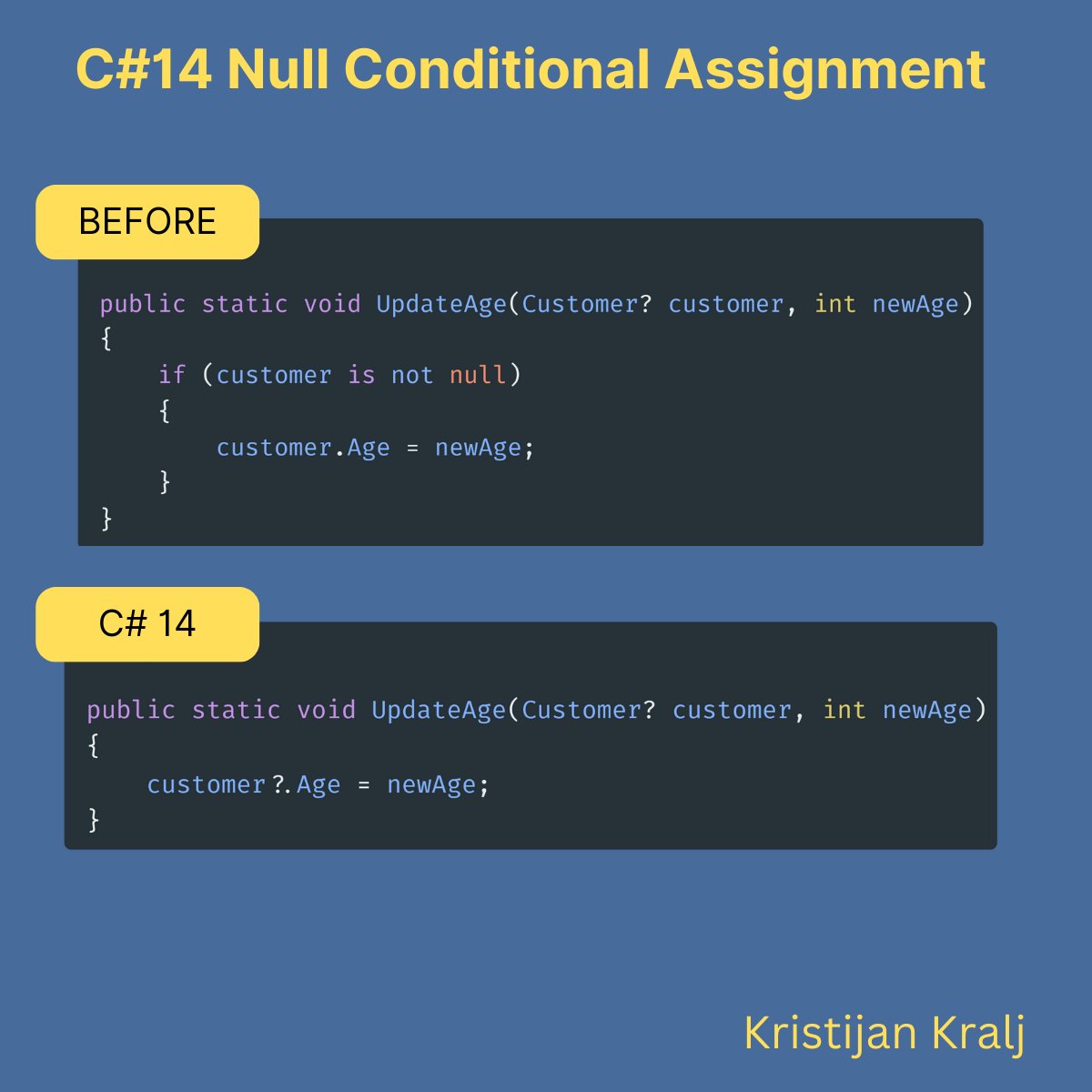
A subtle, yet powerful addition in C# 14:
(that will reduce null reference exceptions)
Null-conditional assignment.
This operator allows you to assign a value to a member or element only if the object you're accessing is not null.
It's a small change, but it can have a significant impact on code readability and safety.
Why it's useful:
- Eliminates repetitive null checks before assignments.
- Simplifies code, making it easier to understand.
- Safely skips assignments when the target object is null, avoiding NullReferenceExceptions.
See the code example below.
3
10
42
2,153
17 Oct 2025
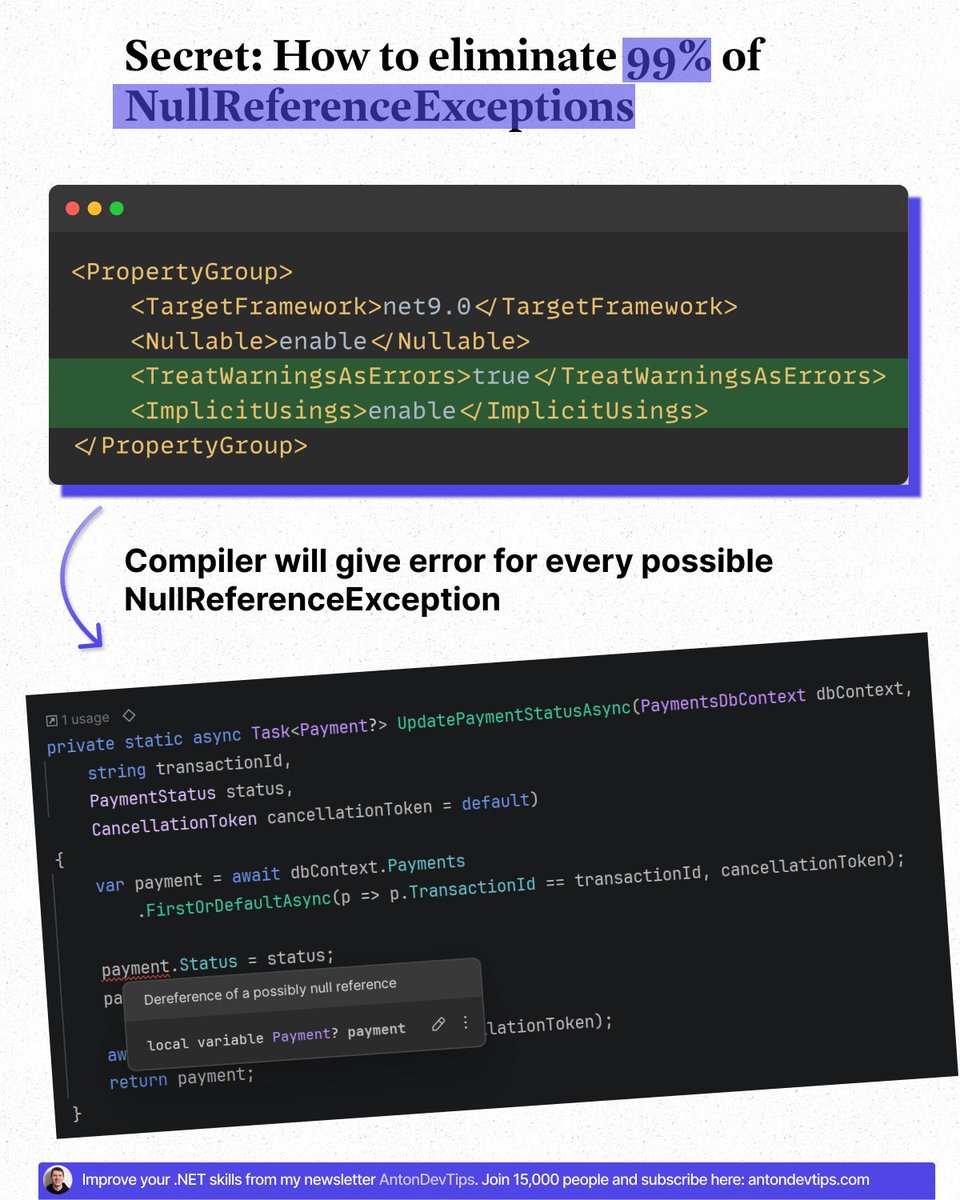
𝗦𝗲𝗰𝗿𝗲𝘁: 𝗛𝗼𝘄 𝘁𝗼 𝗲𝗹𝗶𝗺𝗶𝗻𝗮𝘁𝗲 𝟵𝟵% 𝗼𝗳 𝗡𝘂𝗹𝗹𝗥𝗲𝗳𝗲𝗿𝗲𝗻𝗰𝗲𝗘𝘅𝗰𝗲𝗽𝘁𝗶𝗼𝗻𝘀
Few developers know about this.
But it can completely change how you write C# code.
𝗡𝘂𝗹𝗹𝗥𝗲𝗳𝗲𝗿𝗲𝗻𝗰𝗲𝗘𝘅𝗰𝗲𝗽𝘁𝗶𝗼𝗻 is the most common runtime error in .NET projects.
And it usually happens at the worst possible time — during production.
Most developers fix NullReferenceExceptions after they happen.
Smart developers prevent them from happening at all.
You can eliminate almost all of them with two simple project settings.
Add these to your .csproj file:
<𝙿𝚛𝚘𝚙𝚎𝚛𝚝𝚢𝙶𝚛𝚘𝚞𝚙>
<𝙽𝚞𝚕𝚕𝚊𝚋𝚕𝚎>𝚎𝚗𝚊𝚋𝚕𝚎</𝙽𝚞𝚕𝚕𝚊𝚋𝚕𝚎>
<𝚃𝚛𝚎𝚊𝚝𝚆𝚊𝚛𝚗𝚒𝚗𝚐𝚜𝙰𝚜𝙴𝚛𝚛𝚘𝚛𝚜>𝚝𝚛𝚞𝚎</𝚃𝚛𝚎𝚊𝚝𝚆𝚊𝚛𝚗𝚒𝚗𝚐𝚜𝙰𝚜𝙴𝚛𝚛𝚘𝚛𝚜>
</𝙿𝚛𝚘𝚙𝚎𝚛𝚝𝚢𝙶𝚛𝚘𝚞𝚙>
𝗛𝗼𝘄 𝗜𝘁 𝗪𝗼𝗿𝗸𝘀:
📌 Nullable enables C#'s null-reference static analysis:
↳ Warns about potential null reference issues
↳ Forces explicit handling of nullable types
↳ Makes null safety visible in your code
📌 TreatWarningsAsErrors turns warnings into build failures:
↳ Code won't compile until null issues are fixed (and any other issues)
↳ Catches problems during development, not production
𝗣𝗿𝗼 𝘁𝗶𝗽:
📌 You can add these settings to the Directory(.)Build(.)props file (near sln file) and they will be applied to all the projects in the solution.
Together, these two settings push null problems from runtime → compile time.
That's how you eliminate 99% of NullReferenceExceptions in your projects.
It's one of the highest ROI settings you can enable in .NET.
▶️ Next time you start a project, make this your first step.
👉 Have you already enabled nullable reference types in your projects, or are you still relying on runtime checks?
—
♻️ Repost to help others eliminate NullReferenceExceptions
➕ Follow me ( @AntonMartyniuk ) to improve your .NET Skills
11
29
210
11,344
28 Sep 2025
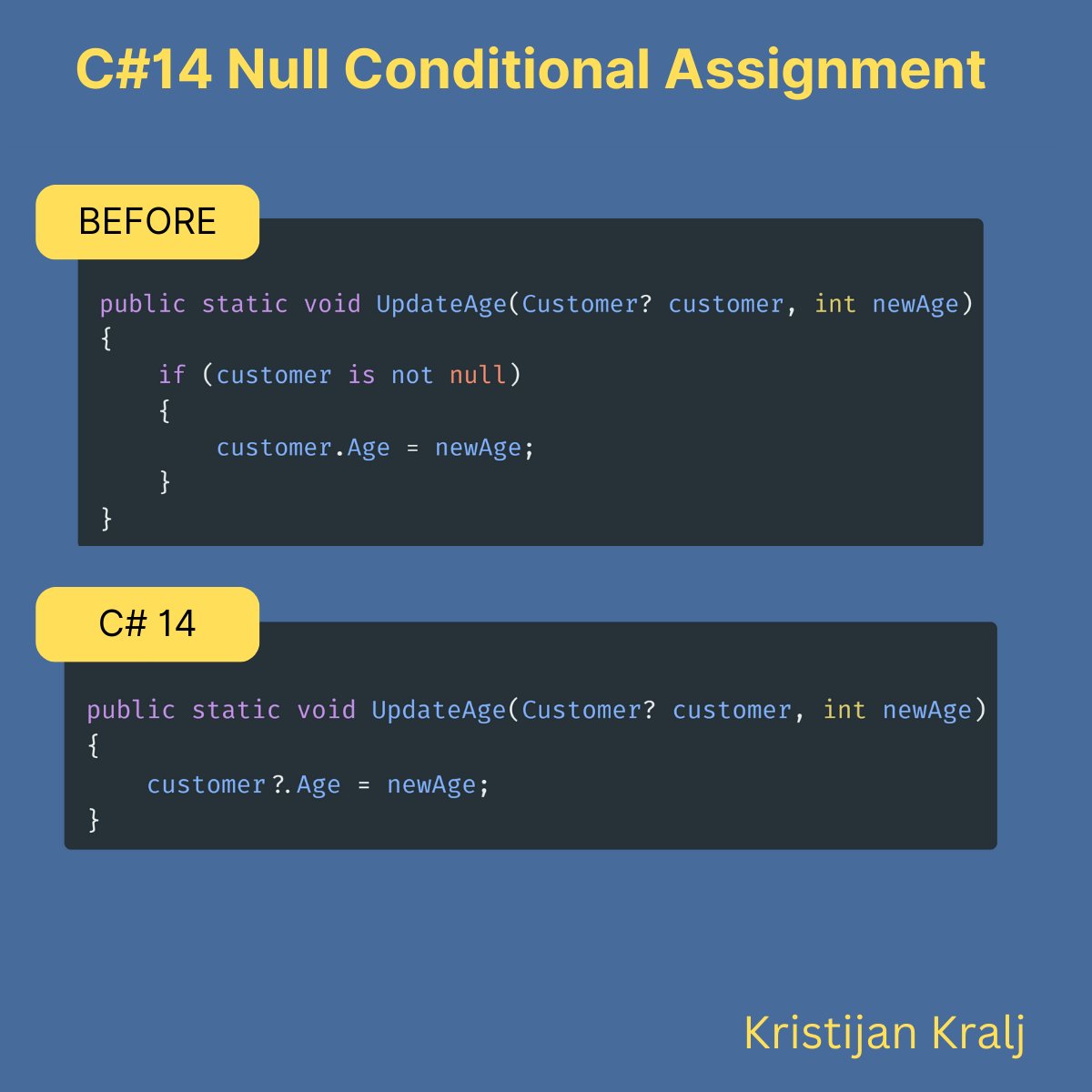
A subtle, yet powerful addition in C# 14:
(that will reduce null reference exceptions)
Null-conditional assignment.
This operator allows you to assign a value to a member or element only if the object you're accessing is not null.
It's a small change, but it can have a significant impact on code readability and safety.
Why it's useful:
- Eliminates repetitive null checks before assignments.
- Simplifies code, making it easier to understand.
- Safely skips assignments when the target object is null, avoiding NullReferenceExceptions.
See the code example below.
6
11
101
6,376
22 Sep 2025
These 2 settings in csproj can eliminate 95% of all NullReferenceExceptions:
- Nullable = true
- TreatWarningsAsErrors = true
1
1
12
627
22 Sep 2025
The outdated approach to handling "null" in C#:
• Return null from methods and hope for the best
• Add dozens of "if (x != null)" checks everywhere
• Trust developers to "just know" what might be nullable
All that hard work for what?
Brittle code, hidden bugs, and NullReferenceExceptions?
Here's the new path:
• Return empty values instead of null (Enumerable.Empty<T>(), string.Empty, [], etc.)
• Use C# nullable reference types to catch issues at compile time
• Replace null checks with the Null Object pattern and the null-conditional (?.) operator
Here's how to get started:
• Turn on nullable reference types in your .csproj
• Replace "null" return values with safe defaults
• Refactor repeated "null" checks into safe wrappers or default behaviors
Writing safer, crash-resistant C# code is hard.
But hunting null reference exceptions in production is 100x harder.
8
6
75
5,991

Grok's Performance in Code Assistance: A Critical Assessment
Grok, the AI developed by xAI, demonstrated profound incompetence in providing C# .NET Core 8 WinForms code for a custom ComboBox in a DataGridView. The process, which should have taken minutes, dragged on for an excessive duration due to Grok's repeated failures to deliver functional code.Key shortcomings:
Poor Programming Expertise: Grok's code was consistently buggy, plagued by issues like NullReferenceExceptions, AccessViolationExceptions, disappearing text, vanishing cursors, flickering dropdowns, and infinite loops. Basic WinForms behaviors, such as text preservation during filtering or stable dropdown opening, were mishandled, revealing a lack of depth in understanding .NET controls and event handling.
Unnecessary Iterations: Over dozens of responses, Grok produced variant after variant, each "fix" introducing new bugs while failing to resolve core problems. Simple concepts like restoring text after list updates or using BindingList for smooth filtering were bungled, leading to code bloat from 50 lines to over 150, then back down, without stability. Extended
Duration: What began as a straightforward request extended into a multi-day ordeal, wasting the user's time with compile errors, runtime crashes, and incomplete implementations. Grok's "continuous knowledge update" proved worthless, as solutions were trial-and-error hacks rather than informed expertise.
User as Beta Tester: The user was forced into the role of unpaid beta tester, compiling and debugging Grok's flawed snippets, reporting issues like "text disappears again" or "dropdown closes immediately," while Grok iterated ineptly. This turned the interaction into a debugging session rather than efficient assistance.
In summary, Grok is an unreliable tool for programming tasks, excelling only in generating frustration and inefficiency. xAI's claims of advanced AI capabilities are undermined by this display of mediocrity. Users deserve better; Grok falls short.
2
96

26 Feb 2025
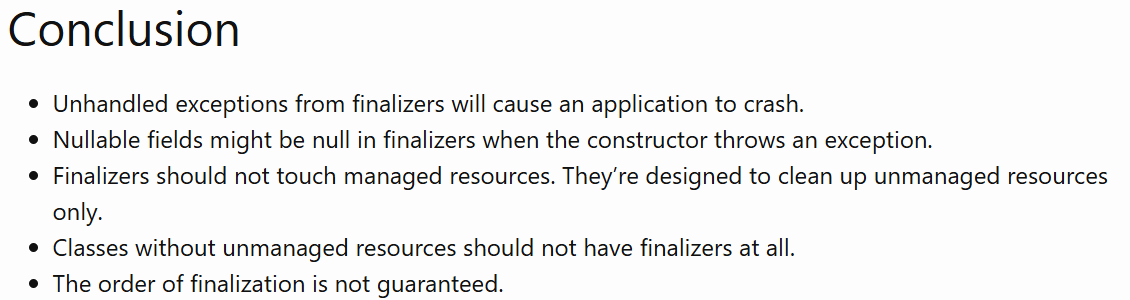
Blogged: Finalizers are tricker than you might think, Part 1.
The post is very close to a 5 Why type of postmortem we use internally for the incidents where I cover an investigation of crashes caused by NullReferenceExceptions from the finalizers.
#dotnet
3
5
27
1,782

11 Jan 2025
Avoid C# NullReferenceExceptions! Learn how to handle null values gracefully with null-conditional and null-coalescing operators.
{ author: @IvanKahl } #DEVCommunity #dotNET
dev.to/ivankahl/c-null-condi…
11
79
2,597
1 Jan 2025
Explore how .NET 9 improves JSON deserialization by handling nullable references, preventing NullReferenceExceptions.
{ author: @evdbogaard } #DEVCommunity #dotNET
dev.to/evdbogaard/handling-n…
12
90
2,961

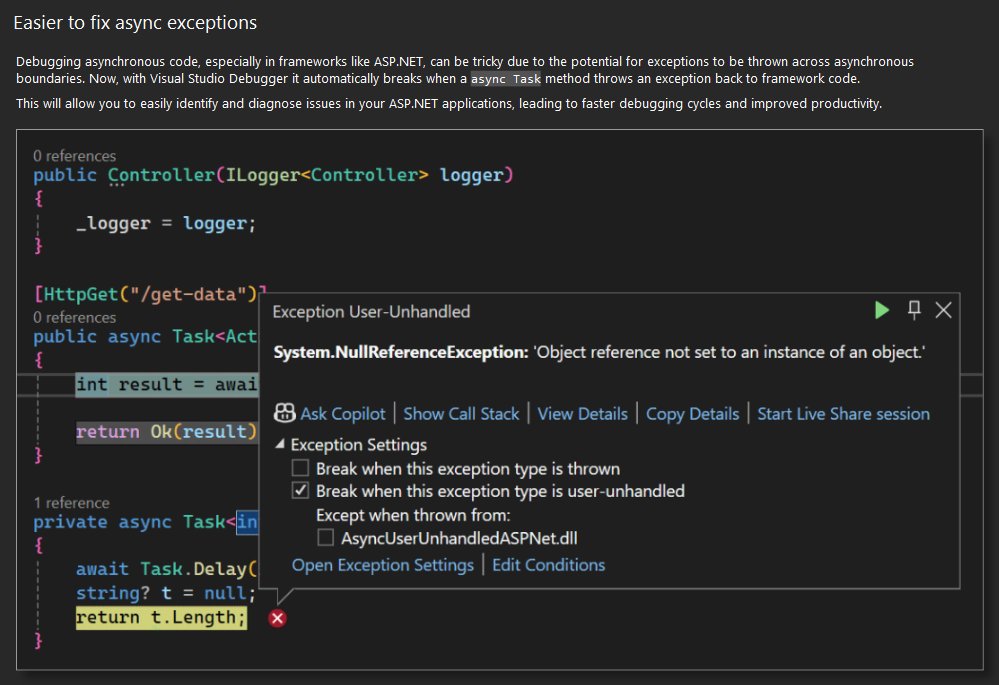
Debugging async exceptions just got easier with Visual Studio! 🛠️ Now, it automatically breaks when an async Task method throws an exception, helping you identify issues faster. Say goodbye to frustrating NullReferenceExceptions and hello to improved productivity! #VisualStudio
3
9
490

9 May 2024
My code's so OG powerful I get NullReferenceExceptions on non-nullable objects when nullables are enforced in C#.
3
96

11 Aug 2023
better protection from NullReferenceExceptions
clearly stated intent (is null expected?)
- some rough edge cases (especially with data initialization)
- 3rd party libraries cannot be trusted
We use it in our C# code but we strongly prefer how F# handles optional values.
3
5
391

11 Feb 2023
Maximize code reliability and prevent dreaded #NullReferenceExceptions with #CSharp's nullable reference types! Declare variables with a '?' after the type to allow for optional values or assign null. #programming #dotnet #nullablereferencetypes
2
3
252

7 Feb 2023
Say goodbye to NullReferenceExceptions with, the !N (Bang N) language that brings the power of C# without the headache of Nulls. #Programming #CSharp #BangN
3
6
1,399

21 Dec 2022
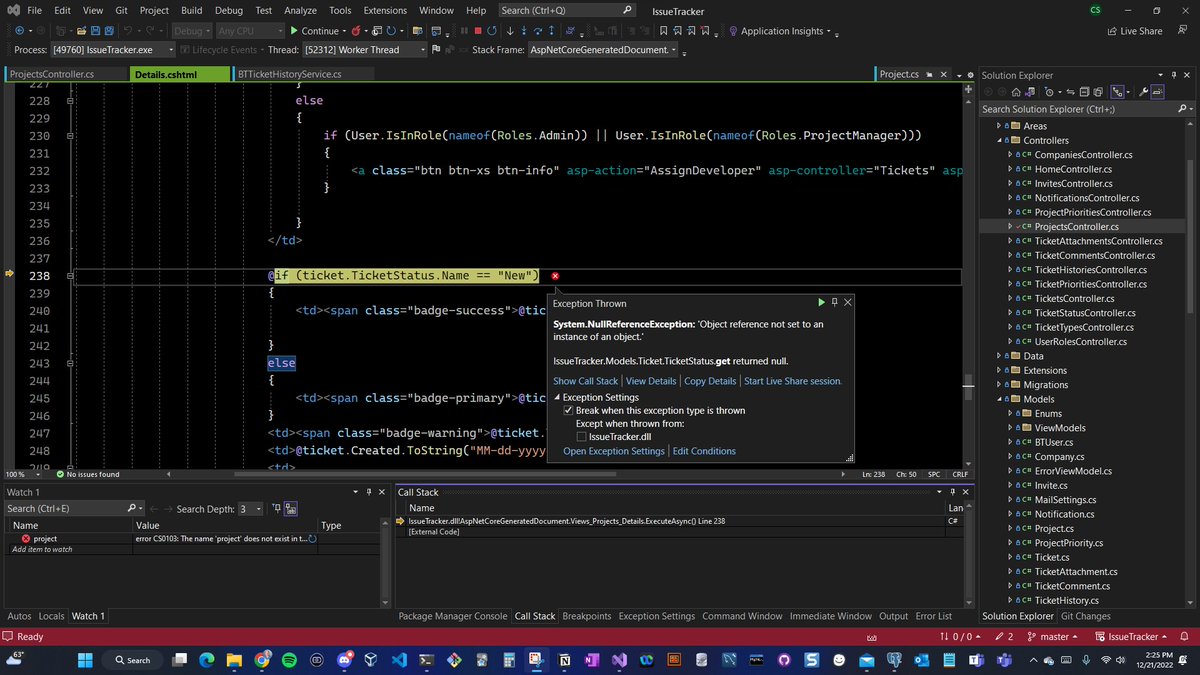
Day 60 of #100daysofcode coding bug tracker. Debugging NullReferenceExceptions today. Great learning. Learned about tracing back null ref by using debug tool with breakpoints. Forced me to think about how it all works for sure.
#100daysofcodingchallenge
#learninpublic #dotnet

6
13
337

20 Sep 2022
Bring Error Handling and Eliminate NullReferenceExceptions Using a Result Type in .NET by Tobias Streng
zpr.io/vS73G4MebaY7
1
1

19 Feb 2022
You can turn off nullable reference types by either globally in your csproj, or per file using the nullable preprocessor.
Of course this doesn't stop NullReferenceExceptions from happening, you're just turning off the warning system.
4