
17m
Understanding Kubernetes Storage: StorageClass, PersistentVolume, PVC with Minikube (MongoDB… medium.com/@sishakil546/unde…
23

Jun 13
When containers require direct access to the filesystem or physical disks of an host node, developers often take the dangerous shortcut of using a hostPath volume allocation. This is an architectural anti-pattern.
Here is why you must upgrade your storage definitions to Local Persistent Volumes:
🔹 HostPath Volume: Bypasses the K8s volume sub-tier entirely. It maps an arbitrary directory from the host node straight into the container.
The Fatal Flaw: The scheduler has zero awareness of this mapping. If your pod restarts, K8s might schedule it onto a completely different node that lacks that folder, causing immediate application failure. Even worse, it opens up container escape vulnerabilities if an attacker gains root write access to the host directory.
🔹 Local Persistent Volume: Integrates fully with the control plane lifecycle. You pre-declare physical disks (like localized NVMe arrays or mounted partitions) as cluster-wide PersistentVolume resources.
The Architectural Win:
Local PVs mandate an explicit nodeAffinity block. The kube-scheduler caches this data structural sheet, ensuring that your stateful pod is always pinned and scheduled to the exact Ubuntu host node where that physical disk resides.
Stop using HostPath hacks; build deterministic, node-aware storage topologies!
#K8sArchitecture #SystemDesign #Storage
2
1
13
439
Jun 10
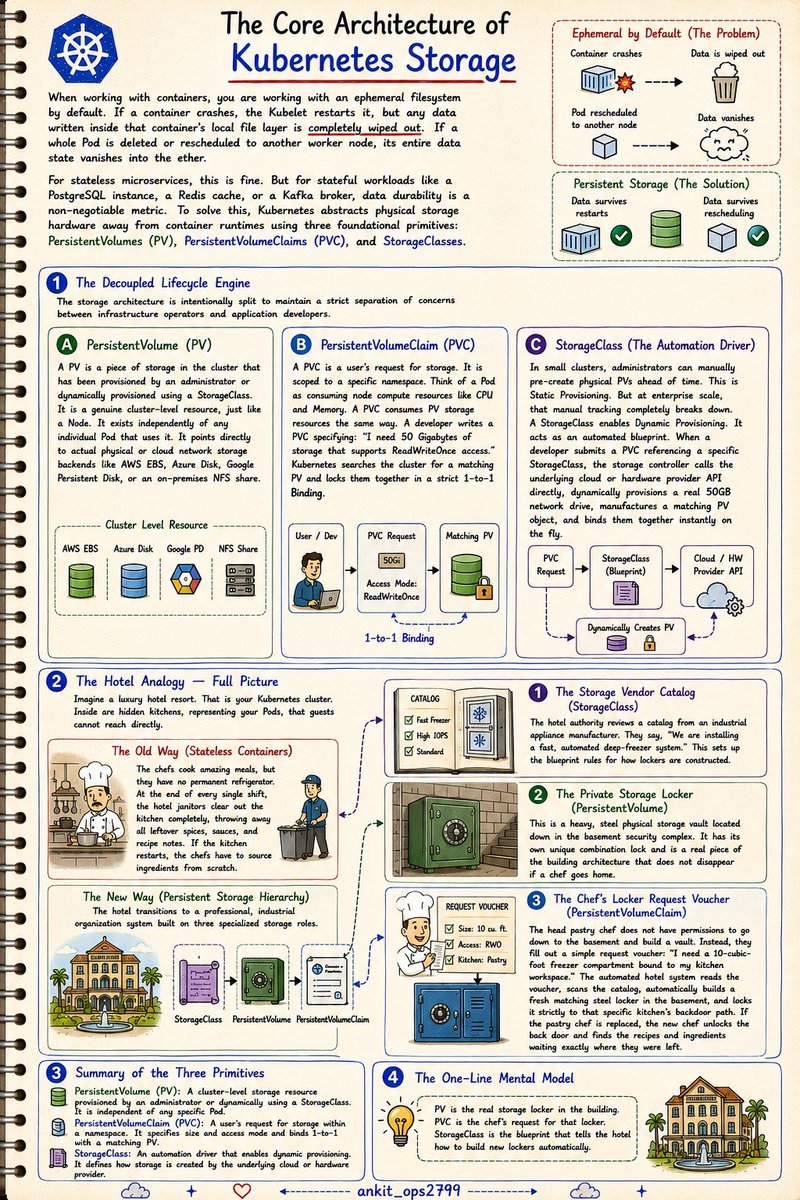
Kubernetes storage confuses almost everyone because it splits one simple task—"saving data"—into three different things.
If you're tired of confusing your claims with your volumes, think of your cluster as a luxury hotel resort
The Problem: By default, containers are ephemeral. If a Pod crashes or gets rescheduled, its data vanishes into thin air. Great for stateless apps, a nightmare for databases.
1. StorageClass (The Vendor Catalog):
The hotel authority reviews an appliance catalog and sets up blueprint rules: "We are installing a fast, automated deep-freezer system."
2. PersistentVolume (The Private Storage Locker):
A heavy, physical storage vault located in the basement. It exists independently of the kitchen and doesn't disappear if a chef goes home.
3. PersistentVolumeClaim (The Request Voucher):
The head chef can't go to the basement and build a vault. Instead, they fill out a voucher: "I need a 10-cubic-foot freezer bound to my kitchen."
The automated hotel system reads the voucher (PVC), scans the catalog (StorageClass), instantly provisions a fresh physical locker (PV) in the basement, and locks it to that specific kitchen’s backdoor.
TL;DR:
• PV: The real storage locker in the building.
• PVC: The chef's request voucher for that locker.
• StorageClass: The blueprint that tells the hotel how to build new lockers automatically.
Dive into the full architecture blueprint below! 👇
10
6
48
836

Jun 8
Your Pod's emptyDir volume is not storage.
It's a sticky note.
Node dies → sticky note gone.
Pod evicted → sticky note gone.
Pod rescheduled → sticky note gone.
If your data matters, PersistentVolume. No exceptions.
#Kubernetes #DevOps #DataEngineering #CloudNative #SRE
8

May 31
PV vs PVC 📝
PersistentVolume (PV) → The actual storage resource (disk, NFS, cloud volume).
PersistentVolumeClaim (PVC) → A request for storage made by a Pod.
Think of it like:
📦 PV = Storage unit
🔑 PVC = Key to access it
Pod says: “I need 5Gi, ReadWriteOnce.” → Kubernetes finds a matching PV and binds them together.
2
12
400

May 15
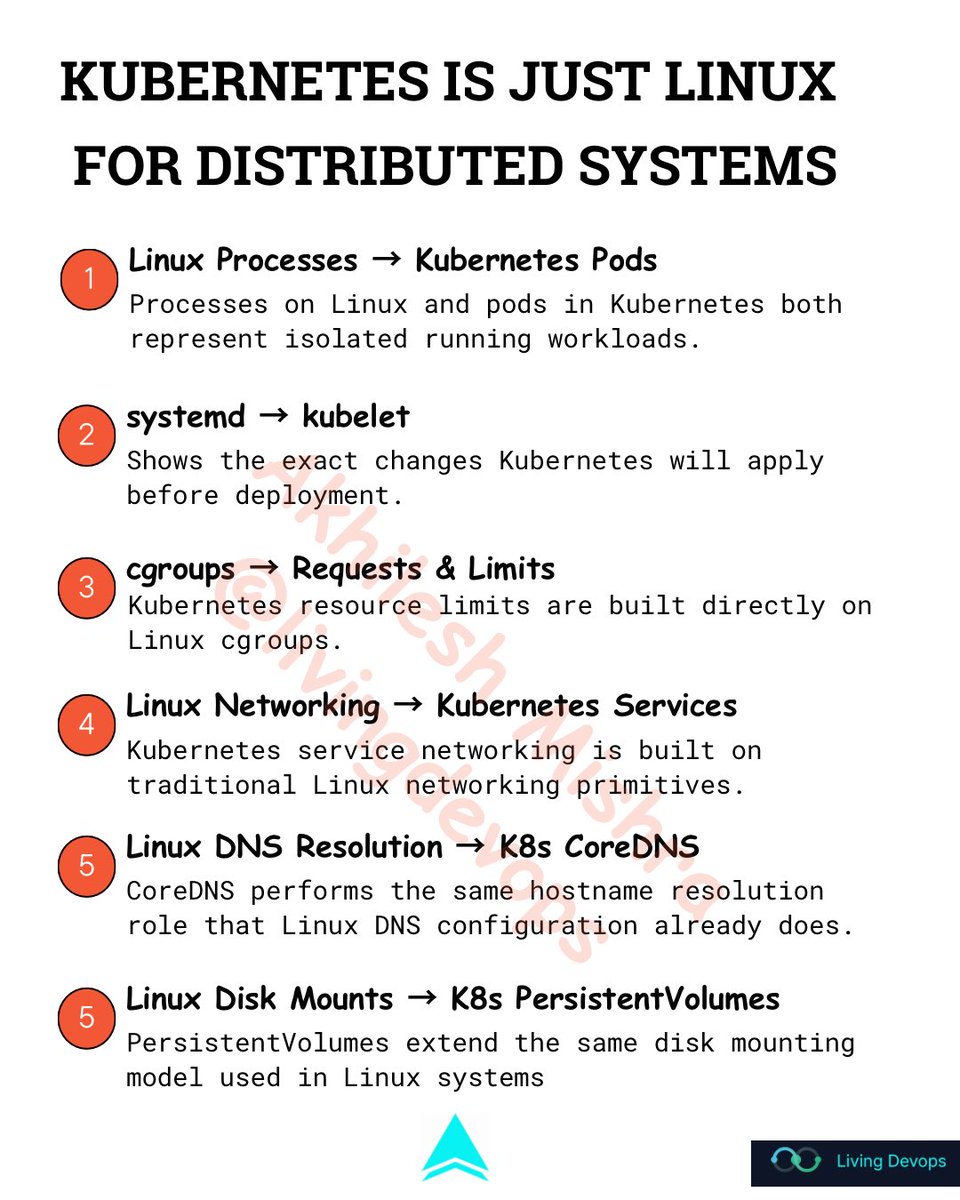
Kubernetes is just Linux for distributed systems
𝗦𝘁𝗮𝗿𝘁 𝘄𝗶𝘁𝗵 𝗮 𝘀𝗶𝗺𝗽𝗹𝗲 𝗽𝗿𝗼𝗰𝗲𝘀𝘀.
> On a Linux box, you start a process. It runs in its own memory space, gets a PID, and writes logs to stdout.
> In Kubernetes, you start a pod. It runs in its own namespace, gets a name, and writes logs to stdout.
Same thing. Different scope.
𝗡𝗼𝘄 𝘁𝗵𝗶𝗻𝗸 𝗮𝗯𝗼𝘂𝘁 𝘄𝗵𝗼 𝗸𝗲𝗲𝗽𝘀 𝘁𝗵𝗮𝘁 𝗽𝗿𝗼𝗰𝗲𝘀𝘀 𝗮𝗹𝗶𝘃𝗲.
> On Linux, systemd watches your service.
- If it dies, systemd restarts it.
- You declare what you want in a unit file. systemd reconciles reality to match.
> In Kubernetes, the kubelet watches your pod.
- If it dies, the kubelet restarts it.
- You declare what you want in a YAML file.
- The control plane reconciles reality to match.
Same loop. Bigger radius.
𝗥𝗲𝘀𝗼𝘂𝗿𝗰𝗲 𝗹𝗶𝗺𝗶𝘁𝘀.
> On Linux, cgroups cap how much CPU and memory a process can use. You set them in the unit file or with systemd-run.
> In Kubernetes, you set requests and limits on a container. Under the hood, the kubelet is just writing those values into cgroups on the node.
It is literally the same kernel feature. You are just one abstraction higher.
𝗡𝗼𝘄 𝘁𝗵𝗶𝗻𝗸 𝗮𝗯𝗼𝘂𝘁 𝗡𝗲𝘁𝘄𝗼𝗿𝗸𝗶𝗻𝗴.
> On Linux, iptables rules decide which packets reach which port on which interface.
> In Kubernetes, kube-proxy programs iptables rules on every node to decide which packets reach which pod on which service.
Same iptables. More rules.
𝗡𝗮𝗺𝗲 𝗿𝗲𝘀𝗼𝗹𝘂𝘁𝗶𝗼𝗻.
> On Linux, /etc/hosts and /etc/resolv.conf tell your process how to find other hosts.
> In Kubernetes, CoreDNS does the same thing for pods. service-name.namespace.svc.cluster.local is just a fancy hostname.
Same DNS. Dynamic backend.
𝗦𝘁𝗼𝗿𝗮𝗴𝗲.
> On Linux, you mount a disk at a path. The process reads and writes files there. If the disk fails, the data is gone.
> In Kubernetes, you mount a PersistentVolume at a path inside a pod. Same model. The disk just lives somewhere else and follows the pod around.
You will find the same patterns everywhere.
Every concept you find confusing in Kubernetes has a Linux ancestor sitting on a server you have already touched.
If you know Linux, you are not starting from zero.
Learn advanced Kubernetes on AWS with DevSecOps & AIops by building real projects with production-level implementation in my upcoming bootcamp starting 23rd May.
livingdevops.com/courses/8-w…
1
19
100
2,705
May 14
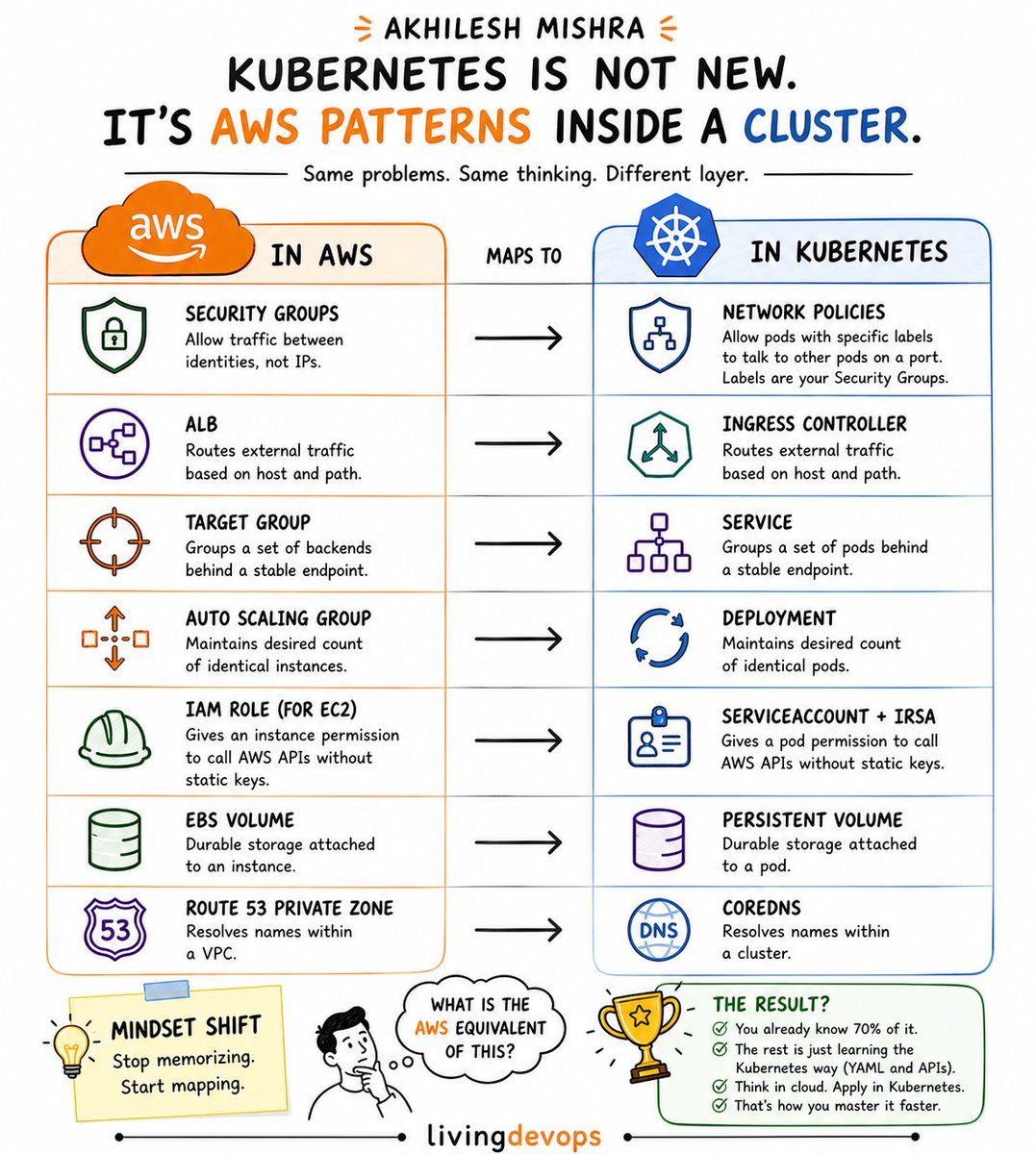
Kubernetes becomes much easier once you realize it is mostly the same AWS patterns you already know. Just running inside a cluster.
Take Network Policies, for example
In AWS, you create a Security Group rule like this:
> > Allow port 5432 from the app Security Group to the RDS Security Group
You are not opening random IPs.
You are allowing one identity to talk to another.
Kubernetes does the exact same thing:
> > Only pods with label `app=api` can talk to pods with label `app=db` on port 5432
That is basically a Security Group for pods.
And once this clicks, Kubernetes stops feeling alien.
More useful mappings:
> > ALB --> Ingress Controller
> > Target Group --> Service
> > Auto Scaling Group --> Deployment
> > IAM Role --> ServiceAccount IRSA
> > EBS Volume --> PersistentVolume
> > Route 53 Private Zone --> CoreDNS
The engineers who struggle with Kubernetes try to memorize YAML.
If you already understand cloud architecture, you are already much closer to Kubernetes than you think.
You are not starting from zero.
You are translating concepts you already know.
2
35
180
6,058
May 13
Kubernetes PV & PVC 📝
TL;DR
PV = Storage
PVC = Storage Request
Pod = Uses the Storage
━━━━━━━━━━━━━━
STEP 1: Create PV
━━━━━━━━━━━━━━
kind: PersistentVolume
capacity: 5Gi
Status:Available
Storage exists and is ready to use.
━━━━━━━━━━━━━━
STEP 2: Create PVC
━━━━━━━━━━━━━━
kind: PersistentVolumeClaim
request: 5Gi
Status:Bound
Kubernetes automatically searches for a matching PV.
━━━━━━━━━━━━━━
STEP 3: Binding
━━━━━━━━━━━━━━
PVC ←→ PV
Kubernetes checks:
- StorageClass
- Size
- AccessMode
Then binds them automatically.
━━━━━━━━━━━━━━
STEP 4: Pod Uses PVC
━━━━━━━━━━━━━━
volumes:
persistentVolumeClaim:
claimName: example-pvc
Mounted inside container:
mountPath: /usr/share/nginx/html
Pod status: Running
━━━━━━━━━━━━━━
STEP 5: Persistence Test
━━━━━━━━━━━━━━
1. Write data
echo 'Hello PVC!' > file
2. Delete Pod
3. Recreate Pod
4. File still exists
Output:
Hello PVC!
Data survived pod deletion because it lives on the PersistentVolume, not inside the container filesystem.
Note: This demo uses hostPath, which is fine for:
Minikube
Kind
Local practice
Production environments usually use:
AWS EBS/EFS, Azure Disk, Ceph/NFS
through StorageClasses and dynamic provisioning.
Quick checks:
kubectl get pv
kubectl get pvc
kubectl get pods
#Kubernetes
1
1
8
191

May 2
PV, PVC, and StorageClass exist for one simple reason:
Your Pod can die.
Your Node can die.
But your data must still be available.
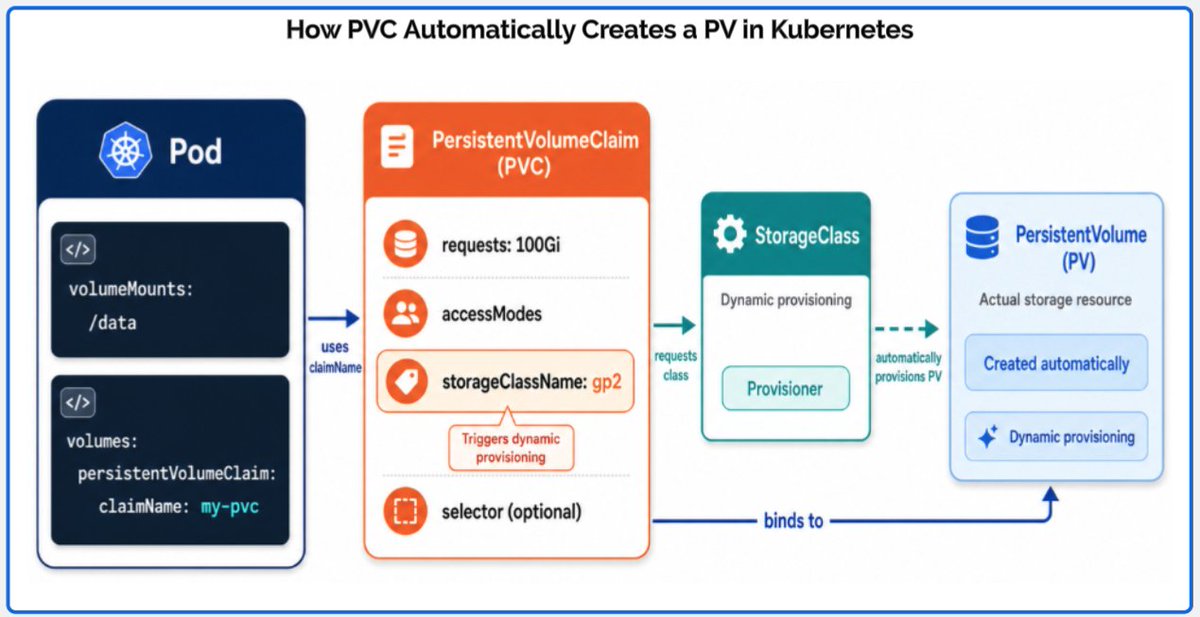
The flow is:
Application / Pod → PVC → StorageClass → PV
1 - Application / Pod
This is your running application.
The Pod need storage mounted inside my container.
Example:
volumeMounts:
- mountPath: /data
2 - PersistentVolumeClaim
The PVC is the storage request.
It defines:
- Size
- Access mode: who can use the volume
- StorageClass name: what type of storage should be created
The PVC does not create the disk.
It asks Kubernetes for storage.
3 - StorageClass
The StorageClass defines how the storage should be created.
For example, in AWS, it can say:
“Use EBS to create the volume.”
It define :
- Storage provider: AWS EBS, EFS, etc.
- Disk type: gp2, gp3, io1, io2
- Provisioner: the CSI driver that creates the volume
- Binding behavior: create the volume immediately or wait until the Pod is scheduled
- AZ behavior: with WaitForFirstConsumer, Kubernetes waits to know which node/AZ the Pod will run in before creating the volume
4 - PersistentVolume
The PV is the real storage created for the application.
In AWS EBS, the PV represents the real EBS volume.
The PV contains details like:
- Volume ID
- Capacity
- Access mode
- StorageClass used
- Reclaim policy
- Node/AZ attachment information
After Kubernetes creates the PV, it binds it to the PVC.
Then the Pod can use the PVC and write data to the real storage.
2
13
73
2,429

May 2
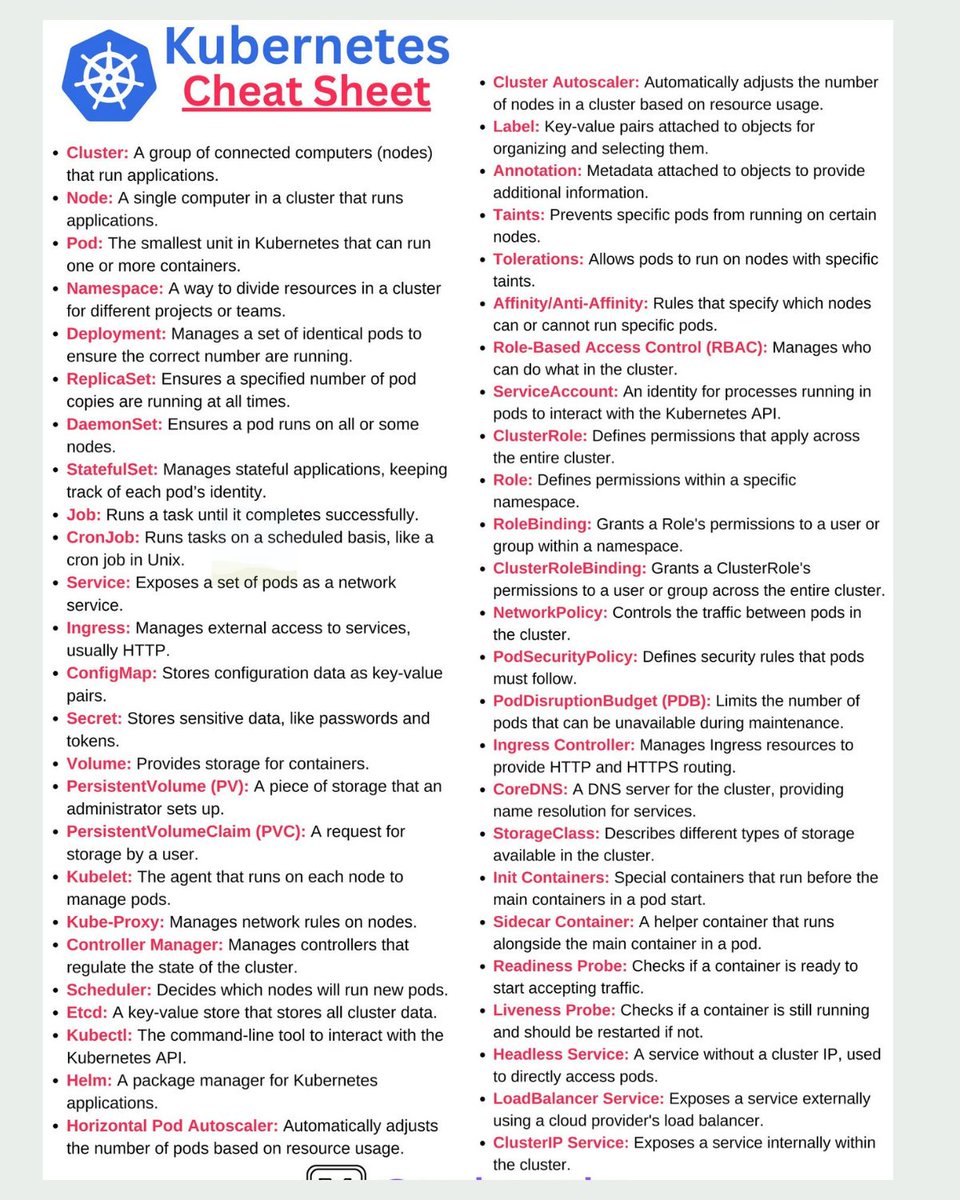
🚀 Kubernetes Cheat Sheet – Core Concepts Every DevOps Engineer Must Know
Kubernetes can feel overwhelming at first.
There are dozens of components, objects, and configurations.
But real work depends on understanding how these pieces fit together.
This cheat sheet simplifies the most important Kubernetes concepts used in daily DevOps work.
📘 What this guide covers:
✅ Core Kubernetes Objects
• Pod, Deployment, ReplicaSet
• StatefulSet and DaemonSet
• Job and CronJob
• Namespace for resource isolation
• ConfigMap and Secret management
✅ Services & Networking
• ClusterIP, NodePort, LoadBalancer services
• Ingress and Ingress Controller
• Service discovery and DNS (CoreDNS)
• Endpoints and internal communication
• NetworkPolicy for traffic control
✅ Storage Concepts
• Volumes and data persistence
• PersistentVolume (PV) and PVC
• StorageClass and dynamic provisioning
• EmptyDir and ephemeral storage
• Stateful application storage handling
✅ Security & Access Control
• RBAC (Role-Based Access Control)
• Roles and ClusterRoles
• RoleBinding and ClusterRoleBinding
• ServiceAccounts for pod identity
• PodSecurityPolicy / security context
✅ Scheduling & Workload Placement
• Scheduler and node selection
• Taints and tolerations
• Affinity and anti-affinity rules
• Priority classes for pods
• Resource requests and limits
✅ Autoscaling & Resource Management
• Horizontal Pod Autoscaler (HPA)
• Vertical Pod Autoscaler (VPA)
• Cluster Autoscaler
• Resource quotas and limits
• PodDisruptionBudget (PDB)
✅ Cluster Components
• API Server and etcd
• Controller Manager and Scheduler
• Kubelet and Kube-Proxy
• Worker nodes vs Master node
• kubectl for cluster interaction
✅ Advanced Concepts
• Custom Resource Definitions (CRDs)
• Operators for complex apps
• Init containers and sidecars
• Probes (liveness and readiness)
• Helm and Kustomize for deployments
💡 Why this matters:
Kubernetes is not about memorizing commands.
It’s about understanding how components interact to run and scale applications reliably.
A strong grasp of these concepts helps you design, debug, and operate production clusters effectively.
🎯 Best suited for:
• DevOps engineers
• SRE and platform engineers
• Engineers learning Kubernetes
• Professionals preparing for interviews
3
34
155
5,960

Apr 27
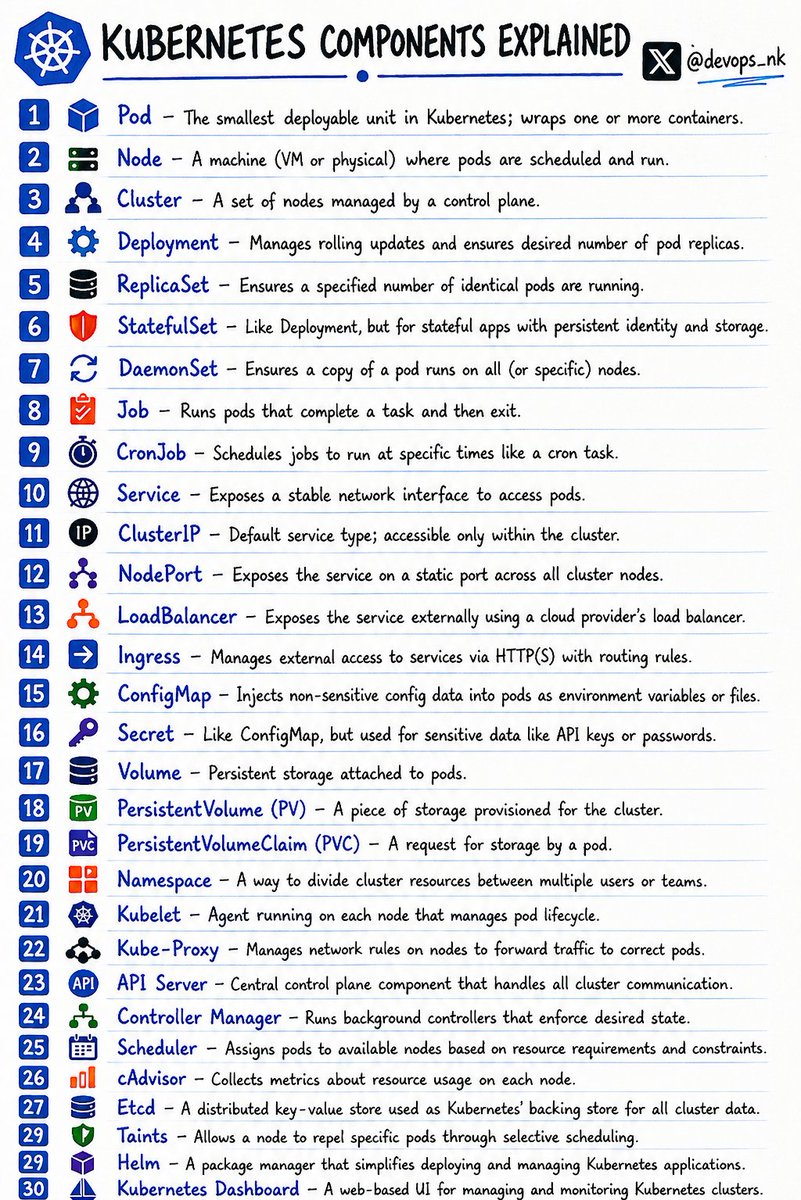
Before appearing for an interview, understand the Kubernetes components.
Master these fundamentals. 👇
Pod → The smallest deployable unit in Kubernetes; wraps one or more containers.
Node → A machine (VM or physical) where pods are scheduled and run.
Cluster → A set of nodes managed by a control plane.
Deployment → Manages rolling updates and ensures desired number of pod replicas.
ReplicaSet → Ensures a specified number of identical pods are running.
StatefulSet → Used for stateful apps with persistent identity and storage.
DaemonSet → Ensures a pod runs on all (or selected) nodes.
Job → Runs pods that complete a task and then exit.
CronJob → Schedules jobs at specific times (like cron).
Service → Exposes a stable network interface to access pods.
ClusterIP → Default service type; accessible only within the cluster.
NodePort → Exposes service on a static port across all nodes.
LoadBalancer → Exposes service externally via cloud provider LB.
Ingress → Manages HTTP(S) routing to services.
ConfigMap → Stores non-sensitive config data for pods.
Secret → Stores sensitive data like API keys/passwords.
Volume → Persistent storage attached to pods.
PersistentVolume (PV) → Storage provisioned for the cluster.
PersistentVolumeClaim (PVC) → Request for storage by a pod.
Namespace → Logical separation of cluster resources.
Kubelet → Agent on each node managing pod lifecycle.
Kube-Proxy → Handles networking rules and traffic forwarding.
API Server → Central control plane component for all communication.
Controller Manager → Ensures desired state via background controllers.
Scheduler → Assigns pods to nodes based on resources.
cAdvisor → Collects resource usage metrics on nodes.
etcd → Distributed key-value store for cluster data.
Taints → Prevents pods from scheduling on certain nodes unless tolerated.
Helm → Package manager for Kubernetes applications.
Kubernetes Dashboard → Web UI for managing clusters.
Follow for more !
6
92
380
13,222
Apr 27
Storage in #Kubernetes is just a handshake between Capacity and Requirement. 🤝
PV (PersistentVolume): The actual "Disk" resource.
PVC (PersistentVolumeClaim): The "Order" for that disk.
When the PVC requirements match the PV capacity, the Control Plane performs a BIND.
Now your data lives on, even if your Pod dies. Simple, durable, automated.
#Storage #K8sArchitecture #DevOps #CloudComputing
1
1
2
121

Apr 23
Ans Time:
1. Inspect the PVC:
kubectl describe pvc <pvc-name>
Look for errors such as “no matching PersistentVolume.”
2. Check PV Status: Ensure the PV is available and matches the claim: kubectl get pv
3. Verify Storage Class: Ensure the PVC and PV have the same storageClassName.
4. Fix the Binding Issue:
Update the capacity, accessModes, or storageClassName of the PV to match the PVC requirements.
If no dynamic provisioning is enabled, manually create a PV that matches the PVC.
Apr 22

Interviewer:
Your pod is stuck in a Pending state because it can't mount a Persistent Volume (PV). How would you resolve this?
1
2
9
1,592

Apr 21
📂 Kubernetes Engineer
├─ 📂 Foundations (START HERE)
│ ├─ 📂 Linux Fundamentals ⭐ FIRST
│ │ ├─ Processes & PID
│ │ ├─ Signals
│ │ ├─ File systems & inodes
│ │ ├─ Users, groups & permissions
│ │ ├─ Networking basics (TCP/IP, ports, DNS)
│ │ └─ cgroups & namespaces (conceptual)
│ │
│ ├─ 📂 Containers
│ │ ├─ What containers really are
│ │ ├─ Containers vs VMs
│ │ ├─ Docker architecture
│ │ ├─ Images, layers & registries
│ │ └─ Container networking basics
│ │
│ ├─ 📂 YAML & CLI
│ │ ├─ YAML structure & indentation
│ │ ├─ kubectl basics
│ │ ├─ Imperative vs Declarative
│ │ └─ Reading manifests confidently
│ │
│ └─ 📂 Why Kubernetes?
│ ├─ Scheduling problem
│ ├─ Scaling problem
│ ├─ Self-healing systems
│ └─ Desired state management
│
├─ 📂 Core Kubernetes
│ ├─ 📂 Architecture
│ │ ├─ Control Plane components
│ │ ├─ Worker Nodes
│ │ ├─ API Server
│ │ ├─ Scheduler
│ │ └─ etcd basics
│ │
│ ├─ 📂 Core Workloads
│ │ ├─ Pod
│ │ ├─ ReplicaSet
│ │ ├─ Deployment
│ │ ├─ StatefulSet
│ │ └─ DaemonSet
│ │
│ ├─ 📂 Configuration
│ │ ├─ ConfigMaps
│ │ ├─ Secrets
│ │ └─ Environment variables
│ │
│ └─ 📂 Services & Networking
│ ├─ ClusterIP
│ ├─ NodePort
│ ├─ LoadBalancer
│ ├─ Ingress basics
│ └─ DNS inside cluster
│
├─ 📂 Storage & Scheduling
│ ├─ 📂 Storage
│ │ ├─ Volumes
│ │ ├─ PersistentVolume (PV)
│ │ ├─ PersistentVolumeClaim (PVC)
│ │ └─ StorageClasses
│ │
│ ├─ 📂 Resource Management
│ │ ├─ Requests & Limits
│ │ ├─ Resource Quotas
│ │ └─ LimitRanges
│ │
│ └─ 📂 Advanced Scheduling
│ ├─ Node Selectors
│ ├─ Node Affinity
│ ├─ Taints & Tolerations
│ └─ Pod Anti-Affinity
│
├─ 📂 Security (NON-NEGOTIABLE)
│ ├─ 📂 Access Control
│ │ ├─ RBAC
│ │ ├─ Roles vs ClusterRoles
│ │ ├─ Service Accounts
│ │ └─ Principle of Least Privilege
│ │
│ ├─ 📂 Pod Security
│ │ ├─ Security Context
│ │ ├─ Pod Security Standards
│ │ └─ Image security basics
│ │
│ └─ 📂 Network Security
│ ├─ Network Policies
│ ├─ Internal-only services
│ └─ mTLS concepts
│
├─ 📂 Advanced Kubernetes (LATER)
│ ├─ 📂 Helm
│ │ ├─ Charts
│ │ ├─ Values
│ │ └─ Releases
│ │
│ ├─ 📂 Autoscaling
│ │ ├─ HPA
│ │ ├─ VPA
│ │ └─ Cluster Autoscaler
│ │
│ ├─ 📂 Observability
│ │ ├─ Logs
│ │ ├─ Metrics
│ │ ├─ Traces
│ │ └─ Debugging live systems
│ │
│ └─ 📂 Troubleshooting
│ ├─ CrashLoopBackOff
│ ├─ OOMKilled
│ ├─ Pending Pods
│ └─ Networking failures
│
├─ 📂 Production & Platform Engineering (LAST)
│ ├─ 📂 CI/CD
│ │ ├─ GitOps concepts
│ │ ├─ Deployment strategies
│ │ ├─ Rollbacks
│ │ └─ Progressive delivery
│ │
│ ├─ 📂 Multi-Environment Strategy
│ │ ├─ Dev / Stage / Prod
│ │ ├─ Namespaces vs Clusters
│ │ └─ Promotion flows
│ │
│ └─ 📂 Cloud Kubernetes
│ ├─ Managed Kubernetes (EKS/GKE/AKS)
│ ├─ Cloud networking
│ └─ Cost optimization
│
└─
├─ 📂 Hands-on Practice
│ ├─ kind / minikube
│ ├─ Break & fix labs
│ └─ Real incident simulations
5
24
191
8,954

Apr 18
Your Kubernetes pod is stuck in the Pending state for 20 minutes.
No errors in the logs. Cluster looks healthy.
What is causing it?
A - Insufficient CPU or memory on nodes
B - PersistentVolume not bound
C - Image pull policy misconfigured
D - Node selector does not match any node
Drop your answer with an explanation.
1
2
147

Apr 17
Day 12/99: No electricity for most of the day… but that didn’t stop me ... Still powered through the remaining core Kubernetes object types
These are the pieces that actually make your app production-ready:
• Service → gives your pods a stable IP load balancing (ClusterIP, NodePort, LoadBalancer)
• ConfigMap & Secret → configuration sensitive data injected into pods
• Ingress → smart HTTP routing, TLS termination, and path-based rules
• PersistentVolume PersistentVolumeClaim → storage that survives pod restarts
• StatefulSet → for stateful apps (databases, queues) that need stable identities
All of these together turn random containers into a real, manageable system.
I feel like doing something more pratical tomorrow...stay tuned
Apr 16

Day 11/99: Pods are awesome but they die. ReplicaSets Deployments help keeps your app alive 24/7 in Kubernetes.
ReplicaSets: help with fault tolerance of the running application maintaining High Availabilty.
It makes always sure that N number of pods is running (if 1 dies, it instantly create a new one)
Deployment: It does the excat thing as ReplicaSet but also handles rolling updates, rollbacks, scaling and version history.
In production we use deployment instead of replicaSet to ensure complete lifecycle of pods.
Tomorrow I will continue with remaining object types.

1
3
437

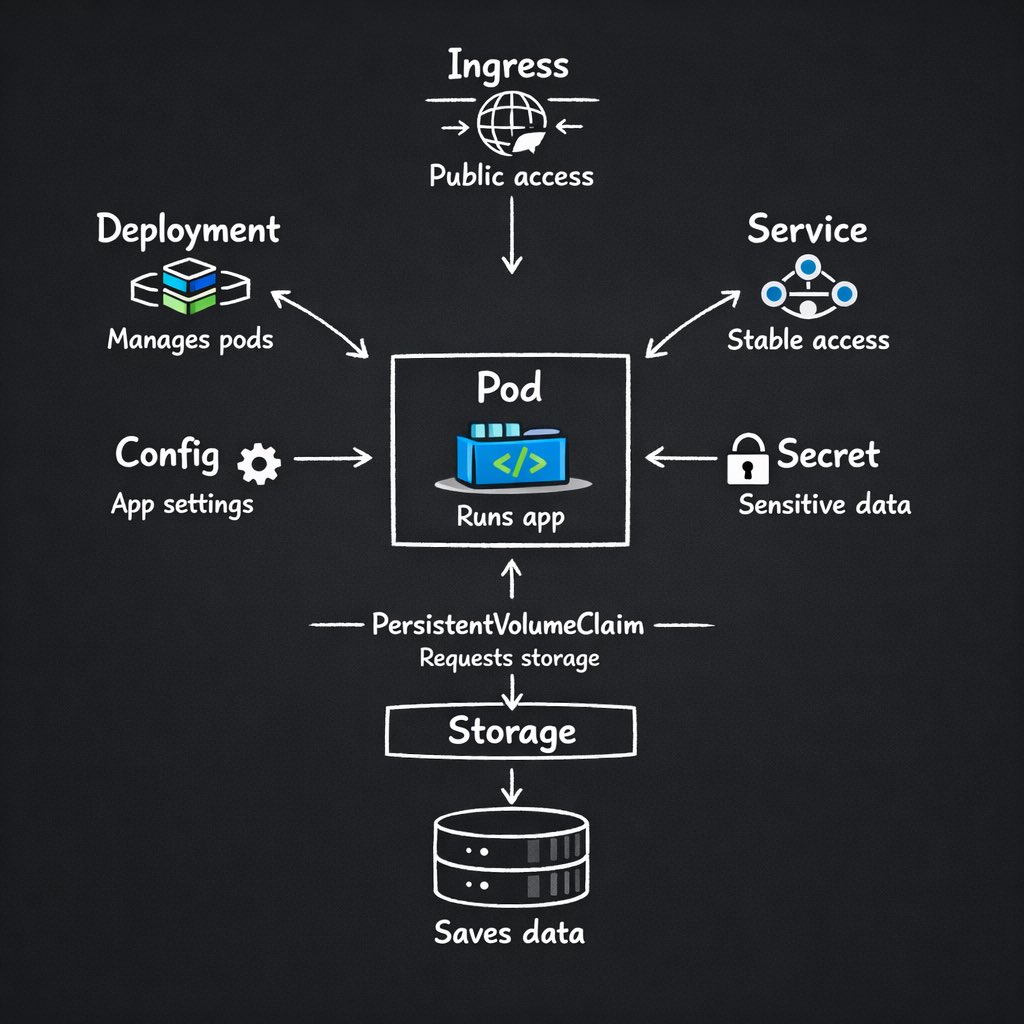
Kubernetes resources in one-liners:
> Kubernetes Pod runs your app container
> Deployments keeps your app running and updates it safely
> Service gives a stable way to access your app
> Ingress exposes your app to the internet
> ConfigMap stores app configuration
> Secret stores sensitive data securely
> PersistentVolume stores your app data
> PersistentVolumeClaim requests storage for your app
> Namespaces separates apps and environments
> ReplicaSets maintains required number of pods
> Job runs a task once
> CronJob → runs tasks on a schedule
9
39
178
34,313

Apr 13
【Cloud Praticaで学べる技術を一挙公開】
✅ Go (DDD)
✅ Docker
✅ Terraform
✅ GitHub Actions
✅ AWS
Organizations, IAM Identity Center, IAM (User, Role, Policy, スイッチロール), Route 53, VPC, Subnet, Route Table, Internet Gateway, NAT Gateway, Security Group, ALB, S3, ECS, EC2, ECR, RDS, Session Manager, SSM Parameter Store, Secrets Manager, Certificate Manager, CloudWatch (Logs/Metrics/Alarm), SNS, CloudFront, Lamdba@Edge, Amplify, SES, SQS, EventBridge Scheduler, Step Functions, WAF, AWS Batch, Lambda, API Gateway, DynamoDB, Cognito, EKS, Glue, Kinesis Data Firehose
✅ Google Cloud
GKE, BigQuery, GCE, Cloud Functions, GCS, Cloud Scheduler, Pub/Sub, Cloud Run, Cloud Tasks, Cloud DNS, Cloud CDN, Cloud Load Balancing, Artifact Registry, Cloud Build, Secret Manager, Cloud SQL, VPC Connector, Service accounts , IAM, Workload Identify, I Cloud Logging, Cloud Armor
✅ Kubernetes (EKS)
## リソース
Node, Pod, Deployment, ReplicaSet, Service (ClusterIP, Headless, NodePort, LoadBalancer), Ingress, ConfigMap, Secret, Job, CronJob, StatefulSet, PersistentVolume, PersistentVolumeClaim, DaemonSet, HPA
## その他
Helm, Kustomize, Grafana, Prometheus, AWS Load Balancer Controller, External Secrets Operator, Pod Identity, Istio, Fluentd
※ 現時点で上記は確定ですが、これからどんどん需要の高いコースを無限アップデートしていきます。
辞書的に網羅すると挫折する気しかしないと思いますが、実務を完全に再現したストーリー仕立てになっており、ミニマムの構成から始めて徐々に難しい技術を導入していく流れなので、中毒性高く進められます。
すでに構築されたアカウントを見放題なので、答えを見ながら手を動かすことが可能です。
加えて、Zoomでの1on1、受講生アカウントにログインしてのデバッグ代行、テキストでの質問、動画でのインフラ設定、コードレビューまでつけているので理論上、挫折する方が難しいです。
現役バックエンド、インフラエンジニアが学べるディズニーランドを目指して今後も精進していきます!
28
3,429
Apr 4
☸️Kubernetes Engineer Roadmap from(Zero to Hero)
📂 Kubernetes Engineer Roadmap
├─ 📂 Foundations (START HERE)
│ ├─ 📂 Linux Fundamentals ⭐ FIRST
│ │ ├─ Processes & PID
│ │ ├─ Signals
│ │ ├─ File systems & inodes
│ │ ├─ Users, groups & permissions
│ │ ├─ Networking basics (TCP/IP, ports, DNS)
│ │ └─ cgroups & namespaces (conceptual)
│ │
│ ├─ 📂 Containers
│ │ ├─ What containers really are
│ │ ├─ Containers vs VMs
│ │ ├─ Docker architecture
│ │ ├─ Images, layers & registries
│ │ └─ Container networking basics
│ │
│ ├─ 📂 YAML & CLI
│ │ ├─ YAML structure & indentation
│ │ ├─ kubectl basics
│ │ ├─ Imperative vs Declarative
│ │ └─ Reading manifests confidently
│ │
│ └─ 📂 Why Kubernetes?
│ ├─ Scheduling problem
│ ├─ Scaling problem
│ ├─ Self-healing systems
│ └─ Desired state management
│
├─ 📂 Core Kubernetes
│ ├─ 📂 Architecture
│ │ ├─ Control Plane components
│ │ ├─ Worker Nodes
│ │ ├─ API Server
│ │ ├─ Scheduler
│ │ └─ etcd basics
│ │
│ ├─ 📂 Core Workloads
│ │ ├─ Pod
│ │ ├─ ReplicaSet
│ │ ├─ Deployment
│ │ ├─ StatefulSet
│ │ └─ DaemonSet
│ │
│ ├─ 📂 Configuration
│ │ ├─ ConfigMaps
│ │ ├─ Secrets
│ │ └─ Environment variables
│ │
│ └─ 📂 Services & Networking
│ ├─ ClusterIP
│ ├─ NodePort
│ ├─ LoadBalancer
│ ├─ Ingress basics
│ └─ DNS inside cluster
│
├─ 📂 Storage & Scheduling
│ ├─ 📂 Storage
│ │ ├─ Volumes
│ │ ├─ PersistentVolume (PV)
│ │ ├─ PersistentVolumeClaim (PVC)
│ │ └─ StorageClasses
│ │
│ ├─ 📂 Resource Management
│ │ ├─ Requests & Limits
│ │ ├─ Resource Quotas
│ │ └─ LimitRanges
│ │
│ └─ 📂 Advanced Scheduling
│ ├─ Node Selectors
│ ├─ Node Affinity
│ ├─ Taints & Tolerations
│ └─ Pod Anti-Affinity
│
├─ 📂 Security (NON-NEGOTIABLE)
│ ├─ 📂 Access Control
│ │ ├─ RBAC
│ │ ├─ Roles vs ClusterRoles
│ │ ├─ Service Accounts
│ │ └─ Principle of Least Privilege
│ │
│ ├─ 📂 Pod Security
│ │ ├─ Security Context
│ │ ├─ Pod Security Standards
│ │ └─ Image security basics
│ │
│ └─ 📂 Network Security
│ ├─ Network Policies
│ ├─ Internal-only services
│ └─ mTLS concepts
│
├─ 📂 Advanced Kubernetes (LATER)
│ ├─ 📂 Helm
│ │ ├─ Charts
│ │ ├─ Values
│ │ └─ Releases
│ │
│ ├─ 📂 Autoscaling
│ │ ├─ HPA
│ │ ├─ VPA
│ │ └─ Cluster Autoscaler
│ │
│ ├─ 📂 Observability
│ │ ├─ Logs
│ │ ├─ Metrics
│ │ ├─ Traces
│ │ └─ Debugging live systems
│ │
│ └─ 📂 Troubleshooting
│ ├─ CrashLoopBackOff
│ ├─ OOMKilled
│ ├─ Pending Pods
│ └─ Networking failures
├─ 📂 Production & Platform Engineering (LAST)
│ ├─ 📂 CI/CD
│ │ ├─ GitOps concepts
│ │ ├─ Deployment strategies
│ │ ├─ Rollbacks
│ │ └─ Progressive delivery
│ │
│ ├─ 📂 Multi-Environment Strategy
│ │ ├─ Dev / Stage / Prod
│ │ ├─ Namespaces vs Clusters
│ │ └─ Promotion flows
│ │
│ └─ 📂 Cloud Kubernetes
│ ├─ Managed Kubernetes (EKS/GKE/AKS)
│ ├─ Cloud networking
│ └─ Cost optimization
│
└─ 📂 Career Layer
├─ 📂 Hands-on Practice
│ ├─ kind / minikube
│ ├─ Break & fix labs
└─ Real incident simulations
3
32
169
8,046