PHYSICAL MODELING SYNTHESIS BASICS, PLUS TIPS ON WHICH APP / PLUGIN FOR WHAT:
Given how interested people have been in the giveaway I did for Geoshred Pro all IAPs, I thought it would be nice to do a post about physical modeling synthesis, in a very general sense. This short article covers what it is and gives tips as well as specific app / plugin recommendations.
WHAT IS PHYSICAL MODELING SYNTHESIS?
Physical modeling (I’ll just call it PM from here on) creates sounds by simulating real instruments and objects, instead of just playing samples. It uses math and physics concepts to model things like strings, membranes, and air columns.
Two key concepts when talking about PM are that of an ‘exciter’ (eg. a bow, plectrum or drumstick) and a ‘resonator’ (eg. a string or membrane).
For example, to synthesize a guitar sound, the software recreates how a guitar string vibrates when plucked by modeling the physics of a vibrating string. Things like string thickness, tension, and material can be adjusted, just like on a real guitar, although you can also push these in extreme directions not possible with traditional instruments, and combine and modulate things in novel ways.
Other examples are modeling a drumhead being struck, a brass instrument player's lips buzzing into a mouthpiece, or air blowing through a pipe.
Compared to just triggering audio samples, physical modeling can sound more realistic, responsive, and natural. You have more flexibility to manipulate sounds in creative ways by tweaking physical parameters.
PHYSICAL MODELING VS SAMPLES:
In general, I prefer physical modeling synthesis over samples because:
It can be more realistic, and MUCH more tweakable, making PM instruments a lot more enjoyable to play and also more enjoyable for sound designers
PM instruments take up a lot less space than samples, important when working on a phone or iPad
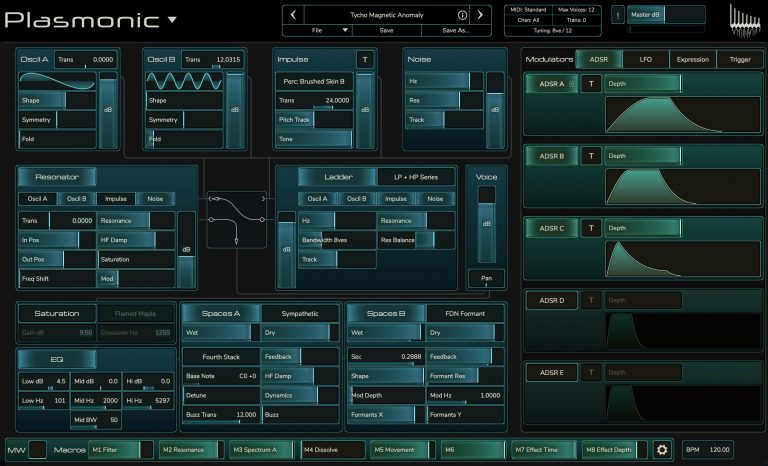
Instead of just taking a sampled sound and adding FX to it to come up with weird stuff, you can (depending on the software of course) play with things on a much deeper level - for example changing the parameters of a physically modeled guitar so that the guitar sounds like it has a massive body that in real life would make it impossible to play, or making it sound like the strings are made of some weird hybrid material. Madrona Labs Kaivo and Rhizomatic Plasmonic are 2 examples of physical modeling synths that are fantastic for experimental tweaking, though even instruments with more focus on modeling real sounds, like Geoshred and Pianoteq, have some room for tweaking
To me, the most interesting PM synths are ones that make it easy to then tweak those realistic sounds in weird directions that play with the listener's perception of whether they are hearing is a real or synthesised.
PRACTICAL TIPS
Choose MPE. In general I prefer MPE instruments when it comes to physical modeling. The sound engine is important but the ability to play expressively is also very important, as is the ability to easily adjust expression parameters. Geoshred, Plasmonic and Kaivo (these 2 are desktop only, unfortunately) are a few examples of MPE PM synths. Geoshred stands out in terms of how playable it is on a touchscreen. However, compared to Kaivo or Plasmonic, Geoshred imposes more limits - most sounds are at best duophonic, for example. That’s fine for emulating real workload instruments but not ideal when it comes to making your own instruments. Pianoteq is very cool, but it would be still more useful if it were MPE, and the in-app keyboard is not conducive to performance. MPE is not necessary for modeling a piano, for example, but it is useful for creatively playing with the listener’s perception: why not have an instrument that sounds like a piano but plays like a violin, for example?
Mix PM with other synthesis types. Kaivo, for example, lets you mix Physical Modeling and Granular.
Experiment with impulse responses: Pianoteq has some really well-chosen IRs built in, which really sound excellent, but it can be fun to load your own IRs and use something weird, like IRs from underground caves like the ones Venus Theory and Benn Jordan made - or just make your own.
Use micro-tuning and scale customization: Geoshred, for example, allows you to make custom scales and temperaments.
Program realistic articulations: Focus on programming realistic articulations for replicating real instruments. Geoshred, Audio Modeling SWAM and Pianoteq all do well in this area, allowing you control over things like how ‘tongued’ a flute sounds, how much pedal and key sound can be heard in a piano patch, etc.
Decide what you want: if focusing on realistic sounds, go for apps that aim for that like the 3 mentioned above, but if you want to push things into the experimental go for synths with UIs that make that easy, like Plasmonic and Kaivo.
Don’t forget to give this a ’like’ if you enjoyed it, and maybe drop some of your own thoughts on Physical Modeling in the comments, cheers!🎶🖥️🎻
#physicalmodeling #synth #mpe #plasmonic #kaivo #geoshred #pianoteq #stringlab #mersenne #laplace #springsound