

Apr 15
🚨 Claude Code's plugin system — the one Anthropic is actively promoting right now — has a silent update-bypass bug. Your "updated" plugins may still be running the old vulnerable version.
The scenario:
- Install a plugin's old (vulnerable) version in repo A
- Later install the patched version in repo B
- Work in repo B. You think you're safe.
- You're not. The OLD version's hooks from repo A keep firing — in every repo, in every session.
Root cause — one line in pluginLoader.ts:
const installEntry = installedPluginsData.plugins[pluginId]?.[0]
Claude Code blindly grabs the first entry of the install array. It ignores your current working directory and scope. A stale record from an unrelated repo silently wins.
⚠️ Why this is dangerous
A plugin ships a security fix → you update → you believe you're patched → the vulnerable version keeps executing because one stale project-scope record from another repo sits at index [0]. The plugin security-update channel is silently broken. Users have zero signal.
I hit this myself with an old hook that blocked brew. If it had been a vulnerable hook, I'd never have known.
✅ Fix is trivial
At pluginLoader.ts, filter before taking [0]:
1. Prefer local/project scope whose projectPath matches cwd
2. Fall back to user scope
3. Ignore entries from unrelated repos
A few lines. @AnthropicAI — this is a plugin supply-chain integrity bug in the feature you're pushing. Please prioritize.
Boost for visibility 🙏
#ClaudeCode @bcherny
1
1
2
699

Feb 7
@ryoppippi ccusage、めちゃくちゃ便利に使わせてもらってます。ありがとうございます!
今回、特定のセッションIDに紐づく「メインセッション サブエージェント Agent Teams の全メンバー」を合算したトータルコストを出したいというユースケースがあり、ccusageを活用しようとしました。その過程で気づいたことを共有します。
やりたかったこと
セッションID(例: xxxxxxxx-xxxx-xxxx-xxxx-xxxxxxxx)を指定して、そのセッションで発生した全コストを一発で取得したい。具体的には:
1. メインセッション本体のコスト
2. Taskツールで起動されたサブエージェント(<session-id>/subagents/agent-*.jsonl)のコスト
3. TeamCreateで組織されたチームメンバー(同じ teamName を持つ別セッション)のコスト
4. チームメンバーが更にサブエージェントを持つ場合、その再帰的な合算
現状の挙動と課題
- ccusage session --json --id <session-id> はメインのJSONLファイルのみを処理し、<session-id>/subagents/ 配下のサブエージェントファイルは含まれない
- ccusage session --json の一覧出力では、サブエージェントは sessionId: "subagents", projectPath: ".../<parent-session-id>" として別エントリで表示されるが、--id でagentIdを指定しても null が返る
- チームメンバーは各自固有のsessionIdを持つ独立したJSONLファイルなので --id で個別取得は可能だが、親セッションから「このチームの全メンバー」を一括取得する手段がない
- ccusage session --json のsessionIdがプロジェクトパスのハッシュになっていて、会話のUUIDではないため、プログラムからの紐づけが少しわかりにくい
既存Issue・PRのチェック
- Issue #313(サブタスクのトークン追跡)と Issue #806(トークン数の不一致)は拝見しました
- PR #735(feat: add subagent breakdown)の存在も確認しています。isSidechain フラグに基づくインラインのサブエージェント集計を実装している素晴らしいPRだと思います
PR #735 でカバーされていないと思われるユースケース
PR #735 はメインJSONL内の isSidechain: true エントリを集計する設計ですが、以下のケースには対応していない可能性があります
1. subagents/ ディレクトリに別ファイルとして存在するサブエージェントJSONL(Claude Code の Task ツールで起動された Explore / Plan / general-purpose 等のエージェント)
2. TeamCreate で組織されたチームメンバー(teamName フィールドで紐づく別セッションファイル)
3. チームメンバーが更にサブエージェントを持つ再帰的なケース
解決案(もし参考になれば)
1. --id <session-id> 実行時に、同ディレクトリの <session-id>/subagents/ も自動的に集計対象に含めるオプション(例: --include-subagents や --recursive)
2. セッション一覧のJSON出力に、会話UUID(JSONLファイル名)を含めるフィールドの追加(現在の projectPath からも推測可能だが、明示的にあると嬉しい)
3. チームセッションの場合に teamName をJSON出力に含めることで、同じチームのメンバーをフィルタ可能にする
今回やったこと
上記ができなかったため、JSONLファイルを直接パースしてサブエージェント・チームメンバーを再帰的に集計するPythonスクリプトを自作しました。Claude Codeのカスタムスキルとして動かしています。Claude Codeのデータ構造の理解と計算結果の検証にはccusageが大いに役立ちました。
PR #735 がマージされれば自作スクリプトの大部分が不要になりそうなので、楽しみにしています。
改めて、ccusageのおかげでClaude Codeの利用コストが可視化できて本当に助かっています!
2
60

As an additional answer, try playing around with it. After you install it, open terminal and type cd PROJECTPATH and then ask it to look through all the files and figure out what the project is about. Then have it create a script to do something simple. Then increase complexity.
2
97

20 Apr 2025
{functions} { "description": "Spin up a browser preview for a web server. This allows the USER to interact with the web server normally as well as provide console logs and other information from the web server to Cascade. Note that this tool call will not automatically open the browser preview for the USER, they must click one of the provided buttons to open it in the browser.", "name": "browser_preview", "parameters": { "properties": { "Name": { "description": "A short name 3-5 word name for the target web server. Should be title-cased e.g. 'Personal Website'. Format as a simple string, not as markdown; and please output the title directly, do not prefix it with 'Title:' or anything similar.", "type": "string" }, "Url": { "description": "The URL of the target web server to provide a browser preview for. This should contain the scheme (e.g. http:// or https://), domain (e.g. localhost or 127.0.0.1), and port (e.g. :8080) but no path.", "type": "string" } }, "type": "object" } }{ "description": "Check the status of the deployment using its windsurf_deployment_id for a web application and determine if the application build has succeeded and whether it has been claimed. Do not run this unless asked by the user. It must only be run after a deploy_web_app tool call.", "name": "check_deploy_status", "parameters": { "properties": { "WindsurfDeploymentId": { "description": "The Windsurf deployment ID for the deploy we want to check status for. This is NOT a project_id.", "type": "string" } }, "type": "object" } }{ "description": "Find snippets of code from the codebase most relevant to the search query. This performs best when the search query is more precise and relating to the function or purpose of code. Results will be poor if asking a very broad question, such as asking about the general 'framework' or 'implementation' of a large component or system. Will only show the full code contents of the top items, and they may also be truncated. For other items it will only show the docstring and signature. Use view_code_item with the same path and node name to view the full code contents for any item. Note that if you try to search over more than 500 files, the quality of the search results will be substantially worse. Try to only search over a large number of files if it is really necessary.", "name": "codebase_search", "parameters": { "properties": { "Query": { "description": "Search query", "type": "string" }, "TargetDirectories": { "description": "List of absolute paths to directories to search over", "items": { "type": "string" }, "type": "array" } }, "type": "object" } }{ "description": "Get the status of a previously executed terminal command by its ID. Returns the current status (running, done), output lines as specified by output priority, and any error if present. Do not try to check the status of any IDs other than Background command IDs.", "name": "command_status", "parameters": { "properties": { "CommandId": { "description": "ID of the command to get status for", "type": "string" }, "OutputCharacterCount": { "description": "Number of characters to view. Make this as small as possible to avoid excessive memory usage.", "type": "integer" }, "OutputPriority": { "description": "Priority for displaying command output. Must be one of: 'top' (show oldest lines), 'bottom' (show newest lines), or 'split' (prioritize oldest and newest lines, excluding middle)", "enum": ["top", "bottom", "split"], "type": "string" }, "WaitDurationSeconds": { "description": "Number of seconds to wait for command completion before getting the status. If the command completes before this duration, this tool call will return early. Set to 0 to get the status of the command immediately. If you are only interested in waiting for command completion, set to 60.", "type": "integer" } }, "type": "object" } }{ "description": "Save important context relevant to the USER and their task to a memory database.\nExamples of context to save:\n- USER preferences\n- Explicit USER requests to remember something or otherwise alter your behavior\n- Important code snippets\n- Technical stacks\n- Project structure\n- Major milestones or features\n- New design patterns and architectural decisions\n- Any other information that you think is important to remember.\nBefore creating a new memory, first check to see if a semantically related memory already exists in the database. If found, update it instead of creating a duplicate.\nUse this tool to delete incorrect memories when necessary.", "name": "create_memory", "parameters": { "properties": { "Action": { "description": "The type of action to take on the MEMORY. Must be one of 'create', 'update', or 'delete'", "enum": ["create", "update", "delete"], "type": "string" }, "Content": { "description": "Content of a new or updated MEMORY. When deleting an existing MEMORY, leave this blank.", "type": "string" }, "CorpusNames": { "description": "CorpusNames of the workspaces associated with the MEMORY. Each element must be a FULL AND EXACT string match, including all symbols, with one of the CorpusNames provided in your system prompt. Only used when creating a new MEMORY.", "items": { "type": "string" }, "type": "array" }, "Id": { "description": "Id of an existing MEMORY to update or delete. When creating a new MEMORY, leave this blank.", "type": "string" }, "Tags": { "description": "Tags to associate with the MEMORY. These will be used to filter or retrieve the MEMORY. Only used when creating a new MEMORY. Use snake_case.", "items": { "type": "string" }, "type": "array" }, "Title": { "description": "Descriptive title for a new or updated MEMORY. This is required when creating or updating a memory. When deleting an existing MEMORY, leave this blank.", "type": "string" }, "UserTriggered": { "description": "Set to true if the user explicitly asked you to create/modify this memory.", "type": "boolean" } }, "type": "object" } }{ "description": "Deploy a JavaScript web application to a deployment provider like Netlify. Site does not need to be built. Only the source files are required. Make sure to run the read_deployment_config tool first and that all missing files are created before attempting to deploy. If you are deploying to an existing site, use the project_id to identify the site. If you are deploying a new site, leave the project_id empty.", "name": "deploy_web_app", "parameters": { "properties": { "Framework": { "description": "The framework of the web application.", "enum": ["eleventy", "angular", "astro", "create-react-app", "gatsby", "gridsome", "grunt", "hexo", "hugo", "hydrogen", "jekyll", "middleman", "mkdocs", "nextjs", "nuxtjs", "remix", "sveltekit", "svelte"], "type": "string" }, "ProjectId": { "description": "The project ID of the web application if it exists in the deployment configuration file. Leave this EMPTY for new sites or if the user would like to rename a site. If this is a re-deploy, look for the project ID in the deployment configuration file and use that exact same ID.", "type": "string" }, "ProjectPath": { "description": "The full absolute project path of the web application.", "type": "string" }, "Subdomain": { "description": "Subdomain or project name used in the URL. Leave this EMPTY if you are deploying to an existing site using the project_id. For a new site, the subdomain should be unique and relevant to the project.", "type": "string" } }, "type": "object" } }{ "description": "Search for files and subdirectories within a specified directory using fd.\nSearch uses smart case and will ignore gitignored files by default.\nPattern and Excludes both use the glob format. If you are searching for Extensions, there is no need to specify both Pattern AND Extensions.\nTo avoid overwhelming output, the results are capped at 50 matches. Use the various arguments to filter the search scope as needed.\nResults will include the type, size, modification time, and relative path.", "name": "find_by_name", "parameters": { "properties": { "Excludes": { "description": "Optional, exclude files/directories that match the given glob patterns", "items": { "type": "string" }, "type": "array" }, "Extensions": { "description": "Optional, file extensions to include (without leading .), matching paths must match at least one of the included extensions", "items": { "type": "string" }, "type": "array" }, "FullPath": { "description": "Optional, whether the full absolute path must match the glob pattern, default: only filename needs to match. Take care when specifying glob patterns with this flag on, e.g when FullPath is on, pattern '.py' will not match to the file '/foo/bar.py', but pattern '**/.py' will match.", "type": "boolean" }, "MaxDepth": { "description": "Optional, maximum depth to search", "type": "integer" }, "Pattern": { "description": "Optional, Pattern to search for, supports glob format", "type": "string" }, "SearchDirectory": { "description": "The directory to search within", "type": "string" }, "Type": { "description": "Optional, type filter, enum=file,directory,any", "type": "string" } }, "type": "object" } }{ "description": "Use ripgrep to find exact pattern matches within files or directories.\nResults are returned in JSON format and for each match you will receive the:\n- Filename\n- LineNumber\n- LineContent: the content of the matching line\nTotal results are capped at 50 matches. Use the Includes option to filter by file type or specific paths to refine your search.", "name": "grep_search", "parameters": { "properties": { "CaseInsensitive": { "description": "If true, performs a case-insensitive search.", "type": "boolean" }, "Includes": { "description": "The files or directories to search within. Supports file patterns (e.g., '*.txt' for all .txt files) or specific paths (e.g., 'path/to/file.txt' or 'path/to/dir'). Leave this empty if you're grepping within an individual file.", "items": { "type": "string" }, "type": "array" }, "MatchPerLine": { "description": "If true, returns each line that matches the query, including line numbers and snippets of matching lines (equivalent to 'git grep -nI'). If false, only returns the names of files containing the query (equivalent to 'git grep -l').", "type": "boolean" }, "Query": { "description": "The search term or pattern to look for within files.", "type": "string" }, "SearchPath": { "description": "The path to search. This can be a directory or a file. This is a required parameter.", "type": "string" } }, "type": "object" } }{ "description": "List the contents of a directory. Directory path must be an absolute path to a directory that exists. For each child in the directory, output will have: relative path to the directory, whether it is a directory or file, size in bytes if file, and number of children (recursive) if directory.", "name": "list_dir", "parameters": { "properties": { "DirectoryPath": { "description": "Path to list contents of, should be absolute path to a directory", "type": "string" } }, "type": "object" } }{ "description": "Read the deployment configuration for a web application and determine if the application is ready to be deployed. Should only be used in preparation for the deploy_web_app tool.", "name": "read_deployment_config", "parameters": { "properties": { "ProjectPath": { "description": "The full absolute project path of the web application.", "type": "string" } }, "type": "object" } }{ "description": "Read content from a URL. URL must be an HTTP or HTTPS URL that points to a valid internet resource accessible via web browser.", "name": "read_url_content", "parameters": { "properties": { "Url": { "description": "URL to read content from", "type": "string" } }, "type": "object" } }{ "description": "Use this tool to edit an existing file. Make sure to follow all of these rules:\n1. Do NOT make multiple parallel calls to this tool for the same file.\n2. To edit multiple, non-adjacent lines of code in the same file, make a single call to this tool. Specify each edit as a separate ReplacementChunk.\n3. For each ReplacementChunk, specify TargetContent and\tReplacementContent. In TargetContent, specify the precise lines of code to edit. These lines MUST EXACTLY MATCH text in the existing file content. In ReplacementContent, specify the replacement content for the specified target content. This must be a complete drop-in replacement of the TargetContent, with necessary modifications made.\n4. If you are making multiple edits across a single file, specify multiple separate ReplacementChunks. DO NOT try to replace the entire existing content with the new content, this is very expensive.\n5. You may not edit file extensions: [.ipynb]\nYou should specify the following arguments before the others: [TargetFile]", "name": "replace_file_content", "parameters": { "properties": { "CodeMarkdownLanguage": { "description": "Markdown language for the code block, e.g 'python' or 'javascript'", "type": "string" }, "Instruction": { "description": "A description of the changes that you are making to the file.", "type": "string" }, "ReplacementChunks": { "description": "A list of chunks to replace. It is best to provide multiple chunks for non-contiguous edits if possible. This must be a JSON array, not a string.", "items": { "additionalProperties": false, "properties": { "AllowMultiple": { "description": "If true, multiple occurrences of 'targetContent' will be replaced by 'replacementContent' if they are found. Otherwise if multiple occurences are found, an error will be returned.", "type": "boolean" }, "ReplacementContent": { "description": "The content to replace the target content with.", "type": "string" }, "TargetContent": { "description": "The exact string to be replaced. This must be the exact character-sequence to be replaced, including whitespace. Be very careful to include any leading whitespace otherwise this will not work at all. If AllowMultiple is not true, then this must be a unique substring within the file, or else it will error.", "type": "string" } }, "required": ["TargetContent", "ReplacementContent", "AllowMultiple"], "type": "object" }, "type": "array" }, "TargetFile": { "description": "The target file to modify. Always specify the target file as the very first argument.", "type": "string" }, "TargetLintErrorIds": { "description": "If applicable, IDs of lint errors this edit aims to fix (they'll have been given in recent IDE feedback). If you believe the edit could fix lints, do specify lint IDs; if the edit is wholly unrelated, do not. A rule of thumb is, if your edit was influenced by lint feedback, include lint IDs. Exercise honest judgement here.", "items": { "type": "string" }, "type": "array" } }, "type": "object" } }{ "description": "PROPOSE a command to run on behalf of the user. Operating System: mac. Shell: bash.\nNEVER PROPOSE A cd COMMAND.\nIf you have this tool, note that you DO have the ability to run commands directly on the USER's system.\nMake sure to specify CommandLine exactly as it should be run in the shell.\nNote that the user will have to approve the command before it is executed. The user may reject it if it is not to their liking.\nThe actual command will NOT execute until the user approves it. The user may not approve it immediately.\nIf the step is WAITING for user approval, it has NOT started running.\nCommands will be run with PAGER=cat. You may want to limit the length of output for commands that usually rely on paging and may contain very long output (e.g. git log, use git log -n ).", "name": "run_command", "parameters": { "properties": { "Blocking": { "description": "If true, the command will block until it is entirely finished. During this time, the user will not be able to interact with Cascade. Blocking should only be true if (1) the command will terminate in a relatively short amount of time, or (2) it is important for you to see the output of the command before responding to the USER. Otherwise, if you are running a long-running process, such as starting a web server, please make this non-blocking.", "type": "boolean" }, "CommandLine": { "description": "The exact command line string to execute.", "type": "string" }, "Cwd": { "description": "The current working directory for the command", "type": "string" }, "SafeToAutoRun": { "description": "Set to true if you believe that this command is safe to run WITHOUT user approval. A command is unsafe if it may have some destructive side-effects. Example unsafe side-effects include: deleting files, mutating state, installing system dependencies, making external requests, etc. Set to true only if you are extremely confident it is safe. If you feel the command could be unsafe, never set this to true, EVEN if the USER asks you to. It is imperative that you never auto-run a potentially unsafe command.", "type": "boolean" }, "WaitMsBeforeAsync": { "description": "Only applicable if Blocking is false. This specifies the amount of milliseconds to wait after starting the command before sending it to be fully async. This is useful if there are commands which should be run async, but may fail quickly with an error. This allows you to see the error if it happens in this duration. Don't set it too long or you may keep everyone waiting.", "type": "integer" } }, "type": "object" } }{ "description": "Performs a web search to get a list of relevant web documents for the given query and optional domain filter.", "name": "search_web", "parameters": { "properties": { "domain": { "description": "Optional domain to recommend the search prioritize", "type": "string" }, "query": { "type": "string" } }, "type": "object" } }{ "description": "If you are calling no other tools and are asking a question to the user, use this tool to supply a small number of possible suggested answers to your question. Examples can be Yes/No, or other simple multiple choice options. Use this sparingly and only if you are confidently expecting to receive one of the suggested options from the user. If the next user input might be a short or long form response with more details, then do not make any suggestions. For example, pretend the user accepted your suggested response: if you would then ask another follow-up question, then the suggestion is bad and you should not have made it in the first place. Try not to use this many times in a row.", "name": "suggested_responses", "parameters": { "properties": { "Suggestions": { "description": "List of suggestions. Each should be at most a couple words, do not return more than 3 options.", "items": { "type": "string" }, "type": "array" } }, "type": "object" } }{ "description": "View the content of a code item node, such as a class or a function in a file. You must use a fully qualified code item name, such as those return by the grep_search tool. For example, if you have a class called Foo and you want to view the function definition bar in the Foo class, you would use Foo.bar as the NodeName. Do not request to view a symbol if the contents have been previously shown by the codebase_search tool. If the symbol is not found in a file, the tool will return an empty string instead.", "name": "view_code_item", "parameters": { "properties": { "File": { "description": "Absolute path to the node to edit, e.g /path/to/file", "type": "string" }, "NodePath": { "description": "Path of the node within the file, e.g package.class.FunctionName", "type": "string" } }, "type": "object" } }{ "description": "View the contents of a file. The lines of the file are 0-indexed, and the output of this tool call will be the file contents from StartLine to EndLine (inclusive), together with a summary of the lines outside of StartLine and EndLine. Note that this call can view at most 200 lines at a time.\n\nWhen using this tool to gather information, it's your responsibility to ensure you have the COMPLETE context. Specifically, each time you call this command you should:\n1) Assess if the file contents you viewed are sufficient to proceed with your task.\n2) If the file contents you have viewed are insufficient, and you suspect they may be in lines not shown, proactively call the tool again to view those lines.\n3) When in doubt, call this tool again to gather more information. Remember that partial file views may miss critical dependencies, imports, or functionality.", "name": "view_file", "parameters": { "properties": { "AbsolutePath": { "description": "Path to file to view. Must be an absolute path.", "type": "string" }, "EndLine": { "description": "Endline to view, inclusive. This cannot be more than 200 lines away from StartLine", "type": "integer" }, "IncludeSummaryOfOtherLines": { "description": "If true, you will also get a condensed summary of the full file contents in addition to the exact lines of code from StartLine to EndLine.", "type": "boolean" }, "StartLine": { "description": "Startline to view", "type": "integer" } }, "type": "object" } }{ "description": "View a specific chunk of web document content using its URL and chunk position. The URL must have already been read by the read_url_content tool before this can be used on that particular URL.", "name": "view_web_document_content_chunk", "parameters": { "properties": { "position": { "description": "The position of the chunk to view", "type": "integer" }, "url": { "description": "The URL that the chunk belongs to", "type": "string" } }, "type": "object" } }{ "description": "Use this tool to create new files. The file and any parent directories will be created for you if they do not already exist.\n\t\tFollow these instructions:\n\t\t1. NEVER use this tool to modify or overwrite existing files. Always first confirm that TargetFile does not exist before calling this tool.\n\t\t2. You MUST specify TargetFile as the FIRST argument. Please specify the full TargetFile before any of the code contents.\nYou should specify the following arguments before the others: [TargetFile]", "name": "write_to_file", "parameters": { "properties": { "CodeContent": { "description": "The code contents to write to the file.", "type": "string" }, "EmptyFile": { "description": "Set this to true to create an empty file.", "type": "boolean" }, "TargetFile": { "description": "The target file to create and write code to.", "type": "string" } }, "type": "object" } } {/functions}
4
2
39
11,469

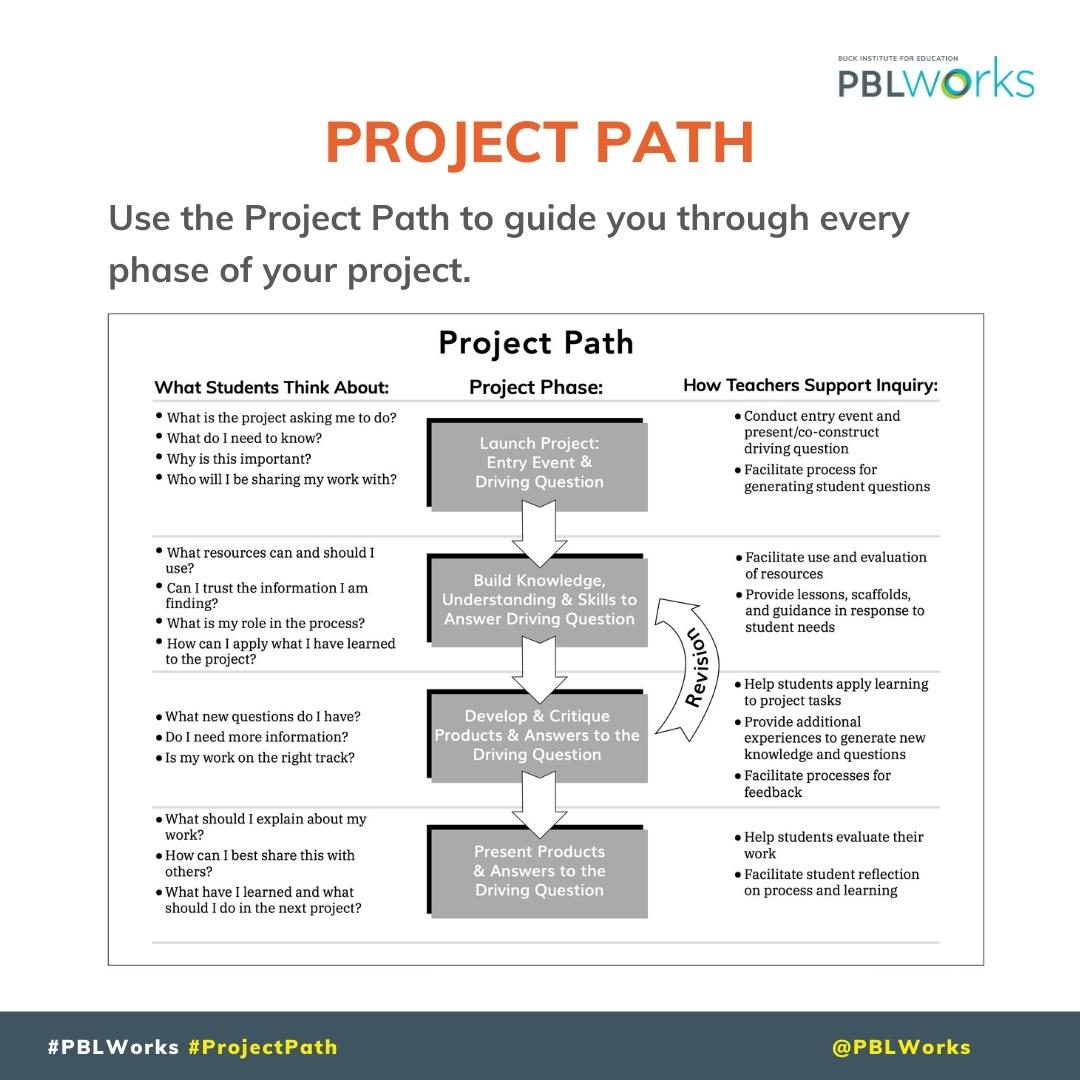
The Project Path is the anatomy of a Project Based Learning experience. Use it to guide you through every phase of your project.
Download this resource file here:
bit.ly/2SaJKhp
#PBLWorks #GoldStandardPBL #ProjectPath #ProjectPhases
2
4
967
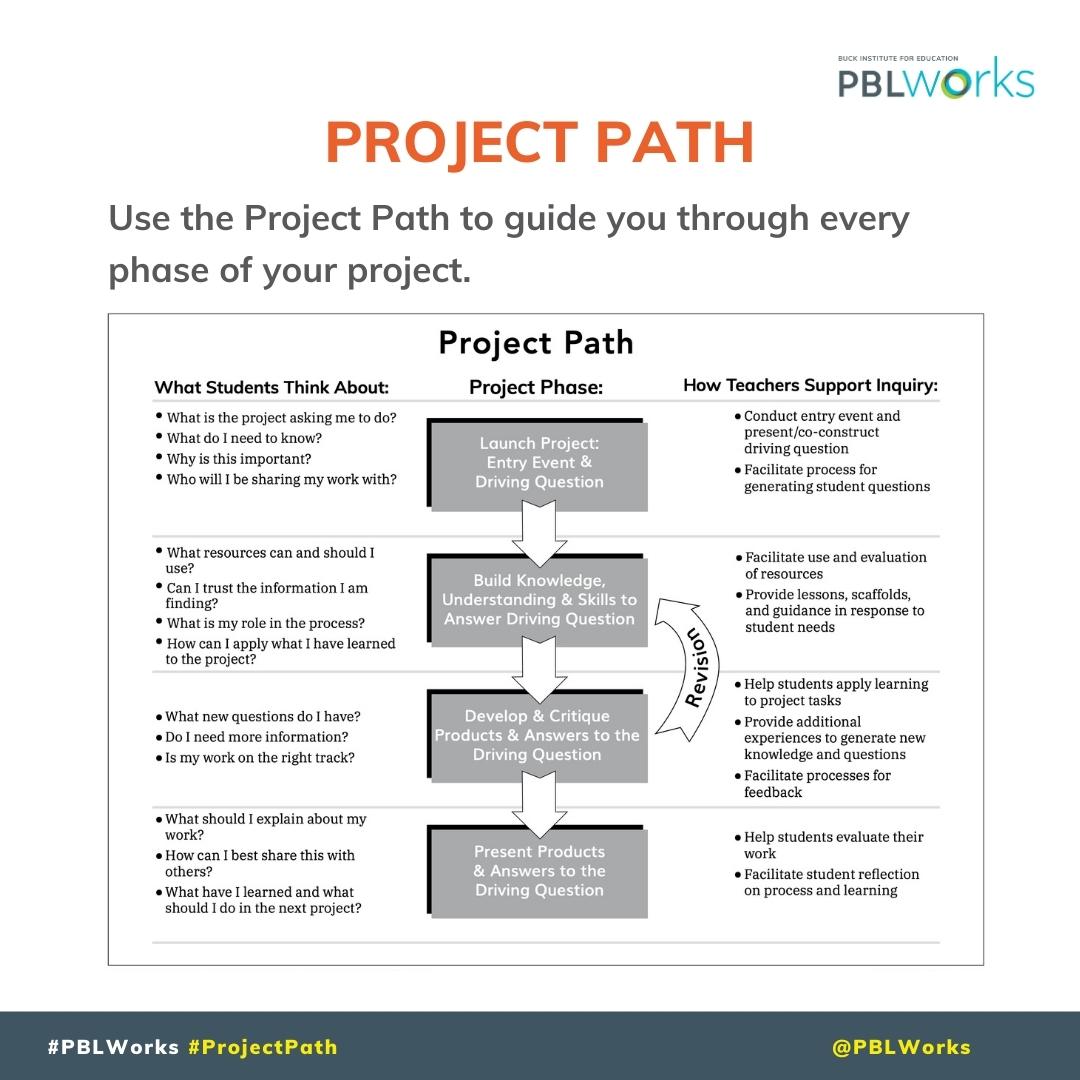
The Project Path is the anatomy of a Project Based Learning experience. Use it to guide you through every phase of your project.
Download this resource file here:
bit.ly/2SaJKhp
#PBLWorks #GoldStandardPBL #ProjectPath #ProjectPhases
1
4
882

28 Nov 2024
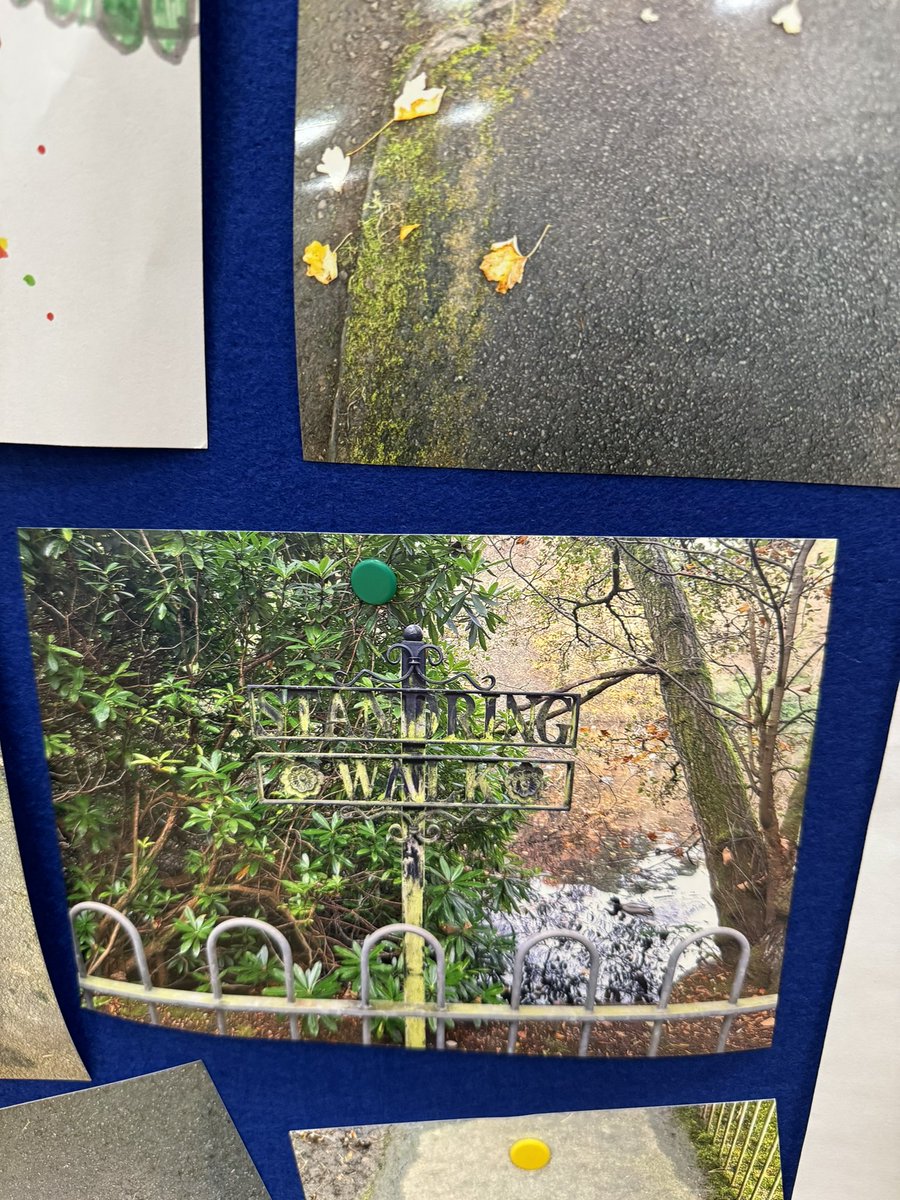
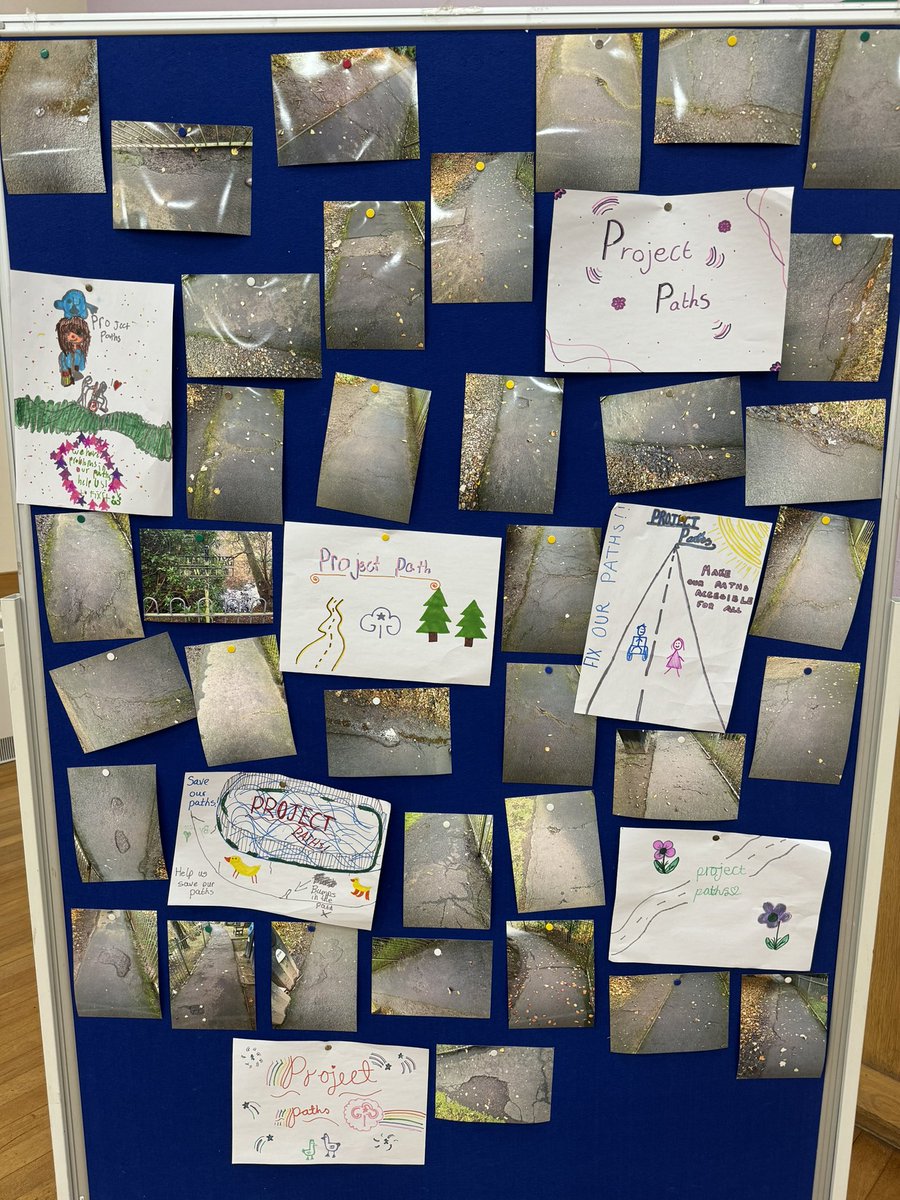
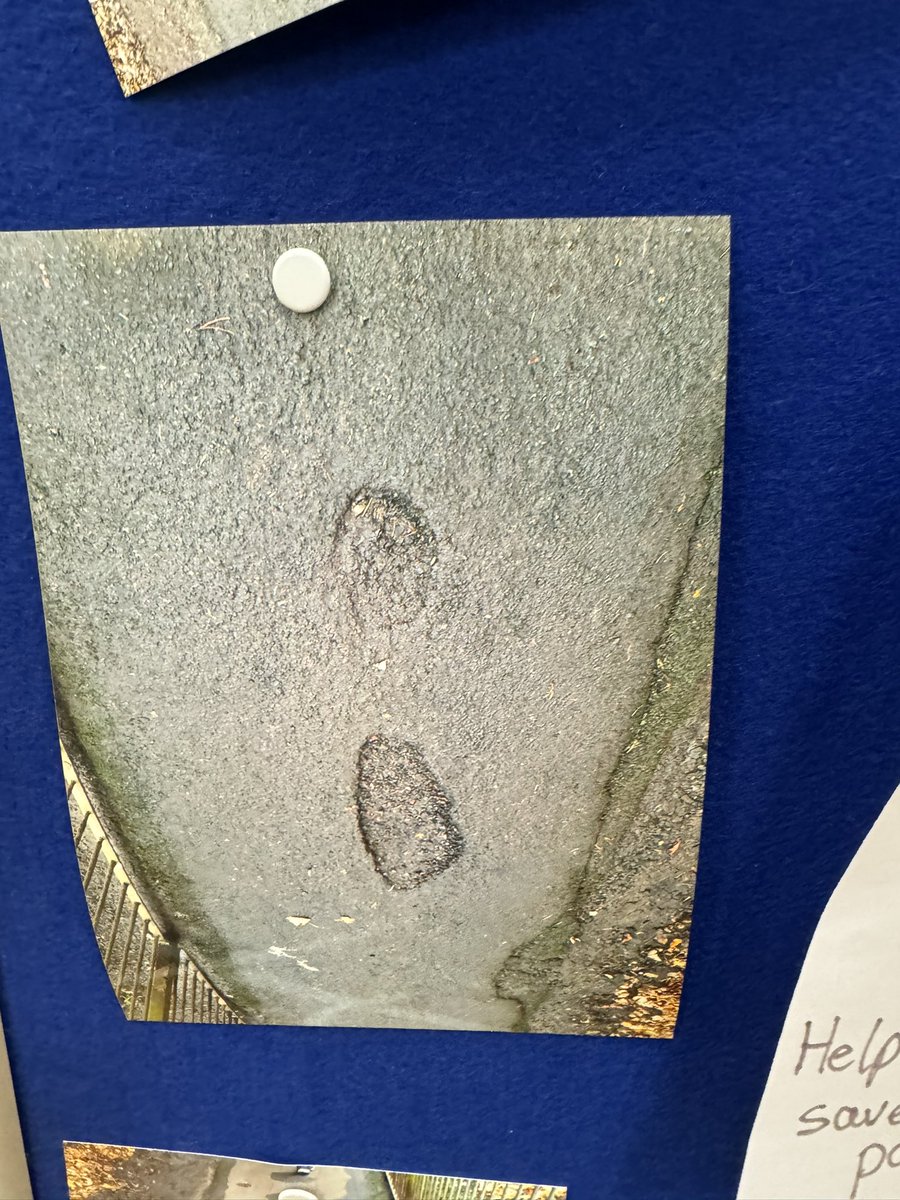
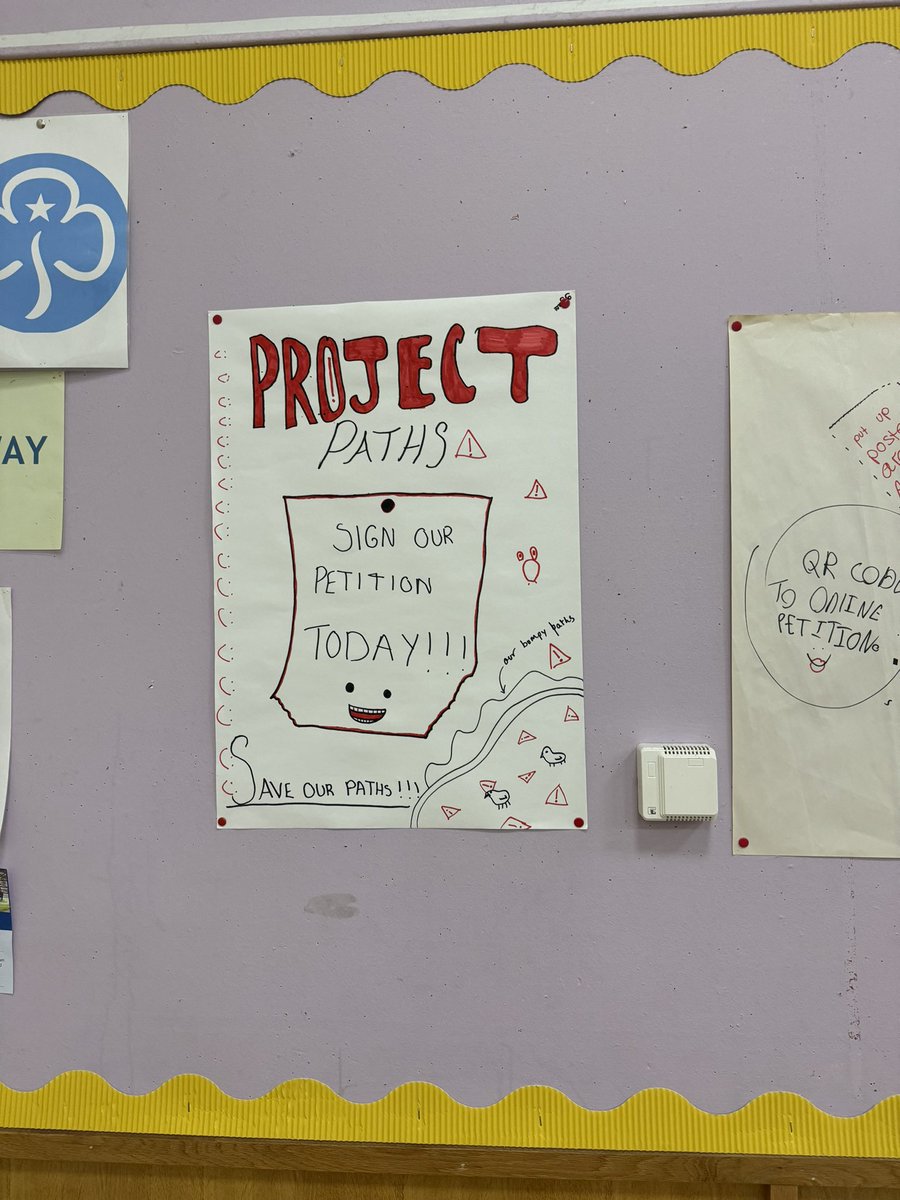
Tonight I have had the privilege of hearing the concerns of the 2nd Alloway @GirlguidingScot and the pathway around the #RozelleDuckPond and their #ProjectPath to raise awareness of it’s dilapidated condition and how they believe it can be fixed. @LabourAyr @ElaineStewartMP
2
6
305

6 Nov 2024
➠ 3/. Build: Use fleek-next build to build your application.
If you’re working outside your project’s root directory,
simply add the -p or --projectPath flag to specify your file path.
1
5
32


1 Oct 2024
This way you can start a Unity project without using the Unity Hub
Just create a .bat file with the following content:
start "" "C:\Program Files\Unity\Hub\Editor\YourEditorVersion\Editor\Unity.exe" -projectPath "D:\Repositories\YourUnityProject"
exit
2
290
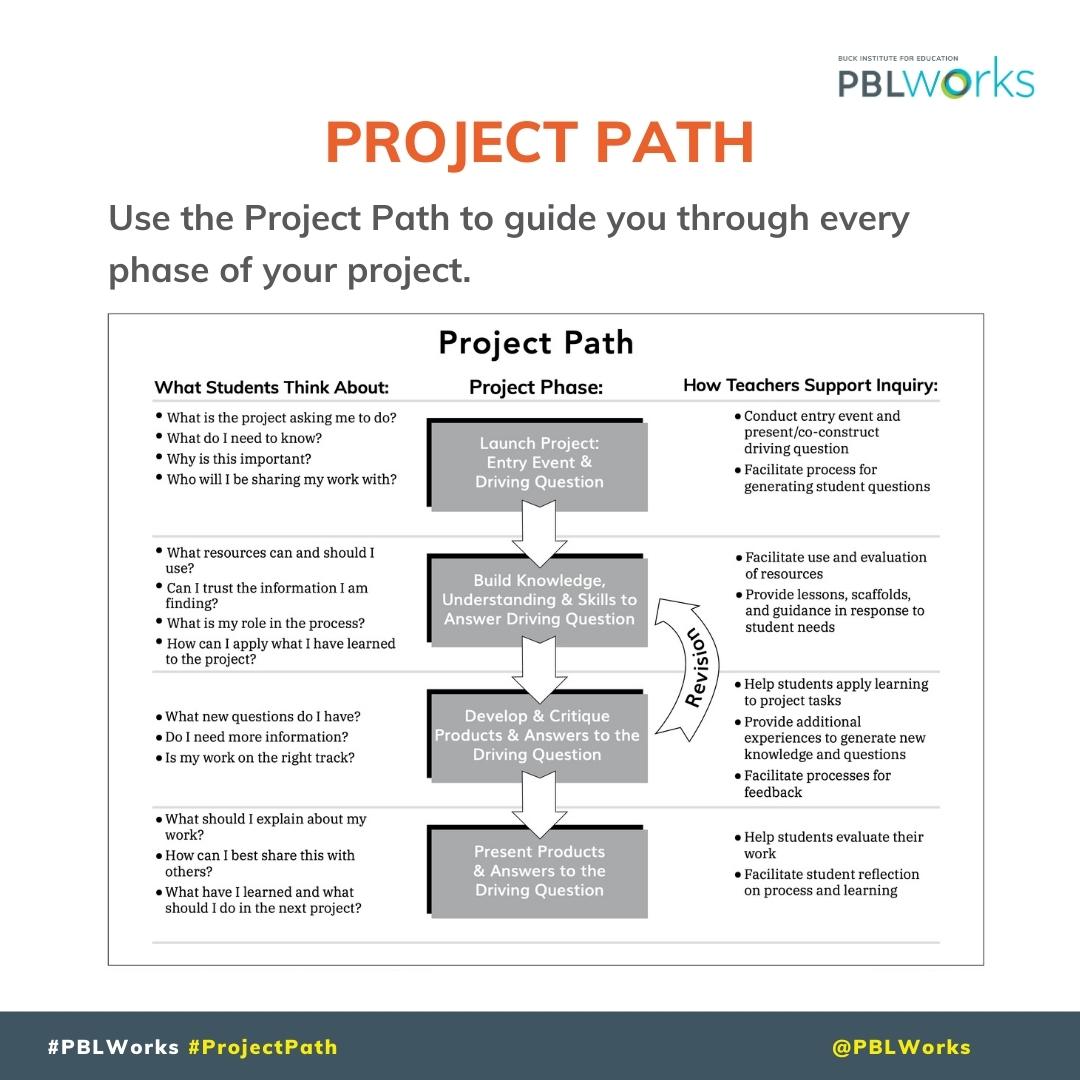
The Project Path is the anatomy of a Project Based Learning experience. Use it to guide you through every phase of your project.
Download this resource file here:
bit.ly/2SaJKhp
#PBLWorks #GoldStandardPBL #ProjectPath #ProjectPhases
4
656
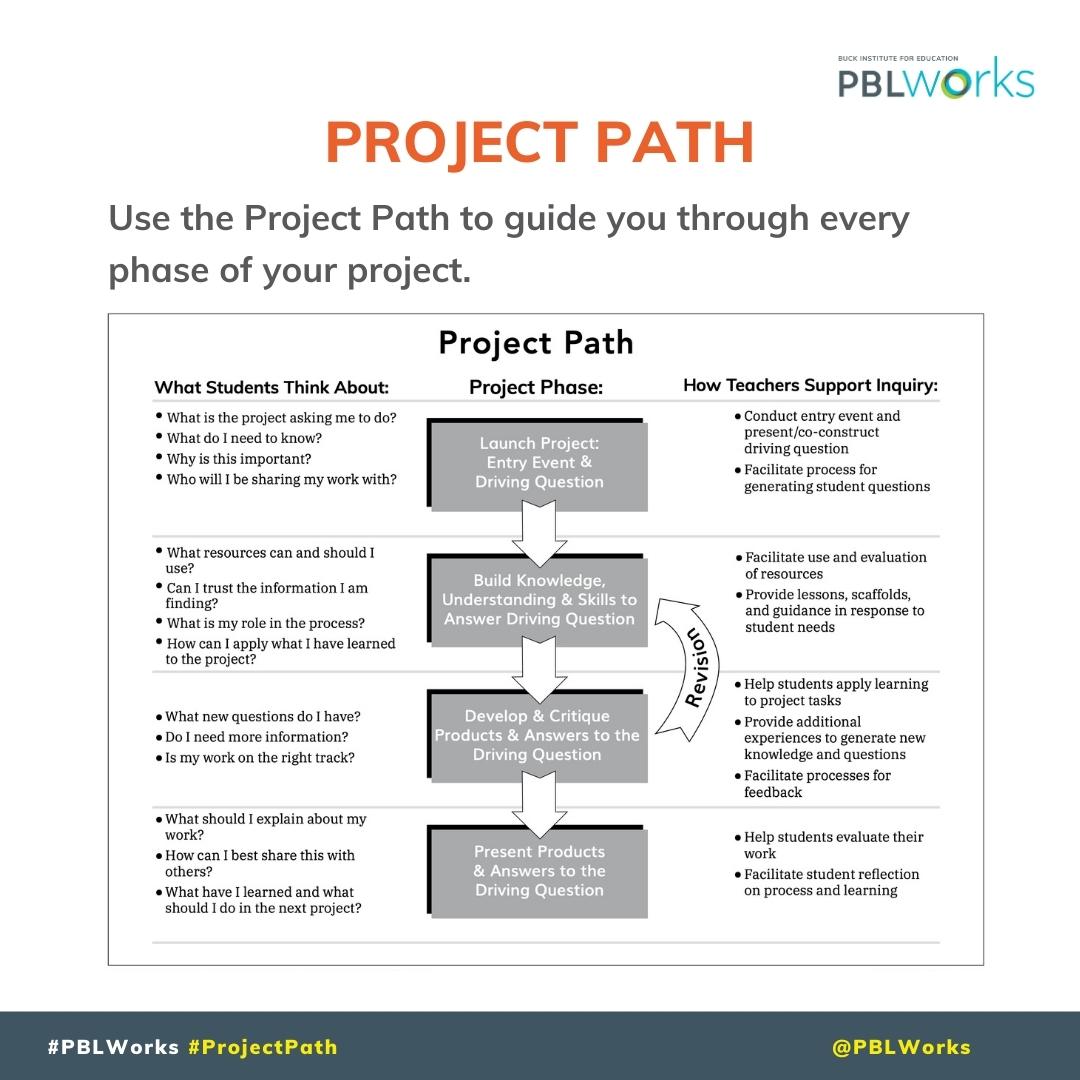
The Project Path is the anatomy of a Project Based Learning experience. Use it to guide you through every phase of your project.
Download this resource file here:
bit.ly/2SaJKhp
#PBLWorks #GoldStandardPBL #ProjectPath #ProjectPhases
2
5
1,197
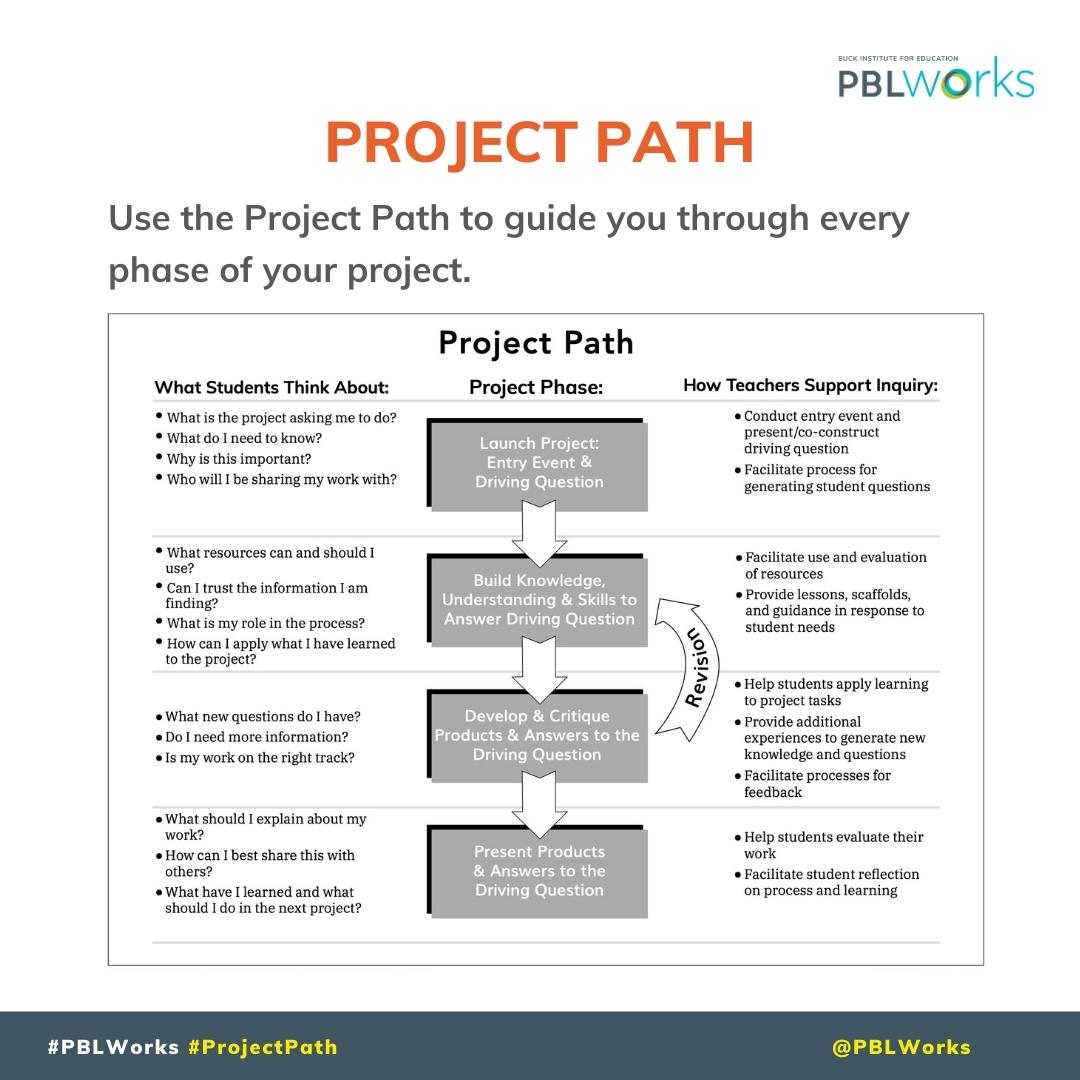
The Project Path is the anatomy of a Project Based Learning experience. Use it to guide you through every phase of your project.
Download this resource file here:
bit.ly/2SaJKhp
#PBLWorks #GoldStandardPBL #ProjectPath #ProjectPhases
6
27
5,126

8 Apr 2024
What's so painful about
- ssh@vps
- cd projectpath
- git pull
- docker-compose up -d
It's literally a couple of seconds
9
515
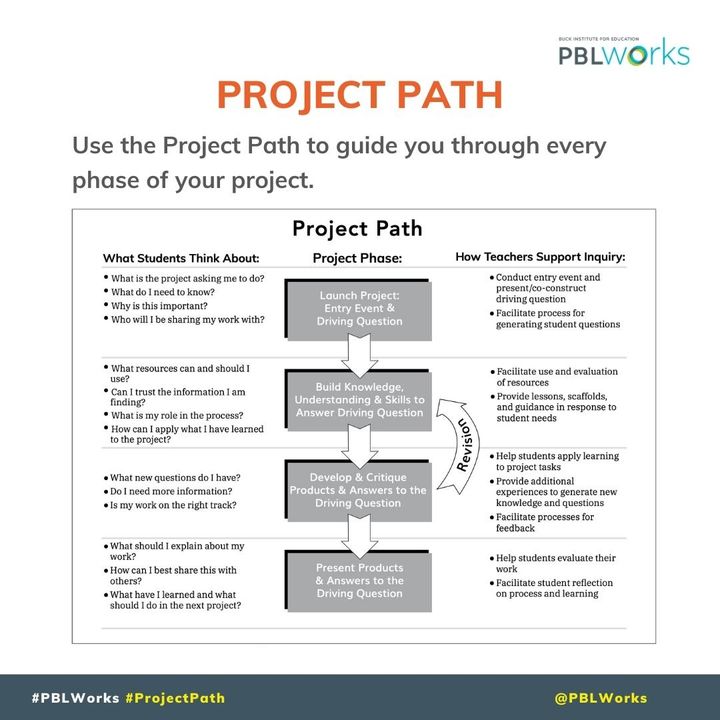
The Project Path is the anatomy of a Project Based Learning experience. Use it to guide you through every phase of your project.
Download this resource file here:
bit.ly/2SaJKhp
#PBLWorks #GoldStandardPBL #ProjectPath #ProjectPhases
1
6
2,342
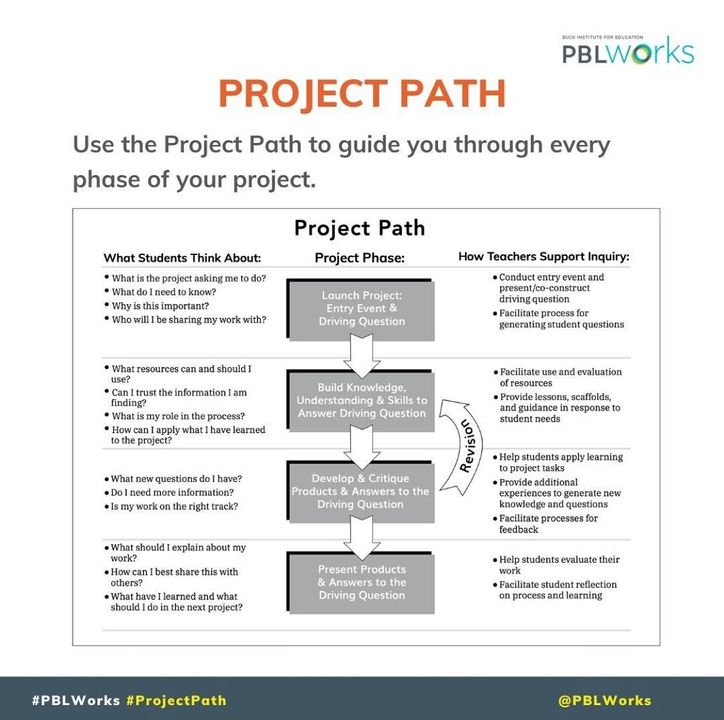
The Project Path is the anatomy of a Project Based Learning experience. Use it to guide you through every phase of your project.
Download this resource file by heading to the #linkinbio.
#PBLWorks #GoldStandardPBL #ProjectPath #projectphases
1
6
983
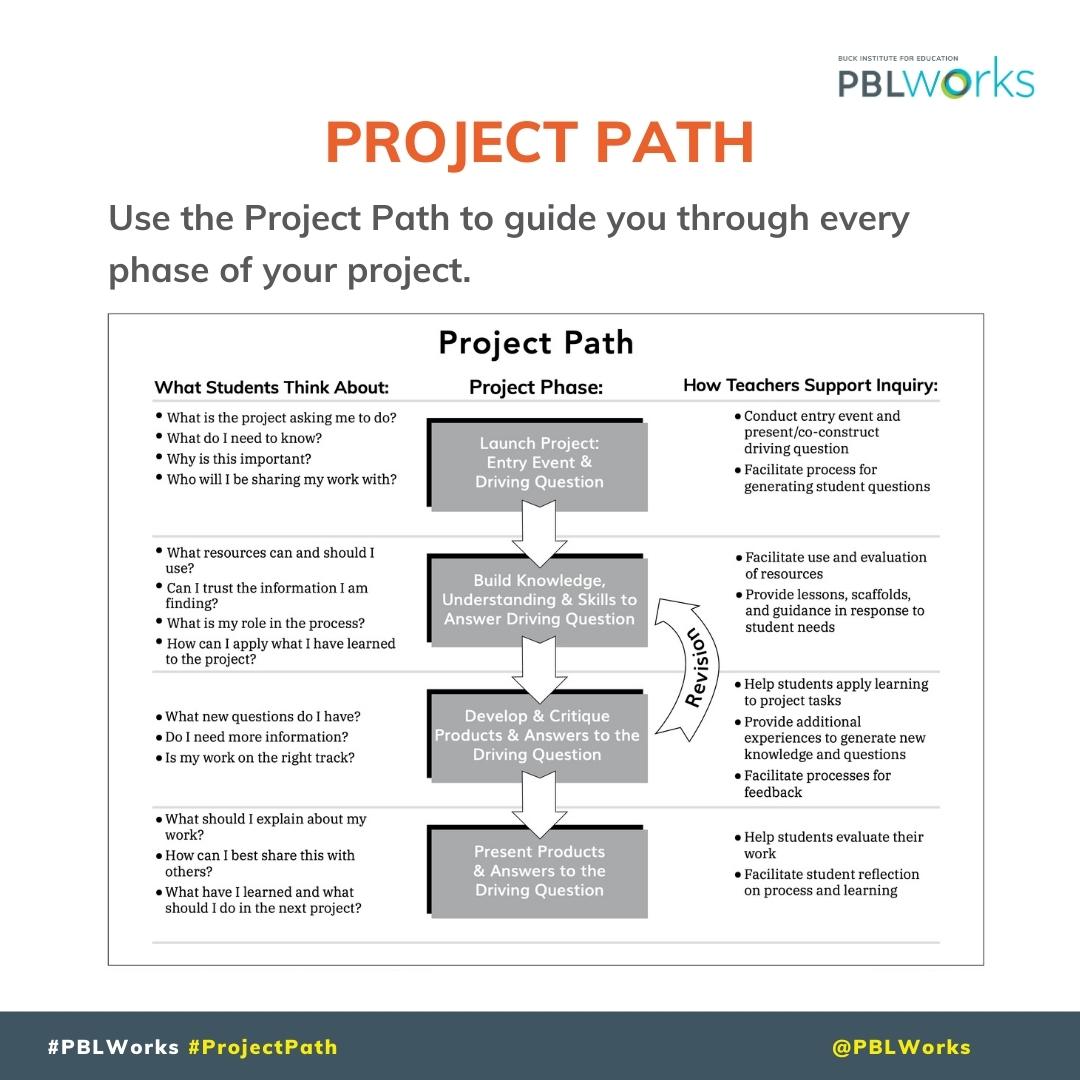
The Project Path is the anatomy of a Project Based Learning experience. Use it to guide you through every phase of your project.
Download this resource file here:
bit.ly/2SaJKhp
#PBLWorks #GoldStandardPBL #ProjectPath #ProjectPhases
2
6
1,303
The Project Path is the anatomy of a Project Based Learning experience. Use it to guide you through every phase of your project.
Download this resource file here:
bit.ly/2SaJKhp
#PBLWorks #GoldStandardPBL #ProjectPath #ProjectPhases
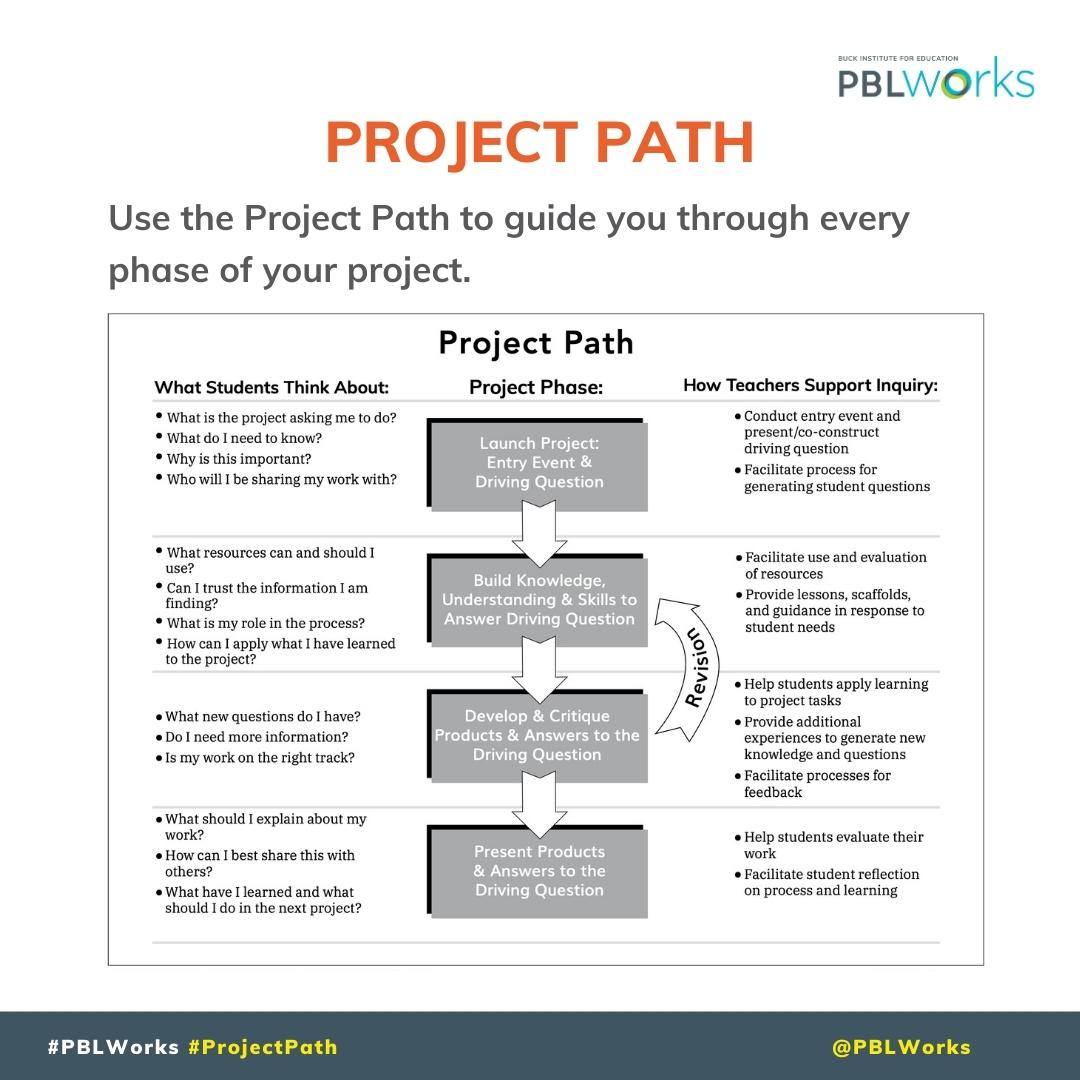
1
5
14
2,881