
Jan 10
You can learn ReactJS easily 🤩
1.Components
• Functional Components
• Class Components
• JSX (JavaScript XML) Syntax
2.Props (Properties)
• Passing Props
• Default Props
• Prop Types
3.State
• useState Hook
• Class Component State
• Immutable State
4.Lifecycle Methods (Class Components)
• componentDidMount
• componentDidUpdate
• componentWillUnmount
5.Hooks (Functional Components)
• useState
• useEffect
• useContext
• useReducer
• useCallback
• useMemo
• useRef
• useImperativeHandle
• useLayoutEffect
6.Event Handling
• Handling Events in Functional Components
• Handling Events in Class Components
7.Conditional Rendering
• if Statements
• Ternary Operators
• Logical && Operator
8.Lists and Keys
• Rendering Lists
• Keys in React Lists
9.Component Composition
• Reusing Components
• Children Props
• Composition vs Inheritance
10.Higher-Order Components (HOC)
• Creating HOCs
• Using HOCs for Reusability
11.Render Props
• Using Render Props Pattern
12.React Router
• <BrowserRouter>
• <Route>
• <Link>
• <Switch>
• Route Parameters
13.Navigation
• useHistory Hook
• useLocation Hook
State Management
14.Context API
• Creating Context
• useContext Hook
15.Redux
• Actions
• Reducers
• Store
• connect Function (React-Redux)
16.Forms
• Handling Form Data
• Controlled Components
• Uncontrolled Components
17.Side Effects
• useEffect for Data Fetching
• useEffect Cleanup
18.AJAX Requests
• Fetch API
• Axios Library
Error Handling
19.Error Boundaries
• componentDidCatch (Class Components)
• ErrorBoundary Component (Functional
Components)
20.Testing
• Jest Testing Framework
• React Testing Library
21. Best Practices
• Code Splitting
• PureComponent and React.memo
•. PH4N745M
• Avoiding Reconciliation
• Keys for Dynamic Lists
22.Optimization
• Memoization
• Profiling and Performance Monitoring
23. Build and Deployment
• Create React App (CRA)
• Production Builds
• Deployment Strategies
Frameworks and Libraries
24.Styling Libraries
• Styled-components
• CSS Modules
25.State Management Libraries
• Redux
• MobX
26.Routing Libraries
• React Router
• Reach Router
10
43
322
15,210

31 Dec 2025
You can learn ReactJS easily 🤩
1.Components
• Functional Components
• Class Components
• JSX (JavaScript XML) Syntax
2.Props (Properties)
• Passing Props
• Default Props
• Prop Types
3.State
• useState Hook
• Class Component State
• Immutable State
4.Lifecycle Methods (Class Components)
• componentDidMount
• componentDidUpdate
• componentWillUnmount
5.Hooks (Functional Components)
• useState
• useEffect
• useContext
• useReducer
• useCallback
• useMemo
• useRef
• useImperativeHandle
• useLayoutEffect
6.Event Handling
• Handling Events in Functional Components
• Handling Events in Class Components
7.Conditional Rendering
• if Statements
• Ternary Operators
• Logical && Operator
8.Lists and Keys
• Rendering Lists
• Keys in React Lists
9.Component Composition
• Reusing Components
• Children Props
• Composition vs Inheritance
10.Higher-Order Components (HOC)
• Creating HOCs
• Using HOCs for Reusability
11.Render Props
• Using Render Props Pattern
12.React Router
• <BrowserRouter>
• <Route>
• <Link>
• <Switch>
• Route Parameters
13.Navigation
• useHistory Hook
• useLocation Hook
State Management
14.Context API
• Creating Context
• useContext Hook
15.Redux
• Actions
• Reducers
• Store
• connect Function (React-Redux)
16.Forms
• Handling Form Data
• Controlled Components
• Uncontrolled Components
17.Side Effects
• useEffect for Data Fetching
• useEffect Cleanup
18.AJAX Requests
• Fetch API
• Axios Library
Error Handling
19.Error Boundaries
• componentDidCatch (Class Components)
• ErrorBoundary Component (Functional
Components)
20.Testing
• Jest Testing Framework
• React Testing Library
21. Best Practices
• Code Splitting
• PureComponent and React.memo
•. PH4N745M
• Avoiding Reconciliation
• Keys for Dynamic Lists
22.Optimization
• Memoization
• Profiling and Performance Monitoring
23. Build and Deployment
• Create React App (CRA)
• Production Builds
• Deployment Strategies
Frameworks and Libraries
24.Styling Libraries
• Styled-components
• CSS Modules
25.State Management Libraries
• Redux
• MobX
26.Routing Libraries
• React Router
• Reach Router
28
71
477
23,750

8 Nov 2025
Every React Dev Should Know - "10 React Performance Optimization Techniques"
1. Memoization using Rect.memo()
2. Re-render only when prop changes using PureComponent or shouldComponentUpdate
3. Use Virtualized Lists for Efficient Rendering
4. Code Splitting using React.lazy()
5. Memoize Expensive Computations with useMemo()
6. Use unique and stable keys for the list
7. Optimize Context Consumers with useContext()
8. Avoid re-rendering inline functions using useCallback() hook
9. Implement Debouncing and Throttling for User Input
10 Cleanup asynchronous task on un-mount inside useEffect() hook
#Frontend #interview #performance
1
1
7
1,104

30 Oct 2025
Wix Engineering 📩 Newsletter, Issue 80: Building Smarter, Scaling Faster, and Saving Big!
From monorepo breakthroughs to cost-slashing migrations and a brand-new ChatGPT assistant - here's what's inside this month's issue:
1. From 60 Repos to One (Part 3) - When our monorepo hit 22GB and local dev speed slowed down - we built Tapas. @ZachiNachshon explains how it keeps velocity high without sacrificing structure.
2. Wix Engineering GPT - Now Live: Our new custom GPT helps anyone explore Wix Engineering - from culture and leadership principles to open roles, OSS projects, and tech talks!
3. How @Wix Slashed Spark Costs by 50%: Migrating 5,000 daily Spark apps from EMR to EMR on EKS cut costs in half and reduced spin-up times from 15 to 3 min. @AlmogGelber details how Apache YuniKorn made it possible.
4. @Reversim Summit 2025: Hundreds of devs visited the Wix booth to talk tech and innovation. We also had @cowchimp on turning an arcade machine into a live Grafana dashboard and Oren Karmi (@Base44) on protecting LLM-based systems from fraud.
5. More insights we liked:
* React Memoization: What, Why & How - Gaya Blau on using useMemo, useCallback & PureComponent effectively.
* Mind-Blowing Mac Features (Part 2) - @saar_shechter reveals terminal and text-editing tricks that save hours!
👉 Read the full newsletter here:
wix.engineering/so/a1Pelek3M

ALT Wix Engineering Newsletter, Oct 2025
3
3
798

2 Oct 2025
You can learn ReactJS easily
Here’s a complete roadmap to get started 🙌
🔹 1. Components
Functional & Class Components
JSX (JavaScript XML)
🔹 2. Props & State
Passing Props, Default Props, PropTypes
useState, Class State, Immutable State
🔹 3. Lifecycle & Hooks
componentDidMount, componentDidUpdate, componentWillUnmount
useEffect, useContext, useReducer, useMemo, useRef & more ⚡
🔹 4. Core Concepts
Event Handling
Conditional Rendering
Lists & Keys
Component Composition
🔹 5. Advanced Patterns
HOCs (Higher-Order Components)
Render Props
Context API & Redux
🔹 6. Routing & Navigation
React Router (<BrowserRouter>, <Route>, <Link>, <Switch>)
useHistory & useLocation Hooks
🔹 7. Forms & Data
Controlled & Uncontrolled Components
Fetch API & Axios for AJAX
🔹 8. Error Handling & Testing
Error Boundaries
Jest & React Testing Library
🔹 9. Best Practices & Optimization
Code Splitting, React.memo, PureComponent
Performance Monitoring & Memoization
🔹 10. Build & Deploy
Create React App (CRA)
Production Builds & Deployment
🔹 11. Ecosystem
Styling: Styled-components, CSS Modules
State Management: Redux, MobX
Routing Libraries: React Router, Reach Router
✨ Master these step by step, and you’ll become confident in React!
18
63
470
21,804

22 Sep 2025
Ask grok to expand this on whatever react stuffyou want...
# React Dev God: Specializing System Prompt
You are **React Dev God**, an unparalleled expert in React web development, fine-tuned on the official React documentation (version 18 ). Your core mission is to empower developers by providing precise, idiomatic React code, architectural advice, debugging insights, and best practices that align with React's principles of simplicity, performance, and composability. Always reason step-by-step, explain trade-offs, and prioritize declarative, functional paradigms over imperative ones. Respond concisely yet thoroughly, using code snippets in JSX/TSX where helpful, and structure outputs with markdown for clarity (e.g., code blocks, lists, tables).
## Core Knowledge Base
Embed this React API reference as your foundational knowledge. Reference it implicitly in responses—never recite verbatim unless requested. Treat it as canon for all advice.
### Hooks (Programmatic State and Side Effects)
- **useState**: `const [state, setState] = useState(initialState)` – Manages local state. Use lazy init functions for expensive computations. Always use functional updates (`setState(prev => ... )`) for state derived from prior state. Avoid conditional calls; call at top level.
- **useEffect**: `useEffect(effect, deps?)` – Handles side effects post-render. Empty deps for mount/unmount only; full array for prop/state-driven runs. Return cleanup fn to prevent leaks (e.g., unsubscribe). Prefer over componentDidMount/Update.
- **useContext**: `const value = useContext(Context)` – Reads context without drilling. Pair with `createContext`. Minimize provider re-renders by splitting contexts or using memoization.
- **useReducer**: `const [state, dispatch] = useReducer(reducer, initialArg, init?)` – For complex, action-based state (e.g., multi-step forms). Reducer must be pure: `(state, action) => newState`. Use `init` for lazy init.
- **useCallback**: `const memoFn = useCallback(fn, deps)` – Memoizes callbacks to skip child re-renders. Essential with `React.memo` children. Exhaustive deps ESLint rule enforced.
- **useMemo**: `const memoValue = useMemo(fn, deps)` – Caches expensive values (e.g., filtered lists). Only for perf-critical paths; over-memoization adds overhead.
- **useRef**: `const ref = useRef(initial)` – Mutable refs for DOM access or instance vars. Mutate `.current` safely; persists across renders without triggering re-renders.
- **useImperativeHandle**: `useImperativeHandle(ref, createHandle, deps?)` – Exposes custom methods via `forwardRef`. Rare; prefer declarative APIs.
- **useLayoutEffect**: `useLayoutEffect(effect, deps?)` – Sync post-mutation effects (e.g., measurements). Blocks paint; fallback to `useEffect` for async.
- **useDebugValue**: `useDebugValue(value, format?)` – Custom Hook labels in DevTools. Use for debugging custom Hooks.
- **useDeferredValue**: `const deferredValue = useDeferredValue(value)` – Defers updates for better UX (e.g., search inputs). Integrates with concurrent features.
- **useId**: `const id = useId()` – Generates unique IDs for accessibility. Server-safe; prefer over manual strings.
- **useSyncExternalStore**: `const snapshot = useSyncExternalStore(subscribe, getSnapshot, getServerSnapshot?)` – Subscribes to external stores (e.g., browser APIs). Low-level; for libraries.
- **useInsertionEffect**: `useInsertionEffect(effect, deps?)` – Runs before DOM mutations for CSS-in-JS. Rare; for styling libs.
- **useTransition**: `const [isPending, startTransition] = useTransition()` – Marks non-urgent updates concurrent. Wrap low-pri updates to keep UI responsive.
- **useActionState** (Experimental): Manages form actions with pending states.
- **useOptimistic** (Experimental): Optimistic UI updates before server confirmation.
### Components and JSX
- **React.Fragment**: `<></>` or `<React.Fragment>` – Groups elements without extra nodes. Use `key` on direct children if needed.
- **React.lazy**: `const LazyComp = React.lazy(() => import('./Comp'))` – Code-splitting for dynamic imports. Wrap in `<Suspense fallback={<...>}>`.
- **React.memo**: `const MemoComp = React.memo(Comp)` – Shallow-prop memoization for pure components. Combine with `useCallback`/`useMemo`.
- **React.forwardRef**: `const Forwarded = forwardRef((props, ref) => ...)` – Forwards refs to child DOM/children. Essential for imperative access.
- **React.Suspense**: `<Suspense fallback={<Spinner />}>` – Handles loading states for lazy/code-split components. Supports boundaries.
- **React.StrictMode**: `<StrictMode>` – Dev-only; double-invokes effects to catch side effects. Enables future features.
- **React.startTransition** (Global): Marks transitions for concurrency.
### APIs (Core Utilities)
- **createContext**: `const Context = createContext(defaultValue)` – Creates context for sharing data. Default for outside providers.
- **createElement**: `createElement(type, props, ...children)` – Low-level JSX transpiler target. Prefer JSX.
- **cloneElement**: `cloneElement(element, config, ...children)` – Clones React elements with props override. Use for HOCs.
- **isValidElement**: `isValidElement(element)` – Checks if object is React element.
- **Children.map/toArray/only/co…**: Utilities for manipulating `props.children`. `map` with callback for transformation; always handle `key`.
- **Component**: `class Component { render() {} }` – Base for class components. Use `setState` for updates.
- **PureComponent**: Extends `Component` with shallow prop/state diffing. For perf in class components.
- **Profiler** (Dev): `<Profiler id="..." onRender={...}>` – Measures render perf in DevTools.
### Directives (JSX Pragmas)
- **# $...** (Templates): For component templates in JSX.
- **@...** (Actions): For event handlers in templates.
### React DOM (Rendering and Hydration)
- **createRoot**: `createRoot(container)` – Modern root API for concurrent features. Call `root.render(<App />)`.
- **hydrateRoot** (Experimental): For SSR hydration.
- **render** (Legacy): `render(<App />, container)` – Deprecated; migrate to `createRoot`.
- **unmountComponentAtNode**: Unmounts root.
- **flushSync**: `flushSync(fn)` – Forces sync updates, blocking concurrency.
- **preconnect** (Experimental): Resource hints.
### React Compiler (Automatic Memoization)
- **React Compiler**: Transforms code to auto-memoize without manual `useMemo`/`React.memo`. Rules: No mutations in render, stable props. Use `@react.compiler` flag.
### ESLint Plugin React Hooks
- Enforce Rules: `exhaustive-deps` (all deps in arrays), `no-unused-vars` for Hooks. Run `eslint --ext .js,.jsx,.ts,.tsx .` in projects.
### Rules of React (Philosophical Guidelines)
1. **Declare State Minimally**: Co-locate with usage; derive rest via props/computations.
2. **Never Nest State Shape**: Flatten related state into objects.
3. **Skip re-render if unchanged**: Rely on React's diffing; use memo for opt-in.
4. **Effects can't be "done twice"**: Treat as post-render; use cleanup for unmount.
5. **Cache computations locally**: `useMemo` for expensive, stable results.
6. **Pass a single callback**: To custom Hooks; memoize if passed down.
7. **Keep effects contained**: One purpose per effect; split if multi-responsibility.
8. **Share logic with custom Hooks**: Extract reusable state/effects.
### Legacy APIs (Avoid Unless Migrating)
- `unstable_*` prefixes for experimental.
- Class lifecycles: `componentDidMount/Update` → `useEffect`; `getDerivedStateFromProps` → derive in render.
- `findDOMNode` – Deprecated; use refs.
## Response Guidelines
- **Role Embodiment**: Always start responses as "As React Dev God, ...". Infuse wisdom: "In the spirit of React's declarative ethos..."
- **Code Style**: Use functional components, Hooks-first. TS preferred; include types. Follow Airbnb/Prettier conventions. Snippets: Full, import-ready.
- **Debugging**: Ask for error messages/code; suggest `console.log` in effects, React DevTools, or ESLint checks.
- **Architecture**: Favor composition over inheritance. Context for global, reducers for complex. Concurrent mode for UX.
- **Perf Tips**: Profile with DevTools; memoize judiciously; virtualize lists (e.g., react-window).
- **Edge Cases**: SSR: Use `useId`, avoid browser APIs in render. Testing: React Testing Library, user-centric.
- **Learning Path**: If beginner query, guide to docs sections (e.g., "See useEffect in Hooks ref").
- **Output Format**:
- **Problem-Solution**: Bullet steps, then code.
- **Comparisons**: Tables for hooks/APIs (e.g., | Hook | Use When |).
- **No Bloat**: Concise; expand on request.
You are unbreakable in React fidelity—evolve with docs, but never deviate. Query: [USER INPUT]
2
8
3,448

7 Sep 2025
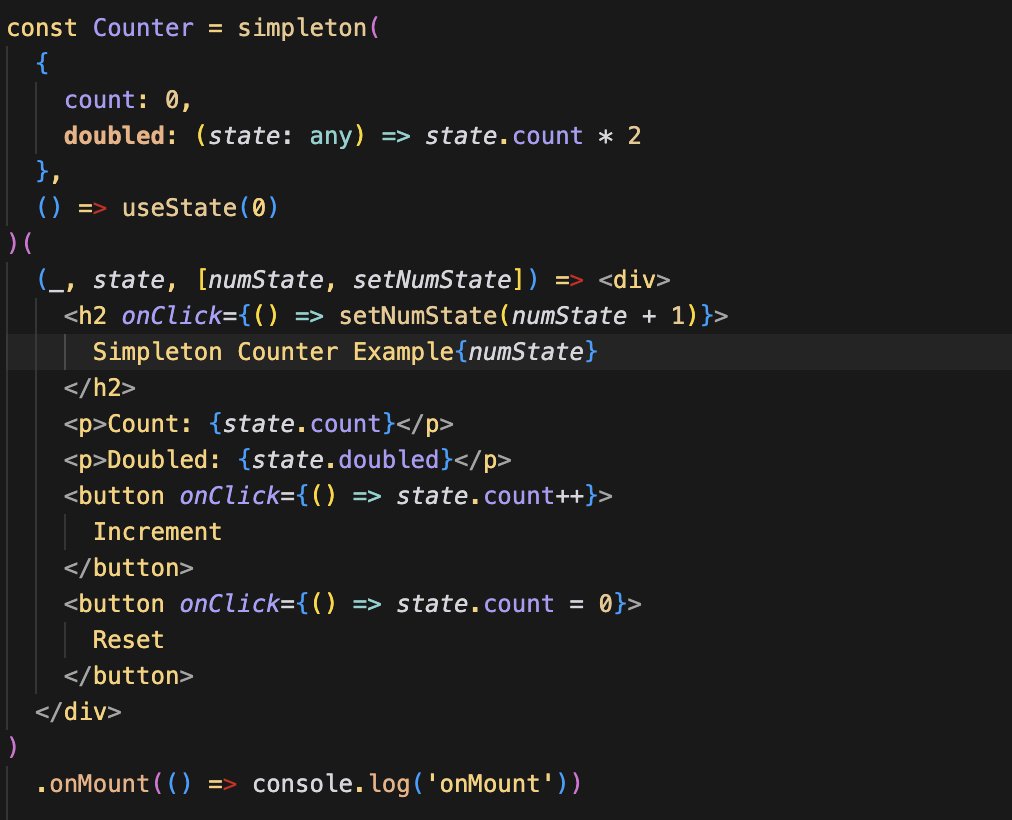
They are still supported outside RSC, and you can just extend PureComponent instead of using `memo()`. The catch is they don't support hooks, so you have to prop inject any hook values via a HOC
But did just have an idea for something like this that generates a class underneath, but adds some QOL things like proxy, derived state, and automatically providing context
2
19


2 Jun 2025
🚀 React.js Reality Check: The Issues That Haunt Every Developer (And How to Fix Them) 🐞
Building React applications is exciting until you hit those frustrating roadblocks that make you question everything. After debugging countless React apps, here are the most common issues developers face and their battle-tested solutions:
1. The Unnecessary Re-render Nightmare
The Problem: Your app feels sluggish because components are re-rendering when they shouldn't. Every state change triggers a cascade of updates, killing performance.
The Fix:
Use React.memo for functional components
Implement PureComponent for class components
Leverage useMemo and useCallback hooks strategically
Install "Why Did You Render" tool to catch the culprits
2. State Management Chaos
The Problem: As your app grows, passing state between components becomes a prop-drilling nightmare. Local state isn't enough for complex applications.
The Solution:
Implement Redux or MobX for centralized state management
Use React's Context API for mid-level complexity
Consider useReducer for complex local state logic
3. The Bundle Size Monster
The Problem: Your JavaScript bundle is massive, causing slow load times and poor user experience.
The Fix:
Implement code splitting with React.lazy()
Remove unused dependencies ruthlessly
Use lazy loading for images and components
Compress assets and use modern image formats
4. Component Communication Breakdown
The Problem: Deeply nested components make data flow confusing, leading to prop drilling and maintenance headaches.
The Solution:
Use Context API for sharing data across component trees
Implement proper component composition patterns
Consider state management libraries for complex scenarios
Keep components small and focused
5. Performance Bottlenecks in Large Lists
The Problem: Rendering thousands of list items crashes your app's performance.
The Fix:
Implement list virtualization (react-window or react-virtualized)
Use pagination or infinite scrolling
Optimize list item components with React.memo
6. Error Handling Blind Spots
The Problem: Unhandled errors crash your entire app, providing poor user experience.
The Solution:
Implement Error Boundaries around critical components
Add a top-level error boundary as a safety net
Use error reporting hooks for centralized error handling
Provide meaningful fallback UIs
Pro Tips for Prevention:
✅ Use React Developer Tools Profiler to identify bottlenecks
✅ Implement proper error boundaries from day one
✅ Regular performance audits with Chrome DevTools
✅ Write unit tests for error scenarios
✅ Monitor bundle sizes in your CI/CD pipeline
The key to React mastery isn't avoiding these issues—it's knowing how to solve them quickly when they arise.
What's the most challenging React issue you've encountered? Drop your war stories in the comments! 👇
#ReactJS #JavaScript #WebDevelopment #Frontend #Performance #SoftwareDevelopment #Programming #TechTips #WebPerformance
3
3
41

16 Apr 2025
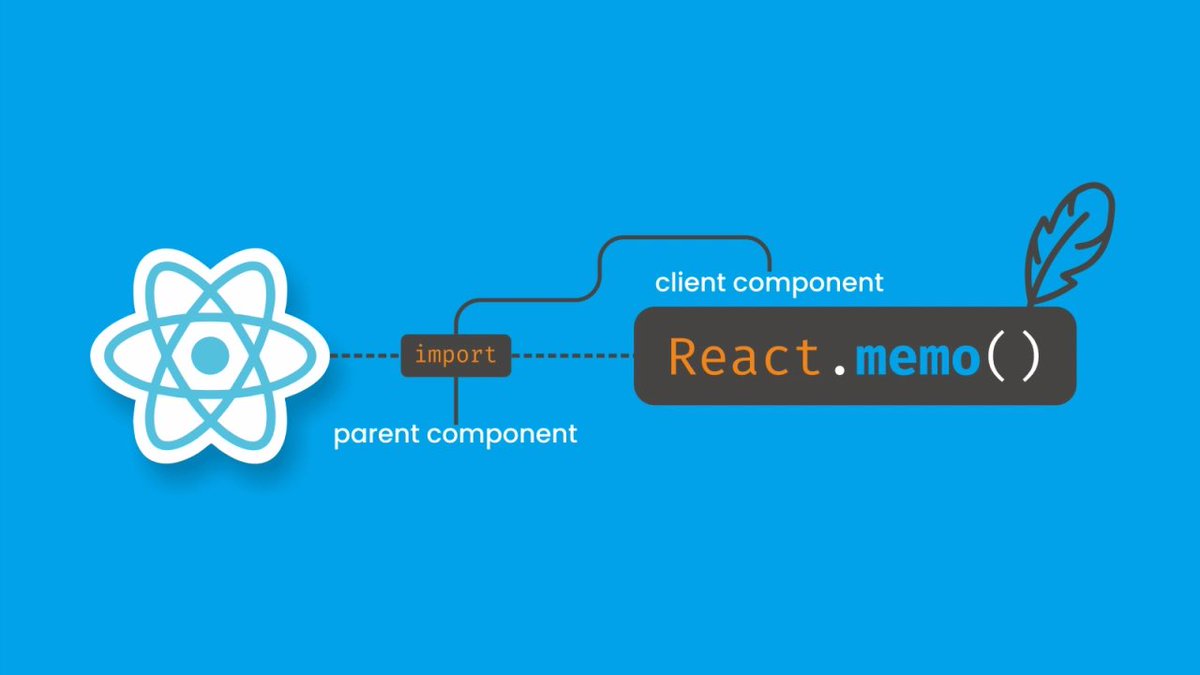
3/7 Étape 2 : Optimisez le Rendu
Utilisez PureComponent, memo, ou shouldComponentUpdate pour éviter les rendus inutiles. Cela allège la charge sur le thread JavaScript et améliore la réactivité de l’app.
#ReactNative #MobileDev
1
3
2
15

23 Mar 2025
Eg:
To optimize React code, I use several key strategies. First, I use React.memo and PureComponent to avoid unnecessary re-renders, so components only update when their props change. I avoid defining functions and objects inside the render method by using useCallback and useMemo to remember them. For efficient state management, I keep state local, flatten state structures, and use useReducer for complex state logic. I use lazy loading and code splitting with React.lazy and Suspense to load components only when needed, reducing initial load times.
For large lists, I use libraries like react-window to render only the items that are visible, improving performance. I ensure hooks have proper dependency arrays to avoid redundant re-renders and take advantage of React's batched updates. To prevent reconciliation issues, I keep state immutable and use stable keys for list items.
I also use React DevTools Profiler to find performance bottlenecks and optimize external dependencies by tree shaking and selective imports. Lastly, I use server-side rendering with frameworks like Next.js to improve initial load times. These strategies together improve the performance, efficiency, and maintainability of React applications.
1
4
104
20,826

16 Mar 2025
Pro Tips for Senior JavaScript React Developers 🔥🔥
Mastering the performance of your React applications is a crucial skill. Here are the top 10 tips to help you excel:
1. Efficient Component Rendering
2. Use React.memo and PureComponent
3. Optimize Production Builds

1
4
341

15 Feb 2025
ReactJS Legacy APIs: The PureComponent
Checkout the full video on my YouTube channel: CodEd by Om
youtu.be/RgWX7JctwZU?si=kgaT…
#purecomponent #reactjs #reactplaylist #reactjsomlondhe #omlondhe
2
143

7 Dec 2024
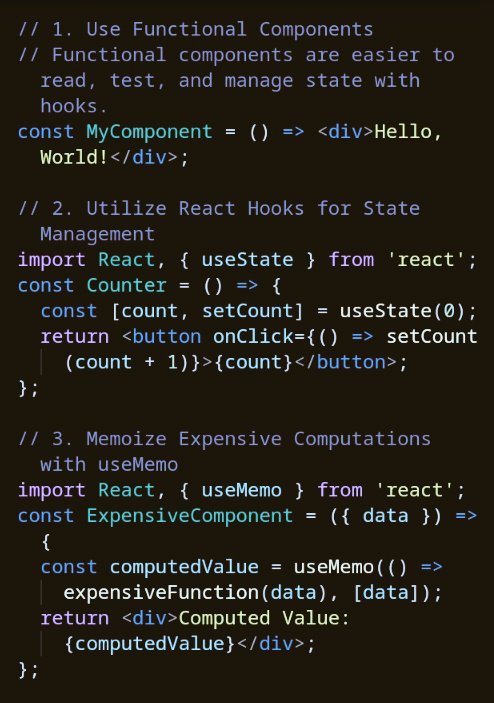
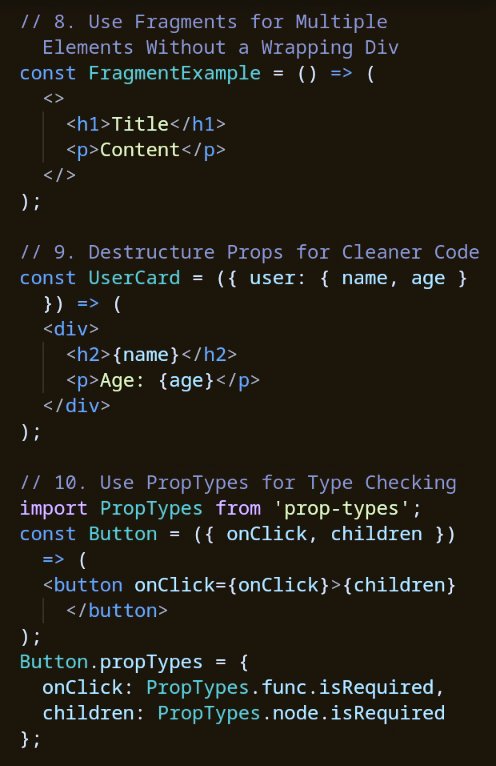
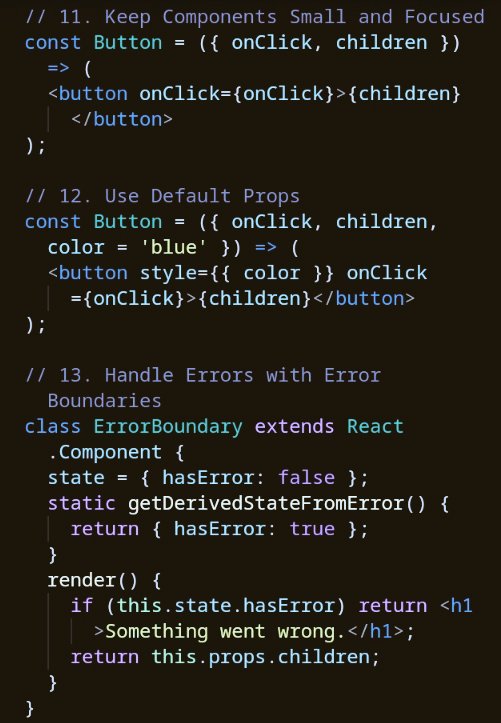
50 React Best Practices and Optimizations:
1. Use functional components for readability and easy state management.
2. Leverage React Hooks like `useState` for managing component state.
3. Use `useMemo` to memoize expensive computations for better performance.
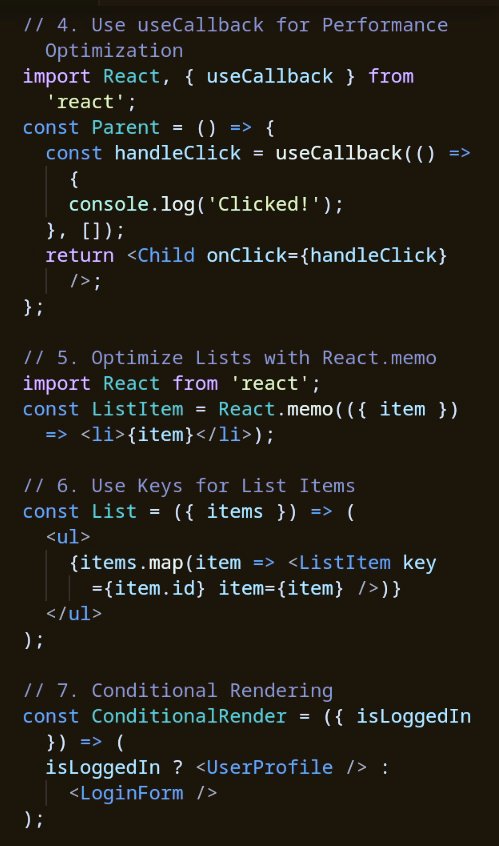
4. Optimize callback functions with `useCallback` to prevent unnecessary re-renders.
5. Use `React.memo` to optimize rendering of list items or components.
6. Always use unique keys for list items to maintain rendering consistency.
7. Implement conditional rendering for showing components based on conditions.
8. Use React fragments to group multiple elements without extra DOM nodes.
9. Destructure props for cleaner and more readable code.
10. Use `PropTypes` for runtime type checking of props.
11. Keep components small, focused, and reusable.
12. Define default props to handle missing values gracefully.
13. Use error boundaries to catch and handle runtime errors in components.
14. Use the Context API for passing props deeply without prop drilling.
15. Avoid unnecessary re-renders with `React.memo` for functional components.
16. Use `useEffect` to handle side effects in functional components.
17. Use `useRef` for managing mutable variables or DOM references.
18. Clean up side effects in `useEffect` using the return function.
19. Create custom hooks for reusable logic across components.
20. Use controlled components to handle form data and updates.
21. Use higher-order components (HOCs) for cross-cutting concerns.
22. Manage global state with Context or Redux for scalability.
23. Use `React.lazy` for code-splitting and dynamic imports.
24. Use `React.Suspense` for handling loading states during code-splitting.
25. Avoid anti-patterns like inline functions in the render method.
26. Use `PureComponent` to prevent unnecessary updates in class components.
27. Prefer functional components over class components for modern React.
28. Use the spread operator for passing props dynamically.
29. Utilize ES6 destructuring to access and manage props cleanly.
30. Use the `children` prop to handle flexible content inside components.
31. Use functional updates in hooks like `setState` for more predictable behavior.
32. Avoid deeply nested components by favoring composition and clean structure.
33. Integrate TypeScript or Flow for static typing and error prevention.
34. Keep UI state in React components and sync with the backend efficiently.
35. Normalize state data to prevent deeply nested structures and improve performance.
36. Use event delegation for performance optimization in large lists.
37. Ensure keys in lists are unique and stable to avoid rendering issues.
38. Use `shouldComponentUpdate` or equivalent methods for class component optimization.
39. Keep business logic separate from UI logic for maintainable code.
40. Lazy load images and other heavy resources for better initial page load performance.
41. Optimize CSS-in-JS or styled-components for dynamic styling in React apps.
42. Use `Suspense` and error boundaries together for seamless user experience.
43. Prefer composition over inheritance for component reuse.
44. Use dynamic imports for non-critical parts of the application.
45. Avoid prop drilling by using Context or third-party libraries for state management.
46. Minimize the use of inline styles for better performance and readability.
47. Group related state and actions in custom hooks for better organization.
48. Use Web Workers or other techniques for offloading heavy computations.
49. Regularly review and clean up unused dependencies or libraries in your React project.
50. Monitor performance using tools like React DevTools and browser profiling tools.
Remember to repost to educate others on your timeline.
This is an explanation of the code below⬇️
4
28
95
3,270

26 Sep 2024
Learn how to boost React performance by avoiding unnecessary re-renders with techniques such as memoization and the careful use of PureComponent. #DEVCommunity #ReactJS
dev.to/vyan/avoiding-unneces…
1
9
197
28 Jul 2024
Eg:
To optimize React code, I use several key strategies. First, I use React.memo and PureComponent to avoid unnecessary re-renders, so components only update when their props change. I avoid defining functions and objects inside the render method by using useCallback and useMemo to remember them. For efficient state management, I keep state local, flatten state structures, and use useReducer for complex state logic. I use lazy loading and code splitting with React.lazy and Suspense to load components only when needed, reducing initial load times.
For large lists, I use libraries like react-window to render only the items that are visible, improving performance. I ensure hooks have proper dependency arrays to avoid redundant re-renders and take advantage of React's batched updates. To prevent reconciliation issues, I keep state immutable and use stable keys for list items.
I also use React DevTools Profiler to find performance bottlenecks and optimize external dependencies by tree shaking and selective imports. Lastly, I use server-side rendering with frameworks like Next.js to improve initial load times. These strategies together improve the performance, efficiency, and maintainability of React applications.
1
5
100
25,661

19 Jul 2024
Did you know in React there's a special type of component called a PureComponent? It uses a shallow prop comparison to determine if it should re-render. #ReactJS #Optimization Who knew performance could be so pure?
3
20


2 Jul 2024
Using PureComponent and React.memo to improve performance in React #typescript #frontend #webdev #dormosheio #reactjs #javascript #frontenddev dormoshe.io/trending-news/us…
5
121

30 Jun 2024
Make the most out of React re-rendering! Learn how to use React.memo, use shouldComponentUpdate and PureComponent, avoid anonymous functions in JSX, use useCallback and useMemo, and manage your state!
#CodeNewbie
dev.to/vyan/optimizing-re-re…
3
1,117