
22 Nov 2023
[Python For Beginners]
[Day 20th]: Review
So, pass 20 days, how about your skil, mate?
#PythonForBeginners #PythonForLife #PyFor2u
214
6
56
8,878
20 Nov 2023
[Python For Beginners]
[Day 19th]: Handling Alerts and Pop-ups in Sele
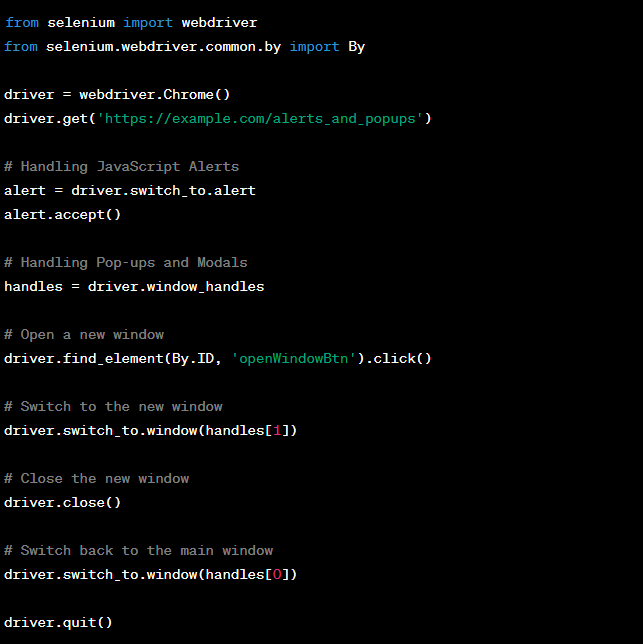
### Handling JavaScript Alerts:
1. **Accepting Alerts:**
- Use `accept()` to click the "OK" button.
2. **Dismissing Alerts:**
- Use `dismiss()` to click the "Cancel" button.
3. **Getting Alert Text:**
- Retrieve the alert message using `text`.
### Handling Pop-ups and Modals:
1. **Switching to Pop-ups:**
- Use `switch_to.window()` to navigate to a new window.
2. **Closing Pop-ups:**
- Use `close()` to close the current window.
Implementing in the PyForBeginner_Day19th.py script.
#PythonForBeginners
#PythonForLife
#PyFor2u
166
10
57
12,230
20 Nov 2023
[Python For Beginners]
[Day 18th]: Working with Forms and Dropdowns in Sele.
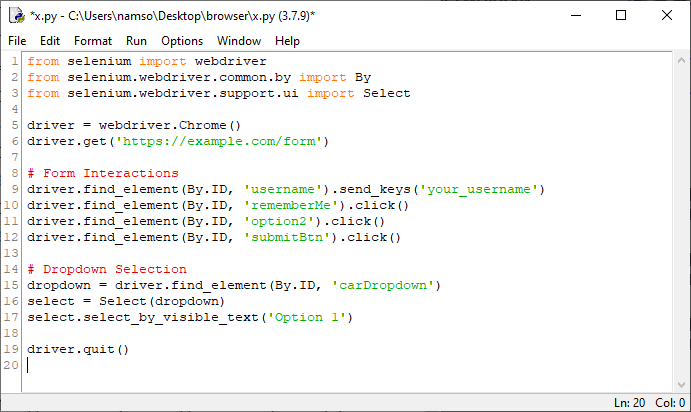
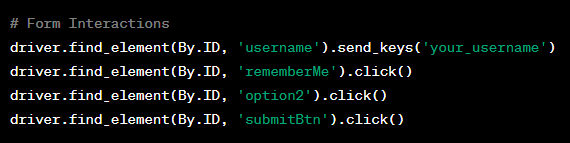
### Forms Interaction:
1. **Text Fields:**
- Use `send_keys()` for text input.
2. **Checkboxes:**
- Use `click()` to toggle checkbox states.
3. **Radio Buttons:**
- Use `click()` to select a radio button.
4. **Buttons:**
- Use `click()` for button interactions.
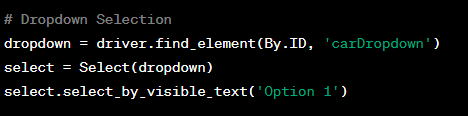
### Dropdown Selection:
1. **Import `'Select':**
2. **Selecting Options:**
- Select = Select(dropdown)
# Select by Visible Text
- select.select_by_visible_text('Option 1')
# Select by Index
- select.select_by_index(2)
# Select by Value
- select.select_by_value('option2')
Implementing in the PyForBeginner_Day18th.py script.
#PythonForBeginners
#PythonForLife
#PyFor2u
113
9
36
8,789
17 Nov 2023
[Python For Beginners]
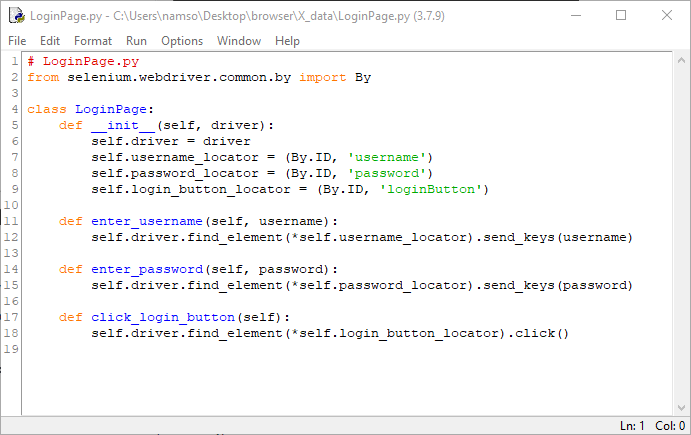
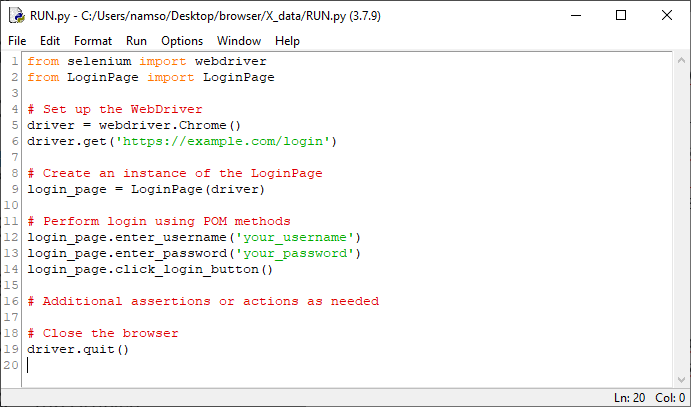
[Day 17th]: Page Object Model (POM) in Sele.
1. **Page Objects:**
- Each web page is represented as a separate class.
- Elements on the page are defined within the respective class.
2. **Actions and Methods:**
- Methods in the page class represent actions that can be performed on the page.
- These methods interact with the web elements using Selenium WebDriver.
3. **Benefits:**
- **Code Reusability:** Page objects can be reused across multiple tests.
- **Maintainability:** Changes to the UI are confined to the page class, making maintenance easier.
- **Readability:** Improved readability as test scripts become more focused on business logic.
Implementing the Page Object Model in the PyForBeginner_Day17th.py script. #PythonForBeginners
#PythonForLife
#PyFor2u
156
4
32
8,574
16 Nov 2023
[Python For Beginners]
[Day 16th: Handling Different Browser Windows and Tabs in Sele]
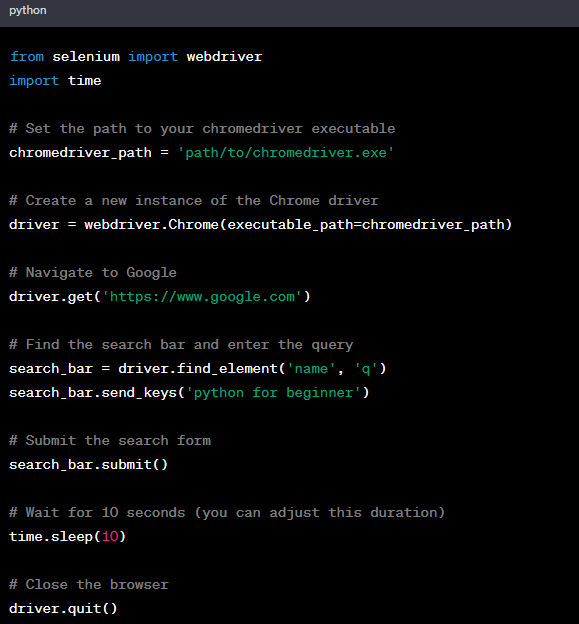
1. **Opening a New Window or Tab:**
- Use `driver.window_handles` to get the list of handles (IDs) of all open windows/tabs.
- Use `driver.execute_script("window.open('', '_blank');")` to open a new tab.
2. **Switching Between Windows/Tabs:**
- Use `driver.switch_to.window(handle)` to switch to a specific window/tab using its handle.
3. **Perform Actions in the New Window/Tab:**
- After switching, perform actions in the new window/tab.
4. **Closing Windows/Tabs:**
- Use `driver.close()` to close the current window/tab.
- Use `driver.quit()` to close the entire browser.
**Challenges:**
Practice these concepts to master effective window and tab management in the PyForBeginner_Day16th.py script. #PythonForBeginners
#PythonForLife
#PyFor2u
107
4
25
7,237
15 Nov 2023
[Python For Beginners]
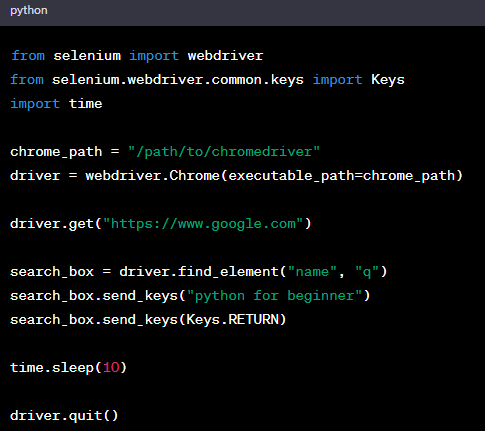
[Day 15th: Locators in Selenium: Mastering XPath and CSS Selectors]
After familiar with Sele, a most import part is interact with elements on websites.
Two key locators are XPath and CSS Selectors.
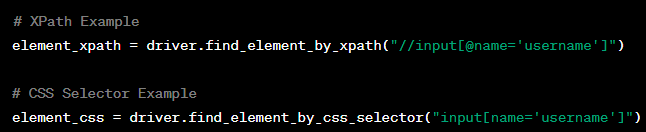
1. **XPath:**
- Uses a path expression to navigate HTML.
- Examples:
- Absolute: `/html/body/div[1]/span`
- Relative: `//div[@id='example']//input`
2. **CSS Selectors:**
- Patterns for selecting HTML elements.
- Examples:
- ID: `#example_id`
- Class: `.example_class`
- Attribute: `input[name='username']`
**When to Use:**
1. **XPath:**
- Complex hierarchies.
- Both forward and backward navigation.
- No unique IDs or classes.
2. **CSS Selectors:**
- Simple and fast selection.
- Clear IDs or classes.
- Modern browsers with optimized performance.
**Best Practices:**
- Prefer ID and Class selectors.
- Validate in browser developer tools.
- Update locators for dynamic pages.
**Challenges:**
Practice creating XPath and CSS Selectors for different scenarios in the PyForBeginner_Day15th.py script. #PythonForBeginners #PythonForLife #PyFor2u
76
2
28
7,432
14 Nov 2023
[Python For Beginners]
[Day 14th: Get familiar about #Sele with Python]
Sele, a powerful tool for web automation, has evolved to become a cornerstone in testing. Understanding its basics is crucial for efficient automated testing.
Part 2: WebDriver Architecture:
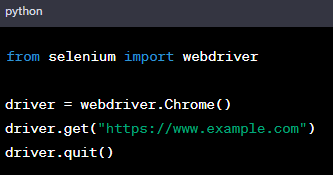
First Selenium Script:
Craft a basic script exemplifying how Selenium opens a webpage:
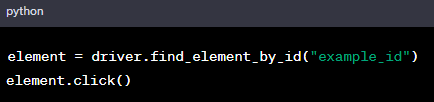
Web Elements Interaction:
Learn interacting with HTML elements:
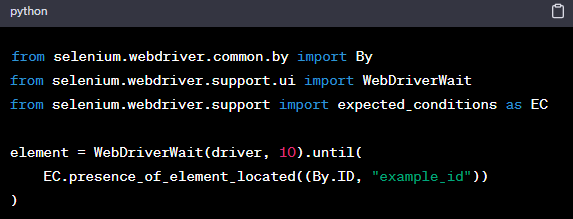
Synchronization:
Handle dynamic pages with waits:
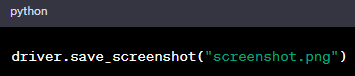
Taking Screenshots:
Capture screenshots for documentation or issue reporting:
Explore the power of Sele in the PyForBeginner_Day14th.py script.
#PythonForBeginners #PythonForLife
#PyFor2u
161
7
40
10,221
13 Nov 2023
[Python For Beginners]
[Day 13th: Get familiar about #Sele with Python]
Sele, a powerful tool for web automation, has evolved to become a cornerstone in testing. Understanding its basics is crucial for efficient automated testing.
Part 1:
Basic Selenium Commands:
Opening a Web Browser:
Navigating to a URL:
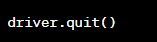
Closing the Browser:
Explore the power of Sele in the PyForBeginner_Day13th.py script.
🔒📷 #PythonForBeginners #PythonForLife 📷📷 #PyFor2u


145
2
35
7,757
10 Nov 2023
[Python For Beginners]
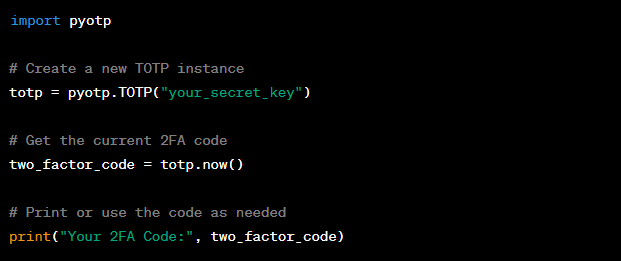
[Day 12th: Get 2FA code with Python]
Enter the realm of security with PyOTP, your gateway to Time-based One-Time Passwords (TOTPs). PyOTP allows you to fortify your applications with two-factor authentication, adding an extra layer of protection.
Example:
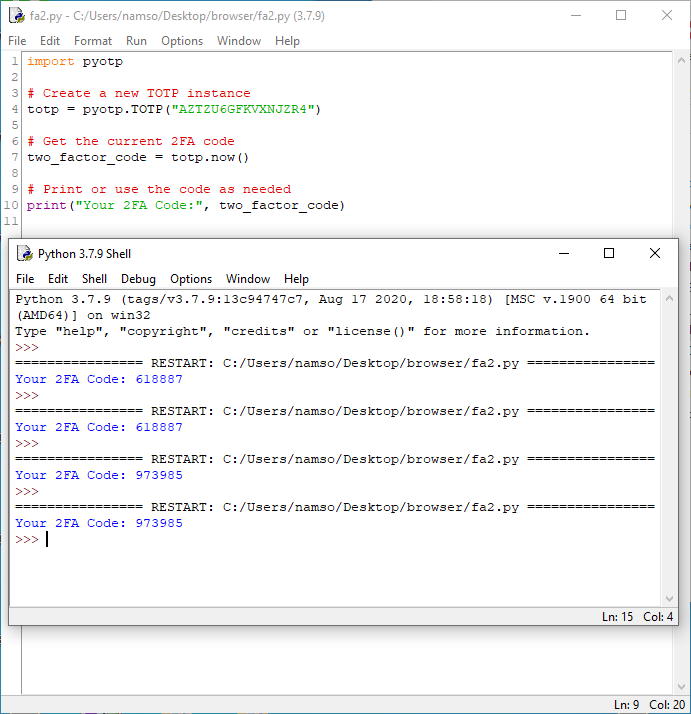
Result:
Explore the power of PyOTP in the PyForBeginner_Day12th.py script. 🔒🚀
#PythonForBeginners #PythonForLife 📷📷
#PyOTP
#PyFor2u
162
1
33
8,810