
24 Nov 2023
[Python For Beginners]
[Day 22th]: Kiếm tiền với Python
Hy các bạn, hôm nay mình sẽ giới thiệu cách kiếm tiền từ python mà các KOL hiện nay hay dùng.
Hy vọng bài học này sẽ giúp cho các bạn được như KOL
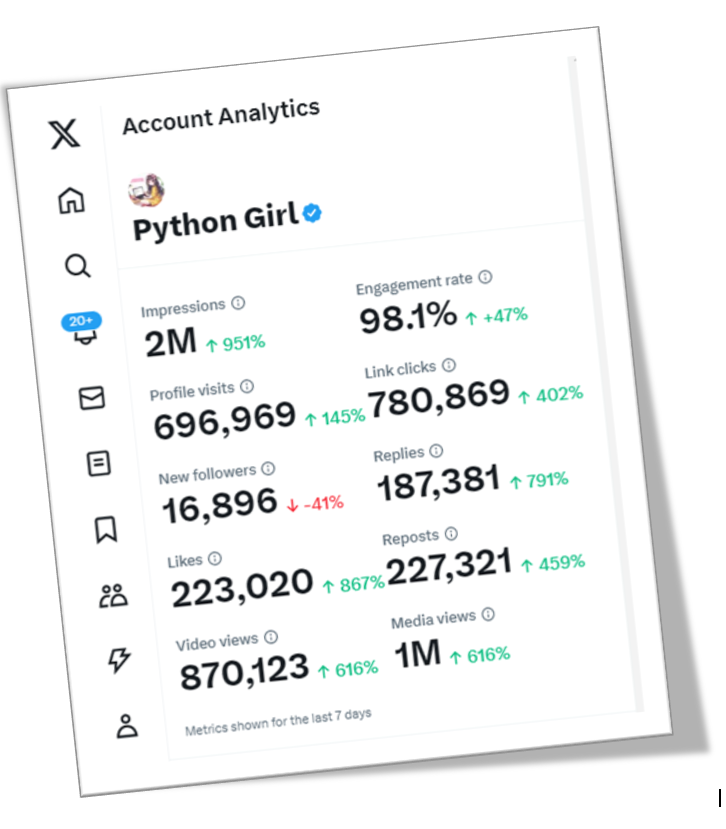
Bước 1: Vào trang thống kê như các bạn đã biết.
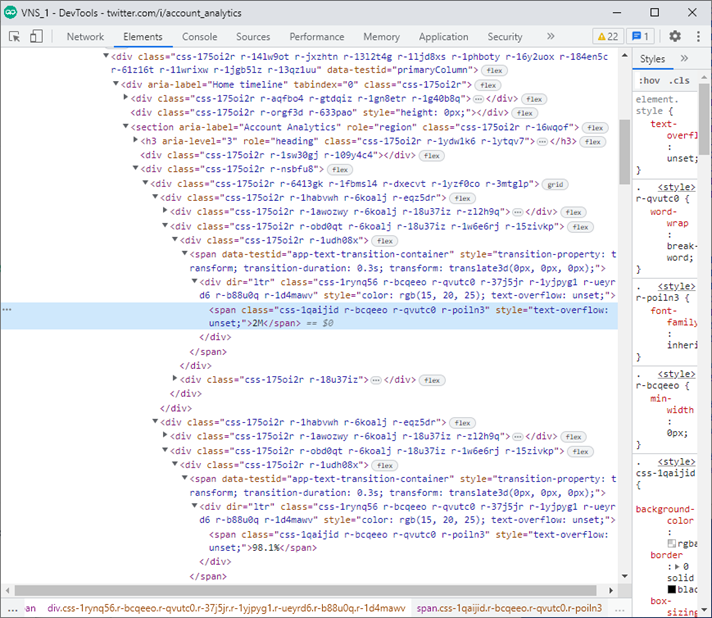
Bước 2: Nhấn F12, nó sẽ xuất hiện cửa sổ DevTols
Bước 3: Xác định thông số cần tăng, bước này cực kỳ quang trọng, vì nó sẽ ảnh hưởng đến doanh thu của bạn sau này.
Về phần mình, sau bao nhiu khóa space trên X, nghe bảo số lần click nhìu thì sẽ được nhiều tiền, nên mình quyết định tăng số đó lên. Đương nhiên thì lượt Imp cũng phải tăng, số đó nhiều thì chất lượng của bạn mới cao,lượt hiển thị mới nhiều.
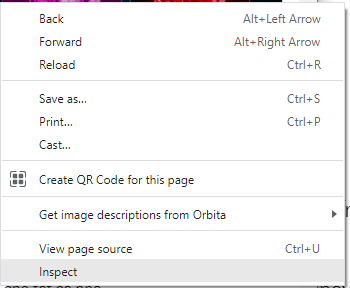
Bước 4: Click phải vào thông số, chọn Inspect. Nó sẽ trỏ bạn đến phần tử đó ở cửa sổ DevTols mới mở hồi nãy. Tìm đến số đó, thay đổi thành giá trị bạn muốn.
Đương nhiên, bạn phải điền một số hợp lý, ví dụ bạn người mới, bạn không thể kiếm ra 2M imp 1 tuần như mình được, các bạn mới thì chỉ tầm 300k đổ lại, các thông số khác cũng tương tự, cái này các bạn phải tự tìm hiểu, chứ mình ko bày được. Điền xong rồi thì nhấn Enter.
Bước 5: Chụp ảnh lại màn hình, đăng bài lên. Mục này cũng quang trọng không kém. Mặc dù anh M có #Grok để kiểm tra tài khoản của các bạn, nhưng mình khuyên các bạn cũng nên lưu lại làm bằng chứng. Chứ lần đầu mình quên lưu lại được trả có 2u, gởi support Twitter thì họ bảo "Let us check again" nhưng 4 tuần rồi vẫn chưa thấy check xong!
Bước 6: FINISH, giờ ngồi đợi TING-TING thôi.
#PythonForBeginners #PythonForLife
91
16
38
31,462

23 Nov 2023
Programming is not hard, problem solving is hard 🙂🙂.
Python truly is beginner's friendly.
Variables, Conditions, Iterations, Functions
That's basically it, The rest you would do is problem solving, that's what differentiates you from others.#PythonForLife #PythonForBeginners
1
3
109

23 Nov 2023
🎉 Exciting News! Thrilled to start my journey as a Python Developer Intern at @technohacksedu , I am grateful for the opportunity and excited for the challenges ahead. Let's do this! 🚀
#pythonprogramming #PythonForLife

12
774
23 Nov 2023
[Python For Beginners]
[Day 21th]: Read Outlook email with Python
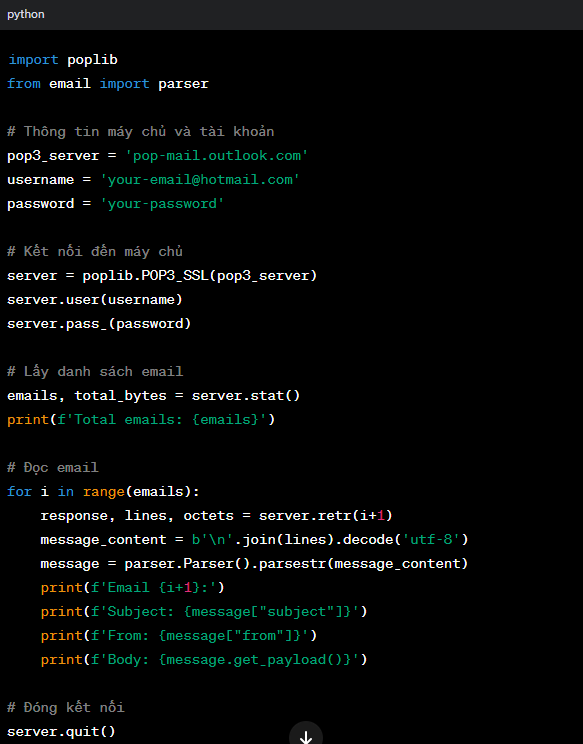
1. **Giới thiệu về POP3**: POP3 là giao thức truyền thống dùng để truy cập email từ máy chủ. Nó cho phép tải về và xóa thư từ máy chủ.
2. **Python và Thư Viện Hỗ Trợ**: Python hỗ trợ làm việc với email qua giao thức POP3 thông qua thư viện `poplib`. Bạn cần nhập khẩu thư viện này vào mã của mình.
3. **Kết Nối với Máy Chủ Hotmail**: Để kết nối với máy chủ Hotmail (Outlook), bạn sẽ cần thông tin máy chủ POP3 của Outlook và cổng. Thông thường, thông tin này là `pop-mail.outlook.com` và cổng `995`.
4. **Xác Thực Người Dùng**: Sau khi kết nối với máy chủ, bạn cần xác thực tài khoản Hotmail của mình bằng tên người dùng và mật khẩu.
5. **Đọc Emails**: Sau khi xác thực thành công, bạn có thể lấy danh sách email hoặc đọc nội dung từng email.
6. **Đóng Kết Nối**: Cuối cùng, đừng quên đóng kết nối với máy chủ sau khi hoàn thành việc đọc email.
Dưới đây là một ví dụ đơn giản về mã Python để kết nối và đọc email từ tài khoản Hotmail qua POP3:
#PythonForBeginners #PythonForLife
279
38
81
14,816

23 Nov 2023
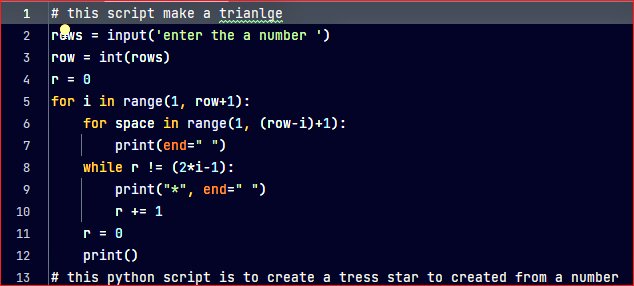
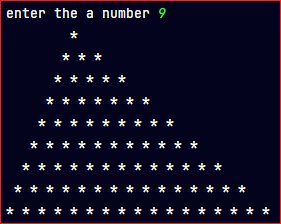
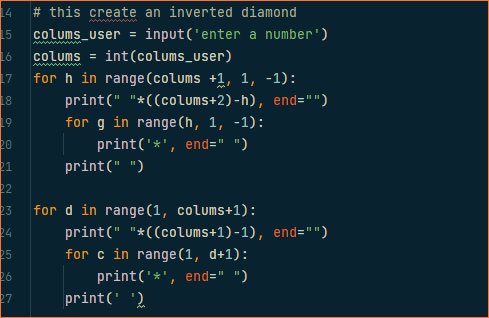
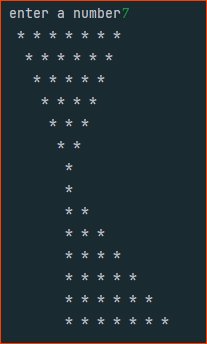
Check these out #PythonForBeginners #python #developers #MachineLearning #DataScience #PythonForLife @clcoding @pythoncodequs #softwaredevelopment
Coming soon on my GitHub repo 🤗
5
97

22 Nov 2023
Hey everyone,
I am engaged in exciting Django projects at the moment and eager to take on more opportunities. Open to new job prospects bring them my way! 🚀#Django #WebDevelopment #pythonprogramming #PythonForLife #PythonForBeginners #django @djangoproject @djcafrica @djangocon
1
2
77

22 Nov 2023
[Python For Beginners]
[Day 20th]: Review
So, pass 20 days, how about your skil, mate?
#PythonForBeginners #PythonForLife #PyFor2u
214
6
56
8,878
20 Nov 2023
[Python For Beginners]
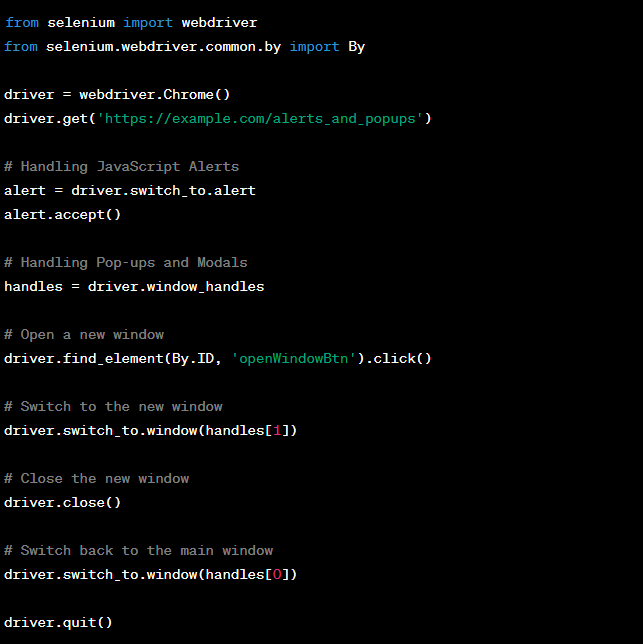
[Day 19th]: Handling Alerts and Pop-ups in Sele
### Handling JavaScript Alerts:
1. **Accepting Alerts:**
- Use `accept()` to click the "OK" button.
2. **Dismissing Alerts:**
- Use `dismiss()` to click the "Cancel" button.
3. **Getting Alert Text:**
- Retrieve the alert message using `text`.
### Handling Pop-ups and Modals:
1. **Switching to Pop-ups:**
- Use `switch_to.window()` to navigate to a new window.
2. **Closing Pop-ups:**
- Use `close()` to close the current window.
Implementing in the PyForBeginner_Day19th.py script.
#PythonForBeginners
#PythonForLife
#PyFor2u
166
10
57
12,230
20 Nov 2023
[Python For Beginners]
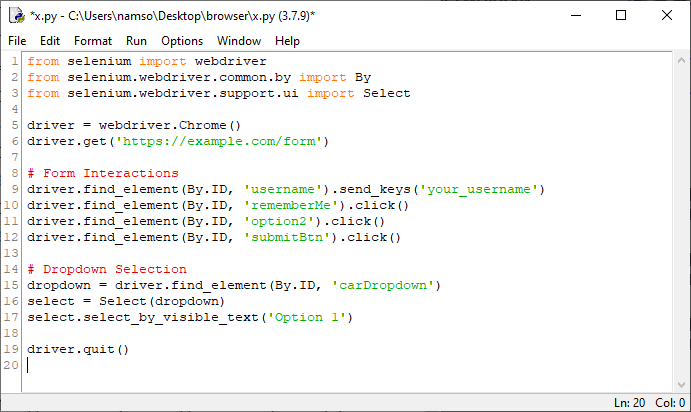
[Day 18th]: Working with Forms and Dropdowns in Sele.
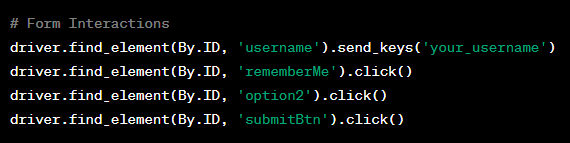
### Forms Interaction:
1. **Text Fields:**
- Use `send_keys()` for text input.
2. **Checkboxes:**
- Use `click()` to toggle checkbox states.
3. **Radio Buttons:**
- Use `click()` to select a radio button.
4. **Buttons:**
- Use `click()` for button interactions.
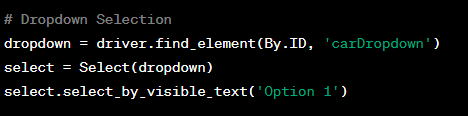
### Dropdown Selection:
1. **Import `'Select':**
2. **Selecting Options:**
- Select = Select(dropdown)
# Select by Visible Text
- select.select_by_visible_text('Option 1')
# Select by Index
- select.select_by_index(2)
# Select by Value
- select.select_by_value('option2')
Implementing in the PyForBeginner_Day18th.py script.
#PythonForBeginners
#PythonForLife
#PyFor2u
113
9
36
8,789
17 Nov 2023
[Python For Beginners]
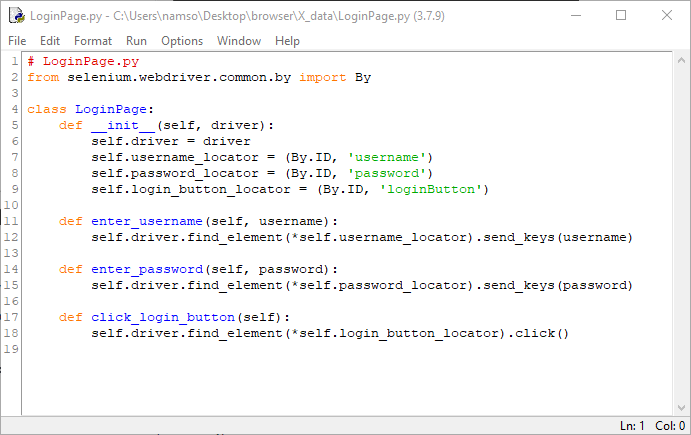
[Day 17th]: Page Object Model (POM) in Sele.
1. **Page Objects:**
- Each web page is represented as a separate class.
- Elements on the page are defined within the respective class.
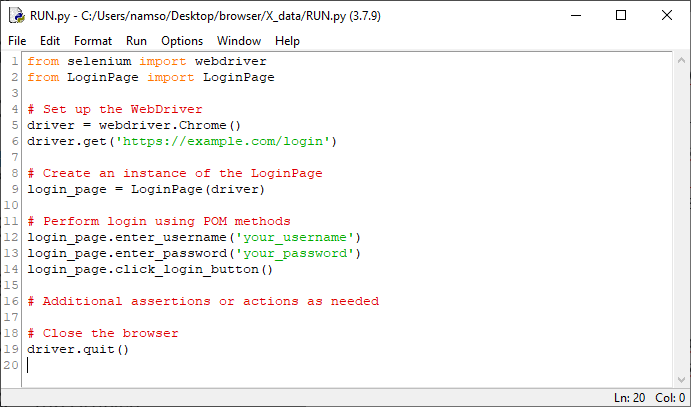
2. **Actions and Methods:**
- Methods in the page class represent actions that can be performed on the page.
- These methods interact with the web elements using Selenium WebDriver.
3. **Benefits:**
- **Code Reusability:** Page objects can be reused across multiple tests.
- **Maintainability:** Changes to the UI are confined to the page class, making maintenance easier.
- **Readability:** Improved readability as test scripts become more focused on business logic.
Implementing the Page Object Model in the PyForBeginner_Day17th.py script. #PythonForBeginners
#PythonForLife
#PyFor2u
156
4
32
8,574
16 Nov 2023
[Python For Beginners]
[Day 16th: Handling Different Browser Windows and Tabs in Sele]
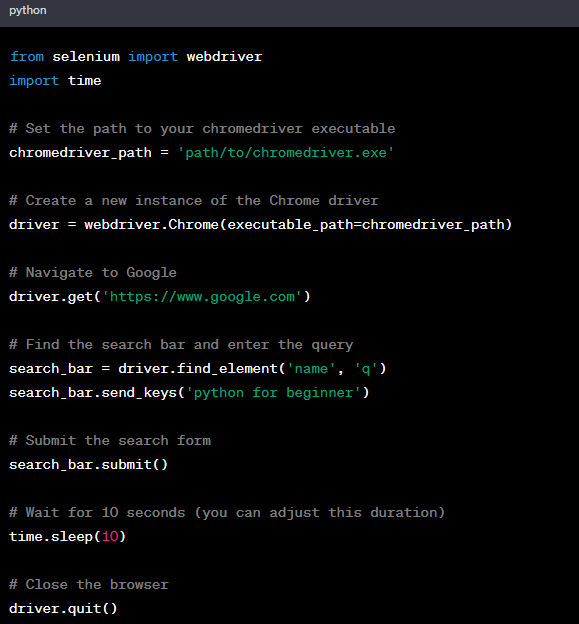
1. **Opening a New Window or Tab:**
- Use `driver.window_handles` to get the list of handles (IDs) of all open windows/tabs.
- Use `driver.execute_script("window.open('', '_blank');")` to open a new tab.
2. **Switching Between Windows/Tabs:**
- Use `driver.switch_to.window(handle)` to switch to a specific window/tab using its handle.
3. **Perform Actions in the New Window/Tab:**
- After switching, perform actions in the new window/tab.
4. **Closing Windows/Tabs:**
- Use `driver.close()` to close the current window/tab.
- Use `driver.quit()` to close the entire browser.
**Challenges:**
Practice these concepts to master effective window and tab management in the PyForBeginner_Day16th.py script. #PythonForBeginners
#PythonForLife
#PyFor2u
107
4
25
7,237
15 Nov 2023
[Python For Beginners]
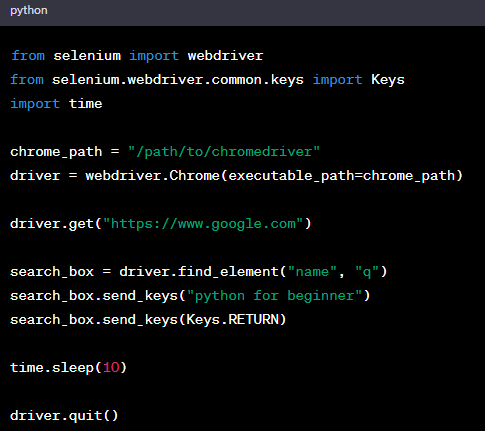
[Day 15th: Locators in Selenium: Mastering XPath and CSS Selectors]
After familiar with Sele, a most import part is interact with elements on websites.
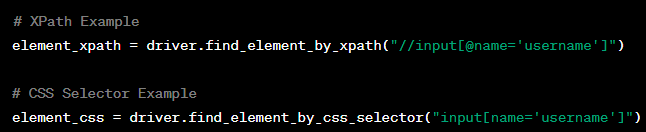
Two key locators are XPath and CSS Selectors.
1. **XPath:**
- Uses a path expression to navigate HTML.
- Examples:
- Absolute: `/html/body/div[1]/span`
- Relative: `//div[@id='example']//input`
2. **CSS Selectors:**
- Patterns for selecting HTML elements.
- Examples:
- ID: `#example_id`
- Class: `.example_class`
- Attribute: `input[name='username']`
**When to Use:**
1. **XPath:**
- Complex hierarchies.
- Both forward and backward navigation.
- No unique IDs or classes.
2. **CSS Selectors:**
- Simple and fast selection.
- Clear IDs or classes.
- Modern browsers with optimized performance.
**Best Practices:**
- Prefer ID and Class selectors.
- Validate in browser developer tools.
- Update locators for dynamic pages.
**Challenges:**
Practice creating XPath and CSS Selectors for different scenarios in the PyForBeginner_Day15th.py script. #PythonForBeginners #PythonForLife #PyFor2u
76
2
28
7,432
14 Nov 2023
[Python For Beginners]
[Day 14th: Get familiar about #Sele with Python]
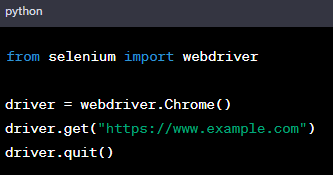
Sele, a powerful tool for web automation, has evolved to become a cornerstone in testing. Understanding its basics is crucial for efficient automated testing.
Part 2: WebDriver Architecture:
First Selenium Script:
Craft a basic script exemplifying how Selenium opens a webpage:
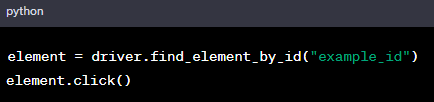
Web Elements Interaction:
Learn interacting with HTML elements:
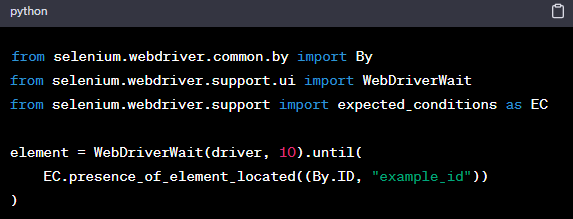
Synchronization:
Handle dynamic pages with waits:
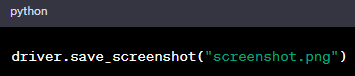
Taking Screenshots:
Capture screenshots for documentation or issue reporting:
Explore the power of Sele in the PyForBeginner_Day14th.py script.
#PythonForBeginners #PythonForLife
#PyFor2u
161
7
40
10,221
13 Nov 2023
[Python For Beginners]
[Day 13th: Get familiar about #Sele with Python]
Sele, a powerful tool for web automation, has evolved to become a cornerstone in testing. Understanding its basics is crucial for efficient automated testing.
Part 1:
Basic Selenium Commands:
Opening a Web Browser:
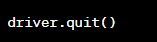
Navigating to a URL:
Closing the Browser:
Explore the power of Sele in the PyForBeginner_Day13th.py script.
🔒📷 #PythonForBeginners #PythonForLife 📷📷 #PyFor2u


145
2
35
7,757
10 Nov 2023
[Python For Beginners]
[Day 12th: Get 2FA code with Python]
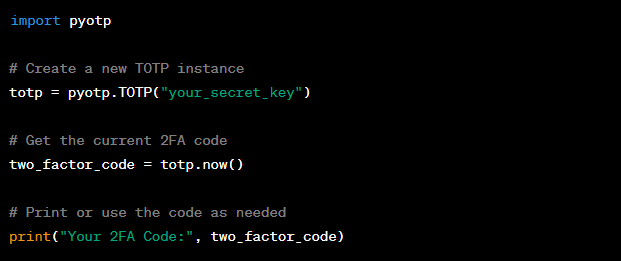
Enter the realm of security with PyOTP, your gateway to Time-based One-Time Passwords (TOTPs). PyOTP allows you to fortify your applications with two-factor authentication, adding an extra layer of protection.
Example:
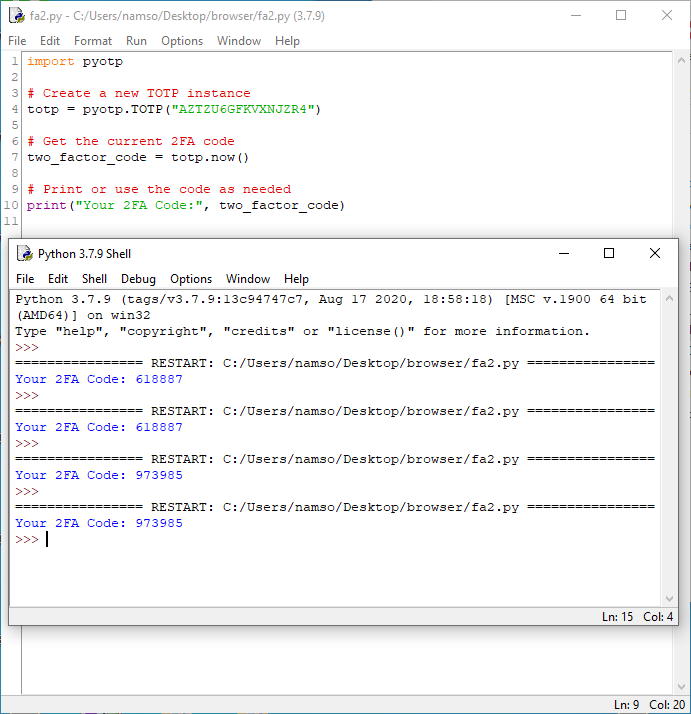
Result:
Explore the power of PyOTP in the PyForBeginner_Day12th.py script. 🔒🚀
#PythonForBeginners #PythonForLife 📷📷
#PyOTP
#PyFor2u
162
1
33
8,810
9 Nov 2023
[Python For Beginners]
[Day 11: Crafting Realistic Data with Python]
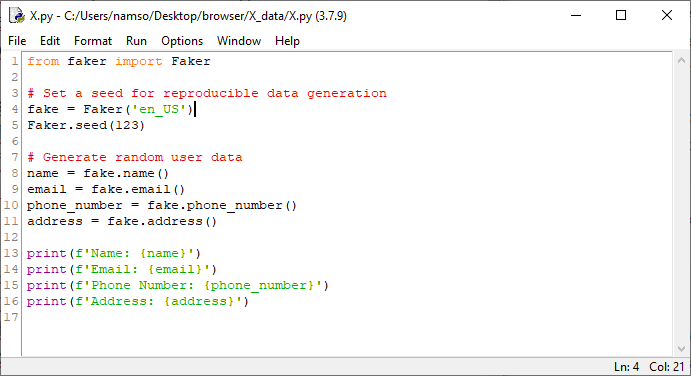
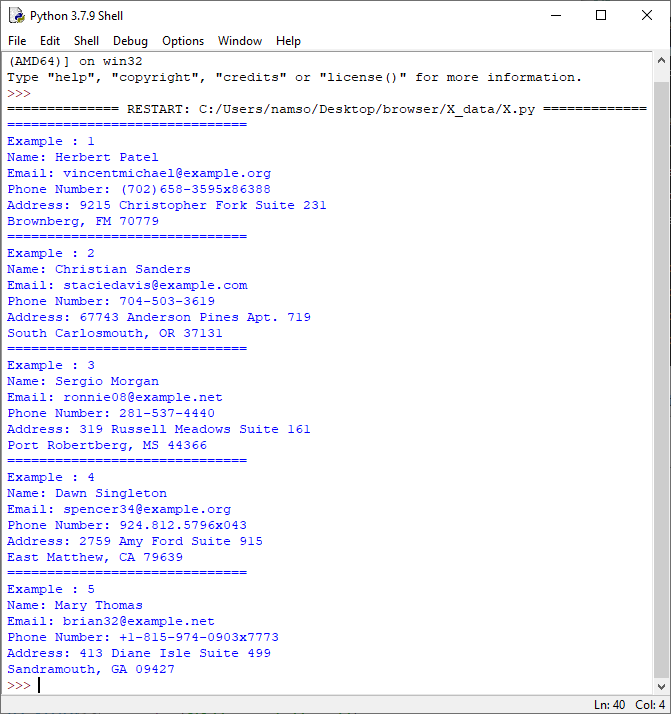
Unlock the potential of the `Faker` library for crafting lifelike, random data. From names to addresses, emails to phone numbers, delve into the art of imaginative content creation.
Say farewell to dull data, and let's embark on an exciting journey together!
Experience it all in the PyForBeginner_Day11th.py script. 🚀
#PythonForBeginners #PythonForLife #Web3📷
130
27
9,224
6 Nov 2023
[Python For Beginners]
[Day 10th: Checking Ethereum Address Balance with Python]
**Important Note**: Please keep in mind that we will be utilizing dummy data for testing.
1. Import the required libraries.
from web3 import Web3
2. Initialize the Web3 instance by connecting to an Ethereum node.
web3 = Web3(Web3.HTTPProvider('YOUR_ETHEREUM_NODE_URL'))
3. Specify the Ethereum address to check.
address = '0xYourEthereumAddress'
4. Convert the address to checksum format for accuracy.
checksum_address = web3.toChecksumAddress(address)
5. Retrieve the balance in wei and convert it to Ether.
balance_wei = web3.eth.getBalance(checksum_address)
balance_eth = web3.fromWei(balance_wei, 'ether')
6. Display the address and balance in Ether.
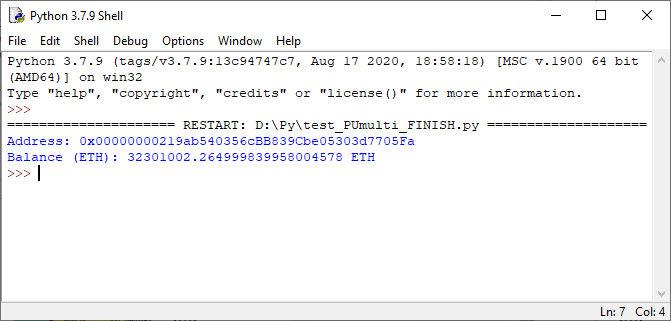
print(f'Address: {checksum_address}')
print(f'Balance (ETH): {balance_eth} ETH')
Replace `'YOUR_ETHEREUM_NODE_URL'` and `'0xYourEthereumAddress'` with your Ethereum node's URL and the address you want to check. This script connects to the Ethereum node, fetches the balance, and displays it in Ether.
Organize all these steps in the PyForBeginner_Day7th.py script and share the results. 🚀
#PythonForBeginners #PythonForLife #Web3
#DMMETQUA

211
34
14,372
2 Nov 2023
[Python For Beginners]
[Day 9th: Read/Write text file with Python]
**Important Note**: Please keep in mind that we will be utilizing dummy Pro5 data for testing.
**Writing to a Text File:**
with open("my_file.txt", "w") as file:
file.write("Hello, this is some text.\n")
file.write("You can write more lines too!")
**Reading from a Text File:**
with open("my_file.txt", "r") as file:
for line in file:
print(line.strip())
# Use strip to remove newline characters
These code snippets demonstrate how to write text to a file and read text from a file in Python. Using the 'with' statement ensures that the file is properly closed after the operation, which is considered a best practice.
Organize all these steps in the PyForBeginner_Day7th.py script and share the results. 🚀📷 #PythonForBeginners #PythonForLife
#DMMETQUA

172
1
31
13,290
1 Nov 2023
[Python For Beginners]
[Day 8th: XPATH in life with Python]
**Important Note**: Please keep in mind that we will be utilizing dummy Pro5 data for testing.
After delving into theory on the previous day, today is all about putting that knowledge into practice.
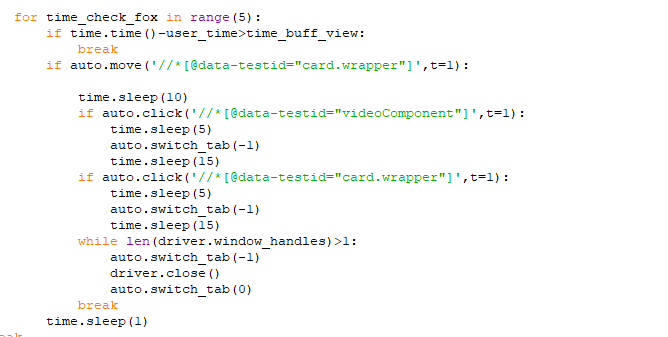
Depending on the webpage you're working with, you can use the following XPath formula for an easy and accurate way to access elements:
💯XPATH = '//*[@attribute="attribute_value"]'
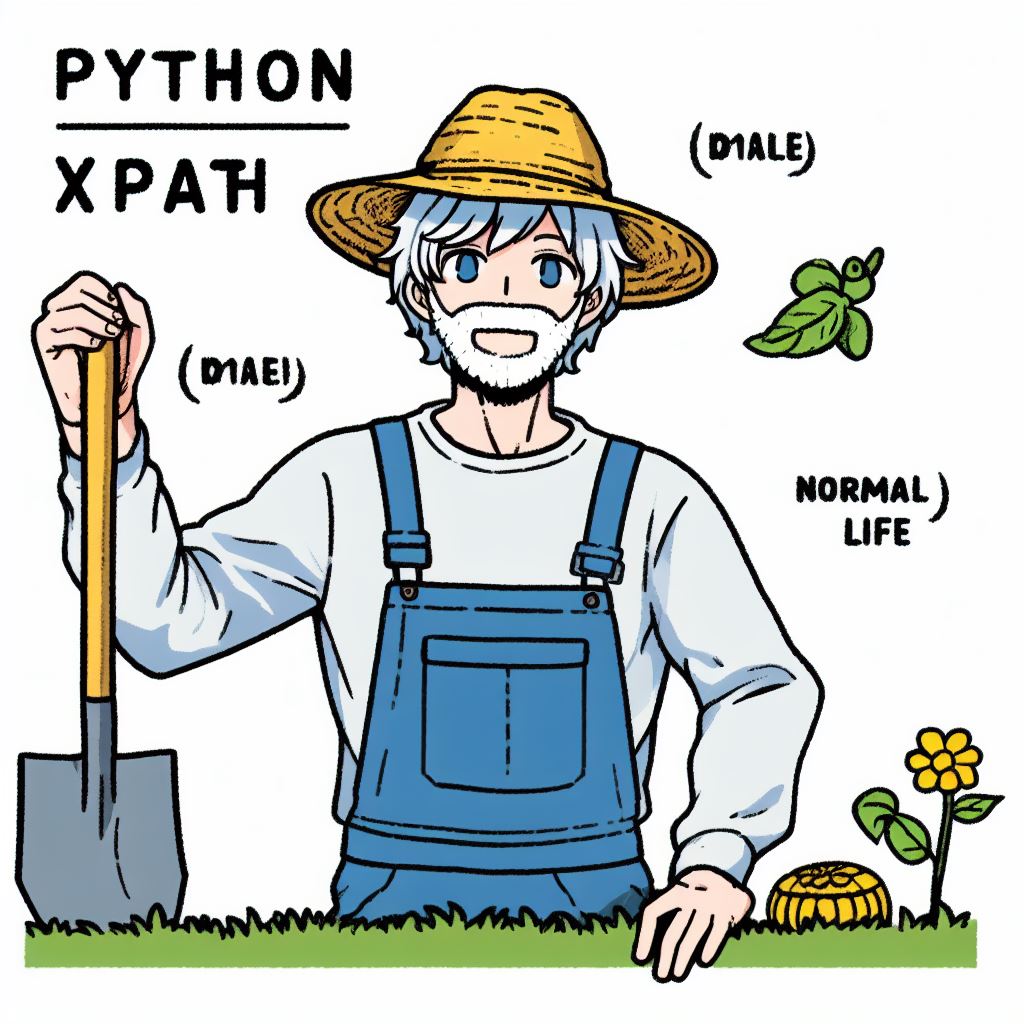
With the example in the picture below, you can use various methods to locate the selected element:
1⃣ XPATH = '//*[@role="region"]'
2⃣ XPATH = '//*[@class="css-1dbjc4n"]'
or
3⃣ XPATH = '//*[@aria-labelledby="accessible-list-3"]'
Organize all these steps in the PyForBeginner_Day8th.py script and share the results. 🚀📷 #PythonForBeginners #PythonForLife

31 Oct 2023

[Python For Beginners]
[Day 7th: Mastering #XPATH in Python]
**Important Note**: Please note that we will be using dummy Pro5 data for testing purposes.
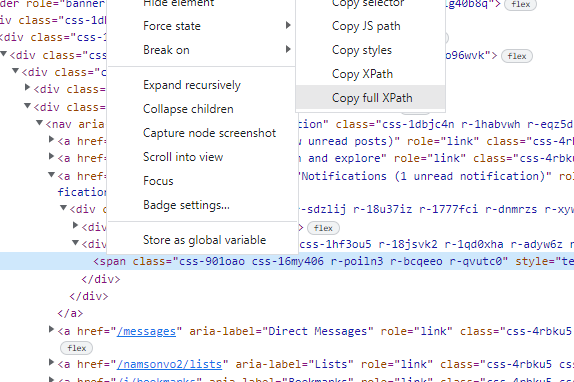
When it comes to utilizing XPath for element location and interaction, experts often advocate using the full XPath for seamless integration with website elements. Traditionally, many have relied on XPaths like:
/html/body/div[1]/div/div/div[2]/header/div/div/div/div[1]/div[2]/nav/a[3]/div/div[2]/span
However, today, we explore a variety of XPath expressions that are not dependent on page size. These 10 XPath examples offer diverse criteria for precise element location:
1. **By Tag Name** - Locate all anchor (a) elements:
- XPath: `//a`
2. **By ID** - Find an element by its unique ID attribute:
- XPath: `//*[@id='element_id']`
3. **By Class Name** - Locate elements with a specific CSS class:
- XPath: `//*[contains(@class, 'class_name')]`
4. **By Text Content** - Find elements with exact text content:
- XPath: `//*[text()='exact_text']`
5. **By Partial Text** - Locate elements with partial text content:
- XPath: `//*[contains(text(), 'partial_text')]`
6. **By Attribute Value** - Find elements with a specific attribute value:
- XPath: `//*[@attribute_name='attribute_value']`
7. **By Parent-Child Relationship** - Locate child elements under a specific parent element:
- XPath: `//parent_element/child_element`
8. **By Position (Index)** - Find the nth element of a specific type:
- XPath: `(//element_type)[n]`
9. **By Ancestor-Descendant Relationship** - Locate descendants of a specific ancestor element:
- XPath: `//ancestor_element//descendant_element`
10. **Combining XPath Expressions** - Combine multiple criteria:
- XPath: `//div[@class='example']//a[contains(@href, 'example.com')]`
So, change your mind and try something new:
Organize all these steps in the PyForBeginner_Day7th.py script and share the results. 🚀📷 #PythonForBeginners #PythonForLife
185
34
12,639