
15 Nov 2023
[Python For Beginners]
[Day 15th: Locators in Selenium: Mastering XPath and CSS Selectors]
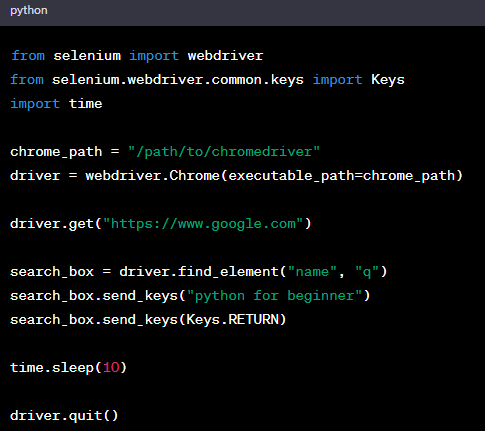
After familiar with Sele, a most import part is interact with elements on websites.
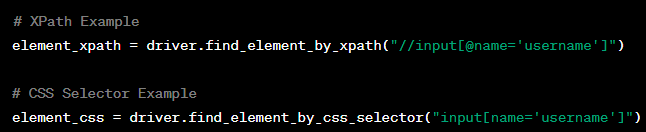
Two key locators are XPath and CSS Selectors.
1. **XPath:**
- Uses a path expression to navigate HTML.
- Examples:
- Absolute: `/html/body/div[1]/span`
- Relative: `//div[@id='example']//input`
2. **CSS Selectors:**
- Patterns for selecting HTML elements.
- Examples:
- ID: `#example_id`
- Class: `.example_class`
- Attribute: `input[name='username']`
**When to Use:**
1. **XPath:**
- Complex hierarchies.
- Both forward and backward navigation.
- No unique IDs or classes.
2. **CSS Selectors:**
- Simple and fast selection.
- Clear IDs or classes.
- Modern browsers with optimized performance.
**Best Practices:**
- Prefer ID and Class selectors.
- Validate in browser developer tools.
- Update locators for dynamic pages.
**Challenges:**
Practice creating XPath and CSS Selectors for different scenarios in the PyForBeginner_Day15th.py script. #PythonForBeginners #PythonForLife #PyFor2u
76
2
28
7,432


26 Aug 2023
My support always abhishek bhaiya and rahega chahe kuch bhi ho jaiye
Only abhishek 💛
#PandaGang
@RAJVEER_KANISHQ
2
90


26 Aug 2023
Appreciation ho ya na ho ham toh Abhishek bhai ko Puri zindagi support karenge 💛💛 @shiv_gayatriii
1
104


26 Aug 2023
My friends name swagata he full support to Abhishek malhan from big boss.
2
2
4
1,031


