
Apr 25
➤ Important Rule - Read Inside Out!
ROUND(ABS(MOD(-17, 5)), 0)
Step 1: MOD(-17, 5) → -2 (innermost)
Step 2: ABS(-2) → 2 (next level)
Step 3: ROUND(2, 0) → 2 (outermost)
Final Output: 2
• Always evaluate innermost first, work outwards!
➤ Quick Summary:
• ROUND(n, d) = rounds to d decimal places, negative d rounds to tens/hundreds
• TRUNC(n, d) = cuts at d decimal places, no rounding at all
• MOD(n, d) = remainder after division, use to find even/odd numbers
• ABS(n) = always returns positive value useful for differences
• CEIL(n) = always rounds UP even 55.1 becomes 56
• FLOOR(n) = always rounds DOWN even 55.9 becomes 55
• POWER(n, e) = n raised to power e
• SQRT(n) = square root
• Nested functions = inner executes first, outer uses inner's result
• Always read nested functions inside out
• Can nest as many levels as needed 2, 3, 4 levels deep all work
#OracleSQL #NumericFunctions #ROUND #TRUNC #MOD #NestedFunctions #LearnSQL #SQLBeginners #Day23 #100DaysOfCode #TechTwitter
2
65
Apr 22
➤ Most Important Use - Case Insensitive Search!
Remember Oracle data is case sensitive. These functions solve that!
-- Problem: You don't know if city is stored as
-- 'Delhi', 'DELHI', 'delhi', 'dElHi'
-- ❌ This might miss results:
WHERE city = 'Delhi'
-- ✅ This finds regardless of how it's stored:
WHERE LOWER(city) = 'delhi'
WHERE UPPER(city) = 'DELHI'
-- Real Example — user types city in any case:
SELECT name, city
FROM employees
WHERE UPPER(city) = UPPER('&enter_city');
-- User types 'delhi', 'DELHI', 'Delhi' → all work! ✅
➤ Using Functions in ORDER BY:
-- Sort by name case-insensitively:
SELECT name FROM employees
ORDER BY LOWER(name);
➤ Quick Summary:
• Single Row Functions = work on one row at a time - return one result per row
• Group Functions = work on multiple rows - return one result total (covered later)
• Four categories - Character, Numeric, Date, Conversion
• LOWER() = converts entire string to lowercase
• UPPER() = converts entire string to uppercase
• INITCAP() = first letter of each word uppercase, rest lowercase
• Most important use = case-insensitive search using UPPER() or LOWER() in WHERE clause
• Functions can also be used in ORDER BY clause
#OracleSQL #SingleRowFunctions #UPPER #LOWER #INITCAP #CharacterFunctions #LearnSQL #SQLBeginners #Day20 #100DaysOfCode #TechTwitter
3
54
Apr 20
> Quick Summary:
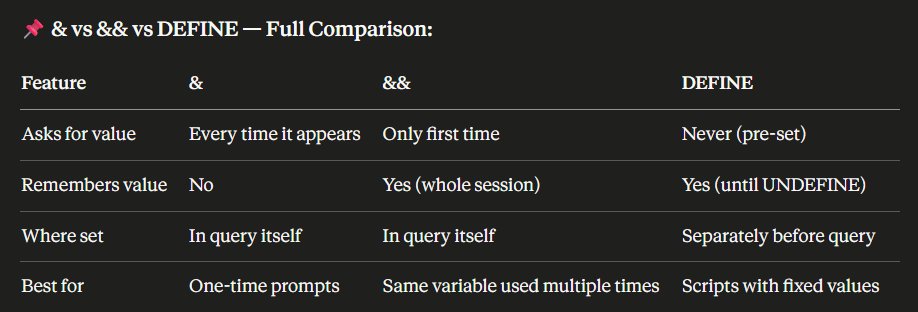
• &variable = placeholder that asks user for value at runtime
• & asks for value every single time it appears - even same variable name
• Text/Date values need quotes around & - numbers don't
• & works in SELECT, FROM, WHERE, ORDER BY - anywhere in the query
• &&variable = asks only ONCE and remembers for the whole session
• && persists automatically - second occurrence doesn't prompt again
• DEFINE variable = value = pre-sets the value - Oracle never asks
• DEFINE alone = shows value of one variable
• DEFINE with no args = shows ALL defined variables
• UNDEFINE variable = clears it from memory - Oracle asks again next time
• Professional scripts use DEFINE at top - change once, updates everywhere
#OracleSQL #SubstitutionVariables #DEFINE #UNDEFINE #SQLScripting #LearnSQL #SQLBeginners #Day18 #100DaysOfCode #TechTwitter
3
64
Apr 17
> With Multiple Columns:
SELECT name, dept, commission
FROM employees
ORDER BY dept ASC, commission DESC NULLS LAST;
• Within each department → commission highest first → NULLs at the very end!
> Quick Summary:
• ORDER BY = sorts results - always the last clause in the query
• Can sort by column name, alias, or position number
• Column alias CAN be used in ORDER BY - it runs after SELECT
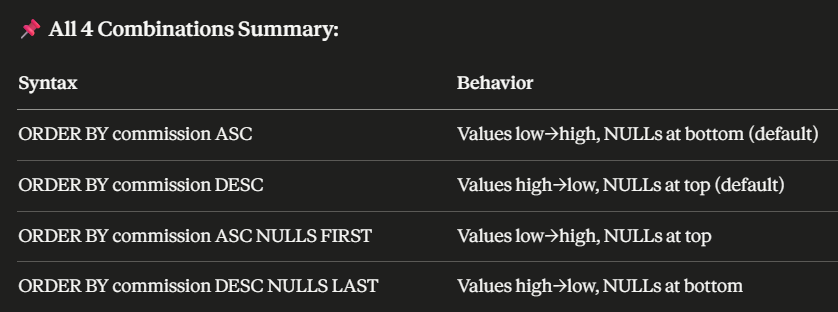
• ASC = low to high (default - no need to write it)
• DESC = high to low - must write explicitly
• Each column in multi-sort can have its own ASC or DESC direction
• Dates sorted chronologically - DESC gives most recent first
• ASC → NULLs at bottom by default
• DESC → NULLs at top by default
• NULLS FIRST → forces NULLs to top regardless of sort direction
• NULLS LAST → forces NULLs to bottom regardless of sort direction
#OracleSQL #ORDERBY #ASC #DESC #NullsFirst #NullsLast #LearnSQL #SQLBeginners #Day15 #100DaysOfCode #TechTwitter
3
73
Apr 15
> IS NULL Operator - Why IS NULL?
We covered NULL before - let's consolidate it here completely in the context of WHERE.
Use IS NULL and IS NOT NULL to check for NULL values.
Never use = NULL or != NULL — they will never work!
~IS NULL:
-- Employees with NO commission:
SELECT name, commission
FROM employees
WHERE commission IS NULL;
Output:
Name | Commission
Priya | NULL
Neha | NULL
Suresh | NULL
Meera | NULL
~IS NOT NULL:
-- Employees WHO HAVE commission:
SELECT name, commission
FROM employees
WHERE commission IS NOT NULL;
Output:
Name | Commission
Raj | 5000
Arjun | 3000
Kavya | 2000
Vikram | 8000
> Why = NULL Never Works:
WHERE commission = NULL -- Returns 0 rows ❌ ALWAYS!
WHERE commission IS NULL -- Works correctly ✅
Because NULL means unknown. Oracle can't confirm if unknown = unknown.
Think of it as: "Is mystery box 1 equal to mystery box 2?"
You can't know - both are unknown!
> Quick Summary:
• IN = match against a specific list - much cleaner than multiple OR conditions
• NOT IN works - but NEVER put NULL in the list or you get zero results
• Use IN for discrete specific values, BETWEEN for continuous ranges
• LIKE = pattern search using wildcards
• % = any number of characters (zero or more)
• _ = exactly one character
• Data is case sensitive - use UPPER() with LIKE for safety
• ESCAPE lets you search for literal % or _ characters
• IS NULL = only correct way to check for NULL
• = NULL always returns zero rows - never use it
#OracleSQL #INOperator #LIKEOperator #ISNull #Wildcards #LearnSQL #SQLBeginners #Day13 #100DaysOfCode #TechTwitter
2
79
Apr 14
> NOT BETWEEN:
-- Employees whose salary is NOT between 50000 and 65000:
SELECT name, salary
FROM employees
WHERE salary NOT BETWEEN 50000 AND 65000;
Output:
Name | Salary
Arjun | 48000
Neha | 70000
Kavya | 45000
Vikram | 80000
> Common Mistake with BETWEEN:
Always write the smaller value first!
WHERE salary BETWEEN 65000 AND 50000
-Returns nothing!
WHERE salary BETWEEN 50000 AND 65000
-Correct!
> Quick Summary:
• WHERE = filters rows - runs before SELECT in processing order
• Text values need single quotes, numbers don't, dates need single quotes
• Cannot use column alias in WHERE - alias doesn't exist yet
• =, !=, <>, >, <, >=, <= all comparison operators
• != and <> both mean not equal, <> is SQL standard
• Dates compared chronologically - later date = greater value
• BETWEEN is inclusive - both boundary values are included
• Always write smaller value first in BETWEEN
• NOT BETWEEN excludes the range
#OracleSQL #WHEREClause #ComparisonOperators #BETWEEN #LearnSQL #SQLBeginners #Day12 #100DaysOfCode #TechTwitter
3
87
Apr 11
> NULL Summary Table:
Concept Rule
What is NULL Absence of any value
NULL = NULL FALSE - never equal
NULL = 0 FALSE - completely different
Check for NULL Use IS NULL / IS NOT NULL
Math with NULL Always results in NULL
Replace NULL Use NVL() function
NULL in ASC orderAppears LAST
NULL in DESC orderAppears FIRST
#OracleSQL #NullValues #NVL #IsNull #COALESCE #LearnSQL #SQLBeginners #Day9 #100DaysOfCode #TechTwitter
1
6
78
Apr 10
> Quick Summary:
• Data Type = tells Oracle what kind of data a column can store
• VARCHAR2 → variable text (most used for text)
• NUMBER → all numbers - whole and decimal (most used for numbers)
• DATE → stores date time both together (most used for dates)
• CHAR → fixed length text - use only when length never changes
• BLOB → images, videos, files
• CLOB → very large text up to 4 GB
• TIMESTAMP → date time milliseconds
• ROWID → Oracle's internal row address - auto created
#OracleSQL #DataTypes #VARCHAR2 #NUMBER #DATE #BLOB #LearnSQL #SQLBeginners #OracleDataTypes #Day8 #100DaysOfCode #TechTwitter
1
6
90
Apr 9
> Quick Summary:
• SQL = language used to communicate with a database
• SQL is declarative - you say WHAT, Oracle figures out HOW
• DDL → defines structure (CREATE, ALTER, DROP, TRUNCATE)
• DML → works with data (INSERT, UPDATE, DELETE)
• DQL → fetches data (SELECT)
• DCL → controls access (GRANT, REVOKE)
• TCL → manages transactions (COMMIT, ROLLBACK, SAVEPOINT)
• Oracle SQL = standard SQL extra enterprise-grade power
#OracleSQL #WhatIsSQL #SQLCommands #DDL #DML #DQL #DCL #TCL #LearnSQL #SQLBeginners #Day7 #100DaysOfCode #TechTwitter
1
13
187
Apr 8
7. Trigger - The Automatic Responder
Code that automatically runs when something happens in the database - on INSERT, UPDATE, or DELETE.
When a new order is placed (INSERT) →
Trigger automatically sends a confirmation email
• Think of it like a motion sensor light - you walk in, it turns on automatically
• We will cover these in detail later in the course
> We will learn each of these objects in deep detail as we progress.
#OracleSQL #DatabaseObjects #LearnSQL #SQLBeginners #OracleForBeginners #Day6 #100DaysOfCode #TechTwitter
3
95