

Apr 30
A single missing 'ON' clause just cost the company $10,000 in cloud compute fees. 😱
Most developers think a Cartesian Product is just a theoretical math concept. Until they run a 'CROSS JOIN' on two 1-million row tables and watch the production database grind to a halt.
I built an Interactive Masterclass to show you exactly how to avoid this 'Oops' moment.
Inside the demo:🛠️ Workbench: Break the DB (safely) with Cartesian products.
🎯 Inner Joins: The precision matches you actually want. 🛡️ Left Joins: Your safety net for missing data.
👇 Stop the crashes. Master the geometry of SQL.
🔔 Follow me @quanwen_zhao for more Oracle deep-dives! #OracleSQL #DatabaseReliability #SQLTips
See my post in the comment area! 👇 Namely, like, repost are always welcome ...
1
2
42

Apr 25
➤ Important Rule - Read Inside Out!
ROUND(ABS(MOD(-17, 5)), 0)
Step 1: MOD(-17, 5) → -2 (innermost)
Step 2: ABS(-2) → 2 (next level)
Step 3: ROUND(2, 0) → 2 (outermost)
Final Output: 2
• Always evaluate innermost first, work outwards!
➤ Quick Summary:
• ROUND(n, d) = rounds to d decimal places, negative d rounds to tens/hundreds
• TRUNC(n, d) = cuts at d decimal places, no rounding at all
• MOD(n, d) = remainder after division, use to find even/odd numbers
• ABS(n) = always returns positive value useful for differences
• CEIL(n) = always rounds UP even 55.1 becomes 56
• FLOOR(n) = always rounds DOWN even 55.9 becomes 55
• POWER(n, e) = n raised to power e
• SQRT(n) = square root
• Nested functions = inner executes first, outer uses inner's result
• Always read nested functions inside out
• Can nest as many levels as needed 2, 3, 4 levels deep all work
#OracleSQL #NumericFunctions #ROUND #TRUNC #MOD #NestedFunctions #LearnSQL #SQLBeginners #Day23 #100DaysOfCode #TechTwitter
2
65
Apr 24
➤ Real World RPAD Uses:
-- Format report columns with consistent width:
SELECT RPAD(name, 15, ' ') ||
RPAD(city, 15, ' ') ||
RPAD(dept, 10, ' ') AS report_line
FROM employees;
Output:
Report Line
Raj Delhi Finance
Priya Mumbai IT
Arjun Delhi Finance
• Everything aligned perfectly like a report!
➤ Quick Summary:
• TRIM() = removes spaces or characters from both sides
• TRIM(char FROM string) = removes specific character from both sides
• TRIM LEADING = left side only, TRIM TRAILING = right side only
• LTRIM() = removes characters from LEFT keeps removing while left char is in list
• RTRIM() = removes characters from RIGHT - same logic
• Combine LTRIM RTRIM to remove from both sides for specific chars
• REPLACE(string, find, replace) = replaces ALL occurrences
• REPLACE with empty string = deletes the search string
• LPAD(string, length, char) = pads LEFT to reach total length
• RPAD(string, length, char) = pads RIGHT to reach total length
• If string is longer than total_length - LPAD/RPAD truncate it
#OracleSQL #TRIM #LTRIM #RTRIM #REPLACE #LPAD #RPAD #CharacterFunctions #LearnSQL #Day22 #100DaysOfCode #TechTwitter
2
44
Apr 22
➤ Most Important Use - Case Insensitive Search!
Remember Oracle data is case sensitive. These functions solve that!
-- Problem: You don't know if city is stored as
-- 'Delhi', 'DELHI', 'delhi', 'dElHi'
-- ❌ This might miss results:
WHERE city = 'Delhi'
-- ✅ This finds regardless of how it's stored:
WHERE LOWER(city) = 'delhi'
WHERE UPPER(city) = 'DELHI'
-- Real Example — user types city in any case:
SELECT name, city
FROM employees
WHERE UPPER(city) = UPPER('&enter_city');
-- User types 'delhi', 'DELHI', 'Delhi' → all work! ✅
➤ Using Functions in ORDER BY:
-- Sort by name case-insensitively:
SELECT name FROM employees
ORDER BY LOWER(name);
➤ Quick Summary:
• Single Row Functions = work on one row at a time - return one result per row
• Group Functions = work on multiple rows - return one result total (covered later)
• Four categories - Character, Numeric, Date, Conversion
• LOWER() = converts entire string to lowercase
• UPPER() = converts entire string to uppercase
• INITCAP() = first letter of each word uppercase, rest lowercase
• Most important use = case-insensitive search using UPPER() or LOWER() in WHERE clause
• Functions can also be used in ORDER BY clause
#OracleSQL #SingleRowFunctions #UPPER #LOWER #INITCAP #CharacterFunctions #LearnSQL #SQLBeginners #Day20 #100DaysOfCode #TechTwitter
3
54
Apr 20
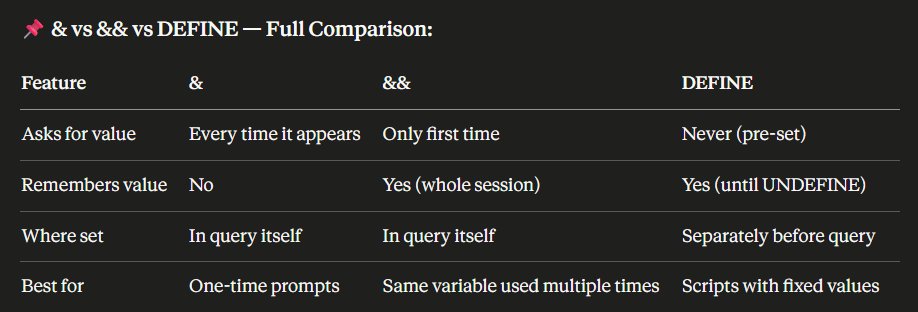
> Quick Summary:
• &variable = placeholder that asks user for value at runtime
• & asks for value every single time it appears - even same variable name
• Text/Date values need quotes around & - numbers don't
• & works in SELECT, FROM, WHERE, ORDER BY - anywhere in the query
• &&variable = asks only ONCE and remembers for the whole session
• && persists automatically - second occurrence doesn't prompt again
• DEFINE variable = value = pre-sets the value - Oracle never asks
• DEFINE alone = shows value of one variable
• DEFINE with no args = shows ALL defined variables
• UNDEFINE variable = clears it from memory - Oracle asks again next time
• Professional scripts use DEFINE at top - change once, updates everywhere
#OracleSQL #SubstitutionVariables #DEFINE #UNDEFINE #SQLScripting #LearnSQL #SQLBeginners #Day18 #100DaysOfCode #TechTwitter
3
64
Apr 17
> With Multiple Columns:
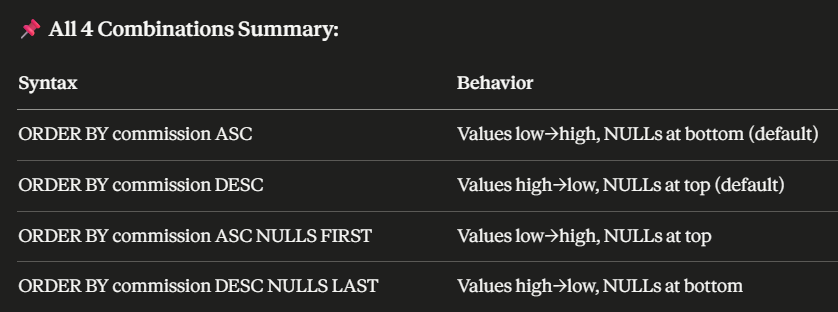
SELECT name, dept, commission
FROM employees
ORDER BY dept ASC, commission DESC NULLS LAST;
• Within each department → commission highest first → NULLs at the very end!
> Quick Summary:
• ORDER BY = sorts results - always the last clause in the query
• Can sort by column name, alias, or position number
• Column alias CAN be used in ORDER BY - it runs after SELECT
• ASC = low to high (default - no need to write it)
• DESC = high to low - must write explicitly
• Each column in multi-sort can have its own ASC or DESC direction
• Dates sorted chronologically - DESC gives most recent first
• ASC → NULLs at bottom by default
• DESC → NULLs at top by default
• NULLS FIRST → forces NULLs to top regardless of sort direction
• NULLS LAST → forces NULLs to bottom regardless of sort direction
#OracleSQL #ORDERBY #ASC #DESC #NullsFirst #NullsLast #LearnSQL #SQLBeginners #Day15 #100DaysOfCode #TechTwitter
3
73

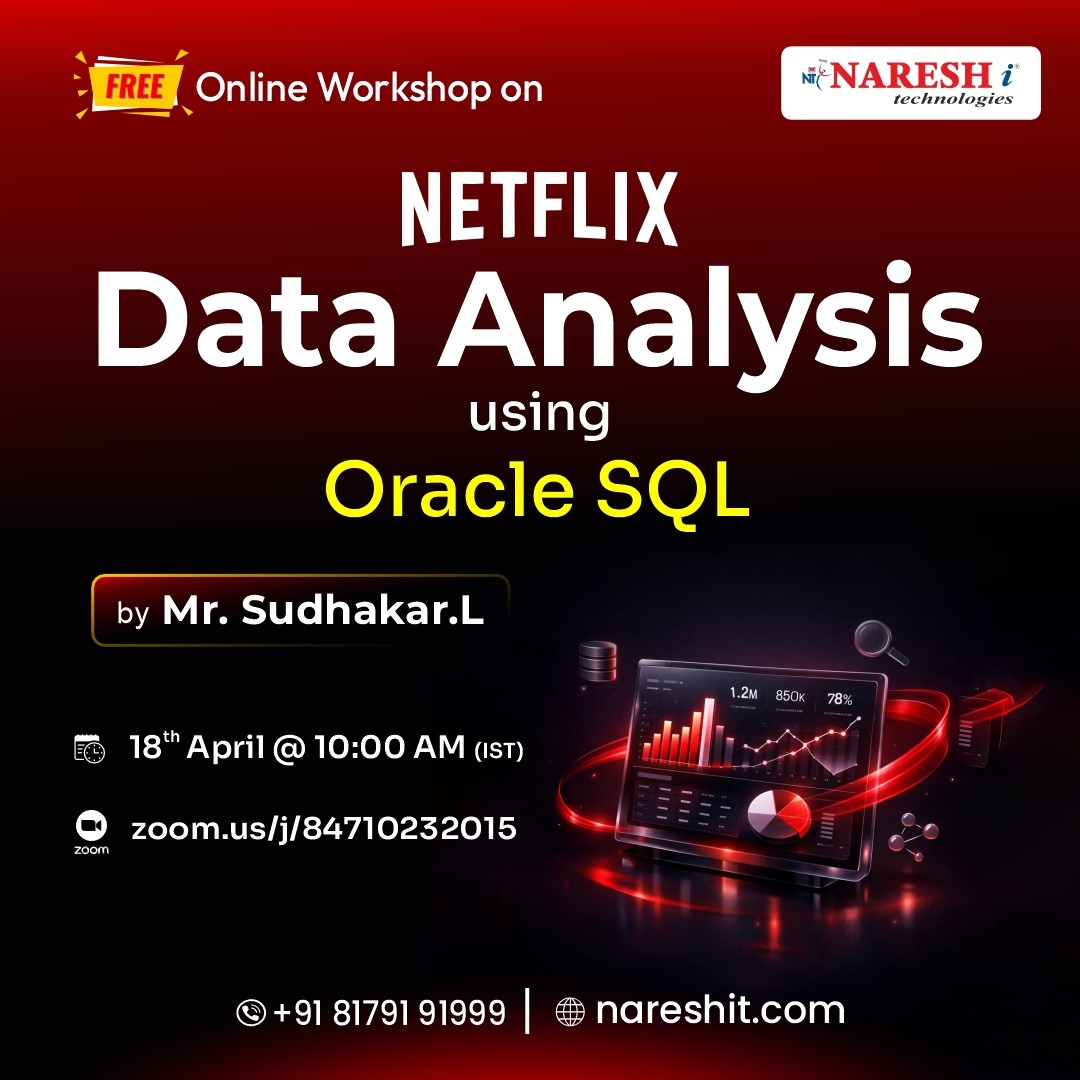
🚀 Want to Become a Data Analyst? Start Here!
👉 Register Now: t.ly/FWSDAORA-18APL
👨🏫 Learn from Mr. Sudhakar L
📅 Date: 18th April 2026
⏰ Time: 10:00 AM (IST)
#Freeworkshop #DataAnalytics #SQL #OracleSQL #DataAnalyst #CareerSwitch #UpskillNow
1
2
40
Apr 15
> IS NULL Operator - Why IS NULL?
We covered NULL before - let's consolidate it here completely in the context of WHERE.
Use IS NULL and IS NOT NULL to check for NULL values.
Never use = NULL or != NULL — they will never work!
~IS NULL:
-- Employees with NO commission:
SELECT name, commission
FROM employees
WHERE commission IS NULL;
Output:
Name | Commission
Priya | NULL
Neha | NULL
Suresh | NULL
Meera | NULL
~IS NOT NULL:
-- Employees WHO HAVE commission:
SELECT name, commission
FROM employees
WHERE commission IS NOT NULL;
Output:
Name | Commission
Raj | 5000
Arjun | 3000
Kavya | 2000
Vikram | 8000
> Why = NULL Never Works:
WHERE commission = NULL -- Returns 0 rows ❌ ALWAYS!
WHERE commission IS NULL -- Works correctly ✅
Because NULL means unknown. Oracle can't confirm if unknown = unknown.
Think of it as: "Is mystery box 1 equal to mystery box 2?"
You can't know - both are unknown!
> Quick Summary:
• IN = match against a specific list - much cleaner than multiple OR conditions
• NOT IN works - but NEVER put NULL in the list or you get zero results
• Use IN for discrete specific values, BETWEEN for continuous ranges
• LIKE = pattern search using wildcards
• % = any number of characters (zero or more)
• _ = exactly one character
• Data is case sensitive - use UPPER() with LIKE for safety
• ESCAPE lets you search for literal % or _ characters
• IS NULL = only correct way to check for NULL
• = NULL always returns zero rows - never use it
#OracleSQL #INOperator #LIKEOperator #ISNull #Wildcards #LearnSQL #SQLBeginners #Day13 #100DaysOfCode #TechTwitter
2
79
Apr 14
> NOT BETWEEN:
-- Employees whose salary is NOT between 50000 and 65000:
SELECT name, salary
FROM employees
WHERE salary NOT BETWEEN 50000 AND 65000;
Output:
Name | Salary
Arjun | 48000
Neha | 70000
Kavya | 45000
Vikram | 80000
> Common Mistake with BETWEEN:
Always write the smaller value first!
WHERE salary BETWEEN 65000 AND 50000
-Returns nothing!
WHERE salary BETWEEN 50000 AND 65000
-Correct!
> Quick Summary:
• WHERE = filters rows - runs before SELECT in processing order
• Text values need single quotes, numbers don't, dates need single quotes
• Cannot use column alias in WHERE - alias doesn't exist yet
• =, !=, <>, >, <, >=, <= all comparison operators
• != and <> both mean not equal, <> is SQL standard
• Dates compared chronologically - later date = greater value
• BETWEEN is inclusive - both boundary values are included
• Always write smaller value first in BETWEEN
• NOT BETWEEN excludes the range
#OracleSQL #WHEREClause #ComparisonOperators #BETWEEN #LearnSQL #SQLBeginners #Day12 #100DaysOfCode #TechTwitter
3
87
Apr 13
> DUAL Table - Quick Note
DUAL is a special dummy table in Oracle with exactly one row and one column. Used when you want to run a SELECT that doesn't need a real table.
SELECT 2 2 FROM dual; -- Output: 4
SELECT SYSDATE FROM dual; -- Output: today's date
SELECT Q'[Raj's name]' FROM dual; -- Output: Raj's name
• Think of DUAL as Oracle's calculator table - use it whenever you want to test expressions or functions without needing a real table
#OracleSQL #Aliases #DISTINCT #Concatenation #QOperator #DESCRIBE #DUALTable #Comments #LearnSQL #Day11 #100DaysOfCode #TechTwitter
3
106
Apr 11
> NULL Summary Table:
Concept Rule
What is NULL Absence of any value
NULL = NULL FALSE - never equal
NULL = 0 FALSE - completely different
Check for NULL Use IS NULL / IS NOT NULL
Math with NULL Always results in NULL
Replace NULL Use NVL() function
NULL in ASC orderAppears LAST
NULL in DESC orderAppears FIRST
#OracleSQL #NullValues #NVL #IsNull #COALESCE #LearnSQL #SQLBeginners #Day9 #100DaysOfCode #TechTwitter
1
6
78

JavaとOracleSQL📖📚
本当にずっと親
Apr 9

ITエンジニアは最初に学んだプログラミング言語を親だと思う習性があるけど、最初の言語なんだった?
7
310
Apr 10
> Quick Summary:
• Data Type = tells Oracle what kind of data a column can store
• VARCHAR2 → variable text (most used for text)
• NUMBER → all numbers - whole and decimal (most used for numbers)
• DATE → stores date time both together (most used for dates)
• CHAR → fixed length text - use only when length never changes
• BLOB → images, videos, files
• CLOB → very large text up to 4 GB
• TIMESTAMP → date time milliseconds
• ROWID → Oracle's internal row address - auto created
#OracleSQL #DataTypes #VARCHAR2 #NUMBER #DATE #BLOB #LearnSQL #SQLBeginners #OracleDataTypes #Day8 #100DaysOfCode #TechTwitter
1
6
90
Apr 9
> Quick Summary:
• SQL = language used to communicate with a database
• SQL is declarative - you say WHAT, Oracle figures out HOW
• DDL → defines structure (CREATE, ALTER, DROP, TRUNCATE)
• DML → works with data (INSERT, UPDATE, DELETE)
• DQL → fetches data (SELECT)
• DCL → controls access (GRANT, REVOKE)
• TCL → manages transactions (COMMIT, ROLLBACK, SAVEPOINT)
• Oracle SQL = standard SQL extra enterprise-grade power
#OracleSQL #WhatIsSQL #SQLCommands #DDL #DML #DQL #DCL #TCL #LearnSQL #SQLBeginners #Day7 #100DaysOfCode #TechTwitter
1
13
187
Apr 8
7. Trigger - The Automatic Responder
Code that automatically runs when something happens in the database - on INSERT, UPDATE, or DELETE.
When a new order is placed (INSERT) →
Trigger automatically sends a confirmation email
• Think of it like a motion sensor light - you walk in, it turns on automatically
• We will cover these in detail later in the course
> We will learn each of these objects in deep detail as we progress.
#OracleSQL #DatabaseObjects #LearnSQL #SQLBeginners #OracleForBeginners #Day6 #100DaysOfCode #TechTwitter
3
95

"It seems to me to be a reasonable approach."
If you're working on some monstrosity like OracleSQL yes.
It's also reasonable to expand your build system so that you can write new pieces of code in rust

Fil-C is an interesting project. It seems to me to be a reasonable approach.
“Memory safety” in existing C code.
If being “memory safe” is truly the goal, this accomplishes that far more rapidly and completely (without needing to scrap well tested code) than Rust.
1
5
347
Apr 7
🆚 CDB vs PDB - Key Differences:
• CDB → one per Oracle installation, manages all PDBs, holds shared infrastructure
• PDB → many per CDB, holds actual business data, fully portable
• DBA connects to CDB to manage all databases at once
• Developers connect to PDB to work with their specific data
🏛️ Oracle-Specific Facts:
• PDB architecture was introduced in Oracle 12c (2013)
• Oracle 21c made CDB/PDB the only supported architecture
• In Oracle 19c and above - every database you create is technically inside a CDB
• Cloud services like Oracle Autonomous Database use PDBs heavily
• One CDB can have up to 4096 PDBs in Oracle 19c
🧠 Quick Summary:
• CDB = Container Database - the outer shell
• PDB = Pluggable Database - self-contained DB inside CDB
• CDB$ROOT = master container managing everything
• PDB$SEED = read-only template for creating new PDBs
• PDBs share memory and processes → saves cost and resources
• PDBs can be plugged/unplugged → makes migration easy
• Every Oracle 21c database uses this architecture
#OracleSQL #PluggableDatabase #PDB #CDB #OracleArchitecture #Oracle12c #LearnSQL #DatabaseAdmin #Day5 #100DaysOfCode #TechTwitter
4
126
Apr 6
🔑 How Relationships Are Built in Oracle SQL:
CREATE TABLE customers (
cust_id NUMBER PRIMARY KEY,
name VARCHAR2(50)
);
CREATE TABLE orders (
order_id NUMBER PRIMARY KEY,
cust_id NUMBER,
item VARCHAR2(50),
CONSTRAINT fk_cust FOREIGN KEY (cust_id)
REFERENCES customers(cust_id)
);
• PRIMARY KEY → marks the unique identifier
• FOREIGN KEY → creates the link between tables
• REFERENCES → points to which table and column the FK links to
⚠️ What Happens if You Break the Relationship?
If you try to insert an order with a cust_id that doesn't exist in CUSTOMERS → Oracle throws an error.
This is called a Referential Integrity Constraint - it protects your data from becoming inconsistent.
🏛️ Oracle-Specific Notes:
• Oracle enforces FK constraints strictly by default
• You can add ON DELETE CASCADE → if a customer is deleted, their orders delete too
• You can add ON DELETE SET NULL → if a customer is deleted, cust_id in orders becomes NULL
• Oracle's CONSTRAINT keyword lets you name your constraints for easier debugging
🧠 Quick Summary:
• Entity = a real-world thing stored as a table
• Relationship = how two tables are connected
• 1:1 → one row links to one row (rare)
• 1:M → one row links to many rows (most common)
• M:M → needs a junction table in between
• FK REFERENCES = how Oracle builds relationships
• Referential Integrity = Oracle protects data consistency automatically
#OracleSQL #EntityRelationship #ERDiagram #DatabaseDesign #PrimaryKey #ForeignKey #RDBMS #LearnSQL #Day4 #100DaysOfCode #TechTwitter
4
116
Apr 5
🛡️ RDBMS follows ACID properties - this is what makes it reliable:
↳ A - Atomicity → all operations complete, or none do
↳ C - Consistency → database always stays in a valid state
↳ I - Isolation → transactions don't interfere with each other
↳ D - Durability → once saved, data stays saved even after a crash
This is why banks use Oracle - they cannot afford to lose even one transaction.
🏛️ Oracle-Specific Facts:
↳ Oracle Database is an RDBMS - it stores data in tables
↳ We use SQL (Structured Query Language) to interact with it
↳ Oracle supports all ACID properties out of the box
↳ In Oracle, every table lives inside a schema (a user)
🧠 Quick Summary:
• RDBMS = database with tables connected via keys
• Primary Key = uniquely identifies a row
• Foreign Key = links two tables together
• Relationship = how tables talk to each other
• Oracle DB = enterprise-grade RDBMS
• ACID = the 4 properties that keep data safe and reliable
#OracleSQL #RDBMS #RelationalDatabase #SQL #PrimaryKey #ForeignKey #ACID #LearnSQL #Day3 #100DaysOfCode #TechTwitter #BuildInPublic
5
112