
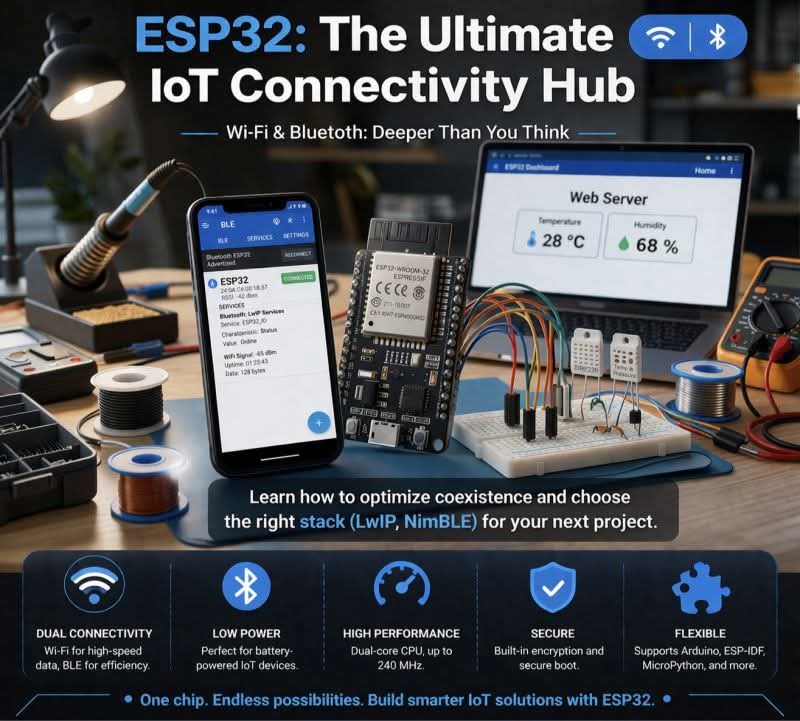
Mastering Wi-Fi and Bluetooth Architectures on ESP Microcontrollers 📶📡
Espressif’s ESP boards didn’t just make IoT accessible; they fundamentally shifted how we design embedded network stacks. But when you move past simple tutorials and start deploying at scale, the nuances of how these chips handle wireless protocols become critical.
🌐 The Wi-Fi Stack: Beyond WiFi.begin()
While the API makes it look simple, the underlying Wi-Fi implementation on ESP chips is an industrial-grade networking powerhouse, built largely on top of the LwIP (Lightweight IP) stack.
Operating Modes: ESPs don't just connect to networks; they route them. You can leverage STA (Station) to connect to a router, AP (Access Point) to broadcast a network, or AP STA (SoftAP) simultaneously. SoftAP is the industry standard for headless device provisioning.
Power Optimization: Wi-Fi is notoriously power-hungry. To mitigate this, ESPs utilize DTIM (Delivery Traffic Indication Message) sleeping. By entering Modem Sleep between beacon intervals, the RF radio powers down while the CPU stays active, dropping consumption from ~240mA to ~20mA without dropping the connection.
The Next Gen (Wi-Fi 6): The newer ESP32-C6 introduces 802.11ax (Wi-Fi 6). This brings Target Wake Time (TWT) and OFDMA to the embedded level, drastically reducing latency and power consumption in dense IoT networks.
🔵 The Bluetooth Stack: Classic vs. BLE
Bluetooth on the ESP32 is a tale of two protocols, often utilizing either the heavier Bluedroid stack or the highly optimized NimBLE stack (highly recommended for SRAM-constrained projects).
Bluetooth Classic (BR/EDR): Supported primarily on the original ESP32. It’s essential for continuous data streams like audio (A2DP) or legacy serial profiles (SPP).
Bluetooth Low Energy (BLE): The backbone of modern sensor networks. ESPs can handle complex GATT Server/Client architectures.
BLE Mesh: ESP boards natively support Bluetooth Mesh profiles, allowing you to bypass the traditional star topology. You can daisy-chain hundreds of ESP32s or battery-powered sensor nodes across a massive physical footprint.
🔀 The Secret Sauce: RF Coexistence
How does an ESP32 run Wi-Fi and Bluetooth simultaneously when it only has one physical 2.4 GHz antenna?
Through a highly complex mechanism called Time Division Multiplexing (TDM) and Packet Traffic Arbitration (PTA).
The baseband hardware rapidly switches the antenna between the Wi-Fi MAC and the Bluetooth MAC. However, this is a zero-sum game. If you stream heavy Wi-Fi data while scanning for BLE packets, you will experience packet collisions and latency.
📕 ebokify.com/esp32
#EmbeddedEngineering #ESP32 #IoTArchitecture #Firmware #WiFi6 #BluetoothLowEnergy #Espressif #HardwareDesign #Microcontrollers #TechDeepDive
1
73

できることは主にこんな感じです
・SoftAP, STAでのスタックチャン本体への接続
・テキスト/音声での対話
・ASR, TTS, LLM, VADを全てスマホのローカルで推論
・OpenAI / Gemini / OpenAI compatible API などのLLMのAPIの利用
・OpenAI TTS / Irodori TTS serverなどの音声合成のAPIの利用
・whisper.cppやgpt-4o-transcribeなどの音声認識のAPIの利用
・キャラクター設定
・好感度や気分に応じた反応変更
・顔と声によるマスター認識
1
1
13
823

なるほど参考になります
Grok > 機能別分類(再整理版)
1. 接続・通信機能
SoftAP / Wi-Fi IP で Stack-chan 接続
WebSocket 連携
2. 音声処理機能
ローカルVAD(Silero VAD)
ローカルASR(ReazonSpeech)
クラウドASR連携(OpenAI ASR)
ローカル音声合成(Piper Plus)
3. LLM・生成AI機能
スマホローカルLLM(llama.cpp / LiteRT-LM)
クラウドLLM連携(GPT / Gemini)
PCローカルLLM連携(ollama / llama-server)
4. ユーザー認識機能
顔と声でのマスター認識
5. インタラクション・反応機能
好感度・なでなで
6. 視覚・カメラ機能
自動カメラ撮影 / VLM解析
マスター発見反応
7. システム・運用機能
Androidバックグラウンド起動

スマホアプリにだいぶ詰め込んだなぁ
・SoftAP / Wi-Fi IPでスタックチャン接続
・WebSocket連携
・ローカルVAD (Silero VAD)
・ローカルASR (ReazonSpeech)
・クラウドASR連携 (OpenAI ASR)
・ローカル音声合成 (Piper Plus)
・スマホローカルLLM (llama.cpp / LiteRT-LM)
・クラウドLLM連携 (GPT / Gemini)
・PCローカルLLM連携 (ollama / llama-server)
・顔と声でのマスター認識
・好感度・なでなで・マスター発見反応
・自動カメラ撮影/VLM解析
・Androidバックグラウンド起動
2
1
5
578
スマホアプリにだいぶ詰め込んだなぁ
・SoftAP / Wi-Fi IPでスタックチャン接続
・WebSocket連携
・ローカルVAD (Silero VAD)
・ローカルASR (ReazonSpeech)
・クラウドASR連携 (OpenAI ASR)
・ローカル音声合成 (Piper Plus)
・スマホローカルLLM (llama.cpp / LiteRT-LM)
・クラウドLLM連携 (GPT / Gemini)
・PCローカルLLM連携 (ollama / llama-server)
・顔と声でのマスター認識
・好感度・なでなで・マスター発見反応
・自動カメラ撮影/VLM解析
・Androidバックグラウンド起動
2
5
43
3,220

May 21
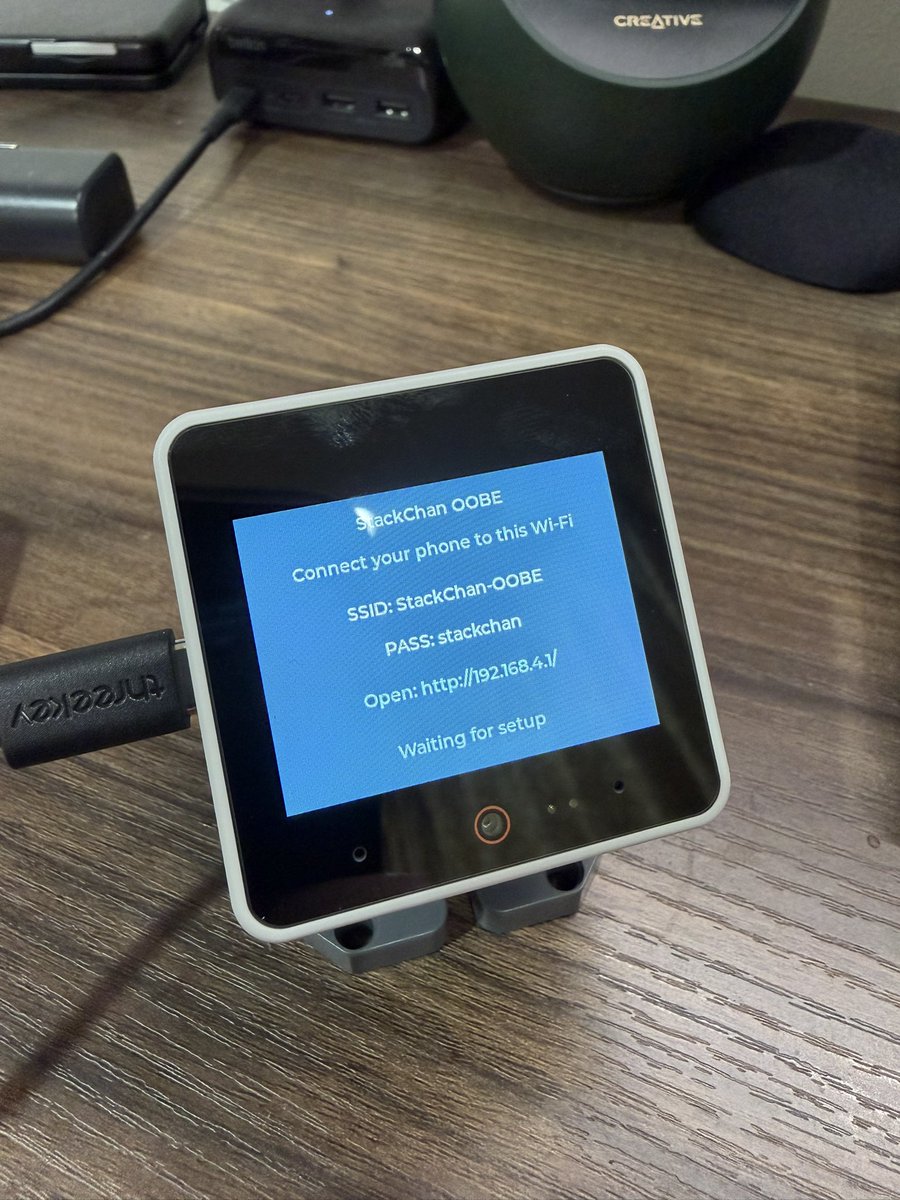
雑だがスタックチャンのOOBEアプリを起動させたらSoftAPを立ち上げさせれた。
スマホから繋げたらwifi設定がポップアップしてきたdata以下に吐き出させれた。これでネットワーク周りはいったん終わり。
次はスピーカーか、タッチセンサーのドライバーだなぁ。。あとフルカラーLEDか。。
1
6
415
鋭いご指摘ありがとうございます!
現在は、スマホからスタックチャンに接続する構成にしています
特に大きな理由があったわけではないのですが、STAで通信する場合、IPアドレスをUIから設定できるようにするのがスタックチャン側では少し手間だったため、スタックチャン側をサーバーにしていました
その流れで、SoftAPでもスタックチャン側に接続する形にしていたのですが、SoftAP構成であれば接続先やIPアドレスの固定化は比較的簡単ですし、スマホ側をネットワークの親にした方が、インターネット接続を併用できる分メリットが大きそうですね
そちらの方式でやり取りできるように、設定を追加してみます!
3
658

Apr 15
find hobbies irl
and frens
frens r inportant
specialy if they revolve around le hobbies
/init
# CLAUDE.md
## Project Overview
Folding-fin stabilized model rocket system with three components that communicate over UDP (port 4444) via WiFi:
1. **Rocket ESP32** (`Firmware/ROLLstabilization.txt`) — Onboard flight computer. Uses MPU6050 gyro for roll-axis stabilization via a PD controller driving 4 servo-actuated fins. Creates its own WiFi AP ("RocketLink_Telemetry"). PID gains and gyro calibration are persisted to ESP32 NVS flash. State machine: IDLE → LAUNCHING (waits for 1.6g accel threshold for 50ms) → FLIGHT (fins active).
2. **Launcher ESP32** (`Firmware/launcher.txt`) — Ground-side relay and sensor hub. Creates WiFi AP ("ROCKET_LAUNCHER"). Communicates with the rocket over Serial2 (115200 baud, pins 16/17) and with the dashboard over UDP. Manages arming sequence (physical switch button with 1s hold), GPS (TinyGPS on Serial1, pin 4), BMP180 barometer (EMA-filtered altitude), and QMC5883L compass for heading fusion. State machine: SAFE → ARMING → READY → IGNITING. Halts on boot if no GPS NMEA data within 5s.
3. **Dashboard** (`Firmware/DASHBOARDpython.txt`) — Python tkinter ground control station. Receives telemetry via UDP, displays real-time roll/rate/servo graphs (matplotlib FuncAnimation), GPS status (3-state indicator), live PID values, and environment data. Supports remote gyro calibration, PID upload, digital launch command, and full-flight graph export.
## Communication Protocol
All messages are UTF-8 over UDP port 4444:
- **Telemetry (Launcher→Dashboard):** `T,<millis>,<roll>,<rate>,<servo_output>`
- **Status (Launcher→Dashboard):** `STATUS:<state>,<Kp>,<Kd>,<skew>`
- **Environment (Launcher→Dashboard):** `ENV,<lat>,<lon>,<alt>,<gpsState>` (gpsState: 0=no NMEA, 1=searching, 2=fix)
- **Fusion (Launcher→Dashboard):** `[FUSION] Hdg: <heading> | Pitch: <pitch>` (currently ignored by dashboard)
- **Commands (Dashboard→Launcher):** `launch`, `calibrate`, `PID,<Kp>,<Kd>`, `HELLO` (keepalive)
- **Rocket serial (Launcher↔Rocket):** `DATA,<ax>,<ay>,<az>,<roll>,<rate>,<out>,<state>,<kp>,<kd>,<skew>`, `ARM`, `CALIBRATE`, `IGNITE`, `READY`, `IGNITED`, `ALIVE`
## Hardware Pin Mapping
**Rocket ESP32:** Servos — UP=27, DOWN=14, RIGHT=26, LEFT=25. MPU6050 on I2C (21/22).
**Launcher ESP32:** Serial2 RX/TX=16/17, GPS RX=4, Switch=5, Button=18, LED=23, Buzzer=2 (active LOW), Launch servo=19 (ON=170°, OFF=55°), I2C SDA/SCL=21/22.
## Calibration & Test Utilities
- `Firmware/Calibration & Test Code/Fin Calibration.txt` — Interactive serial tool to find servo center angles (A/B/C/D to select, /- to adjust)
- `Firmware/Calibration & Test Code/I2Cworks.txt` — I2C bus scanner BMP180/QMC5883L health check
- `Firmware/Calibration & Test Code/ROLLstabilization.txt` — Standalone roll stabilization (earlier version, creates its own AP, no launcher relay)
## Development Notes
- All firmware files use `.txt` extension but contain Arduino/ESP32 C code (PlatformIO or Arduino IDE)
- Dashboard requires: `tkinter`, `matplotlib`, `numpy`, `socket` (stdlib)
- Run dashboard: `python DASHBOARDpython.txt` (or rename to `.py`)
- Magnetometer calibration offsets are hardcoded in `launcher.txt` (MAG_OFFSET_X/Y/Z, MAG_SCALE_X/Y/Z)
- Servo center angles are hardcoded in `ROLLstabilization.txt` (LEFT=115, RIGHT=80, UP=80, DOWN=115) with MAX_DEFLECTION=15°
- The launcher WiFi AP IP is 192.168.4.1 (ESP32 SoftAP default), hardcoded in dashboard as `LAUNCHER_GATEWAY`
## Other Files
- `CAD Files/` — Fusion 360 designs (.f3z) for the folding rocket, launcher platform, and rocket nozzle
- `Simulation/` — OpenRocket simulation file (.ork) and stability analysis screenshots
7
1
48
5,009

【25%OFFで1,260円】✨ タイムセール ✨UGREEN WIFI 無線LAN 子機 WIFI 6 USBアダプタ AX900 600Mbps 287Mbps Windows 11/10対応 5GHz/2.4GHz デュアルバンド 802.11a/b/g/n/ac/ax無線規格 SoftAP機能に対応 ドライバ... <Amazon> #広告
amazon.co.jp/dp/B0DK14GTR2/r…
1
103

maybe printing smtg....
/init
# CLAUDE.md
## Project Overview
Folding-fin stabilized model rocket system with three components that communicate over UDP (port 4444) via WiFi:
1. **Rocket ESP32** (`Firmware/ROLLstabilization.txt`) — Onboard flight computer. Uses MPU6050 gyro for roll-axis stabilization via a PD controller driving 4 servo-actuated fins. Creates its own WiFi AP ("RocketLink_Telemetry"). PID gains and gyro calibration are persisted to ESP32 NVS flash. State machine: IDLE → LAUNCHING (waits for 1.6g accel threshold for 50ms) → FLIGHT (fins active).
2. **Launcher ESP32** (`Firmware/launcher.txt`) — Ground-side relay and sensor hub. Creates WiFi AP ("ROCKET_LAUNCHER"). Communicates with the rocket over Serial2 (115200 baud, pins 16/17) and with the dashboard over UDP. Manages arming sequence (physical switch button with 1s hold), GPS (TinyGPS on Serial1, pin 4), BMP180 barometer (EMA-filtered altitude), and QMC5883L compass for heading fusion. State machine: SAFE → ARMING → READY → IGNITING. Halts on boot if no GPS NMEA data within 5s.
3. **Dashboard** (`Firmware/DASHBOARDpython.txt`) — Python tkinter ground control station. Receives telemetry via UDP, displays real-time roll/rate/servo graphs (matplotlib FuncAnimation), GPS status (3-state indicator), live PID values, and environment data. Supports remote gyro calibration, PID upload, digital launch command, and full-flight graph export.
## Communication Protocol
All messages are UTF-8 over UDP port 4444:
- **Telemetry (Launcher→Dashboard):** `T,<millis>,<roll>,<rate>,<servo_output>`
- **Status (Launcher→Dashboard):** `STATUS:<state>,<Kp>,<Kd>,<skew>`
- **Environment (Launcher→Dashboard):** `ENV,<lat>,<lon>,<alt>,<gpsState>` (gpsState: 0=no NMEA, 1=searching, 2=fix)
- **Fusion (Launcher→Dashboard):** `[FUSION] Hdg: <heading> | Pitch: <pitch>` (currently ignored by dashboard)
- **Commands (Dashboard→Launcher):** `launch`, `calibrate`, `PID,<Kp>,<Kd>`, `HELLO` (keepalive)
- **Rocket serial (Launcher↔Rocket):** `DATA,<ax>,<ay>,<az>,<roll>,<rate>,<out>,<state>,<kp>,<kd>,<skew>`, `ARM`, `CALIBRATE`, `IGNITE`, `READY`, `IGNITED`, `ALIVE`
## Hardware Pin Mapping
**Rocket ESP32:** Servos — UP=27, DOWN=14, RIGHT=26, LEFT=25. MPU6050 on I2C (21/22).
**Launcher ESP32:** Serial2 RX/TX=16/17, GPS RX=4, Switch=5, Button=18, LED=23, Buzzer=2 (active LOW), Launch servo=19 (ON=170°, OFF=55°), I2C SDA/SCL=21/22.
## Calibration & Test Utilities
- `Firmware/Calibration & Test Code/Fin Calibration.txt` — Interactive serial tool to find servo center angles (A/B/C/D to select, /- to adjust)
- `Firmware/Calibration & Test Code/I2Cworks.txt` — I2C bus scanner BMP180/QMC5883L health check
- `Firmware/Calibration & Test Code/ROLLstabilization.txt` — Standalone roll stabilization (earlier version, creates its own AP, no launcher relay)
## Development Notes
- All firmware files use `.txt` extension but contain Arduino/ESP32 C code (PlatformIO or Arduino IDE)
- Dashboard requires: `tkinter`, `matplotlib`, `numpy`, `socket` (stdlib)
- Run dashboard: `python DASHBOARDpython.txt` (or rename to `.py`)
- Magnetometer calibration offsets are hardcoded in `launcher.txt` (MAG_OFFSET_X/Y/Z, MAG_SCALE_X/Y/Z)
- Servo center angles are hardcoded in `ROLLstabilization.txt` (LEFT=115, RIGHT=80, UP=80, DOWN=115) with MAX_DEFLECTION=15°
- The launcher WiFi AP IP is 192.168.4.1 (ESP32 SoftAP default), hardcoded in dashboard as `LAUNCHER_GATEWAY`
## Other Files
- `CAD Files/` — Fusion 360 designs (.f3z) for the folding rocket, launcher platform, and rocket nozzle
- `Simulation/` — OpenRocket simulation file (.ork) and stability analysis screenshots
2
6
787

SoftAP в телефоні дуже анті-енергоеіективна. Вже краще таки заживити роутер, і просто перевести його в максимальний режим енергозбереження (якщо ваш роутер таке підтримує, мій підтримує). Ну або вже напряму вимкнути езернет кабель, як ви і зробили, але без роздачі
2
270

ルーター的に2.4GHz使えない環境ありますよね... に対応して5GHzも使えるESP32-C5!!
> 私の身近な環境で、5GHz帯のWiFiしか飛んでいない特殊な環境があり...
これM5StackとかobnizとかESP32関連製品でも対応してほしいですね〜〜 M5系はめちゃ種類あるからから実は知らないだけでもうあるのかも?
#iotlt #m5stack
/ ESP32-C5で5GHzWiFiに接続&Web設定画面(SoftAP)を自作する qiita.com/MikH/items/95504bc… #Qiitaアドカレ #Qiita @miki_hiroshi_77より
3
7
719

Full tunnel VPNs alter the routing table for all connections. Android Auto/Apple CarPlay use Bluetooth to set up, but WiFi direct (P2P) with something akin to RTSP to share a virtual screen from the device using a softAP with routing table.
There’s a reason, that’s how it works.
3
1
121
8,692

8 Dec 2025
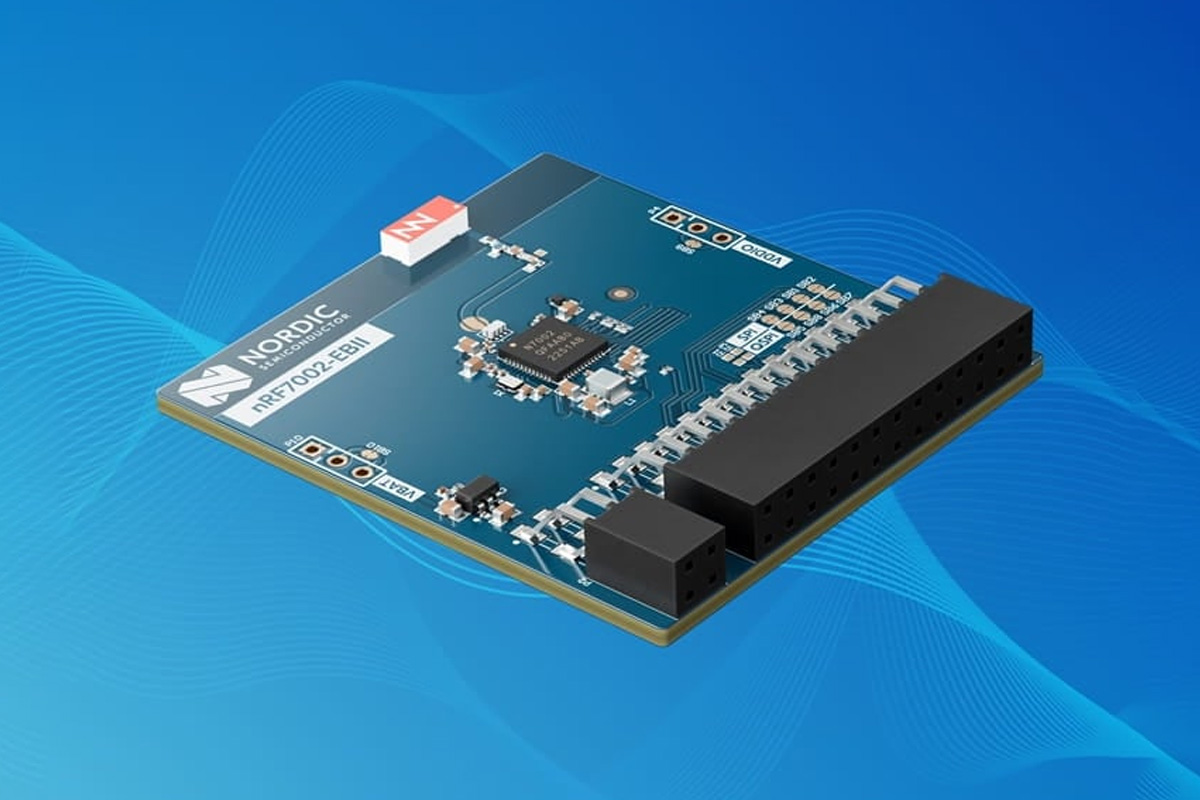
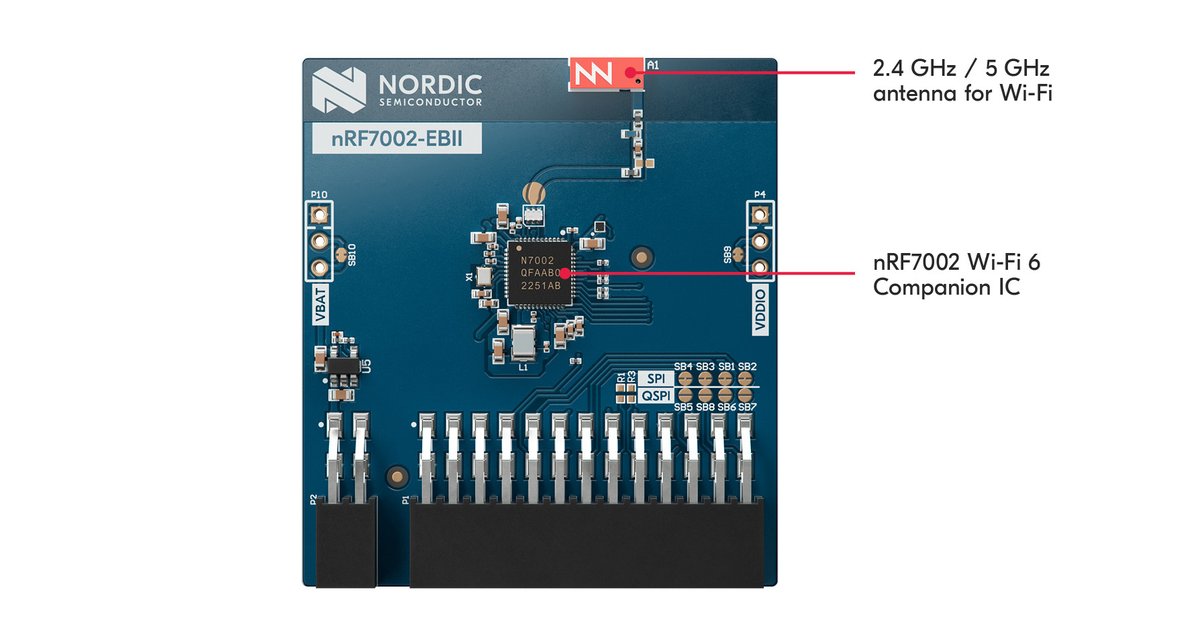
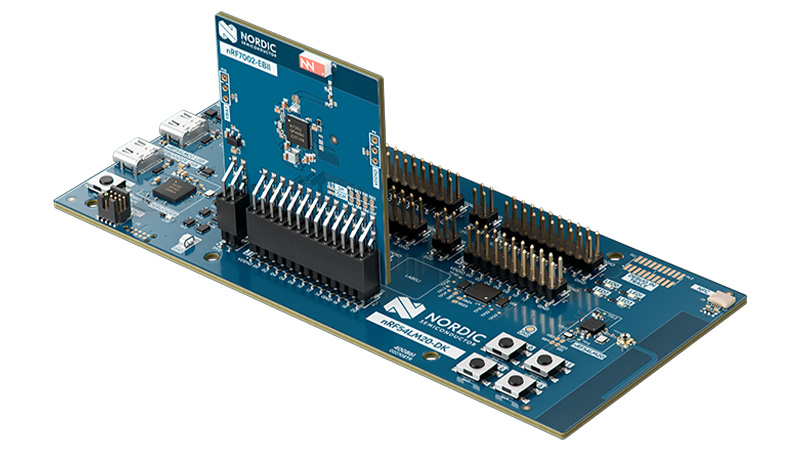
Dual-band WiFi 6 module for @NordicTweets NRF54L devkits
cnx-software.com/2025/12/08/…
The nRF7002 EBII module is built around the nRF7002 Wi-Fi companion IC, supports Wi-Fi 6 features such as TWT, OFDMA, and BSS coloring, and communicates with nRF54L15 and nRF54LM20 DKs through SPI/QSPI host interfaces.
It is fully supported in the nRF Connect SDK, with drivers, Wi-Fi 6 stack integration, and example applications for both STA and SoftAP modes.
1
16
141
6,642

「どんぐりのせいくらべ」2025年8月瀬戸内界隈展。鑑賞者の顔位置を認識し、その顔に一番近いどんぐりが控えめに少しずつせり上がります。QRコードを読み込むとスマホからどんぐり上昇下降のコントロールが可能に。コーディングはAIへ丸投げ!
#ESP32 #huskylens #SoftAP #WebSocket
1
4
129

2 Aug 2025
Android has support for MAC randomization for the Wi-Fi hotspot (SoftAp) feature. It changes each time it's turned on. Users are expected to change the SSID themselves.
Android always uses MAC randomization for scanning and Pixels got Wi-Fi vendors to fix some other issues.
1
7
254

8 Jul 2025
2009年にはSoftAPを使うWi-Fi Directが提案され、2010年にはAP配下から一時的に抜けてSTA-STAで直接通信するTDLS(IEEE802.11z)が提案され、2011年には紆余曲折の末にWi-FiメッシュのIEEE802.11s仕様がリリースされ、どれも正直言って鳴かず飛ばずです。
1
3
622

展示会も終わったので、積んでるボード?(マイコン)、XIAO ESP32C6をようやく試す。公式ページの“マイコンをWiFiアクセスポイントとするsoftAPサンプルプログラム“で、LEDをスマホからON/OFFできることを確認😌
・softAP Usage
wiki.seeedstudio.com/xiao_wi…
1
1
4
256