
So this was made in aura.build using Fable 5 when it was available:
neon-oiran.aura.build
It's insanely good with a one-shot prompt. You can do it with GPT 5.5 but it will make more mistakes.
Prompt:
Recreate the website "NEON OIRAN - Cyber Geisha Action RPG" with high visual fidelity as a single-page React TypeScript Tailwind CSS site. Use inline styles wherever exact sizing, transforms, object positioning, filters, or background textures are needed. Use GSAP 3.12.5 with ScrollTrigger, lucide-react icons, and Iconify icons where useful.
The result must match the supplied reference website, not a cleaned-up reinterpretation. Preserve source quirks:
- Browser/page title says "Neon Oiran - Cyber Geisha Action RPG".
- The visible brand often says "NEON ORIAN" and "About NEON ORIAN"; reproduce this spelling exactly.
- Desktop hero headline is two lines: "NEON" then "ORIAN".
- Mobile hero headline is "Neon › Oiran".
- The first carousel has 4 panels but only 3 visible progress dots, matching the reference.
- The late-scroll CTA heading text is black, while its paragraph is white/82.
GLOBAL STYLE
- Background: #0a0608 / black. Body font defaults to Imprima; section UI uses Montserrat or Inter as specified.
- Set html to scrollbar-gutter: stable; body margin/padding 0; background #0a0608; scroll-behavior auto.
- Load fonts:
- Viaoda Libre for cinematic serif headings.
- Imprima for the hero body fallback.
- Montserrat for most technical sections.
- Inter Oswald for the patch carousel.
- Optional Didot, Bodoni 72, Bodoni MT, Playfair Display fallbacks for desktop hero.
- Use a premium cyberpunk action-RPG look: near-black panels, white technical borders, white/cyan accents, glassy black overlays, thin corner brackets, subtle grid fields, grayscale/luminosity media that clears on hover, hardware-accelerated transform motion.
- Use rounded cards as in the source: hero media cards rounded 28px, arsenal cards rounded 24px, roster/pricing cards rounded 16px/2xl.
- Common glass pill style: border-white/10, bg-black/40 or bg-white/5, backdrop-blur-md, uppercase 0.2em-0.24em tracking, thin font weight.
- Use object-position scroll animation from 50% 0% to 50% 100% for article/product images.
- Add @keyframes bobUp: 0/100 translateY(0), 50 translateY(-6px). Add @keyframes scan: top -5% to 105% with opacity fade.
ASSET MAP
Hero world video:
cdn.midjourney.com/video/3d9…
Portal frame:
hoirqrkdgbmvpwutwuwj.supabas…
Curtains:
Left: hoirqrkdgbmvpwutwuwj.supabas…
Right: hoirqrkdgbmvpwutwuwj.supabas…
Hero cards:
Mobile/tablet:
hoirqrkdgbmvpwutwuwj.supabas…
hoirqrkdgbmvpwutwuwj.supabas…
hoirqrkdgbmvpwutwuwj.supabas…
Desktop:
hoirqrkdgbmvpwutwuwj.supabas…
hoirqrkdgbmvpwutwuwj.supabas…
hoirqrkdgbmvpwutwuwj.supabas…
Calibration carousel images:
Shibuya Slums: hoirqrkdgbmvpwutwuwj.supabas…
Corp Towers: hoirqrkdgbmvpwutwuwj.supabas…
Neon Alleys: hoirqrkdgbmvpwutwuwj.supabas…
Echo District: hoirqrkdgbmvpwutwuwj.supabas…
Patch carousel images:
Eclipse: hoirqrkdgbmvpwutwuwj.supabas…
Void: hoirqrkdgbmvpwutwuwj.supabas…
Hotfix: hoirqrkdgbmvpwutwuwj.supabas…
Launch: hoirqrkdgbmvpwutwuwj.supabas…
Gameplay video:
cdn.midjourney.com/video/f41…
Arsenal images:
Neural Kinetics: hoirqrkdgbmvpwutwuwj.supabas…
Plasma Katana: hoirqrkdgbmvpwutwuwj.supabas…
Ocular Uplink: hoirqrkdgbmvpwutwuwj.supabas…
Character images:
Valkyrie: hoirqrkdgbmvpwutwuwj.supabas…
Juggernaut: hoirqrkdgbmvpwutwuwj.supabas…
Spectre: hoirqrkdgbmvpwutwuwj.supabas…
Pulse: hoirqrkdgbmvpwutwuwj.supabas…
Aegis: hoirqrkdgbmvpwutwuwj.supabas…
Pricing/table images:
Standard card: hoirqrkdgbmvpwutwuwj.supabas…
Collection card: hoirqrkdgbmvpwutwuwj.supabas…
Table Standard: hoirqrkdgbmvpwutwuwj.supabas…
Table Deluxe: hoirqrkdgbmvpwutwuwj.supabas…
Table Ultimate: hoirqrkdgbmvpwutwuwj.supabas…
Table Collection: hoirqrkdgbmvpwutwuwj.supabas…
SECTION 1 - SCROLL HERO
Create a 480vh scroll track with a sticky top-0 100vh stage, overflow hidden. Layer order:
1. #world absolute inset -6%, z-index 0, object-cover video, transform scale(1 to 1.18) plus mouse parallax.
2. #portal absolute inset -10%, z-index 10, transform-origin 50% 45%, object-cover image, transform scale(1 to 7.5), opacity fades after p .65.
3. #curtainL top left, height 100%, width 64%, z-index 20, image object-right.
4. #curtainR top right, height 100%, width 64%, z-index 20, image object-left.
5. #hero absolute inset-0, z-index 40.
6. #cta absolute inset-0 centered, z-index 46.
7. #nav absolute top full width, z-index 50.
Hero mobile/tablet:
- Flex column centered, text-center, px-6, gap-6.
- H1 "Neon › Oiran", color #3b1a0a, Viaoda Libre, clamp(2.25rem, 8vw, 3.5rem), line-height 1.08.
- Paragraph: "Step into the neon-drenched underworld of Neo-Edo. A cyberpunk action-RPG where tradition meets chrome."
- One 148x148 card on mobile, three cards on md. Rounded 28px, shadow-2xl, bottom black gradient with backdrop-filter blur(6px).
- Card labels: Watch Trailer, 12 Cyber Augments, Gameplay. Play icon uses solar:play-linear or lucide Play.
Hero desktop >=1100px:
- Left text absolute top 46%, left 60px, translateY(-50%), max-width 440px.
- H2 uppercase white, Didot/Bodoni/Playfair, text 5xl to 9xl, leading .86, lines: NEON / ORIAN.
- Paragraph same as mobile, white/80, mt-5, max-width 400px.
- Right cards absolute top 50%, right 40px, translateY(-50%), display flex gap 16px.
- Cards 158x158, rounded 28px, hover image scale 1.10 over 700ms.
- Dots bottom 40px: at desktop left 60px; first pill width 28px white, next three 14px white/35.
- Scroll cue bottom 36px centered, hidden below min-[1100px], text "Descend", circular 34x34 chevron down with bobUp animation.
Nav:
- Absolute top, full width, border-b border-white/10, backdrop-blur-sm.
- Three-column grid, h-14 mobile and h-16 desktop.
- Left links: Lore, Augments, Missions. Right links: Armory, Factions, Buy Now. Hide side links on mobile, use md:flex.
- Center badge: 36x36 clipped square with border-white/40 and cyan gamepad icon (#67e8f9). The clip path is polygon(0 0, 100% 0, 100% 78%, 78% 100%, 0 100%).
- Link style: uppercase, 12px, tracking 0.3em, text-white/90, hover cyan-300.
Hero scroll math:
- Helpers: easeInOut(t) = t < 0.5 ? 2*t*t : -1 (4 - 2*t)*t; lerp(a,b,t); clamp(v,min,max).
- MAG = { world: 6, portal: 7, curtainL: 14, curtainR: 14 }.
- Mouse targetX/targetY normalized -1..1, smooth rx/ry with lerp step .07 in RAF.
- scrollProgress = scrollY / (document height - viewport height), clamped 0..1.
- Entrance: after 100ms set entryOpen true; after 600ms show nav and hero opacity 1; after 2200ms disable transitions and set entryDone true.
- Curtains: openShift 62 when entryOpen; totalShift = openShift eased*88, reaching 150%; curtain scale lerps 1 to 1.3.
- Left transform: translateX(calc(-totalShift% cRx*14px)) translateY(cRy*14*.3 px) scale(curtainScale) translateZ(0).
- Right transform: translateX(calc(totalShift% cRx*14px)) translateY(cRy*14*.3 px) scale(curtainScale) translateZ(0).
- Hero opacity after entryDone = clamp(1 - p/.22, 0, 1).
- CTA opacity = clamp((p - .68)/.16, 0, 1).
Late-scroll CTA:
- Centered text, pointer-events none until visible.
- H2: "Code &" line break "Steel"; Viaoda Libre, clamp(2.375rem, 7vw, 4.875rem), letter-spacing .03em, line-height 1.05, text color #000000, text-shadow 0 2px 20px rgba(0,0,0,.4).
- Paragraph: "Master cybernetic fans and energy katanas in a dystopian future." max-width 260 mobile / 480 desktop, white rgba(255,255,255,.82), line-height 1.6.
SECTION 2 - CALIBRATION CAROUSEL
- Full-screen black section, Montserrat, min-h-screen, p-3 sm:p-5 lg:p-8.
- Add transparent WebGL canvas absolute inset, opacity .4, mix-blend-screen.
- Center frame max-w-[min(100vw,160vh)], aspect-ratio 4/3, border-white/10, bg-black/60, shadow-2xl, backdrop-blur-xl.
- Frame background grid: two linear gradients rgba(255,255,255,.02) at 1px with background-size 4rem 4rem.
- Add inner border white/5, four 32px corner brackets border-white/40, and vertical guide lines at left/right 6.5% with small 6px nodes at 7% and 93%.
- Inside #carousel use flex h-full w-full overflow-hidden.
- Panel active width animates to 52%, inactive to 24%, duration .9, ease cubic-bezier(0.22,1,0.36,1). setActive(0) on init. Autoplay 3500ms. Hover/click dot activates. Mouse parallax on .product x=14, y=10 with intensity 1 active/.35 inactive.
- Each panel uses radial/linear dark background, opacity .30 inner grid 2rem, a vertical guide line, rotating .ring-field circles/crosshair, right header code/subtitle, left .title-wrap, product card, play button, bottom telemetry pills.
- Use 4 panels but only 3 visible dot buttons in the bottom-right progress pill.
- Top-left status pill: glowing white dot "System Uplink".
Calibration panel content:
1. Label Calibration 01; title SHIBUYA / SLUMS; code OS; subtitle ALPHA-TANGENT; image Shibuya Slums; nav pills Telemetry/Array with radar icon and Compute/Core with cpu icon.
2. Label Calibration 02; title CORP / TOWERS; code MT; subtitle VECTOR PROTOCOL; image Corp Towers; nav Data/Node, Pulse/Grid, Link/Hub.
3. Label Calibration 03; title NEON / ALLEYS; code CX; subtitle RADIANT CORE; image Neon Alleys; nav Optic/Relay, Void/Station, Forge/Bay.
4. Label Sector 09; title ECHO / DISTRICT; code EQ; subtitle NEXUS PROTOCOL; image Echo District; nav Cyber/Link, Core/Hub, Tech/Lab.
SECTION 3 - PATCH CAROUSEL
- Wrap in a div with Inter font, background #0a0608, white text, relative width 100%, overflow hidden.
- Add a subtle SVG turbulence/noise layer: absolute inset 0, pointer-events none, z-index 50, opacity .035, mix-blend-mode multiply.
- Section is min-h-screen, p-3 sm:p-5 lg:p-8, bg #0a0608, Inter.
- Frame h-[85vh], min-h 600px, max-h 900px, max-w 1600px, border-white/10, bg-black/60, shadow-2xl, backdrop-blur-xl, same grid/corner/guide treatment.
- Panels animate active width 40%, inactive 20%; duration .9; autoplay 4000ms; dots width 48 active / 32 inactive.
- Product is bottom 10%, right 5%, h 80%, w 45%, rounded 16px, border-white/15.
- Patch title font is Oswald, uppercase, thin, text-4xl sm:5xl md:7xl, leading .86.
- Active image filter grayscale(0%) brightness(1); inactive grayscale(60%) brightness(.75).
- Top-left status pill: "System Changelog Online".
Patch panel content:
1. Header V 1.3.0 / ECLIPSE; pill MAJOR UPDATE; title ECLIPSE; text "Major expansion adding new maps, operatives, and overhauling the ranked system."; image Eclipse; nav Ranked/Overhaul and New Map/Zenith.
2. Header V 1.2.4 / VOID; pill CONTENT PATCH; title VOID; text "Introduces the Aether operative class and addresses multiple systemic stability issues."; image Void; nav Class/Aether and Stability/Fixes.
3. Header V 1.1.0 / HOTFIX; pill BALANCE; title HOTFIX; text "Weapon balancing, hit registration improvements, and neural interface tweaks."; image Hotfix; nav Weapon/Tuning and Hit Reg/Improved.
4. Header V 1.0.0 / LAUNCH; pill GLOBAL; title LAUNCH; text "The official global release of the game. Servers are now live across all regions."; image Launch; nav Global/Servers and Launch/Roster.
SECTION 4 - ARSENAL
- Section id arsenal. Background #0a0608, border-t border-white/10, py-24 md:py-32, px-4 sm:px-6 md:px-12, Montserrat.
- Add top centered glow: max-w 1000px, h 500px, from white/[.03] to transparent, opacity .5, blur-3xl.
- Header max-width 2xl. Label row: 32px line "Equipment & Augments".
- H2: "About NEON ORIAN" with a visible extra space/nonbreaking gap between About and NEON. Viaoda Libre, uppercase, text 5xl to 8xl, leading .9.
- Paragraph: "Customize your playstyle with over 50 cybernetic enhancements, lethal traditional weaponry, and experimental neural mods forged in the underworld."
- Button: "View Full Arsenal" with arrow, rounded full, border-white/20, bg-white/5, hover bg-white text-black.
- Cards grid: 1 col, md 2, lg 3, gap 6/8, mt-16.
- Cards h 450/500/600, rounded 24px, bg-black/40, border-white/10, shadow-2xl, hover border-white/30 and bg-white/5.
- Card image absolute full, opacity .40, mix-blend-luminosity, hover scale 1.05 opacity .70 mix-blend-normal, object-position 50% 100%.
- Add bottom black gradient, 3 corner brackets, content p-6/8 rising -8px on hover.
- Card 1 Neural Kinetics: description "Enhance reaction times and unlock physics-defying combat maneuvers with military-grade spinal implants."; footer Tier III / Agility.
- Card 2 Plasma Katana: "High-frequency thermal blades capable of slicing through reinforced corporate security armor with ease."; footer Tier IV / Lethality.
- Card 3 Ocular Uplink: "Real-time threat assessment HUD, thermal vision, and biometric tracking of high-value bounties."; footer Tier II / Utility.
SECTION 5 - ELITE OPERATIVES VIDEO
- Full-screen #0a0608 section, border-t border-white/10, centered, Montserrat, py-24.
- Add subtle central white/[.02] rounded glow max-w 1000px h 800px blur 120px.
- Center label "Class Archives" between two 32px white/40 lines.
- H2 "Elite Operatives", Viaoda Libre, uppercase, text 4xl to 7xl, leading .9.
- Paragraph: "Choose your path through the neon-drenched underworld. Each class brings unique cybernetic enhancements, lethal proficiencies, and distinct tactical advantages to the battlefield."
- Video panel: max-w 7xl, h 700px, w-full, border-white/10, bg-black/40, ring-white/5, shadow-2xl, square corners, px-8.
- Overlay 2rem grid at opacity .30 mix-blend-overlay.
- Video uses gameplay video, autoplay loop muted playsInline, w/h full object-cover, opacity .70, mix-blend-luminosity, initial style filter brightness(.3) blur(20px), hover opacity 1 mix-blend-normal scale 1.05.
- Bottom gradient from black/90 via black/20 to transparent.
- Overlays: top-left red pulsing dot "REC // LIVE FEED"; top-right hidden below sm stats "FPS: 60.00", "RES: 4K UHD", "BITRATE: AUTO".
- Bottom-left title "Class: Spectre" and line "Role: Stealth & Infiltration" with target icon.
- Bottom-right circular play button.
- Four 32px corner brackets border-white/30.
- Scanline element: h-1 bg-white/10 blur 2px, box-shadow 0 0 15px 2px rgba(255,255,255,.1), animation scan 6s linear infinite.
- Below video chips: Assault Specialist, Stealth Assassin, Heavy Enforcer with swords/crosshair/shield icons.
SECTION 6 - CHARACTER ROSTER
- Full-screen black technical frame, Montserrat, p-3 sm:p-5 lg:p-8, min-h-screen.
- WebGL particle canvas like previous technical sections.
- Frame h-[85vh], min-h 600px, max-h 900px, max-w 1600px, border-white/10, bg-black/60, grid 4rem, corner brackets, hidden md vertical guide lines.
- Top-left pill "Roster Selection".
- #character-carousel flex h-full, overflow-x-auto, snap-x mandatory, scroll-smooth, hide scrollbar, gap 4/6, py-8, px 5vw sm 10vw.
- Cards: h 85%/90%, w 85vw sm 400px lg 460px, flex-none, snap-center, rounded 2xl, border-white/10, bg-black/40, backdrop-blur-md, hover border-white/30 bg-white/5.
- Each card image is absolute full, opacity .50, mix-blend-luminosity, hover opacity .80 scale 1.05 mix-blend-normal, object-position 50% 100%, with bottom black gradient.
- Top chip number class. Bottom title, description, Damage/Mobility 4-bar stats, "Select Character" pill button.
- Characters:
01 Valkyrie, Assault Class. Description "High mobility aerial combat specialist equipped with advanced thrust mechanics and targeted ordinance." Damage 3/4, Mobility 4/4.
02 Juggernaut, Heavy Class. Description "Frontline defense unit featuring reinforced exoskeleton plating and heavy area-denial weaponry." Damage 4/4, Mobility 1/4.
03 Spectre, Stealth Class. Description "Infiltration expert utilizing cloaking technology and silent melee takedowns for covert operations." Damage 2/4, Mobility 4/4.
04 Pulse, Support Class. Description "Tactical medic providing squad restorative fields and synchronized sensory upgrades." Damage 1/4, Mobility 2/4.
05 Aegis, Defense Class. Description "Cybernetic bulwark capable of deploying localized kinetic barriers and redirecting hostile fire." Damage 2/4, Mobility 1/4.
- Bottom-right prev/next buttons 40/48px circles, bg-black/60, border-white/20, hover bg-white text-black. Scroll by one card width 24px.
SECTION 7 - PRICING
- Section id pricing, black, min-h-screen, px-4 py-24, Montserrat.
- Add absolute 4rem grid overlay opacity .4 mix-blend-screen and top white/[.02] glow.
- Header badge "New To Neo-Edo?" then H2 "The Adventure Starts Now", Viaoda Libre, uppercase, text 4xl to 6xl, white, text-shadow 0 0 30px rgba(255,255,255,.25).
- Two edition cards in max-w 5xl grid, 1 col mobile, 2 col md, gap 6/8, mb-24.
- Pricing cards: bg-black/60, border-white/10, rounded 2xl, backdrop-blur-xl, shadow-2xl, hover border-white/30 bg-white/5; image h 240/300, opacity .50 luminosity, hover opacity .80 normal blend scale 1.05; content centered, -mt-20.
- Standard card: label "Standard Edition"; H3 "Neon Oiran"; paragraph "Experience the ultimate action RPG. Embark on an epic campaign and explore the neon-drenched underworld of Neo-Edo."; includes Base Game; button Buy Now.
- Collection card: label "Neon Oiran Void Echoes"; H3 "Age of Chrome"; paragraph "The ultimate way to begin your journey. Instantly unlock the base game, plus the Void Echoes expansion and premium bundles."; includes Base Game, Void Echoes Expansion, & More; button Buy Now.
- Desktop separator: hidden below md, max-w 6xl, horizontal border-white/10 with centered CPU icon in bg-black px-6 text-white/20.
- Compare Editions panel: max-w 1200px, border-white/10, bg-black/60, shadow-2xl, backdrop-blur-xl, py-12, px 4/8, four corner brackets.
- Title "Compare Editions"; paragraph "Instantly unlock the first expansion, Void Echoes, with any edition above Standard."
- Horizontal table min-width 900px, grid-cols-5. Columns after feature column: Standard Edition, Deluxe Edition, Ultimate Edition, Age of Chrome Collection. Each has 4:3 or 32x32 thumbnail, "Select" button.
- Feature rows and checks:
Neon Oiran Base Game, sublabel Instant Unlock: checked in all four editions.
Void Echoes Expansion: checked Deluxe, Ultimate, Age of Chrome.
1 Extra Stash Tab, sublabel Instant Unlock: checked Deluxe, Ultimate, Age of Chrome.
2 Additional Character Slots: checked Deluxe, Ultimate, Age of Chrome.
Crimson Guard Cosmetic: checked Ultimate, Age of Chrome.
Cyber-Basilisk Mount: checked Ultimate, Age of Chrome.
Premium Battle Pass: checked Ultimate, Age of Chrome.
3,000 Credits: checked Age of Chrome only.
SECTION 8 - NEWSLETTER AND FOOTER
Newsletter:
- id newsletter, background #0a0608, border-t border-white/10, px-6 md:px-12, py-24 md:py-32.
- Centered max-w 4xl.
- Label "Initiate Protocol", uppercase, text-white/60, tracking .22em.
- H2 "Enter the Underworld", Viaoda Libre, uppercase, clamp(2rem, 5vw, 3.5rem), line-height 1.1.
- Paragraph: "Register your neural implant for exclusive beta access and early weapon drops."
- Form max-w-md, flex column then row on sm, gap 4. Input placeholder "Enter your network alias...", rounded full, bg-white/5, border-white/20, focus border #ff3333/50. Button white bg, black text, label "Connect", arrow-right icon.
Footer:
- Background #0a0608, border-t border-white/10, pt-16 pb-8, px-6 md:px-12.
- Top row max-w 6xl, flex column to md row, items center, gap 8.
- Brand "NEON ORIAN" in Viaoda Libre, uppercase, text 4xl on mobile and sm:text-lg due source quirk.
- Text: "A cyberpunk action-RPG where tradition meets chrome in the heart of Neo-Edo."
- Links: Lore, Press, Support.
- Social icons: Twitter, Twitch, YouTube via Iconify lucide icons.
- Bottom row: "© 2024 Neo-Edo Interactive. All rights reserved." plus Privacy Policy and Terms of Service.
WEBGL PARTICLE CANVAS
Implement for each technical section canvas:
- Transparent WebGL canvas, opacity .4, mix-blend-screen.
- Use 240 points in a 24-column grid. Positions: col = i % 24, row = floor(i/24), x = -1 col/11.5, y = -1 row/5.5.
- Cap devicePixelRatio at 2.
- Vertex shader waves:
wave = sin((p.x*6.0) u_time*.7)*.035 cos((p.y*7.0)-u_time*.55)*.028;
p.x = wave;
p.y = sin(u_time*.35 p.x*4.0)*.018;
gl_PointSize = 1.6;
v_alpha = .12 .12 * sin(u_time p.x*4.0 p.y*5.0).
- Fragment shader: radial point alpha via smoothstep, color mix vec3(.5,.5,.55) to vec3(.9,.9,.95), blend SRC_ALPHA, ONE.
GLOBAL GSAP SCROLLTRIGGER MOTION
- Register ScrollTrigger on load.
- Animate section h2, section p, .info-text, section ul li, .title-wrap h1 from opacity 0, y 40, filter blur(10px) to opacity 1, y 0, blur 0, duration 1.2, ease power3.out, trigger start top 85%, reverse on leave.
- Animate section .grid and #character-carousel cards from opacity 0, y 80, blur(15px) to visible, stagger .15, duration 1.5, ease expo.out, start top 80%.
- Animate article img and .product img objectPosition from 50% 0% to 50% 100%, scrubbed from trigger top bottom to bottom top.
- Move all canvas backgrounds yPercent 30 with scrub 1.
- For the gameplay video element, ScrollTrigger from scale 1.15 and filter brightness(.3) blur(20px) to scale 1 and filter brightness(1) blur(0), start top 95%, end center center, scrub 1.5.
- Footer divs and form reveal from opacity 0, y 30, blur(8px) to visible, duration 1.2, ease power3.out, start top 90%.
IMPLEMENTATION REQUIREMENTS
- Build the actual landing page as the first screen; no explanatory page, no placeholder boxes, no stock replacements.
- Use the exact text, assets, section order, IDs, and visual states above.
- Preserve responsive behavior: mobile hero is centered and dark-brown, desktop hero is split white editorial type; side nav hides on mobile; roster/table scroll horizontally where needed.
- All videos must autoplay, loop, mute where appropriate, and use playsInline.
- Hover states must remove grayscale/luminosity and increase clarity exactly as specified.
- Use CSS and JS safely in React effects with cleanup for event listeners, RAF, intervals, and ScrollTriggers.
- Final page should feel like a cinematic, technical cyberpunk game site with black/crimson base, white technical frame language, cyan navigation accent, and precise scroll choreography.
1
3
36
6,249

May 28
Yeah I have a targetx which I will hit daily, relating to tweets and replies !
1
1
18

May 13
*full credits to the team behind inkwell.tech, the animation is entirely inspired by them, if you want to recreate and use their ideas, make sure to credit them and do your own spin on it.
Full prompt for the circular gallery: Build a 3D Circular Image Gallery with GSAP
Build an interactive circular image gallery with sophisticated 3D animations using HTML, CSS, JavaScript, and GSAP. The aesthetic should be minimal, elegant, and gallery-like small thumbnail-sized cards arranged in a clean, well-spaced circle on an off-white background. Think high-end art portfolio, not a maximalist showcase.
Visual Reference
Background: Off-white / very light warm gray (around #f4f3f0 or #f5f4f1)
Card size: SMALL — roughly 80×110px to 100×130px. The cards should look like thumbnails, not posters
Card spacing: Cards should NOT overlap or touch each other. There should be clear breathing room between adjacent cards around the circle
Circle size: The ring should be large relative to the cards — radius around 380–450px so 25 small cards space out cleanly without crowding
Overall feel: Minimal, airy, refined. Lots of negative space inside and around the circle. No text overlays, no labels, just the gallery centered on the page
Core Features
Circular layout — Small image thumbnails arranged in a perfect, well-spaced circle using trigonometry
Radius-based hover flip — Cards near the cursor flip in 3D (not just the hovered one)
Parallax tilt — Entire gallery tilts on X/Y/Z axes based on cursor position
Click-to-zoom preview — Clicking a card rotates the gallery so that card centers, then zooms forward
Idle auto-rotation — Gallery slowly rotates when idle
Scroll/touch navigation — In preview mode, scroll/swipe rotates through images
Intro fade-in — Cards stagger-fade in on page load
Tech Stack
HTML, CSS, vanilla JavaScript (ES modules)
GSAP (core only — no plugins needed)
No frameworks, no Three.js — just GSAP for all 3D transforms
Step 1: HTML Structure
Create index.html with:
.container → .gallery-container → .gallery (nested wrappers: outer for parallax tilt, inner for zoom/rotation)
.bg-overlay for the darkening effect during preview
.intro-overlay for initial page-load fade
No nav, no footer, no text — just the gallery
Step 2: CSS
Universal reset (margin: 0; padding: 0; box-sizing: border-box)
Body background: #f4f3f0 (off-white, slightly warm). Set on html, body, and .container to avoid any white seams
Images: object-fit: cover, backface-visibility: hidden, width: 100%, height: 100%
.container: full viewport (100vw × 100vh), overflow: hidden, background #f4f3f0
.gallery-container: full size, perspective: 1200px, transform-style: preserve-3d
.gallery: absolutely centered (top/left 50% with translate), fixed size matching the circle diameter, transform-style: preserve-3d, position: relative
.card: width 90px, height 120px, absolutely positioned at center (top/left 50%, margin-left: -45px, margin-top: -60px so transforms rotate around card center), border-radius: 4px, overflow: hidden, transform-style: preserve-3d, subtle box-shadow: 0 4px 20px rgba(0,0,0,0.08) for depth
.bg-overlay: fixed full-screen, background: rgba(244, 243, 240, 0.95), opacity: 0, pointer-events: none
.intro-overlay: fixed full-screen, background: #f4f3f0, sits on top initially
Step 3: Data Module
Create collection.js:
const collection = [
{ title: "img1", img: "/img1.webp" },
{ title: "img2", img: "/img2.webp" },
{ title: "img3", img: "/img3.webp" },
{ title: "img4", img: "/img4.webp" },
{ title: "img5", img: "/img5.webp" },
{ title: "img6", img: "/img6.webp" },
{ title: "img7", img: "/img7.webp" },
{ title: "img8", img: "/img8.webp" },
{ title: "img9", img: "/img9.webp" },
{ title: "img10", img: "/img10.webp" },
];
export default collection;
Step 4: Initial Setup (main.js)
Import collection and gsap
Inside DOMContentLoaded:
Query: .gallery, .gallery-container, .bg-overlay
State variables:cards = [], transformState = []
isPreviewActive = false, isTransitioning = false
currentPreviewRotation = 0, currentGalleryRotation = 0
Config object — tuned for small cards in a large circle:{ imageCount: 25, radius: 400, // Large radius so small cards don't overlap cardWidth: 90, cardHeight: 120, sensitivity: 350, // Hover detection range effectFalloff: 200, // Distance over which flip effect fades cardMoveAmount: 40, lerpFactor: 0.15, isMobile: window.innerWidth < 1000}
Sanity check: With 25 cards on a circle of radius 400, arc length between cards ≈ (2π × 400) / 25 ≈ 100px. Card width is 90px, so they sit with ~10px gap. If you change imageCount, recompute radius to maintain that gap (radius = (imageCount × (cardWidth gap)) / (2π))
Parallax state with targetX/Y/Z and currentX/Y/Z
Step 5: Card Generation Loop
For i from 0 to imageCount:
angle = (i / imageCount) * Math.PI * 2
x = radius * cos(angle), y = radius * sin(angle)
cardIndex = i % collection.length
Create .card div with dataset.index and dataset.title
Append <img> with the corresponding image source
gsap.set(card, { x, y, rotation: angle*180/PI 90, transformPerspective: 800 })
Append to gallery, push to cards[], push initial state to transformState[] (rotation, scale, offset, angle)
Card click listener:
If not previewing/transitioning, call togglePreview(index) and e.stopPropagation()
Step 6: Intro Animation
Fade out .intro-overlay over 2s
gsap.from(cards, { scale: 0, opacity: 0, duration: 1.5, stagger: 0.05, ease: "power4.out" })
Step 7: togglePreview(index) — The Centerpiece
Set isPreviewActive and isTransitioning to true.
Calculate rotation:
Target position = 3π/2 (bottom of circle)
targetGalleryRotationDeg = ((targetPosition - angle) * 180) / PI
Compute shortest path: diff = (target - current) % 360, adjust if > 180 or < -180
Add 360 to ensure a full extra spin for visual flair
Reset all transformState entries
Build a GSAP timeline:
All cards return to base position/rotation/scale (duration 1.25)
bgOverlay fades in (duration 2)
Gallery: scale: 4, y: 800, rotation: currentPreviewRotation (duration 2, power4.inOut) — tuned down from larger card version since cards are smaller now
Parallax animates to 0 with onUpdate syncing galleryContainer transforms
On complete: isTransitioning = false.
Step 8: resetGallery()
If transitioning, return early
Set isTransitioning = true
Determine galleryScale based on viewport width (0.6 < 768px, 0.8 < 1200px, else 1)
Fade bgOverlay to 0 (duration 2.5)
Animate gallery to scale: galleryScale, x: 0, y: 0 (duration 2.5, power4.inOut)
On complete: reset all flags and parallax state
Step 9: Resize & Global Click Handlers
handleResize(): update config.isMobile, set gallery scale, reset state if not previewing
Bind to resize event, call once on load
document.click: if previewing and not transitioning, resetGallery()
document.keydown Escape: same
Step 10: Mouse Move — Parallax Hover Flip
Skip entirely if previewing, transitioning, or mobile.
Calculate percentX, percentY from screen center (-1 to 1 range)
Update parallax targets: targetY = percentX * 15, targetX = -percentY * 15, targetZ = (percentX percentY) * 5
For each card:
Get bounding rect, calculate distance from mouse to card center
If distance < sensitivity:flipFactor = max(0, 1 - distance / effectFalloff)
targetRotation = 180 * flipFactor
targetScale = 1 0.3 * flipFactor
targetX/Y = cardMoveAmount * flipFactor * cos/sin(angle) (push outward)
Else: reset all targets to 0
Also handle mouseout to HTML to reset all states.
Step 11: Animation Loop
requestAnimationFrame loop:
If not previewing/transitioning:
Lerp parallax current values toward target (lerpFactor = 0.15)
Decrement currentGalleryRotation by 0.05 (slow idle spin)
Apply parallax to galleryContainer (rotateX/Y, rotation Z)
Apply rotation to gallery
For each card:
Lerp currentRotation, currentScale, currentX/Y toward targets
Recompute base x, y from angle
gsap.set(card, { x: x currentX, y: y currentY, rotationY, scale, rotation: angle*180/PI 90, transformOrigin: "center center", transformPerspective: 1000 })
Always request next frame.
Step 12: Scroll & Touch in Preview Mode
wheel event (passive: false): if previewing, preventDefault, increment currentPreviewRotation by deltaY * 0.15, tween gallery rotation
touchstart/touchmove: same idea, multiply delta by 0.5
Critical Layout Rules (Don't Skip These)
Cards must be small — 90×120px. If they look like full-page banners, they're wrong.
Cards must NOT overlap — verify by inspecting the static layout before adding any animation. Adjust radius upward if there's any visual overlap between neighbors.
Background must be off-white — #f4f3f0, not pure white, not gray. Set it on html, body, and .container.
Gallery is centered — both horizontally and vertically in the viewport. Use top: 50%; left: 50%; transform: translate(-50%, -50%) on .gallery, then let GSAP handle additional transforms.
No text, no nav, no footer — just the circle of images on the off-white background.
Card transform origin — each card's transforms should rotate around its own center, not its top-left corner. Use negative margins equal to half the card's width/height, or transformOrigin: "center center".
Implementation Order Suggestion
HTML CSS skeleton — render one static card centered, confirm size (90×120px) and off-white background look right
Card generation loop — verify 25 cards form a clean circle with visible gaps between them, no overlap
Animation loop with lerp (no hover yet) — confirm idle rotation works
Mouse-move parallax tilt
Hover flip effect with radius falloff
Click → togglePreview (zoom rotation)
resetGallery global click/Escape
Resize handling and mobile scaling
Scroll/touch navigation in preview mode
Notes
Use lerping (linear interpolation) everywhere for buttery motion — never snap values
Keep all transform updates inside the single requestAnimationFrame loop; don't fight GSAP with overlapping tweens
transform-style: preserve-3d and perspective must be set correctly on parents for 3D to work
The two wrapper divs (.gallery-container and .gallery) are essential — one handles parallax, the other handles zoom/rotation independently
Set passive: false on wheel/touch listeners so preventDefault works
1
1
16
1,129

May 11
Access ALL prompts for stunning animated websites in one click: motionsites.ai
---
**Build a fullscreen hero section in a Vite React TypeScript Tailwind CSS project. Use `gsap` and `lucide-react`. No other UI libraries.**
### Fonts (in `src/index.css`)
Import at the top of index.css BEFORE `@tailwind` directives:
```css
@import url('fonts.googleapis.com/css2?fa…');
@font-face {
font-family: 'Dirtyline';
src: url('fonts.cdnfonts.com/s/15011/D…') format('woff');
font-weight: normal;
font-style: normal;
font-display: swap;
}
```
Body font: `'Barlow', sans-serif`, background `#000`.
### Tailwind config (`tailwind.config.js`)
```js
theme: {
extend: {
fontFamily: {
heading: ['Instrument Serif', 'serif'],
body: ['Barlow', 'sans-serif'],
dirtyline: ['Dirtyline', 'sans-serif'],
},
borderRadius: { DEFAULT: '9999px' },
},
},
```
### CSS (append to `src/index.css`)
```css
.liquid-glass {
background: rgba(255,255,255,0.01);
background-blend-mode: luminosity;
backdrop-filter: blur(4px);
-webkit-backdrop-filter: blur(4px);
border: none;
box-shadow: inset 0 1px 1px rgba(255,255,255,0.1);
position: relative;
overflow: hidden;
}
.liquid-glass::before {
content: "";
position: absolute; inset: 0;
border-radius: inherit;
padding: 1.4px;
background: linear-gradient(180deg,
rgba(255,255,255,0.45) 0%,
rgba(255,255,255,0.15) 20%,
rgba(255,255,255,0) 40%,
rgba(255,255,255,0) 60%,
rgba(255,255,255,0.15) 80%,
rgba(255,255,255,0.45) 100%);
-webkit-mask: linear-gradient(#fff 0 0) content-box, linear-gradient(#fff 0 0);
-webkit-mask-composite: xor;
mask-composite: exclude;
pointer-events: none;
}
.liquid-glass-strong {
background: rgba(255,255,255,0.01);
background-blend-mode: luminosity;
backdrop-filter: blur(50px);
-webkit-backdrop-filter: blur(50px);
border: none;
box-shadow: 4px 4px 4px rgba(0,0,0,0.05), inset 0 1px 1px rgba(255,255,255,0.15);
position: relative;
overflow: hidden;
}
.liquid-glass-strong::before {
content: "";
position: absolute; inset: 0;
border-radius: inherit;
padding: 1.4px;
background: linear-gradient(180deg,
rgba(255,255,255,0.5) 0%,
rgba(255,255,255,0.2) 20%,
rgba(255,255,255,0) 40%,
rgba(255,255,255,0) 60%,
rgba(255,255,255,0.2) 80%,
rgba(255,255,255,0.5) 100%);
-webkit-mask: linear-gradient(#fff 0 0) content-box, linear-gradient(#fff 0 0);
-webkit-mask-composite: xor;
mask-composite: exclude;
pointer-events: none;
}
.hero-title {
font-family: 'Instrument Serif', serif;
font-style: italic;
font-size: clamp(96px, 18vw, 280px);
line-height: 0.92;
letter-spacing: -0.02em;
color: white;
text-align: center;
}
```
### Component (`src/App.tsx`)
**Constants:**
- `NAV_LINKS = ['Gallery', 'Styles', 'API', 'Pricing', 'Blog']`
- `VIDEO_SRC = 'd8j0ntlcm91z4.cloudfront.net…'`
**LogoMark** — inline SVG, 44x26, viewBox `0 0 44 26`, three white rects at x=0/16/30, y=3, widths 14/12/14, height 20, rx=3.
**State/refs:**
- `mounted` (boolean, set true in a mount effect for fade-in).
- `videoRef` (HTMLVideoElement), `videoBgRef` (HTMLDivElement), `displayCanvasRef` (HTMLCanvasElement).
- `framesReady` boolean state, `framesRef` = `useRef<HTMLCanvasElement[]>([])`.
**Effect 1 — Frame capture (boomerang setup):**
- On mount, get `videoRef.current`. Set `capturing = true`, `lastTime = -1`, `MAX_WIDTH = 960`, `frames: HTMLCanvasElement[] = []`.
- `captureFrame()`: bail if `!capturing` or `readyState < 2` or `currentTime === lastTime`. Update `lastTime`. Scale = `min(1, 960/videoWidth)`. Create offscreen canvas at scaled w/h, `ctx.drawImage(video, 0, 0, w, h)`, push to frames.
- Use `requestVideoFrameCallback` when available, else `requestAnimationFrame` fallback.
- On `loadedmetadata`: call `video.play().catch(()=>{})` then start the capture loop.
- On `ended`: set `capturing = false`, store frames in `framesRef.current`, `setFramesReady(true)`.
- If `readyState >= 1`, invoke `onLoaded()` immediately.
- Cleanup: cancel raf remove listeners.
**Effect 2 — Boomerang render:**
- When `framesReady` true, grab `displayCanvasRef`, set its `width/height` from `frames[0]`.
- Variables: `index = 0`, `direction = 1`, `last = performance.now()`, `interval = 1000/30`.
- In an `requestAnimationFrame(render)` loop: if `now - last >= interval`, draw `frames[index]`, advance `index = direction`. When `index >= frames.length - 1`, clamp and flip to `-1`. When `index <= 0`, clamp and flip to ` 1`.
- Cleanup: cancelAnimationFrame.
**Effect 3 — Parallax mouse tracking (gsap):**
- `strength = 20`. Track `targetX/Y`, smoothly lerp `currentX/Y = (target - current) * 0.06` each frame.
- On `mousemove`: `targetX = ((clientX - cx)/cx) * strength` (same for Y).
- Each frame: `gsap.set(videoBgRef.current, { x: currentX, y: currentY })`.
**JSX structure:**
Root: `<div className="min-h-screen bg-black text-white font-body overflow-x-hidden">`
1. **Video background layer:** `<div ref={videoBgRef} className="fixed top-0 left-0 w-full h-full z-0 scale-[1.08] origin-center">` containing:
- `<video>` with `src={VIDEO_SRC}`, `muted`, `playsInline`, `preload="auto"`, `crossOrigin="anonymous"`, `className="w-full h-full object-cover"`, `style={{ display: framesReady ? 'none' : 'block' }}`.
- `<canvas ref={displayCanvasRef} className="w-full h-full object-cover" style={{ display: framesReady ? 'block' : 'none' }}>`.
2. **Hero title:** fixed div, `left-0 right-0 z-20 w-full px-4`, `style={{ top: '126px' }}`, fades in via `transition-all duration-1000` toggling `opacity-100 translate-y-0` vs `opacity-0 translate-y-6` based on `mounted`. Inside: `<h1 className="hero-title select-none">MicroVisuals</h1>`.
3. **Nav:** `<nav className="fixed top-5 left-1/2 -translate-x-1/2 z-50 whitespace-nowrap">` containing a `liquid-glass flex items-center gap-6 rounded px-4 py-2.5` pill:
- `<LogoMark />`
- `<div className="flex items-center gap-5">` of `NAV_LINKS` as `<a>` with classes `text-sm font-body font-light text-white/70 hover:text-white transition-colors duration-200`.
- Right cluster `flex items-center gap-3 ml-4`: "Sign in" link (same style), then "Try it free" with `liquid-glass-strong text-sm font-body font-medium text-white rounded px-4 py-1.5 transition-all duration-200 hover:scale-[1.04] hover:shadow-[0_0_16px_2px_rgba(255,255,255,0.12)] active:scale-[0.97]`.
4. **Bottom row:** fixed, `bottom-12 left-0 right-0 px-10 flex items-end justify-between z-20`, fade-in with `transition-all duration-1000 delay-300`.
- Left `<p>`: `text-sm font-body font-light text-white/75 max-w-[220px] leading-relaxed`, text: "Forma's AI understands context, composition, and style like a creative director would."
- Center absolute `left-1/2 -translate-x-1/2 bottom-0 flex items-center gap-3` with two buttons:
- Primary: `group relative bg-white text-black text-sm font-body font-medium rounded px-6 py-3 overflow-hidden active:scale-[0.97] transition-all duration-200 shadow-[0_0_0_0_rgba(255,255,255,0)] hover:shadow-[0_0_24px_4px_rgba(255,255,255,0.25)] hover:scale-[1.03]`. Contents: `<span className="relative z-10">Start generating</span>` overlay `<span className="absolute inset-0 bg-gradient-to-b from-white to-white/85 opacity-0 group-hover:opacity-100 transition-opacity duration-200" />`.
- Secondary: `liquid-glass group text-white text-sm font-body font-medium rounded px-6 py-3 active:scale-[0.97] transition-all duration-200 hover:scale-[1.03] hover:shadow-[inset_0_1px_1px_rgba(255,255,255,0.2),0_0_20px_2px_rgba(255,255,255,0.07)]` — label "See templates".
- Right `<p>`: same classes as left plus `text-right`, text: "Describe what you see in your head — get images that actually match."
### Notes
- Tailwind default border-radius is overridden to `9999px` (full pill) — every `rounded` in the markup produces pill corners.
- Do NOT use `video.currentTime` to reverse — the boomerang uses the captured `frames[]` array only.
- The video element stays mounted (hidden once `framesReady`) so the canvas keeps drawing snapshots.
1
1
9
4,211
May 10
Access ALL prompts for stunning animated websites in one click: motionsites.ai
PROMPT:
Build a full-viewport cinematic hero section for a travel brand called "Wanderful" using React TypeScript Vite Tailwind CSS. Use GSAP for animation and `lucide-react` for icons.
**Fonts (load via Google Fonts in `src/index.css`):**
```css
@import url('fonts.googleapis.com/css2?fa…');
```
Also load a custom display font:
```css
@font-face {
font-family: 'Dirtyline';
src: url('fonts.cdnfonts.com/s/15011/D…') format('woff');
font-weight: normal; font-style: normal; font-display: swap;
}
```
Body font: `Barlow`. Hero headings: `Inter`. Body background: `#000`.
**Video background (fixed, full screen, z-0):**
- Use this exact CloudFront URL as the `<video>` src:
`d8j0ntlcm91z4.cloudfront.net…`
- Attributes: `autoPlay muted loop playsInline`, `object-cover`, wrapper scaled `scale-[1.08]` with `origin-center`.
- On `onLoadedMetadata`, set `playbackRate = 1.25`.
- Add GSAP-driven mouse parallax: listen to `mousemove`, compute `targetX/Y = ((clientX - cx)/cx) * 20`, lerp `currentX/Y = (target - current) * 0.06` inside `requestAnimationFrame`, and apply via `gsap.set(videoBg, { x, y })`.
**Liquid-glass utility (add to `index.css`):**
```css
.liquid-glass {
background: rgba(255,255,255,0.01);
background-blend-mode: luminosity;
backdrop-filter: blur(4px);
-webkit-backdrop-filter: blur(4px);
border: none;
box-shadow: inset 0 1px 1px rgba(255,255,255,0.1);
position: relative;
overflow: hidden;
}
.liquid-glass::before {
content: "";
position: absolute; inset: 0;
border-radius: inherit;
padding: 1.4px;
background: linear-gradient(180deg,
rgba(255,255,255,0.45) 0%,
rgba(255,255,255,0.15) 20%,
rgba(255,255,255,0) 40%,
rgba(255,255,255,0) 60%,
rgba(255,255,255,0.15) 80%,
rgba(255,255,255,0.45) 100%);
-webkit-mask: linear-gradient(#fff 0 0) content-box, linear-gradient(#fff 0 0);
-webkit-mask-composite: xor;
mask-composite: exclude;
pointer-events: none;
}
```
**Header (fixed top, z-50, `px-10 py-8`, flex justify-between items-center):**
- Left: wordmark `Wanderful` followed by `<sup>TM</sup>`, `text-[17px] font-semibold tracking-tight`.
- Center: `<nav>` using `.liquid-glass rounded-full px-2 py-2 flex items-center gap-1`. Links: `JOURNEY`, `BENEFITS`, `JOURNAL`, `GUIDEBOOK`. Each link: `text-[11px] font-medium tracking-[0.12em] text-white/90 hover:text-white px-4 py-1.5 rounded-full transition-colors duration-200`.
- Right: "GET ROAMING" anchor with same `.liquid-glass rounded-full px-5 py-2.5 text-[11px] font-medium tracking-[0.12em] text-white/90 hover:text-white`.
**Hero headline (fixed, `top: 120px`, centered, z-20):**
Two lines, both centered, `Inter` 400, `font-size: clamp(40px, 5.4vw, 72px)`, `line-height: 1.1`, `letter-spacing: -0.02em`:
- Line 1 (white): `Venture without edges.`
- Line 2 (`rgba(255,255,255,0.55)`): `Uncover with keen instinct.`
Fade-in on mount: `opacity 0 → 100` and `translate-y-6 → 0` with `transition-all duration-1000`.
**Bottom block (fixed `bottom-14`, z-20, flex-col items-center gap-6), fade-in with `delay-300`:**
1. Paragraph, `max-w-[620px] text-[15px] leading-relaxed` centered:
- White: "Our smart itineraries shape around you — your rhythm, your vibe, your hunger for adventure."
- `text-white/55`: " Each getaway is tailored, seamless, and wholly yours."
2. Button: white bg, black text, `text-[15px] font-medium rounded-full px-8 py-3.5`, hover `scale-[1.03]` `shadow-[0_0_32px_4px_rgba(255,255,255,0.2)]`, active `scale-[0.97]`. Label: `Plan my escape today`.
3. Row: `Lock` icon from lucide-react (`size={13} strokeWidth={1.5}`) `text-[11px] font-medium tracking-[0.14em] text-white/70`, text: `SECURE BY DESIGN. ZERO DATA LEAKS.`
**Root container:** `min-h-screen bg-black text-white overflow-x-hidden` with inline `fontFamily: "'Inter', sans-serif"`.
Dependencies: `gsap`, `lucide-react`, `react`, `react-dom`, tailwind configured with content globs `./index.html` and `./src/**/*.{js,ts,jsx,tsx}`.
2
1
13
4,942

Mar 29
Nothing Fancy... just experimenting and exploring with the available ones before exploring the new trending ones..
The core trick here:
ctx.measureText() pre-computes every word into a data object with a baseX, current x, and targetX.
Each frame, a 120-segment dragon emits collision nodes with anatomically-computed radii.
For every line of text, it projects each node onto the line's Y axis, compute the X exclusion span via √(r² - dy²), merge overlapping intervals, then run a relaxation solver (forward backward pass) to find stable non-overlapping target positions.
Words lerp toward those targets each frame - giving the parting/closing flow you see.
Sometimes i feel platform APIs that's already shipped in every browser are still criminally underexplored.
#CreativeCoding #Canvas #WebDev #TypeScript #InteractiveDesign #GenerativeArt #Frontend #TechArt
25
86
1,055
73,549

4 Sep 2025
Not familiar with three.js, but try interpolating your values. Example: x=(targetX - currentX) * .8. This smooths out the inevitable gap between a high frame rate (60 fps) and network speed.
4
338



21 Aug 2025
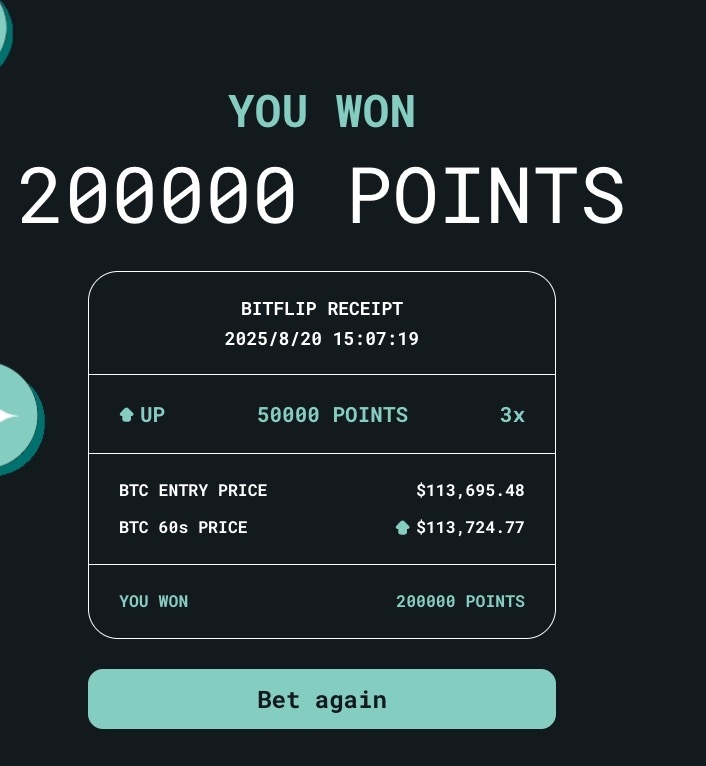
昨晚 @anoma 中文AMA完美结束
0门槛送了20个邀请码
这是一份最完整最流畅最简洁的测试网教程
按照以下顺序完成⬇️
踩单车
赌涨跌
虾吃虫
摇摇乐
找星星
老虎机
大巫师
1️⃣踩单车
F12脚本⬇️
(function() {
// 提示用户选择点击位置
console.log("🟢 脚本已激活!请点击页面上想要连续点击的位置...");
// 变量存储点击位置和状态
let targetX, targetY;
let isClicking = false;
let clickInterval;
// 监听第一次点击以获取位置
document.addEventListener('click', function init(e) {
// 只执行一次
document.removeEventListener('click', init);
// 记录点击坐标
targetX = e.clientX;
targetY = e.clientY;
console.log(`📍 已记录坐标: X=${targetX}, Y=${targetY}`);
// 开始连续点击
isClicking = true;
startClicking();
// 添加停止提示
console.log("🚦 正在连续点击中... 按 ESC 键停止");
}, { once: true });
// 连续点击函数
function startClicking() {
clickInterval = setInterval(() => {
// 获取当前坐标位置的元素
const targetElement = document.elementFromPoint(targetX, targetY);
if (!targetElement) return;
// 创建并触发鼠标事件
const mouseEvents = ['mousedown', 'mouseup', 'click'];
mouseEvents.forEach(eventType => {
const event = new MouseEvent(eventType, {
view: window,
bubbles: true,
cancelable: true,
clientX: targetX,
clientY: targetY
});
targetElement.dispatchEvent(event);
});
}, 50); // 20次/秒 (50ms/次)
}
// ESC键停止功能
document.addEventListener('keydown', (e) => {
if (e.key === 'Escape' && isClicking) {
clearInterval(clickInterval);
isClicking = false;
console.log('🔴 连续点击已停止');
}
});
})();
2️⃣赌涨跌
配合degen.aevo.xyz/trading/btc使用
anoma的k线速度慢一到两秒,遇到大幅度涨跌立马下单
下单格式:3x 50000points(这样可以消耗最少的fitcoin)
3️⃣虾吃虫
可以上下可以左右,但是不要上下左右
4️⃣摇摇乐
看命
5️⃣找星星
把网页缩小,看全所有星星位置
6️⃣老虎机
别玩,去推荐别人玩
7️⃣大巫师
社交任务
最后祝大家次次20万分
8
15
13,486
📡 Join the #TARGETX webinar: “Construction Deep Dive: 5G for Automation and Deconstruction Processes”!
📅 22 July 2025
🕑 14:00–15:30 CEST
Discover how #5G & #XR enable smarter & circular construction!
🔗 Register here: tinyurl.com/4epxxpx8
#TARGETX #SmartConstruction

2
136
🚀 Don’t miss #TARGETX webinar “Network Edge Orchestrator – Dynamic Service Orchestration” on 26 June!
Learn how #EdgeComputing & #ServiceOrchestration are transforming #5G and shaping #6G.
🎙 Dr. Seyed Mahdi Darroudi
🕐 13:00–14:30 CEST
👉 Register: tinyurl.com/4xjt37v3

1
6
222

13 Apr 2025
#iPhone📱だけで "#code" "#HTML" で動画表示が出来ます。
諦めていた人はチャレンジしてみてね!
#マトリックス 風の数字が落ちてくる画面、数字降らし画面で
#タッチ機能 で数字が並ぶよ d(^_^o)💡
かなりジレッタイけど
#JavaScrip #programming #Matrix
#プログラミング #映画 #code
<!DOCTYPE html>
<html lang="ja">
<head>
<meta charset="UTF-8">
<meta name="viewport" content="width=device-width, initial-scale=1.0, user-scalable=no">
<title>Interactive Matrix Effect</title>
<style>
body { margin: 0; background: black; overflow: hidden; }
canvas { display: block; }
</style>
</head>
<body>
<canvas id="matrix"></canvas>
<script>
const canvas = document.getElementById('matrix');
const ctx = canvas.getContext('2d');
canvas.width = window.innerWidth;
canvas.height = window.innerHeight;
const chars = '0123456789';
const fontSize = 14;
const columns = Math.floor(canvas.width / fontSize);
const drops = Array(columns).fill().map(() => Math.random() * canvas.height / fontSize);
let targetX = null;
let targetY = null;
// タッチイベントの処理
canvas.addEventListener('touchstart', (e) => {
e.preventDefault();
const touch = e.touches[0];
targetX = touch.clientX;
targetY = touch.clientY;
});
canvas.addEventListener('touchmove', (e) => {
e.preventDefault();
const touch = e.touches[0];
targetX = touch.clientX;
targetY = touch.clientY;
});
canvas.addEventListener('touchend', () => {
targetX = null;
targetY = null;
});
function draw() {
ctx.fillStyle = 'rgba(0, 0, 0, 0.05)';
ctx.fillRect(0, 0, canvas.width, canvas.height);
ctx.fillStyle = '#0F0';
ctx.font = `${fontSize}px monospace`;
for (let i = 0; i < drops.length; i ) {
const text = chars.charAt(Math.floor(Math.random() * chars.length));
const x = i * fontSize;
const y = drops[i] * fontSize;
// タッチ位置に近づく動き
if (targetX !== null && targetY !== null) {
const dx = targetX - x;
const dy = targetY - y;
const distance = Math.sqrt(dx * dx dy * dy);
if (distance > 50) { // 近づきすぎないように
const speed = 0.1;
drops[i] = (dy / distance) * speed;
if (Math.abs(dx) > 5) {
drops[i] = (dx / distance) * speed / fontSize;
}
}
} else {
// 通常の落下
drops[i] ;
if (y > canvas.height && Math.random() > 0.975) {
drops[i] = 0;
}
}
ctx.fillText(text, x, drops[i] * fontSize);
}
}
setInterval(draw, 33);
</script>
</body>
</html>
9
377

27 Feb 2025
Targetx bukan itu bang..saya menduga (80%) ..Ahok is target operasi khusus nan brutal kaki tangan Mulyono..setelah Johni Plate, Tom Lembong, Hasto...
3
1
1,264

20 Feb 2025
Save this in notepad. Title it like "didldo.html" - has to be .html for the file. Open with a web browser like chrome.
Gonna put the final project on github
<!DOCTYPE html>
<html lang="en">
<head>
<meta charset="UTF-8">
<meta name="viewport" content="width=device-width, initial-scale=1.0">
<title>Dildo vs. Kamala (FPS)</title>
<style>
body {
margin: 0;
display: flex;
justify-content: center;
align-items: center;
height: 100vh;
background-color: #f0f0f0;
overflow: hidden;
}
#game-container {
position: relative;
width: 800px;
height: 600px;
border: 2px solid black;
overflow: hidden;
}
#game-canvas {
width: 100%;
height: 100%;
cursor: none;
}
#score {
position: absolute;
top: 10px;
left: 10px;
font-size: 24px;
font-family: Arial, sans-serif;
color: #d81b60;
text-shadow: 1px 1px 2px black;
z-index: 10;
}
#level {
position: absolute;
top: 40px;
left: 10px;
font-size: 24px;
font-family: Arial, sans-serif;
color: #d81b60;
text-shadow: 1px 1px 2px black;
z-index: 10;
}
#loading-message {
position: absolute;
top: 50%;
left: 50%;
transform: translate(-50%, -50%);
font-size: 20px;
color: black;
z-index: 10;
}
#level-screen {
position: absolute;
top: 0;
left: 0;
width: 100%;
height: 100%;
background: rgba(0, 0, 0, 0.7);
display: none;
justify-content: center;
align-items: center;
font-size: 48px;
font-family: Arial, sans-serif;
color: white;
text-shadow: 2px 2px 4px black;
z-index: 20;
}
</style>
</head>
<body>
<div id="game-container">
<div id="score">Score: <span id="score-value">0</span></div>
<div id="level">Level: <span id="level-value">1</span></div>
<div id="loading-message">Loading...</div>
<div id="level-screen"></div>
<canvas id="game-canvas"></canvas>
</div>
<script>
const canvas = document.getElementById('game-canvas');
const ctx = canvas.getContext('2d');
const scoreDisplay = document.getElementById('score-value');
const levelDisplay = document.getElementById('level-value');
const loadingMessage = document.getElementById('loading-message');
const levelScreen = document.getElementById('level-screen');
canvas.width = 800;
canvas.height = 600;
// Load images
const targetImage = new Image();
targetImage.src = 'via.placeholder.com/120x120.…';
const dildoImage = new Image();
dildoImage.src = 'via.placeholder.com/30x90.pn…';
const backgroundImages = [
'images.unsplash.com/photo-16…', // Flag
'images.unsplash.com/photo-16…', // Eagle
'images.unsplash.com/photo-15…', // Statue
'images.unsplash.com/photo-16…' // Rushmore
];
let currentBackground = new Image();
currentBackground.src = backgroundImages[0];
// Audio setup
const audioCtx = new (window.AudioContext || window.webkitAudioContext)();
function playBackgroundMusic() {
const notes = [
{ freq: 261.63, duration: 0.4 }, // C4
{ freq: 329.63, duration: 0.4 }, // E4
{ freq: 392.00, duration: 0.4 }, // G4
{ freq: 392.00, duration: 0.4 }, // G4
{ freq: 349.23, duration: 0.4 }, // F4
{ freq: 392.00, duration: 0.4 }, // G4
{ freq: 440.00, duration: 0.6 } // A4
];
let time = audioCtx.currentTime;
function playNote(frequency, startTime, duration) {
const oscillator = audioCtx.createOscillator();
const gainNode = audioCtx.createGain();
oscillator.type = 'sine';
oscillator.frequency.setValueAtTime(frequency, startTime);
gainNode.gain.setValueAtTime(0.1, startTime);
oscillator.connect(gainNode);
gainNode.connect(audioCtx.destination);
oscillator.start(startTime);
oscillator.stop(startTime duration);
}
function loopMusic() {
time = audioCtx.currentTime;
notes.forEach((note, index) => {
playNote(note.freq, time index * 0.4, note.duration);
});
setTimeout(loopMusic, notes.length * 400);
}
loopMusic();
}
function playHitSound() {
const notes = [
{ freq: 523.25, duration: 0.1 }, // C5
{ freq: 659.25, duration: 0.1 }, // E5
{ freq: 783.99, duration: 0.2 } // G5
];
let time = audioCtx.currentTime;
notes.forEach((note, index) => {
const oscillator = audioCtx.createOscillator();
const gainNode = audioCtx.createGain();
oscillator.type = 'square';
oscillator.frequency.setValueAtTime(note.freq, time index * 0.1);
gainNode.gain.setValueAtTime(0.2, time index * 0.1);
oscillator.connect(gainNode);
gainNode.connect(audioCtx.destination);
oscillator.start(time index * 0.1);
oscillator.stop(time index * 0.1 note.duration);
});
}
function playMissSound() {
const utterance = new SpeechSynthesisUtterance("You need big balls to hit me");
utterance.volume = 0.8;
utterance.rate = 1.0;
utterance.pitch = 1.0;
speechSynthesis.speak(utterance);
}
let score = 0;
let level = 1;
let projectiles = [];
let hitParticles = [];
let targetX = 340;
let targetY = 300; // Initial Y position
let targetDepth = 0.5; // 0.3 (far) to 0.7 (near)
let baseSpeed = 6; // Base speed
let targetSpeedX = baseSpeed;
let targetSpeedY = baseSpeed * 0.5; // Slightly slower vertical
let movingRight = true;
let movingUp = true;
let imagesLoaded = 0;
let gameStarted = false;
let hitReaction = false;
let hitTimer = 0;
let isPaused = false;
let crosshairX = canvas.width / 2;
let crosshairY = canvas.height / 2;
// Image load handling
function handleImageLoad() {
imagesLoaded ;
if (imagesLoaded === 3 && !gameStarted) {
loadingMessage.style.display = 'none';
gameStarted = true;
playBackgroundMusic();
gameLoop();
}
}
targetImage.onload = handleImageLoad;
dildoImage.onload = handleImageLoad;
currentBackground.onload = handleImageLoad;
setTimeout(() => {
if (!gameStarted) {
console.log("Images failed to load, using fallbacks.");
loadingMessage.style.display = 'none';
gameStarted = true;
playBackgroundMusic();
gameLoop();
}
}, 3000);
// Particle class
class Particle {
constructor(x, y, depth) {
this.x = x;
this.y = y;
this.radius = (Math.random() * 5 2) * depth;
this.speedX = (Math.random() - 0.5) * 8;
this.speedY = (Math.random() - 0.5) * 8;
this.life = 30;
this.color = `hsl(${Math.random() * 360}, 100%, 50%)`;
}
draw() {
ctx.beginPath();
ctx.arc(this.x, this.y, this.radius, 0, Math.PI * 2);
ctx.fillStyle = this.color;
ctx.globalAlpha = this.life / 30;
ctx.fill();
ctx.closePath();
}
update() {
this.x = this.speedX;
this.y = this.speedY;
this.life -= 1;
this.radius *= 0.98;
}
}
// Projectile (dildo) in FPS style
class Projectile {
constructor(x, y) {
this.startX = x;
this.startY = y;
this.depth = 0;
this.speed = 10;
this.hit = false;
}
draw() {
const scale = 1 - this.depth;
const width = 30 * scale;
const height = 90 * scale;
const x = this.startX - (this.startX - crosshairX) * this.depth;
const y = this.startY - (this.startY - crosshairY) * this.depth;
if (dildoImage.complete && dildoImage.naturalWidth !== 0) {
ctx.drawImage(dildoImage, x - width / 2, y - height / 2, width, height);
} else {
ctx.save();
ctx.translate(x, y);
ctx.rotate(-Math.PI / 12);
ctx.scale(scale, scale);
ctx.beginPath();
ctx.moveTo(-12, 30);
ctx.lineTo(-12, -30);
ctx.quadraticCurveTo(0, -45, 12, -30);
ctx.lineTo(12, 30);
ctx.closePath();
ctx.fillStyle = '#ff9999';
ctx.fill();
ctx.strokeStyle = '#cc6666';
ctx.stroke();
ctx.beginPath();
ctx.moveTo(0, 30);
ctx.lineTo(0, -30);
ctx.strokeStyle = 'rgba(200, 102, 102, 0.5)';
ctx.stroke();
ctx.beginPath();
ctx.arc(0, -30, 6, 0, Math.PI * 2);
ctx.fillStyle = '#ffcccc';
ctx.fill();
ctx.stroke();
ctx.restore();
}
}
update() {
this.depth = this.speed / 100;
}
}
// Target with full movement and depth
function drawTarget() {
ctx.globalAlpha = 1;
const scale = targetDepth;
const size = 120 * scale;
const x = targetX;
const y = targetY;
if (targetImage.complete && targetImage.naturalWidth !== 0) {
ctx.drawImage(targetImage, x - size / 2, y - size / 2, size, size);
} else {
ctx.save();
ctx.translate(x, y);
ctx.scale(scale, scale);
ctx.beginPath();
ctx.arc(0, 0, 60, 0, Math.PI * 2);
ctx.fillStyle = '#c68e63';
ctx.fill();
ctx.strokeStyle = 'black';
ctx.stroke();
ctx.closePath();
ctx.fillStyle = '#3c2f2f';
ctx.beginPath();
ctx.moveTo(-20, -60);
ctx.quadraticCurveTo(-70, -20, -60, 40);
ctx.lineTo(-40, 60);
ctx.quadraticCurveTo(-50, 10, -20, -60);
ctx.fill();
ctx.beginPath();
ctx.moveTo(-20, -60);
ctx.quadraticCurveTo(70, -20, 60, 40);
ctx.lineTo(40, 60);
ctx.quadraticCurveTo(50, 10, -20, -60);
ctx.fill();
ctx.strokeStyle = '#2f1f1f';
ctx.lineWidth = 4;
ctx.beginPath();
ctx.moveTo(-30, -25);
ctx.quadraticCurveTo(-20, -35, -10, -30);
ctx.stroke();
ctx.beginPath();
ctx.moveTo(30, -25);
ctx.quadraticCurveTo(20, -35, 10, -30);
ctx.stroke();
ctx.lineWidth = 1;
if (hitReaction) {
ctx.beginPath();
ctx.ellipse(-20, -15, 15, 10, 0, 0, Math.PI * 2);
ctx.fillStyle = 'white';
ctx.fill();
ctx.stroke();
ctx.closePath();
ctx.beginPath();
ctx.ellipse(20, -15, 15, 10, 0, 0, Math.PI * 2);
ctx.fill();
ctx.stroke();
ctx.closePath();
ctx.fillStyle = '#3c2f2f';
ctx.fillRect(-22, -17, 6, 6);
ctx.fillRect(16, -17, 6, 6);
ctx.beginPath();
ctx.ellipse(0, 25, 15, 20, 0, 0, Math.PI * 2);
ctx.fillStyle = '#ff4040';
ctx.fill();
ctx.stroke();
ctx.closePath();
} else {
ctx.beginPath();
ctx.ellipse(-20, -15, 12, 8, 0, 0, Math.PI * 2);
ctx.fillStyle = 'white';
ctx.fill();
ctx.stroke();
ctx.closePath();
ctx.beginPath();
ctx.ellipse(20, -15, 12, 8, 0, 0, Math.PI * 2);
ctx.fill();
ctx.stroke();
ctx.closePath();
ctx.fillStyle = '#3c2f2f';
ctx.fillRect(-22, -17, 4, 4);
ctx.fillRect(18, -17, 4, 4);
ctx.beginPath();
ctx.arc(0, 30, 20, 0, Math.PI, false);
ctx.fillStyle = '#ff4040';
ctx.fill();
ctx.stroke();
ctx.closePath();
}
ctx.beginPath();
ctx.moveTo(0, 5);
ctx.lineTo(-5, 15);
ctx.lineTo(5, 15);
ctx.fillStyle = '#c68e63';
ctx.fill();
ctx.stroke();
ctx.restore();
}
}
// Move target all around with depth
function moveTarget() {
if (isPaused) return;
// Horizontal movement
if (movingRight) {
targetX = targetSpeedX;
if (targetX > canvas.width - 60 * targetDepth) movingRight = false;
} else {
targetX -= targetSpeedX;
if (targetX < 60 * targetDepth) movingRight = true;
}
// Vertical movement
if (movingUp) {
targetY -= targetSpeedY;
if (targetY < 60 * targetDepth) movingUp = false;
} else {
targetY = targetSpeedY;
if (targetY > canvas.height - 60 * targetDepth) movingUp = true;
}
// Random depth adjustment
if (Math.random() < 0.02) { // 2% chance per frame
targetDepth = Math.random() * 0.4 0.3; // 0.3 to 0.7
}
if (hitReaction) {
hitTimer -= 1;
if (hitTimer <= 0) hitReaction = false;
}
}
// Collision detection
function checkCollision(projectile) {
if (isPaused) return false;
const targetSize = 120 * targetDepth;
const projX = projectile.startX - (projectile.startX - crosshairX) * projectile.depth;
const projY = projectile.startY - (projectile.startY - crosshairY) * projectile.depth;
const distX = projX - targetX;
const distY = projY - targetY;
const distance = Math.sqrt(distX * distX distY * distY);
if (distance < targetSize / 2 45 * (1 - projectile.depth)) {
projectile.hit = true;
score = 1;
scoreDisplay.textContent = score;
if (score >= 25) {
levelUp();
}
hitReaction = true;
hitTimer = 20;
playHitSound();
for (let i = 0; i < 15; i ) {
hitParticles.push(new Particle(targetX, targetY, targetDepth));
}
return true;
}
return false;
}
// Level up
function levelUp() {
level = 1;
score = 0;
baseSpeed *= 1.2; // Increase base speed by 20%
targetSpeedX = baseSpeed;
targetSpeedY = baseSpeed * 0.5;
levelDisplay.textContent = level;
scoreDisplay.textContent = score;
const bgIndex = (level - 1) % backgroundImages.length;
currentBackground.src = backgroundImages[bgIndex];
isPaused = true;
levelScreen.textContent = `Level ${level}`;
levelScreen.style.display = 'flex';
setTimeout(() => {
levelScreen.style.display = 'none';
isPaused = false;
}, 2000);
}
// Crosshair
function drawCrosshair() {
ctx.beginPath();
ctx.moveTo(crosshairX - 10, crosshairY);
ctx.lineTo(crosshairX 10, crosshairY);
ctx.moveTo(crosshairX, crosshairY - 10);
ctx.lineTo(crosshairX, crosshairY 10);
ctx.strokeStyle = 'red';
ctx.lineWidth = 2;
ctx.stroke();
}
// Game loop
function gameLoop() {
ctx.clearRect(0, 0, canvas.width, canvas.height);
if (currentBackground.complete && currentBackground.naturalWidth !== 0) {
ctx.drawImage(currentBackground, 0, 0, canvas.width, canvas.height);
} else {
ctx.fillStyle = '#ffeb3b';
ctx.fillRect(0, 0, canvas.width, canvas.height);
}
if (!isPaused) {
moveTarget();
}
drawTarget();
hitParticles = hitParticles.filter(p => p.life > 0);
hitParticles.forEach(particle => {
if (!isPaused) particle.update();
particle.draw();
});
projectiles = projectiles.filter(p => {
if (p.depth < 1) return true;
if (!p.hit) {
score -= 1;
if (score < 0) score = 0;
scoreDisplay.textContent = score;
playMissSound();
}
return false;
});
projectiles.forEach((projectile, index) => {
if (!isPaused) {
projectile.update();
if (checkCollision(projectile)) {
projectiles.splice(index, 1);
}
}
projectile.draw();
});
drawCrosshair();
requestAnimationFrame(gameLoop);
}
// Mouse movement for crosshair
canvas.addEventListener('mousemove', (e) => {
const rect = canvas.getBoundingClientRect();
crosshairX = e.clientX - rect.left;
crosshairY = e.clientY - rect.top;
});
// Shoot on click
canvas.addEventListener('click', (e) => {
if (isPaused) return;
const rect = canvas.getBoundingClientRect();
const x = canvas.width / 2; // Fixed gun position
const y = canvas.height;
projectiles.push(new Projectile(x, y));
});
</script>
</body>
</html>
1
60

生成コードは貼れるかな?
```
<!DOCTYPE html>
<html lang="ja">
<head>
<meta charset="utf-8">
<title>3D視点のカーレースゲーム with ライバルカー (カメラ近め・左右逆転)</title>
<style>
body { margin: 0; overflow: hidden; }
canvas { display: block; }
</style>
</head>
<body>
<!-- Three.jsライブラリの読み込み -->
<script src="cdnjs.cloudflare.com/ajax/li…"></script>
<script>
// グローバル変数の定義
let scene, camera, renderer;
let car; // プレイヤーの車
let roadSegments = [];
let laneMarkers = [];
const roadLength = 500; // 1枚の道路セグメントの長さ
const numRoadSegments = 2; // 道路セグメントの数(無限道路効果のため)
const carSpeed = 0.5; // プレイヤー車の前進スピード
const laneMarkerSpacing = 20; // レーンマーカー間隔
const numLaneMarkers = 30; // レーンマーカーの個数
const carLeftBound = -2.5; // 車の左端の移動制限
const carRightBound = 2.5; // 車の右端の移動制限
let moveLeft = false;
let moveRight = false;
// ライバルカーの設定
const rivalCars = [];
const numRivals = 3; // ライバルカーの台数
// 衝突カウンターとクールダウン、ゲームオーバーフラグ
let collisionCount = 0;
let collisionCooldown = false;
let gameOver = false;
// 初期化とアニメーション開始
init();
animate();
function init() {
// シーン・カメラ・レンダラーの作成
scene = new THREE.Scene();
scene.background = new THREE.Color(0x87ceeb); // 空色
camera = new THREE.PerspectiveCamera(75, window.innerWidth/window.innerHeight, 0.1, 2000);
renderer = new THREE.WebGLRenderer({antialias: true});
renderer.setSize(window.innerWidth, window.innerHeight);
document.body.appendChild(renderer.domElement);
// 環境光と方向光の追加
const ambientLight = new THREE.AmbientLight(0xffffff, 0.6);
scene.add(ambientLight);
const directionalLight = new THREE.DirectionalLight(0xffffff, 0.8);
directionalLight.position.set(0, 10, -10);
scene.add(directionalLight);
// プレイヤーの車(赤いボックス)の作成
const carGeometry = new THREE.BoxGeometry(1, 0.5, 2);
const carMaterial = new THREE.MeshPhongMaterial({color: 0xff0000});
car = new THREE.Mesh(carGeometry, carMaterial);
car.position.set(0, 0.25, 0);
scene.add(car);
// 無限道路効果のための道路セグメントの作成
for (let i = 0; i < numRoadSegments; i ) {
const roadGeometry = new THREE.PlaneGeometry(6, roadLength);
const roadMaterial = new THREE.MeshPhongMaterial({color: 0x333333});
const road = new THREE.Mesh(roadGeometry, roadMaterial);
road.rotation.x = -Math.PI / 2;
road.position.z = roadLength/2 i * roadLength;
scene.add(road);
roadSegments.push(road);
}
// 中央のレーンマーカー(ダッシュ状の線)の作成
for (let i = 0; i < numLaneMarkers; i ) {
const markerGeometry = new THREE.PlaneGeometry(0.2, 10);
const markerMaterial = new THREE.MeshBasicMaterial({color: 0xffffff});
const marker = new THREE.Mesh(markerGeometry, markerMaterial);
marker.rotation.x = -Math.PI/2;
marker.position.set(0, 0.01, i * laneMarkerSpacing 10);
scene.add(marker);
laneMarkers.push(marker);
}
// ライバルカーの作成(緑色、プレイヤーの速度の30%で前進)
for (let i = 0; i < numRivals; i ) {
const rivalGeometry = new THREE.BoxGeometry(1, 0.5, 2);
const rivalMaterial = new THREE.MeshPhongMaterial({color: 0x00ff00}); // 緑色
const rival = new THREE.Mesh(rivalGeometry, rivalMaterial);
// プレイヤーの車より前方に配置(50~150のランダムなオフセット)
rival.position.z = car.position.z Math.random() * 100 50;
// x座標は車の移動範囲内でランダムに決定
rival.position.x = Math.random() * (carRightBound - carLeftBound) carLeftBound;
rival.position.y = 0.25;
// userDataに、ライバルカー独自の情報を保持
rival.userData = {
speed: carSpeed * 0.3, // プレイヤーの速度の30%
targetX: rival.position.x, // 目標のx座標
changeTimer: 0, // レーン変更用のタイマー
// 一定フレーム数ごとに新しいレーン(x座標)へ変更(100~300フレーム)
changeInterval: Math.floor(Math.random() * 200) 100
};
scene.add(rival);
rivalCars.push(rival);
}
// カメラをプレイヤーの車の後方に近い位置に配置し、注視
camera.position.set(0, 2.5, -6); // カメラを車に近づける
camera.lookAt(car.position);
// 画面リサイズとキーボード操作のイベントリスナー設定
window.addEventListener('resize', onWindowResize, false);
window.addEventListener('keydown', onKeyDown, false);
window.addEventListener('keyup', onKeyUp, false);
}
// 画面リサイズ時の処理
function onWindowResize() {
camera.aspect = window.innerWidth/window.innerHeight;
camera.updateProjectionMatrix();
renderer.setSize(window.innerWidth, window.innerHeight);
}
// キーダウン時の処理(左右移動フラグをセット)
function onKeyDown(event) {
if (event.keyCode === 37) { // 左矢印
moveLeft = true;
} else if (event.keyCode === 39) { // 右矢印
moveRight = true;
}
}
// キーアップ時の処理(フラグをリセット)
function onKeyUp(event) {
if (event.keyCode === 37) {
moveLeft = false;
} else if (event.keyCode === 39) {
moveRight = false;
}
}
// 簡易的なAABB衝突判定関数
function checkCollision(obj1, obj2) {
const dx = Math.abs(obj1.position.x - obj2.position.x);
const dz = Math.abs(obj1.position.z - obj2.position.z);
// 両車とも 幅1, 長さ2 として、閾値は x:1, z:2 とする
return dx < 1 && dz < 2;
}
// 毎フレーム呼ばれるアニメーションループ
function animate() {
if (gameOver) return; // ゲームオーバーならループ停止
requestAnimationFrame(animate);
// プレイヤーの車は常に前進( z方向)
car.position.z = carSpeed;
// キー操作の左右を逆に変更:
// 左キー (moveLeft) で右へ、右キー (moveRight) で左へ移動
if (moveLeft && car.position.x < carRightBound) {
car.position.x = 0.1;
}
if (moveRight && car.position.x > carLeftBound) {
car.position.x -= 0.1;
}
// カメラをプレイヤーの車に追従させる(近い位置で追従)
camera.position.x = car.position.x;
camera.position.z = car.position.z - 6;
camera.position.y = car.position.y 2.5;
camera.lookAt(car.position);
// 道路セグメントの再配置(プレイヤーの車より後ろになったら前方に移動)
roadSegments.forEach(segment => {
if (segment.position.z roadLength/2 < car.position.z - 20) {
segment.position.z = numRoadSegments * roadLength;
}
});
// レーンマーカーの再配置
laneMarkers.forEach(marker => {
if (marker.position.z < car.position.z - 20) {
marker.position.z = numLaneMarkers * laneMarkerSpacing;
}
});
// ライバルカーの更新処理
rivalCars.forEach(rival => {
// ライバルカーも前進(各自の速度で)
rival.position.z = rival.userData.speed;
// 現在のx座標と目標のx座標(targetX)との差を補正
if (rival.position.x < rival.userData.targetX - 0.05) {
rival.position.x = 0.02;
} else if (rival.position.x > rival.userData.targetX 0.05) {
rival.position.x -= 0.02;
}
// レーン変更用のタイマー更新
rival.userData.changeTimer ;
if (rival.userData.changeTimer > rival.userData.changeInterval) {
// 一定間隔ごとに新しい目標x座標を設定
rival.userData.targetX = Math.random() * (carRightBound - carLeftBound) carLeftBound;
rival.userData.changeTimer = 0;
}
// ライバルカーがプレイヤーの車より大きく後方に下がった場合、再配置する
if (rival.position.z < car.position.z - 20) {
rival.position.z = car.position.z Math.random() * 50 50; // 50~100の範囲で再配置
rival.position.x = Math.random() * (carRightBound - carLeftBound) carLeftBound;
rival.userData.targetX = rival.position.x;
}
});
// 衝突判定処理(衝突クールダウン中でなければ判定)
if (!collisionCooldown) {
let collisionDetected = false;
for (let i = 0; i < rivalCars.length; i ) {
if (checkCollision(car, rivalCars[i])) {
collisionDetected = true;
break;
}
}
if (collisionDetected) {
collisionCooldown = true;
collisionCount ;
car.material.color.set(0xffff00); // 衝突時は黄色に変更
setTimeout(() => {
if (!gameOver) {
car.material.color.set(0xff0000); // 元の赤に戻す
}
collisionCooldown = false;
}, 200);
// 3回衝突したらゲームオーバー
if (collisionCount >= 3) {
gameOver = true;
alert("ゲームオーバー");
return;
}
}
}
renderer.render(scene, camera);
}
</script>
</body>
</html>
```
1
3
390

HTML代码如下:
-----
<!DOCTYPE html>
<html>
<head>
<style>
body {
margin: 0;
overflow: hidden;
background: #000;
}
canvas {
display: block;
}
.message {
position: fixed;
top: 50%;
left: 50%;
transform: translate(-50%, -50%);
color: #fff;
font-size: 48px;
font-family: Arial, sans-serif;
text-align: center;
opacity: 0;
pointer-events: none;
text-shadow: 0 0 10px #ff0, 0 0 20px #ff0, 0 0 30px #ff0;
}
</style>
</head>
<body>
<canvas id="canvas"></canvas>
<div id="message" class="message">2025<br>Happy New Year</div>
<script>
const canvas = document.getElementById('canvas');
const ctx = canvas.getContext('2d');
const message = document.getElementById('message');
// 设置画布大小
function resize() {
canvas.width = window.innerWidth;
canvas.height = window.innerHeight;
}
resize();
window.addEventListener('resize', resize);
// 烟花粒子类
class Particle {
constructor(x, y, color) {
this.x = x;
this.y = y;
this.color = color;
this.velocity = {
x: (Math.random() - 0.5) * 8,
y: (Math.random() - 0.5) * 8
};
this.alpha = 1;
this.decay = Math.random() * 0.015 0.015;
}
draw() {
ctx.save();
ctx.globalAlpha = this.alpha;
ctx.beginPath();
ctx.arc(this.x, this.y, 2, 0, Math.PI * 2);
ctx.fillStyle = this.color;
ctx.fill();
ctx.restore();
}
update() {
this.velocity.y = 0.05;
this.x = this.velocity.x;
this.y = this.velocity.y;
this.alpha -= this.decay;
return this.alpha > 0;
}
}
// 烟花类
class Firework {
constructor(x, y, targetX, targetY, color) {
this.x = x;
this.y = y;
this.targetX = targetX;
this.targetY = targetY;
this.color = color;
this.particles = [];
this.speed = 8;
this.angle = Math.atan2(targetY - y, targetX - x);
this.exploded = false;
}
draw() {
if (!this.exploded) {
ctx.beginPath();
ctx.arc(this.x, this.y, 3, 0, Math.PI * 2);
ctx.fillStyle = this.color;
ctx.fill();
}
this.particles.forEach(particle => particle.draw());
}
update() {
if (!this.exploded) {
this.x = Math.cos(this.angle) * this.speed;
this.y = Math.sin(this.angle) * this.speed;
const distance = Math.hypot(this.targetX - this.x, this.targetY - this.y);
if (distance < this.speed) {
this.explode();
}
}
this.particles = this.particles.filter(particle => particle.update());
return this.particles.length > 0 || !this.exploded;
}
explode() {
this.exploded = true;
for (let i = 0; i < 100; i ) {
this.particles.push(new Particle(this.x, this.y, this.color));
}
}
}
const fireworks = [];
const colors = ['#ff0', '#f0f', '#0ff', '#0f0', '#ff5'];
let lastAutoLaunch = 0;
let messageShown = false;
let fireworkCount = 0;
// 自动发射烟花
function autoLaunchFirework() {
const now = Date.now();
if (now - lastAutoLaunch > 1000) {
const startX = Math.random() * canvas.width;
const targetY = Math.random() * canvas.height * 0.5;
fireworks.push(new Firework(
startX,
canvas.height,
startX,
targetY,
colors[Math.floor(Math.random() * colors.length)]
));
lastAutoLaunch = now;
}
}
// 点击发射烟花
canvas.addEventListener('click', (e) => {
const startX = Math.random() * canvas.width;
fireworks.push(new Firework(
startX,
canvas.height,
e.clientX,
e.clientY,
colors[Math.floor(Math.random() * colors.length)]
));
});
// 动画循环
function animate() {
ctx.fillStyle = 'rgba(0, 0, 0, 0.1)';
ctx.fillRect(0, 0, canvas.width, canvas.height);
autoLaunchFirework();
fireworks.forEach((firework, index) => {
if (!firework.update()) {
fireworks.splice(index, 1);
fireworkCount ;
}
firework.draw();
});
// 每放完一波烟花(约10个)显示新年祝福
if (fireworkCount >= 10 && !messageShown) {
message.style.opacity = '1';
setTimeout(() => {
message.style.opacity = '0';
messageShown = false;
fireworkCount = 0;
}, 3000);
messageShown = true;
}
requestAnimationFrame(animate);
}
animate();
</script>
</body>
</html>
1
5
3,208



4 Jun 2024
Tapera itu siasat licik untuk memeras rakyatx biar gak berdaya apabila rakyat gak berdaya mudah diperalat dg bansos akan menurut itu targetx
1
8
1,792
16 Mar 2024
Klo angket terjadi rakyat dan mahasiswa akan menunggui targetx Jokowi di makzulkan gak mau ya digulingkan rame2
2
2
4
188

The ACCS hosted its second TargetX Customer Relations Management (CRM) Administrator regional meeting of the year at @SUSCCNews's Opelika campus this week, collaborating and sharing best practices and updates!

1
5
167