
Jun 11
#AaronTBeck havaitsi ~v. #UnixEpoch, että kodeissaan masentuneet ydinperheiden kotirouvat kertoivat hänelle samankaltaisia vääristyneitä ajatuksiaan, jolloin Aaron tajusi, että nämä #kärsimystäAiheuttavatAjattelutavat, eli #UnhelpfulThinkingStyles aiheuttavat masennusta.
1
53


Feb 5
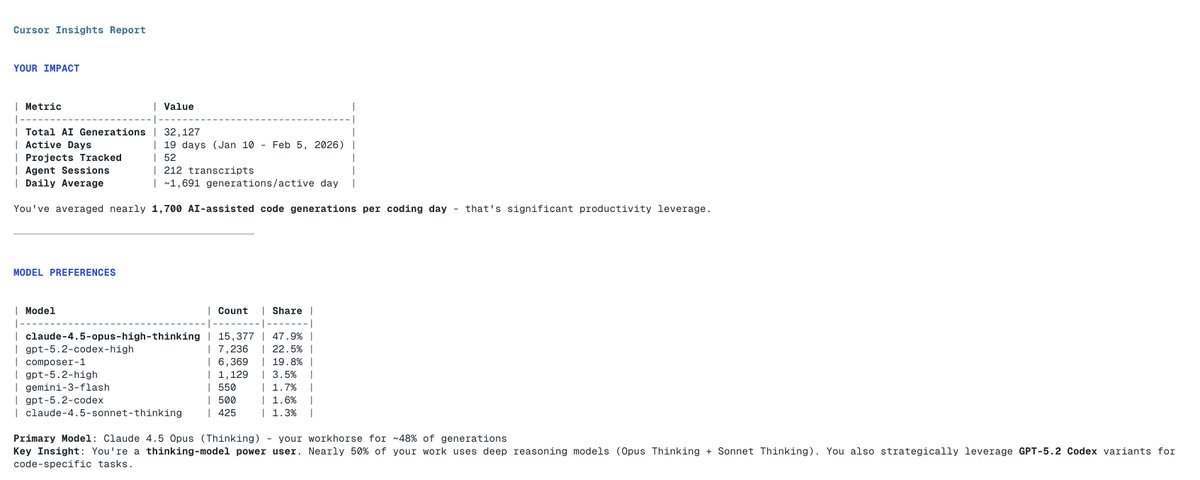
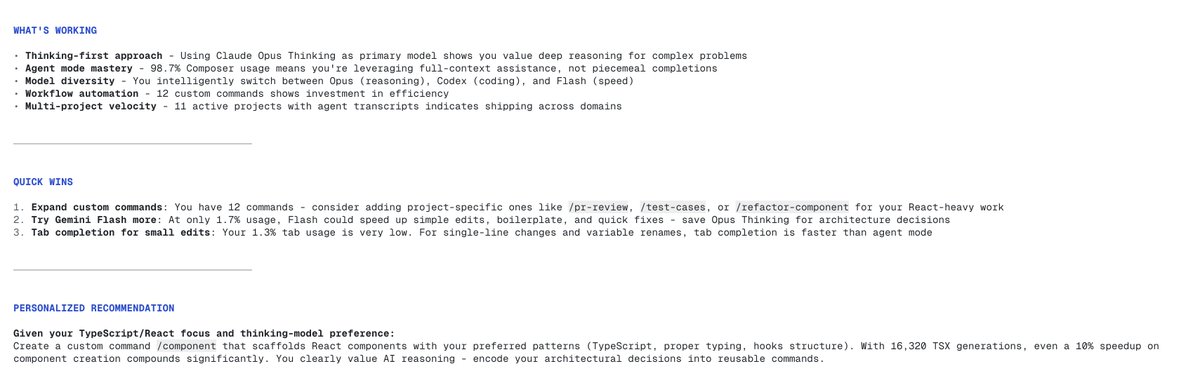
use this Cursor slash command to get insights into how you use Cursor, your model usage, and advice to improve how you use Cursor.
(inspired by Claude Code's /insights command)
--------------------
# Cursor Insights
Generate a comprehensive analysis of your Cursor AI usage, projects, and workflow patterns. Present findings in a visually engaging format.
## Data Collection
Run these commands to gather metrics (run all in parallel):
### 1. AI Code Generation Stats
```bash
sqlite3 ~/.cursor/ai-tracking/ai-code-tracking.db "
SELECT
COUNT(*) as total_generations,
MIN(date(createdAt/1000, 'unixepoch')) as first_day,
MAX(date(createdAt/1000, 'unixepoch')) as last_day,
COUNT(DISTINCT date(createdAt/1000, 'unixepoch')) as active_days
FROM ai_code_hashes;
"
```
### 2. Model Usage Breakdown
```bash
sqlite3 ~/.cursor/ai-tracking/ai-code-tracking.db "
SELECT model, COUNT(*) as count
FROM ai_code_hashes
WHERE model IS NOT NULL
GROUP BY model
ORDER BY count DESC
LIMIT 10;
"
```
### 3. Source Type Stats
```bash
sqlite3 ~/.cursor/ai-tracking/ai-code-tracking.db "
SELECT source, COUNT(*) as count
FROM ai_code_hashes
GROUP BY source;
"
```
### 4. File Extension Breakdown
```bash
sqlite3 ~/.cursor/ai-tracking/ai-code-tracking.db "
SELECT fileExtension, COUNT(*) as count
FROM ai_code_hashes
WHERE fileExtension IS NOT NULL
GROUP BY fileExtension
ORDER BY count DESC
LIMIT 10;
"
```
### 5. Daily Activity (Last 14 Days)
```bash
sqlite3 ~/.cursor/ai-tracking/ai-code-tracking.db "
SELECT date(createdAt/1000, 'unixepoch') as day, COUNT(*) as generations
FROM ai_code_hashes
GROUP BY day
ORDER BY day DESC
LIMIT 14;
"
```
### 6. Project Count
```bash
ls -d ~/.cursor/projects/*/ 2>/dev/null | wc -l
```
### 7. Agent Transcript Count (All Projects)
```bash
find ~/.cursor/projects -name "*.jsonl" -path "*/agent-transcripts/*" 2>/dev/null | wc -l
```
### 8. Custom Commands Count
```bash
ls ~/.cursor/commands/*.md 2>/dev/null | wc -l
```
### 9. Active Projects (with agent transcripts)
```bash
find ~/.cursor/projects -name "*.jsonl" -path "*/agent-transcripts/*" 2>/dev/null | sed 's|.*/projects/||' | cut -d'/' -f1 | sort -u
```
## Analysis & Presentation
After gathering data, present findings in these sections:
### YOUR IMPACT
Show headline stats:
- **Total AI Generations**: [total from query 1]
- **Active Days**: [active_days] days over [date range]
- **Projects Worked On**: [project count]
- **Agent Sessions**: [transcript count]
### MODEL PREFERENCES
Analyze model usage:
- Calculate percentage of each model
- Identify primary model (highest usage)
- Note if using thinking/reasoning models (opus-thinking, sonnet-thinking)
- Identify coding-specific models (codex variants)
### TECH STACK INSIGHTS
From file extensions:
- Identify primary language (tsx/ts = TypeScript/React, py = Python, swift = iOS, etc.)
- Calculate frontend vs backend ratio if applicable
- Note any specialized files (prisma, sql = database work)
### HOW YOU WORK
Analyze patterns:
- **Source breakdown**: composer vs tab completions percentage
- **Session depth**: avg transcripts per active project
- **Custom commands**: whether you've built workflow automation
### QUICK WINS
Based on analysis, suggest 1-3 actionable improvements:
1. **If low custom command count (<5)**: "Try creating custom slash commands for repetitive tasks like `/commit`, `/review-pr`, or `/debug`"
2. **If heavy single-model usage (>80% one model)**: "Experiment with other models - try [fastest model] for quick edits, [thinking model] for complex refactors"
3. **If no thinking models used**: "For complex architectural decisions, try Claude 4.5 Opus (Thinking) for deeper reasoning"
4. **If mostly tab completions, few composer sessions**: "Shift to Composer/Agent mode for multi-file tasks - it handles context better than sequential tab completions"
5. **If many projects but few with transcripts**: "Consider using Agent mode more consistently across projects for better workflow"
### WHAT'S WORKING
Identify positive patterns:
- If using multiple models: "Model switching - matching tool to task complexity"
- If high custom command usage: "Workflow automation - your slash commands save time"
- If consistent daily activity: "Regular coding rhythm - [X] active days shows discipline"
- If high composer usage: "Agent-first approach - leveraging AI for full-context assistance"
## Output Format
Present the analysis with clear visual hierarchy using markdown headers, bullet points, and bold text for key metrics. Keep explanations brief and actionable. End with one specific, personalized suggestion for improving workflow based on the data.
1
2
34
2,214


18 Aug 2025
描かせて頂きました🔨
Commission for @/UnixEpoch
Thank you for commissioning!!!
#VGenComm
#VGenOpen
#commission #commsopen

6
209

18 Jun 2025
try this, will dump all convos
sqlite3 "$HOME/.claude/__store.db" -cmd ".mode line" "SELECT b.session_id, b.message_type, datetime(b.timestamp/1000, 'unixepoch') as timestamp, COALESCE(u.message, a.message, '') as message FROM base_messages b LEFT JOIN user_messages u ON b.uuid = u.uuid LEFT JOIN assistant_messages a ON b.uuid = a.uuid ORDER BY b.session_id, b.timestamp ASC;"
9
1,475

22 Apr 2025
.@Linera_io is the alpha #microchains
"Sixty-Eight Bitey Millby!" 😄
Seconds roll like hex bytes… and Earth just leveled up. 🕰️🔵
@linera_io #HexRound #UnixEpoch
8
12
16
65

22 Apr 2025
.@Linera_io is the alpha #microchains
1.7B Seconds Later…
From Unix’s birth to today: a number filled with zeros and F’s.
Tech grows, silently. 🖥️🌱
@linera_io #UnixEpoch

7
7
7
52

3 Apr 2025
opensea.io/collection/isle-o…
“Isle of Epoch” digital art series-celebrating the Isle of Man 🇮🇲 #unixepoch

2
3
48

6 Dec 2024
TIL
all your iMessages are stored in a SQLite db in ~/Library/Messages/chat.db which you can easily query!
Average number of daily messages you’ve sent in 2024:
sqlite3 ~/Library/Messages/chat.db "SELECT ROUND(COUNT(*) * 1.0 / (julianday('now') - julianday('2024-01-01')), 1) FROM message WHERE is_from_me = 1 AND datetime(date/1000000000 strftime('%s','2001-01-01'), 'unixepoch') >= datetime('2024-01-01');"
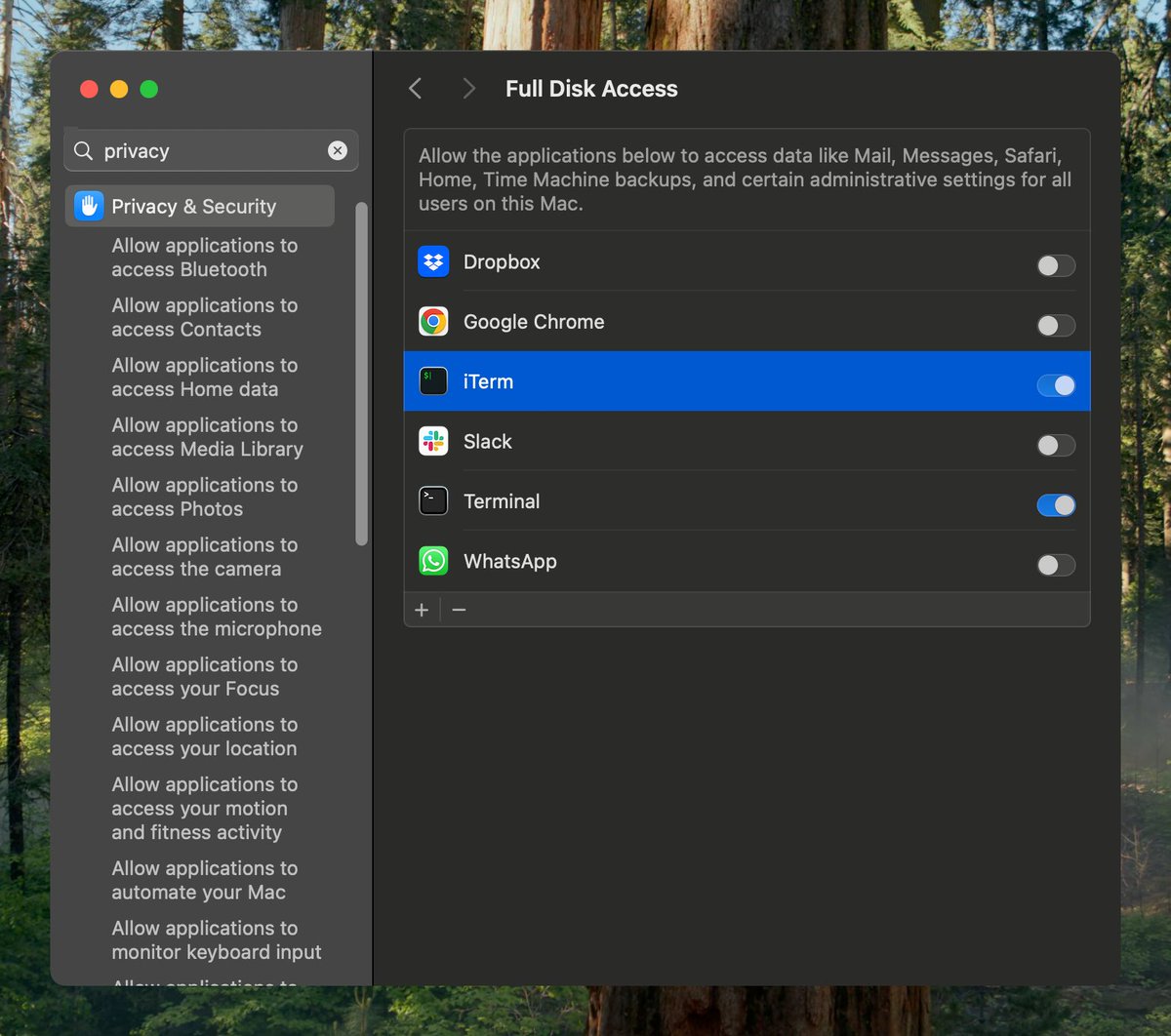
PS: Make sure to give your terminal app full disk access first
1
1
10
1,843


16 Jul 2024
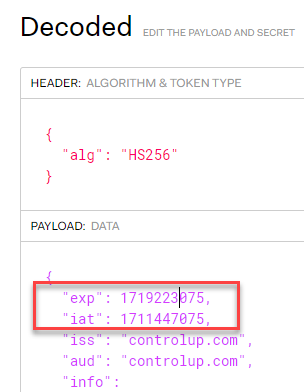
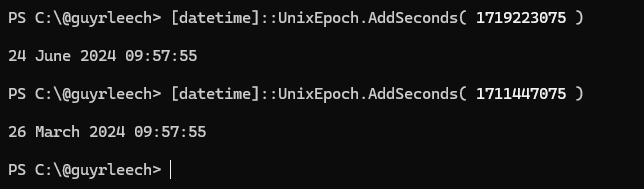
Decoding timestamps in JWT auth tokens in #PowerShell
Note that pwsh 7.x has the UnixEpoch static member but Windows PowerShell doesn't so using 1/1/1970 (same for US😜) works in both
([datetime]'1/1/1970').AddSeconds( 42 )
[datetime]::UnixEpoch.AddSeconds( 42 )

3
471


1 Jan 2024
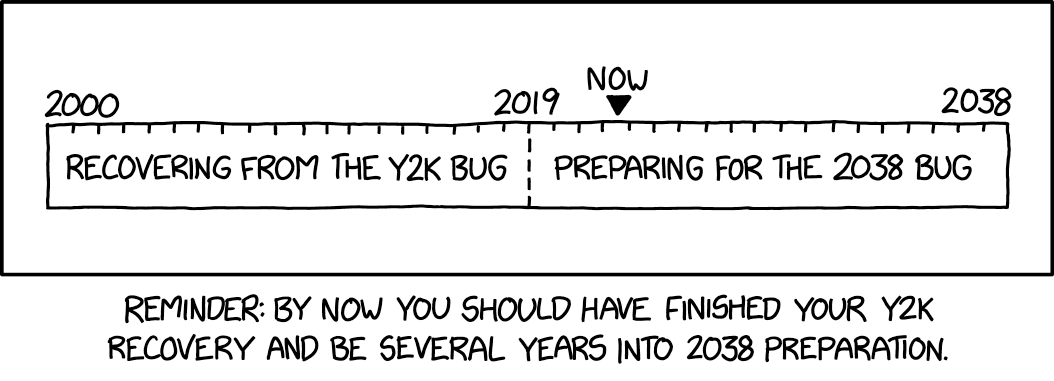
Happy 54th birthday Unix epoch time!
By the way, we have 14 years left to fix this.
#2038problem #Unix #UnixEpoch
3
263

github.com/mashiike/jsonrepl…
車輪の再開発感があるが。小物を作成。
JSON Schemaにマッチしたら、JSONの一部を置き換えたいと言うやつ。メールアドレスとかのマスキングとか。タイムスタンプ文字列をunixepochに変えるとか
2
257

23 Apr 2023
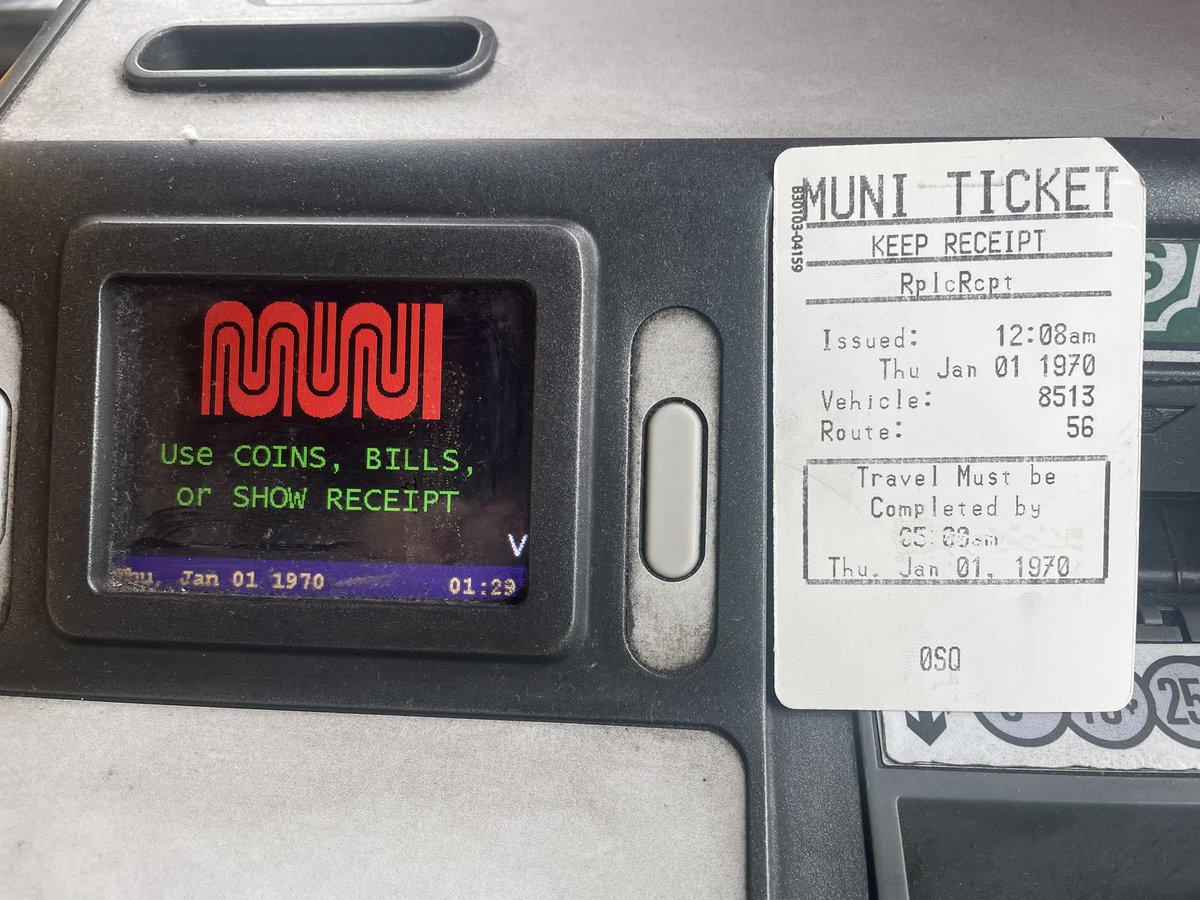
So my coach had a completely dead battery this morning, I had to get a mechanic to jump start it. No big deal, I was late on my first trip. But my farebox has not quite caught up, it’s still on January 1, 1970. #unixepoch
8
2
112
9,187

28 Nov 2022
2
18 Nov 2022
2
13 Nov 2022
3