
Jun 11
Very cool not needing to use declare!
Would it be possible to add an example/best practice for editable cells in react?
Or is it pretty much: Pass updateData using tablemeta and call inside onblur for example when using input
1
1
276

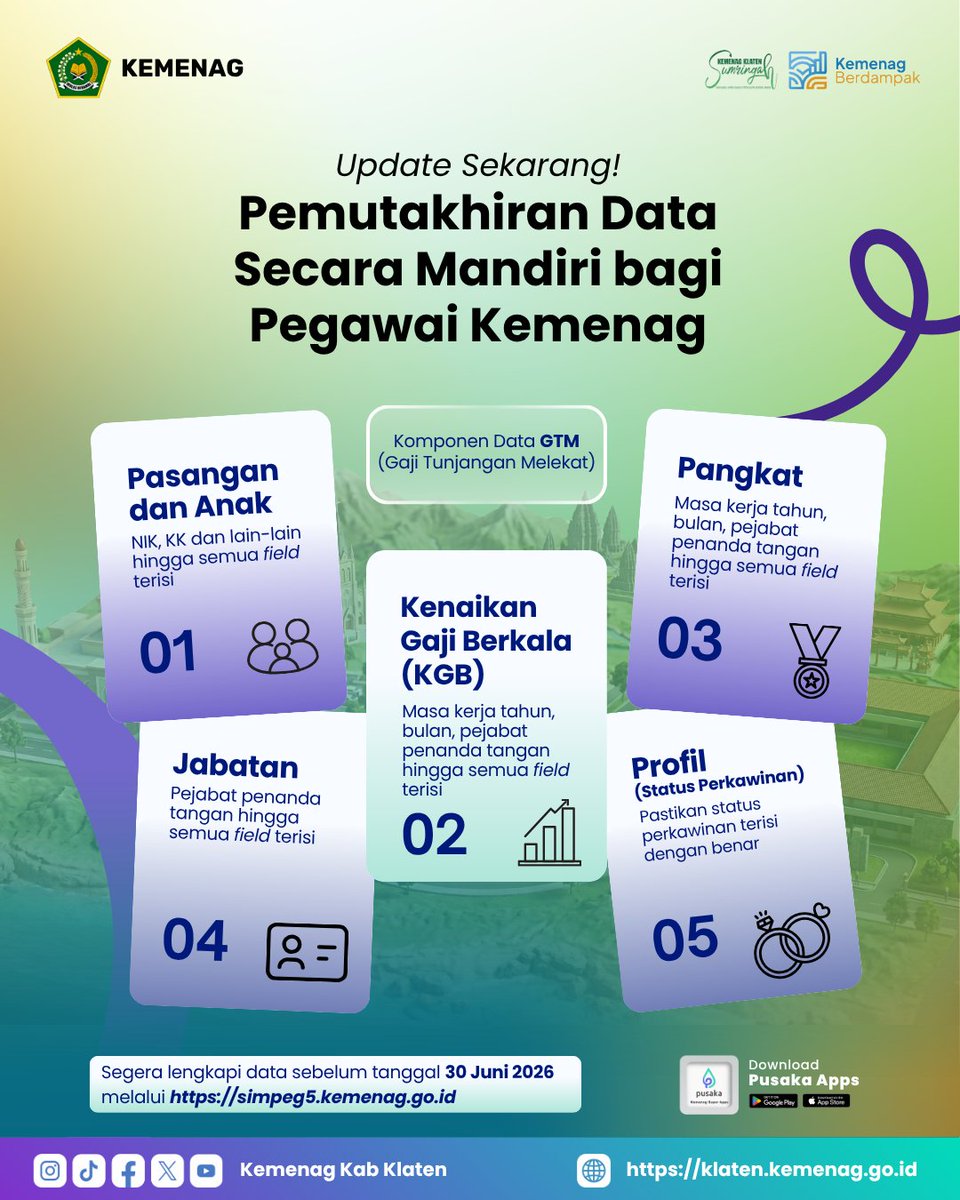
Siapa nih yang profilnya masih stuck di zaman baheula? 😭 Jangan sampai urusan administrasi ngadat gara-gara lupa update data mandiri ya! Yuk sat-set buka portalnya & beresin sekarang biar tenang tanpa drama birokrasi! 🏃💨🔥 #KemenagBerdampak #UpdateData #CaraBaruKemenag
33

Feb 13
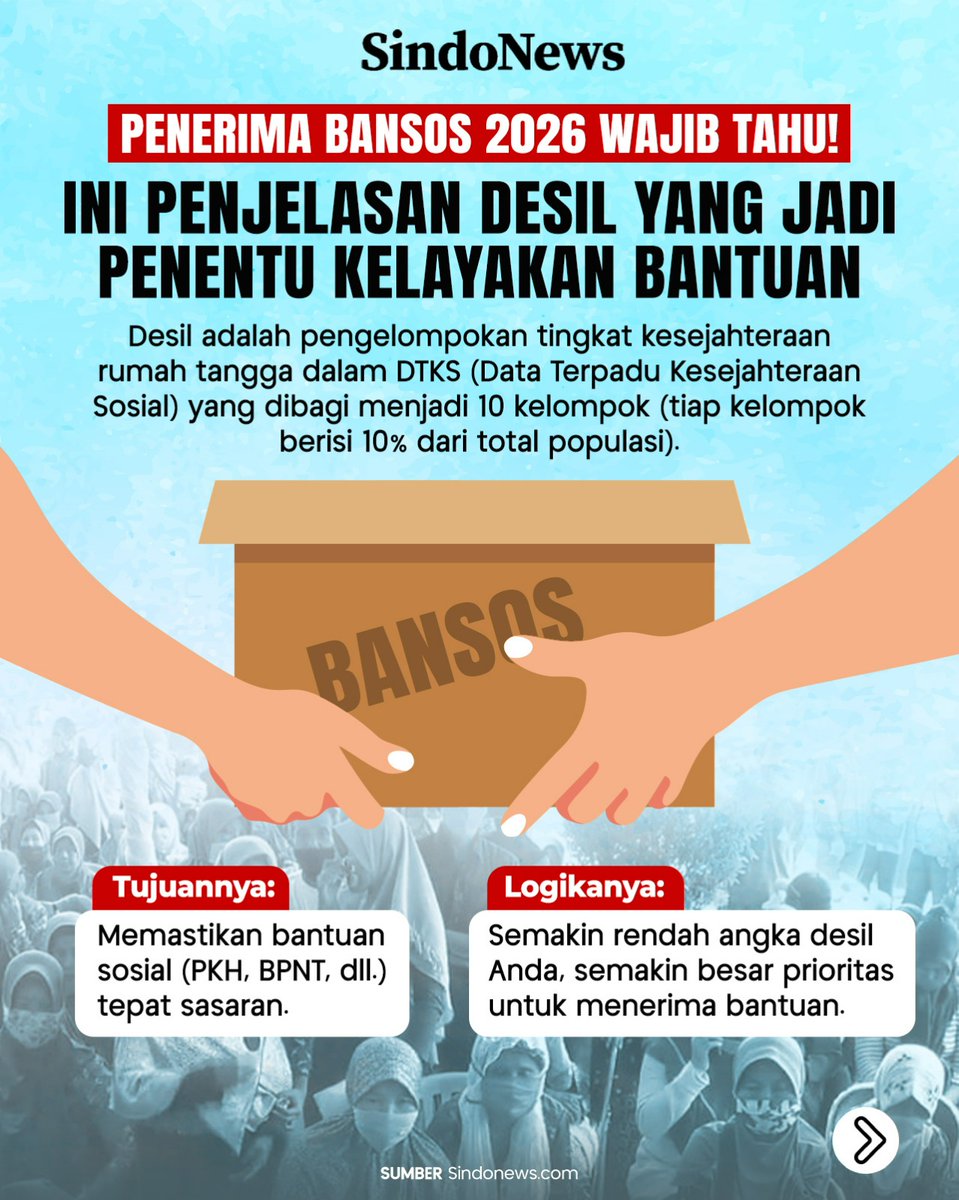
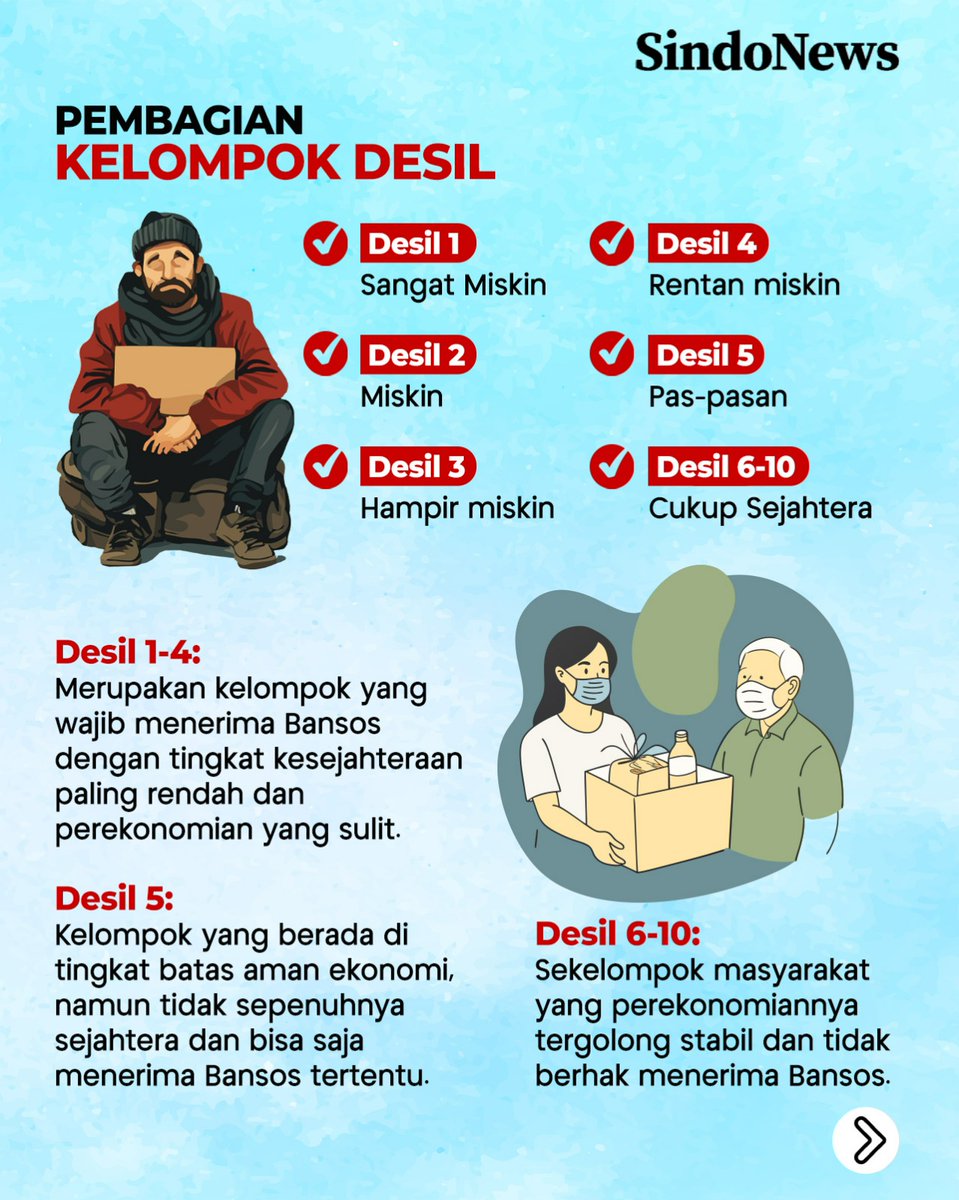
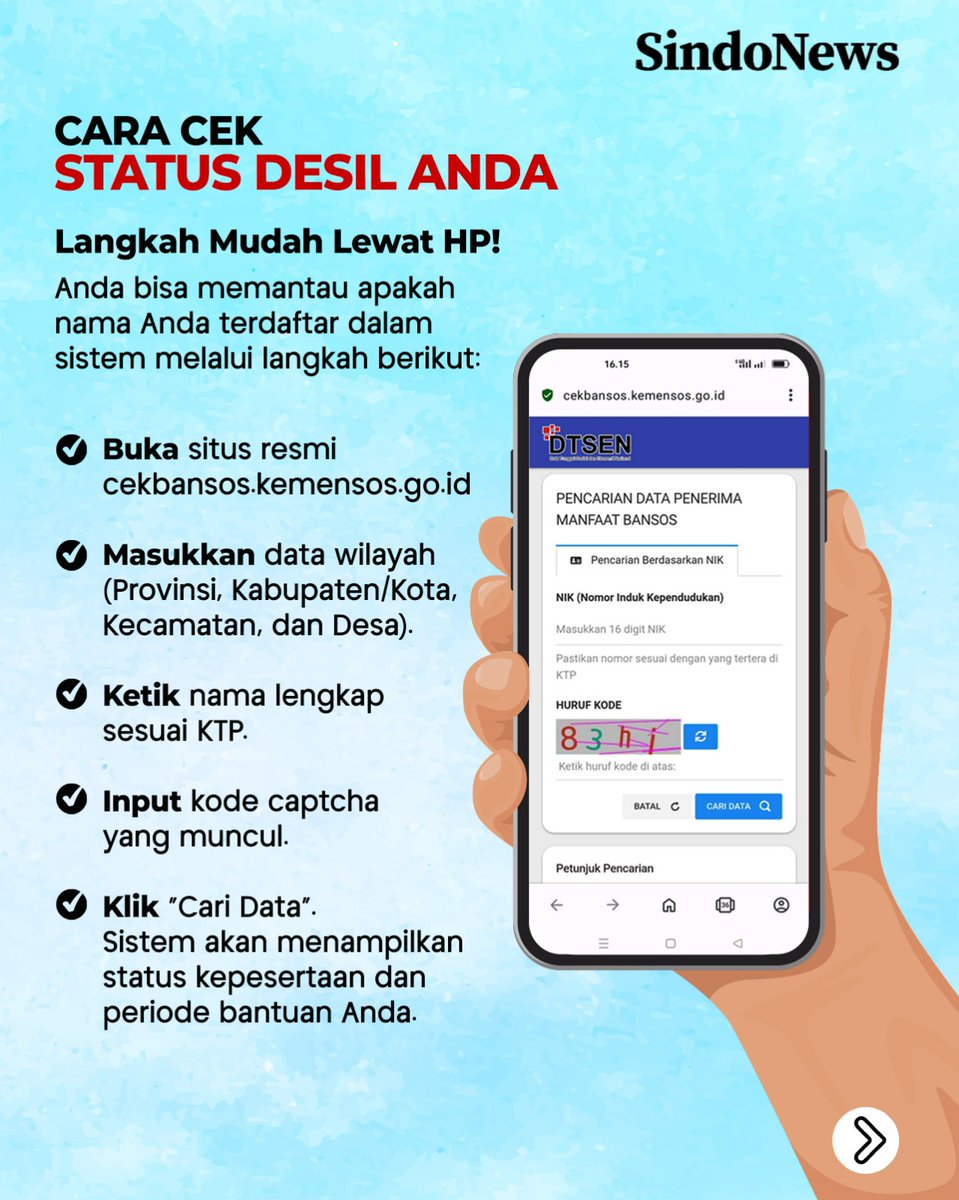
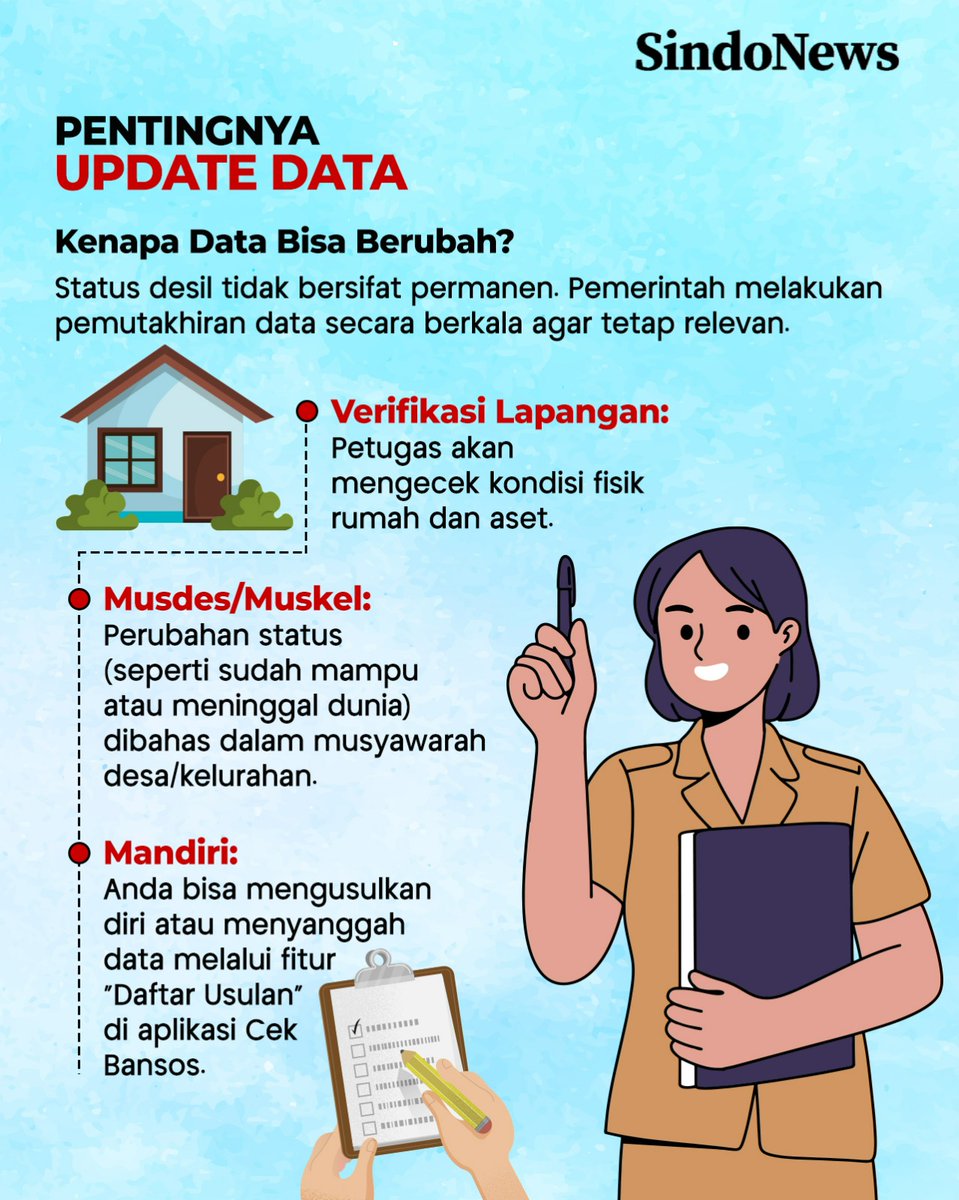
Banyak yang bertanya, kenapa bantuan sosial (PKH, BPNT, dll.) bisa tepat sasaran atau berubah statusnya? Kuncinya ada pada "Desil" dalam DTKS (Data Terpadu Kesejahteraan Sosial).
Singkatnya, Desil adalah pengelompokan tingkat kesejahteraan rumah tangga menjadi 10 kelompok. Semakin rendah angka desil Anda, semakin besar prioritas untuk menerima bantuan.
#Bansos2026 #InfoBansos #DTKS #Kemensos #CekBansos #IndonesiaSejahtera #PKH #BPNT #UpdateData
1
7
758

Jan 21
コンテキストを分析し、5〜10枚のスライド構成(タイトル、本文)を作成してください。
ai_slide_generator.html のコードを出力してください。
<!DOCTYPE html>
<html lang="ja">
<head>
<meta charset="UTF-8">
<meta name="viewport" content="width=device-width, initial-scale=1.0">
<title>AI Slide Studio Pro - Background Focus</title>
<script src="cdn.tailwindcss.com"></script>
<style>
@import url('fonts.googleapis.com/css2?fa…');
:root {
--primary: #6366f1;
--bg-dark: #020617;
}
body {
font-family: 'Inter', 'Noto Sans JP', sans-serif;
background-color: var(--bg-dark);
color: #f8fafc;
}
.slide-container {
aspect-ratio: 16 / 9;
position: relative;
overflow: hidden;
border-radius: 1.5rem;
box-shadow: 0 0 60px -15px rgba(99, 102, 241, 0.4);
background: #0f172a;
}
.slide-bg {
position: absolute;
inset: 0;
background-size: cover;
background-position: center;
transition: opacity 0.8s ease;
}
.slide-overlay {
position: absolute;
inset: 0;
background: linear-gradient(135deg, rgba(2,6,23,0.9) 0%, rgba(2,6,23,0.3) 50%, rgba(2,6,23,0.9) 100%);
display: flex;
flex-direction: column;
justify-content: center;
padding: 8%;
z-index: 10;
}
.glass-panel {
background: rgba(15, 23, 42, 0.7);
backdrop-filter: blur(16px);
border: 1px solid rgba(255, 255, 255, 0.1);
}
.loader {
border-top-color: var(--primary);
animation: spinner 1s linear infinite;
}
@keyframes spinner {
0% { transform: rotate(0deg); }
100% { transform: rotate(360deg); }
}
.message-box {
position: fixed;
top: 20px;
right: 20px;
padding: 1rem 1.5rem;
border-radius: 1rem;
background: rgba(30, 41, 59, 0.9);
backdrop-filter: blur(10px);
border: 1px solid rgba(99, 102, 241, 0.5);
color: white;
z-index: 100;
transform: translateX(120%);
transition: transform 0.3s ease;
}
.message-box.show {
transform: translateX(0);
}
@media print {
body { background: white !important; padding: 0 !important; margin: 0 !important; }
.no-print { display: none !important; }
.print-only { display: block !important; }
.slide-container {
width: 100vw !important;
height: 56.25vw !important;
border-radius: 0 !important;
box-shadow: none !important;
page-break-after: always;
}
.slide-overlay { background: linear-gradient(135deg, rgba(0,0,0,0.7) 0%, transparent 50%, rgba(0,0,0,0.7) 100%) !important; }
#app-ui { display: none !important; }
}
.print-only { display: none; }
</style>
</head>
<body class="min-h-screen p-4 lg:p-8 flex items-center justify-center">
<div id="messageBox" class="message-box"></div>
<div id="app-ui" class="max-w-7xl w-full grid grid-cols-1 lg:grid-cols-12 gap-6 items-start">
<!-- 管理サイドバー -->
<div class="lg:col-span-3 space-y-4 no-print">
<div class="glass-panel p-6 rounded-3xl">
<div class="mb-6">
<h1 class="text-xl font-black text-white italic tracking-tighter">SLIDE STUDIO PRO</h1>
<p class="text-[10px] text-indigo-400 font-bold tracking-widest uppercase">Visual Edition</p>
</div>
<div id="slideList" class="space-y-2 max-h-[40vh] overflow-y-auto mb-4 pr-2 text-sm"></div>
<div class="space-y-2">
<button onclick="addSlide()" class="w-full py-2.5 bg-white/5 hover:bg-white/10 text-gray-400 rounded-xl transition-all flex items-center justify-center gap-2 border border-white/5">
スライド追加
</button>
<button onclick="autoGenerateAll()" class="w-full py-3 bg-indigo-600 hover:bg-indigo-500 text-white font-bold rounded-xl transition-all shadow-lg shadow-indigo-500/20 flex items-center justify-center gap-2">
全背景一括生成
</button>
<button onclick="exportToPDF()" class="w-full py-2.5 bg-gray-700 hover:bg-gray-600 text-white rounded-xl transition-all flex items-center justify-center gap-2">
PDF/印刷エクスポート
</button>
</div>
</div>
<div id="statusPanel" class="glass-panel p-4 rounded-2xl hidden">
<p id="statusMsg" class="text-[10px] text-indigo-300 font-bold uppercase mb-2">生成状況</p>
<div class="h-1.5 w-full bg-white/5 rounded-full overflow-hidden">
<div id="progressInner" class="h-full bg-indigo-500 transition-all duration-300" style="width: 0%"></div>
</div>
</div>
</div>
<!-- メイン編集・プレビュー -->
<div class="lg:col-span-9 space-y-4">
<div class="slide-container" id="previewArea">
<div id="slideBg" class="slide-bg"></div>
<div class="slide-overlay">
<h2 id="displayTitle" class="text-3xl lg:text-5xl font-black mb-6 leading-tight text-white uppercase tracking-tight">TITLE</h2>
<p id="displayContent" class="text-base lg:text-xl text-gray-300 max-w-2xl font-light leading-relaxed whitespace-pre-wrap">CONTENT</p>
</div>
<div id="loadingIndicator" class="hidden absolute inset-0 bg-black/80 backdrop-blur-md flex flex-col items-center justify-center z-50">
<div class="loader w-12 h-12 border-4 border-white/10 border-solid rounded-full mb-4"></div>
<p id="loadingText" class="text-xs font-bold tracking-widest text-indigo-400 uppercase"></p>
</div>
</div>
<!-- 操作グリッド -->
<div class="grid grid-cols-1 md:grid-cols-2 gap-4 no-print">
<div class="glass-panel p-5 rounded-3xl space-y-3">
<div class="flex justify-between items-center">
<span class="text-xs font-bold text-gray-500 uppercase tracking-widest">Editor</span>
<div id="slideCounter" class="text-xs font-bold text-indigo-400">01 / 07</div>
</div>
<input type="text" id="editTitle" oninput="updateData()" placeholder="タイトル" class="w-full bg-white/5 border border-white/10 rounded-xl p-3 outline-none focus:border-indigo-500 transition-all text-sm">
<textarea id="editContent" oninput="updateData()" placeholder="本文" class="w-full bg-white/5 border border-white/10 rounded-xl p-3 outline-none focus:border-indigo-500 h-32 text-sm resize-none"></textarea>
<div class="flex gap-2">
<button onclick="prevSlide()" class="flex-1 py-2 bg-white/5 hover:bg-white/10 rounded-lg transition-all text-xs font-bold">前へ</button>
<button onclick="nextSlide()" class="flex-1 py-2 bg-white/5 hover:bg-white/10 rounded-lg transition-all text-xs font-bold">次へ</button>
</div>
</div>
<div class="glass-panel p-5 rounded-3xl space-y-3">
<div class="flex justify-between items-center">
<span class="text-xs font-bold text-gray-500 uppercase tracking-widest">Visual Logic</span>
<button onclick="suggestPrompts()" class="text-[10px] bg-purple-600/30 text-purple-300 px-3 py-1 rounded-full border border-purple-500/30 hover:bg-purple-600/50 transition-all">AI再提案</button>
</div>
<div class="space-y-2">
<div class="flex gap-2">
<input type="text" id="editBgPrompt" oninput="updateData()" placeholder="背景プロンプト (English)" class="flex-1 bg-white/5 border border-white/10 rounded-xl p-3 text-xs outline-none focus:border-indigo-500">
<button onclick="generateImage('bg')" class="px-4 bg-indigo-600 hover:bg-indigo-500 rounded-xl text-xs font-bold transition-all">背景生成</button>
</div>
</div>
<p class="text-[9px] text-gray-500 leading-tight">Imagen 4.0を使用してスライドの背景を生成します。背景画像はコンテンツを邪魔しない落ち着いたデザインが推奨されます。</p>
</div>
</div>
</div>
</div>
<div id="printContainer" class="print-only"></div>
<script>
// API Keyは実行環境によって自動的に提供されるため、空文字のままにします。
const apiKey = "";
let currentIndex = 0;
let slides = [
{
title: "次世代AI「Gemini」が切り拓く未来",
content: "Googleが放つマルチモーダルの衝撃\nAIは「テキスト」から「理解」のフェーズへ進化します。",
bgPrompt: "Deep blue and cosmic purple space nebula, subtle glowing crystalline structures, cinematic lighting, ultra-high resolution, 8k",
bgUrl: ""
},
{
title: "Geminiとは何か?",
content: "Google DeepMind開発。史上最も高性能で汎用性の高いAIモデル。\n「ネイティブ・マルチモーダル」設計により、テキスト・画像・音声・動画を同時に理解します。",
bgPrompt: "Abstract digital network with flowing data particles, neon connections, dark slate blue background, futuristic neural architecture",
bgUrl: ""
},
{
title: "ラインナップと使い分け",
content: "Ultra: 最も複雑なタスク向け\nPro: 幅広いタスクに対応する万能型\nFlash: 高速かつ軽量なリアルタイム処理\nNano: デバイス上での実行に最適化",
bgPrompt: "Clean enterprise tech background, smooth gradient of deep navy and charcoal, soft lens flare, professional aesthetic",
bgUrl: ""
},
{
title: "圧倒的な「記憶力」: 1.5 Pro",
content: "100万〜200万トークンの巨大なコンテキストウィンドウ。\n1時間の動画や数万行のコードを一度に読み込み、複雑な推論を可能にします。",
bgPrompt: "Infinite library or digital archive stretching into the horizon, glowing blue light rays, bokeh depth of field",
bgUrl: ""
},
{
title: "実務での活用シーン",
content: "クリエイティブ: 動画内容に基づく脚本作成\nデータ分析: 膨大なPDFの傾向をグラフ化\n開発支援: 巨大コードのバグ特定\nGoogle連携: Gmail要約やDocs下書き作成",
bgPrompt: "A modern workspace with holographic UI elements, soft glowing panels, dark moody aesthetic, creative technology",
bgUrl: ""
},
{
title: "安全性と責任あるAI",
content: "GoogleのAI原則に基づく責任ある開発。\nエンタープライズレベルのデータ保護と、厳格なセキュリティ評価プロセスを完備。",
bgPrompt: "Abstract digital shield pattern, deep emerald and blue hues, sophisticated geometric security theme",
bgUrl: ""
},
{
title: "結論:変革するワークスタイル",
content: "Geminiは単なるチャットボットではなく、共に思考する「パーソナル・エージェント」へ。\nAIを使いこなすことが、次の時代の創造性を解き放つ鍵になります。",
bgPrompt: "Cinematic sunrise over a digital skyline, warm golden light meeting deep indigo shadows, visionary atmosphere",
bgUrl: ""
}
];
// 指数バックオフを伴うAPI呼び出し
async function apiCallWithRetry(url, options, retries = 5) {
const delays = [1000, 2000, 4000, 8000, 16000];
for (let i = 0; i < retries; i ) {
try {
const response = await fetch(url, options);
const data = await response.json().catch(() => ({}));
if (response.ok) return data;
// エラーメッセージがあればログに出力(デバッグ用)
if (data.error) {
console.error(`API Error (Attempt ${i 1}):`, data.error.message || data.error);
}
// 最終試行で失敗した場合のみエラーをスロー
if (i === retries - 1) {
throw new Error(data.error?.message || `HTTP Error: ${response.status}`);
}
} catch (e) {
if (i === retries - 1) throw e;
}
// リトライ待機
if (i < retries - 1) {
await new Promise(r => setTimeout(r, delays[i]));
}
}
throw new Error("すべてのリトライが失敗しました。");
}
function showMessage(msg) {
const box = document.getElementById('messageBox');
box.textContent = msg;
box.classList.add('show');
setTimeout(() => box.classList.remove('show'), 3000);
}
function init() {
renderSlideList();
renderPreview();
}
function exportToPDF() {
const container = document.getElementById('printContainer');
container.innerHTML = '';
slides.forEach(slide => {
const slideEl = document.createElement('div');
slideEl.className = 'slide-container mb-0';
slideEl.innerHTML = `
<div class="slide-bg" style="background-image: ${slide.bgUrl ? `url(${slide.bgUrl})` : 'none'}; opacity: ${slide.bgUrl ? 1 : 0.1}; background-color: #0f172a;"></div>
<div class="slide-overlay">
<h2 class="text-4xl font-black mb-6 text-white uppercase">${slide.title}</h2>
<p class="text-xl text-gray-200 font-light leading-relaxed whitespace-pre-wrap">${slide.content}</p>
</div>
`;
container.appendChild(slideEl);
});
window.print();
}
async function autoGenerateAll() {
const statusPanel = document.getElementById('statusPanel');
const progressInner = document.getElementById('progressInner');
statusPanel.classList.remove('hidden');
try {
for (let i = 0; i < slides.length; i ) {
currentIndex = i;
renderSlideList();
renderPreview();
progressInner.style.width = `${((i 1) / slides.length) * 100}%`;
if (!slides[i].bgUrl) await generateImage('bg', true);
}
showMessage("全ての背景生成処理が完了しました。");
} catch (e) {
console.error(e);
showMessage("一部の処理に失敗しましたが、完了しました。");
} finally {
statusPanel.classList.add('hidden');
}
}
async function suggestPrompts(silent = false) {
const slide = slides[currentIndex];
if (!silent) showLoading("AIがデザインを分析中...");
try {
const res = await apiCallWithRetry(
`generativelanguage.googleapi…${apiKey}`,
{
method: 'POST',
headers: { 'Content-Type': 'application/json' },
body: JSON.stringify({
contents: [{ parts: [{ text: `Slide Title: ${slide.title}\nContent: ${slide.content}` }] }],
systemInstruction: { parts: [{ text: `Generate one English image prompt for Imagen 4.0. bg: abstract cinematic background. JSON output: {"bg": "..."}` }] },
generationConfig: {
responseMimeType: "application/json",
responseSchema: {
type: "OBJECT",
properties: {
bg: { type: "STRING" }
}
}
}
})
}
);
if (res && res.candidates && res.candidates[0].content.parts[0].text) {
const result = JSON.parse(res.candidates[0].content.parts[0].text);
slide.bgPrompt = result.bg;
if (!silent) renderPreview();
} else {
throw new Error("プロンプトの取得に失敗しました。");
}
} catch (e) {
console.error(e);
showMessage("プロンプト提案に失敗したため、デフォルト値を使用します。");
slide.bgPrompt = "Abstract digital background, dark theme, high quality";
if (!silent) renderPreview();
} finally {
if (!silent) hideLoading();
}
}
async function generateImage(type, silent = false) {
const slide = slides[currentIndex];
const prompt = slide.bgPrompt;
if (!prompt) return;
if (!silent) showLoading("背景を生成中...");
const refined = `${prompt}. Cinematic, high resolution, soft focus background, no text, no people, professional photography, clean composition.`;
try {
const res = await apiCallWithRetry(
`generativelanguage.googleapi…${apiKey}`,
{
method: 'POST',
headers: { 'Content-Type': 'application/json' },
body: JSON.stringify({
instances: { prompt: refined },
parameters: { sampleCount: 1 }
})
}
);
if (res && res.predictions && res.predictions[0] && res.predictions[0].bytesBase64Encoded) {
const dataUrl = `data:image/png;base64,${res.predictions[0].bytesBase64Encoded}`;
slide.bgUrl = dataUrl;
if (!silent) renderPreview();
} else if (res && res.error) {
throw new Error(res.error.message || "API Error");
} else {
throw new Error("画像のデータがレスポンスに含まれていません。");
}
} catch (e) {
console.error("Image generation error:", e);
showMessage("画像生成に失敗したため、サンプル画像を使用します。");
// フォールバック: Unsplashの抽象的な画像URL
slide.bgUrl = "images.unsplash.com/photo-16…";
if (!silent) renderPreview();
} finally {
if (!silent) hideLoading();
}
}
function showLoading(text) {
document.getElementById('loadingText').textContent = text;
document.getElementById('loadingIndicator').classList.remove('hidden');
}
function hideLoading() {
document.getElementById('loadingIndicator').classList.add('hidden');
}
function updateData() {
const s = slides[currentIndex];
s.title = document.getElementById('editTitle').value;
s.content = document.getElementById('editContent').value;
s.bgPrompt = document.getElementById('editBgPrompt').value;
renderPreview();
renderSlideList();
}
function renderSlideList() {
const list = document.getElementById('slideList');
list.innerHTML = '';
slides.forEach((s, i) => {
const item = document.createElement('div');
item.className = `p-3 rounded-xl cursor-pointer transition-all border ${i === currentIndex ? 'bg-indigo-600/20 border-indigo-500/50 text-indigo-100' : 'bg-white/5 border-white/5 text-gray-500 hover:bg-white/10'}`;
item.onclick = () => { currentIndex = i; renderSlideList(); renderPreview(); };
item.innerHTML = `<div class="truncate font-bold">${String(i 1).padStart(2, '0')}. ${s.title || '(無題)'}</div>`;
list.appendChild(item);
});
document.getElementById('slideCounter').textContent = `${String(currentIndex 1).padStart(2, '0')} / ${String(slides.length).padStart(2, '0')}`;
}
function renderPreview() {
const s = slides[currentIndex];
document.getElementById('displayTitle').textContent = s.title || "TITLE";
document.getElementById('displayContent').textContent = s.content || "CONTENT";
document.getElementById('editTitle').value = s.title;
document.getElementById('editContent').value = s.content;
document.getElementById('editBgPrompt').value = s.bgPrompt;
const bg = document.getElementById('slideBg');
bg.style.backgroundImage = s.bgUrl ? `url(${s.bgUrl})` : 'none';
bg.style.opacity = s.bgUrl ? '1' : '0.1';
}
function addSlide() {
slides.push({ title: "新しいスライド", content: "", bgPrompt: "", bgUrl: "" });
currentIndex = slides.length - 1;
renderSlideList();
renderPreview();
}
function prevSlide() { if (currentIndex > 0) { currentIndex--; renderSlideList(); renderPreview(); } }
function nextSlide() { if (currentIndex < slides.length - 1) { currentIndex ; renderSlideList(); renderPreview(); } }
window.onload = init;
</script>
</body>
</html>
その際、コード内の let slides = [...] 配列に、あなたが作成した構成を流し込んでください。
bgPrompt(背景用)と iconPrompt(ワンポイント用)には、各スライドの内容に合わせた高品質な英語プロンプトをあらかじめ設定してください。
2
687


3 Nov 2025
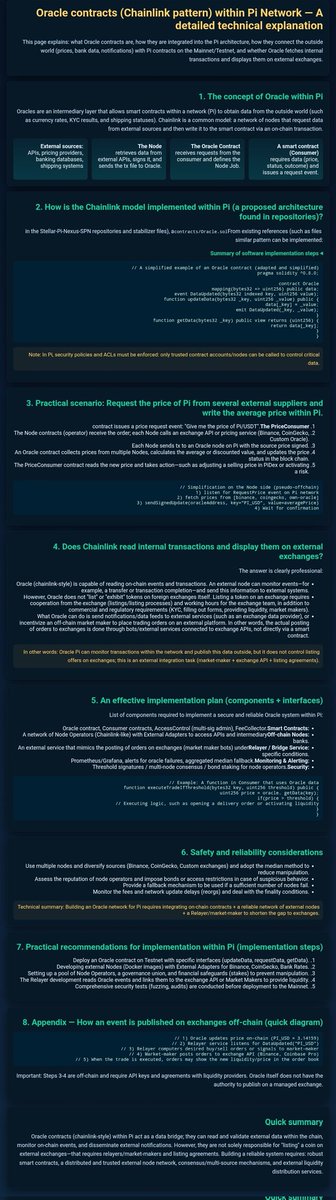
### Oracle Contracts in Pi Network: Chainlink-Style Integration Explained
Diving into this infographic on how oracle contracts work in Pi Network—the crypto that's pushing for everyday use. It's basically a Chainlink-inspired setup to pull real-world data (like prices, bank info, or notifications) into Pi's blockchain. This bridges Pi's internal world with external stuff on Mainnet/Testnet, displaying it on external exchanges without compromising security.
Breaking it down section by section:
1. **Oracle Basics in Pi**
- Oracles act as a middle layer for off-chain data, like currency rates or KYC results, feeding into Pi's smart contracts.
- Key players: External sources (APIs, banking, shipping), the Node (retrieves and signs data), Oracle Contract (receives and defines it), Smart Contract (uses the data, like adjusting prices).
It's all about getting trusted external info into Pi without writing directly to the chain.
2. **Chainlink Model in Pi's Repos**
- Built in Stellar-Pi/NeXus repos with stabilizer files and oracle.sol for a similar pattern.
- Simplified steps: Contract requests data, node fetches it, oracle updates the chain with verified info.
- Policies enforce trusted accounts/nodes, plus ACLs for control. Data's only from vetted sources.
3. **Real-World Scenario: Fetching Pi's Average Price**
- Operator contract issues a request: "Get me the PI/USD price."
- Node calls external APIs (like Binance/CoinGecko), each node calculates the average.
- Oracle collects from multiple nodes, discounts outliers, updates the price.
- Consumer contract reads the new node and acts—like adjusting a sell price in PiDex or triggering a shrink.
Waits for confirmation to keep it smooth.
4. **Internal Transactions on External Exchanges?**
- Chainlink-style doesn't expose on-chain events or transactions directly. External node monitors for events—but not for listing on exchanges.
- Oracles handle "illicit" or "exhibit" tokens from foreign exchanges, but listing needs KYC/filing forms, liquidity makers.
- Commercial regs apply; oracles pull data but don't send notifications externally. Exchanges get data through bots/external services connected via APIs—not direct from smart contracts.
- In other words: Pi can monitor transactions within the network and publish data outside, but it doesn't control external listing offers. That's an integration task for market-makers/exchange APIs.
5. **Solid Implementation Plan (Components Interfaces)**
- List of components: Consumer contracts, access control (multi-admin), Feeder/Selector for smart contracts.
- Network of Node Operators (Chainlink-like) with external adapters to access APIs and intermediary off-chain.
- External service monitors orders on exchanges (market bot under Relayer/Bridge).
- Prometheu/Grafana for alerts on failures, aggregated median fallback, threshold sigs.
- Executing logic: Such as opening a delivery order or activating liquidity.
6. **Safety and Reliability Tips**
- Use multiple nodes/diverse sources (Binance, CoinGecko, custom exchanges) to cut manipulation risks.
- Assess rep of node operators, fallback for network updates (reorgs), deal with finality conditions.
- Monitor fees and build an oracle network for Pi integrating on-chain contracts relayer/market-maker to shorten the gap to external exchanges.
7. **Practical Rollout for Testnet with Specific Interfaces**
- Deploy oracle contract on Testnet with specific interfaces (updateData, requestData).
- Develop external Nodes (Docker images) with adapters for Binance, CoinGecko, Bank.
- Set up development reads events and links them to the exchange API for Market Makers to provide liquidity.
- Comprehensive security tests (fuzzing, audits) before deploying to Mainnet.
🪡🧶👀⚠️
8
15
109
7,127

1 Sep 2025
pbo->updateData() for texture of 2,796,216 B took 0.4233 ms (6.606 GB/s)
Why do my updates of pixel buffer objects (PBOs) with glBufferSubData only run at 6 or 7 GB/s?
I stepped through the driver disassembly and it appears to be an optimised loop copying 64 bytes at once.
3
125

25 Aug 2025
To kick off the post-TGE week, our first product will go live for public beta starting as soon as Wednesday.
🔹 ContractQuard: Smart, AI-powered contract audits
Alongside, the QuantLink oracle team is working in parallel on the core development of our oracle solution stack. Over the next weeks, the MVP will be operational and our architecture will retrieve data on the testnet, achieve consensus, and transmit data to the on-chain smart contract that is targeted.
This week, core dev @0raclus will be creating the first Oracle Smart Contract (v0.1), that includes a structure to store authorized node addresses, an updateData function to accept data solely from authorized addresses, and basic event logging.
Also, our off-chain node software expert will be working on the first node application, to funnel the first set of external data through the system, whilst our supporting oracle developers work on the data collection phase, the first unit tests and the preparation of the basic server infrastructure.
TL;DR: Core functionality dropping in as soon as Wednesday. Oracle architecture development in full-action.

16
13
52
1,241

16 Jul 2025
The fact you can just write
.refreshable {
updateData()
}
to get pull-to-refresh functionality on a view feels like a cheat code.
3
198

13 May 2025
The signer provided a signature for mintNft, but the user maliciously used this signature to call updateData, passing the bossId from the signed data as the score, and providing an empty array for bossIds.
5
181

12 May 2025
I mean here the score is an user input and not validated, it is public so anyone can call it (maybe after try to call updateData first, not sure about the code flow)
so by providing valid signature for minting NFT, user can set arbitrary score for their NFT _bossIds

2
2
208

11 Mar 2025
Spring Boot Puzzle:
You have a scheduled task in your Spring Boot app:
@CacheEvict(value = "dataCache", allEntries = true)
public void updateData(MyData newData) {
repository.save(newData);
}
But the task never runs in production. What could be the reason?
#Spring

3
1,929

14 Feb 2025
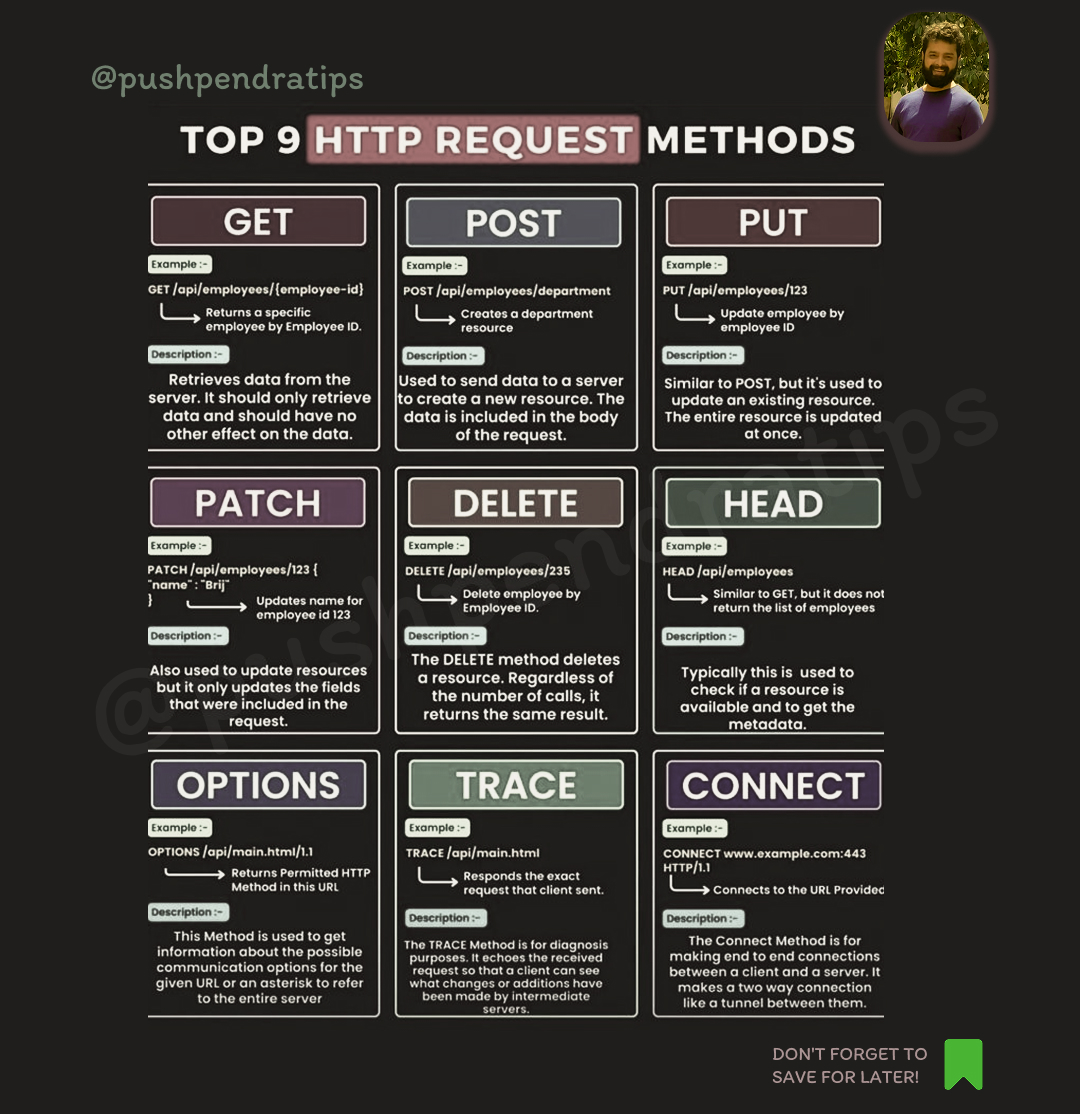
🚀Here are the top 9 HTTP request methods:
GET 🏗️ – Retrieves data from the server (e.g., fetching a webpage).
POST 📤 – Sends data to the server (e.g., submitting a form).
PUT 🔄 – Updates or replaces a resource on the server.
PATCH 🛠️ – Partially updates a resource.
DELETE 🗑️ – Removes a resource from the server.
HEAD 👀 – Similar to GET but only retrieves headers, not the body.
OPTIONS ❓ – Describes the communication options for the target resource.
CONNECT 🔌 – Establishes a tunnel to the server (used for HTTPS).
TRACE 🔍 – Performs a loopback test to see how requests are being processed.
#HTTPMethods #WebDevelopment #APIRequests #RESTAPI #WebDev #FetchData #ReadRequest #SendData #CreateRequest #UpdateData #ReplaceRequest #ModifyData #PartialUpdate #RemoveData #DeleteRequest #HeaderOnly #LightRequest #CheckMethods #APIOptions #SecureTunnel #ProxyRequest #DebugRequest #LoopbackTest #http #methods #coder #coding
30
9
39
1,065

18 Apr 2024
acho q lá usam createdAt e updatedAt
sem contar q ali o gênio escreveu errado, colocou “createdDate” e “updateDatA”
1
6
407

18 Apr 2024
O que mais me pega é createDate é updateData, date e data 🥲
1
26
5,826

22 Dec 2023
🔄 Updating Data: If a book's details change, we update it. Similarly, we're updating the email of the user with 'UserID' 1. #UpdateData #SQLUpdate
UPDATE Users SET Email = 'john.doe@newemail.com' WHERE UserID = 1;
1
1
45

22 Jul 2023
เธอๆ ฉันรอยอดวิว เข้า 7แสนนะ ตอนนี้ 6.9แสน 😌 จะได้ updatedata 💕
악당으로 변신한 민니의(MINNIE)의 새로운 모습😈 '빌런(Villain)'|비긴어게인 오픈마이크 youtu.be/3MhPVbOij1U ผ่าน @YouTube
1
2
166

25 Jun 2023
Solid signals are identical to @vuejs reactive refs as well #MobX when that was cool 🧠
😒 TLDR instead of:
useEffect(() => callAPI(id).then(updateData), [id])
😏 Just:
const data = computedAsync(() => callAPI(id))
Brought to you by:
Another @VueUse hook for your toolbelt 🧰
4 Mar 2023

Signal in @solid_js is a distinct concept from Signal in Elm or the old AS3 library:
1. AS3 - event handler for a single (partially applied) event type
2. Elm - composable handler of event streams like Rxjs specialized for its unique architecture
3. 🧵
github.com/robertpenner/as3-…
1
11
683

6 Jun 2023
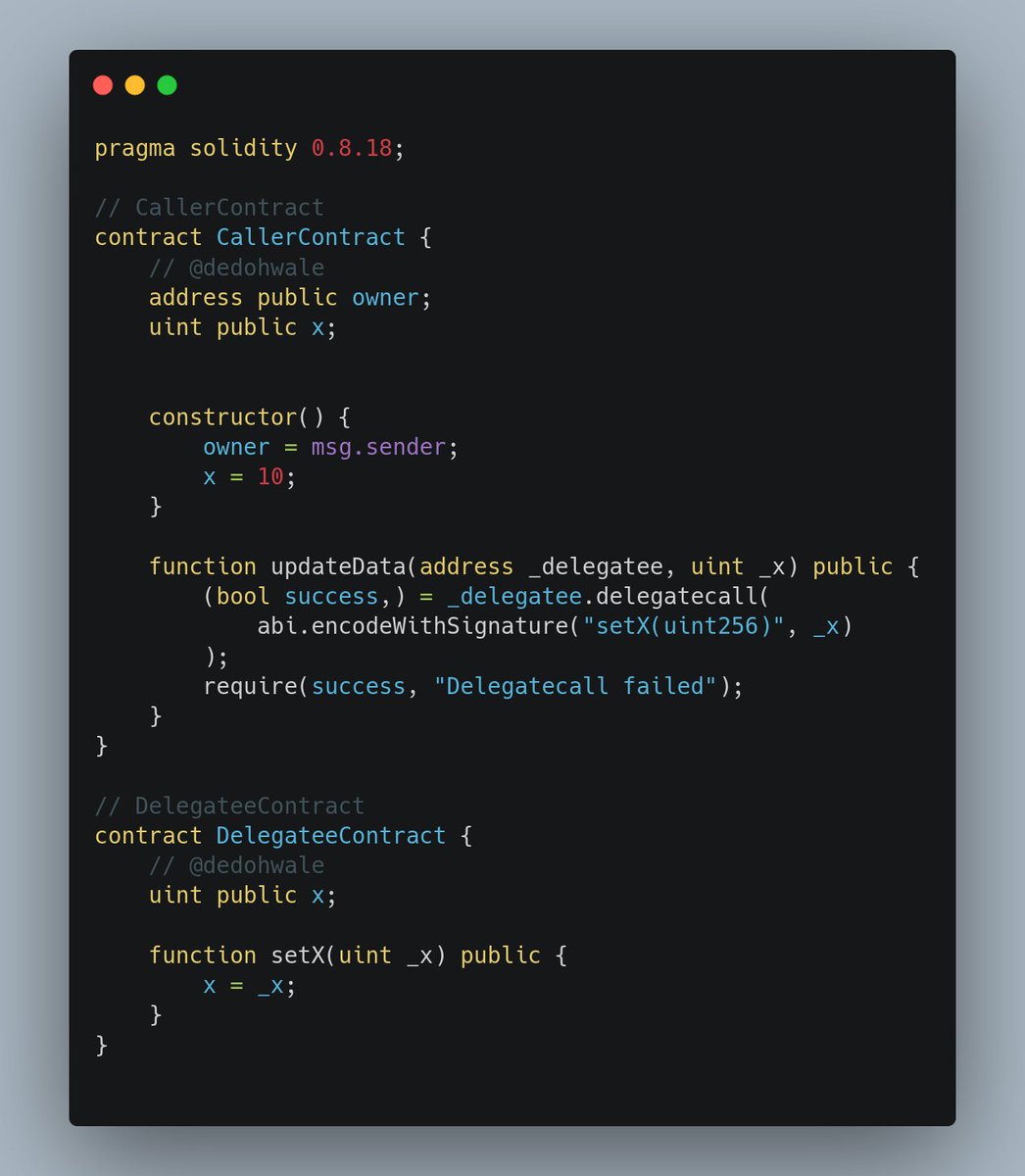
📚 Solidity Quiz #1📚
What happens if we call `updateData` from the `CallerContract`?
Quick run-down of this in 24hrs. ⌛️
7
1
24
1,992

Kepala daerah yang jadi bagian dari dinasti politik (melanjutkan keluarga, ortu, kakak dll, siapa saja #NanyaSerius untuk #UpdateData. Terima kasih🙂 #HappyMonday💜
1
1
856