
24 Dec 2025
Day 4 of Building Projects #BuildingInPublic
Today I fell i am a backend devloper,
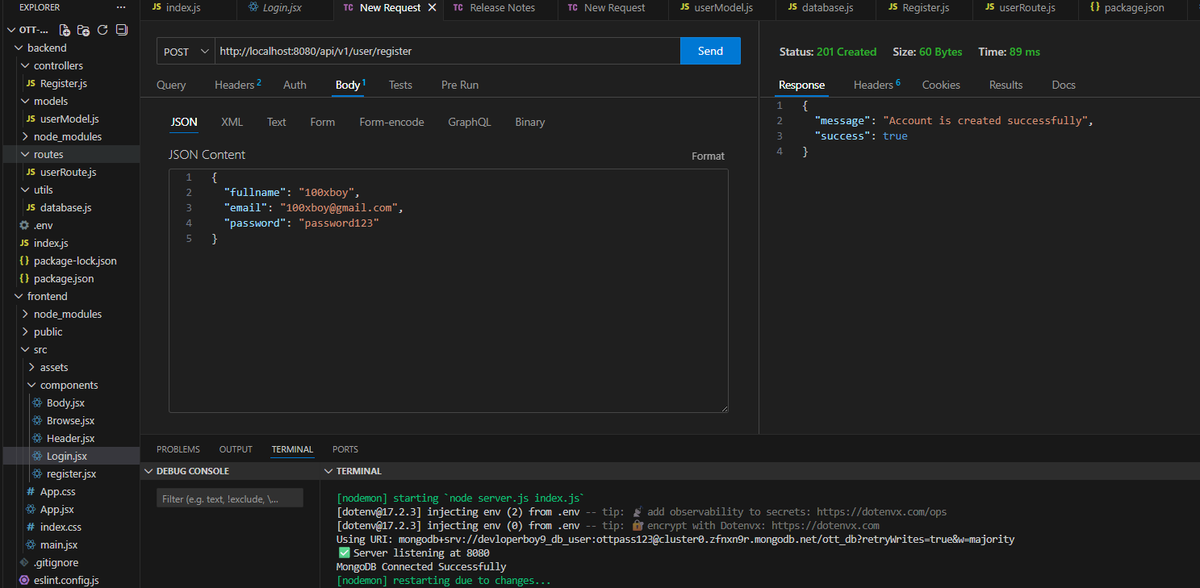
I built my first proper User Register API and secured it.
✅ Created User Registration API
✅ Validated incoming user data
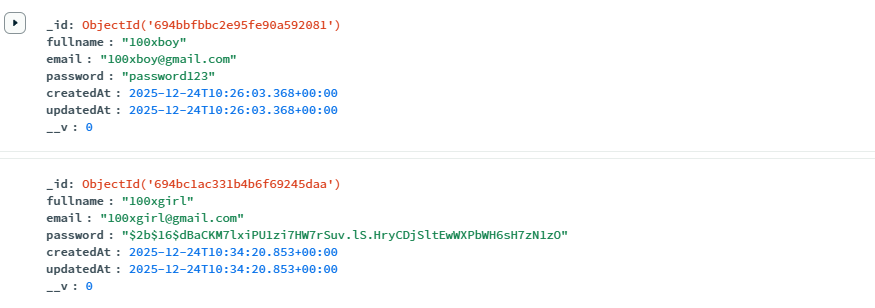
✅ Hashed passwords before saving (no plain text 🔐)
✅ Stored users safely in MongoDB
✅ Tested the API end-to-end
Honestly, today felt intense.
❌ API not responding at first
❌ One small mistake breaking everything
But when the user finally got saved with a hashed password…
that feeling was worth it.
Today I learned:
> Security is not optional
>Backend errors teach patience
>One working API = real confidence boost
I’m not just building features now.
I’m building things the right way.
Slow progress. Strong foundation.
This OTT app is no longer just UI — it’s becoming a real product.
If you’re building something:
Learn deeply. Secure early. Keep going.
Day 4 done.
#buildinpublic #webdevprojects
2
11
163
10 Dec 2025
Day 3 of Building Projects #buildinginpublic
>Today was simple … but a big milestone for my project.
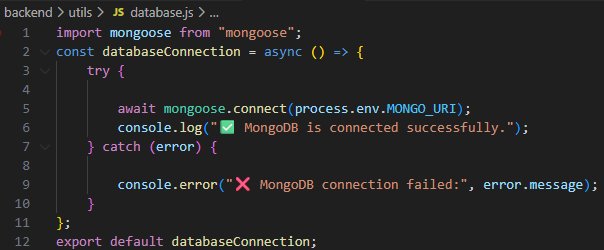
> finally connected my backend to MongoDB.
Small step, HUGE progress.
✅ Installed & configured Mongoose
✅ Connected my server to the database
✅ Tested the connection
✅ Confirmed MongoDB is running smoothly with my OTT backend
>No new features today.
>No fancy UI.
>Just one thing — making sure the heart of my app beats.
>Today i don't struggle smooth journey.............
>Today i learn how backend actually talks to a database.
>Every day I’m learning that building a real app isn’t about speed —
it’s about showing up, solving one problem at a time, and also consistency is on top.
>From today I learned:
• Database connection is the foundation
• Even “small tasks” push the project forward
This OTT platform is getting real, piece by piece.
If you need a reminder:
Tiny progress still counts. Don’t stop.
Day 3 done.
#buildinpublic #webdevprojects
1
12
417
9 Dec 2025
Day 2 of Building Projects #buildinpublic
>Today I moved from frontend to backend — and it was a whole new battlefield.
Not easy. Not smooth. But REAL progress again.
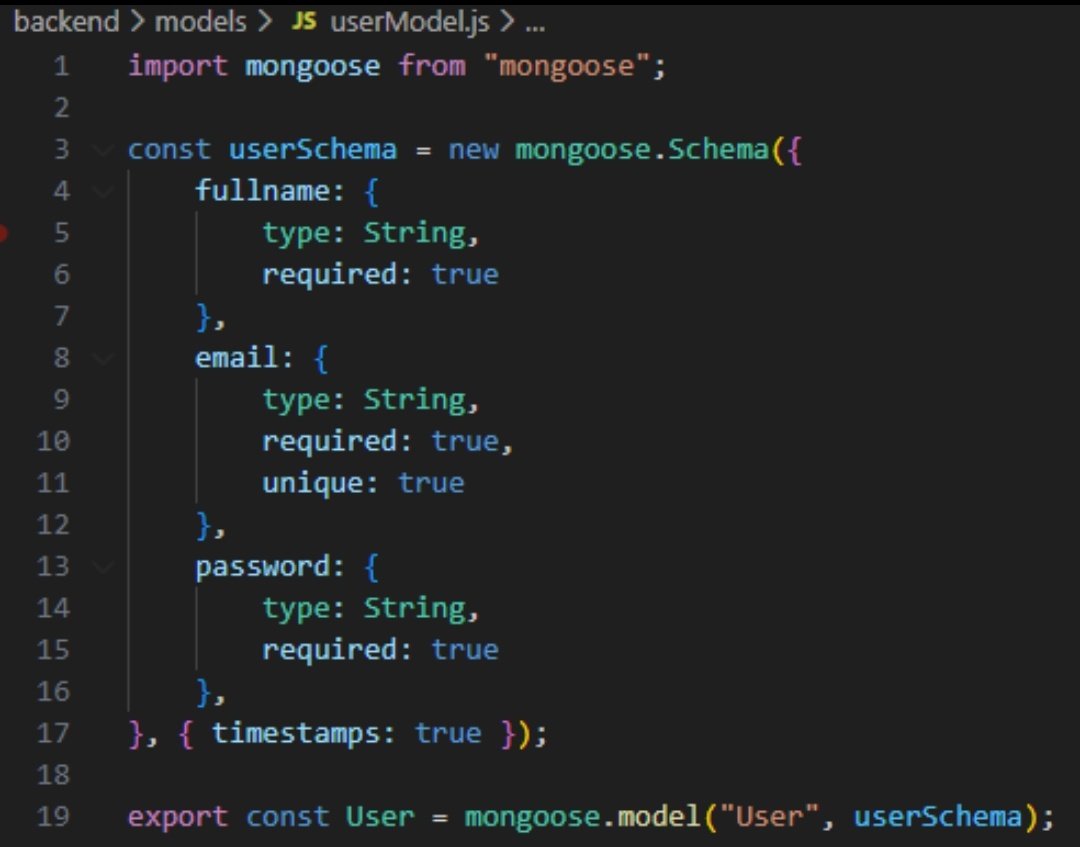
✅ Built my first MongoDB User Schema
✅ Added fullname, email, password fields
✅ Enabled timestamps
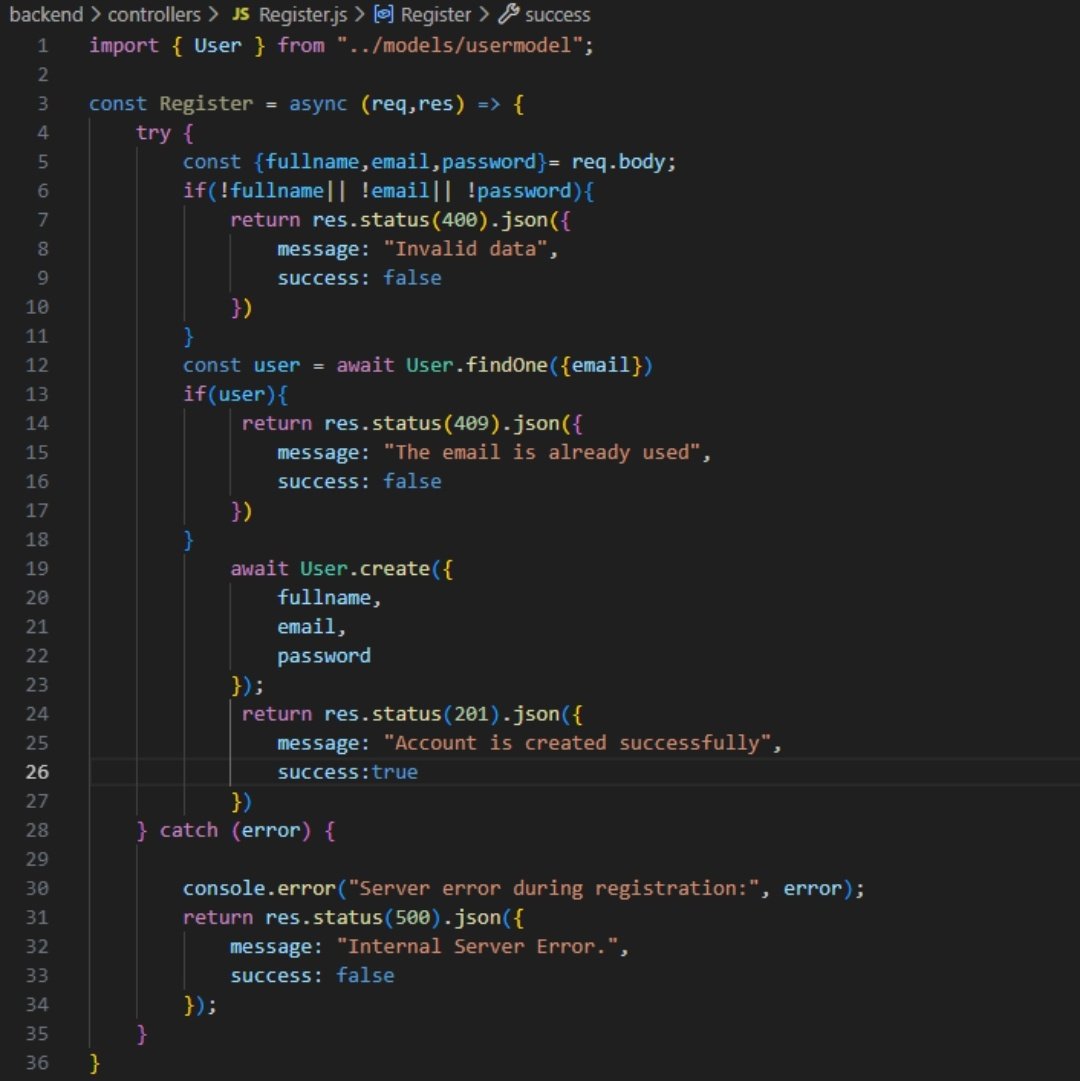
✅ Created a full Registration Controller
• Validates incoming data
• Checks email conflicts (409)
• Saves new user to MongoDB (201)
• Catches unexpected errors (500)
>But today wasn’t perfect.
❌ Syntax errors
❌ Missing braces
❌ Debugging for hours
>Still, every error made me sharper.
>I’m not chasing shortcuts.
>I’m learning the hard way — the real way.
From today’s backend grind, I learned:
• Backend demands patience
• Clean structure matters
• Errors teach faster than tutorials
• Progress isn’t always visible, but it counts
This OTT app is slowly getting its backbone.
If you need motivation:
Start scared. Break things. Fix them. Build anyway.
Day 2 done.
#buildinpublic #webdevprojects
2
1
4
250
7 Dec 2025
Day 1 of Building Projects (Build in Public)
>Today I officially started my OTT platform journey.
Not perfect. Not flashy. But REAL progress.
✅ Initialized my React project
✅ Created basic components
✅ Implemented React Router DOM for proper single-page navigation
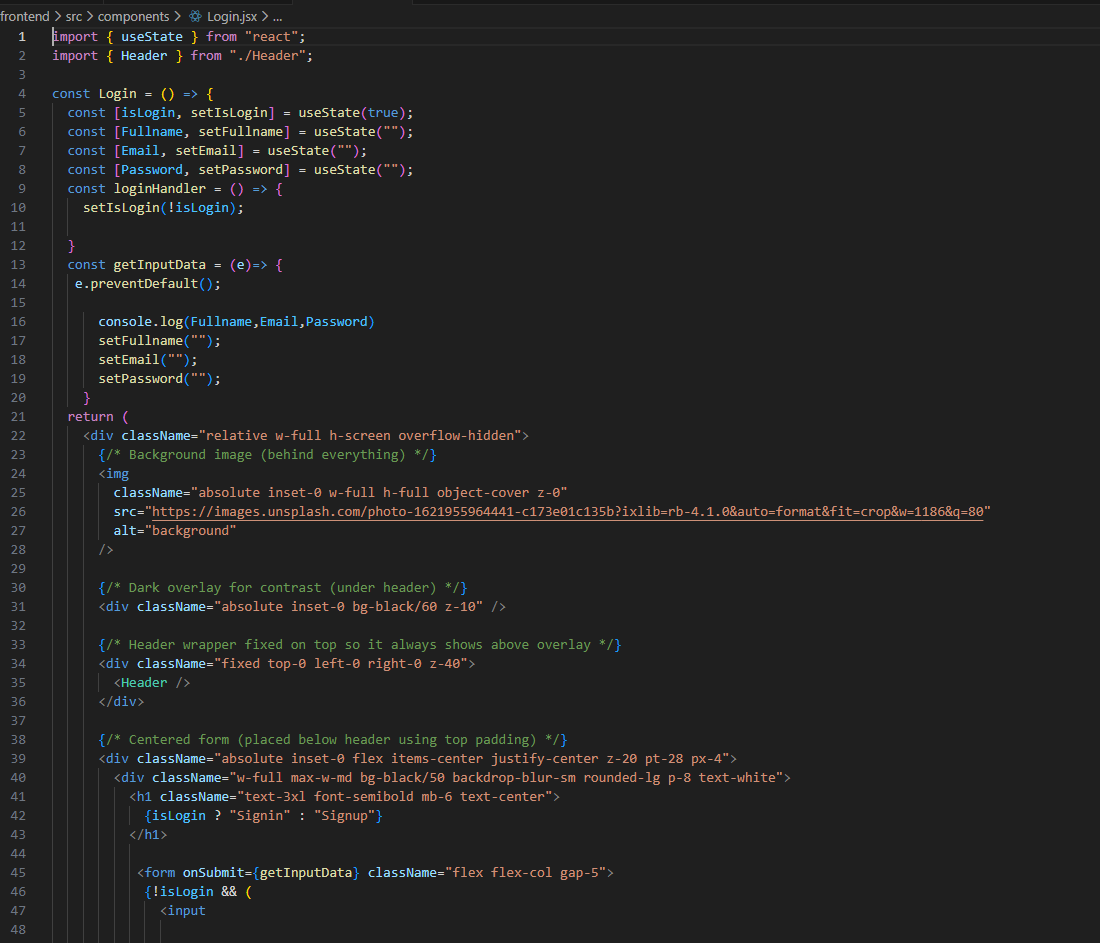
✅ Built the Signup & Signin UI
✅ Handled input with useState
✅ Connected form submission & logged real user data in the browser
>No backend yet. No database yet.
>But seeing real input data in the console for the first time felt powerful.
>I also struggled.
❌ UI bugs
❌ State confusion
❌ Small logic mistakes
>But every bug taught me something.
>I’m not chasing perfection.
>I’m chasing consistency.
From today, I will document:
• What I build
• What I break
• What I learn
• What scares me
• What excites me
This OTT app will be my proof of work.
If you’re waiting for motivation, here it is:
Start messy. Stay consistent. Win silently.
Day 1 done.
#buildinpublic #webdevprojects
4
7
158

29 Nov 2025
Just built a hacker-themed portfolio website using React Framer Motion ThreeJS Antigravity prompts — and it looks absolutely insane.
If you want to create a similar portfolio, just REPOST, REPOST, and COMMENT “PROMPT” — I’ll DM you the exact prompt I used.
Showcase link: sidharth-two.vercel.app/
You guys can also modify the prompt. Its a JSON prompt.
Let’s build more 🔥 futuristic developer portfolios.
#webdevelopment #reactjs #threejs #framermotion #fullstack #frontend #backend #devops #cloud #aws #gcp #azure #linux #hackers #programmer #codinglife #softwareengineer #developercommunity #techportfolio #javascript #opensource #indiedev #devcommunity #3dweb #nextjs #uidesign #animationdesign #cybertech #webdevprojects #reactdevelopers
1
2
10
907

23 Nov 2025
Just built something crazy.
Demo dropping soon. Bookmark this. 👀⚡
#BuildInPublic #AIProjects #WebDevProjects #ComingSoon #Tech
2
32

4 Jun 2024
We have added a new project. We want to add more logic-based projects to our programming courses.
In this series, we feel Tic-Tac-Toe is an ideal start. Check it out here buff.ly/3VrmgGa
#webdevelopment #learntocode #javascript #webdevprojects #tictactoe #game
3
50

15 Jan 2024
Starting a new project today! Excited to dive into MERN Stack and build something awesome. It's a diagramming web app that would allow multiple users to work on a diagram simultaneously. What do you think about it ? Worth it ? #WebDevProjects #buildinpublic #EntrepreneurLife
1
311

1 Jan 2024
Ready to excel your Web Development Skills! 🎉
Here's to a year filled with innovative projects 😱🌐
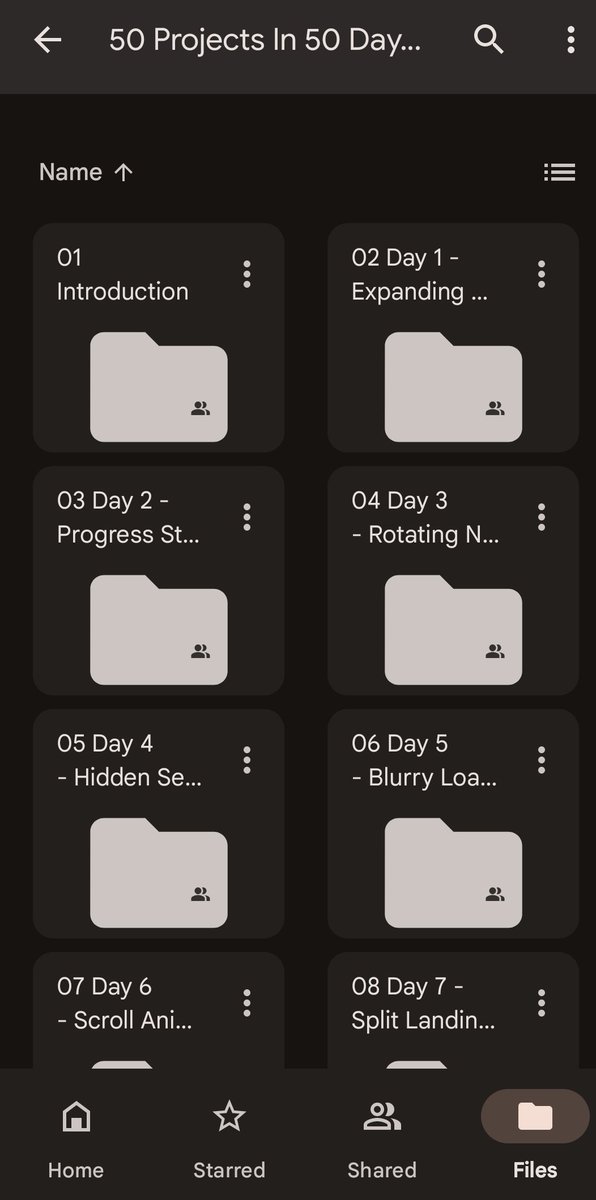
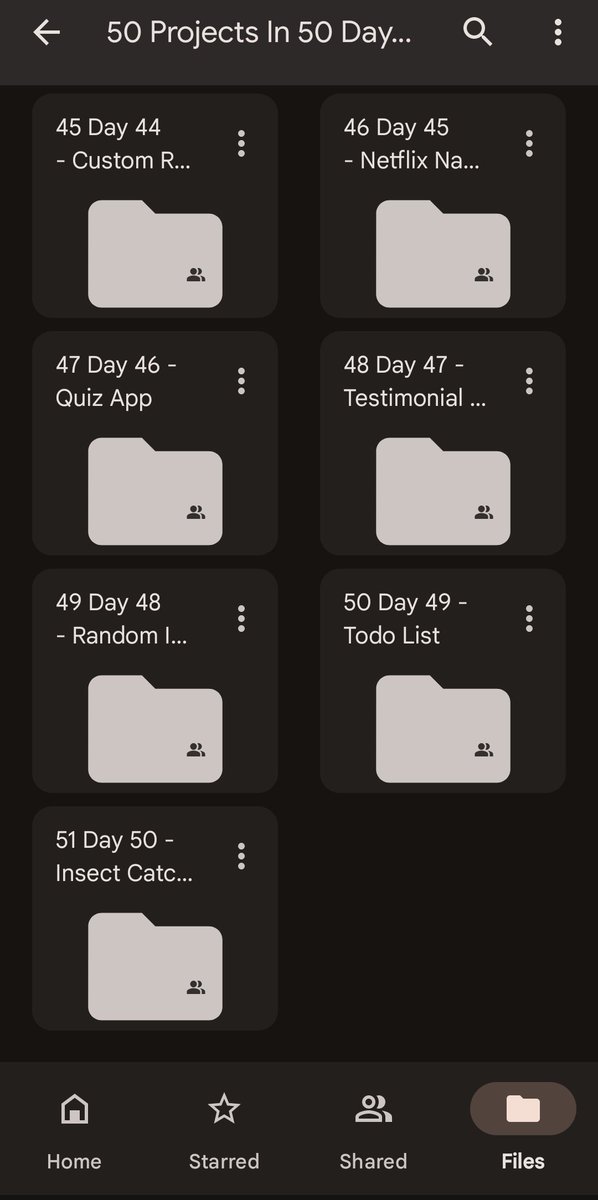
Learn 50 Basic Projects in Just 50 days.
Simply follow these steps:
1. Follow
2. Like & Repost
3. Comment 'Web'
#BuildTheWeb
#WebDevProjects
#webdevelopment
103
58
102
9,456

27 Oct 2023
🚀Here's a collection of 50 beginner-friendly projects to help you learn and hone your skills. From building your personal portfolio to creating interactive app💻🌐
#WebDevProjects #CodingBeginner
1
10
246

20 Oct 2023
5 apps that are improving the quality of my life and are completely free!
Which app are you going to download next?
Share it in the comments
#webdevprojects #webdev #coding #beyondexams
1
2
142
16 Oct 2023
2
135

3 Sep 2023
#Day9 of #100DaysOfCode
#JavaScript
Took my coding skills up a notch today! 🚀.
Implemented setInterval⏰, setTimeout⌛, and forEach in my previous project.
It's amazing how these tools can enhance functionality.💻💡
#CodingUpgrade
#WebDevProjects
1
16
236
30 Aug 2023
#Day5 of #100DaysOfCode
#JavaScript
Just leveled up my coding skills! 🚀 Learned DOM manipulation and completed projects: Rock Paper Scissors game ✊✋✌️ and a Simple Calculator 🔢. Exciting journey into web development! 💻 #CodingJourney #WebDevProjects.
1
4
81
7 Jul 2023
Empowering Minds, Shaping Futures: Welcome to the Beyond Exams Campus"
DM us to know more!
#learning #webdev #webdevprojects
6
164

16 May 2023
5 #DNS Records Explained! 🌐🐈
~Explain Like I'm 12~
1️⃣ A (Address) Record:
🗺️ Maps your website domain to a machine-readable IP address. Just like how an 🚏address tells people where your 🏠house is and that can be translated into 📍GPS coordinates!
📝Example: fluffykitty.com -> 192.168.0.1
2️⃣ cNAME (Canonical Name) Record:
Alias alert! 🌟 A CNAME is like a nickname that refers to your real name. CNAME allows you to point one web domain to another domain. ✨ #Shortcuts #DomainAliases
📝Example: meowtown.com -> fluffykitty.com
3️⃣ MX (Mail Exchange) Record:
Your email post office! 📬 Tells other servers where they are allowed to send email messages for your domain, and routes them accordingly. If you have the wrong MX records, you won't receive mail. 😿💌 #EmailDeliverability #MailExchange
📝Example: purrfectcat.com -> mail.purrfectcat.com
4️⃣ TXT (Text) Record:
Notes & verification! 📝 Add any text you want for authentication & verification purposes. 🔐 It's like leaving a message saying, "Hey, CloudFlare, I'm the real deal... I even added this TXT record you wanted to prove it!" #Verification #Security
📝Example: pawsome.com -> "This domain is verified and secure af"
5️⃣ 🔌SRV (Service) Record:
Service directory! 📂 Specify locations (meaning the PORT # or website address) of specific services or applications. 🌐 #ServiceDiscovery #SRV
📝Example: _http._tcp.kittycentral.com -> 0 0 80 webserver.kittycentral.com
⭐️🔌Note on TCP Ports: HTML webpage traffic typically is routed through either Port 80 (http) or Port 443 (https). The "0" "0" in the above Port 80 example refers to weight & priority.
Remember, DNS is the cat's meow when it comes to navigating the internet! 🌍🐾
Enhance your web development skills and conquer the digital world. 🚀💻
Follow me @WP_Panther on 📸Instagram or 🐦Twitter for more informative listicles like this and other programming content!
#WebDevelopment #DNSMadeFun
Image Credit: Constellix
#CodeGeek #WebsiteSetup #DomainHosting #WordPressDevelopment #PHPProgrammer #WebDesignTips #DNSConfiguration #WebsiteSecurity #WebDevTools #WebsiteOptimization #DNSResolver #WebDevProjects #WordPressCustomization #PHPCommunity #WebsiteMaintenance
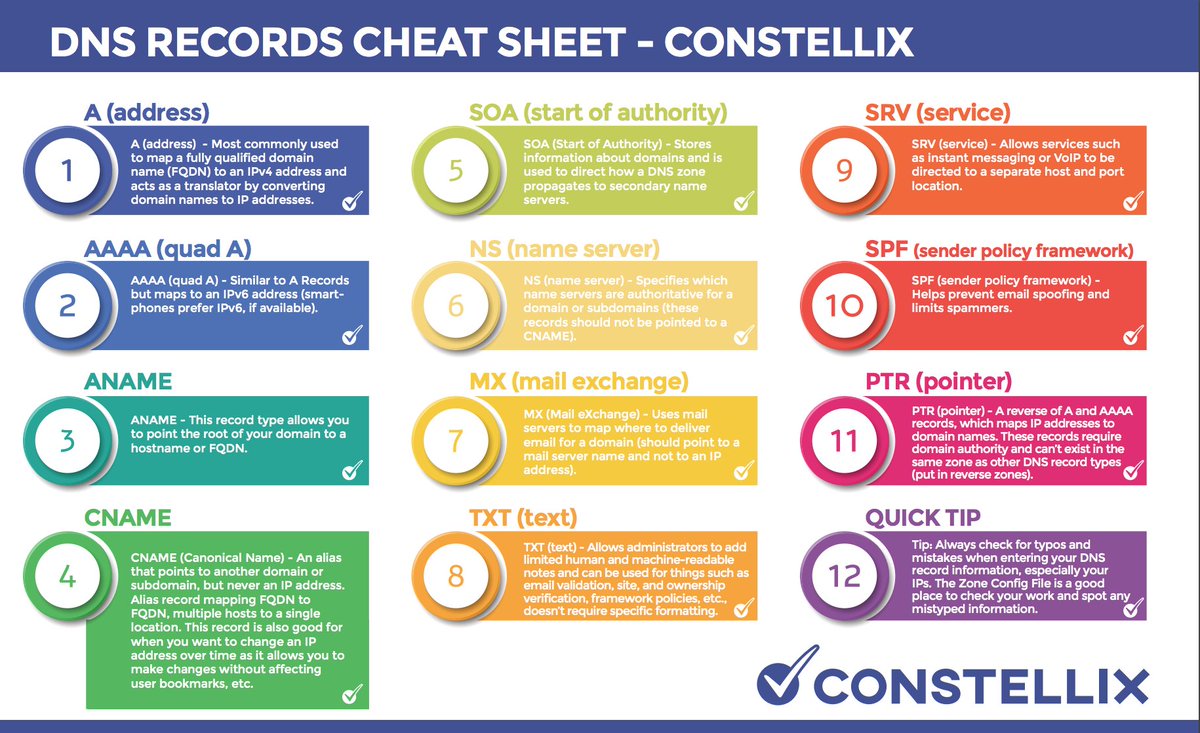
ALT Infographic by Constellix briefly descibing all types of DNS records. A records, AAAA records, ANAME records, CNAME records, MX Records, TXT records, SRV records, SPF records, etc.
1
1
6
379

27 Nov 2022
This thread is saved to your Notion database.
Tags: [Webdevprojects]
18 Oct 2022
This thread is saved to your Notion database.
Tags: [Webdevprojects]
18 Oct 2022
This thread is saved to your Notion database.
Tags: [Webdevprojects]

11 Jan 2017
#Freelance #job - Bootstrap Website PSD to HTMK5/CSS by webdevprojects goo.gl/fb/jw56GR #graphicdesign