
Apr 29
のぼり旗作った。物理じゃなくてWorldPositionOffsetで少し揺らすテスト。
ポールとの接続部分があるので大きく揺らすとズレちゃうので難しい。
揺れる部分を限定するとか色々できると思うけどこれくらいでいいかなと。
1
8
61
3,538

Mar 22
7
167

31 Oct 2025
本日とても助かった表現 #ちる学
WorldPositionOffsetってマテリアルの異なるメッシュだとメッシュ同士が離れてしまうのはどうすれば…
勉強あるのみだねー
30 Oct 2025

Hello planet! Thursday morning started with coffee and Unreal Engine. I love these two elements combined to wake me up. And I also love World Position Offset and Multiply - Floor - Divide (to simulate visual layers) #UnrealEngine #UE5 #gamedev #uetips
7
219

26 Oct 2025
youtei見て以前作成してたやつを久々に弄りたくなって少しだけいじってました。
前にLandscapeにある程度大きくWorldPositionOffsetしようとすると表示壊れるなと思ってたら,LandscapeのBoundingBox超えてたようで、ZBounddsExtensionを広げたら上手くいった。
マテリアルが仮すぎるのでそのうちそこもいじるかな。
youtube.com/watch?v=IloNndMU…
#UE5 #Snow #Rendertarget #WorldPositionOffset

2
257
7 Aug 2025
エンジン改造してVSMとCSM共存させた。
WorldPositionOffsetを使っているものはCSMに、そうでないものはVSMにしてCacheInvalidateを起こさないようにしたもの。
ShadowMaskは両方計算する必要があるのでデメリットもあるがCacheInvalideがクリティカルな場面で有効。
youtube.com/watch?v=IzYfLdID…
#UE5 #VSM #Optimization #WorldPositionOffset
2
17
77
5,009

4 Aug 2025
【本日のUE5ゲーム進捗#7】
今日も色々失敗が多かったけど…
キャラのマテリアルをWorldPositionOffsetで歪ませたことで『スピードの迫力』がさらにUP⤴!
あと、レーンを明るくしたことで、ゲームがかなり遊びやすくなった気がします…はい( ..)φ
#UE5ぷちこん #ゲーム制作 #ゲーム開発
3 Aug 2025

【本日のUE5ゲーム進捗#7】
ステージ作りの『沼』にハマりそうだったので…一時撤退💦
進捗を得るためにゲームクリア&オーバーの判定を追加しました!
落下や手札ありor加速不足でOUT!
手札を全て消費&十分に加速していればPASS👍
#UE5ぷちこん #ゲーム制作 #ゲーム開発
28
976

17 Dec 2024
マテリアル改良しようとして立体感は出たけど目が悪くなりそうなブレが出た…ハイトマップとその他のテクスチャのUVの取得の仕方が違うせいだとは思う…
TextureBombingノードが直接WorldPositionOffsetノードにつなげられたらいいんだろうけど……
1
2
226

(1/3)
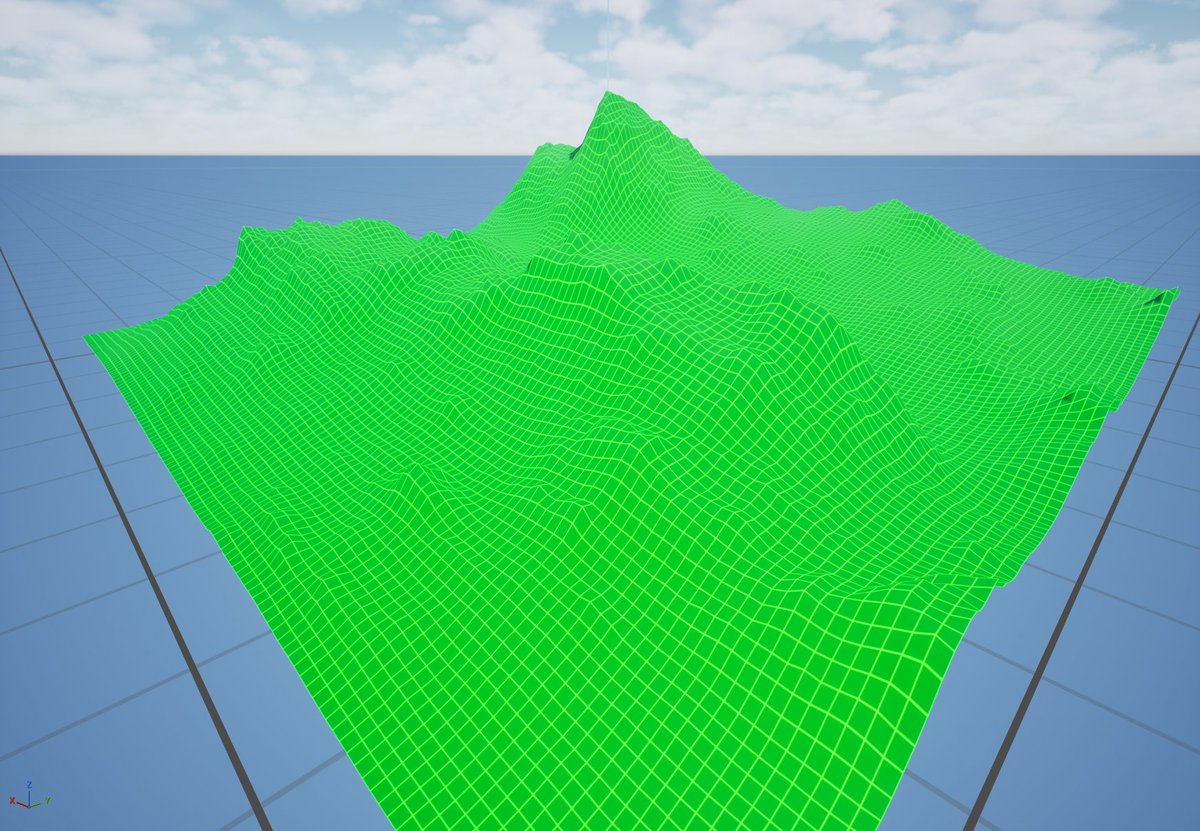
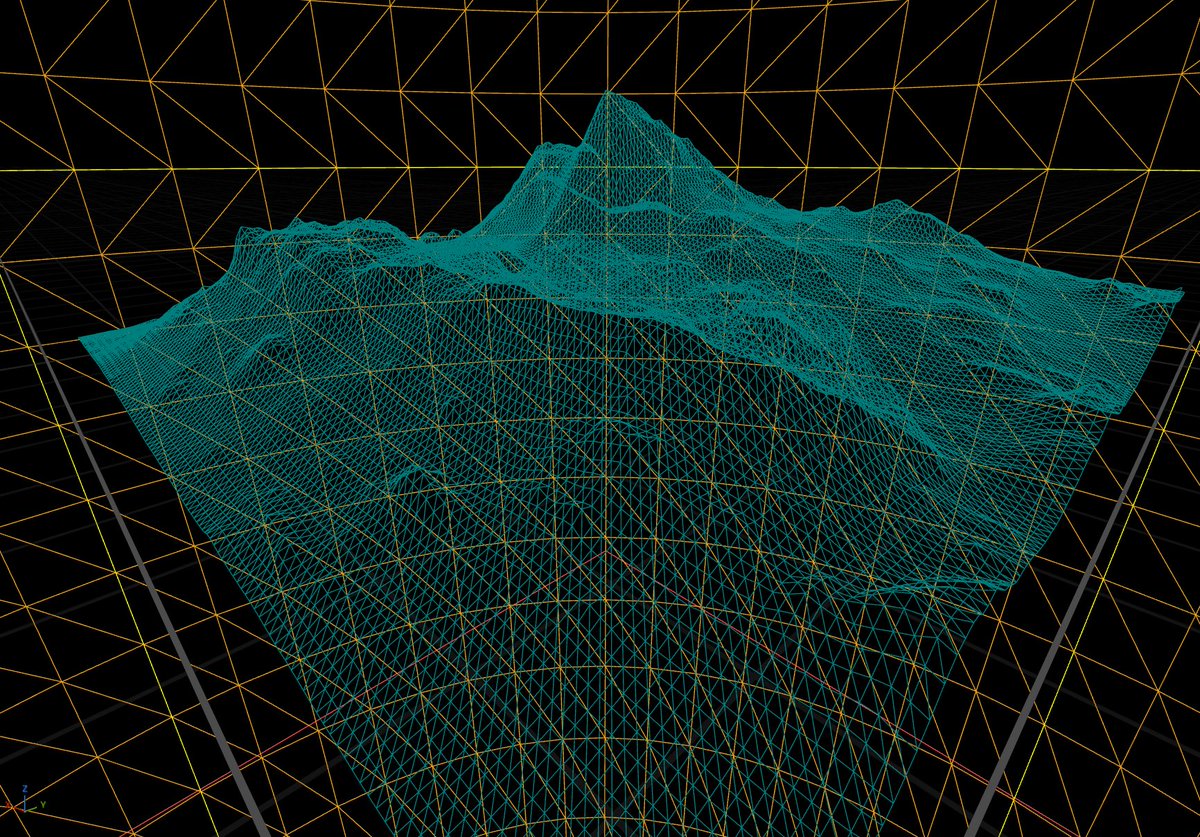
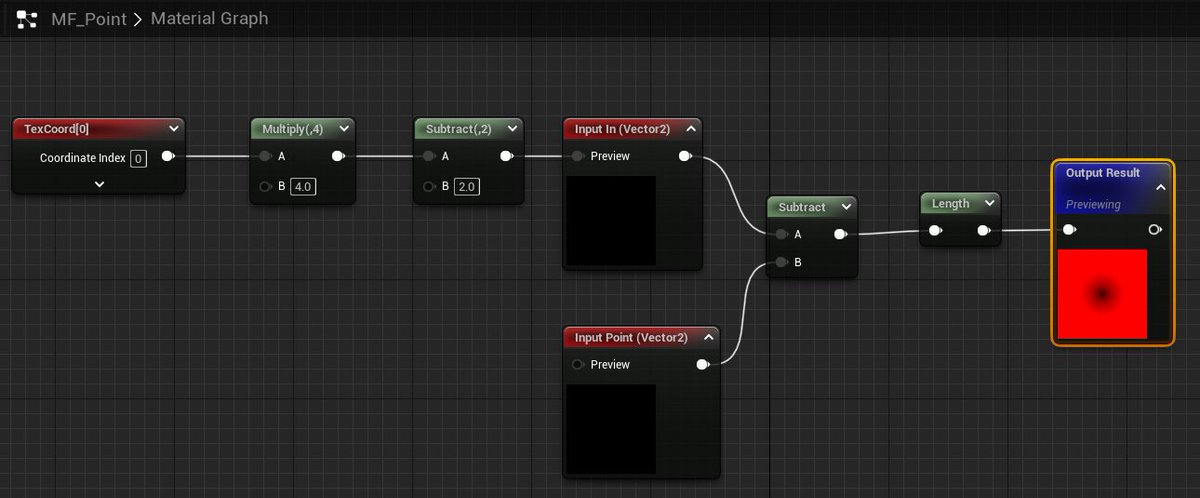
ハイトマップ
スカラー場はハイトマップとして扱うことができます。
細かく分割された平面状のメッシュに WorldPositionOffset で高さを与えることで効果的な可視化ができます。
距離の大きい部分を低く表示するほうが見やすいため、Z軸に符号を反転した値を適用しています。
#UE5 #UE5Study

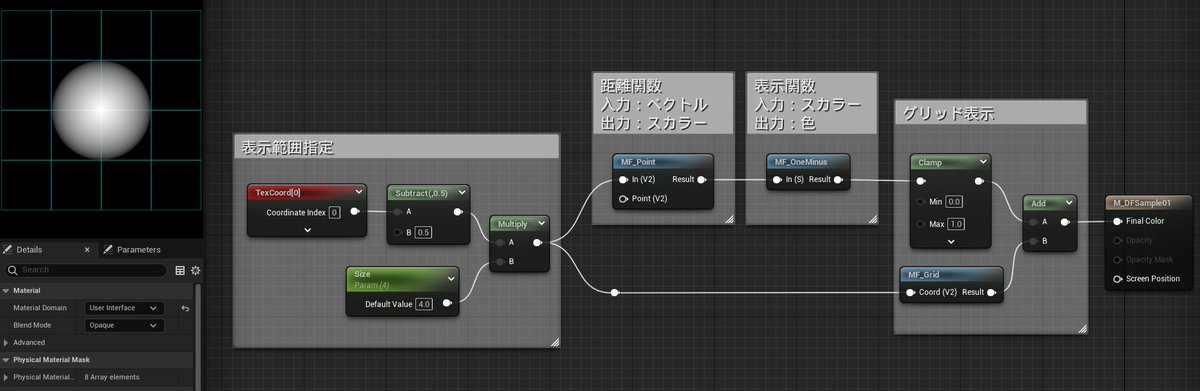
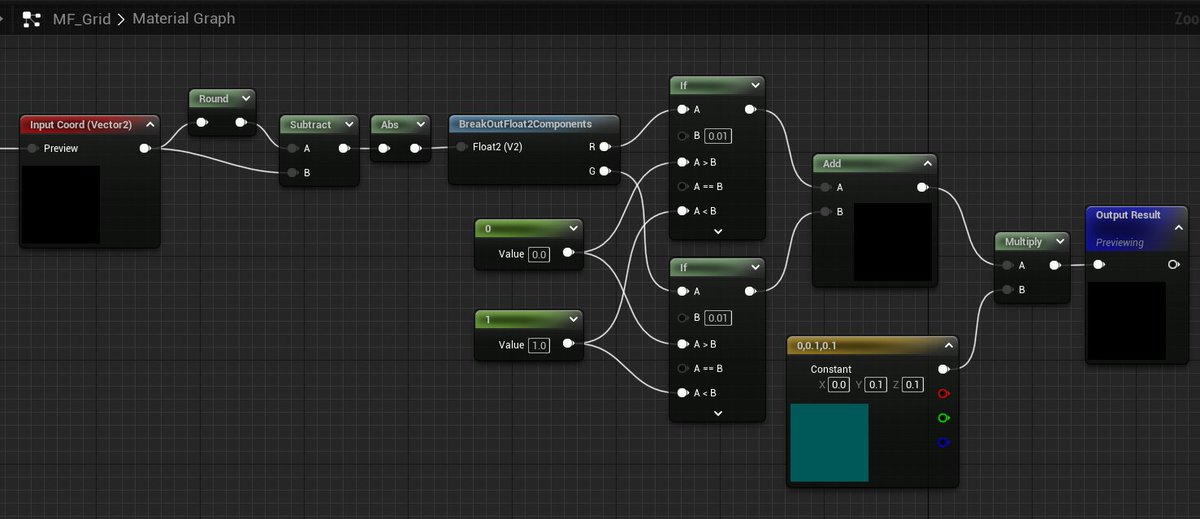
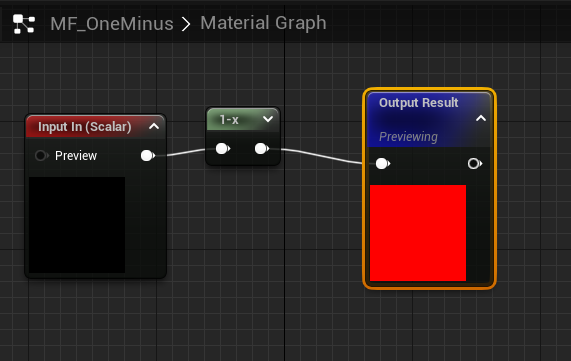
マテリアル芸人が明示的あるいは暗黙的に使う「distance function」「distance field」、もう少し一般化して「scalar field」みたいなものの入門キットをツリーにぶら下げます。
写経から得るものもあるでしょうが、リポジトリを置いておきます(UE5.3)
github.com/nkdtr/MaterialRec…
#UE5 #UE5Study
1
17
121
7,673

23 Sep 2024
Naniteも頂点アニメーション(WorldPositionOffsetで草木揺らすとか)でVRAM負荷高い話しを聞いた。
Nanaiteの弱点って他にありますか?
後は半透明に使えないくらい?
ほかに無ければ使いたいなぁ。
#UE5
1
10
883

6 May 2024
UE/UnityなどのマテリアルビジュアルスクリプティングでWorldPositionOffset/Masked/Raymarching芸等を駆使したProceduralな表現がアーティストサイドでできるようになったのはいいけどそれらがNanite等の先端ジオメトリシステムやレイトレ等と食い合わせ良くなくてこういう表現のトレンドと仕組みのトレンドのズレみたいなものの皺寄せがどこかで爆発するんだろうかゴールデンウィーク終わった
5
27
4,448

7 Nov 2023
To maximize CPU performance!
- skeletal animations have more overhead and are computed by CPU.
- static meshes are cheaper, they work with instancing and WorldPositionOffset vertex animations are done by GPU.
1
1
90

4 Oct 2023
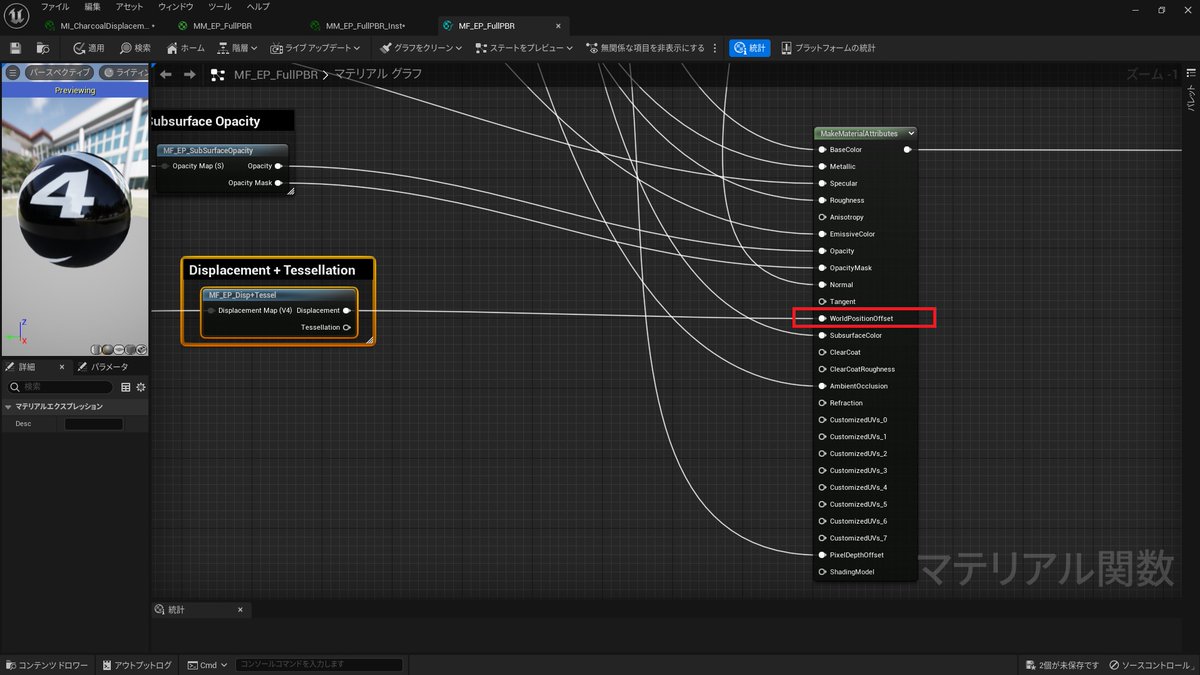
今月の神無料アセットのEP Master Materialで5.1でもDisplacementサクッと実装できる!?と思ったのですが何故かMaster MaterialのDisplacementノードが外れていて詰んでいたので一応ポストしておきます。Worldpositionoffsetにつなげると出来ました。間違っていたら教えてください!
#UE5
7
510

2 Sep 2023
UE5.3から、WorldPositionOffsetによるVelocityの出力をメッシュコンポーネント単位で指定できるようになりました。VATがMotion Blur上でぶれてしまう場合などに有効です。ただし、速度を生成しなくなるのでTSR上で不具合が出る可能性があります。そちらも併せてご確認ください
#UE5
31
129
11,076

30 Dec 2022
ふつーにWorldPositionOffsetに繋ぐとスフィアの頭とお尻が特にパタパタして見栄え悪かったけど、WorldPositionノードを使ったらスムーズな頂点アニメーションになった
#UE5
19
94
4,932
20 Dec 2022
Heads up. Don't bother with the last bit of logic (the vertex interpolator stuff) if you're plugging this math into material WorldPositionOffset.
2
694


3 Jul 2022
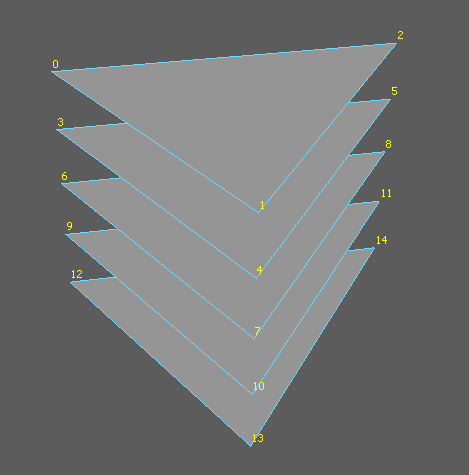
To handle dynamic topology we need to author a mesh with maximum number of triangles that a voxel can emit(=5) and cull unneeded triangles inside VS (WorldPositionOffset = -WorldPosition).
This has some overhead but seems fine.
1
5

9 Jun 2022
WorldPositionOffset Scale
--
I forgot how to do this, I had to relearn. Sharing to anyone else who wonder how to scale a mesh with WPO.
Now I wonder how to scale just one face of the cube... 🤔
--
#UnrealEngine #UE4 #UE4Study #UE5 #UE5Study #UEMaterial
1
5
55

3 Mar 2022
UE4でForce ShieldのDissolve Material.
今回はWorldPositionOffsetとDissolveを合わせたMaterialを作ることが目的。#UE4Study
諸事情でしばらくUE4触れなかった分、今回のマテリアル作成が物凄く楽しく感じた。これからもUE4触っていきたい。
1
27
208