
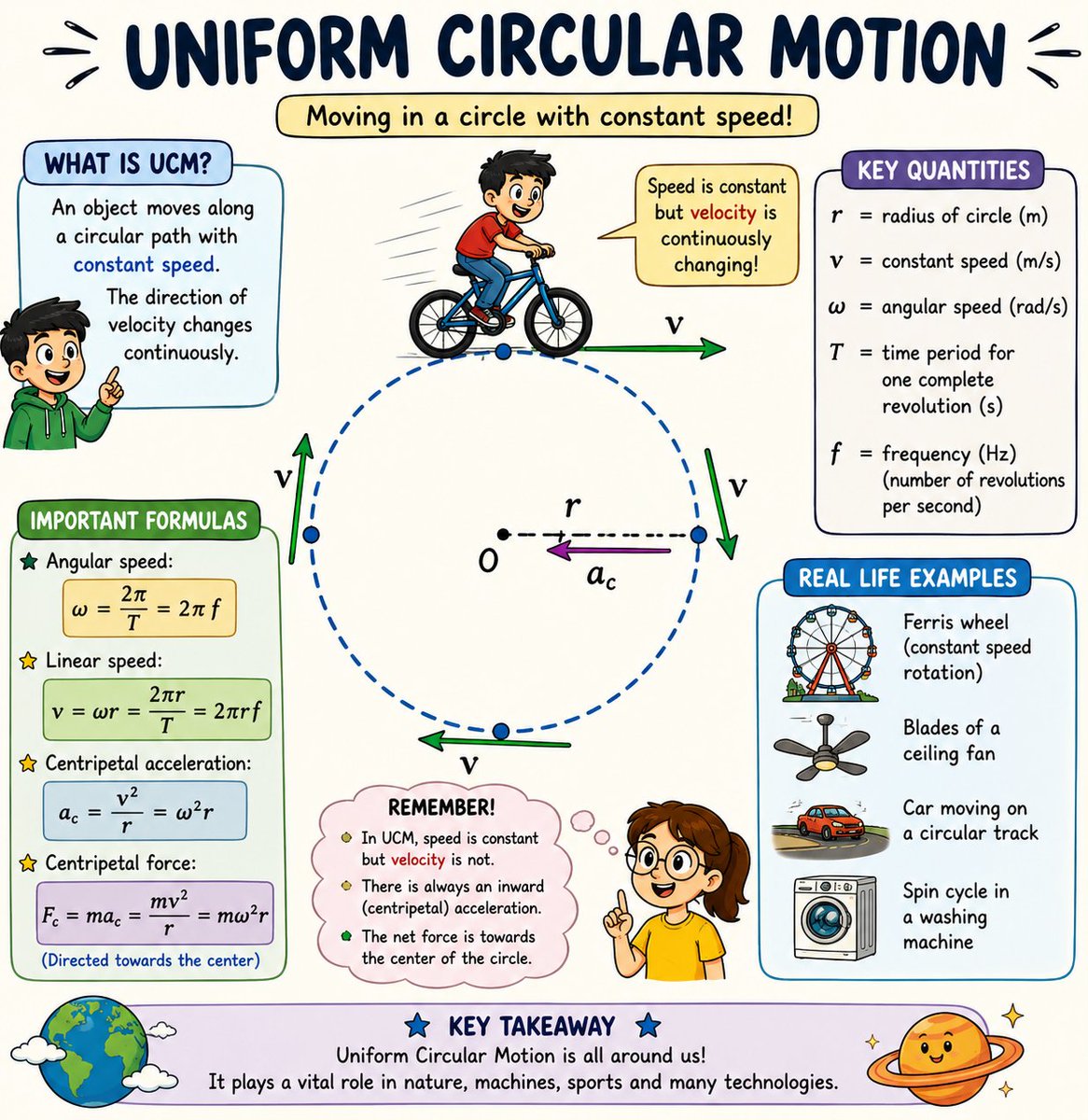
🔄 Uniform Circular Motion (UCM) 🔄
Did you know? An object moving in a circle at constant speed is still accelerating! 🤯
✅ Speed remains constant
✅ Velocity changes continuously
✅ Centripetal acceleration always points toward the center
✅ Essential in satellites, Ferris wheels, fan blades, planets, and particle accelerators
Key Formula:
ω = 2πf
v = ωr
aₙ = v²/r
From spinning fans to orbiting planets, Uniform Circular Motion powers countless phenomena in nature and technology! 🌍🛰️⚙️
Follow for more Physics, Science & STEM content!
@NASA @ESA @CERN @ISRO @PhysicsWorld @APSPhysics @SciTechDaily @Nature @ScienceMagazine
#UniformCircularMotion #Physics #STEM #Science #ScienceEducation #PhysicsTeacher #PhysicsStudent #LearningPhysics #CentripetalForce #CentripetalAcceleration #AngularVelocity #Motion #Mechanics #Engineering #Technology #Astronomy #SpaceScience #ISRO #NASA #ESA #CERN #Education #ScienceCommunication #ScienceFacts #STEMEducation #PhysicsLovers #ScienceForEveryone #ScienceCommunity #Innovation #ScientificThinking
26
37
312

Apr 20
i believe bare minimum you're replicating a cframe per player not counting assemblylinear/angularvelocity, usually not axis-aligned which is 49 bytes by itself per player. that is 392 bits. physics replication is scary so i don't know the extents but that's a LOT in comparison
1
1
162

Mar 4
Actualización 4/3/2026 - Notas:
[ VARIOS ]
A partir de hoy, los objetos puestos en venta en el Mercado de la Comunidad de Steam permanecerán en tu inventario para su uso mientras estén listados (por ejemplo, tu arma puede equiparse en tu equipamiento mientras esté publicada). Mientras estén en venta, los objetos no podrán consumirse ni modificarse. Puedes cancelar tus publicaciones en cualquier momento.
Se agregó la posibilidad de establecer tu límite máximo de oferta para objetos en la Terminal, y el Arms Dealer solo mostrará ofertas hasta ese límite.
Se corrigió una leve inclinación en la animación de carrera de las gallinas.
[ MAPAS ]
Inferno
El balcón en el sitio de bomba A ha sido extendido.
El Cementerio en el sitio de bomba A ha sido cerrado al público.
Se ajustó la colisión en la pequeña ventana junto al balcón de Second Mid.
Warden, Sanctum
Se actualizaron a la última versión del Community Workshop.
[ SCRIPTING DE MAPAS ]
Se agregó hitEntity a los datos del evento OnBulletImpact.
Se agregó Entity.GetAbsAngularVelocity().
Se agregó Entity.GetLocalAngularVelocity().
Se agregó angularVelocity a Entity.Teleport().
Se agregó CSWeaponBase.GetClipAmmo().
Se agregó CSWeaponBase.SetClipAmmo().
Se agregó CSWeaponBase.GetReserveAmmo().
Se agregó CSWeaponBase.SetReserveAmmo().
Se agregó CSWeaponData.GetMaxClipAmmo().
Se agregó CSWeaponData.GetMaxReserveAmmo().
Se corrigió la ausencia de CSPlayerPawn.IsDucking().
Se corrigió la ausencia de CSPlayerPawn.IsDucked().
Se corrigió un error donde JUMP no se activaba para WasInputJustPressed() y WasInputJustReleased() si la pulsación no cruzaba un límite de tick.
Se corrigió un error donde los métodos de Entity GetEyePosition(), GetEyeAngles(), GetHealth(), GetMaxHealth() y SetMaxHealth() solo funcionaban en CSPlayerPawns.

2
124
12,160


23 Aug 2025
小ネタ
Rigidbody の angularVelocity は『回転軸×回転速度[radian/s] 』です。
rigidbody.angularVelocity = Vector3.up*2.0f*Mathf.PI;
で、Y 軸周りに、1秒間に1回転します。
1
1
19
4,934

5 Aug 2025
here's the prompt: (credits @_overment )
Create a single-file index.html that implements a colorful, fully animated physics scene in vanilla JavaScript, no external libraries.
Goal
A polygonal container (default hexagon, but edges configurable, min 3) spins and moves inside a rectangular canvas. Inside it, multiple balls move under gravity, collide elastically with the polygon edges and with each other. The polygon itself bounces off the canvas boundaries. Gravity varies over time and direction, affecting both the polygon’s motion and the balls within it. All motion should feel natural and respect conservation of momentum and coefficient of restitution.
Requirements
1) Tech
- Single index.html with inline CSS and JS
- Vanilla JS only
- Responsive canvas that fits window
- High-DPI support with devicePixelRatio
- Use requestAnimationFrame; keep 60fps where possible
2) Controls (exposed via simple on-screen UI and via a single config object at top of JS)
- polygonSides: integer >= 3
- polygonSize: radius in pixels
- spinSpeed: radians per second (positive CW or CCW; also allow spinDirection boolean or sign)
- ballsCount: integer >= 1
- polygonSpinDirection: "cw" or "ccw"
- gravityMode: "varying" by default; gravity vector changes smoothly over time
- gravityMagnitudeRange: [min, max]
- gravityDirectionChangeSpeed: how fast gravity direction rotates
- polygonBounceRestitution: 0..1
- ballRestitution: 0..1
- wallRestitution: 0..1
- ballRadiusRange: [min, max]
- ballMassFromRadius: true to set mass proportional to area
- polygonLinearDamping and angularDamping
- polygonInitialVelocity and angularVelocity override when provided
- colorMode: "dynamic"
- trail: boolean with fade amount
- paused: boolean
- timeScale: number for slow/fast motion
3) Physics details
- Represent polygon as a rigid body with position, velocity, angle, angular velocity
- Polygon collides with rectangular canvas boundaries and bounces using restitution; correct penetration robustly
- Gravity applies to both polygon center of mass and balls; polygon’s response includes both translation and torque as appropriate (can simplify to center force)
- Balls move under gravity, collide with polygon edges (treat edges as line segments in world space) with elastic response
- Balls collide with each other via circle-circle collisions with impulse resolution and positional correction to avoid sinking
- Use stable, iterative solver per frame: integrate velocities, predict positions, detect collisions, resolve impulses, positional correction, then finalize positions
- Prevent tunneling at high speeds: use smaller substeps per frame or conservative advancement
- Use a small slop and baumgarte-style correction for stability
- Include friction (tangent impulse) optional; if added, keep simple Coulomb friction
- Preserve momentum as reasonably as possible for a simple engine
4) Animation and visuals
- Colorful, dynamic theme; polygon outline glows, balls have gradients
- Background can show gravity direction indicator (arrow) and magnitude
- Optionally draw velocity/force vectors as subtle lines
- Optionally add trails/fading for motion blur feel
- Show polygon rotation and spin visually; maybe color shift based on angular speed
- Show bounce effects with brief color flashes on contact
5) Interactivity
- Provide a simple UI panel: sliders or inputs for polygonSides, polygonSize, ballsCount, spinSpeed, spinDirection, gravityMagnitudeRange, timeScale, pause/resume, reset
- A “Randomize” button to re-seed balls' positions and velocities without overlaps
- Ensure polygonSides change rebuilds the shape safely without trapping balls outside; reposition as needed
- Keep balls inside polygon on creation; resolve any overlaps
6) Structure
- Top-level config object with defaults
- Utility functions: vector ops, polygon vertex generation, point-in-polygon, segment-circle collision, circle-circle collision, SAT for polygon-wall if needed
- Physics step(dt) with optional substeps
- Rendering step with clear layering: background, container bounds, polygon, balls, overlays (vectors/labels/UI)
- Initialization that seeds balls at non-overlapping positions inside polygon; reject or jitter to resolve overlaps
7) Edge cases
- Very small polygon size relative to balls: clamp minimum size or warn in UI
- High spinSpeed or timeScale: auto-increase substeps
- Large ballsCount: degrade gracefully, maybe cap, and keep >30fps if possible
- Keep numeric stability: use EPS, clamp impulses, limit max velocity
- Handle window resize cleanly; preserve state
8) Comments and readability
- Comment core physics: impulse equations, restitution, positional correction
- Explain gravity variation function
- Keep code tidy and modular within the single file
Deliverables
- A complete index.html that runs by opening in a browser
- Includes UI, canvas, styles, and fully working physics per above
- Sensible defaults: polygonSides=6, polygonSize=180px, ballsCount=12, spinSpeed=0.8 rad/s, gravity varying slowly
Optional enhancements (if time)
- Audio pings on collisions with volume scaled by impulse
- Toggle for wireframe/debug view showing normals and contact points
- Snapshot/export of current config as JSON and import button
Make sure everything is self-contained and works out of the box.
1
3
946

31 Jul 2025
This:
#########
Create a single-file index.html that implements a colorful, fully animated physics scene in vanilla JavaScript, no external libraries.
Goal
A polygonal container (default hexagon, but edges configurable, min 3) spins and moves inside a rectangular canvas. Inside it, multiple balls move under gravity, collide elastically with the polygon edges and with each other. The polygon itself bounces off the canvas boundaries. Gravity varies over time and direction, affecting both the polygon’s motion and the balls within it. All motion should feel natural and respect conservation of momentum and coefficient of restitution.
Requirements
1) Tech
- Single index.html with inline CSS and JS
- Vanilla JS only
- Responsive canvas that fits window
- High-DPI support with devicePixelRatio
- Use requestAnimationFrame; keep 60fps where possible
2) Controls (exposed via simple on-screen UI and via a single config object at top of JS)
- polygonSides: integer >= 3
- polygonSize: radius in pixels
- spinSpeed: radians per second (positive CW or CCW; also allow spinDirection boolean or sign)
- ballsCount: integer >= 1
- polygonSpinDirection: "cw" or "ccw"
- gravityMode: "varying" by default; gravity vector changes smoothly over time
- gravityMagnitudeRange: [min, max]
- gravityDirectionChangeSpeed: how fast gravity direction rotates
- polygonBounceRestitution: 0..1
- ballRestitution: 0..1
- wallRestitution: 0..1
- ballRadiusRange: [min, max]
- ballMassFromRadius: true to set mass proportional to area
- polygonLinearDamping and angularDamping
- polygonInitialVelocity and angularVelocity override when provided
- colorMode: "dynamic"
- trail: boolean with fade amount
- paused: boolean
- timeScale: number for slow/fast motion
3) Physics details
- Represent polygon as a rigid body with position, velocity, angle, angular velocity
- Polygon collides with rectangular canvas boundaries and bounces using restitution; correct penetration robustly
- Gravity applies to both polygon center of mass and balls; polygon’s response includes both translation and torque as appropriate (can simplify to center force)
- Balls move under gravity, collide with polygon edges (treat edges as line segments in world space) with elastic response
- Balls collide with each other via circle-circle collisions with impulse resolution and positional correction to avoid sinking
- Use stable, iterative solver per frame: integrate velocities, predict positions, detect collisions, resolve impulses, positional correction, then finalize positions
- Prevent tunneling at high speeds: use smaller substeps per frame or conservative advancement
- Use a small slop and baumgarte-style correction for stability
- Include friction (tangent impulse) optional; if added, keep simple Coulomb friction
- Preserve momentum as reasonably as possible for a simple engine
4) Animation and visuals
- Colorful, dynamic theme; polygon outline glows, balls have gradients
- Background can show gravity direction indicator (arrow) and magnitude
- Optionally draw velocity/force vectors as subtle lines
- Optionally add trails/fading for motion blur feel
- Show polygon rotation and spin visually; maybe color shift based on angular speed
- Show bounce effects with brief color flashes on contact
5) Interactivity
- Provide a simple UI panel: sliders or inputs for polygonSides, polygonSize, ballsCount, spinSpeed, spinDirection, gravityMagnitudeRange, timeScale, pause/resume, reset
- A “Randomize” button to re-seed balls' positions and velocities without overlaps
- Ensure polygonSides change rebuilds the shape safely without trapping balls outside; reposition as needed
- Keep balls inside polygon on creation; resolve any overlaps
6) Structure
- Top-level config object with defaults
- Utility functions: vector ops, polygon vertex generation, point-in-polygon, segment-circle collision, circle-circle collision, SAT for polygon-wall if needed
- Physics step(dt) with optional substeps
- Rendering step with clear layering: background, container bounds, polygon, balls, overlays (vectors/labels/UI)
- Initialization that seeds balls at non-overlapping positions inside polygon; reject or jitter to resolve overlaps
7) Edge cases
- Very small polygon size relative to balls: clamp minimum size or warn in UI
- High spinSpeed or timeScale: auto-increase substeps
- Large ballsCount: degrade gracefully, maybe cap, and keep >30fps if possible
- Keep numeric stability: use EPS, clamp impulses, limit max velocity
- Handle window resize cleanly; preserve state
8) Comments and readability
- Comment core physics: impulse equations, restitution, positional correction
- Explain gravity variation function
- Keep code tidy and modular within the single file
Deliverables
- A complete index.html that runs by opening in a browser
- Includes UI, canvas, styles, and fully working physics per above
- Sensible defaults: polygonSides=6, polygonSize=180px, ballsCount=12, spinSpeed=0.8 rad/s, gravity varying slowly
Optional enhancements (if time)
- Audio pings on collisions with volume scaled by impulse
- Toggle for wireframe/debug view showing normals and contact points
- Snapshot/export of current config as JSON and import button
Make sure everything is self-contained and works out of the box.
2
2
17
1,368

27 Jun 2025
Increasing the angularvelocity range from -180 to 180 makes this really funky #minacoding #creativecoding
1
5
99


26 Jan 2025
After over half a decade of Unity physics BS, I may have just finally realized how angularVelocity works, and the fact that what it actually represents isn't documented ANYWHERE aside from searching "angular velocity vector" in a non-game engine context is driving me to madness.
3
9
225

23 Jan 2025
VRCObjectSyncがvelocityとangularVelocityも同期してくれてたら、Rigidbodyを使っていながらRigidbody.angularVelocityを使わずにangularVelocityを計算するなどという回りくどいことしなくてよかったんだけどな
1
3
11
921

4 Dec 2024
q' = q (1/2 * AngularVelocity * q)
-> The division by 2 can be done after the other multiplication to preserve accuracy
You treat AngularVelocity as a quaternion with a=0 (So only x, y and z are specified), then you perform quaternion multiplication as in the formula.
1
2
34

12 Jul 2024
Also there is catch for this, you will need to figure out how VectorVelocity and AngularVelocity constaint(s) was setup in order to recreate the plane's movement in the video. If you know how constraints work and whats going on in the code, it'll be a breeze.
sorry script kiddies, no drag'n'drop freemodels here.
2
1
36
12,805

19 Jun 2024
At over 5 minutes, sdPBR470\posteffect\VolumetricCloud_Tornado.fx has the longest initial loading time of any effects I've ever seen, by far.
And, apparently, "AngularVelocity " is too long of a morph name to be saved in a VMD, so now I have to go back and check stuff. Fuck.
1
1
131

3 Mar 2024
#りくせん進捗
フラッシュライトのRigidbodyのvelocity、angularVelocityをOnUpdateで毎回Vector3.zeroにして、Sleep()して、localPositionをOnUpdateでいじらないようにしたら一応治った(?)
ライトがある場所がなんかおかしいけど
変なところですごいハマるのうぜえ
2
1
501

5 Jan 2024
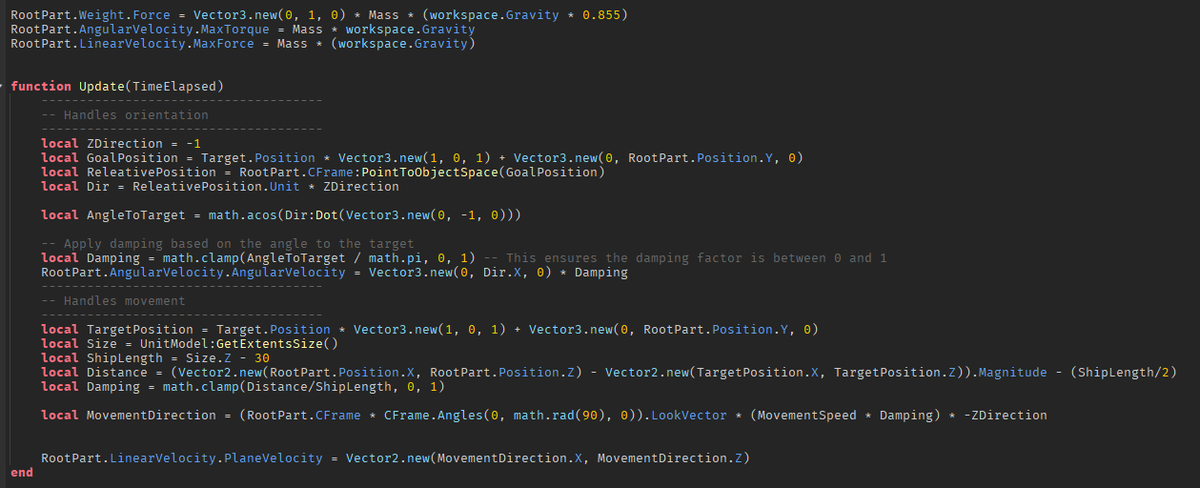
Movement is done by using an AngularVelocity constraint for rotation and LinearVelocity constraint for movement, both require insane amount of torque/force to do anything.
Weirdly the vessel does move forward at a max speed of 25 studs per second which is good because I can scale the speed easier w/ other things in my game... except that the rotation "speed" is not really consistent. I'm not really a mathy person so thats above me with figuring out. Pseudo numbers work for now. I also use an additional VectorForce constraint to help "raise" the boat out of the water since the boat is actually pretty heavy.
3
821

4 Nov 2023

3
8
18
488

ようやく見つけたよ!
全ての関係が図示された資料が
#AngularMomentum
#AngularVelocity
#Polhode
#Herpolhode
#InertialEllipsoid
#RigidBodyRotation
#剛体の力学
#Eulerの方程式
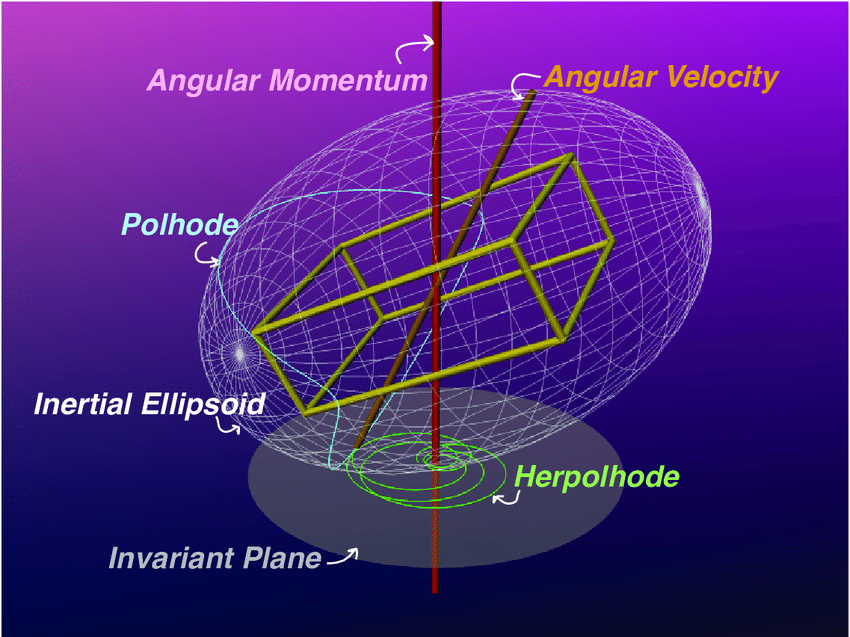

#MatLab を駆使しても #剛体の回転運動 を理解するのは困難だなー
Matlab simulation of rigid body rotation
youtube.com/watch?v=8tKXYXvk…
4
164

18 Aug 2023
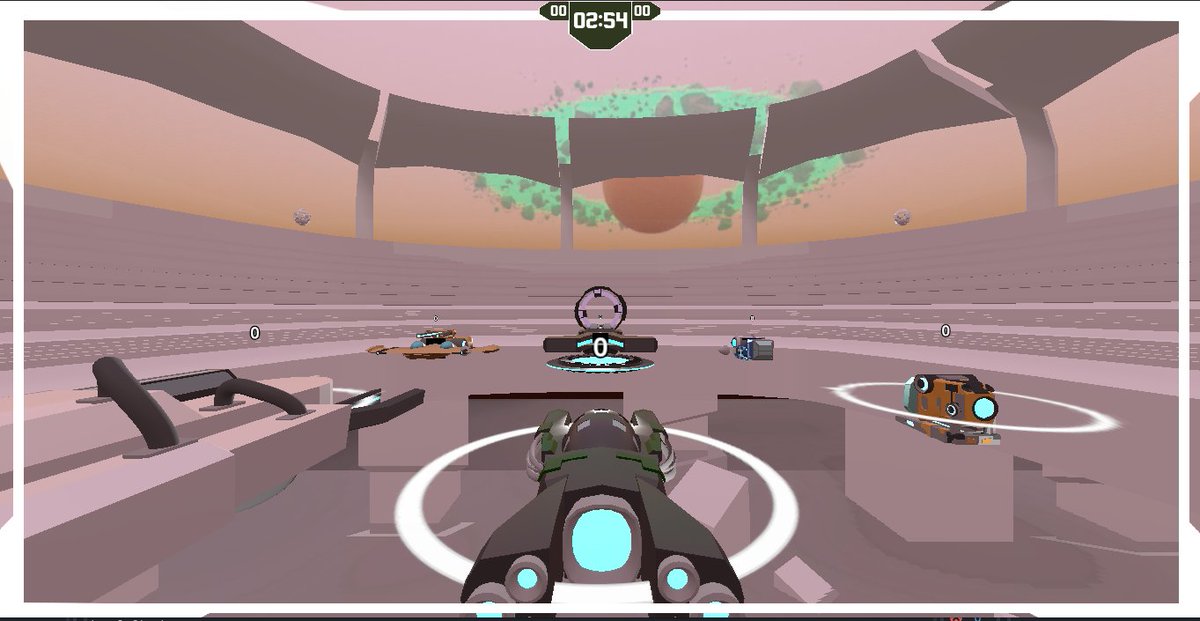
Our project lead shared a screenshot of #AngularVelocity with bots added to the single player game! Can't wait to see a video!
#WIP #IndieGameDev

1
4
71
