
7h
Great engineers do not just write code.
They write code that future teams can understand, maintain, and build upon.
That is the difference between clever software and lasting software.
#TechInnovation #SoftwareEngineering #AI #devbox
5

devbox maybe but for generative projects?

Midjourney will be announcing its first hardware project tomorrow (Wednesday 6/17) at 6pm PT. Stay tuned for a livestream of our in-person launch event in San Francisco. If you're in town and want an invite, reply below, we have just a few slots left.
7

yeah I agree, I've even been looking at old server racks just for my own devbox - great compute value
and you're right about the compute costs for large models at home - I was being optimistic, I don't see myself buying GPU's for a very long time - and you are right, i get the sense there it a piece missing to turn GPU racks into real unified memory.
1
1
10

21h
Another reason I migrated away from work trees is because every single repo I work on has a fully built ast…
I can’t hold more than one AST for a monolith even on my massive devbox
13


Jun 16
AI can generate the code.
But shipping still needs the right environment.
This breakdown shows how Sealos DevBox Sealos Skills help close the gap between “it runs locally” and “it runs in production.”

1
3
18

Jun 16
basically why i am reluctant to let go of one spare vps i turned it into a devbox.
1
11


None one retweeted

Jun 14
Codex Mobile power user guide:
Your phone is a control plane for work running on your Mac / Windows machine / devbox
The best workflows:
> start threads on the right host workspace
> pick branch worktree from mobile
run local environment setup before the task starts
> use /side for questions without derailing the main thread
> use /plan when the change is risky or more involved
> use /goal when the outcome needs multiple iterations
> attach screenshots / files / photos / voice prompts directly from your phone
review diffs, inspect files, leave inline comments
> queue or steer follow-ups while away from desk
Mental model:
- main thread = the work
- side chat = reasoning around the work
- plan = implementation path
- goal = durable end state
Essentially, mobile makes Codex useful in all the in-between moments
See a bug on your phone → screenshot → send to Codex → review diff → leave comments → keep moving
goated guide from @Dimillian 🔥

20
15
248
28,759

Jun 15
Reproducing a teammate's dev environment is still a 2 day yak shave.
Devbox turns it into a single devbox.json file:
- 400k packages from the Nix registry, no Docker overhead
- Isolated shells, per project, no global pollution
- Same tool versions for every contributor, every machine
The dev environment you can actually commit.
github.com/jetify-com/devbox
11

Jun 15
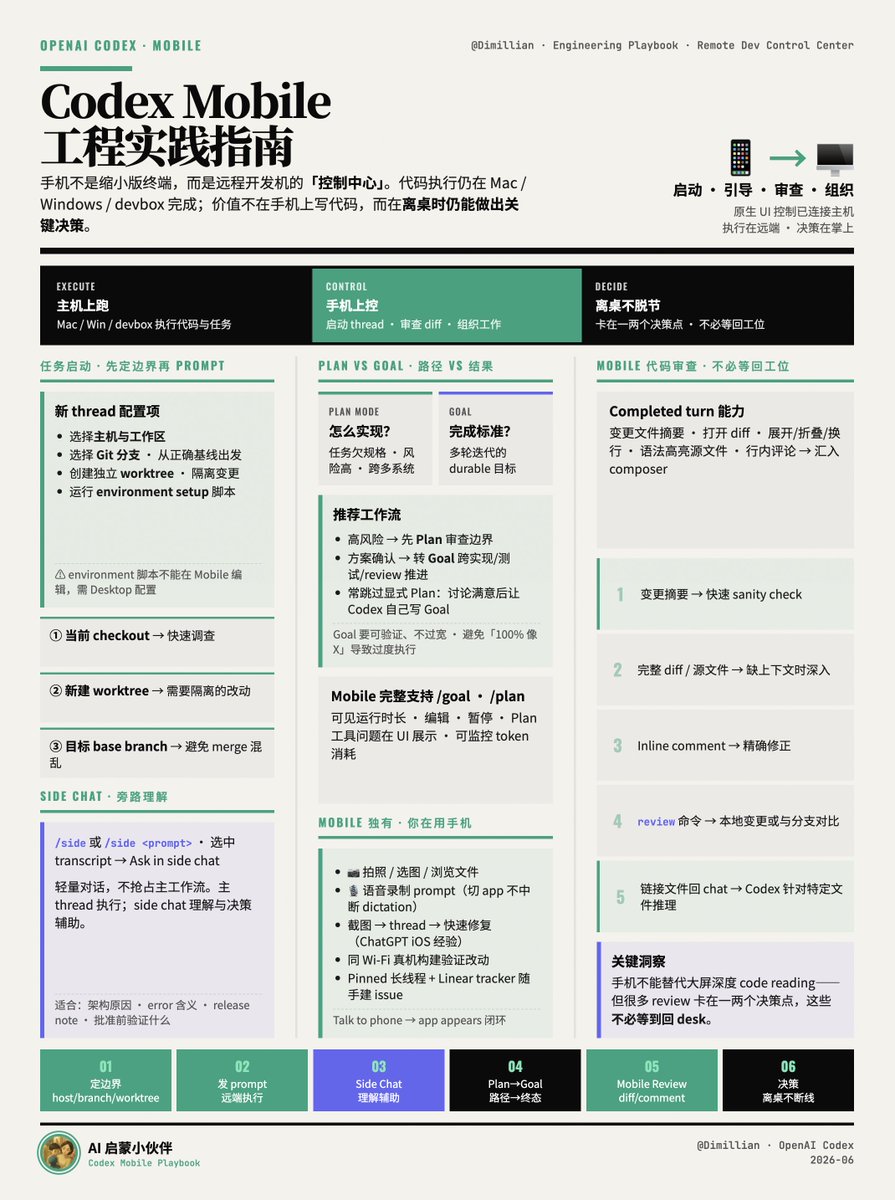
OpenAI Codex Mobile 工程实践指南
@Dimillian 提出了 Codex Mobile 核心心智模型:
手机不只是缩小版终端,它是远程开发机的「控制中心」。
· 代码执行、任务运行仍在 Mac / Windows / devbox 等已连接主机上完成
· 手机提供原生 UI,用于启动、引导、审查、组织工程工作
· 价值不在「在手机上写代码」,而在「离桌时仍能做出关键决策」
# 任务启动:先定边界,再发 prompt
好 agent 工作的前提是正确隔离的执行环境。Codex Mobile 在创建新 thread 时可配置:
· 选择主机与工作区:指定在哪台机器、哪个项目跑
· 选择 Git 分支:从正确基线出发,避免事后修 Git 状态
· 创建独立 worktree:隔离变更,不污染当前 checkout
· 运行 environment setup 脚本:worktree 创建后自动执行桌面端配置的初始化脚本
三种典型模式:
1. 用当前 checkout → 快速调查
2. 新建 worktree → 需要隔离的改动
3. 从目标 base branch 起步 → 避免后续 merge 混乱
限制:environment 脚本目前不能在 Mobile 上编辑,需在 Desktop 配置。
# Side Chat:主线程做活,旁路线程理解
长线程会积累大量上下文;每个旁路问题都打断主线程,会让 transcript 变噪、agent 偏离目标。
Side chat 的定位:与当前 thread 关联的轻量对话,不抢占主工作流。
· /side 或 /side <prompt> 打开
· 选中 transcript 文本 → Ask in side chat,选中内容成为起始上下文
适合的问题类型:
· 为什么选这种架构?
· 这个 error 实际含义?
· 与 desktop 行为是否一致?
· 生成 release note 版说明
· 批准这条命令前应验证什么?
分工: 主 thread 负责执行;side chat 负责理解与决策辅助。
# Plan 与 Goal:路径 vs 结果
两者解决不同问题:
· Plan mode:「怎么实现?」,任务欠规格、风险高、跨多系统
· Goal:「完成标准是什么?」,需多轮迭代的 durable 目标
推荐工作流:
1. 高风险任务 → 先 Plan,审查边界
2. 方案确认后 → 转为 Goal,让 agent 跨实现、测试、review、清理持续推进
3. 实操中常跳过显式 Plan:先与 Codex 讨论细节,满意后让 Codex 自己写 Goal(通常比人工写更好)
Goal 写法注意: 设定可验证、不过宽的终态。过于绝对的要求(如「100% 像 X 或 Y」)容易导致过度执行、浪费 token。Mobile 端现已可监控 token 消耗,但仍应控制 Goal 粒度。
Mobile 对 /goal、/plan 支持完整:可见运行时长、编辑、暂停;Plan 工具的问题也会在 UI 中展示。
# Mobile 独有优势:别忘记「你在用手机」
Composer 内置访问本地手机数据的能力,这是桌面端没有的:
· 拍照 / 选图 / 浏览文件
· 语音录制 prompt(后台持续录音:切到其他 app 时 dictation 不中断)
典型场景(作者做 ChatGPT iOS 的经验):
· 发现问题 → 直接截图发给 Codex thread → 快速修复,无需回电脑
· 同 Wi-Fi 下 → 在真机构建运行,直接验证 Codex 改动结果
· 边用 app 边口述 10 分钟问题 → 回 Codex 发送,形成「Talk to phone → app appears」闭环
Pinned 长线程: 例如绑定 Linear tracker 的 thread,随手粘贴文本即可按当前上下文正确建 issue、打标签。
# Mobile 代码审查:不必等回工位
Completed turn 可展示变更文件摘要,支持:
· 打开 diff、展开/折叠、换行
· 查看带语法高亮的源文件
· 行内评论 → 自动汇入 composer,发回 Codex
分层用法:
1. 变更摘要 → 快速 sanity check
2. 完整 diff / 源文件 → 缺上下文时深入
3. Inline comment → 精确修正
4. review 命令 → 审查本地变更或与分支对比
5. 链接文件回 chat → 让 Codex 针对特定文件推理
关键洞察: 手机不能替代大屏做深度 code reading,但很多 review 卡在一两个决策点——这些决策不必等到回 desk。
28
4
39
7,432

Jun 14
It’s annoying how when accessing my Mac mini devbox from my iPhone or MacBook, it’ll often not be able to use thread controls. Randomly stops working until I retouch via sending a Codex command directly from the mini.
110