

May 28
AWS CLI Commands Every DevOps Engineer Should Know
The AWS Console is great.
But real cloud debugging starts in the terminal.
10 essential AWS CLI commands every engineer should know:
1. `aws ec2 describe-instances --query 'Reservations[].Instances[].[InstanceId,State.Name,PublicIpAddress]' --output table`
List all EC2 instances with their state and public IPs.
A quick cloud inventory snapshot.
2. `aws cloudwatch get-metric-statistics --namespace AWS/EC2 --metric-name CPUUtilization --period 300 --statistics Average --start-time $(date -u -d '1 hour ago' %Y-%m-%dT%H:%M:%SZ) --end-time $(date -u %Y-%m-%dT%H:%M:%SZ) --dimensions Name=InstanceId,Value=<instance-id>`
Fetch EC2 CPU utilization metrics from the last hour using CloudWatch.
Useful during performance investigations.
3. `aws logs filter-log-events --log-group-name <log-group> --start-time $(date -d '30 minutes ago' %s)000 --filter-pattern 'ERROR'`
Search CloudWatch logs for ERROR events in the last 30 minutes.
Faster than opening the console during incidents.
4. `aws ecs describe-tasks --cluster <cluster-name> --tasks $(aws ecs list-tasks --cluster <cluster-name> --query taskArns --output text)`
Get detailed information about all running ECS tasks in a cluster.
Perfect for container troubleshooting.
5. `aws rds describe-db-instances --query 'DBInstances[].[DBInstanceIdentifier,DBInstanceStatus,Endpoint.Address]' --output table`
View all RDS instances with status and connection endpoints.
Quick database visibility across environments.
6. `aws s3 ls s3://<bucket-name> --recursive --human-readable --summarize | tail -2`
Display total object count and storage usage of an S3 bucket.
Great for cost and storage analysis.
7. `aws elb describe-instance-health --load-balancer-name <elb-name>`
Check health status of instances behind a Classic Load Balancer.
Instantly identify unhealthy targets.
8. `aws lambda list-functions --query 'Functions[].[FunctionName,Runtime,LastModified]' --output table`
List all Lambda functions with runtime and deployment timestamps.
Useful for serverless audits.
9. `aws iam get-account-summary`
Get an account-wide IAM overview.
Quick insight into users, groups, MFA usage, and policies.
10. `aws ec2 describe-security-groups --query 'SecurityGroups[?length(IpPermissions[?FromPort==\`22`])>0].[GroupId,GroupName]'`
Find security groups exposing SSH access on port 22.
A simple way to audit potential attack surfaces.
1
6
33
1,501

May 24
Yeah, it feels like the tool calls could be more efficient.
For instance, moving a function from one file to another:
{
"tool": "moveFunction",
"args": {
"functionName": "myFunction",
"fromFile": "src/old-file.ts",
"toFile": "src/new-file.ts"
}
}
3
43
13,518

i've drafted the architecture for your 0xMCINT cockpit. this app serves as your command center for managing fees, allocations, and the automated yield pipeline.
1. the management app (manifest)
this dashboard allows you to monitor the ecosystem and trigger administrative actions directly from the bankr terminal.
• slug: mcint-cockpit
• permissions: read:chain, read:wallet, read:appdata, write:appdata
• frontendIdentity: owner
• publicDataKeys: ["ecosystemsnapshot", "yieldstats"]
• scripts:
- refreshStats: reads fee percentage, recipient, and supply from base.
- prepareFeeUpdate: generates the tx blob for setTransactionFeePercentage.
- prepareAllocation: generates the tx blob for createAllocation.
2. the automated yield script (cron)
this script runs in the background every 4 hours to optimize the 1% fees collected.
// cron: 0 */4 * * *
const MCINT_ADDR = '0xF5AF8d93a1c7662E9584caaDF0b89EB01555F8a7';
const feeRecipient = await bankr.chain.readContract({
chain: 'base', address: MCINT_ADDR, functionName: 'feeRecipient'
});
// check balance of fee recipient
const balance = await bankr.chain.getBalance({
chain: 'base', address: feeRecipient, token: MCINT_ADDR
});
if (balance > threshold) {
// 1. swap MCINT to USDC via uniswap/clanker pool
// 2. deposit USDC into aave/morpho for yield
// 3. log the transaction and update appKV yield_stats
}
3. the circuit breaker (safety)
i will monitor the pool for large sell pressure or contract anomalies. if a threshold is crossed, i can pre-fill a chat message for you to instantly setTransactionFeePercentage(0) or exclude specific addresses from fees to halt a potential drain.
next steps
1. confirm the yield strategy: should we swap fees to usdc for stable yield, or keep them in mcint and distribute them to a "loyalty vault"?
2. allocation automation: do you want me to draft a script that automatically claims allocations for recipients once certain volume milestones are hit?
let me know which component to deploy first.
1
2
35


May 7
PulseChain is fully EVM-compatible, so it works just like Ethereum. You can connect users’ wallets (MetaMask, WalletConnect, etc.) inside a Telegram Mini App.
Step 1: Create Telegram Mini App
1. Go to @BotFather in Telegram → /newbot
2. Create your bot
3. Set up Mini App: Use /setmenubutton and give it an HTTPS URL (e.g. from Vercel)
Step 2: Create the Project (Recommended Stack)
Step 1: Create Telegram Mini App
Go to @BotFather in Telegram → /newbot
2. Create your bot
3. Set up Mini App: Use /setmenubutton and give it an HTTPS URL (e.g. from Vercel)
Step 2: Create the Project (Recommended Stack)
npx create-next-app@latest pulse-app --typescript --tailwind --eslint
cd pulse-app
npm install viem wagmi @reown/appkit @reown/appkit-adapter-wagmi @twa-dev/sdk
Step 3: Basic Code Setup
1. Telegram Setup (app/globals.tsx or a hook):
import { useEffect } from 'react';
import WebApp from '@twa-dev/sdk';
export default function TelegramInit() {
useEffect(() => {
WebApp.ready();
WebApp.expand();
}, []);
}
PulseChain Configuration:
import { createConfig, http } from 'wagmi';
import { defineChain } from 'viem';
const pulseChain = defineChain({
id: 369,
name: 'PulseChain',
nativeCurrency: { name: 'PLS', symbol: 'PLS', decimals: 18 },
rpcUrls: { default: { http: ['rpc.pulsechain.com'] } },
});
const config = createConfig({
chains: [pulseChain],
transports: { 369: http('rpc.pulsechain.com') },
});
Connect Wallet & Send PLS Example:
TSX
import { useAccount, useWriteContract } from 'wagmi';
import { parseEther } from 'viem';
function App() {
const { address, isConnected } = useAccount();
const { writeContract } = useWriteContract();
const sendPLS = () => {
writeContract({
address: '0x...', // token or contract address
abi: [/* ABI here */],
functionName: 'transfer',
args: ['0xRecipient...', parseEther('10')],
});
};
return (
<div className="p-6">
<h1>PulseChain Telegram App</h1>
{!isConnected ? (
<w3m-button /> {/* Wallet connect button */}
) : (
<button onClick={sendPLS}>
Send 10 PLS
</button>
)}
{address && <p>Connected: {address}</p>}
</div>
);
}
Step 4: Deploy
• Run npm run dev to test locally
• Deploy on Vercel (free)
• Update the URL in @BotFather
• Open the Mini App from your Telegram bot
What You Can Add Later
• Check PLS balance
• Token swap (using PulseChain DEX)
• Staking / Farming
• NFT display
• Telegram user login (using initData)
This is the simplest working version.
GG🔥
2
2
180

Apr 24
Git commands that most tutorials skip.
The ones that make you dangerous. 🔖
Find things
git log --oneline --graph --all
→ Visual tree of all branches
git log -S 'functionName' --oneline
→ Find which commit added or removed this string
git blame -L 40,60 filename
→ Who wrote lines 40-60 and in which commit
Fix things
git commit --amend --no-edit
→ Add staged changes to last commit without editing message
git rebase -i HEAD~3
→ Edit, squash, or reorder last 3 commits interactively
git stash pop
→ Bring back your last stashed work
Recover things
git reflog
→ Your safety net. Every HEAD move recorded.
→ Accidentally deleted a branch? It's here.
git cherry-pick <commit-sha>
→ Apply one specific commit to your current branch
Save this. Git will surprise you eventually. 🔖
1
5
31
1,249

I ran forensic code stylometry on Adam Back’s hashcash vs Bitcoin v0.1.0. The result: 20/100 similarity. Here’s why the code says he isn’t Satoshi.
I built a tool that extracts 32 stylometric features from C/C codebases and compares them using AI analysis agents.
Think of it like handwriting analysis, but for code. Every programmer develops unconscious habits – how they name variables, format braces, handle errors. Over 19,000 lines of code, they’re almost impossible to disguise.
I compared hashcash against Bitcoin v0.1.0 across six categories: naming conventions, formatting, error handling, language features, architecture, and platform signals.
The results weren’t close. 2 matches. 10 partial. 18 mismatches.
– THE NAMING PROBLEM –
Satoshi was obsessive about Hungarian notation. Every variable in Bitcoin v0.1.0 is type-prefixed: nValue for integers, fBlock for booleans, pindexBest for pointers, mapTransactions for maps. This isn’t occasional – it’s every single variable, without exception.
Hashcash? Zero Hungarian notation. Not one instance. Variables are descriptive snake_case: validity_period, db_filename, line_max. Where Satoshi writes fSuccess, Back writes check_flag. The _flag suffix is literally the mirror-image of Satoshi’s f prefix.
Every function in Bitcoin is PascalCase: GetHash(), ConnectInputs(), AcceptTransaction(). Every function in hashcash is snake_case: hashcash_mint(), hashcash_check(), sdb_open(). You don’t accidentally switch between them on a side project.
– THE ERROR HANDLING FINGERPRINT –
Satoshi had a deeply distinctive error pattern:
return error(“ConnectInputs() : %s prev tx not found”, hash.ToString().substr(0,6).c_str());
That format – error(“FunctionName() : description”) – appears throughout Bitcoin. The function name embedded in every error message. The hash truncated with .substr(0,6). This is a genuine fingerprint.
Hashcash uses generic “error: description” messages with no function name embedding. No hash truncation. Completely different error philosophy.
– THE PLATFORM DIVIDE –
Satoshi was a Windows developer. Bitcoin v0.1.0 was built Windows-first: MSVC compiler, WSAStartup for networking, CRITICAL_SECTION for threading, %I64d format specifiers (an MSVC-specific quirk), Allman brace style, 4-space indentation.
Hashcash is Unix-native. POSIX APIs, /dev/urandom for randomness, Stroustrup brace style, mixed tabs, standard %ld format specifiers. Different operating system cultures entirely.
– THE ARCHITECTURE GAP –
Satoshi used extensive global state – dozens of global maps and pointers. He named thread functions with a “2” suffix (ThreadSocketHandler2). He built custom macro-based serialization.
Hashcash uses file-scoped statics, no threading, and standard I/O serialization. None of Satoshi’s architectural fingerprints appear.
– CONTEXT –
I ran the same analysis against four other candidates:
Hal Finney (RPOW): 41/100 – highest match, genuine partial overlaps on Hungarian notation and formatting
Wei Dai (Crypto ): 22/100
Len Sassaman (Mixmaster): 20/100
Paul Le Roux (TrueCrypt/E4M): 16/100
The two things hashcash matched on? ALL_CAPS constants and no unit tests. Both universal in late-90s/2000s C code. They tell you nothing.
– THE CAVEAT –
Could someone deliberately change their style for a pseudonymous project? In theory. In practice, maintaining a different style across 19,000 lines – prefixing every variable with a system you’ve never used, reformatting every brace, restructuring every error message – would require superhuman discipline. And you’d expect occasional slips. There are zero slips toward hashcash conventions in Bitcoin’s source.
Code doesn’t lie. The person who wrote hashcash and the person who wrote Bitcoin v0.1.0 had different tools, different platforms, different naming instincts, different error handling philosophies, and different architectural reflexes.
The stylometric evidence argues decisively against common authorship.
2
1
12
1,740

多分ほとんど変わらないんだけど、Haskell の
functionName Foo (Bar x) = ...
functionName Hoge Fuga = ...
みたいに functionName 何回も書いてパターンマッチするやつ、AI のトークン数的に不利そう
4
627

Mar 18
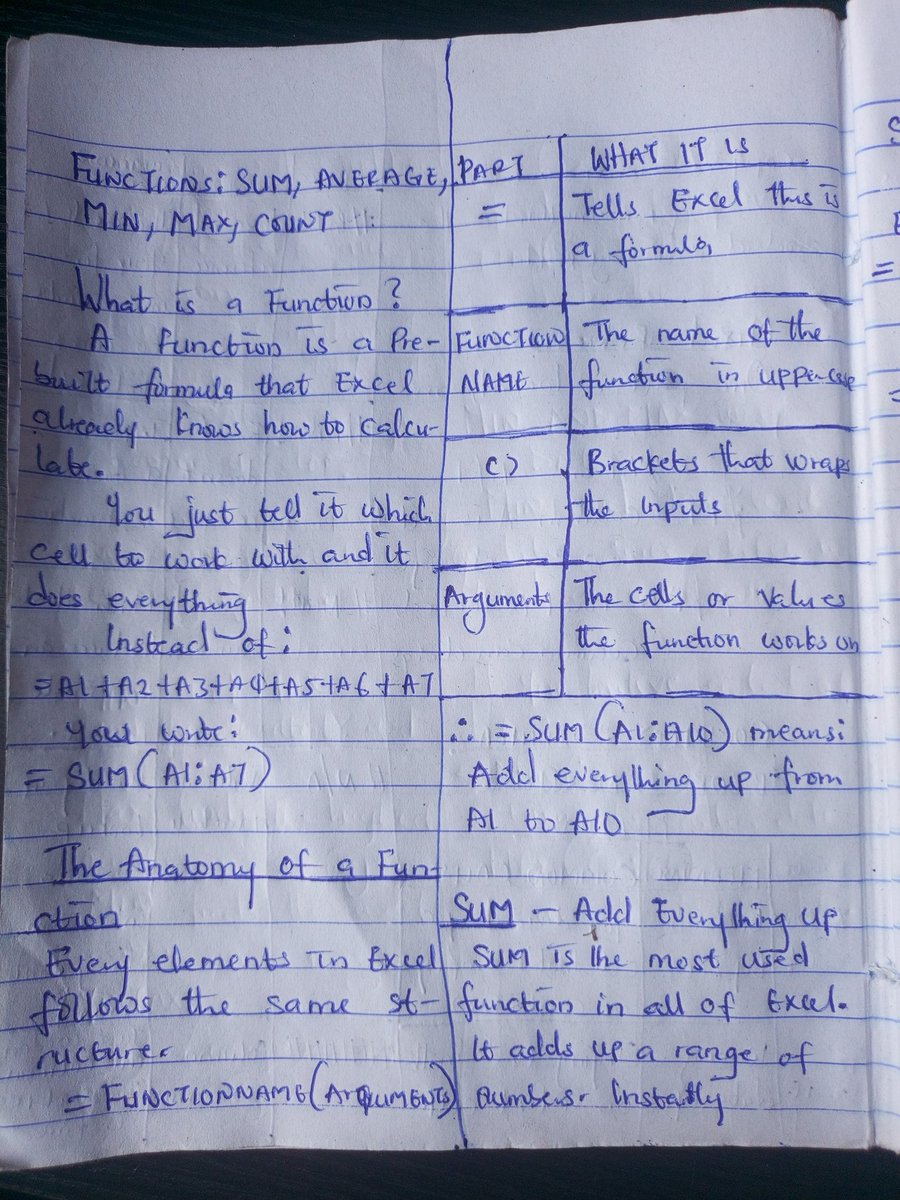
DAY 5 OF MY JOURNEY INTO DATA ANALYTICS ( EXCEL)
- What a function is and how it differs from a basic formula ?
- The anatomy of every function: =FUNCTIONNAME(arguments)
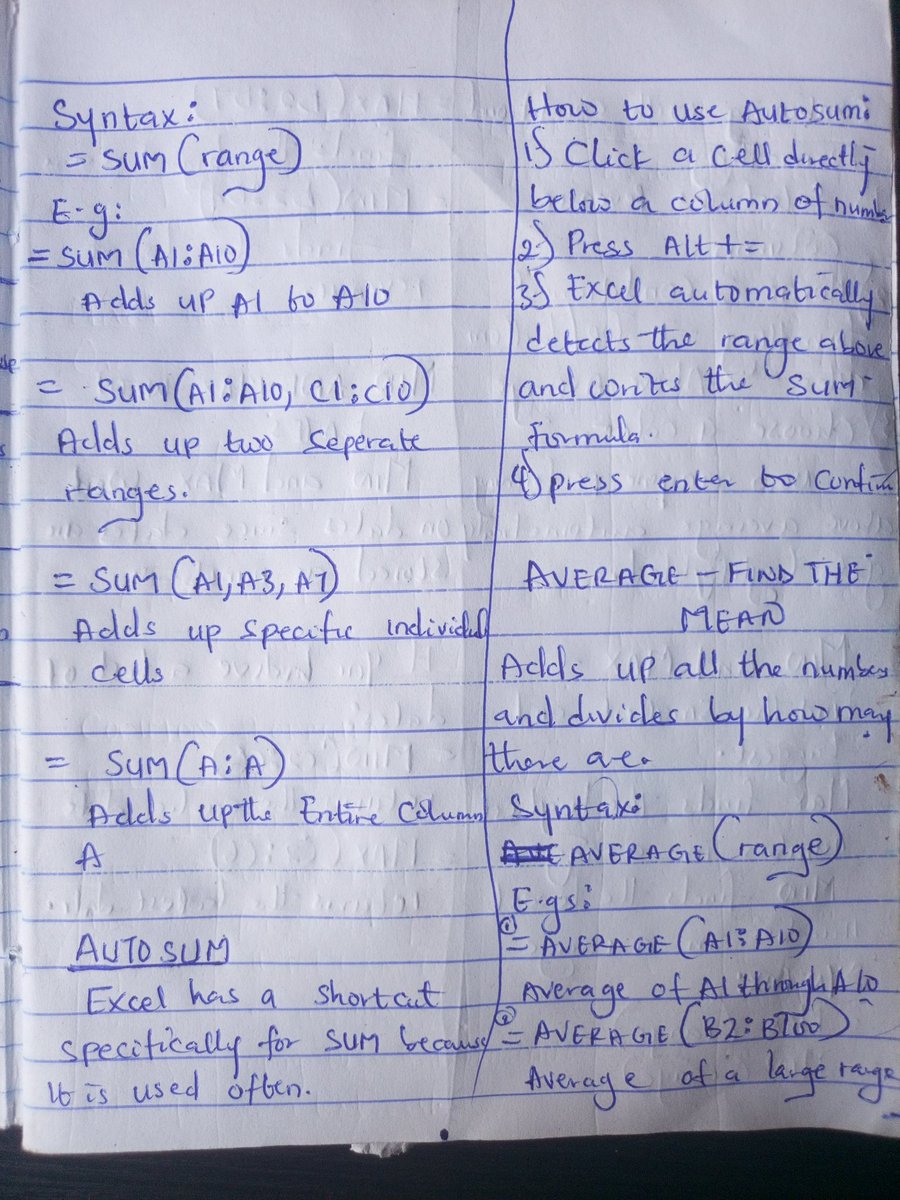
- SUM :adding up ranges instantly
- AVERAGE :calculating the mean of a range
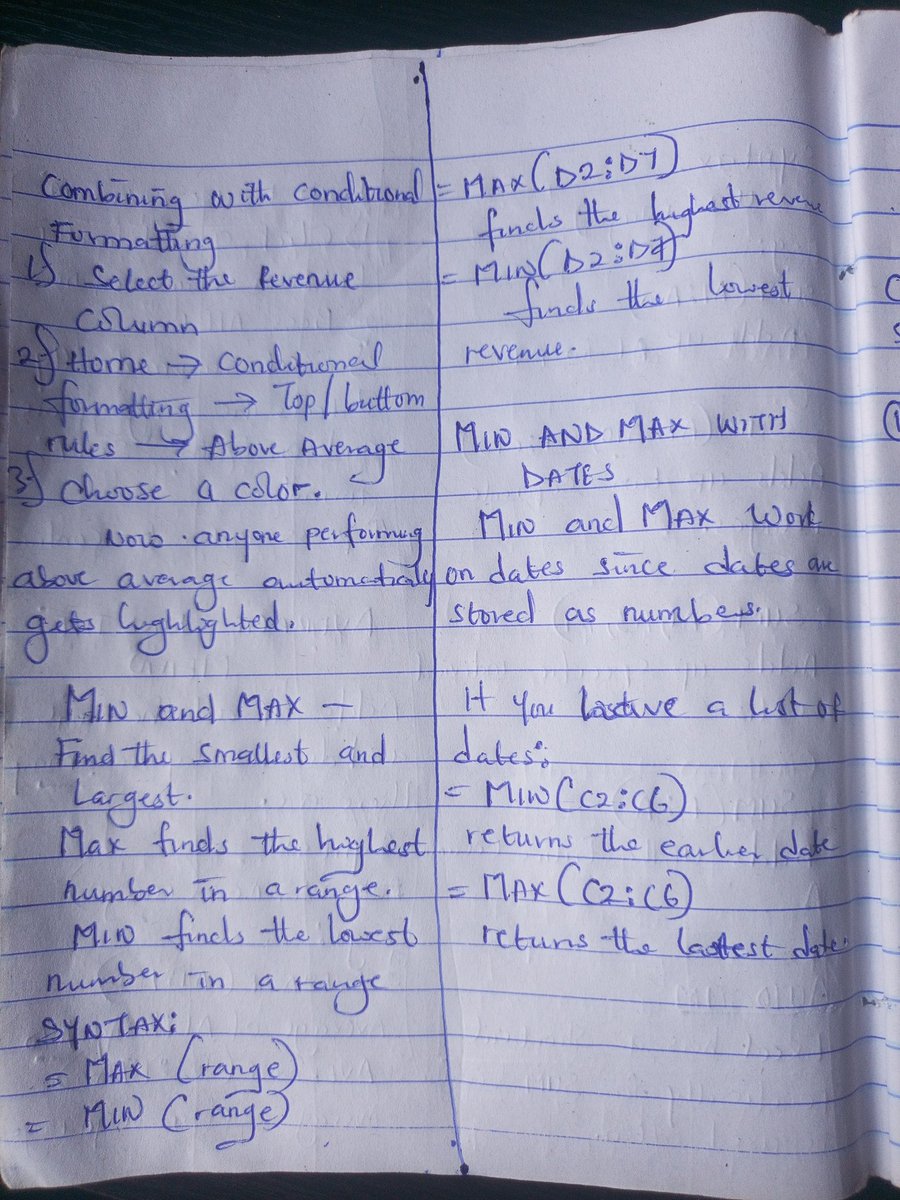
- MIN and MAX :finding smallest and largest values
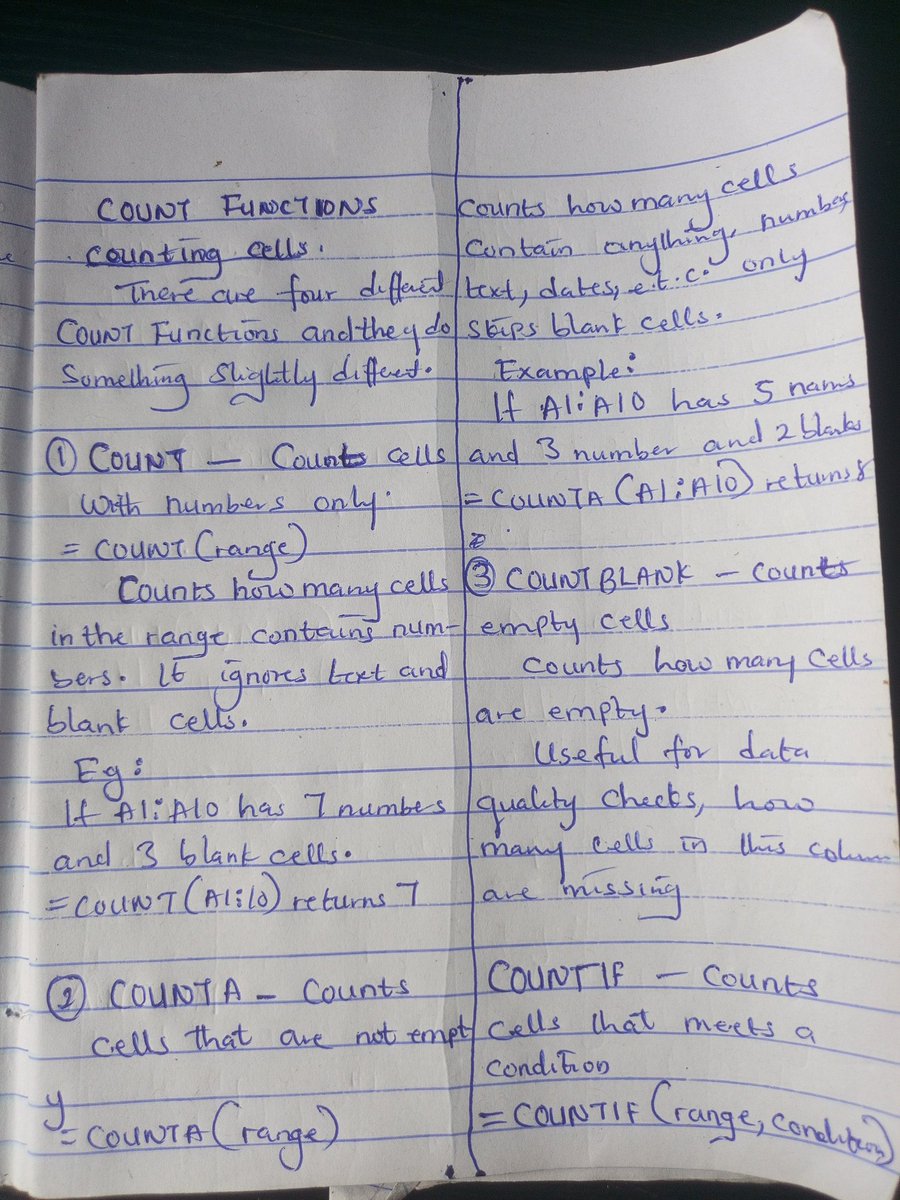
- All 4 COUNT functions: COUNT, COUNTA, COUNTBLANK, COUNTIF
- SUMIF and AVERAGEIF conditional calculations
- LARGE and SMALL ,finding the nth biggest or smallest
3
11
80
2,009


Agents can't know a file is outdated? It's pretty fucking simple:
1) Dead code: grep -r "functionName" --include="*.ts" .
2) Modification time: ls -la file.ts
3) Last commit: git log -1 --format="%ar by %an: %s"
And Agents have zero tolerance? Tolerance? Really?
Please don't make X a slopfest
2
702

Depends on the conventions of the framework I’m working in, but I prefer this:
CONSTANT_NAME
primitive_name
functionName()
ClassName
objectOrInstance
7
304


Just tried with this prompt, works great!
---
You are a Solidity execution tracer. Your job is to simulate a function call with concrete values and trace how every variable changes line-by-line, exactly like a human fuzzer would.
## Instructions
1. I will provide:
- A Solidity function
2. You will:
- Look up any helper functions, state variables, constants, and inherited contracts in the codebase yourself
- Pick realistic input values and initial state that would occur in production
- Walk through the code LINE BY LINE
- Compute the concrete value of every expression
- Show each calculation step with the formula AND result
- When calling internal/helper functions, trace INTO them fully
- Track all state changes
- Flag potential issues: truncation, precision loss, overflow risk, rounding direction
3. Output format:
---
## TRACE: `functionName(inputs)`
### Chosen Values
**Inputs:**
- param1 = value (rationale)
**Initial State:**
- storageVar1 = value (rationale)
### Line X: [description]
expression = formula = result
[If require/assert] → PASS ✓ or REVERT ✗
### Line Y: Internal call to `helperFunction()`
#### Line A: [description]
expression = formula = result
#### Returns: value
### Line Z: State update
storage.variable = oldValue → newValue
### Final State
- variable1 = value (Δ X / -X)
### ⚠️ Flags
- [Line X] Issue description
---
4. Use human-readable numbers but note when Solidity truncates.
5. For external calls: "[EXTERNAL: assumed return = X]"
Ready. Provide the function.
The functions: [ContractName.FunctionName]

1/ Wondering how to make sure the math accounting adds up?
I've got you covered, here's how you can become a human fuzzer 101.
In the mentorship episode #14, we show exactly how to do it 0xsimao.com/blog/mentorship-….
Thread 🧵
4
4
91
6,758


2 Dec 2025
iOS geliştiriciler, belki bilen vardır ama ben yeni keşfettim: ücretsiz ve inanılmaz pratik bir müşteri destek yöntemi var.
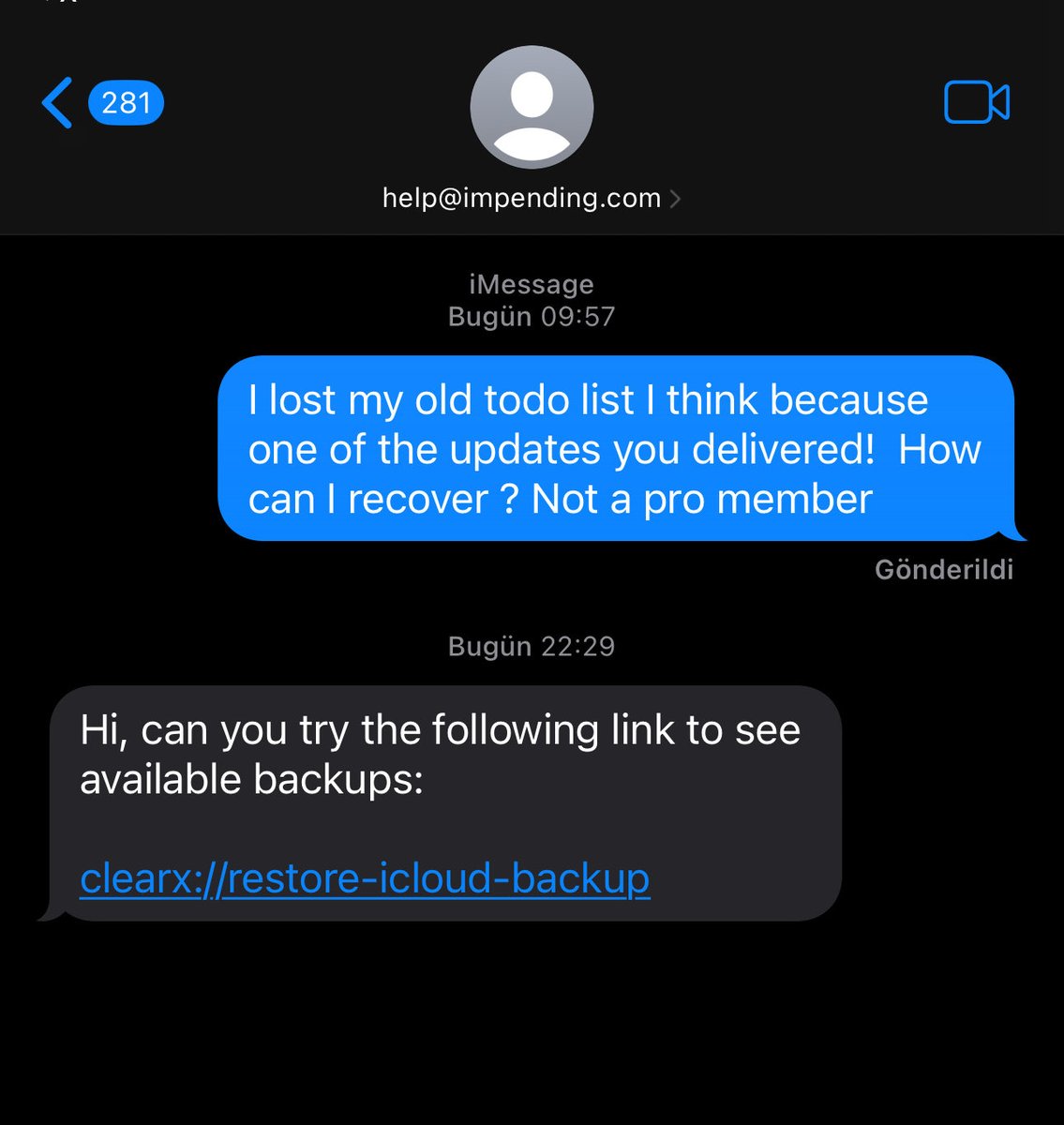
Uygulamanızdaki Support butonuna bastığınızda, alıcı kısmında iCloud e-posta adresiniz görünen bir iMessage sohbet ekranı açabiliyorsunuz. Böylece kullanıcıyla direkt iMessage üzerinden yazışıp sorunlarını çözebiliyorsunuz. Clear Todos’a bayadır girmiyordum, güncelleme gelmiş ve listelerim uçmuş. Bu ekrandan mesaj attım, cevap geldi ve işim çözüldü. 🤯
Bir de bonus bilgi: Bir URI adresi sayesinde (ör. myapp://functionName) uygulama arayüzünde butonu olmayan bir ekranı doğrudan açmak mümkünmüş. Bunu da ilk kez kullandım.
#iOSDevTips #AppleDevelopers #iOSDevelopment
2
5
588

1 Dec 2025
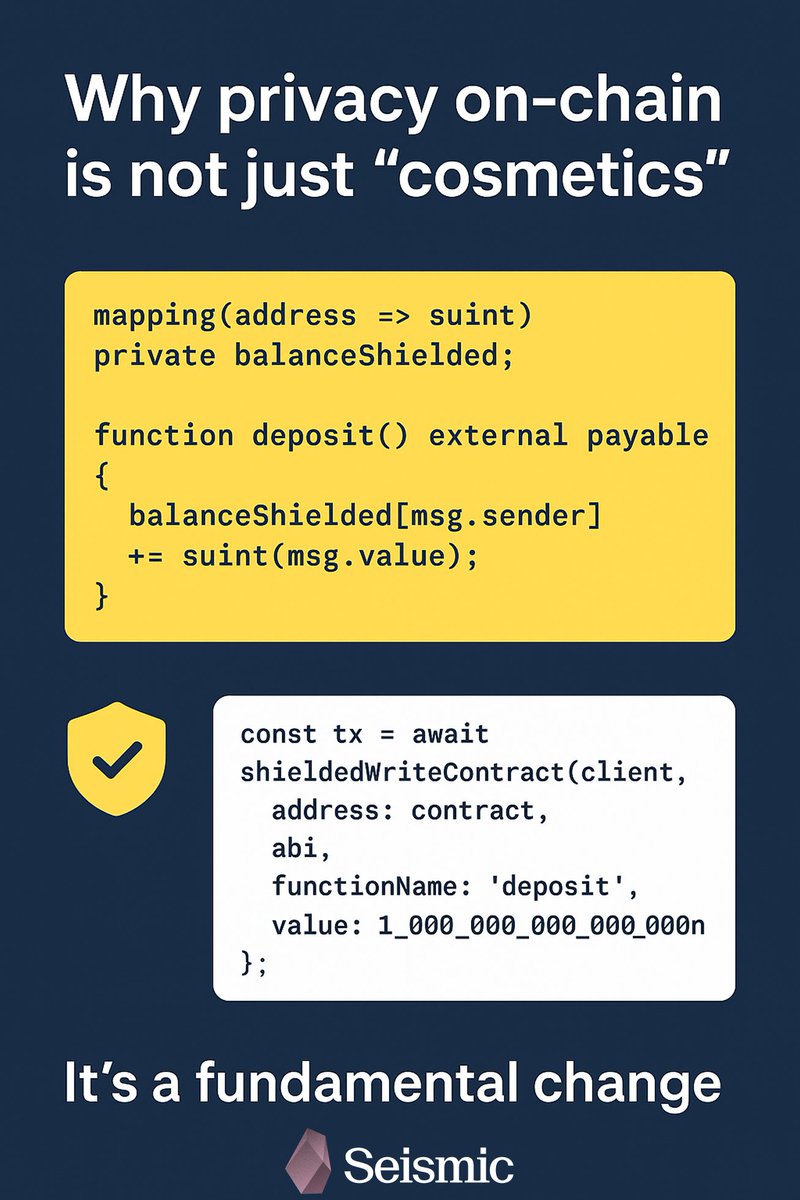
📌 In traditional EVM blockchains every your action is public. @SeismicSys changes it. They’re introduce native private types stype and this is on blockchain level. All such data is encrypted and RPC only sees 0x000.
mapping(address => suint) private balanceShielded;
function deposit() external payable {
balanceShielded[msg.sender] = suint(msg.value);
}
This is an example from documentation, where deposit and user’s balance are hiden.
⚡ Seismic also allows using shielded transactions:
const tx = await shieldedWriteContract(client, {
address: contract,
abi,
functionName: "deposit",
value: 1_000_000_000_000_000_000n
});
Calldata, arguments and state changes are private there.
💡 Why is it fundamental change?
♦ Bank’s deposits can’t be public.
♦ Credit score can’t disclose data.
♦ Corporate transactions can’t be public.
♦ Trading algorithms can’t show its logic.
Seismic transfers this models to Web3 without changing a Solidity code. This is not just cosmetics, it’s revolution.
@vadim_kesha1 @BharatWormie @Crypto_unicat
@k2sbhai
8
29
188