
Jan 6
糞が。使おうとしているCRMサービス、XMLで送れよって言うから送ったのにデータが登録されない。HttpStatusCodeは200が返ってきてる。サポートに問い合わせても放置でやっと他の人経由でつついて回答してもらったら多分XMLがおかしいって。なら200返すなやボケ
1
1
84

18 Nov 2024
SEO TIP!
Address NON INDEXED page issues from search console by doing the following.
1. Crawl your site in full with Screaming Frog SEO Spider - ensuring you set the following:
Go to CONFIGURATION > CRAWL CONFIG
Then go to
> Crawl: Check follow internal nofollow, crawl linked XML sitemaps
> Rendering: Javascript
> Robots.txt: Ignore robots.txt but report status
> API Access: Google Search Console - connect it, select last 16 months
2. Run your crawl
3. Export to a sheet and upload to Google Sheets
4. Export each NON INDEXED ITEM from search console i.e. crawled currently not indexed, discovered currently not indexed, duplicate google chose different canonical etc.
5. Make sure your CRAWL and NON INDEXED items are in the same spreadsheet (different tabs) i.e. name your site crawl tab FULL SITE CRAWL, then name each non indexed tab as the issue
6. Use HTTPSTATUSCODE script and run in APPS SCRIPT and then call it to check each NON INDEXED URLS status code (script is in comments)
7. Use VLOOKUP to pair up CRAWLED HTTP Status - this is great for identifying orphan pages (if your POLLED HTTP Status is 200 but crawled has no value it wasn't seen or found on the crawl - potential orphan)
You can pair anything up - I typically tend to look for:
Polled HTTP Status
Crawled HTTP Status
Word Count
Internal Links (unique)
Index states
Canonical (you can also use IMPORTXML here)
The VLOOKUP CODE is here:
=IFERROR(VLOOKUP(#cellref,'#tabref'!$A$1:$YM$145124,#sheetlookupindex,FALSE),"-")
You need to adjust the vlookup to match your data sets i.e.
=IFERROR(VLOOKUP(A2,'Full Site Crawl'!$A$1:$YM$145124,2,FALSE),"-")
In the example above I would look at cell A2 (URL) in the FULL SITE CRAWL SHEET, the index number is the column index of what I want to look up i.e. column 2 = HTTP status.
When you build your data set you can then do the following:
1. Create a DATA FILTER
2. Make sure you copy and paste special > values only on your HTTP status column so it doesn't rerun the script when you sort/filter
3. You can apply a HTTP STATUS FILTER on say pages under crawled currently not indexed - I tend to duplicate the tab and apply filters for different HTTP status codes - i.e. I would apply 200 to the status filter for crawled/discovered currently not indexed to find all ACTIVE PAGES that are not indexed, I would then look at word count, internal link counts
4. You can also export GSC data to a sheet and vlookup URLS to see if anything NOT INDEXED had been in the last 16 months
Enjoy :)
#seo #seotips #digitalmarketing
8
27
144
13,667

5 Nov 2024
2
11
1,217

10 Oct 2024
OpenRewrite 8.37.0 is out! 🎆
With new recipes for
🟣 .NET projects
🧊 Hibernate 6.0
🕰️ Joda-Time
🦊 GitLab templates
🍃 Spring WebMvcTags & HttpStatusCode
🩹 As well as many smaller fixes & additions
🙏 Special thanks to our 🔟 new contributors!
github.com/openrewrite/rewri…
6
11
512
24 Sep 2024
OpenRewrite 8.36.0 is here! 🎊
☕️Runs on Java 23
🪶Fail fast on Maven pom.xml issues
🐘Patch freestanding Gradle build scripts & .properties
🍃Migrate HttpStatus to HttpStatusCode
🍸New Mockito recipes
🤖First release of rewrite-android
Thanks to all! 🤗
github.com/openrewrite/rewri…
6
15
638
18 Sep 2024
SEO tasks you should be doing:
1. Export 404 Not Found data from Search Console into a google sheet, then copy 200 URLS at a time, paste them into AHREFS batch analysis, export & repeat, then find all the URLS with external referring domain, review quality and redirect those 404s to the nearest most relevant URL
2. Export crawled/discovered currently not indexed data from search console into Google sheets, in the same sheet click EXTENSIONS > APP Scripts, copy and paste this code below:
function httpstatuscode(url) {
var result = [];
url.toString().trim();
var options = {
'muteHttpExceptions': true,
'followRedirects': false,
};
try {
result.push(UrlFetchApp.fetch(url, options).getResponseCode());
}
catch (error) {
result.push(error.toString());
} finally {
return result;
}
}
Save it, run it.
In cell B2 use =httpstatuscode(a2) and cascade this down all the URLS. When all the statuses are populated, copy the column and then paste special > values.
Click DATA > Create a filter
Then select the HTTP status column, click the filter and select 200
This will give you a list of active URLS that are not indexed.
Sort by URL and then look for patterns in sub folder.
3. Making sure your DNS is correct and ensuring no staging sites / sub domains are being indexed
4. Check that your robots.txt is returning HTTP 200
5. Canonical clean ups are GREAT -
> Do not canonicalise pagination series to root
> Avoid or minimise canonical child URLS on the domain - for example allowing canonical child URLS that are parameter driven where the content barely changes, review the PARAMETER contribution in GSC and consider excluding it via robots.txt disallow - only do this if you know what you are doing
6. Remove any disavows that were submitted where there was no manual action - review the conditions as to why a disavow was submitted
7. Render check the output of your pages - take a URL from each page template on your domain, use Google's LIVE URL inspection, copy the output HTML and paste into a Chrome Devtools window to view the visible output
8. If using infinite scroll consider using PushState or switching to static pagination (pagination is much better for UX)
9. Do a full GSC URL export, apply a filter for ? parameter paths and review parameters - Shopify themes with filtering are notorious for creating a tonne of batshit URLS
10. Review URLS under indexing > pages that might be indexed though blocked by robots.txt - you can use Google's URL removals tool if its decided that the URLS indexed despite being blocked absolutely shouldn't be indexed
11. It's important to clean up content marked as DUPLICATE without user selected canonical - this can happen where pages have parameters but no canonical tag
#SEO #SEOTIPS #DIGITALMARKETING
1
13
633

New Post: Migrate HttpStatus to HttpStatusCode in Spring Boot 3 buff.ly/3MMY0sG
2
3
29
3,193

4 Jun 2024
HttpStatusCode >= 400 significa um erro, se a sua request retornou isso, ela deve ser considerada um erro.
Se vc tem um endpoint que, obrigatoriamente, deve retornar uma entidade e ela não existe, você retorna 404 Not Found e a o consumer da sua API deve tratar esse erro.
Se a sua resquest, opcionalmente, pode ou não retornar uma entidade:
- Algo foi retornado: 200 Ok
- Nada foi retornado: 204 No Content
Nos dois casos acima, você pode fazer o tipo da sua resposta como:
{
data: TEntidade | null;
}
ou
{} satisfies TEntidade | null
Caso o seu apiClient (ex: TSRest) é totalmente type-safe:
body: {
200: {} // entidade,
204: null
} e a partir daqui vc usa type-narrowing.
1
1
7
700

2 Jun 2024
#[derive(Debug)]
enum HttpStatusCode {
Ok = 200,
Created = 201,
BadRequest = 400,
Unauthorized = 401,
Forbidden = 403,
NotFound = 404,
InternalServerError = 500,}
fn main() {
let status_code = HttpStatusCode::Ok;
match status_code {//}
}
5
362

28 Apr 2024
Just released: RESTFulSense 2.19.0
This release brings a much needed capability. With this release you can now execute any API call that returns HttpMessageResponse and let RESTFulSense evaluate that response and throw a meaningful HttpResponseException without needing to examine HttpStatusCode.
This implementation should cover *any* API call that falls under that pattern. This is important because RESTFulSense can help simplify handling API errors by converting HttpStatusCodes internally to meaningful exceptions such as HttpUrlNotFoundException or HttpBadRequestException and so on.
For those who build server-side software here's RESTFulSense version:
nuget.org/packages/RESTFulSe…
For thos who build client-side WASM or Blazor software here's RESTFulSense WASM version:
nuget.org/packages/RESTFulSe…
#http #api #restful
3
443

22 Apr 2024
If you access the enum, it'll will be retained and DCE (Dead-code elimination) won't strip it from the final bundle.
And HttpStatusCode is a big enum : github.com/angular/angular/b…
As a framework, it better to not ship code that is not necessary to end users.
1
2
92
22 Apr 2024
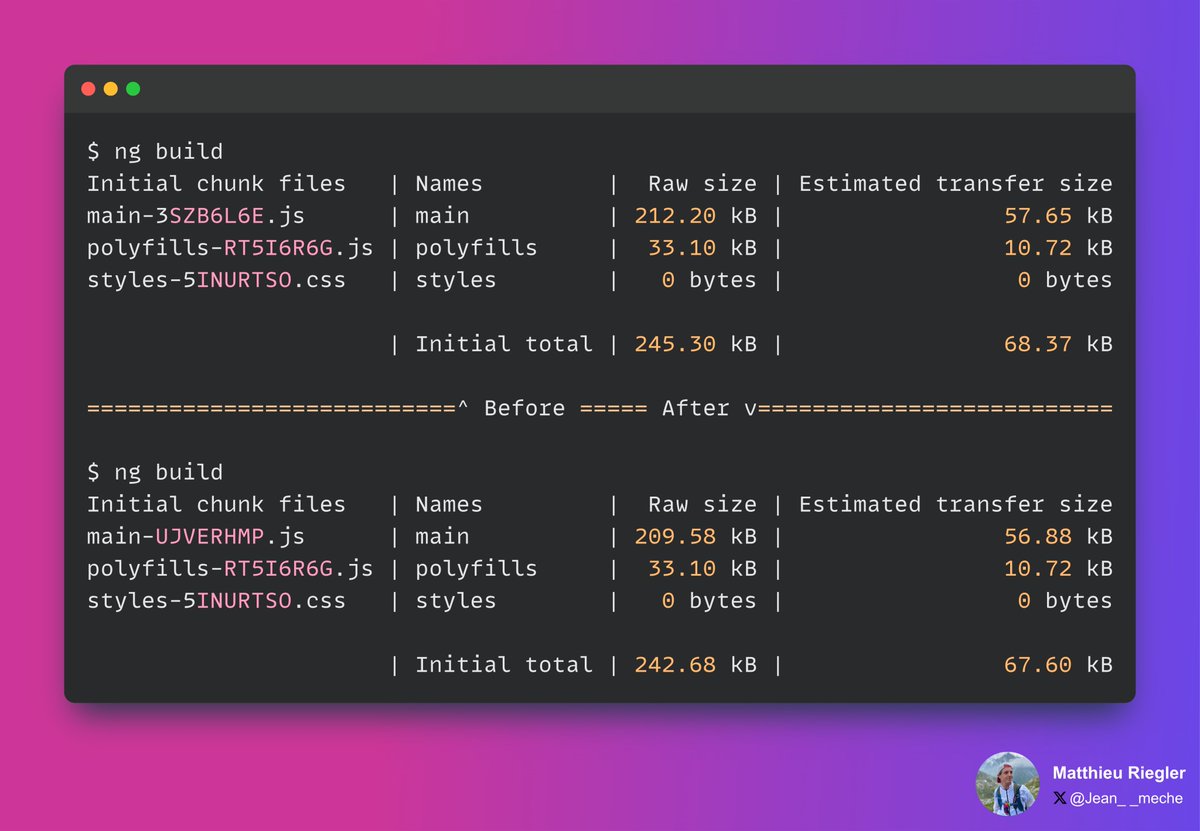
Do you know the impact of #typescript enums ?
With a small optimization, we removed the usage of the HttpStatusCode enum by default in #Angular
➡️ github.com/angular/angular/p…
Inlining the values (to allow treeshaking) is worth almost 3kB !
Use enums wisely !
6
8
86
6,011

Here are some HTTP status codes.
Don't forget to like, share and save for future purpose.
#softwaretesting #qualityassurance #apitesting #httpstatuscode #thebugdetective #tbdcommunity



1
1
5
223
14 Feb 2024
The amount of generated code is pretty bad.
In Angular HttpStatusCode amounts for almost 3kB (we had to drop the const enum)
2
42
2 Jan 2024
Very interesting discovery: changing `const enum` to `enum` results in the 3Kb change in #Angular due to the "massive" HttpStatusCode enum
github.com/angular/angular/p…
github.com/angular/angular/b…
2
23
4,404

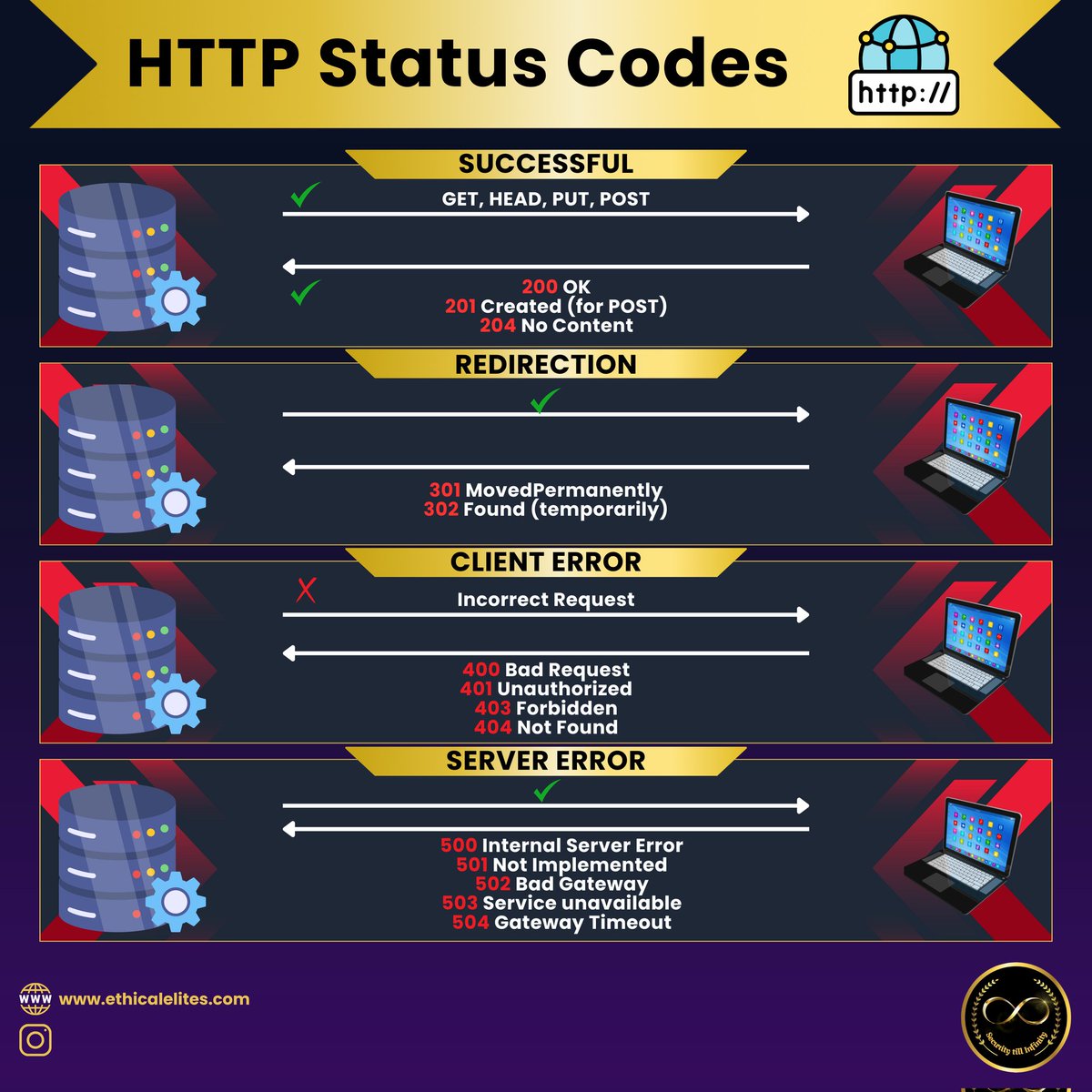
26 Dec 2023
Ever got a 404 & felt lost? It's just the web's way of saying "nope, this page doesn't exist." Don't worry, there's always a 200 adventure waiting!
#http #CyberSecurity #infosec
#webpage #httpstatuscode
#CyberSecurityAwareness #cybersecuritytips
6
6
85

19 Oct 2023
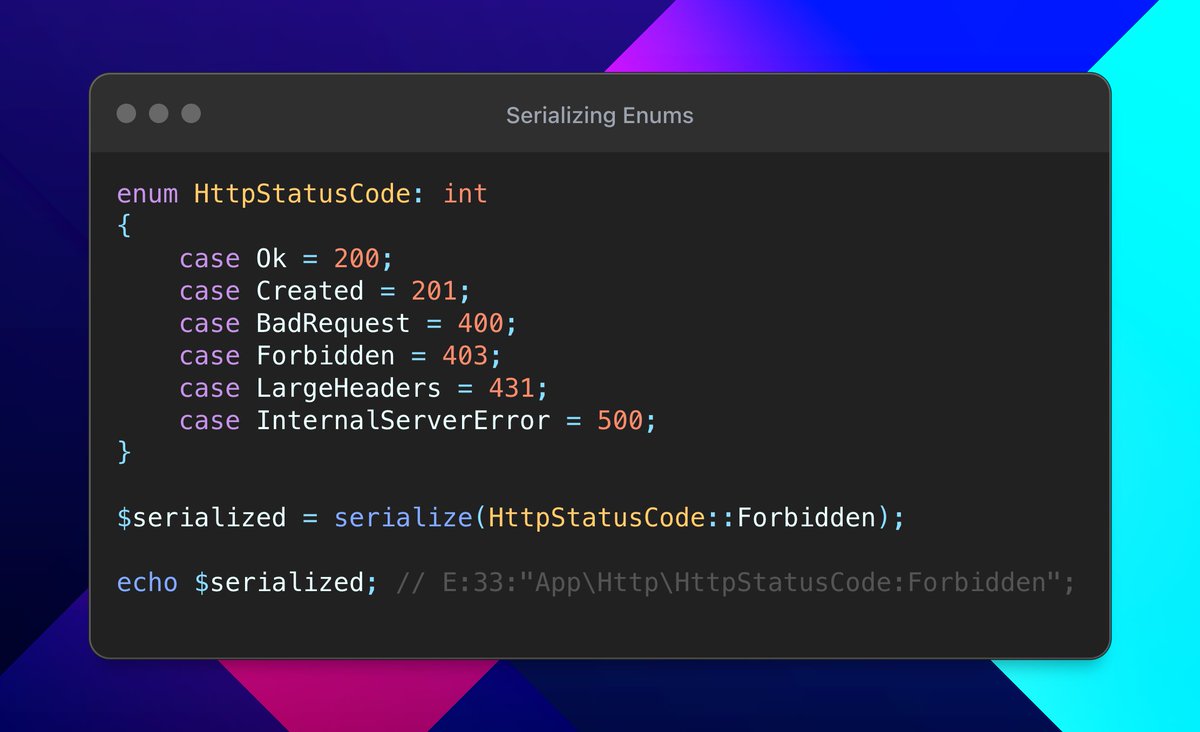
Serializing Enums makes data transport and storage more efficient.
In the code example, I’m serializing one of the HttpStatusCode enum cases, which can be stored or sent, and later be unserialized back into the Enum case.
Watch me do this 👇
youtu.be/0BNXWbFa75w
#PHP #WebDevelopment
2
10
62
4,806

13 Sep 2023
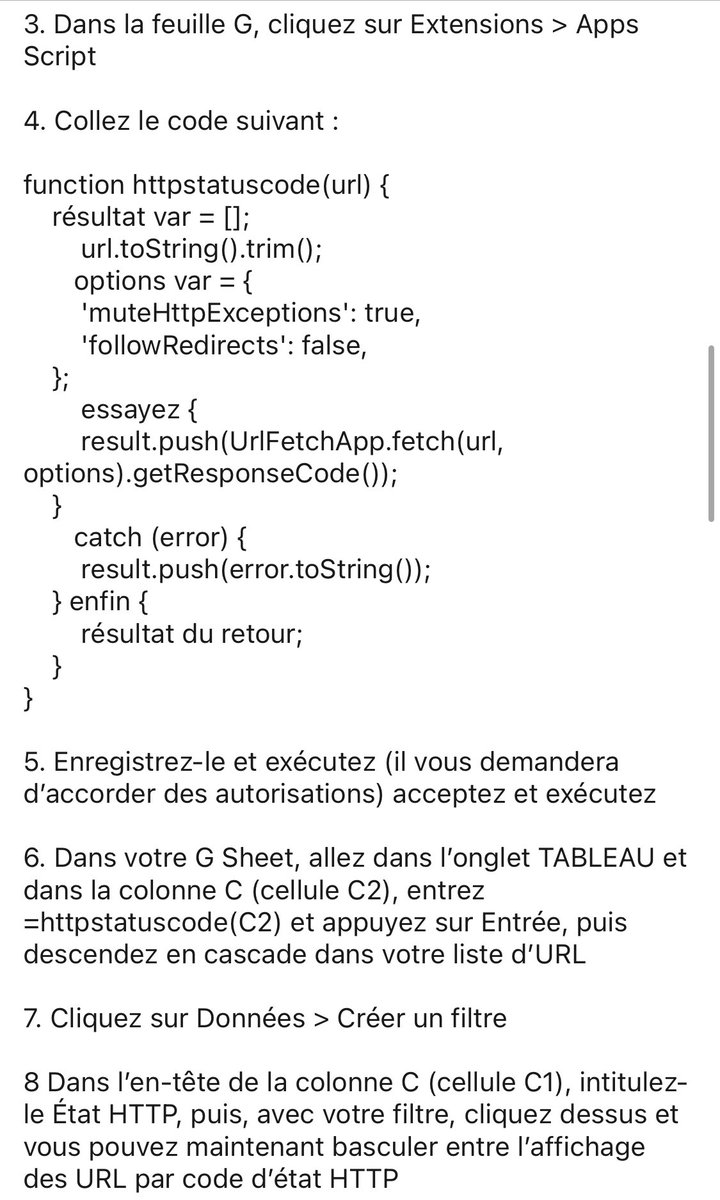
function httpstatuscode(url) {
var result = [];
url.toString().trim();
var options = {
'muteHttpExceptions': true,
'followRedirects': false,
};
try {
result.push(UrlFetchApp.fetch(url, options).getResponseCode());
}
catch (error) {
result.push(error.toString());
} finally {
return result;
}
}
1
2
5
842

30 Jun 2023
That's the most popular option so far. I've found that it leads people to type HttpStatusCode sometimes, depending on context. So it's useful to be able to disambiguate.
1
434

22 May 2023
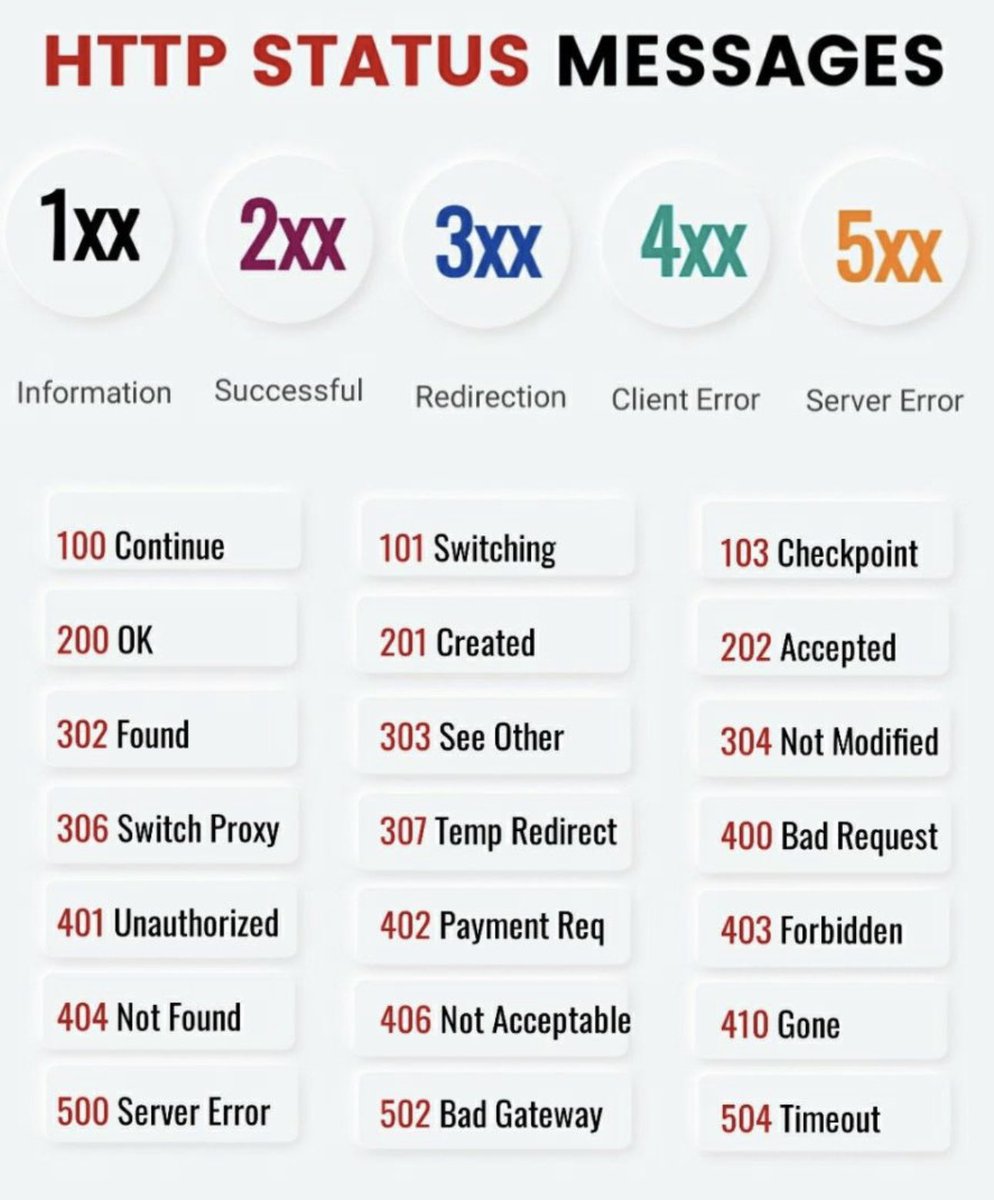
📌 HTTP status messages 📌
HTTP status codes are a standard response code given by web servers on the Internet. They help to identify the cause of the problem when a web page or other resource does not load properly.
In the context of a LinkedIn post, I'll explain the meaning of some common HTTP status codes, with a friendly touch of emojis:
200 OK 🟢: The request has succeeded. Your LinkedIn post has been published successfully! 🚀
201 Created 🟢: The request has been fulfilled and has resulted in a new resource being created. Your new LinkedIn post is up and running! 🎉
400 Bad Request 🔴: The server could not understand the request due to invalid syntax. Oops, seems like there's a mistake in your LinkedIn post request. Please check and try again! 🧐
401 Unauthorized 🔴: The request has not been applied because it lacks valid authentication credentials for the target resource. You may need to log in again to post on LinkedIn. 🚫🔑
403 Forbidden 🔴: The server understood the request, but it refuses to authorize it. Looks like you don't have permission to make that LinkedIn post. 🚫
404 Not Found 🔴: The server can't find the requested resource. In the context of LinkedIn, this could mean the page you're trying to access doesn't exist. Maybe you're trying to post on a page that's been deleted or doesn't exist? 🕵️♂️🔍
500 Internal Server Error 🔴: The server encountered an unexpected condition that prevented it from fulfilling the request. Uh-oh, LinkedIn itself is having some issues. Try posting again later! ⏱️🔧
📌 Join Amigoscode today for premium programming courses - bit.ly/40ujtvS
ps: credits to the respective owner(s).
#https #httpstatuscode #webdevelopment #programming #frontend #backend #developers #coders #softwareengineering #webdesign #webapplications #technicalknowledge #statuscodes #networking #webprotocols #HTTP #webdevelopers #coding #techindustry #softwaredevelopment #digitaltechnology #computerscience
3
9
71
4,388