
Jun 13
Comfort Spaces Cream Twin Size Comforter Set - 2 Pieces
$32.00 (-30%) MSRP: $45.99
👇 Links to the best active deals are waiting for you in the comments!
amzn.to/4uDEtyq - 4.4⭐
Ad📌 May Earn A Commission
#amazondeals #sheetsets
5
1
19
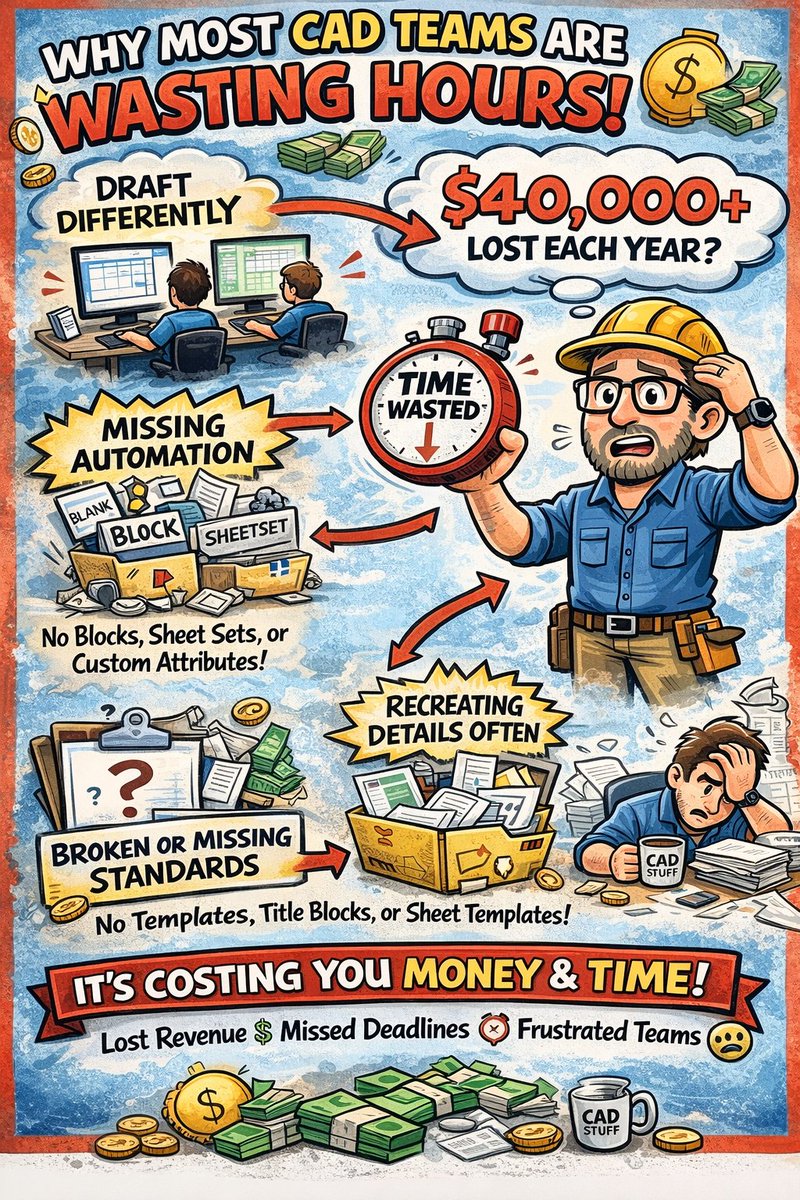
Most CAD teams are wasting hours every week…
Over the past 20 years working in AutoCAD, Civil 3D, and real-world design projects…
I’ve noticed something that shows up in almost every small firm I’ve consulted with.
It's almost never a lack of skill.
Not bad designers.
It’s broken or non-existent systems.
Things like:
Everyone drafting slightly differently
Little to no Automation (Not even Custom Attirbutes, Blocks, or Sheetsets!)
Recreating the same details over and over
Messy folders, Xrefs, and file structures
Inconsistent title blocks, layouts, and plotting
Spending way too long on things that should take minutes
No Standards or Documentation on Workflows and Company guidelines
It's hard to even catch these or realize internally just how much time you're losing because of it.
We’re not talking about small inefficiencies either.
For a single drafter, simply implementing a few of these workflows will save 30 minutes a day!
That's a minimum of $10,000 wasted per year, for every drafter, designer, etc.....
For a team of 4–6 people, it can easily add up to:
👉 10–15 hours per week of wasted time!
That's easily $40,000 in lost time because of incomplete/missing Standards, Templates, Blocks and Automations.
That’s time and money that could be spent on:
Billable work
Delivering projects faster
Reducing stress and rework
Better Hardware
& Profits
Over the past few years, I’ve helped more than a dozen firms 1:1 fix this by building out simple, standardized CAD systems for their teams, .dwt templates, titleblock improvements, workflows, folder structures, documentation and production setups that actually make sense.
And the difference is immediate.
Faster drawings.
Cleaner files.
Less frustration across the team.
Massive time savings when training up new employees
I’m putting something together to help more firms implement this kind of system…
But, I’m curious:
Does any of this sound like something your team struggles with right now?
Just comment below or DM me and let me know, even a quick “yes” or what your biggest frustration is.
I read every reply, and will reach out to see if I can help you in the near future!
Cheers & Happy Drafting!
Brandon
1
2
128

12 Nov 2025
5 Steps to Fix Slow AutoCAD Drawings (Fast!)
#AutoCAD #CADTips #FixSlowDWGs #DraftingHelp
We’ve all been there…
You open a drawing and suddenly it feels like you’re drafting in slow motion.
Zooming lags.
Commands take forever.
Saving takes minutes.
Here’s the good news:
Slow drawings are usually fixable — and these steps will help speed things up right away 👇
✅ 1. Run the Cleanup Crew: PURGE, AUDIT, and OVERKILL
PURGE removes unused blocks, layers, styles, and junk.
AUDIT fixes common drawing errors and corruption.
OVERKILL deletes duplicate or overlapping geometry.
Bonus Tip: Run PURGE near or at the end of projects for a final clean before sending/archiving files!
✅ 2. Use XREFs — Don’t Paste Everything In
Copy-pasting between drawings might seem faster…
But it bloats your file, imports random layers/styles, and slows everything down.
Instead, XREF large or repeated geometry like:
Survey data
Floor plans
Title blocks or base maps
Xrefs = smaller DWG size, easier updates, and faster opens.
✅ 3. Check for Broken or Missing XREFs
A single broken Xref can slow down every open/save.
AutoCAD keeps searching for the missing file — wasting time.
🛠 Fix or detach any broken Xrefs ASAP.
(Use XREF command to check status)
✅ 4. Don’t Work Off Wi-Fi (If You Can Help It)
Working from cloud drives (OneDrive, SharePoint, Dropbox) or network paths?
Wi-Fi is often the culprit of random lag, crashing, and save delays.
Use a wired connection whenever possible, especially on big projects.
And if your PM allows it, cache large imagery or lidar locally for speed (but always update paths and tell your team!).
✅ 5. Check Your System & Graphics Settings
Sometimes it’s not the drawing… it’s your system.
Try turning off hardware acceleration: GRAPHICSCONFIG
Check for GPU driver updates
Run RESETSETTINGS if everything feels off
Even a small tweak can make a big difference in performance.
Reminder:
A clean, fast drawing = fewer crashes, smoother plotting, and happier teams.
If your DWGs feel like they’re stuck in molasses — give these steps a shot today.
(And save this post so you don’t forget 😉)
Have a go-to tip that speeds up YOUR AutoCAD workflow?
Drop it in the comments below 👇
PS. Want to learn more about optimizing your drawings and automating workflows, including templates, cheatsheets and my Sheetsets Mini Course!
Get my new Complete CAD Toolbox Package for a huge discount now!
Included in the package deal:
1. AutoCAD Kickstart Course (Basics for new Users to Get Started Fast!)
2. AutoCAD Fundamentals & Workflows Course (My Workflows, Tips/Tricks & more from 20 years as a Designer!)
3. AutoCAD Sheet Sets Mini Course (Learn Sheet Set basics Fast!)
4. AutoCAD Productivity Webinar
5. Gold Title Block Template Packages
Learn more here: cadintentions.com/hurry
4
89
4 Nov 2025
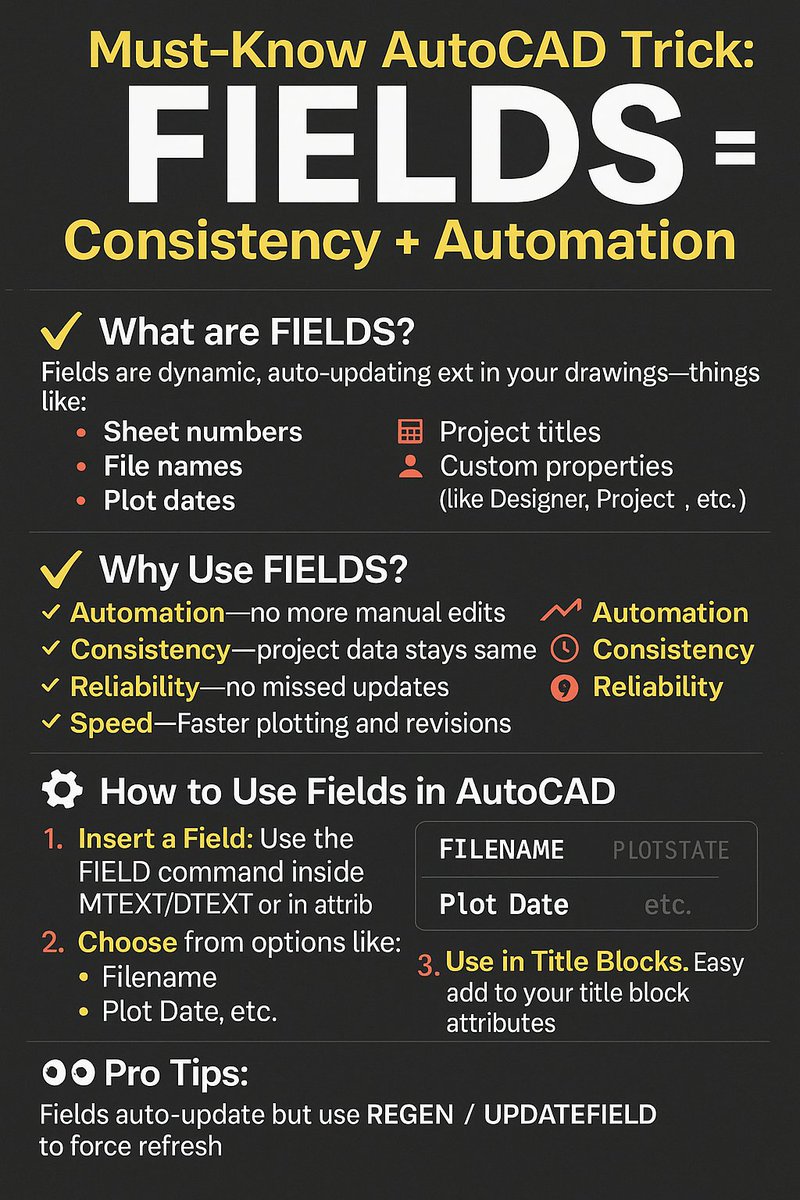
Must-Know AutoCAD Trick: FIELDS = Consistency Automation
#AutoCADTips #Fields #CADAutomation #DraftingWorkflow
Ever manually updated a title block... on 12 different sheets... just to change the date?
Yup, we’ve all been there.
But there’s a better way.
Let me introduce one of the most underrated features in AutoCAD:
FIELDS.
What are FIELDS?
Fields let you insert dynamic, auto-updating text into your drawings, this text can be linked to things like:
Sheet numbers
File names
Project titles
Plot dates
Custom properties (like Designer, Project Name, etc.)
Object Areas
Block Counts
And much more...
They update automatically when the drawing changes, saving you time and reducing mistakes.
✅ Why Use FIELDS?
Automation – No more manual edits across dozens of sheets.
Consistency – Project data stays the same on every layout.
Reliability – No missed updates or forgotten text changes.
Speed – Faster plotting, revisions, and template setup.
How to Use Fields in AutoCAD
Insert a Field:
Use the FIELD command or right-click inside any MTEXT, DTEXT, or Attribute and choose Insert Field.
Choose from Options:
You can select things like:
Filename
Plot Date
Custom DWG Properties
Sheet Set info (if using SSM)
Object Properties (like area, length, etc.)
Use in Title Blocks:
Fields are especially powerful when added to attributes in your title blocks. For example:
Insert Filename in the DWG name field
Use PlotDate in the Revision Date field
Pull DWGPROPS values like “Project Name” or “Checked By” globally
Bonus: DWGPROPS
Use the DWGPROPS command to define custom project-wide fields like:
Client Name
Project Number
Location
Checked By
Discipline
These can be reused in any field across the drawing or set.
⚙️ Pro Tips:
Fields auto-update on open/save/plot — or use REGEN / UPDATEFIELD to force refresh.
Use Fields inside Blocks or XREF’d title blocks for smarter sheet sets.
To really take things to the next level: Combine Fields with the Sheet Set Manager (SSM) for fully automated title blocks.
Real-World Use Case:
I'll use fields to auto-fill every sheet’s project data across 50 drawings, each pulling info from a central sheetset.
If we change the project name or number, it updates everywhere instantly.
No rework. No missed updates. No manual fixes.
If you’re not using Fields in your drawings yet — this is your sign to start today 👇
They’ll save you hours and make your drawings way more professional.
Have a field trick or workflow you love? Drop it in the comments!
And if you want to learn more about optimizing your drawing templates and automating workflows, including my Sheetsets Mini Course!
Get my new Complete CAD Toolbox Package for a huge discount now!
Included in the package deal:
1. AutoCAD Kickstart Course (Basics for new Users to Get Started Fast!)
2. AutoCAD Fundamentals & Workflows Course (My Workflows, Tips/Tricks & more from 20 years as a Designer!)
3. AutoCAD Sheet Sets Mini Course (Learn Sheet Set basics Fast!)
4. AutoCAD Productivity Webinar
5. Gold Title Block Template Packages
Learn more here: cadintentions.com/hurry
2
5
243

Exactly, Pierre is no CONservative when it comes to his personal life. $500 sheetsets!
I would never trust him or his current party with Canadian expenses.
3
2
6
302

Household Mosquito Net princess Wind Floor Stand Encrypted Thick Mosquito Net
jpnyx.com/products/household…
Available on J_pnyx!
#BedSheets #Bedding #BedroomDecor #HomeTextiles #SheetSets #LuxuryBedding #BedroomStyle #HomeInteriors #CozyHome #BedroomEssentials


10

31 Oct 2023
Y’all know who got some pretty good sheetsets? Ikea. They have a pretty good price range too. I’d stay away from the cheapest set and go for a mid range. But if you can splurge that $89 set… superb.
4
254

3 Oct 2023
Eddie Bauer - Queen Sheets, Cotton Flannel Bedding Set, Brushed For Extra Softness, Cozy Home Decor (Skating Penguin, Queen). Click below to know more;
amzn.to/3Q0BZrR
#QueenSheets #BeddingSets #CozyHomeDecor #SheetSets
1
46
22 Aug 2023
Bedsure Twin XL Comforter Set with Sheets - 5 Pieces Twin XL Bedding Sets, Pinch Pleat Dark Grey Bed in a Bag with Comforter, Sheets, Pillowcase & Sham, Kids Bedding Set. Click below to know more;
amzn.to/45E3tcJ
#bedding #comforterset #bedsheets #sheetsets #exclusive

4
336

23 Feb 2023
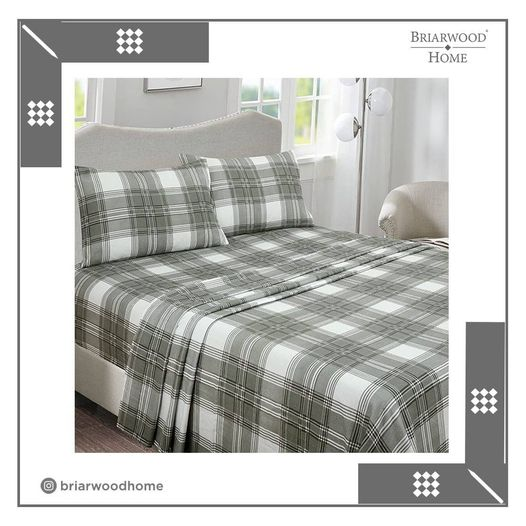
Cotton Printed Flannel Sheet Set - Warm, Cozy, Deep Pocket & Breathable
(Grey Plaid, Cal King)
Shop From Amazon: amz.run/5Oxr
#printedflannel #printedsheets #bedding #sheetsets #shoponline #homedecor #100percentcotton #printedflannelsheets #printed
1
11

29 Jan 2023
Going to need to wade into the topsheet argument here, I am thinking sheetsets are best? Duvet covers and inners too and pillows obviously.
11
44
2,497


9 Dec 2022
Festive Flannel Sheets!
zulily.gfpv.net/c/362137/154…
Oh My GOODNESS, I LOVE my Flannel Sheets - so luxurious, so cozy! @zulily #ad #zulily #flannel #flannelseason #flannelfriday
#sheets #sheetsets #comfy #bedding #beddingdecor #beddingsets 🛏️🛌😍😊😴💤😍😍😍🛒
zulily.gfpv.net/c/362137/154…

ALT Festive Flannel Sheets! https://zulily.gfpv.net/c/362137/1544620/9643 Oh My GOODNESS, I LOVE my Flannel Sheets - so luxurious, so cozy! @zulily #ad #zulily #flannel #flannelseason #flannelfriday #sheets #sheetsets #comfy #bedding #beddingdecor #beddingsets 🛏️🛌😍😊😴💤😍😍😍🛒 https://zulily.gfpv.net/c/362137/1544620/9643
11
2

4 May 2022
Let the countdown begin! #AU2022! #CAD #CADManagement #Community #Civil3D #Revit #BIM #SheetSets #Learning live-pantheon2-au.autodesk.c… @autodesku Very excited to hopefully see you all in person this year in New Orleans #expertelite

3

Right dimensions of a mattress is important when choosing a fitted sheets. With the right dimensions fitted sheets will not easily be pulled out.
#learnwithlsa #fittedsheet #sheetsets #beddings #bedding
27 Feb 2022


2
11 Nov 2021
Modal Cozy 3 Piece Bedding – Fade & Wrinkle Free, All Season Breathable Sheets
(Twin, Grey)
amz.run/4yge
✔️100% Modal ✔️ULTRA SOFT ✔️EASY CARE
#modalsheets #modalbedding #beddiong #sheetsets #bedroomdecor #bedroom

1
2
20 Sep 2021
100% Cotton Printed Flannel Sheet Set - Made with 100% Turkish cotton fibers, this flannel sheet set is brushed various times on each side.
✔️100% Turkish ✔️Cotton ✔️ Flannel
(Buffalo Grey, King)
amz.run/4uKH
#printed #flannel #Briarwoodhome #sheetsets #printedbedding

2
7 Sep 2021
Briarwood Home Bed Sheet Set – Brushed Microfiber 1900 Premium Quality Soft Fabric Breathable Bedding
(King/Charcoal)
amz.run/4s60
#BedSheet #Brushed #Microfiber #Quality #SoftFabric #Wrinkle #4PieceSheets #Bedding #Sheetsets #AmazonSheets #Amazon #AmazonBedding

1
2

16 Jun 2021
suck ot up, Buttercups.
You are our public servants amd are subject to as much vitriol as we can toss out. Don't like it?
FLIP BURGERS.
Y'all can go cry into your egyption cotton sheetsets
1-800-BOO-HOO
ext. wahhhhhh
Try being a mere peasant in this Hellhole 😇 *omg omg omg*
1
31 May 2021
Briarwood Home Jersey Knit Bed Sheet Set – 100% Modal – Heavy Weight from Walmart
(Twin/Dark Grey)
bityl.co/76mp
Limited Stock is available
#BriarwoodHome #sheetsets #bedding #sheetsets #homedecor #modalsheetsets #modalbedding #walmart #modal #modaljersey #darkgrey

2