
20 Nov 2025
DAY 5: DOCUMENTING MY SQL PROGRESS : CTEs
Another day at the office, Chads.
Today, I focused on doing one more Subquery and then CTEs. Here we go!
--FRAME 1--
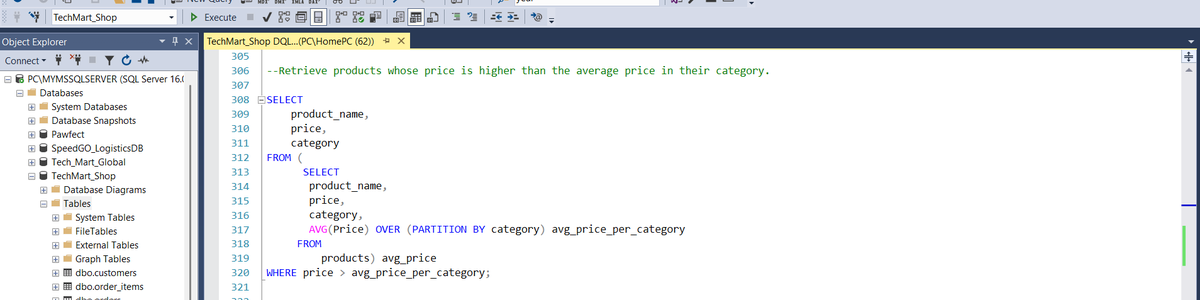
Query 1: This query retrieves products that have a price that is higher than the average price of products in their category.
A challenge I encountered with this query was computing the Average price of products in each category. I initially used an aggregate function and a window function in the same SELECT statement. This is an illegal thing to do in SQL.
This challenged the way I understood subqueries. A subquery is supposed to compute a value or multiple values that can be used by the outer query. Therefore, I sorted grouping with the 'avg_price_per_category' window function. This value is then compared to the price and category of the product in the outer query. Once the price in the subquery is greater than the average price of products in its own category, then that product is returned.
--FRAME 2--
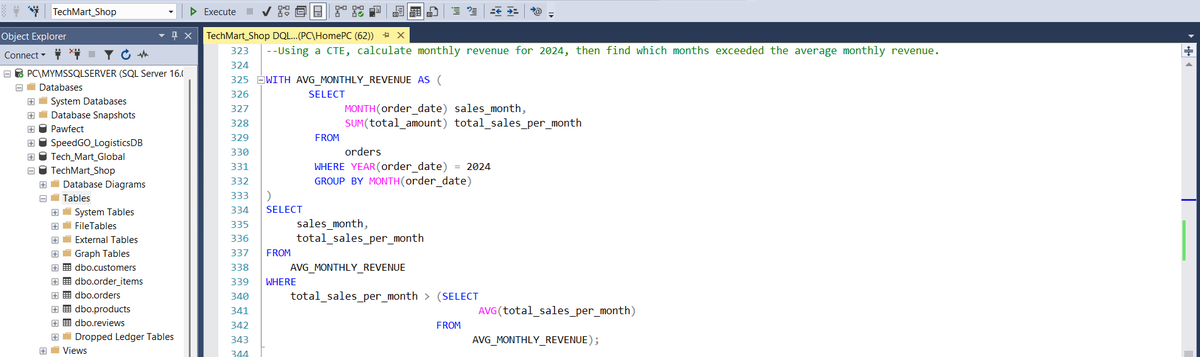
Query 2: Now onto CTEs. This particular CTE computes the average monthly revenue in the year 2024. This was pretty straight forward but I did not know where to add the final filter for monthly revenue that exceeds the average monthly revenue.
I was also writing code that returned multiple rows of results. This cannot work since the ">" operand that I had in the 'WHERE' clause of the retrieving 'SELECT' statement would only product results for scalar inputs.
So I had to use a sort of subquery in the retrieving 'SELECT' statement to compute the average monthly revenue. The revenue per month could then be compared to this average to determine which months exceeded the average monthly revenue.
--FRAME 3--
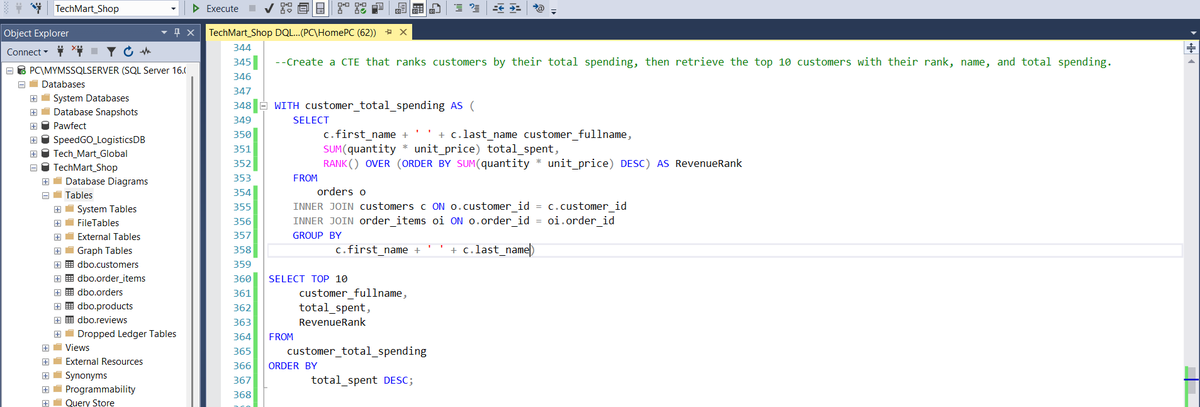
Query 3: This query retrieves the top 10 customers by total spending. Very useful information for marketing and analytics purposes. This was easier than I thought.
All I had to do was build the CTE. I got the customer name, total_spent by the customer, and their rank based on this spending. I had to use the JOIN to connect the orders, customers, and order_items tables. You can see the connecting columns that mandated the use of these JOINS.
--FRAME 4--
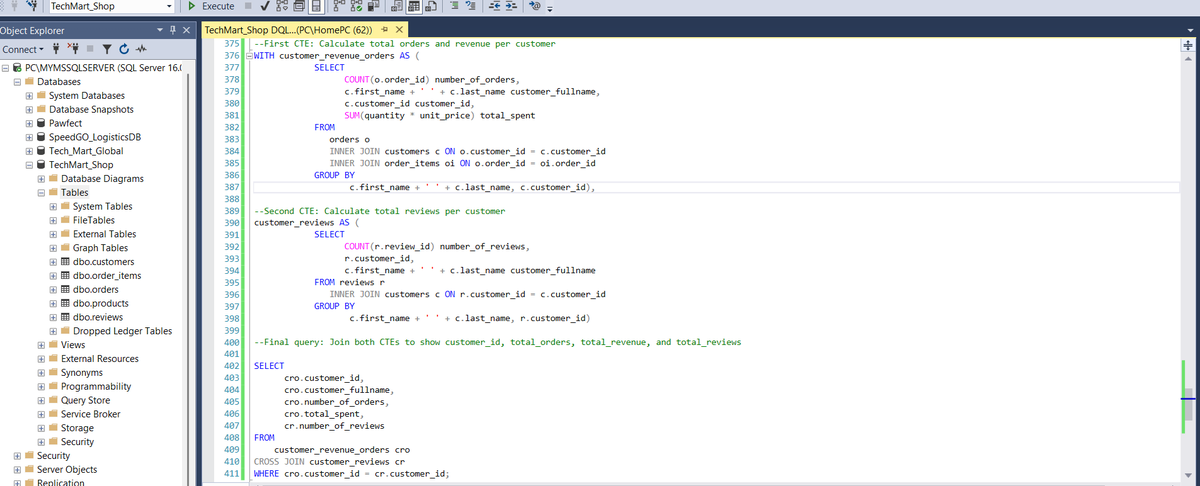
Query 4: This was also very smooth. First CTE was to get the total revenue brought in by a customer as well as the number of orders they placed. JOINS were crucial for linking Foreign keys that made sense for data object connection.
Second CTE was to know the number of reviews that each customer submitted. Very similar to the first CTE. When writing these CTEs, it is crucial to avoid the mistake of not using aliases correctly. Especially when JOINS are involved.
By the Final query, I was just putting all I had retrieved from the first and second CTEs together.
That's it fam!! We are making good progress here! Tomorrow we handle Window function.
Please say hi if these explanations are not clear. or you think I am makin a mistake or even if there is a better way to do things.
As always, corrections, suggestions and feedback is greatly appreciated.
See you tomorrow, Lads!!
#datafam #DataScience #dataengineering #SQL #CodingJourney #sqlbeginner
19 Nov 2025

DAY 4: DOCUMENTING MY SQL PROGRESS
Another day at the office, Chads.
Worked on Subqueries today. Getting better at thinking on the structure of queries before actually writing them. This allows me to consider the necessary results expected.
--FRAME 1--
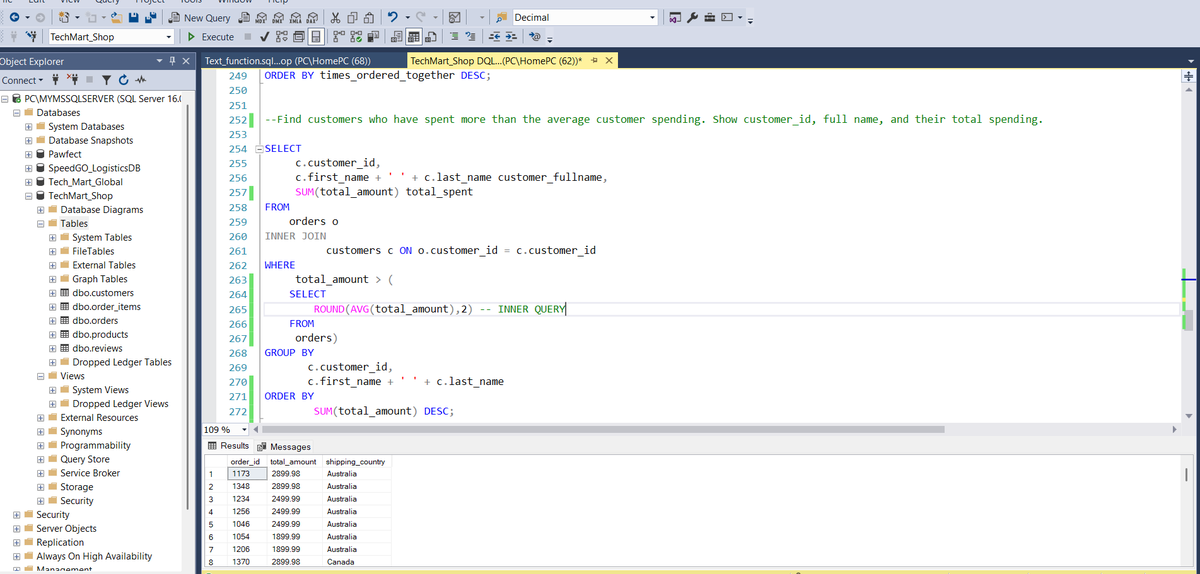
Query 1: This query returns customers who spent more than the average customer spending. So there is a subquery here (INNER QUERY), that does the job of computing the average spent by all customers. This average is then passed on to the outer query. Both are then compared to know if that customer spent more than the average. If they did, their details are returned. Pretty cool stuff for managers trying to get a quick snapshot of high, medium and low value customers. Cool stuff.
--FRAME 2--
Query 2: This query returns products that have never been ordered. A bussiness might want to know the products that are performing poorly in order to take action towards improving the situation.
There is a simple subquery here that takes the product_id in the outer query and compares it to the product_id in the inner query. It is important to notice that the outer query references the products table while the inner query references the order_items table.
The idea that the query returns products that have not been ordered makes sense in this context, since the product_id of an unordered product will not be in the order_items table,
--FRAME 3--
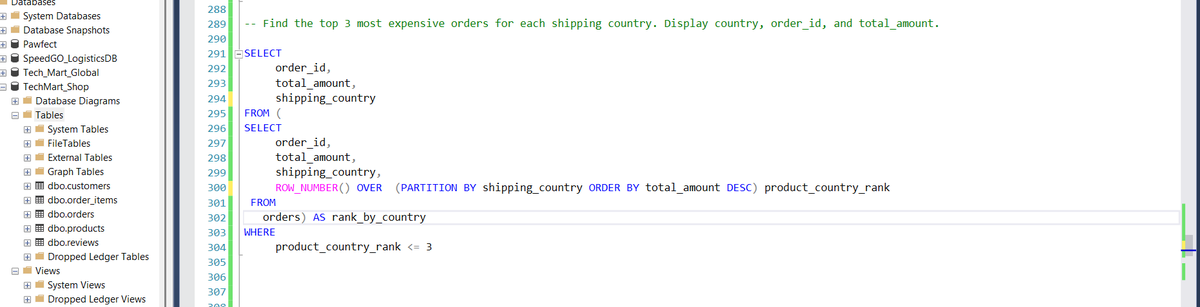
Query 3: The purpose of this query is to return the most expensive orders. It took me too long to figure this one out. I had doubts about adding the columns in the outer query into the subquery too. That was the right thing to do apparently (CHATGPT supported me lmao).
So the subquery here returns the order_id, total_amount and shipping country. It also returns the rank of a particular order , via a ROW_NUMBER window function. This partitions the total_amounts by country. The row number of each 'total_amount' shows its ranking compared to other 'total_amounts' per country.
This is then passed into the outer query and filtered down to the top 3 by the WHERE Clause in the outer query.
Mehn....If you read this and it does not make sense please tag me and call me olodo. I will explain again. 😂😂 This thing must enter my big head.
See you tomorrow lads. Keep cooking!
#SQL #sqlknowledge #sqlbeginner #DataScience #dataengineer #tech

3
6
294
18 Nov 2025
DAY 3: DOCUMENTING MY SQL PROGRESS
Just another day in the Studio, Chads.
Two queries today. Spent more time wrapping up joins. Subqueries begin tomorrow.
--FRAME 1--
Query 1: As stated in the comments above, this query returns a report showing order details with all item in each order. The mix of columns from different 3 tables necessitates the use of 2 INNER JOINS.
The 'STRING_AGG' function is an interesting addition to this query. This function takes product names, and adds their quantity and price. This collapses items that should be in two separate columns into one single cell. This presents the data in a more readable format. Certain dashes were necessary within the function parameters to provide space for better result readability.
--FRAME 2--
Query 2: This query was particularly confusing. I am not very efficient with 'SELF-JOINs', yet. This type of JOINS connect records in the same table and sets them up for filtering and/or comparisons with other records in the table. In this instance, the query picks each order_item and checks if the order_id for that particular item is the same as the order_id for another order_item that has 101 as its product_id.
The result therefore is that all products that have been ordered in the same order_id as product_id 101 is returned, and the number of times they were ordered together is also returned.
This was particularly difficult and I would like feedback on simpler ways of doing this, or better still more efficient ways. I personally need more practice with the SELF JOINS.
Feedback, corrections and suggestions would all be appreciated, My Idolos🤲🏾🤲🏾
See you tomorrow with Subqueries, Lads!!
#DataScience #Analytics #SQL #sqlknowledge #sqlbeginner #code
16 Nov 2025
Day 2: DOCUMENTING MY SQL PROGRESS
Just another day in the trenches, Chads.
Couple of queries today. Each query is separated by comments.
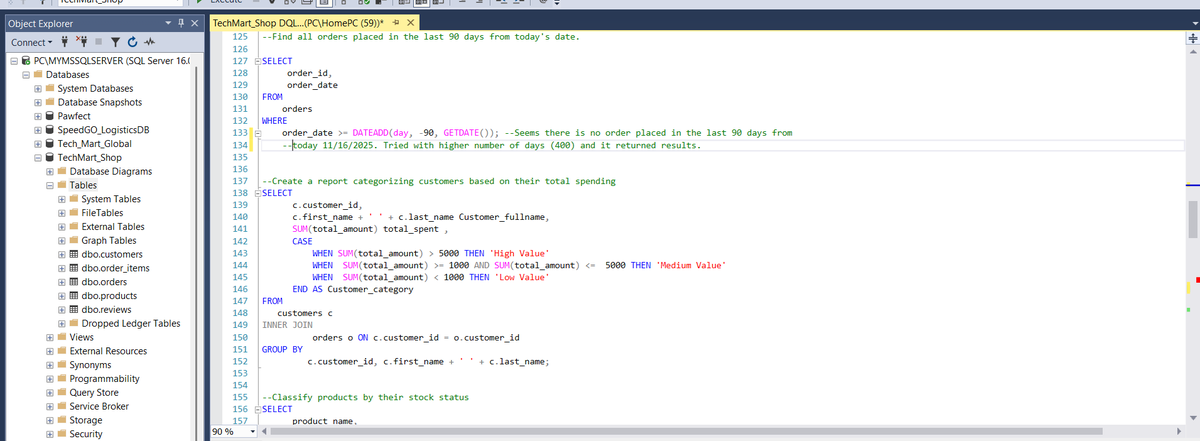
Query 1: All orders placed in the last 90 days from today's date. The idea here is to use the DATEADD function to add 90 days to the current date (GETDATE() function). The WHERE clause is then checks if a particular order date falls between today and 90 days ago (90th day inclusive due to the >= operand), it's record is returned.
Query 2: Customer details are returned based on their spending level. Poor people like @Dolypizo can be found in the 'Low Value' category. While rich men like @uptown_analyst0 are in the High value category. All figures in dollars of dollars. The INNER JOIN is used here to connect the customers and orders table and of course the CASE statement is used to define conditions
-- FRAME TWO --
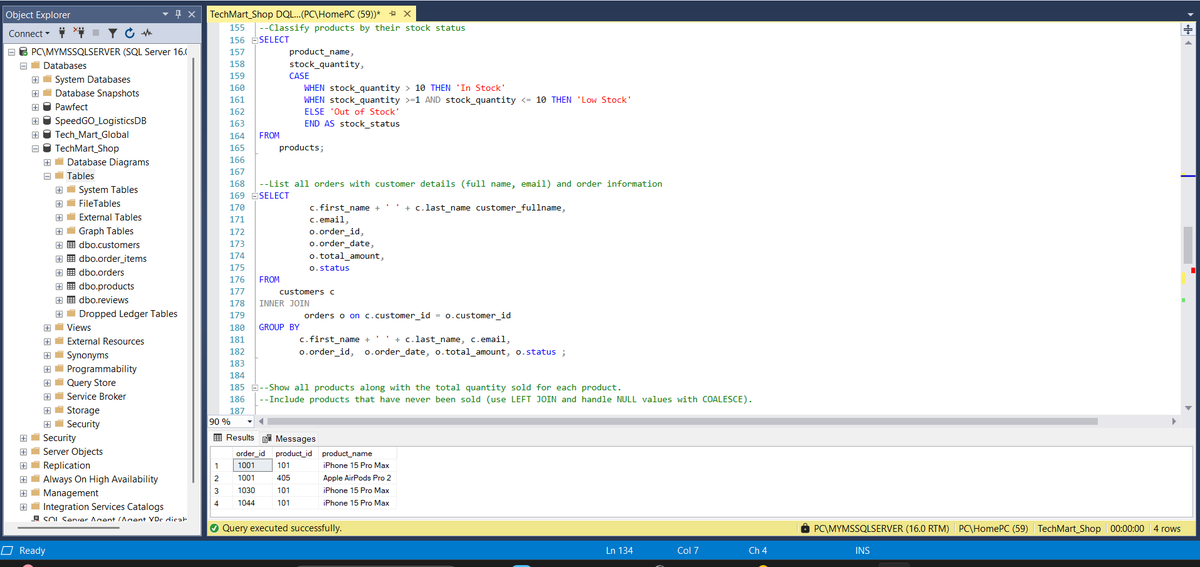
Query 3: This query classifies products by the number/amount left in stock. The CASE statement is used for categorization.
Query 4: This query returns all orders alongside the details of the customer that placed these orders. Classic use of the INNER JOIN. TBH, I instinctively want to use the INNER JOIN before I use any other JOIN type. Is this way of thinking flawed? Please let me know, so I stop fooling.
--FRAME 3--
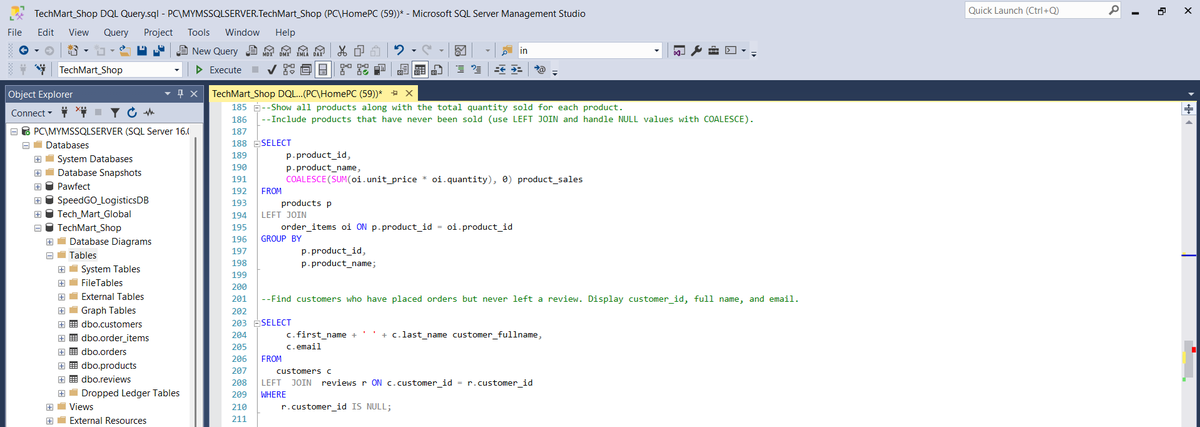
Query 5: This query provides a clear report of each product along with the the quantity sold. From the result observed, Iphone 15 is the top product sold. I used the COALESCE function to add up for products that have not been sold yet. I reckon these products will be left out without the COALESCE function?? Need to confirm that!!
Query 6: This query returns results for all the customers who have placed orders but have not left any review. Based on results, such customers are not really many in this dataset. These kind of customers could prove problematic for a business, if it cannot determine customer satisfaction for business improvement. I guess such businesses have to focus on received reviews.
I actually need feedback. Let me know If I am caping with these queries or they are not optimized for efficiency. I will engage your posts too, Abeg. 😂
So that's it for DAY 2. See you tomorrow!
#DataScience #dataengineering #datanalysis #SQL #sqlknowledge #sqlbeginner
1
1
5
224
16 Nov 2025
Day 2: DOCUMENTING MY SQL PROGRESS
Just another day in the trenches, Chads.
Couple of queries today. Each query is separated by comments.
Query 1: All orders placed in the last 90 days from today's date. The idea here is to use the DATEADD function to add 90 days to the current date (GETDATE() function). The WHERE clause is then checks if a particular order date falls between today and 90 days ago (90th day inclusive due to the >= operand), it's record is returned.
Query 2: Customer details are returned based on their spending level. Poor people like @Dolypizo can be found in the 'Low Value' category. While rich men like @uptown_analyst0 are in the High value category. All figures in dollars of dollars. The INNER JOIN is used here to connect the customers and orders table and of course the CASE statement is used to define conditions
-- FRAME TWO --
Query 3: This query classifies products by the number/amount left in stock. The CASE statement is used for categorization.
Query 4: This query returns all orders alongside the details of the customer that placed these orders. Classic use of the INNER JOIN. TBH, I instinctively want to use the INNER JOIN before I use any other JOIN type. Is this way of thinking flawed? Please let me know, so I stop fooling.
--FRAME 3--
Query 5: This query provides a clear report of each product along with the the quantity sold. From the result observed, Iphone 15 is the top product sold. I used the COALESCE function to add up for products that have not been sold yet. I reckon these products will be left out without the COALESCE function?? Need to confirm that!!
Query 6: This query returns results for all the customers who have placed orders but have not left any review. Based on results, such customers are not really many in this dataset. These kind of customers could prove problematic for a business, if it cannot determine customer satisfaction for business improvement. I guess such businesses have to focus on received reviews.
I actually need feedback. Let me know If I am caping with these queries or they are not optimized for efficiency. I will engage your posts too, Abeg. 😂
So that's it for DAY 2. See you tomorrow!
#DataScience #dataengineering #datanalysis #SQL #sqlknowledge #sqlbeginner
16 Nov 2025
𝗗𝗮𝘆 1: DOCUMENTING MY SQL PROGRESS.
Today, I continued my second SQL assignment from @iam_daniiell's training. Balancing work and upskilling has been so difficult, but we keep showing up and putting in the reps.
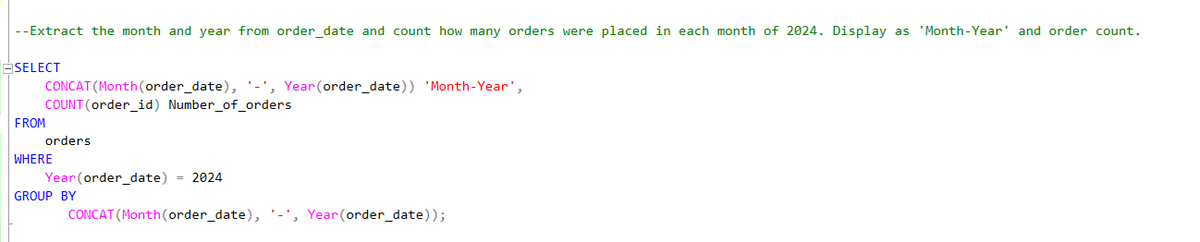
I wrote a query that extracts the month and year from the order_date column and count how many orders were placed in each month of 2024. The query returned the 'order_date' as 'Month-Year' and the number of orders per month.
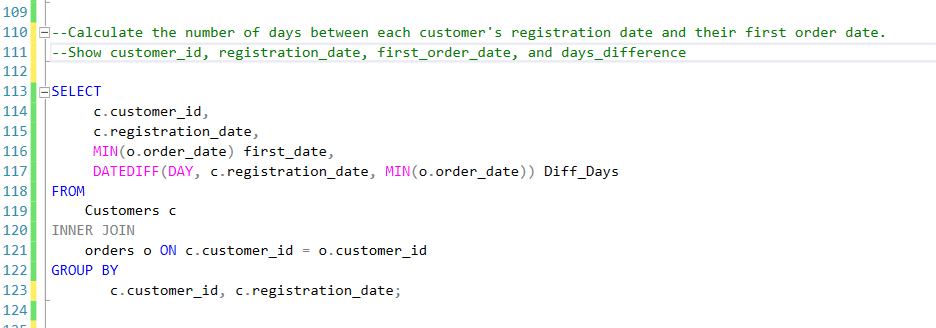
I also wrote a query that calculates the number of days between each customer's registration date and their first order date. This query returns the customer_id, registration_date, first_order_date, and days_difference.
Open to feedback, corrections and suggestions from my Idolos. 🤲🏾🤲🏾
#DataAnalysis #DataEngineering #SQL #Datafam #BuildingInPublic
2
3
7
406

5 Nov 2025
🪟 Q: 1321. Restaurant Growth 🪟 @LeetCode
Ig the Best LC Problem to really try & figure out how SQL Window Functions work!!
( especially the Window Frame clause...rows/range part 👀)
#sqlbasics #sqlbeginner #leetcodeproblems #LeetCode
leetcode.com/problems/restau…
3
73
4 Nov 2025
One of the Best Pieces of Content on 'SQL Window Function' for Noobs !!
W @_Produde_ 🌟 !
It doesn’t dive deep into the window frame clause, but it’ll help you see how window functions work for each row...
#SQL #sqlknowledge #sqlbasics #sqlbeginner
medium.com/learning-sql/sql-…
3
86

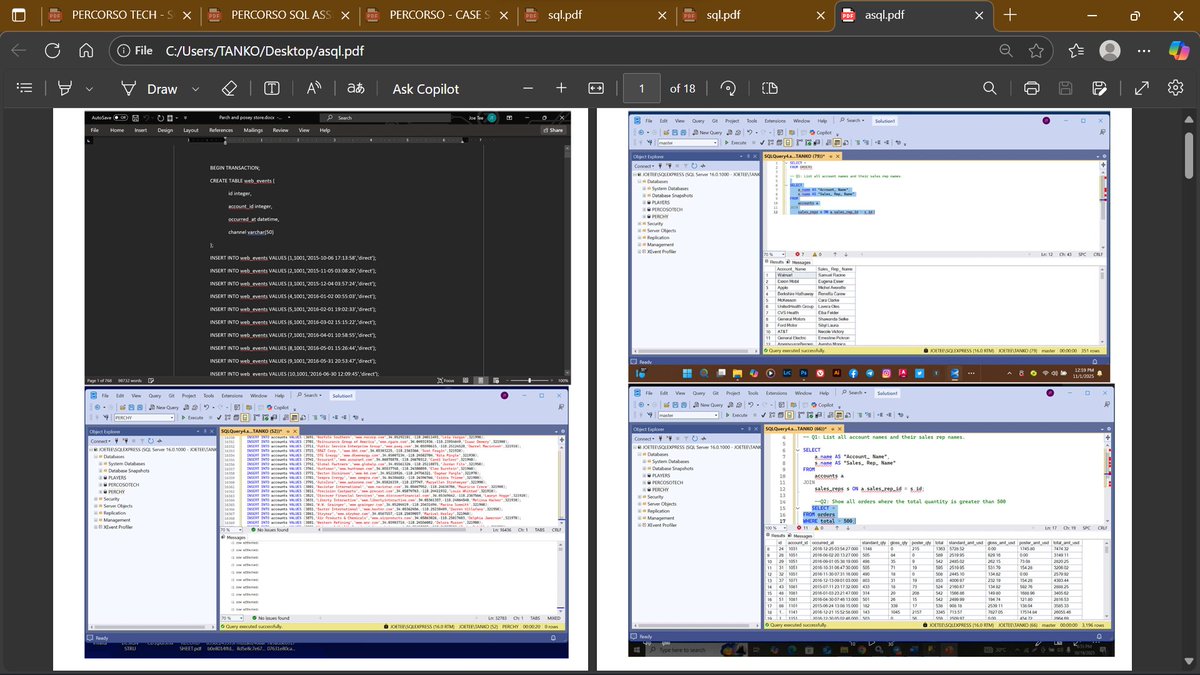
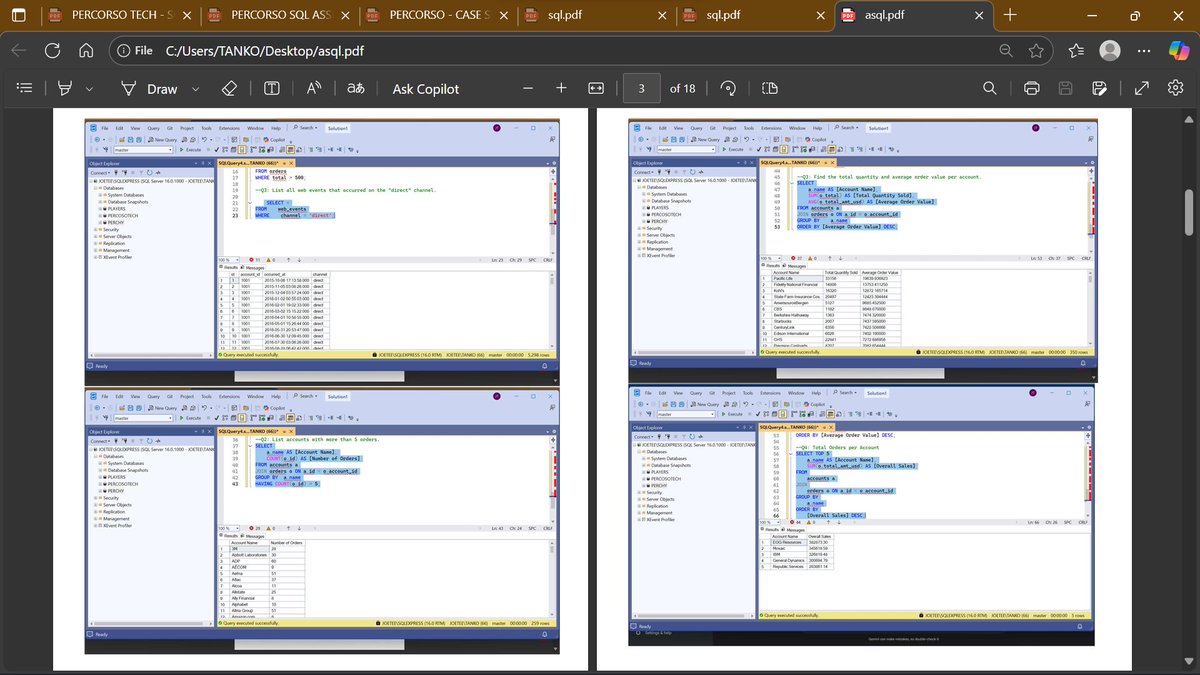
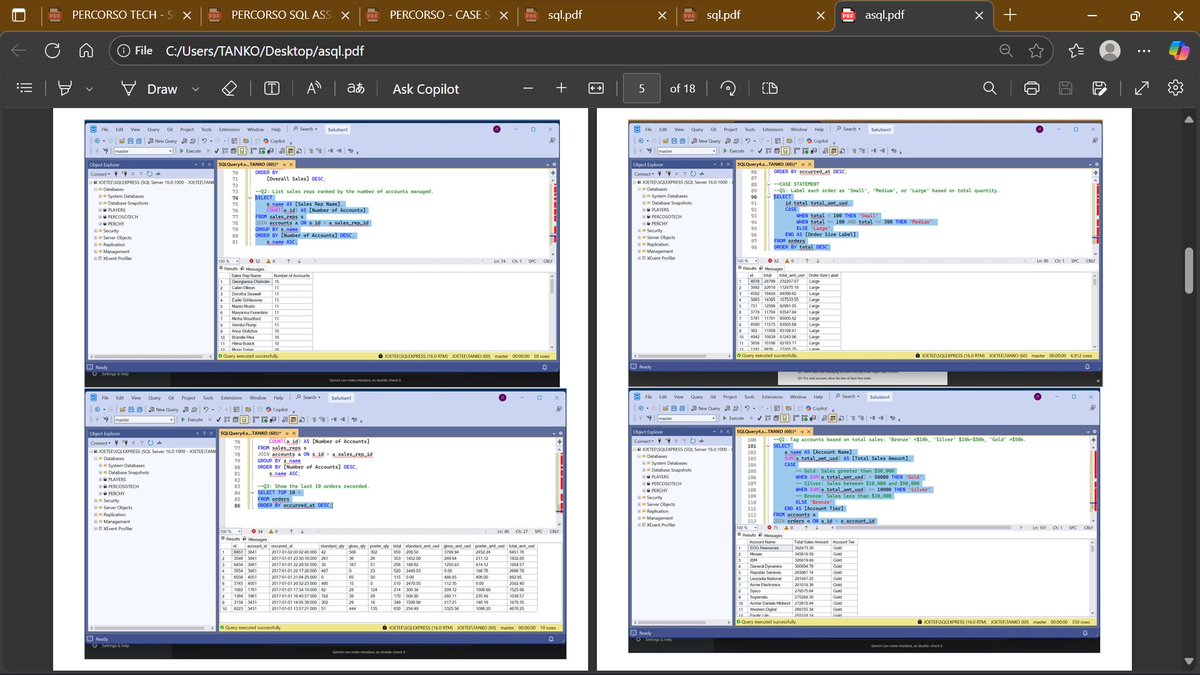
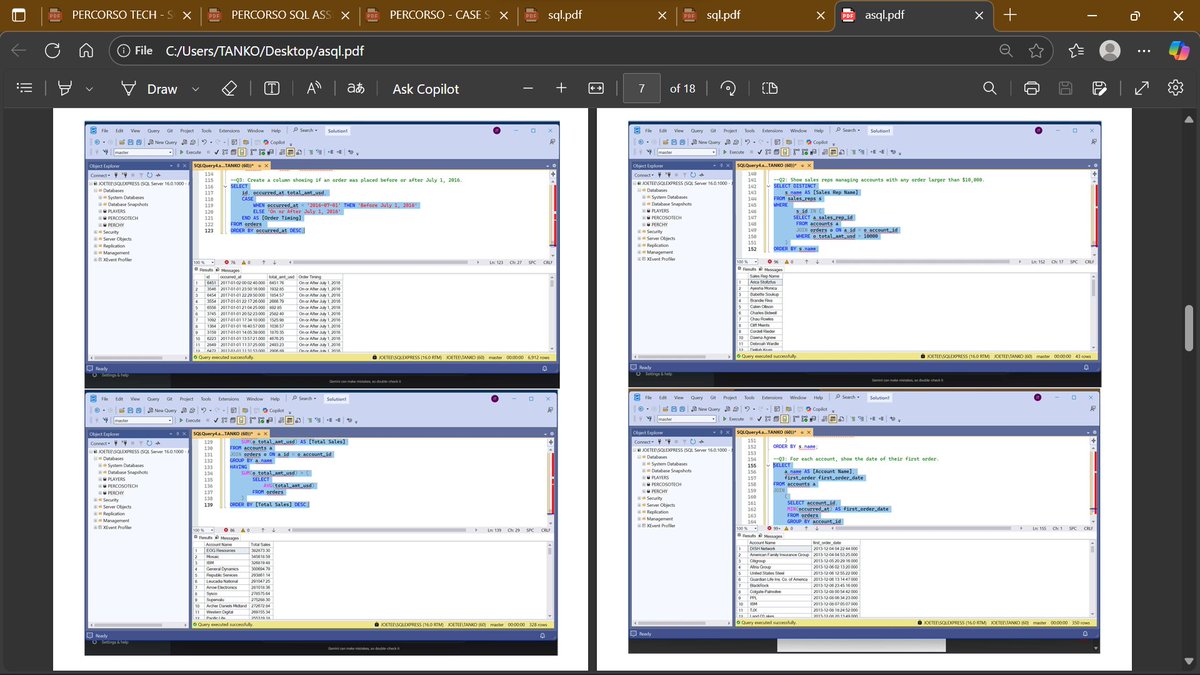
Structured query language sql coding hasn't been my thing but thanks to PercorsoTech for the eye opener.
Here is my assignment from the previous class. It's been an interesting journey
#PercorsoTech #DataAnalytics #FutureOfTech #SQLServer #sqlbeginner
1
7
147

9 Sep 2025
💡 Beginner in MySQL? Don’t worry! Our MySQL Beginner's Guide makes learning SQL easy with examples, best practices, and hands-on exercises.
Start your database journey today 👉 codenovastudio.gumroad.com/l…
#MySQL #SQLBeginner #DataScience #Programming #CodingLife #LearnToCode #TechTips #DevCommunity
1
46

28 Jul 2025
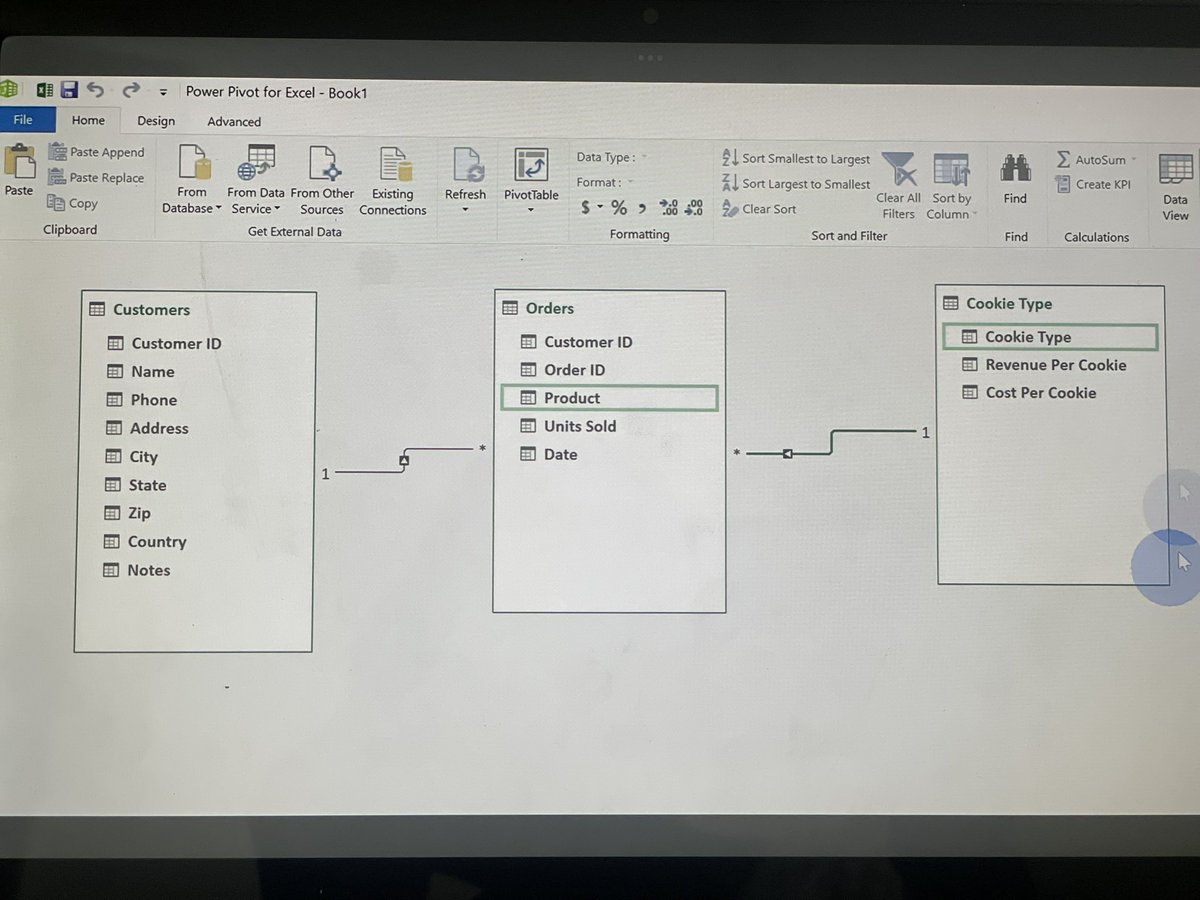
They gave you access to the data.
Now give them a reason to listen.
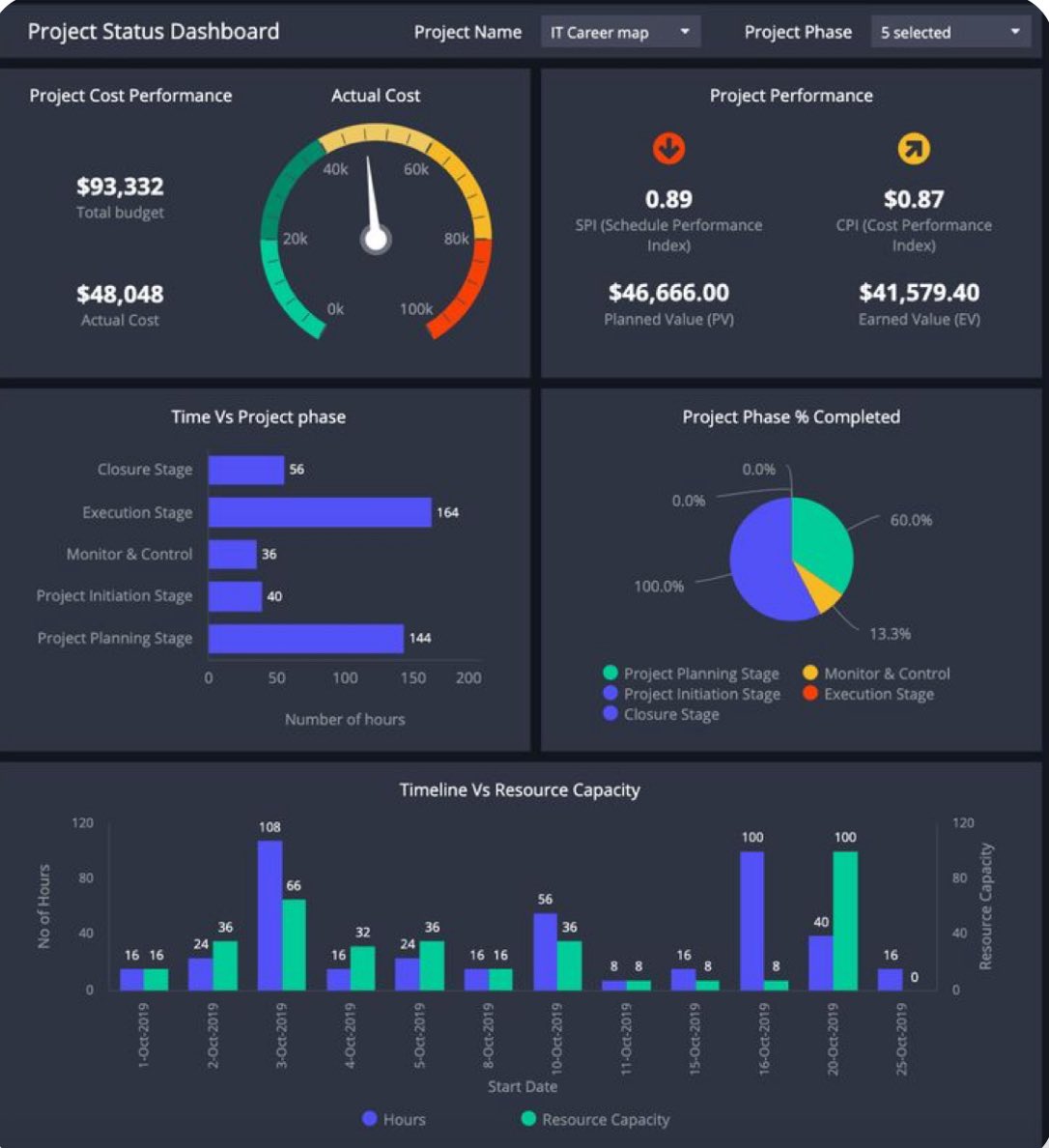
📌 Don’t just build pretty dashboards.
📌 Build ones that shift decisions.
Being in the room is one thing.
Being heard in the room? That’s equity.
#DataAnalyst #SQLBeginner #PowerBI #ExcelTips


1
1
14
640

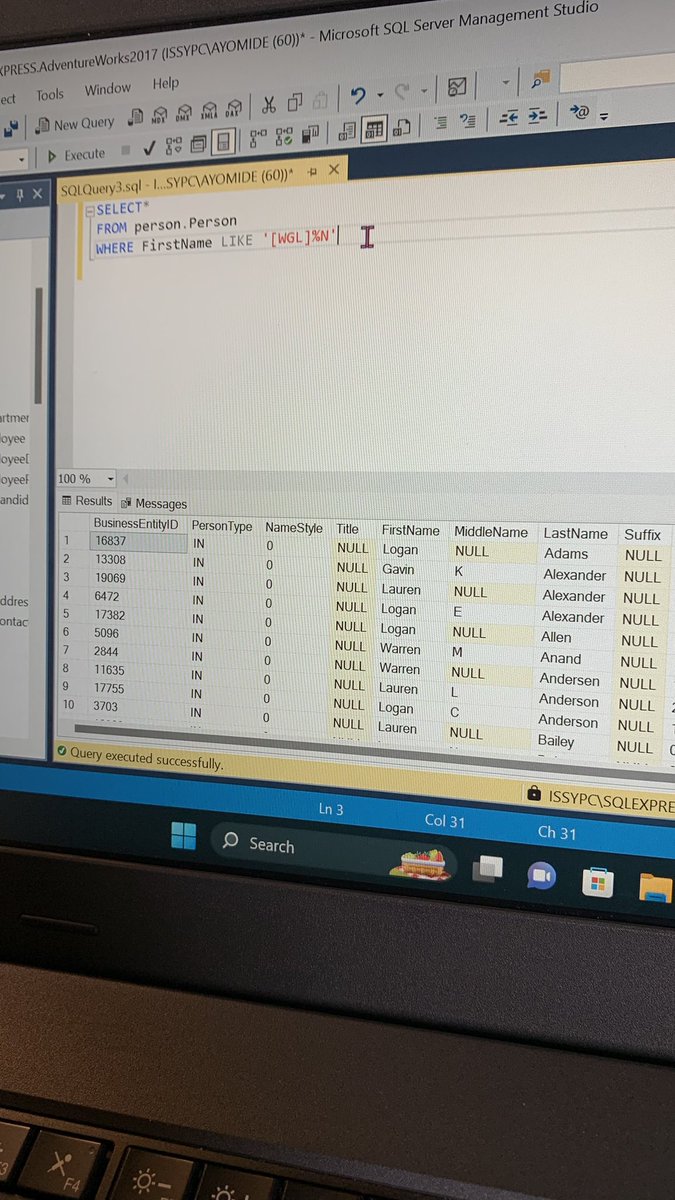
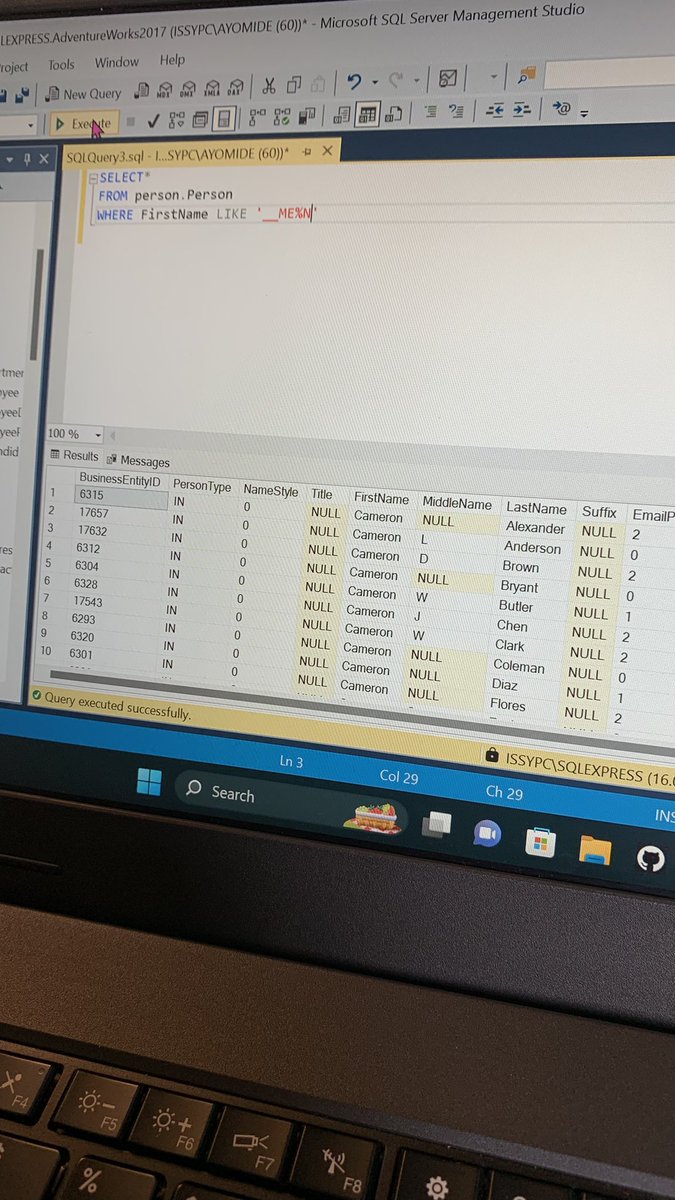
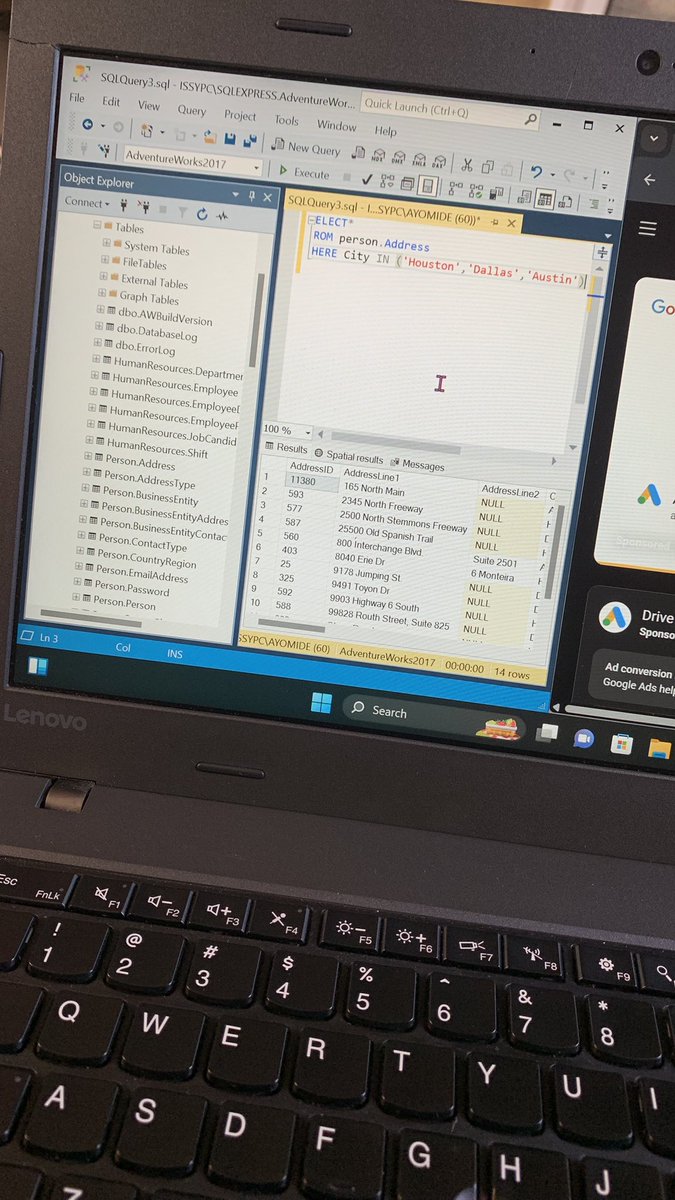
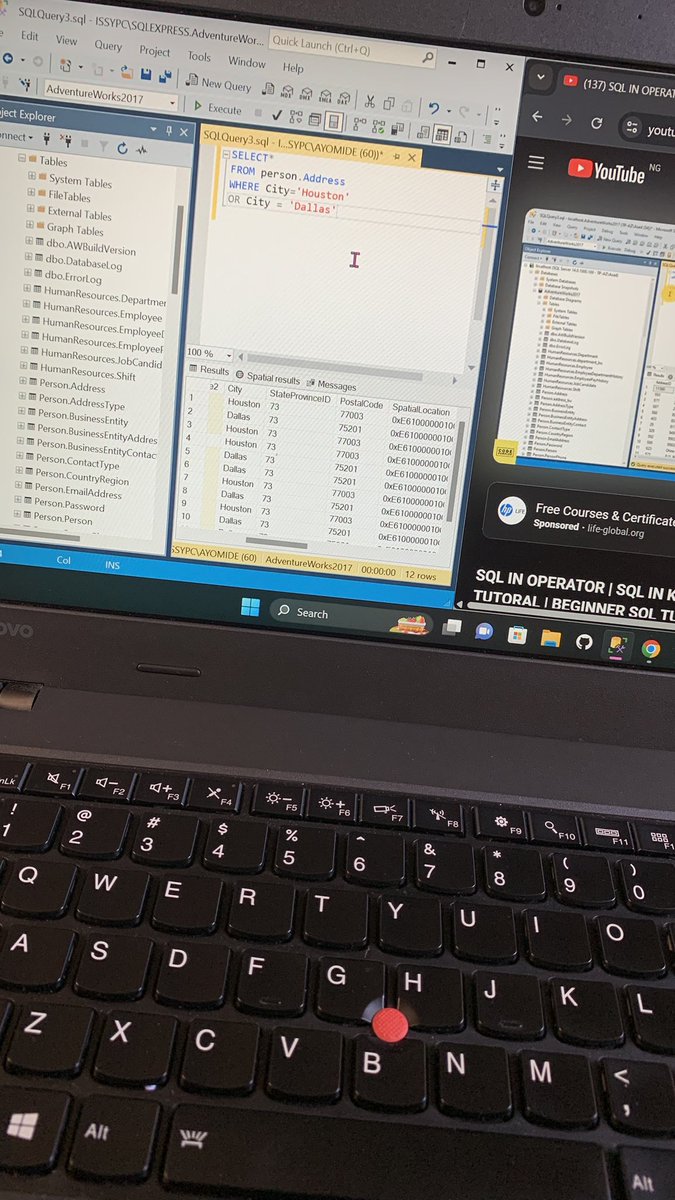
I attached some of the queries I ran after learning the WHERE clause
#SQL #SQLBeginner #Dataworld #SQLWithMe #100DaysSQL
#DataAnalytics
3
119

7 Nov 2023
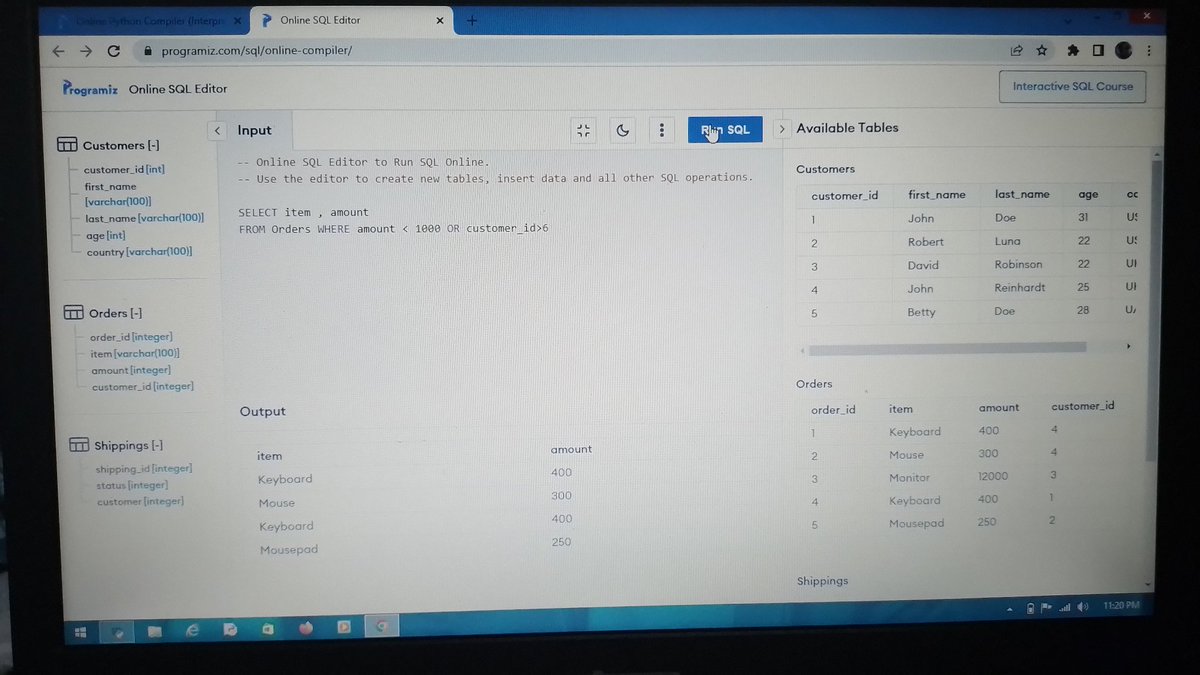
Just found out this PLATFORM @programiz can run SQL, now I can practice my SQL and get lessons for free.
#sql
#sqlbeginner
#DataScientists
#DataAnalytics
3
56

14 Jan 2023
Happy to be part of @moshhamedani Complete SQL Mastery. It's a steep learning curve for those who haven't worked with SQL at all but his explanations are great and easy to follow!
#SQL #SQLbeginner
1
12
3,824

5 Aug 2022
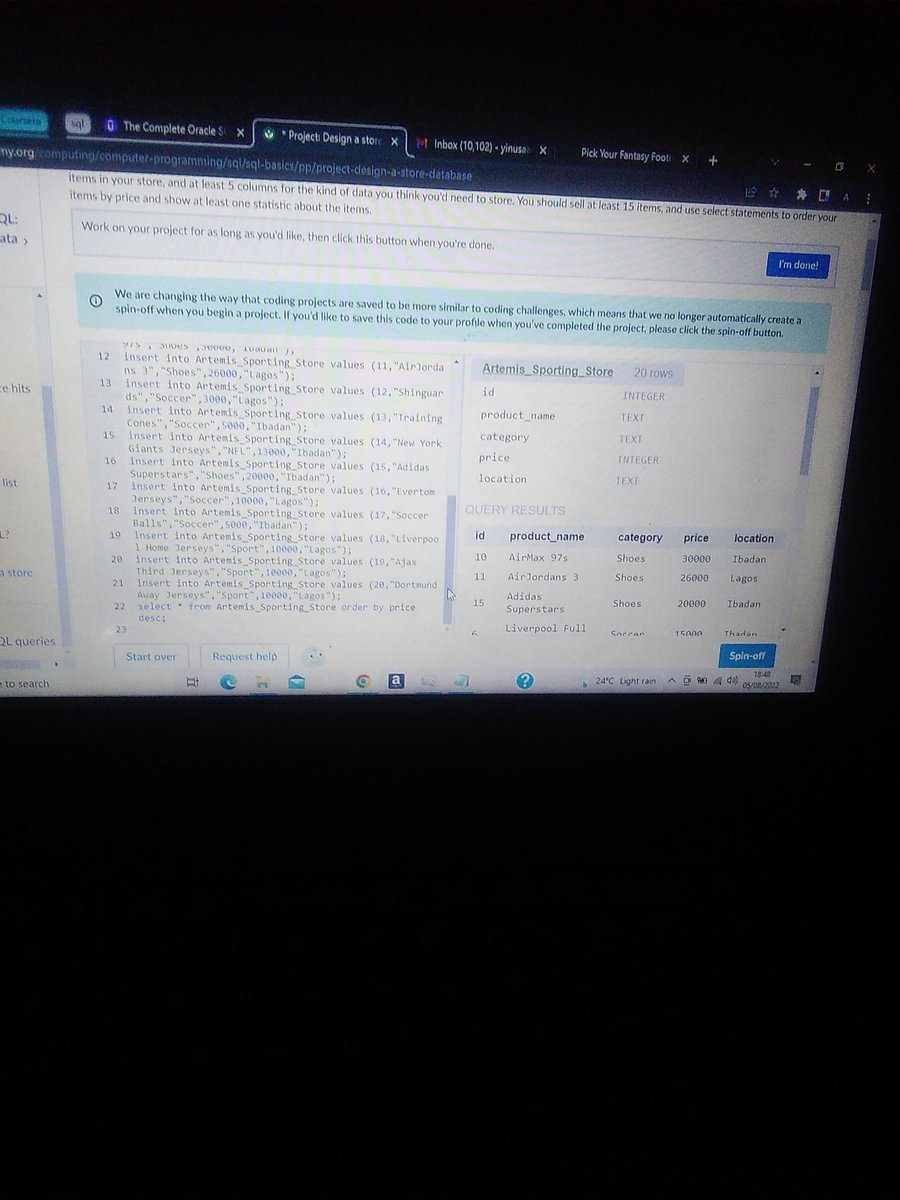
Today in SQL With @khanacademy Created a table for my Sporting Store listing all our products with details and ordered by price. #sqlbeginner @jessica_xls
11

Database? SQL? What does it all mean? Looking for a human-speak explanation? Check out our break-down! #SQL #SQLGate #SQLBeginner #SQLtutorial #Database medium.com/sqlgate/what-is-s…
2

6 Jan 2018
Data Analyst With R Beginner Online Classroom Certification Training Course In Pune, Mumbai.
Apply Now: goo.gl/NkUkae
#database, #microsoft, #sqlserver, #sqlbeginner, #dba, #sql, #analyticscourses, #bigdata, #begineerscourse, #analytics #onlinetraining, #education

2