
19 Sep 2025
I can see it, but maybe it's just because the ability to extend the className and pass props.
Could be simpler without extending until you need it. But I like to always extend the class and props as default
const TableCell = (p) => (<td className="px-3 py-2">{p.children}</td>)
1
1
357
19 Sep 2025
tbh, I would create a small component in the same file called "TableCell"
const TableCell = ({ children, className, ...props }) => (<td className={cn("px-3 py-2", className)} {...props}>{children}</td>);
1 line but
- easily found in the file
- easy to read
- able to override
3
9
1,835

11 Sep 2024
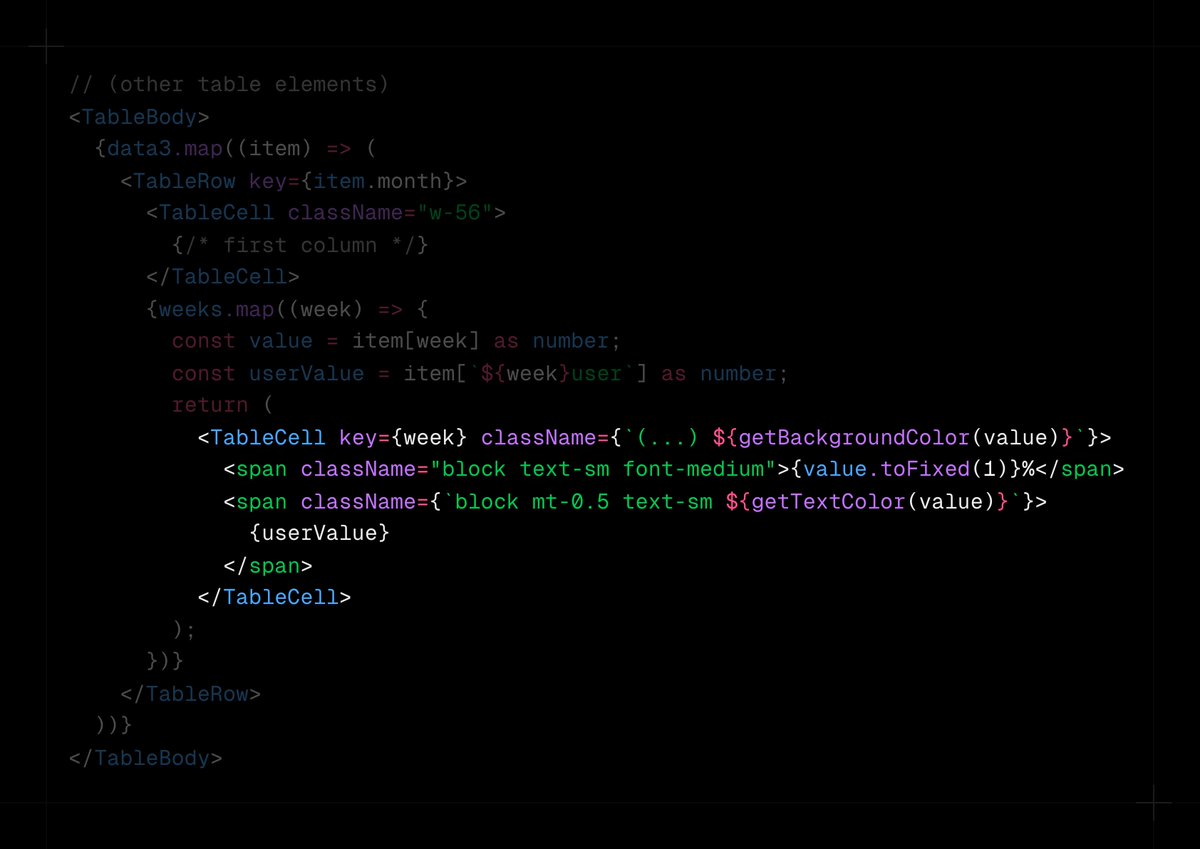
2/2 The color logic functions are used at the <td> (<TableCell/>) level, and that's it. No matter the data range, these functions will always produce a nice-looking heatmap without hard-coding thresholds.
2
247

15 Jul 2024
I believe it could be optimized (@BHolmesDev ?).
I think the problems like below. Say I have 100 rows, 20 columns in a custom <Table> component in SolidJs. Each row is a <TableRow>, each cell a <TableCell>.
That's a 2k instantiations of SolidJs, all with Hydration. Slow.
1
2
95
15 Jul 2024
Astro gets very slow when nesting tons of framework components (i.e. a <Table><TableCell> UI). At that point you need to switch to rendering entire views using a framework of choice, but then you can no longer use Astro components in those. Which sucks.
1
2
99


17 Sep 2023
I’ve tried many things but atm my weapon of choice is to have a TableCell component with variants and create tables using autolayout and that component. I decide case by case if I use row or column based approach.
1
2
114

Full updates include:
Coming soon liquidated debts.
Governance page.
Fixed convertAmount.
Convert Amount 0 decimals.
Aligned tablecell.
Data converted.
Removed converted amount if its ADA.
Testnet v1.3 will be available soon 🍒
3
23
1,734


1
4

29 Apr 2022
TableCell e tem sênior que não sabe centralizar um objetivo verticalmente… kkkk
2

21 Dec 2021
What’s a good model for building Tables for a design system in @figmadesign ? Our approach is to design a TableCell component with variants and let the consumer construct a TableRow component that they can manage. Drawback is that u cannot provide a TableContainer…
3
3

10 Oct 2021
Maybe I wrote, what I wanted to say a bit wrong, but that's exactly what I meant. We are also stuck right there, at getting a table inside of a tablecell
1
3

10 Oct 2021
I was curious and tried to reproduce this issue. I already stuck at the point of getting a table inside of a tablecell. All pages I can create inside of a table are just pages. How do you do this?
1
3

But yes, it's different when a component is more complex (nested, requiring some specific approach, harder to compose, ...).
When that's true, we usually create a "how to" guide explaining these details. One example would be composing tables from TableCell, TableRow, etc.
3

Spacer, Stack, StadiumBorder, StatefulBuilder, StatefulWidget, StatelessWidget, StatusTransitionWidget (didn't know about this one), StepTween, StreamBuilder, StrutStyle, Table, TableCell, TableRow, Text, TextBox, TextSelectionToolbarLayoutDelegate, TickerProvider, TickerMode
1
5

8 Apr 2021
Designers Learn Code: The Table Header Element youtu.be/yB9-XMquy7g via
@YouTube
#HTML #CSS #coding #codinglife #webdesign #designerslearncode #thedailycodesnippet #dailycodesnippet #codingforbeginners #tables #tablecell #tablerow, #tableelement #tableheader #accessibility

1
1
7 Apr 2021
Designers Learn Code: The Table Element youtu.be/OBke108jQ28 via @YouTube #HTML #CSS #coding #codinglife #webdesign #web #designerslearncode #thedailycodesnippet #dailycodesnippet #codingforbeginners #codingbootcamp, #tables #tablecell #tablerow, #tableelement #accessibility
1
1



10 Oct 2020
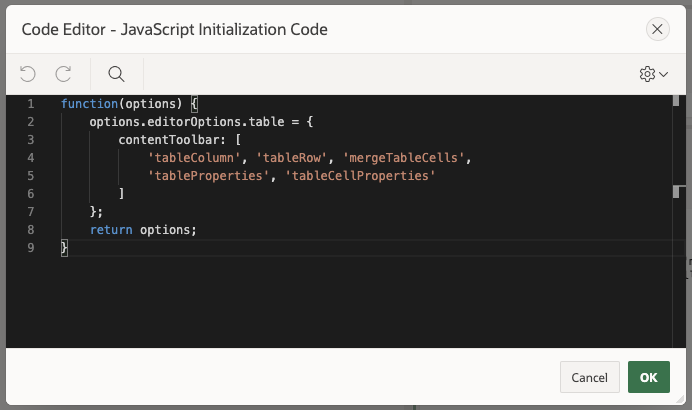
Almost all CKEditor 5 plugins are included in the build shipped with APEX 20.2. To easily see what's included, run the following in the console:
ClassicEditor.builtinPlugins…(p => p.pluginName)
To enable the tablecell toolbar however, you might have to fiddle with some Init JS Code:
2
1
5