
1 Dec 2025
In our last Flerlage Twins blog post of 2025, we want to say THANK YOU to our amazing community by sharing ten #tinytableautips from our amazing community! The post includes tips from @ToreLev @MinaOzgen @CMJCallahan @ItsMehras & Brittany Rosenau.
Link: flerlagetwins.com/2025/12/ti…

3
4
19
682

17 Aug 2025
Thanks for the mention @tableau - and thanks again to Whitney Wood who shares some cool #TinyTableauTips in my summer guest host series!
More cool tips can be found here: youtube.com/@ToreLevinsen
4
176
4 Jun 2025
New #TinyTableauTip alert! ⚡️
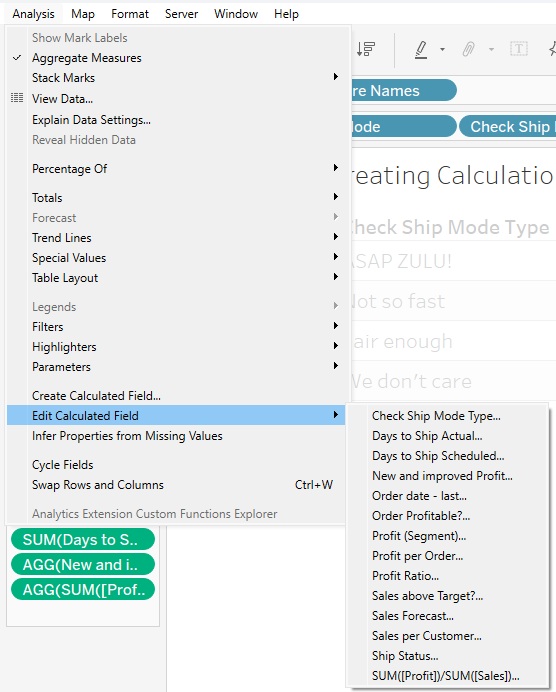
Calculated Fields in @tableau – Part 2 is live!
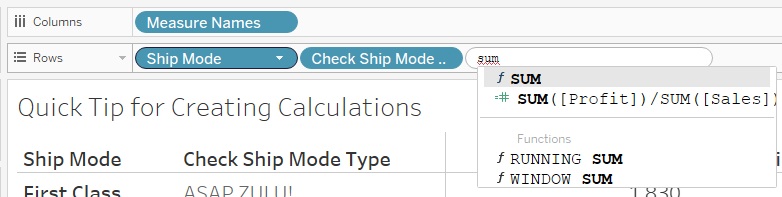
🔥 Inline calcs
🧠 Drag & Drop to create Fixed LOD
💬 Commenting layout tips
Make your formulas cleaner and smarter:
torelevinsen.com/tinytableau…
#CalculatedFields #DataFam #TinyTableauTips
1
7
220

13 May 2025
New Blog Post from @FlerlageKev - For us, #TC25 was all about community. So how about 10 more #TinyTableauTips from our incredible community?
flerlagetwins.com/2025/05/ti…

5
21
842
13 May 2025
New Blog Post -
For me, #TC25 was all about community. So how about 10 more #TinyTableauTips from our incredible community?
flerlagetwins.com/2025/05/ti…

1
5
41
1,131

3 Apr 2024
Thanks buddy! I remember learning that from on of the #TinyTableauTips and it was a game-changer for me! ❤️
3
126

18 Mar 2024
このtips全部すごい!
一番驚いたのは計算フィールドでwith句みたいな定義ができる?まじー? #tinytableautips
18 Mar 2024

In today's 5th #tinytableautips blog post, we've compiled 10 more great tips from our amazing community. With tips from @quantum_relic, @xrayattack, @brrosenau, @ItsElisaDavis & @ToreLev. flerlagetwins.com/2024/03/ti…
1
16
672
18 Mar 2024
In today's 5th #tinytableautips blog post, @FlerlageKev has compiled 10 more great tips from our amazing community. With tips from @quantum_relic, @xrayattack, @brrosenau, @ItsElisaDavis & @ToreLev.
flerlagetwins.com/2024/03/ti…
1
20
1,166
18 Mar 2024
In today's 5th #tinytableautips blog post, we've compiled 10 more great tips from our amazing community. With tips from @quantum_relic, @xrayattack, @brrosenau, @ItsElisaDavis & @ToreLev. flerlagetwins.com/2024/03/ti…
1
13
38
3,849

24 Jan 2024
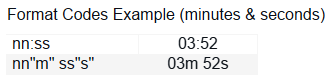
A little @Tableau format code trick - you can use "reserved" characters in format codes by wrapping them in quotes. Normally "s" in custom formatting would return seconds, but look how we can achieve "03m 52s" without any extra calculations.
#tinytableautips #datafam
4
27
1,949
18 Dec 2023
It's exciting learning something from an internal user! All my years using @Tableau, I didn't know you could copy tooltip text on the web... As a creator, turn off "Allow selection by category".
To select your text, click the mark to freeze it first.
#tinytableautips #datafam
1
5
323
13 Nov 2023
New Blog Post - #TinyTableauTips Round 4
Thanksgiving is next week & I am (& will forever be) thankful to the @Tableau community. I would not be where I am today without you! So to thank you all, I'm sharing previously shared tips from our community. flerlagetwins.com/2023/11/ti…
3
32
2,059

16
630

6 Jun 2023
🚨#TinyTableauTips 21 - Hide Unused Fields
Once you are done developing, if you are using an extract:
1) Click the down arrow in the data menu
2) Select hide unused fields
3) Refresh extract
The fields will be gone, and your dashboard faster
#Tableau #DataFam #Data #Analytics
1
1
337
4 Jun 2023
🚨#TinyTableauTips 19 - Navigating Sheets
Sheet!!! That's a lot of sheets....
To cycle through the sheet(s) faster:
1) Use your arrow left or right to move 1 sheet at a time
2) Use page up or page down to move 10 sheets at a time
#Tableau #DataFam #Data #Analytics #Dashboards
1
2
313
3 Jun 2023
🚨#TinyTableauTips 18 - Reset Tooltip
Made a bunch of changes to a tooltip and just want to revert back to the original? This is often overlooked
1) Open the tooltip
2) Click "reset tooltip"
#Tableau #DataFam #Data #Analytics #Dashboards
1
226
2 Jun 2023
🚨#TinyTableauTips 17 - Rename column without changing dimension name
Sometimes you want to change the column name, without changing the dimension name
1) Edit the pill
2) Type "//new name of field"
3) Hit shift enter
4) Click out
#Tableau #DataFam #Data #Analytics #Dashboards
2
188
1 Jun 2023
🚨#TinyTableauTips 16 - Dashboard Grid View
Are you a formatting perfectionist?
Sometimes aligning visuals can be tough (without using the layout tab)
Solution: When on a dashboard, click "g" and a grid will show up to easily align
#Tableau #DataFam #Data #Analytics #Dashboards
1
209
29 May 2023
🚨#TinyTableauTips 13 - Row Level Security - AD Group
Need to limit who can see your data based on ad group?
1) Create a new field called "RLS"
2) Set up a new calc: ismemberof('ad-ent group name')
3) Add RLS to data source filter, keep the true
#Tableau #DataFam #Data #Analytics
1
128