


地区 快捷跳转链接
美国 itms-apps://itunes.apple.com/WebObjects/MZStore.woa/wa/resetAndRedirect?dsf=143441&cc=us
日本 itms-apps://itunes.apple.com/WebObjects/MZStore.woa/wa/resetAndRedirect?dsf=143462&cc=jp
韩国 itms-apps://itunes.apple.com/WebObjects/MZStore.woa/wa/resetAndRedirect?dsf=143466&cc=kr
香港 itms-apps://itunes.apple.com/WebObjects/MZStore.woa/wa/resetAndRedirect?dsf=143463&cc=hk
尼日利亚 itms-apps://itunes.apple.com/WebObjects/MZStore.woa/wa/resetAndRedirect?dsf=143561&cc=ng
土耳其 itms-apps://itunes.apple.com/WebObjects/MZStore.woa/wa/resetAndRedirect?dsf=143480&cc=tr
埃及 itms-apps://itunes.apple.com/WebObjects/MZStore.woa/wa/resetAndRedirect?dsf=143516&cc=eg
印度 itms-apps://itunes.apple.com/WebObjects/MZStore.woa/wa/resetAndRedirect?dsf=143467&cc=in
5
3
14
2,213

May 25
I was at Apple for some WebObjects training shortly after acquisition (we were OpenStep developers) and you could feel the tension between Apple DevRel people and NeXT engineers. It was uncomfortable but made for good gossip at the Cupertino Inn
1
3
190

土区充值 6 折 gpt plus全流程梳理(apple礼品卡充值)
因为最近gpt的特惠途径几乎覆没,但是又离不开天才程序员
看了几个好的充值办法,大多集中于美区、尼区、土区这几个appleid所属区域 美区20美元实在是有些小贵,最后折腾了一下,还是选择土区,实在便宜,只需78元即可订阅。 比价网站: appstoreprice.org/zh/apps/64…
首先我们需要一个苹果设备,好想是任何苹果设备都可以,iphone、ipad只要可以下载gpt app的可以订阅即可。 然后就是需要一个apple id土区账号,这个其实也很简单,因为可以使用这个国内的这个号码注册(门槛极低)唯一需要注意的是,刚注册的账号容易被封控,最好养几天,礼品卡充值可以先充值少一点的,然后再订阅(求稳)
apple id注册简单过程
官网地址: account.apple.com/官网点击注册(推荐电脑端),注意地址一定要选择土耳其,然后就是接收邮箱这边最好选择非qq邮箱 其他信息可以随便写(年龄大于18),这边有比较方便的网站可以直接生成相关信息,直接按照这个进行填写即可,网站地址 土耳其地址生成器 - 在线生成土耳其真实地址和虚拟身份数据 | 1K工具箱 - 免费在线工具集合号码可以选择国内号码,并且无需挂梯子哈,不然不稳定,如果提示暂无法创建账号也没事,换一下浏览器或者切无痕多试试,这个实测都可以成功创建的。 然后大概就创建成功了,然后接下来就是比较重要的一步了,那就是设备登录账号,首先需要先在appstore的历史账号退出,然后复制下面的这个编码浏览器(Safari)切换地区(都是为了伪造清除缓存)切换成功的样子就是appstore的内部都是英文,然后再登录账号。
itms-apps://itunes.apple.com/WebObjects/MZStore.woa/wa/resetAndRedirect?dsf=143480&cc=tr
登录点开account查看country是否显示土耳其(土耳其语),是的话那就恭喜你成功注册且登录了。
礼品卡获取
最后就是礼品卡获取途径:oyunfor、seagm、咸鱼 这几个渠道的500TL价格大概都在这个78-82元之间,更高的就不用选择了,不会说什么稳定无黑卡,除非是本地购买的,否则皆有黑卡的可能性,选择差不多的即可。
oyunfor
oyunfor是土耳其比较老的购买平台了,其相对黑卡概率会小很多,注册也很简单,国内手机号可以直接注册,但是邮箱国内163、126不可用,qq没试过,最后使用的gmail。 注册登录后直接可以购买了,不过支付那边只能使用信用卡或者本地支付方式,我这边使用的招行的visa卡,实测可以顺利支付,最后消费77.66充值成功。因为会收2.49%的手续费,但是也是很好价了。 网站地址: oyunfor.com
seagm
seagm是东南亚那边的公司进行维护的,本身对国内友好,甚至无需梯子可以直接访问,非常简单,并且支付也支持支付宝,非常方便,价格也比较好价。 可以直接注册然后进行购买,购买直接搜索土区:iTunes礼品卡(土耳其)即可,价格略有波动,刚刚看的是78.97,整体还是很便宜的,主要无需办卡,直接支付宝
网站地址: SEAGM - 全球华人首选线上游戏点卡, 购物礼品卡, 手游和直播充值直充平台
咸鱼
权威无需多说,价格在79-82都有,选择销量高的商家购买即可,黑卡看脸,概率应该是三个渠道当中最大的,适合不想折腾的。
充值订阅
获取到卡密,直接点击这个redeem code填入卡密进行兑换,兑换成功余额这个地方显示你的充值金额。 然后打开这个chat gpt的app,登录你的充值帐户,注意每个appleid强绑定一个gpt账号。 进入点开升级订阅,点开看到plus的价格应该是500TL,这个就是正确的充值金额,选择这个档位,然后点击订阅,这个时候大概率会遇到,说你的帐户地址等相关信息未验证,不用担心,选择这个继续,然后跳出来需要完善的信息,按照之前生成的地址填入即可,电话我填的国内号码,也没有要求验证。 然后应该就是订阅成功的界面了,恭喜!成功订阅plus。
以上就是整个订阅的过程了,稍微有一点麻烦,但是价格十分好价,差不多2小时即可完成整个过程。希望可以帮助各位佬。
5
5
37
8,023

app store 如何切换地区,复制网址到浏览器跳转商店,登录对应注册的账号即可,网址如下:
美国itms-apps://itunes.apple.com/WebObjects/MZStore.woa/wa/resetAndRedirect?dsf=143441&cc=us
日本itms-apps://itunes.apple.com/WebObjects/MZStore.woa/wa/resetAndRedirect?dsf=143462&cc=jp
韩国itms-apps://itunes.apple.com/WebObjects/MZStore.woa/wa/resetAndRedirect?dsf=143466&cc=kr
香港itms-apps://itunes.apple.com/WebObjects/MZStore.woa/wa/resetAndRedirect?dsf=143463&cc=hk
尼日利亚itms-apps://itunes.apple.com/WebObjects/MZStore.woa/wa/resetAndRedirect?dsf=143561&cc=ng
土耳其itms-apps://itunes.apple.com/WebObjects/MZStore.woa/wa/resetAndRedirect?dsf=143480&cc=tr
埃及itms-apps://itunes.apple.com/WebObjects/MZStore.woa/wa/resetAndRedirect?dsf=143516&cc=eg
印度itms-apps://itunes.apple.com/WebObjects/MZStore.woa/wa/resetAndRedirect?dsf=143467&cc=in
阿根廷itms-apps://itunes.apple.com/WebObjects/MZStore.woa/wa/resetAndRedirect?dsf=143505&cc=ar
菲律宾itms-apps://itunes.apple.com/WebObjects/MZStore.woa/wa/resetAndRedirect?dsf=143474&cc=ph
巴基斯坦itms-apps://itunes.apple.com/WebObjects/MZStore.woa/wa/resetAndRedirect?dsf=143477&cc=pk
1
2
12
1,339

May 22
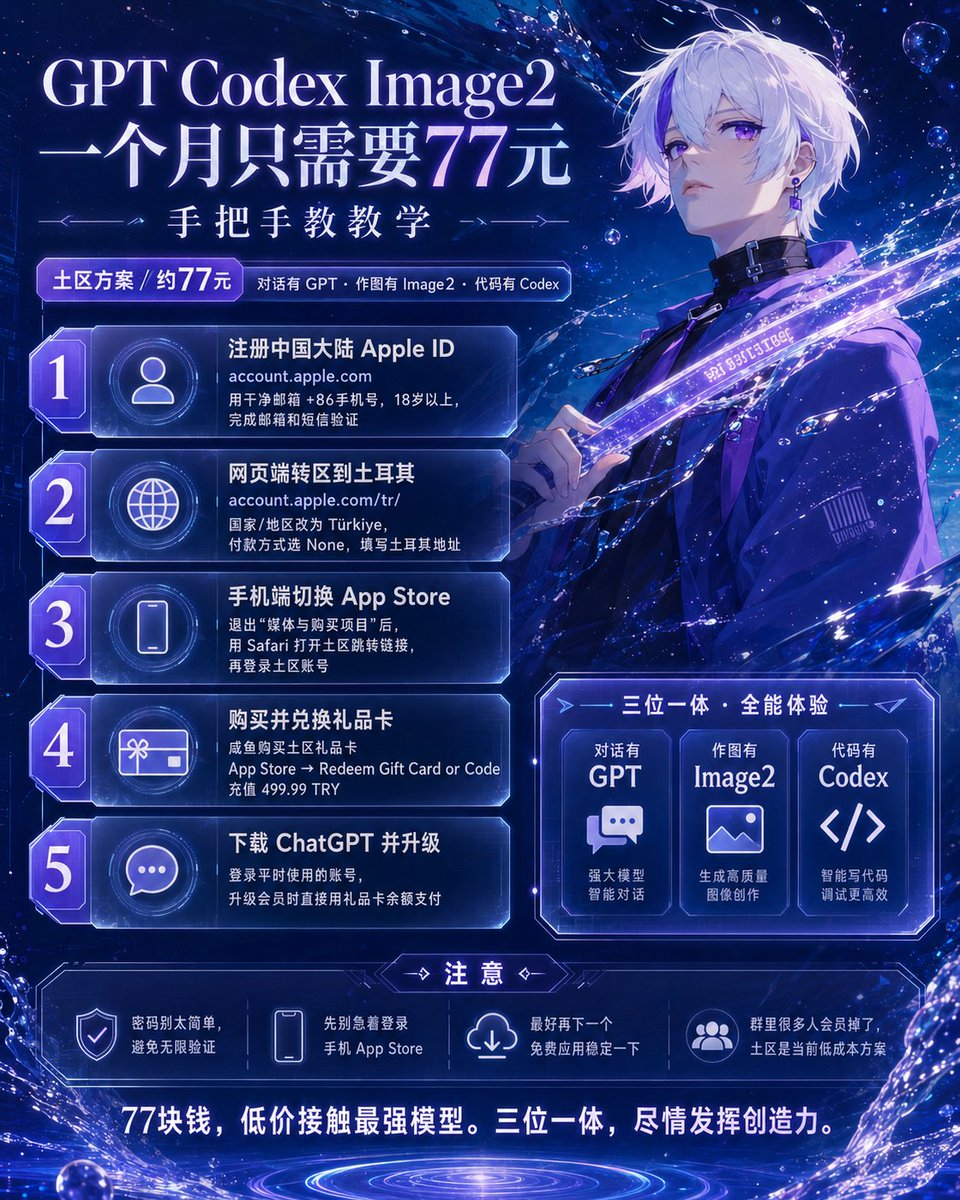
GPT Codex Image2 一个月只需要77元 手把手教学
昨天,半个月之前花四十多块钱在网站上开的会员掉了,但是又不能没有gpt和image2。
在一些群里问了一下,当天也有好几个人也掉了。
然后就选择开成本最低的土区,如果是美区基本上需要20U,土区的话,买一张苹果礼品卡,咸鱼77块钱。
废话不多说,开始教程。
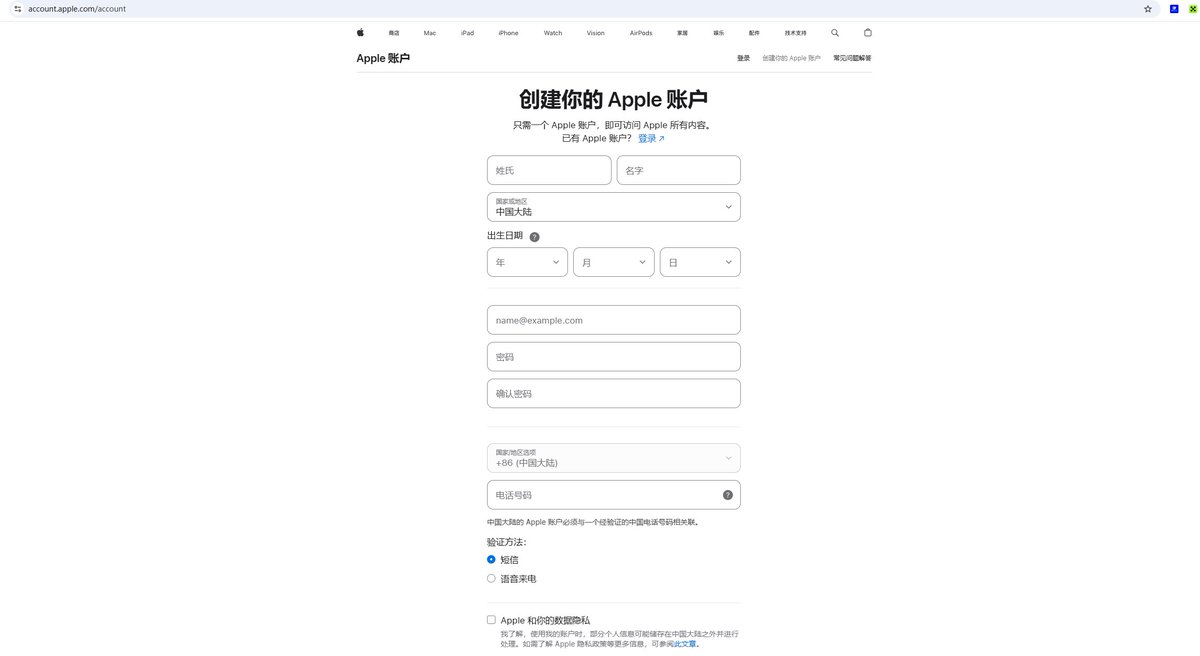
第一步:注册中国大陆 Apple ID(可以用电脑端)
打开浏览器,访问 account.apple.com
点击“创建您的 Apple ID”
国家/地区选择「中国大陆」
使用干净邮箱(未注册过任何 Apple ID 的 163/QQ/Gmail)和 86 手机号填写
出生日期选择大于 18 岁
密码一定不要用自己的姓名或者生日等信息 容易引发无限验证
完成邮箱验证 短信验证
注册成功后,先不要登录手机 App Store
第二步:网页端转区到土耳其(可以用电脑端)
访问土区专用入口:account.apple.com/tr/
用刚注册的国区 Apple ID 登录
进入「个人信息」→ 「国家/地区」→ 点击「更改」
同意条款后,在付款方式页面优先选择 None(无)
账单地址填写土耳其地址生成器生成的完整信息(推荐 haoweichi .com)
电话继续保留 86 手机号
点击保存,确认账户国家变为 Türkiye
第三步:手机端切换 App Store 到土耳其区
iPhone/iPad 设置 → 顶部点击你的 Apple ID → 「媒体与购买项目」→ 退出登录(必须退出!)
退出之后,直接打开 Safari浏览器,就是那个指南针图标的浏览器,复制下面链接并粘贴打开:
itms-apps://itunes.apple.com/WebObjects/MZStore.woa/wa/resetAndRedirect?dsf=143480&cc=tr
(出现“无法连接 App Store”属于正常)
会直接跳转到土区的App Store,用转区的 Apple ID 正常登录
确认账户页面显示 Türkiye / Turkey
第四步 购买礼品卡
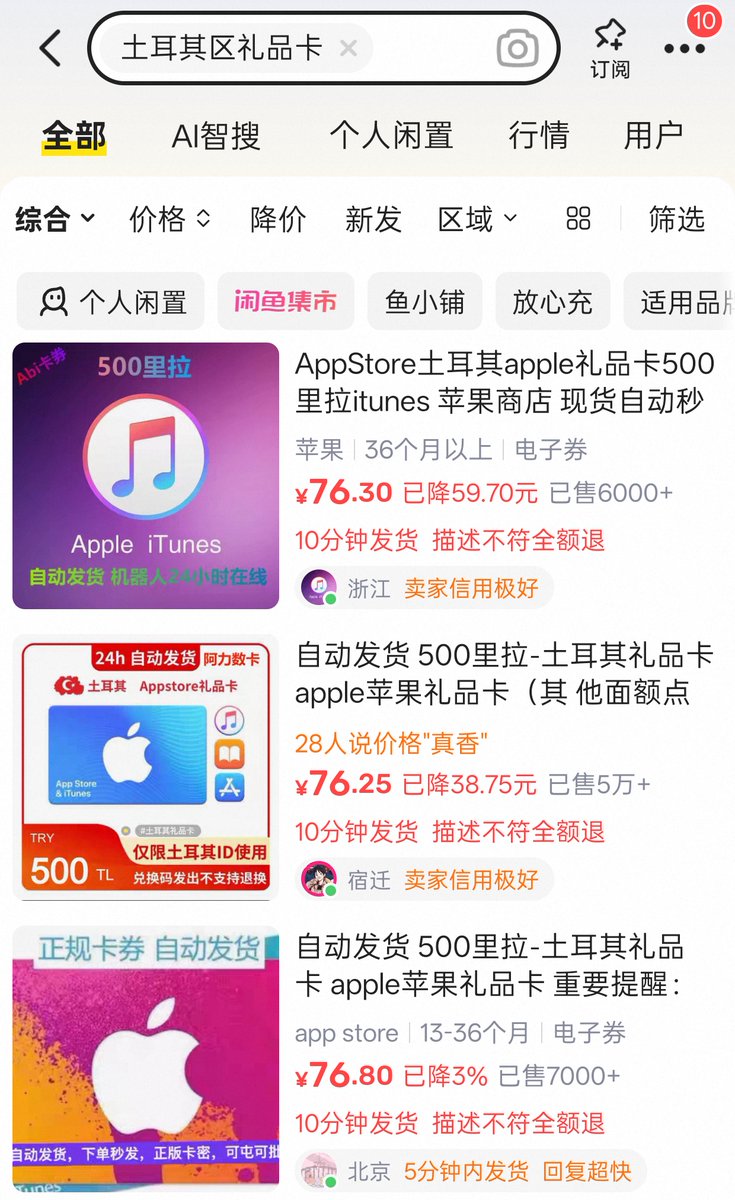
直接去咸鱼
搜索土区礼品卡
找销量大的
他会发给你一段密钥
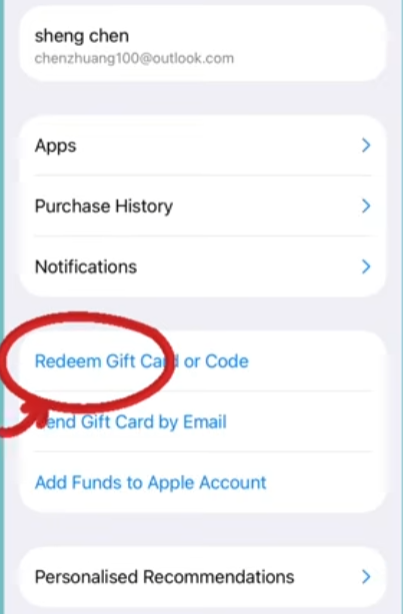
然后回到 App store
点击右上角头像
找到 Redeem Gift Card or Code
把密钥输入进去就行了
499.99土耳其里拉
刚好开会员需要这么多
第五步:下载ChatGPT
正常下载
最好再下载个免费应用稳定一下 避免回滚
之后用你平时登录的账号登录GPT
点开之后 选择升级
升级的会直接用礼品卡的余额支付
OK,现在你已经用77块钱
获得了这个世界上你能低价接触到最牛逼的模型了
对话有GPT 作图有Image2 代码有Codex
三位一体
尽情发挥自己的创造力和想象力吧
May 22

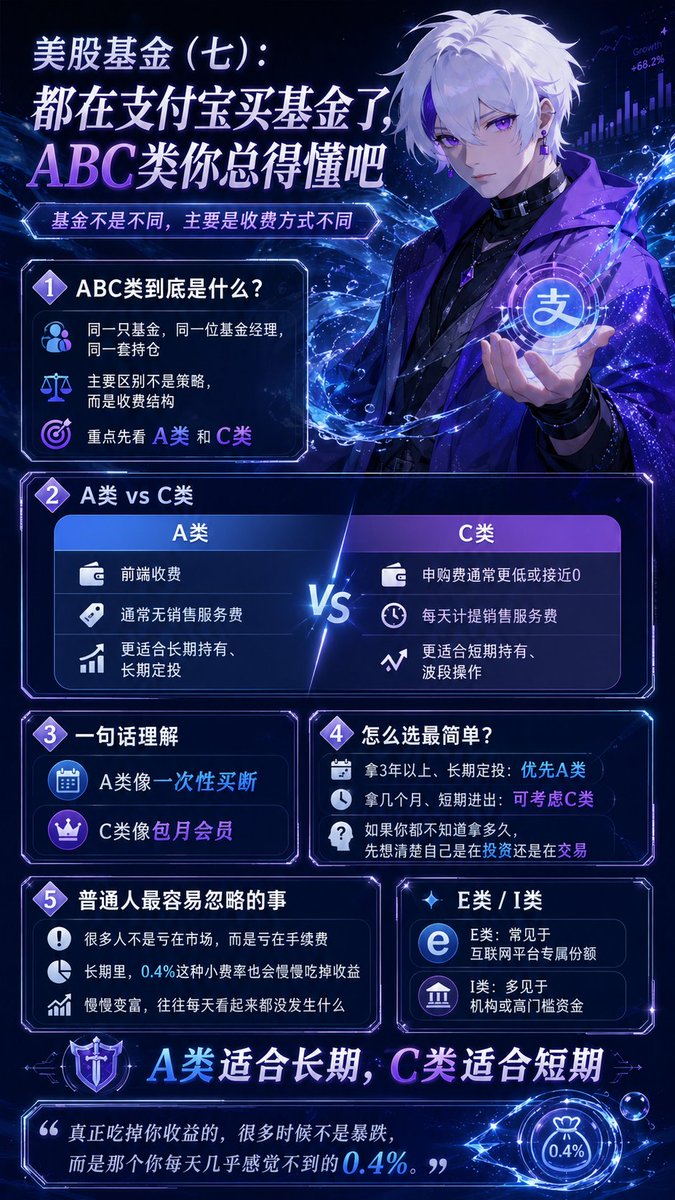
美股基金(七):都在支付宝买基金了,ABC类你总得懂吧
前面几篇,我们讲了纳指、标普、主动型基金、美债、场内ETF,也讲了港美股券商怎么买原版ETF。
但很多人真正开始买的时候,都会遇到一个问题:为什么同一只基金,后面有时候会跟着:A类、C类,甚至还有E类、I类、Y类。
而且最离谱的是:基本上什么都一样。
但代码不一样。
很多人第一次看到,直接懵了。
今天我把支付宝基金里最容易让新手困惑、但又最影响长期收益的东西讲清楚:
基金ABC类,到底是什么?
依旧结论先行
A类适合长期
C类适合短期
但真正重要的,不是字母。
而是:你到底是长期定投的人,还是喜欢频繁进出的人。
因为很多人基金没亏在市场,亏在手续费。
ABC类到底是什么?
先说最核心的。
基金ABC类,本质上不是基金不同。
而是收费方式不同。
也就是说:同一个基金经理、同一个持仓、同一个策略。
只是收费结构不一样。
举个例子,我在支付宝搜一只热门纳指基金,经常会看到
XX纳斯达克100ETF联接A
XX纳斯达克100ETF联接C
很多人以为A和C是不是一个稳一点,一个猛一点?
不是。
它们买的东西一样。
区别主要在收费。
A类和C类最大的区别是什么?
A类前面收费
C类后面收费
什么意思?
A类一般会有申购费。
有些还有赎回费。
但它通常没有销售服务费。
而C类很多时候
买的时候几乎不收费。
但会每天偷偷收一种东西:销售服务费。
这个费用不会一下扣。
而是每天从基金净值里慢慢磨。
看起来没感觉。
但时间一长,很明显。
A类像一次性买断。
C类像包月会员。
短期看,C类舒服。
长期看,A类更划算。
为什么支付宝很多时候默认推荐C类?
因为C类买入体验更好,更符合大众心理。
因为人是有损失厌恶的。
很多人一看
A类买入要手续费。
C类0申购费。
下意识就选C。
尤其是支付宝这种场景,用户大部分是
小额
频繁
定投
波段
追热点
所以平台很多时候会优先展示C类。
因为“现在不收费”这件事,特别容易吸引人。
但问题在于很多人原本是想长期持有三五年的。
结果选了C类。
然后销售服务费天天扣。
几年下来,比A类贵不少。
长期到底差多少?
很多人觉得“不就是一点手续费吗?”
但金融市场最可怕的东西之一,就是复利。
收益会复利,费用也会复利。
举个简单例子
假设:
A类前端收费1%。
C类每年销售服务费0.4%。
如果你只拿半年:C类可能更划算。
但如果你拿5年、10年:很多时候A类反而更便宜。
因为A类前面一次性交了,后面不怎么磨。
而C类是
天天磨
月月磨
年年磨
尤其长期定投的人,影响非常明显。
很多人基金收益没跑输市场。
跑输在了费率结构。
那是不是永远买A类?
也不是。
这里最重要的是:持有时间。
如果你是短期持有、做波段。
可能几个月就卖。
只是临时避险。
那C类很多时候更舒服。
因为前端费用低。
但如果你是长期定投、准备拿3年以上、甚至想拿10年。
A类通常更适合。
所以真正的逻辑不是:“A好还是C好”。
而是我们自己到底是什么交易习惯。
为什么很多长期定投的人,更适合A类?
因为长期定投有一个特点,那就是持有时间会越来越长。
比如我每个月定投一次。
第一笔钱可能拿了5年。
第二笔拿了4年11个月。
第三笔拿了4年10个月。
时间越长,C类的销售服务费累计越多。
所以很多长期定投的人最开始觉得C类便宜。
后来才发现,长期总成本反而更高。
尤其是
标普
纳斯达克
全球指数基金
这种本来就适合长期拿的资产,很多时候A类更合理。
那E类、I类又是什么?
这个很多人也会看到。
但普通人不用太纠结。
简单理解一下就可以了
E类
很多时候是互联网平台专属份额。
比如支付宝、天天基金、银行渠道。
费率可能会更优惠一点。
I类
一般门槛很高。
机构类
大资金类
养老金类
普通人基本接触不到。
还有一些
Y类
养老类
FOF类
本质上都是:不同渠道、不同客户、不同收费结构。
但你我这样的普通投资者最重要的,还是先搞懂A和C。
支付宝买基金,真正容易忽略的是什么?
很多人天天研究
买标普还是纳指
抄底还是定投
AI还是芯片
美股还是港股
但最后真正长期影响收益的,是费率。
尤其很多人有一个问题
特别喜欢频繁操作
今天买
明天卖
跌了加仓
涨了止盈
结果
手续费、销售服务费、申赎成本、QDII溢价损耗
慢慢把收益磨掉。
基金投资有时候很反直觉:操作越多,收益越差。
尤其指数基金。
真正赚大钱的人,很多时候不是交易最厉害的人。
而是能长期拿住的人。
普通人最简单的选择方法
其实特别简单
如果你是长期定投
拿3年以上。
不怎么动。
优先看A类。
如果你是短期持有
喜欢波段。
不确定拿多久。
可以考虑C类。
如果你根本不知道自己会拿多久
那大概率说明:你还没想清楚投资逻辑。
先别急着选基金。
先想清楚你到底是在投资,还是在交易。
总而言之,言而总之
都在支付宝买基金了,ABC类真的得懂。
因为它不是“基金不同”。
而是收费结构不同。
A类
前面收费
长期更友好
C类
前面便宜
长期会慢慢磨
所以
短期看C类舒服。
长期看A类通常更划算。
尤其是标普、纳斯达克这种天然偏长期持有的资产。
很多长期定投的人,更适合A类。
很多人研究了半天市场,最后却输给了手续费。
而基金世界里最隐蔽的一件事就是:有时候真正吃掉你收益的,不是暴跌,而是那个你每天几乎感觉不到的0.4%。
今天看到了一句非常牛逼的话,送给大家
慢慢变富最难的地方,就是每天看起来都没发生什么
但它最厉害的地方,也正是每天看起来都没发生什么
51
4
55
6,033


May 19
=== Day 3/30: The SDK Is No Longer Mounted Archaeology ===
Yesterday I gave the project a map.
Today I gave it a toolbench.
That is the real difference between Day 2 and Day 3. Mac OS X Server 1.0 is no longer only something I can boot, inspect, screenshot, and describe from the outside. It is now something I can build small artifacts inside.
That distinction matters.
A bootable guest is useful. A historically interesting guest is useful. A guest that can run Apache and expose a little bit of its filesystem to the modern host is useful. But a guest that can compile a small Objective-C program against era-native headers and frameworks, run that program, generate output, and serve that output back through its own web stack crosses a different threshold.
It means the lab can now build.
Not completely. Not magically. Not with every developer tool recovered, polished, and proven. But enough to stop treating the old SDK as mounted archaeology and start treating it as a working bench for controlled experiments.
That is what Day 3 is about.
=== The Project Needs A Learning Contract ===
The goal of this month is to build a working mental model of Darwin/XNU in public.
That sounds simple until it gets too vague to be useful. “Understand XNU” is not a plan. “Study early Mac OS X” is not a plan. “Look at old operating system internals” is not a plan.
So Day 3 has to make the contract more explicit.
This is not a screenshot collection. It is not a nostalgia tour. It is not a proprietary source redistribution project. It is not a “look, old software still boots” stunt.
The goal is to use Mac OS X Server 1.0, early Darwin history, available documentation, and a live Rhapsody-era lab to build a clearer picture of how Apple’s operating system stack was put together at the point where NeXT, Mach, BSD, and the future of Mac OS X were all visibly meeting.
If Kernel Cathedral is going to be technically honest, I need to understand enough of each layer to label it without faking certainty.
That means the month needs structure.
The major buckets are now clear.
=== Mach: The Kernel Vocabulary Underneath The Story ===
Mach is one of the first pieces that has to stop being a slogan.
It is easy to say “XNU uses Mach.” It is harder to explain what that means without flattening the architecture into trivia. For this project, the important Mach concepts are tasks, threads, ports, messages, IPC, and virtual memory heritage.
Those are not decorative terms. They shape how the system talks about execution, communication, and address spaces.
A task is not just “a process” in the way userland usually talks about one. A thread is not just a line item in a process viewer. Ports are not TCP ports. Messages are not just abstract “communication.” Mach IPC is a real design surface, and it needs to be treated that way.
By the end of the month, I want to be able to draw the Mach layer in Kernel Cathedral without reducing it to a mysterious box labeled “microkernel stuff.”
That may be the first place where the project needs discipline. Mach is historically loaded, architecturally subtle, and easy to overstate. The goal is not to settle every argument about kernel design. The goal is to understand the concepts well enough to explain what role they play in this system.
=== BSD: The Familiar Surface That Is Not Merely A Surface ===
The second major bucket is BSD.
For many developers, BSD is where the system starts to feel more familiar: files, sockets, processes, users, permissions, signals, POSIX APIs, and command-line behavior. That familiarity is useful, but it can also hide important details.
In a system like this, BSD is not just a compatibility costume. It provides a large part of the operating system personality that userland code actually touches. When a program opens a file, creates a socket, checks permissions, forks, execs, or talks in POSIX-shaped terms, it is leaning on that world.
So the BSD layer has to be more than a label.
The project needs to examine how the visible userland semantics connect downward into kernel structures. Files need to become more than paths. Sockets need to become more than network handles. Processes need to be compared against Mach tasks and threads rather than casually treated as identical concepts.
This is where the “Mach plus BSD” shorthand is useful, but insufficient.
=== XNU Is Not Just “Mach Plus BSD” ===
“XNU is Mach plus BSD” is a decent starting phrase. It is not a complete architecture explanation.
The phrase points in the right direction, but it compresses too much. It can make the system sound like two blocks glued together: one labeled Mach, one labeled BSD. That is too crude for the mental model I am trying to build.
The interesting work is in the joining.
Where does Mach’s model show through? Where does BSD’s model dominate? Where does the system translate between them? Which concepts are cleanly separable, and which ones are only separable in a diagram?
Kernel Cathedral needs to show the shape of that combination carefully. The diagram should not imply that every subsystem fits into a clean rectangle just because clean rectangles are easier to draw.
That is part of the contract: prefer accuracy over false neatness.
=== Boot Flow: From Firmware-Style Setup To Services ===
The next bucket is boot flow.
A running desktop or server environment hides a lot of choreography. The machine does not begin with Apache, shells, users, paths, and services already in place. Something has to find the bootloader. Something has to hand off to the kernel. Something has to mount filesystems. Something has to bring up startup scripts and userland services.
For this lab, BootX, kernel handoff, startup scripts, and service launch behavior all matter.
Boot flow is also where the project can connect the historical system to concrete observation. Instead of talking about startup as an abstract sequence, I can inspect what the guest does, what files participate, what assumptions the system makes, and where the old Mac OS X Server environment differs from modern expectations.
That should make the eventual architecture diagram stronger. A system architecture should not only show what exists after everything is running. It should also explain how the system becomes itself.
=== Processes, Threads, And What Userland Thinks It Sees ===
Processes and threads deserve their own attention because they sit at the boundary between the user’s mental model and the kernel’s model.
Userland sees programs. Tools show processes. Developers talk about launching commands, starting daemons, and running applications. But the kernel has more specific machinery underneath that vocabulary.
Part of the project is to compare those views carefully.
What does userland think a process is? What does the kernel model? How do Mach tasks and threads relate to BSD process semantics? Where does the old system expose those concepts directly, and where does it hide them behind familiar Unix-like behavior?
This bucket is important because it will probably shape one of the central Kernel Cathedral plates. A cathedral diagram that cannot explain execution is only decorative.
=== Virtual Memory: The Invisible Architecture ===
Virtual memory is another layer where the system’s most important behavior is not immediately visible.
A user sees programs running. The machine sees mappings, pages, protections, address spaces, and faults. Mach’s VM heritage makes this especially important. It is one of the places where the operating system’s design history is not just historical background; it is part of the live architecture.
This is also a place where the project needs restraint.
Virtual memory can become a rabbit hole quickly. The goal for the month is not to reproduce a full graduate course in operating systems. The goal is to learn enough to explain how address spaces, mappings, and protections fit into the Darwin/XNU story, and how that layer supports the behavior visible above it.
The cathedral does not need every stone numbered. It does need the load-bearing walls.
=== Filesystems: Paths Are The Friendly Part ===
Filesystems are another place where the familiar surface is only the beginning.
Paths are easy to show. Directory listings are easy to capture. Mount points are easy to mention. But the operating system’s filesystem layer is not just a tree of names. It involves disk layout, mounts, metadata, permissions, and eventually vnode concepts.
For the early part of the project, the filesystem work will likely stay close to observable behavior: what is mounted, where things live, how the guest organizes system files, how the developer side root is attached, and how Apache finds the generated output.
Later, the project needs to go deeper.
The goal is to understand how files become kernel-mediated objects rather than just names in a shell. That matters for anything involving program loading, configuration, logs, web serving, development tools, or system startup.
=== Networking: The Guest Has To Touch The Outside World ===
Networking is where the lab stops being sealed.
The Mac OS X Server 1.0 guest runs inside a modern host environment, with QEMU forming part of the boundary between them. That makes networking both practical and conceptually useful.
On the practical side, networking lets the guest serve content back to the host. Apache becomes a visible proof point. A page generated inside the guest can be requested from outside the guest. That is a small loop, but a meaningful one.
On the conceptual side, networking forces the project to care about interfaces, sockets, routing, services, and the translation between a virtualized old system and a modern environment.
That is exactly the kind of boundary Kernel Cathedral should make visible. The system is not only a kernel in isolation. It is a set of abstractions that become behavior: a socket, a route, a daemon, a response, a page in a browser.
=== Drivers And I/O: Hardware Support Is Architecture ===
Drivers and I/O are easy to treat as a compatibility checklist.
Does the system boot? Does the disk work? Does networking work? Does display output work? Does the keyboard work?
Those questions matter, but they are only the operational surface. Hardware support is also a system architecture problem.
The operating system has to discover devices, represent them, talk to them, schedule work around them, and expose them upward in ways userland can use. Even in a virtual machine, those questions do not disappear. They become filtered through emulated hardware, compatibility constraints, and the gap between old assumptions and modern hosts.
This bucket may be one of the harder parts of the month, especially if the available documentation and observable behavior do not line up cleanly. That is acceptable. The goal is not to pretend certainty. The goal is to mark what is known, what is inferred, and what still needs proof.
=== Userland Services: Apache As The First Living Proof Point ===
The first concrete userland service in this project is Apache.
That is not because Apache is the whole story. It is because Apache makes kernel abstractions visible.
A web server depends on files, permissions, processes, sockets, networking, configuration, and startup behavior. When Apache serves a page generated inside the guest back to the host, it turns a stack of operating system concepts into a result that can be observed directly.
That makes it a good first proof point.
The project is not only asking whether the guest can run. It is asking whether the guest can participate in producing the explanatory artifacts of the project itself.
Today, the answer became yes in a small but important way.
=== The Technical Threshold: /Local/DeveloperRoot ===
The technical milestone for Day 3 is the recovered developer-tool side root:
/Local/DeveloperRoot
The important phrase there is “side root.”
I am not treating the guest image as a disposable scratchpad and casually overwriting system directories.
The side-root approach keeps the working guest controlled. It gives the recovered developer environment a place to exist without pretending it is cleanly or completely integrated into the base system.
That matters for two reasons.
First, it keeps the lab easier to reason about. If something works, I want to know why it works. If something breaks, I want to know what changed. A controlled side root is better than turning the whole guest into an untracked pile of copied files.
Second, it keeps the public claims narrower. I do not need to say “the full developer environment is restored” to make progress. I only need to prove that enough of the environment is usable for focused experiments.
Today’s smoke checks are centered on that narrower claim.
The guest can see enough of the old toolchain to test the pieces that matter for small builds:
cc
ld
as
make
Foundation headers/framework
WebObjects-era headers/frameworks
That is not a finished development workstation. It is not a complete claim about Project Builder, Interface Builder, or every framework in the environment.
It is a working threshold.
=== The First Small Artifact ===
The proof artifact is intentionally small.
A tiny Objective-C program imports:
#import <Foundation/Foundation.h>
#import <WebObjects/WebObjects.h>
It links against the WebObjects-era stack:
WebObjects
EOControl
EOAccess
Foundation
It runs inside Mac OS X Server 1.0.
Then it writes an HTML page into the guest web root.
Then Apache serves that generated page from the guest back to the modern host.
That is the whole proof.
No more, no less.
It is not a complete WebObjects application. It is not a claim that the entire WebObjects development workflow is solved. It is not a claim that the old machine can now build everything I might want it to build.
The accurate claim is narrower:
Focused Objective-C smoke programs can compile and run against Foundation and WebObjects-era frameworks inside the guest, and Apache can serve their generated output.
That is enough for Day 3.
=== Why This Matters ===
This is a small artifact, but it crosses an important threshold.
The old system is not only the subject of the project. It can now help produce the project.
That changes the shape of Kernel Cathedral.
Until now, the cathedral idea could have become a modern poster about an old operating system: useful, maybe beautiful, but still fundamentally external. A contemporary host would gather the research, assemble the diagrams, and produce the visual explanation.
That is still an option, but it is not the strongest version.
The stronger version is a set of artifacts the old system helps generate.
That does not mean forcing the entire project to happen inside Mac OS X Server 1.0. That would be artificial. The modern host is still the practical place for writing, editing, versioning, rendering, and publishing much of the work.
But the guest can now contribute real output.
That matters because the project is about understanding a system through use, not just observation. If the guest can compile a small program, link against its own era-native frameworks, generate a page, and serve it through its own Apache stack, then the lab is no longer passive.
It has become part of the production pipeline.
=== Foundation, WebObjects, And The NeXT Inheritance ===
The specific frameworks in the proof are also meaningful.
Foundation is not incidental. It is one of the places where the NeXT and OpenStep inheritance shows through clearly. It gives the experiment a direct connection to the object-oriented development world that shaped early Mac OS X.
WebObjects matters for a related reason. Mac OS X Server 1.0 was not just a strange transitional operating system. It was a server product with a development world around it. WebObjects belongs to that world.
That makes the proof artifact historically appropriate.
A Foundation/WebObjects-flavored program generating an HTML page inside Mac OS X Server 1.0 and publishing it through Apache is not just a random “hello world.” It is a small tile made from materials that belong to the system’s own era.
That is the kind of tile Kernel Cathedral should use.
=== The First Buildable Tile ===
Kernel Cathedral is still the capstone idea: a visual and technical map of Darwin/XNU as I understand it at the end of the month.
But today reframes how that capstone can be made.
The Foundation/WebObjects page is not the cathedral. It is not even a full chapel. It is one tile.
A small one.
But it proves the tile can be cut inside the lab.
Foundation represents the old NeXT/OpenStep inheritance. WebObjects represents the server-era development context. Apache represents the userland service boundary. The generated page represents a path from source code to compiled program to filesystem output to network-visible artifact.
That path is more interesting than the page itself.
The artifact is valuable because it connects several layers of the system:
- Objective-C source
- old developer toolchain
- Foundation/WebObjects-era frameworks
- guest execution
- filesystem output
- Apache service
- host-visible result
That is exactly the kind of layered relationship this project is supposed to uncover.
=== Why The Small Proof Is Better Than A Large Unproven Claim ===
There is a temptation in projects like this to make every milestone sound larger than it is.
That would be a mistake.
The useful thing about this proof is that it is narrow, observable, and repeatable. A small program either compiles or it does not. It either links or it does not. It either runs in the guest or it does not. The generated page either lands in the web root or it does not. Apache either serves it back or it does not.
That makes it a good technical checkpoint.
It also creates a foundation for future experiments.
Once the lab can build one small artifact, the next question becomes what kind of artifact should come next.
A command-line Foundation tool is one path.
A more structured WebObjects-era experiment is another.
An AppKit or Display PostScript-generated visual plate would be especially interesting if the guest can support it.
Each of those future steps needs its own proof. Today only establishes the first one.
=== The Month Now Has A Shape ===
With Day 3 done, the project has three pieces in place.
Day 1 established the premise: study Darwin/XNU through a live early Mac OS X Server lab.
Day 2 gave the project a map: the historical and architectural terrain that Kernel Cathedral needs to represent.
Day 3 gives that map a toolbench: a controlled developer side root and the first guest-built artifact.
That combination matters.
The month is no longer just a reading plan. It is a loop:
- study the system
- test the system
- build inside the system
- turn the result into explanation
That loop is the project.
The reading keeps the work honest. The lab keeps it grounded. The artifacts keep it visible.
=== Open Questions ===
There are still several questions to carry forward.
How much of Project Builder and Interface Builder can be made useful inside the guest?
Can AppKit or Display PostScript produce the first true Kernel Cathedral visual plate?
Which Mach concept should get the first architecture diagram: tasks and threads, ports and messages, or virtual memory?
How much of the final capstone should be generated by guest code, and how much should be assembled from host-side documentation and modern tooling?
Those are not blockers. They are the next set of experiments.
=== Tomorrow: Make The Lab Bench Explicit ===
Tomorrow is setup day.
I am going to make the lab itself explicit: the VM, the tools, the documentation, the scripts, the notes, and the boundary between observation and redistribution.
Day 3 proved that the guest can now build a small tile.
Day 4 is about showing the bench the tile was built on.
1
3
366


May 12
WebObjects (1995-1996): Through his company NeXT, Jobs developed WebObjects, one of the first web application servers, enabling dynamic, database-driven websites. This technology was crucial for e-commerce
1
1
56


May 6
分享一下自己是如何订阅上土区 ChatGPT Plus 的,每个月只需要 80 人民币不到
1️⃣ 去 Apple ID 的官网注册一个土耳其地区的账户
2️⃣ 过程中需要填写土耳其的地址,使用 1ktools 这个工具可以生成,保存好生成的地址
3️⃣ 手机号可以正常填 86 的电话,但是邮箱一定不能用 QQ 邮箱
下面是非常关键的地方,我因此弄废了一整个账号
先退出你原有的 App Store 账号
⚠️如果你的 App Store 登录了国区账号,那么一定要用下面的快捷指令,切换到土区的 App Store,否则你的土区账号地点将会送回国区,无法使用土区价格订阅!
itms-apps://itunes.apple.com/WebObjects/MZStore.woa/wa/resetAndRedirect?dsf=143480&cc=tr
4️⃣ 切换后登录新的土区账号,点击账号详情,查看地区是否是Türkiye
5️⃣ 使用土区礼品卡就可以充值了,我用的是seagm这个平台,500 土币价格 78 左右,支付宝可以支付
6️⃣ 然后就可以愉快的订阅 ChatGPT Plus 了
17
20
168
19,516

May 5
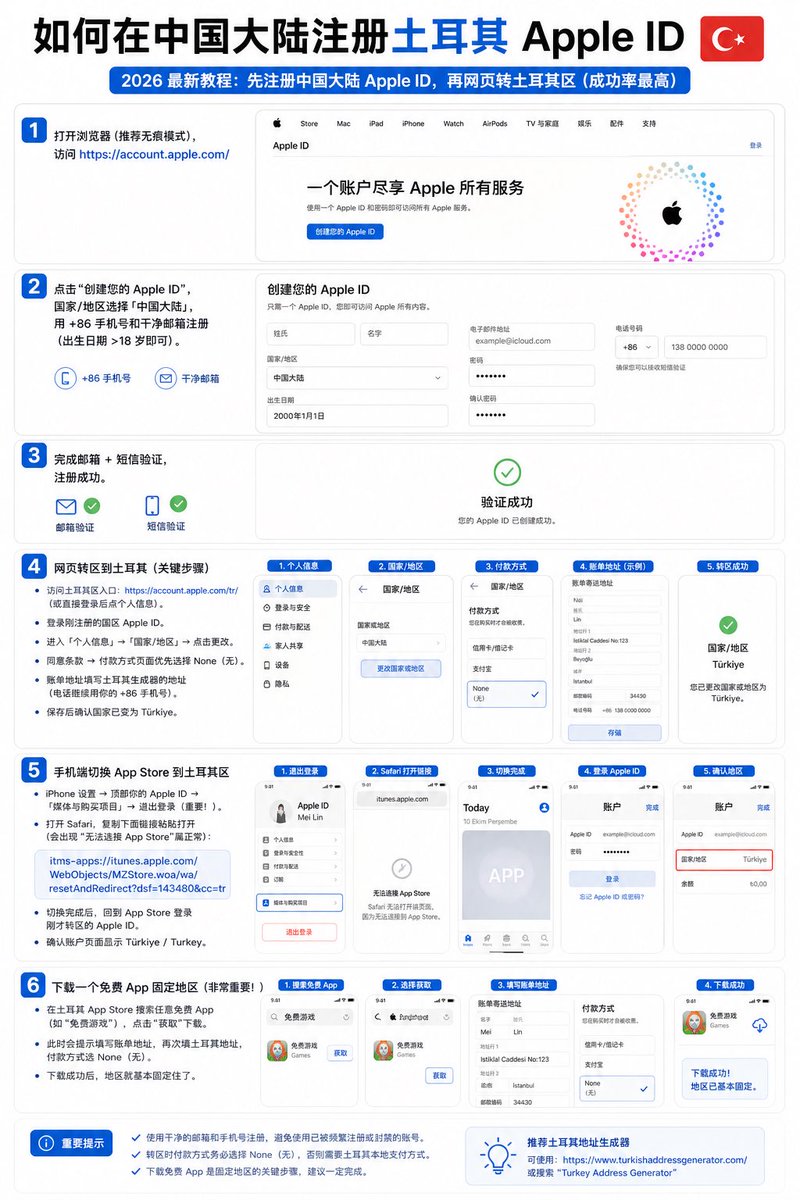
2026 最新亲测中国大陆注册土耳其地区Apple ID (免费完整保姆步骤)
👌成功率几乎100%!
推荐方法:先注册中国大陆 Apple ID,再网页转土耳其区(成功率最高,目前主流方式)
👀完整可步骤如下:
1. 注册中国大陆 Apple ID(基础账号)
- 打开浏览器(推荐无痕模式),访问 account.apple.com/
- 点击“创建您的 Apple ID”
- 国家/地区选择「中国大陆」
- 使用干净邮箱(未注册过任何 Apple ID 的 163/QQ/Gmail)和 86 手机号填写
- 出生日期选择大于 18 岁
- 完成邮箱验证 短信验证
- 注册成功后,先不要登录手机 App Store
2. 网页端转区到土耳其(最关键一步)
- 访问土耳其区专用入口:account.apple.com/tr/
- 用刚注册的国区 Apple ID 登录
- 进入「个人信息」→ 「国家/地区」→ 点击「更改」
- 同意条款后,在付款方式页面优先选择 None(无)
- 账单地址填写土耳其地址生成器生成的完整信息(推荐 1ktools.com/zh-cn/tools/deve…,优先选伊斯坦布尔地址)
- 电话继续保留你的 86 手机号
- 点击保存,确认账户国家变为 Türkiye
3. 手机端切换 App Store 到土耳其区
- iPhone/iPad 设置 → 顶部点击你的 Apple ID → 「媒体与购买项目」→ 退出登录(必须退出!)
- 打开 Safari,复制下面链接并粘贴打开:
itms-apps://itunes.apple.com/WebObjects/MZStore.woa/wa/resetAndRedirect?dsf=143480&cc=tr
(出现“无法连接 App Store”属于正常)
- 切换完成后,返回 App Store,用转区的 Apple ID 重新登录
- 确认账户页面显示 Türkiye / Turkey
4. 下载免费 App 固定地区(必须操作,否则容易回滚)
- 在土耳其 App Store 搜索任意免费 App(例如“免费游戏”或“WhatsApp”)
- 点击“获取” → 下载
- 下载过程中再次填写土耳其地址,付款方式选择 None(无)
- 下载成功后,地区彻底固定,后续订阅、充值都不会轻易变回国区
✍️重要‼️提示(必看):
- 全程使用全局模式稳定网络(美国/日本节点即可)
- 转区后建议立即下载 1-2 个免费 App 养号
- 如遇 None 选项消失:检查余额为 0、无未完成订阅、换浏览器或网络重试
成功了记得留言啊 兄弟们!
101
355
1,808
267,515


HTMLだけ書く人の苦労話じゃないような?"WebObjectsも負荷がかかりすぎるとテンポラリDBのロックが不十分になってスレッド間でコンフリクトみたいなことが起こってたりとか、我々のせいではないバグもあったりして苦労したが今となってはいい思い出だ"> ameblo.jp/takapon-jp/entry-1…
3
1
11
18,585

#ThisDayInTechHistory. March 1, 1996. Steve Jobs, CEO of NeXT Computers, talks about WebObjects at the Microsoft Professional Developers Conference. #Computer #History
 James Gingerich #B2B #Technology #Influencer
2
145