
AI Architect | 725K on LinkedIn | Breaking down AI engineering, agentic systems & enterprise architecture | Building in public
Joined March 2026
- Tweets 259
- Following 55
- Followers 2,902
- Likes 362
148 Photos and videos
2
3
15
298
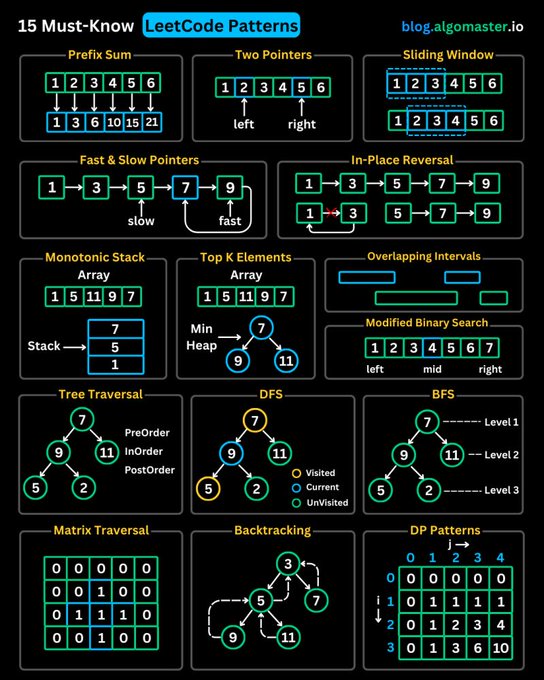
LeetCode was HARD until I Learned these 15 Patterns:
1. Prefix Sum
2. Two Pointers
3. Sliding Window
4. Fast & Slow Pointers
5. LinkedList In-place Reversal
6. Monotonic Stack
7. Top ‘K’ Elements
8. Overlapping Intervals
9. Modified Binary Search
10. Binary Tree Traversal
11. Depth-First Search (DFS)
12. Breadth-First Search (BFS)
13. Matrix Traversal
14. Backtracking
15. Dynamic Programming Patterns
5
11
60
1,456

Jun 13
Stop building RAG like it’s still 2022.
Chunk → Embed → Retrieve → Generate
That pipeline works…
until you try to ship it to production.
The moment RAG meets real users, real data, and real edge cases — it breaks.
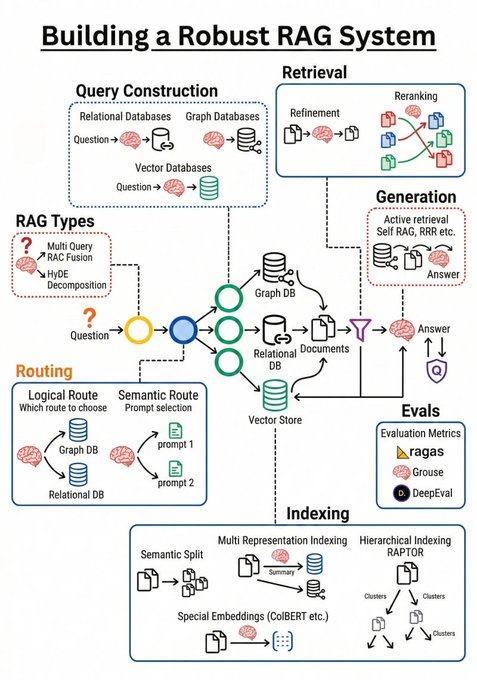
I mapped what production-grade RAG actually needs.
Most teams are missing these 4 layers:
1️⃣ Retrieval ≠ Just Vector Search
Not every question is semantic.
You need:
→ Graph DBs for relationship questions
→ SQL for numbers & structured data
→ Vector search for meaning
One search engine cannot solve all three.
2️⃣ Intelligent Query Routing (the hidden superpower)
Before retrieving anything, decide:
→ semantic or logical?
→ single-hop or multi-hop?
→ which data source first?
This decision layer alone removes ~80% of bad answers.
3️⃣ Advanced Indexing (chunking is not enough)
Naive chunking = low recall.
Real systems use:
→ hierarchical representations (RAPTOR)
→ token-level retrieval (ColBERT)
→ multi-view indexing of the same data
Same data. Smarter access.
4️⃣ Evaluation Loop (non-negotiable)
If you can’t measure it, you can’t fix it.
You need:
→ end-to-end RAG evaluation (Ragas)
→ component testing (DeepEval)
→ continuous monitoring, not one-off demos
No eval = silent hallucinations.
Hard truth:
RAG is no longer a feature.
It’s an engineering system.
Teams that treat it like a plug-and-play API
are the same teams asking:
“Why does our AI hallucinate?”
The gap between demo RAG and production RAG
is these 4 layers.
Build systems.
Not toys.
#RAG #LLM #AIEngineering #MachineLearning #GenAI #Startups #Tech #SoftwareEngineering
7
37
200
5,233
Jun 12
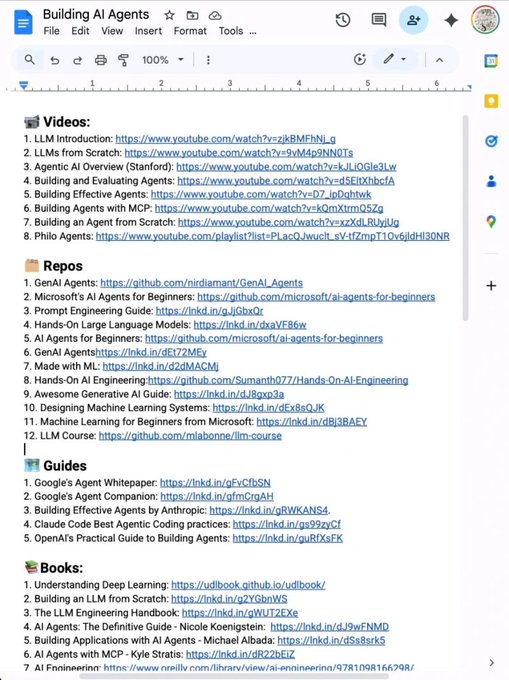
Stop wasting hours trying to learn AI. 📘📚
I have already done it for you.
With one list. Zero confusion. And no fluff
📹 Videos:
1. LLM Introduction: lnkd.in/dMqbaZdK
2. LLMs from Scratch: lnkd.in/dYYwEhYy
3. Agentic AI Overview (Stanford): lnkd.in/dArmMt2i
4. Building and Evaluating Agents: lnkd.in/dBWd2W8u
5. Building Effective Agents: lnkd.in/dHfdebqw
6. Building Agents with MCP: lnkd.in/dXuNHrRJ
7. Building an Agent from Scratch: lnkd.in/da3ANw3w
8. Philo Agents: lnkd.in/dq-BfZE5
🗂️ Repos
1. GenAI Agents: lnkd.in/d3UDtwwv
2. Microsoft's AI Agents for Beginners: lnkd.in/dHvTmJnv
3. Prompt Engineering Guide: lnkd.in/gJjGbxQr
4. Hands-On Large Language Models: lnkd.in/dxaVF86w
5. AI Agents for Beginners: lnkd.in/dHvTmJnv
6. GenAI Agentshttps://lnkd.in/dEt72MEy
7. Made with ML: lnkd.in/d2dMACMj
8. Hands-On AI Engineering:lnkd.in/dgQtRyk7
9. Awesome Generative AI Guide: lnkd.in/dJ8gxp3a
10. Designing Machine Learning Systems: lnkd.in/dEx8sQJK
11. Machine Learning for Beginners from Microsoft: lnkd.in/dBj3BAEY
12. LLM Course: lnkd.in/diZgGACG
🗺️ Guides
1. Google's Agent Whitepaper: lnkd.in/gFvCfbSN
2. Google's Agent Companion: lnkd.in/gfmCrgAH
3. Building Effective Agents by Anthropic: lnkd.in/gRWKANS4.
4. Claude Code Best Agentic Coding practices: lnkd.in/gs99zyCf
5. OpenAI's Practical Guide to Building Agents: lnkd.in/guRfXsFK
📚Books:
1. Understanding Deep Learning: lnkd.in/dgcB68Qt
2. Building an LLM from Scratch: lnkd.in/g2YGbnWS
3. The LLM Engineering Handbook: lnkd.in/gWUT2EXe
4. AI Agents: The Definitive Guide - Nicole Koenigstein: lnkd.in/dJ9wFNMD
5. Building Applications with AI Agents - Michael Albada: lnkd.in/dSs8srk5
6. AI Agents with MCP - Kyle Stratis: lnkd.in/dR22bEiZ
7. AI Engineering: lnkd.in/gi-mQcXa
📜 Papers
1. ReAct: lnkd.in/gRBH3ZRq
2. Generative Agents: lnkd.in/gsDCUsWm.
3. Toolformer: lnkd.in/gyzrege6
4. Chain-of-Thought Prompting: lnkd.in/gaK5CXzD.
🧑🏫 Courses:
1. HuggingFace's Agent Course: lnkd.in/gmTftTXV
2. MCP with Anthropic: lnkd.in/geffcwdq
3. Building Vector Databases with Pinecone: lnkd.in/gCS4sd7Y
4. Vector Databases from Embeddings to Apps: lnkd.in/gm9HR6_2
5. Agent Memory: lnkd.in/gNFpC542
Repost for your network ♻️
2
14
30
1,013
Jun 11
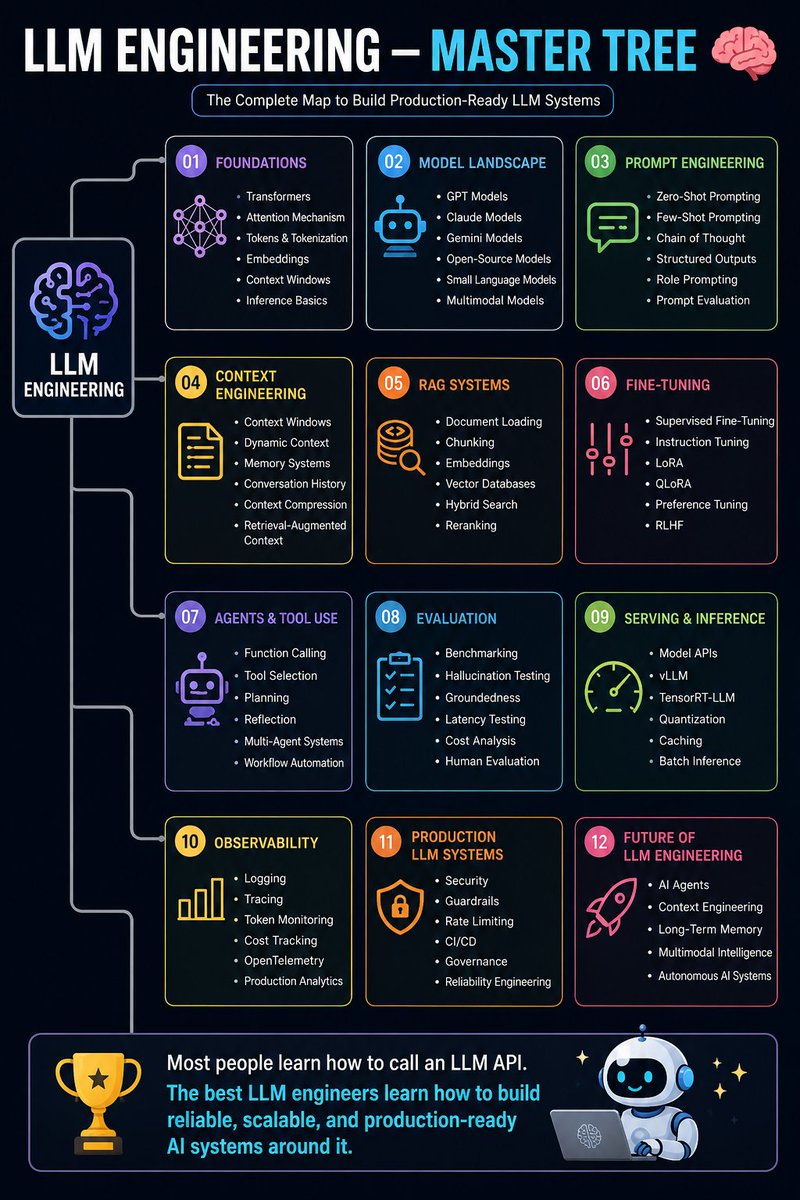
LLM ENGINEERING — MASTER TREE 🧠
LLM Engineering
│
├── 01. Foundations
│ ├── Transformers
│ ├── Attention Mechanism
│ ├── Tokens & Tokenization
│ ├── Embeddings
│ ├── Context Windows
│ └── Inference Basics
│
├── 02. Model Landscape
│ ├── GPT Models
│ ├── Claude Models
│ ├── Gemini Models
│ ├── Open-Source Models
│ ├── Small Language Models
│ └── Multimodal Models
│
├── 03. Prompt Engineering
│ ├── Zero-Shot Prompting
│ ├── Few-Shot Prompting
│ ├── Chain of Thought
│ ├── Structured Outputs
│ ├── Role Prompting
│ └── Prompt Evaluation
│
├── 04. Context Engineering
│ ├── Context Windows
│ ├── Dynamic Context
│ ├── Memory Systems
│ ├── Conversation History
│ ├── Context Compression
│ └── Retrieval-Augmented Context
│
├── 05. RAG Systems
│ ├── Document Loading
│ ├── Chunking
│ ├── Embeddings
│ ├── Vector Databases
│ ├── Hybrid Search
│ └── Reranking
│
├── 06. Fine-Tuning
│ ├── Supervised Fine-Tuning
│ ├── Instruction Tuning
│ ├── LoRA
│ ├── QLoRA
│ ├── Preference Tuning
│ └── RLHF
│
├── 07. Agents & Tool Use
│ ├── Function Calling
│ ├── Tool Selection
│ ├── Planning
│ ├── Reflection
│ ├── Multi-Agent Systems
│ └── Workflow Automation
│
├── 08. Evaluation
│ ├── Benchmarking
│ ├── Hallucination Testing
│ ├── Groundedness
│ ├── Latency Testing
│ ├── Cost Analysis
│ └── Human Evaluation
│
├── 09. Serving & Inference
│ ├── Model APIs
│ ├── vLLM
│ ├── TensorRT-LLM
│ ├── Quantization
│ ├── Caching
│ └── Batch Inference
│
├── 10. Observability
│ ├── Logging
│ ├── Tracing
│ ├── Token Monitoring
│ ├── Cost Tracking
│ ├── OpenTelemetry
│ └── Production Analytics
│
├── 11. Production LLM Systems
│ ├── Security
│ ├── Guardrails
│ ├── Rate Limiting
│ ├── CI/CD
│ ├── Governance
│ └── Reliability Engineering
│
└── 12. Future of LLM Engineering
├── AI Agents
├── Context Engineering
├── Long-Term Memory
├── Multimodal Intelligence
└── Autonomous AI Systems
Most people learn how to call an LLM API.
The best LLM engineers learn how to build reliable, scalable, and production-ready AI systems around it. 🧠🚀
3
16
81
1,473
Jun 10
Everyone talks about LLMs.
Very few teams talk about retrieval.
And that's exactly why so many RAG systems disappoint in production.
When a RAG application gives a bad answer, the first reaction is usually:
"Maybe we need a better model."
But after working with AI systems, I've realized something surprising:
Most failures happen before the prompt ever reaches the LLM.
The model is often blamed for mistakes it didn't actually create.
Think about it.
If the retrieval system brings back the wrong documents, the model can only reason over the wrong information.
If chunking breaks important context into meaningless fragments, the model never sees the complete picture.
If metadata is missing, filtering becomes difficult and irrelevant documents start showing up.
If reranking is skipped, the most relevant evidence may never even make it into the final context window.
And if the context window is overloaded with noisy information, even the smartest model will struggle.
The reality is that many teams treat RAG like this:
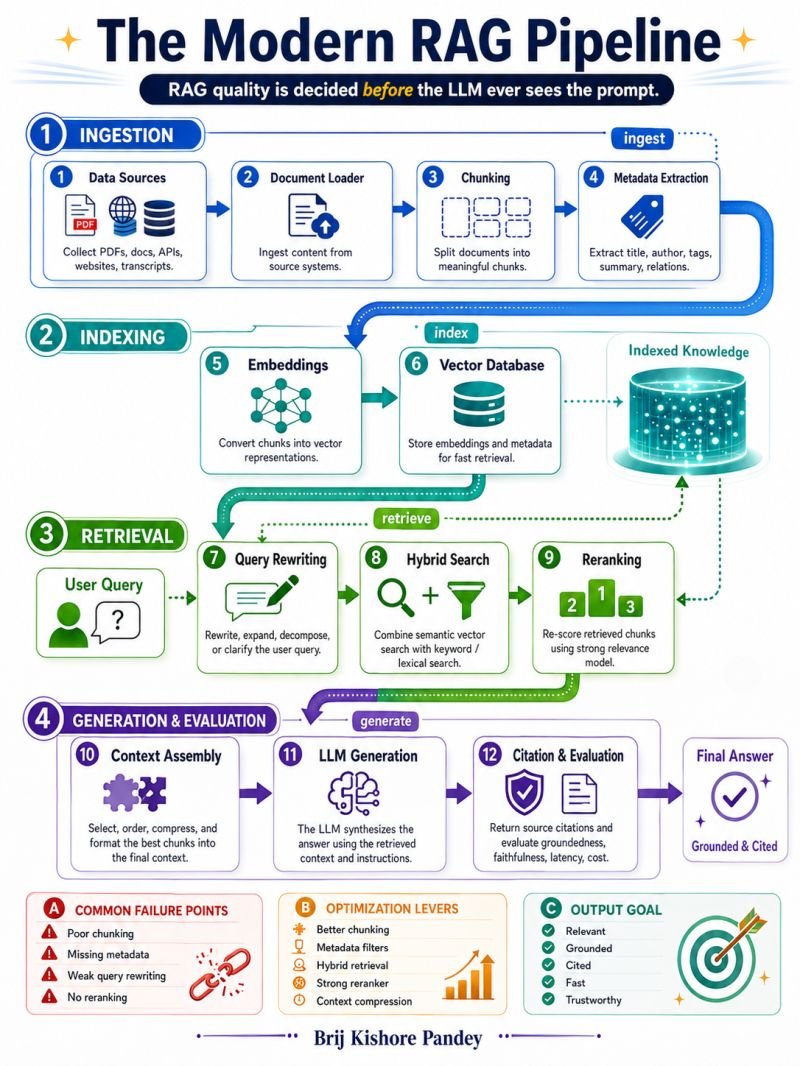
Documents → Vector Database → LLM
But production-grade RAG is much closer to:
Data Sources
↓
Document Processing
↓
Chunking Strategy
↓
Metadata Extraction
↓
Embeddings
↓
Vector Storage
↓
Query Understanding
↓
Hybrid Search
↓
Reranking
↓
Context Assembly
↓
LLM Generation
↓
Evaluation & Monitoring
Every single stage can improve or destroy answer quality.
What makes this challenging is that there isn't a universal best practice.
A chunking strategy that works perfectly for legal documents may perform terribly for code repositories.
A retrieval approach that works for support tickets may fail for research papers.
A reranker that improves relevance in one domain might increase latency beyond acceptable limits in another.
That's why building reliable RAG systems is becoming more of a systems engineering problem than a prompting problem.
The teams getting the best results today aren't necessarily using the biggest models.
They're investing heavily in:
• Better data pipelines
• Smarter chunking
• Rich metadata
• Hybrid retrieval
• Effective reranking
• Continuous evaluation
• Groundedness testing
• Cost and latency optimization
The biggest mindset shift for me was realizing that RAG is not a feature.
It's an architecture.
And architecture is where reliability comes from.
As models continue improving, retrieval quality will become even more important, not less.
Because when every team has access to similar models, the competitive advantage moves to the data layer and retrieval layer.
The future winners won't simply have the smartest AI.
They'll have the systems that consistently deliver the right information to that AI at the right time.
That's where trustworthy AI is built.
Not in the prompt.
But in everything that happens before it.
What part of the RAG pipeline do you think is the most overlooked today?
6
8
55
805
Jun 9
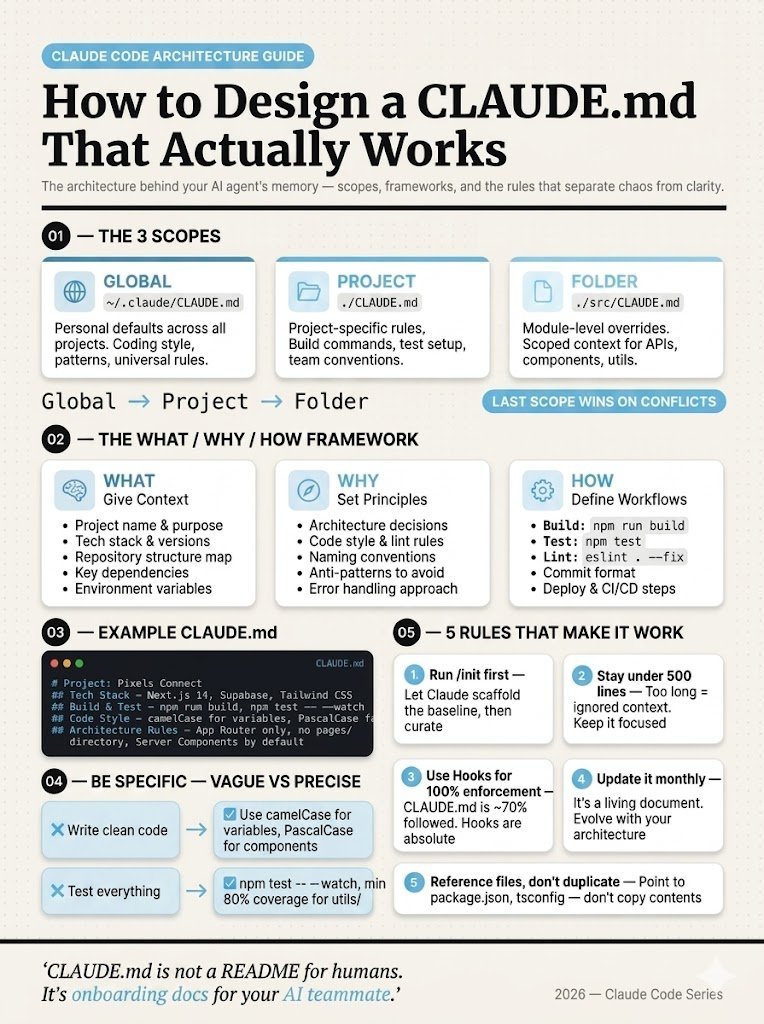
𝗖𝗟𝗔𝗨𝗗𝗘.𝗺𝗱 is NOT a README.
Most devs:
→ Add a few bullets
→ Maybe a build command
→ Call it “done”
Then complain:
“Claude writes bad code” 🤦♂️
No.
Your CLAUDE.md is just… useless.
Here’s how to fix it 👇
1️⃣ Use ALL 3 scopes (not just one)
• Global → ~/.claude/CLAUDE.md
• Project → ./CLAUDE.md
• Folder → ./src/CLAUDE.md
Merge order:
Global → Project → Folder (last wins)
Most people miss this.
2️⃣ Follow WHAT / WHY / HOW
• WHAT → stack, structure, dependencies
• WHY → decisions, patterns, anti-patterns
• HOW → commands, tests, deploy flow
Skip one = Claude guesses.
And it guesses wrong.
3️⃣ Be SPECIFIC
❌ “Write clean code”
✅ “camelCase vars, PascalCase components”
❌ “Test everything”
✅ “80% coverage, npm test --watch”
Vague = ignored
Specific = followed
4️⃣ Follow these 5 rules
• Run /init first
• Keep it < 500 lines
• Expect ~70% compliance
• Update monthly
• Reference configs (don’t copy)
The truth?
Top engineers aren’t better at prompting.
They’re better at designing CLAUDE.md.
Fix this → your AI code quality 10x 🚀
4
16
96
2,796
Jun 9
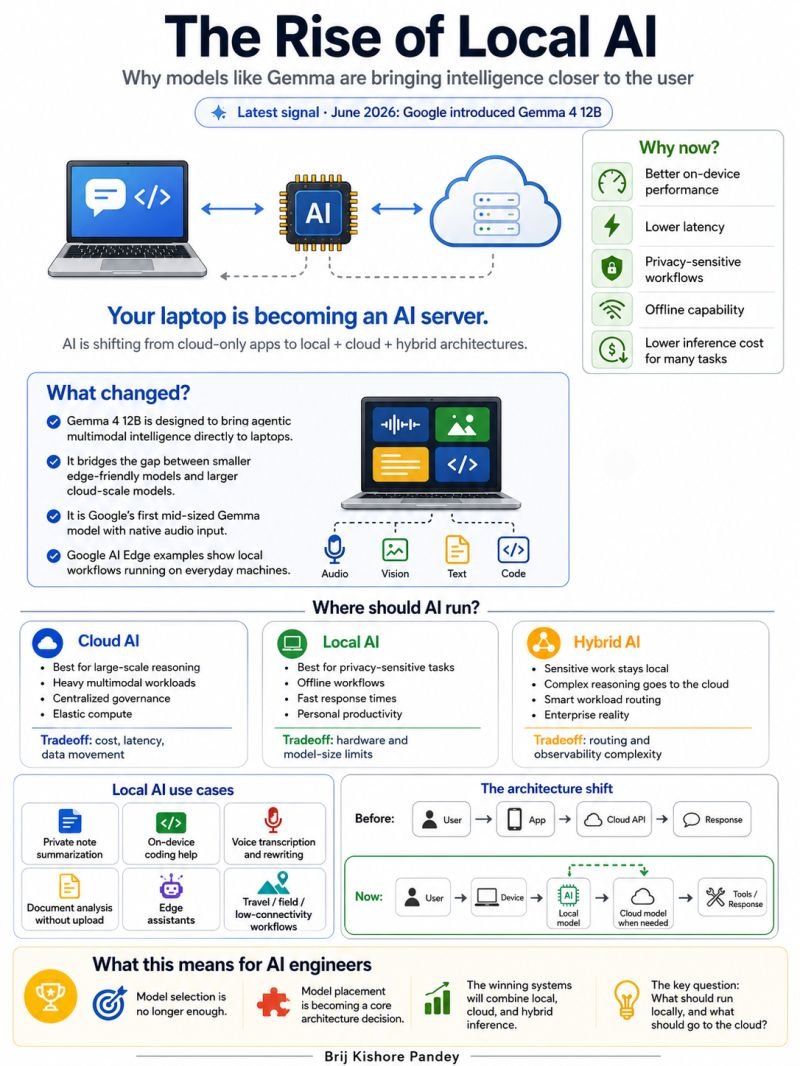
AI Is Coming Back to Your Laptop.
For the last two years, AI followed a simple architecture:
User → App → Cloud API → Response
Every request went to a massive data center somewhere on the internet.
Every prompt.
Every query.
Every workflow.
But something important is changing.
The future of AI isn't cloud-only.
It's hybrid.
And Google's latest Gemma 4 12B release is another signal that the industry is moving in that direction.
We're entering a world where intelligence can run:
💻 On your laptop
📱 On your phone
🌐 In your browser
🏢 In your private cloud
☁️ In the public cloud
Or across all of them at the same time.
For years, the biggest AI question was:
"Which model should we use?"
GPT?
Claude?
Gemini?
DeepSeek?
Llama?
But that's becoming the wrong question.
The new question is:
Where should this intelligence run?
Because not every task needs a frontier model sitting in a hyperscale data center.
Some tasks need:
⚡ Speed
🔒 Privacy
📶 Offline access
💰 Lower cost
📂 Direct access to local files
🧠 Personal context that never leaves the device
That's where local AI starts to shine.
At the same time, cloud AI remains essential for:
• Complex reasoning
• Massive context windows
• Enterprise-scale workloads
• Centralized governance
• Multi-agent orchestration
• Reliability at scale
This isn't a battle between local and cloud AI.
It's a shift toward intelligent routing.
The winning AI systems won't use one model.
They'll use many.
A small model for quick decisions.
A local model for private data.
A specialized model for specific tasks.
A frontier model for deep reasoning.
A retrieval system for organizational knowledge.
Human approval for high-risk actions.
And orchestration layers deciding where every request should go.
Think about what happened in software.
We moved from:
Mainframes → PCs → Mobile → Cloud
Now AI is following a similar path.
We're moving from:
Cloud-only intelligence → Distributed intelligence
The laptop is becoming part of the AI infrastructure stack.
The browser is becoming part of the AI infrastructure stack.
The phone is becoming part of the AI infrastructure stack.
The edge device is becoming part of the AI infrastructure stack.
And AI engineers will need a new skill:
Not just model selection.
Model placement.
The next generation of AI architecture won't be defined by who has the biggest model.
It will be defined by who routes the right task to the right model in the right place at the right time.
That's where the real leverage is.
The future isn't local AI.
The future isn't cloud AI.
The future is knowing when to use each.
What percentage of AI workloads do you think will run locally 5 years from now?
10%? 30%? 50%?
👇 Curious to hear your take.
8
16
88
2,412
Jun 8
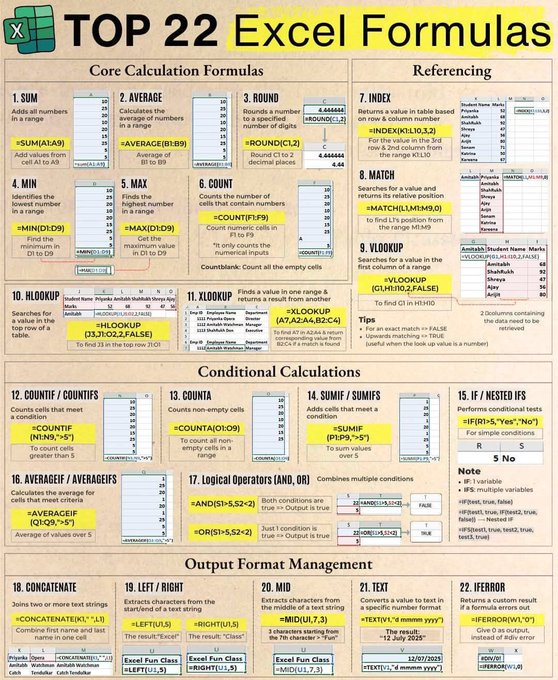
🚨 If you use Excel every day but still rely on your mouse, you're wasting HOURS every month.
These 7 Excel shortcuts can make you work 2x faster:
📌 Ctrl C → Copy selected data
📌 Ctrl V → Paste copied data
📌 Ctrl Z → Undo mistakes instantly
📌 Ctrl Y → Redo an action
📌 Ctrl A → Select everything in a sheet
📌 Ctrl F → Find any value in seconds
📌 Ctrl H → Replace text/numbers in bulk
📌 Ctrl T → Convert data into a smart table
📌 Ctrl Shift L → Apply/Remove filters instantly
💡 Most Excel users know only 2–3 of these.
Power users combine shortcuts to clean, analyze, and manage thousands of rows in minutes.
The less time you spend clicking, the more time you spend getting work done.
🔖 Save this post for later.
♻️ Repost to help someone work smarter.
💬 What's your favorite Excel shortcut?
#Excel #MicrosoftExcel #DataAnalysis #Productivity #Analytics #BusinessAnalytics #Spreadsheet #Office365 #ExcelTips #CareerGrowth
3
5
46
1,384
Jun 8
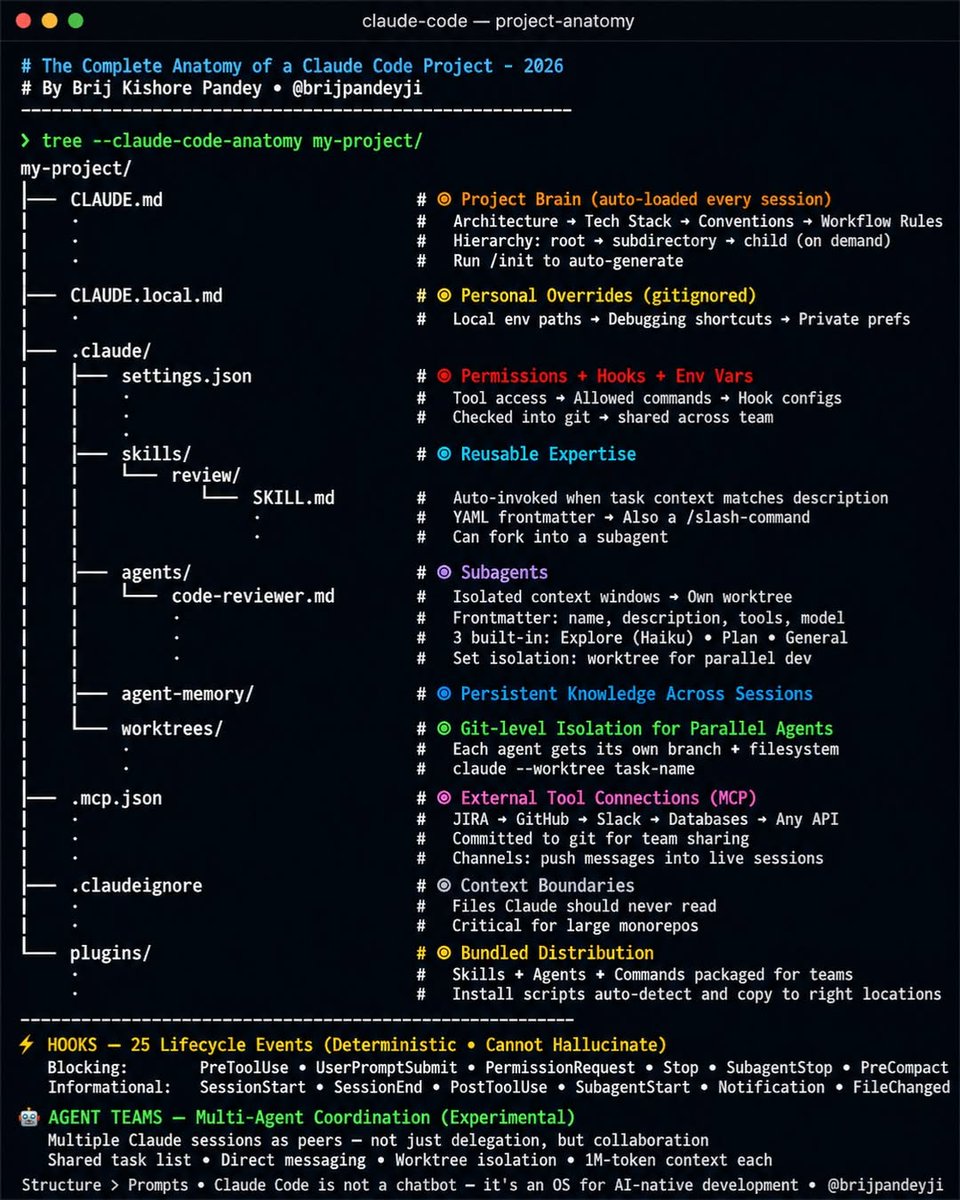
99% of developers using Claude Code are only using 10% of Claude Code.
They create a single `CLAUDE.md` file...
...and miss the entire agent operating system hidden underneath.
The complete Claude Code stack in 2026 👇
🧠 CLAUDE.md
Your project's memory. Auto-loaded every session.
👤 CLAUDE.local.md
Personal preferences that stay out of Git.
⚙️ .claude/settings.json
Permissions, hooks, environment variables, and execution rules.
🧩 .claude/skills/
Reusable expertise that loads only when relevant.
🤖 .claude/agents/
Specialized subagents with their own context windows.
🧬 .claude/agent-memory/
Knowledge that persists across sessions.
🌿 .claude/worktrees/
Parallel development branches for multiple agents.
🔌 .mcp.json
Connect Claude to GitHub, Jira, Slack, databases, APIs, and internal tools.
🚫 .claudeignore
Control what Claude can and cannot see.
📦 Plugins
Package entire workflows and distribute them across teams.
The parts most people still don't know:
⚡ Every SKILL.md is now also a slash command.
⚡ Hooks run at 25 lifecycle events and execute deterministic actions.
⚡ Subagents can work in isolated Git worktrees simultaneously.
⚡ Agent Teams allow multiple Claude sessions to collaborate, share tasks, and message each other.
The biggest productivity unlock isn't a better prompt.
It's building a better system around the agent.
Structure > Prompts.
Save this before your next Claude Code project 🔖
#ClaudeCode #AIAgents #AgenticAI #BuildInPublic #SoftwareEngineering #DeveloperTools #Coding
8
7
63
2,443
Jun 7
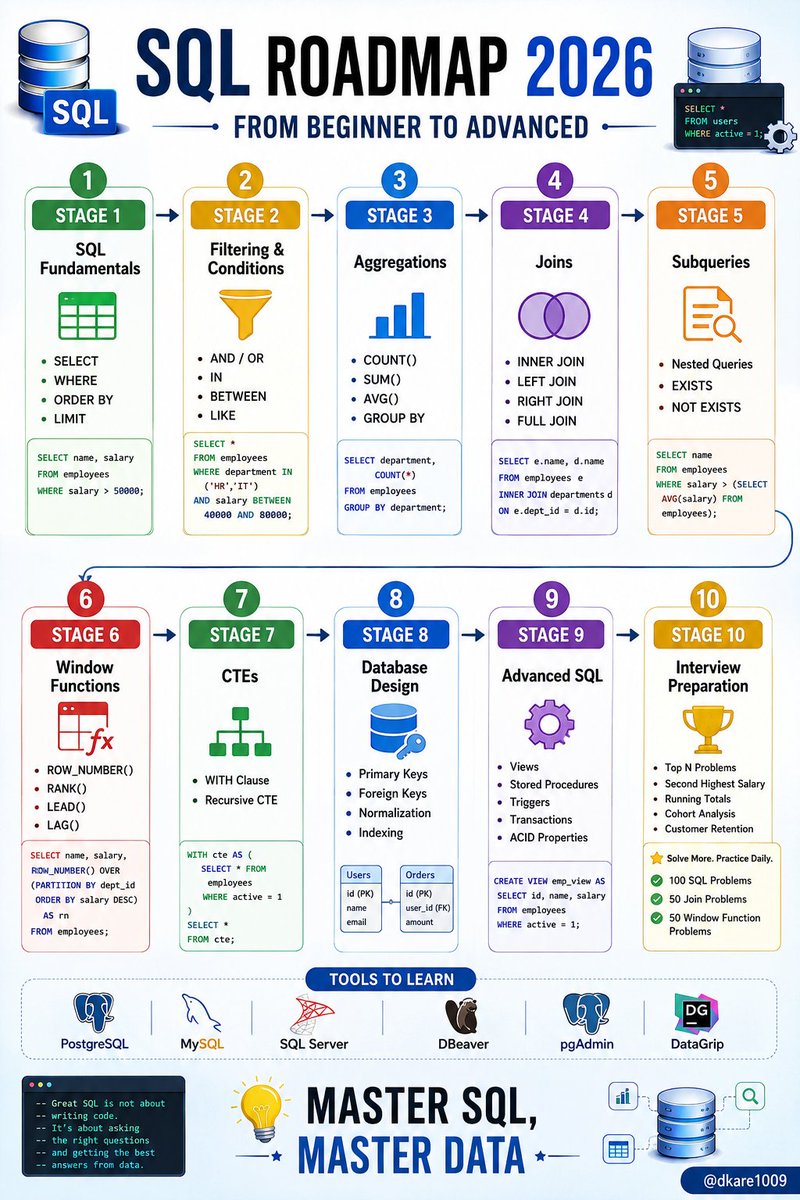
SQL ROADMAP 2026 🗄️
If I were starting SQL in 2026, I wouldn't waste months jumping between random tutorials.
I'd focus on mastering the skills companies actually pay for.
Because SQL isn't just a database language.
It's one of the highest ROI skills in tech.
Whether you're aiming for:
• Data Analyst 📊
• Data Scientist 🤖
• Backend Developer 💻
• Business Analyst 📈
• Data Engineer ⚡
• Product Manager 🚀
SQL is often the common requirement.
Here's the roadmap I'd follow:
━━━━━━━━━━━━━━━
🔹 STAGE 1: SQL FUNDAMENTALS
Learn:
✓ SELECT
✓ WHERE
✓ ORDER BY
✓ LIMIT
✓ DISTINCT
✓ Aliases
Goal:
Retrieve exactly the data you need.
Example:
SELECT name, salary
FROM employees
WHERE salary > 50000;
━━━━━━━━━━━━━━━
🔹 STAGE 2: FILTERING & CONDITIONS
Master:
✓ AND / OR
✓ IN
✓ BETWEEN
✓ LIKE
✓ IS NULL
✓ CASE Statements
Most interview questions start here.
━━━━━━━━━━━━━━━
🔹 STAGE 3: AGGREGATIONS
Learn:
✓ COUNT()
✓ SUM()
✓ AVG()
✓ MAX()
✓ MIN()
✓ GROUP BY
✓ HAVING
Example:
SELECT department,
COUNT(*)
FROM employees
GROUP BY department;
This is where real business reporting begins.
━━━━━━━━━━━━━━━
🔹 STAGE 4: JOINS
The most important SQL topic.
Master:
✓ INNER JOIN
✓ LEFT JOIN
✓ RIGHT JOIN
✓ FULL JOIN
✓ SELF JOIN
If you understand joins well, you're ahead of most beginners.
━━━━━━━━━━━━━━━
🔹 STAGE 5: SUBQUERIES
Learn:
✓ Nested Queries
✓ Correlated Subqueries
✓ EXISTS
✓ NOT EXISTS
This teaches you how databases think.
━━━━━━━━━━━━━━━
🔹 STAGE 6: WINDOW FUNCTIONS
This is where average developers stop.
Learn:
✓ ROW_NUMBER()
✓ RANK()
✓ DENSE_RANK()
✓ LEAD()
✓ LAG()
✓ NTILE()
These appear constantly in real-world analytics jobs.
━━━━━━━━━━━━━━━
🔹 STAGE 7: COMMON TABLE EXPRESSIONS
Master:
✓ WITH Clause
✓ Recursive CTEs
Cleaner code.
Easier debugging.
Better interviews.
━━━━━━━━━━━━━━━
🔹 STAGE 8: DATABASE DESIGN
Understand:
✓ Primary Keys
✓ Foreign Keys
✓ Normalization
✓ Relationships
✓ Indexing
This separates SQL users from database professionals.
━━━━━━━━━━━━━━━
🔹 STAGE 9: ADVANCED SQL
Learn:
✓ Views
✓ Stored Procedures
✓ Triggers
✓ Transactions
✓ ACID Properties
These topics show up frequently in backend and DBA interviews.
━━━━━━━━━━━━━━━
🔹 STAGE 10: SQL INTERVIEW PREPARATION
Practice:
✓ Top N Problems
✓ Duplicate Records
✓ Second Highest Salary
✓ Running Totals
✓ Cohort Analysis
✓ Customer Retention Queries
Solve at least:
• 100 SQL Questions
• 50 Join Problems
• 50 Window Function Problems
━━━━━━━━━━━━━━━
🔥 BONUS: TOOLS TO LEARN
✓ PostgreSQL
✓ MySQL
✓ SQL Server
✓ DBeaver
✓ pgAdmin
✓ DataGrip
━━━━━━━━━━━━━━━
Most people think SQL is easy.
Writing a SELECT query is easy.
Writing efficient queries on millions of rows is where the skill begins.
SQL has been around for decades.
And it's still one of the most valuable skills in tech.
Save this roadmap.
You'll thank yourself in 12 months.
♻️ Repost to help someone learn SQL in 2026.
#SQL #DataAnalytics #DataScience #Database #PostgreSQL #MySQL #BackendDevelopment #DataEngineering #Programming #TechCareer
5
19
85
2,734
Jun 7
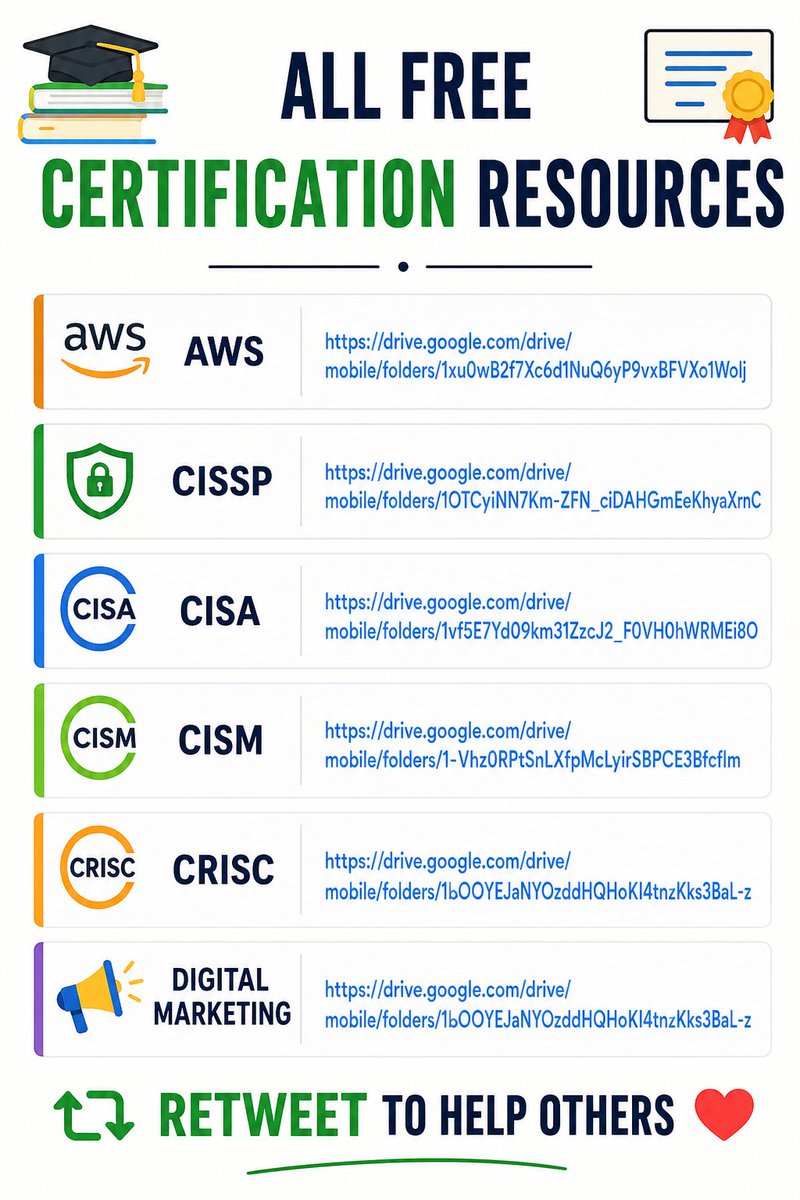
ALL FREE CERTIFICATION RESOURCES
AWS
drive.google.com/drive/mobil…
CISSP
drive.google.com/drive/mobil…
CISA
drive.google.com/drive/mobil…
CISM
drive.google.com/drive/mobil…
CRISC
drive.google.com/drive/mobil…
Digital Marketing
drive.google.com/drive/mobil…
Retweet to help others
3
6
28
773
Jun 6
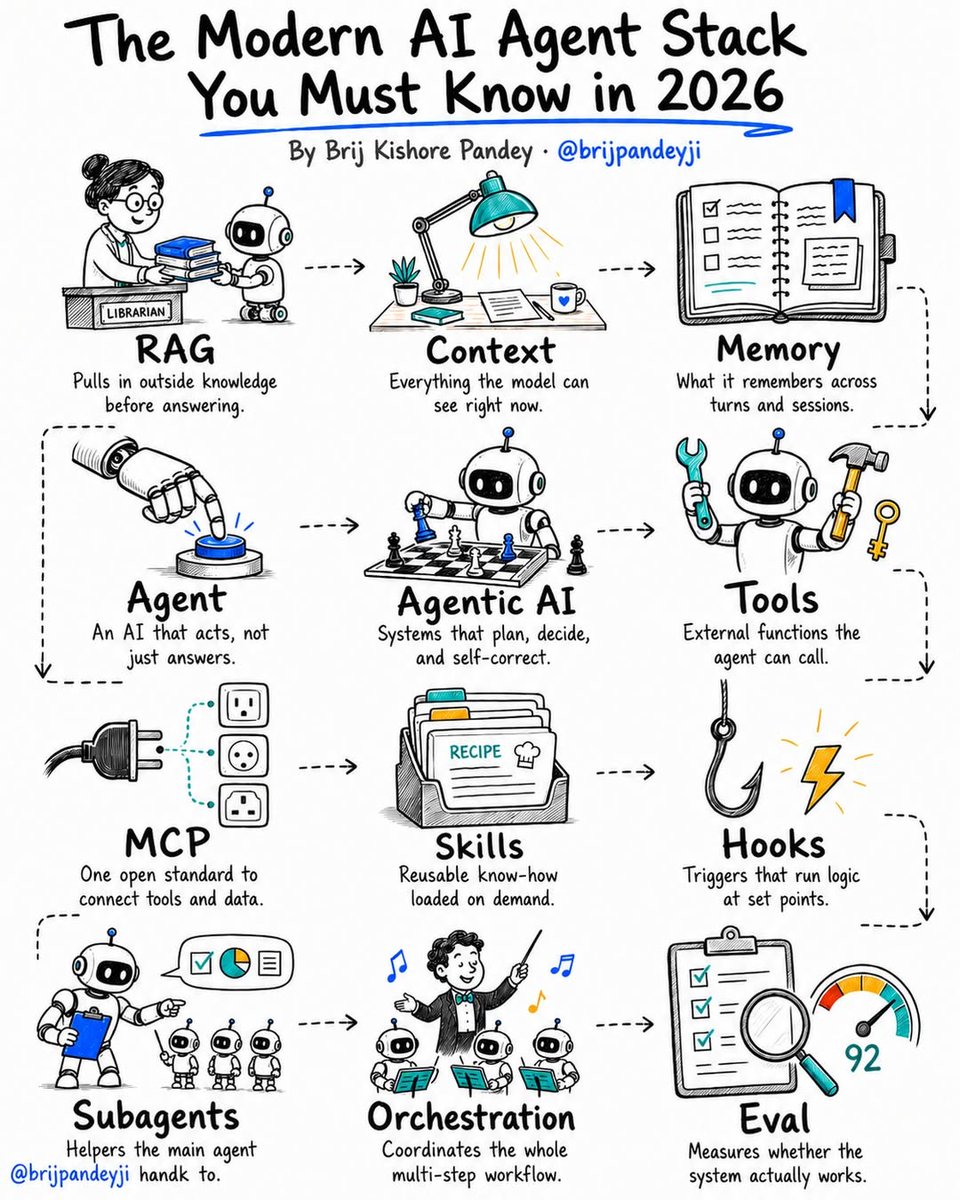
Most people building AI agents are stuck.
Not because the models are bad.
Because they don't understand the stack.
Everyone keeps throwing around buzzwords:
RAG.
Agents.
MCP.
Memory.
Tools.
Evals.
But very few people can explain how they fit together.
The reality?
Modern AI systems are built on just 12 core concepts.
Master these 12 terms and you'll understand 90% of what's happening in AI today.
🧠 FOUNDATION
→ RAG = brings in external knowledge
→ Context = what the model sees right now
→ Memory = what it remembers over time
🤖 AGENT LAYER
→ Agent = AI that can take actions
→ Agentic AI = AI that can plan and make decisions
→ Tools = functions the AI can use
→ MCP = the standard that connects AI to tools & data
⚡ CAPABILITY LAYER
→ Skills = reusable expertise
→ Hooks = event-driven automation
→ Subagents = specialist workers
🎯 EXECUTION LAYER
→ Orchestration = coordinates everything
→ Eval = tells you if any of it actually works
Here's what most people miss:
You can have the smartest model in the world...
But weak memory.
Bad tools.
No evaluation.
And the entire system falls apart.
The companies winning with AI today aren't chasing the newest buzzword.
They're understanding how all the pieces work together.
Save this.
You'll keep seeing these 12 terms everywhere for the next few years.
Which one do you think is the most misunderstood?
👇
10
39
152
4,324
Brij Pandey retweeted
Jun 5
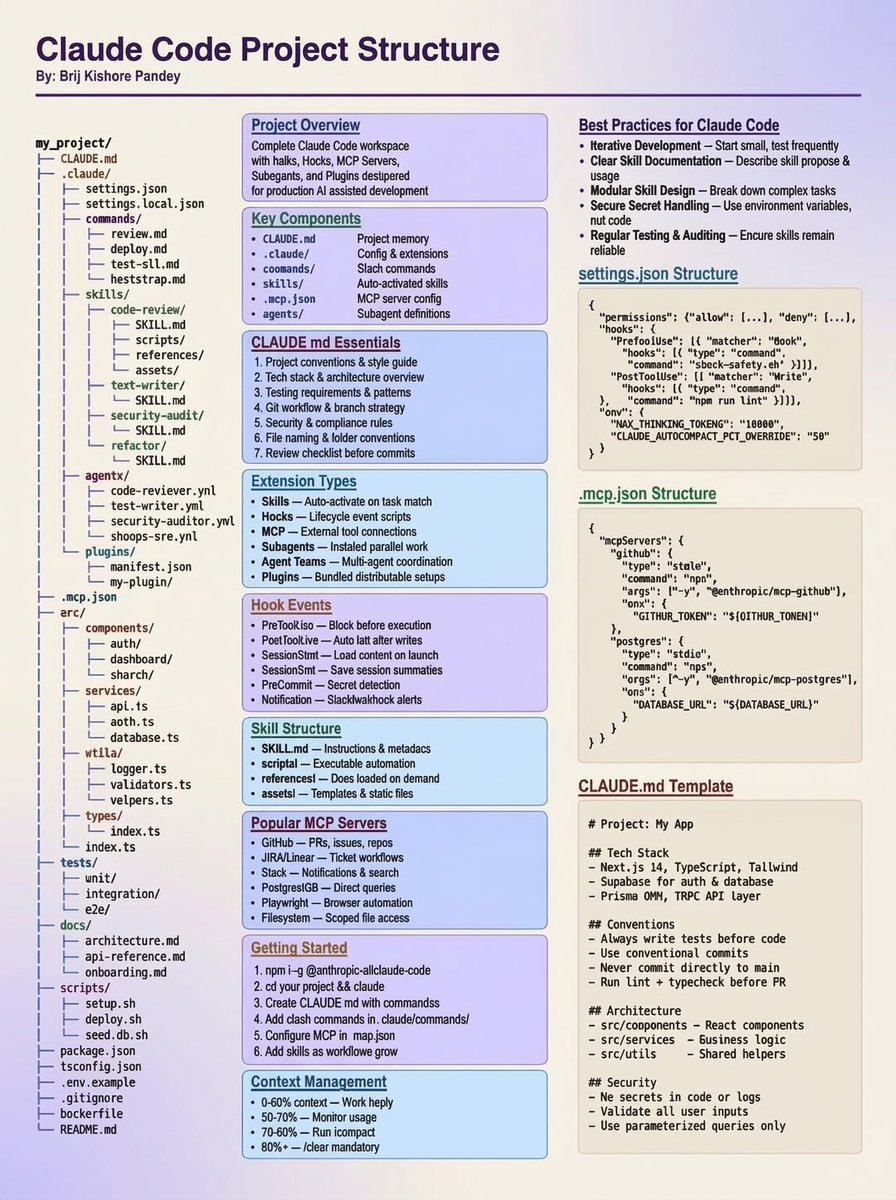
Most people using Claude Code are still organizing projects like it's 2024.
That's a mistake.
The best Claude Code setups aren't just folders and files.
They're systems for memory, context, automation, and agent collaboration.
Here's the Claude Code project structure I wish I had from day one:
📁 CLAUDE.md
→ Persistent project memory
→ Architecture decisions
→ Coding standards
→ Context Claude should never forget
📂 .claude/
→ The brain of your workspace
Inside:
⚙️ Agents
→ Specialized AI teammates for different tasks
🛠️ Skills
→ Reusable capabilities and workflows
🔗 MCP
→ Connect Claude to tools, APIs, databases, and external systems
🎣 Hooks
→ Trigger actions before and after events
🔌 Plugins
→ Extend functionality without cluttering your codebase
📚 Context Management
→ Keep Claude focused on what matters
→ Reduce repetitive prompting
→ Improve output consistency
The biggest unlock?
Treating Claude like a teammate with memory, processes, and tools.
Not just a chatbot that writes code.
The developers building the fastest are the ones building systems around AI, not just using AI.
Save this.
You'll need it when your Claude Code projects start getting serious.
🔥 Comment "CLAUDE" if you want the full-resolution version.
#ClaudeCode #AIEngineering #AIAgents #AgenticAI #BuildInPublic #DeveloperTools
1
10
39
1,101
Jun 5
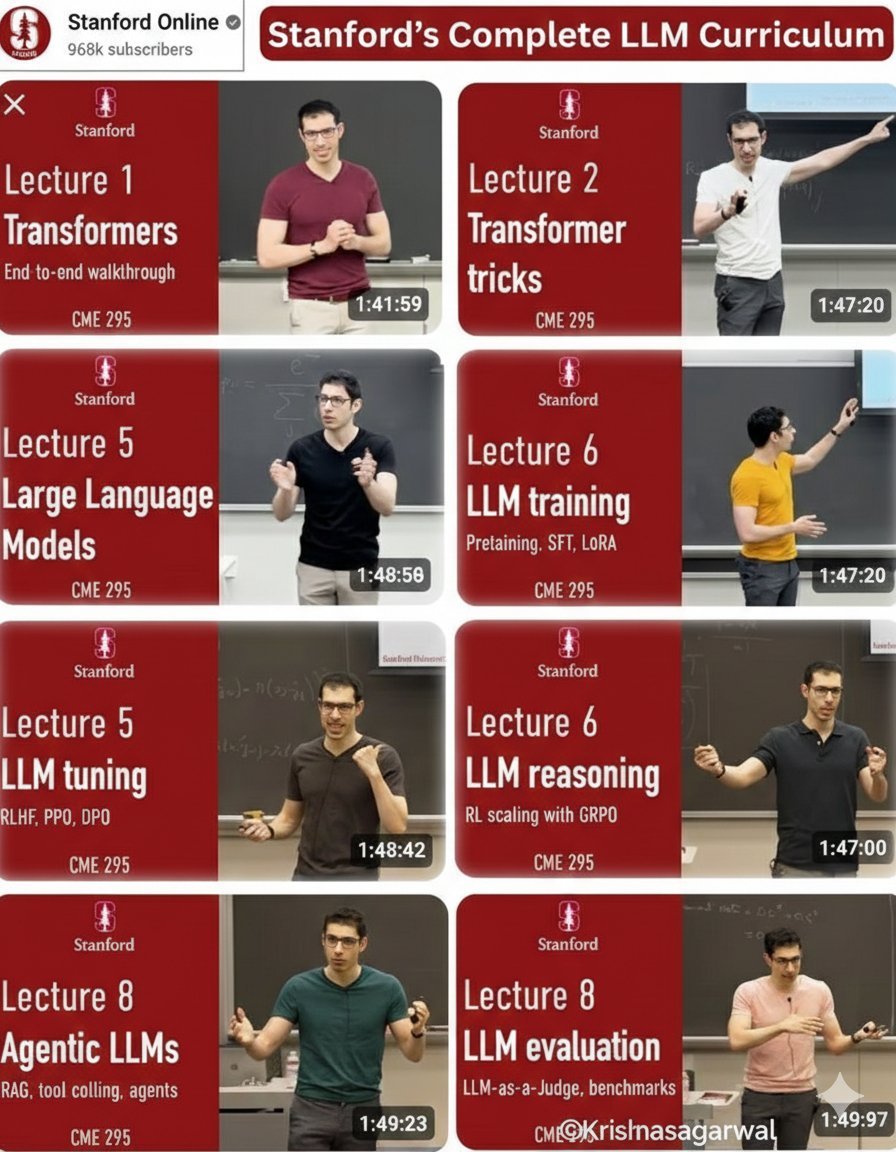
Most people use LLMs.
Very few actually understand how they work under the hood.
If you want to go from prompt user → real AI engineer, study these 9 concepts in order:
1️⃣ Transformers — attention, tokens, self-attention basics
lnkd.in/gaaRDexT
2️⃣ Transformer tricks — what makes them stable & scalable
lnkd.in/gy4FUwNY
3️⃣ From Transformers → LLMs — how scale changes behavior
lnkd.in/gsPiCrEU
4️⃣ LLM training — where “intelligence” actually emerges
lnkd.in/gvHJvgqP
5️⃣ Instruction tuning & alignment — why fine-tuning matters
lnkd.in/g6kgtPKR
6️⃣ LLM reasoning — why models fail what improves them
lnkd.in/gAACSUG6
7️⃣ Agentic LLMs — models that plan, call tools, and act
lnkd.in/gVm6js9z
8️⃣ LLM evaluation — measure beyond demos & vibes
lnkd.in/gJhbFQ4s
9️⃣ What’s next, trends that actually matter
Bookmark this. Study step-by-step. Your prompts will level up, and so will your builds.
7
13
63
1,713
Jun 4
2
26
219
5,356
Jun 4
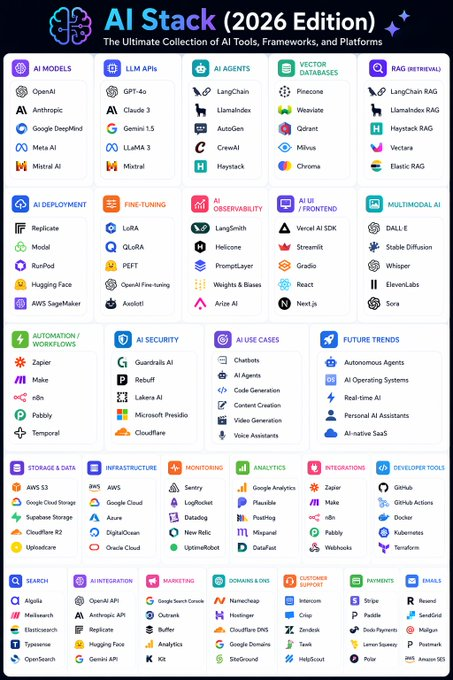
📂 AI Stack (2026 Edition)
┃
┣ 📂 AI Models
┃ ┣ 📂 OpenAI
┃ ┣ 📂 Anthropic
┃ ┣ 📂 Google DeepMind
┃ ┣ 📂 Meta AI
┃ ┗ 📂 Mistral AI
┃
┣ 📂 LLM APIs
┃ ┣ 📂 GPT-4o
┃ ┣ 📂 Claude 3
┃ ┣ 📂 Gemini 1.5
┃ ┣ 📂 LLaMA 3
┃ ┗ 📂 Mixtral
┃
┣ 📂 AI Agents
┃ ┣ 📂 LangChain
┃ ┣ 📂 LlamaIndex
┃ ┣ 📂 AutoGen
┃ ┣ 📂 CrewAI
┃ ┗ 📂 Haystack
┃
┣ 📂 Vector Databases
┃ ┣ 📂 Pinecone
┃ ┣ 📂 Weaviate
┃ ┣ 📂 Qdrant
┃ ┣ 📂 Milvus
┃ ┗ 📂 Chroma
┃
┣ 📂 RAG (Retrieval-Augmented Generation)
┃ ┣ 📂 LangChain RAG
┃ ┣ 📂 LlamaIndex RAG
┃ ┣ 📂 Haystack RAG
┃ ┣ 📂 Vectara
┃ ┗ 📂 Elastic RAG
┃
┣ 📂 AI Deployment
┃ ┣ 📂 Replicate
┃ ┣ 📂 Modal
┃ ┣ 📂 RunPod
┃ ┣ 📂 Hugging Face
┃ ┗ 📂 AWS SageMaker
┃
┣ 📂 Fine-Tuning
┃ ┣ 📂 LoRA
┃ ┣ 📂 QLoRA
┃ ┣ 📂 PEFT
┃ ┣ 📂 OpenAI Fine-tuning
┃ ┗ 📂 Axolotl
┃
┣ 📂 AI Observability
┃ ┣ 📂 LangSmith
┃ ┣ 📂 Helicone
┃ ┣ 📂 PromptLayer
┃ ┣ 📂 Weights & Biases
┃ ┗ 📂 Arize AI
┃
┣ 📂 AI UI / Frontend
┃ ┣ 📂 Vercel AI SDK
┃ ┣ 📂 Streamlit
┃ ┣ 📂 Gradio
┃ ┣ 📂 React
┃ ┗ 📂 Next.js
┃
┣ 📂 Multimodal AI
┃ ┣ 📂 DALL·E
┃ ┣ 📂 Stable Diffusion
┃ ┣ 📂 Whisper
┃ ┣ 📂 ElevenLabs
┃ ┗ 📂 Sora
┃
┣ 📂 Automation / Workflows
┃ ┣ 📂 Zapier
┃ ┣ 📂 Make
┃ ┣ 📂 n8n
┃ ┣ 📂 Pabbly
┃ ┗ 📂 Temporal
┃
┣ 📂 AI Security
┃ ┣ 📂 Guardrails AI
┃ ┣ 📂 Rebuff
┃ ┣ 📂 Lakera AI
┃ ┣ 📂 Microsoft Presidio
┃ ┗ 📂 Cloudflare
┃
┣ 📂 AI Use Cases
┃ ┣ 📂 Chatbots
┃ ┣ 📂 AI Agents
┃ ┣ 📂 Code Generation
┃ ┣ 📂 Content Creation
┃ ┣ 📂 Video Generation
┃ ┗ 📂 Voice Assistants
┃
┗ 📂 Future Trends
┣ 📂 Autonomous Agents
┣ 📂 AI Operating Systems
┣ 📂 Real-time AI
┣ 📂 Personal AI Assistants
┗ 📂 AI-native SaaS
4
10
48
2,312