

Jun 13
募集系AI増えて時代だな〜とも思ったけど、やっぱり色彩とかデザイン学の勉強してFigmaAI使ってるとかしてるの見てると面白いな〜って思う。
使うのは自由だし、公序良俗や権利に反してなければ使うのは使い手の自由かと〜
好みで言ったらあまり好みじゃないけどね〜
時代には合わせないとだし。
30

39

Jun 10
そして今、東北部のサイトもつくりたくてfigmaAIに頼んでみたら、無料版の150クレジットをカフェサイト含めてあっという間に使い切った🥹
余談、、、
figmaAIがReactコードを生成するから、Reactも学び直そうかなって思ってる。
1
88
Jun 10
以前にコーディングしたカフェ(cafeCalmati)のデザインをGPTにブラッシュアップしてもらって、さらにFigmaAIにWordPressを視野に入れてデザインしてもらって、Codex(1ヶ月無料)にコーディングしてもらってできたのが👇
verablog.com/BSC/
ちなみに画像は生成AIと、Unsplashからです。
ここまで
1
159

Jun 9
Figma's AI features in 2026 are genuinely impressive. First Draft alone has changed how you start new screens. But the best part? It works with your actual component library. That changes everything. figma.com/resource-library/a… #Figma #FigmaAI #ProductDesign #UIDesign
45

Jun 9
【デザインとAI】20260608〜09|デザインとAI note.com/design_to_ai/n/n0f6… #デザインとAI
#AIデザイン
#生成AI
#UIUX
#FigmaAI
#AIワークフロー
#デザイナーAI
#クリエイティブAI
#AI実用例
#DesignWithAI
31
Jun 8
【デザインとAI】20260607〜08|デザインとAI note.com/design_to_ai/n/nd13… #デザインとAI
#生成AIデザイン
#ClaudeCode
#AIUX
#ジェネレーティブデザイン
#WebデザインAI
#ProductDesign
#AIエージェント
#FigmaAI
#実践AIデザイン
1
43



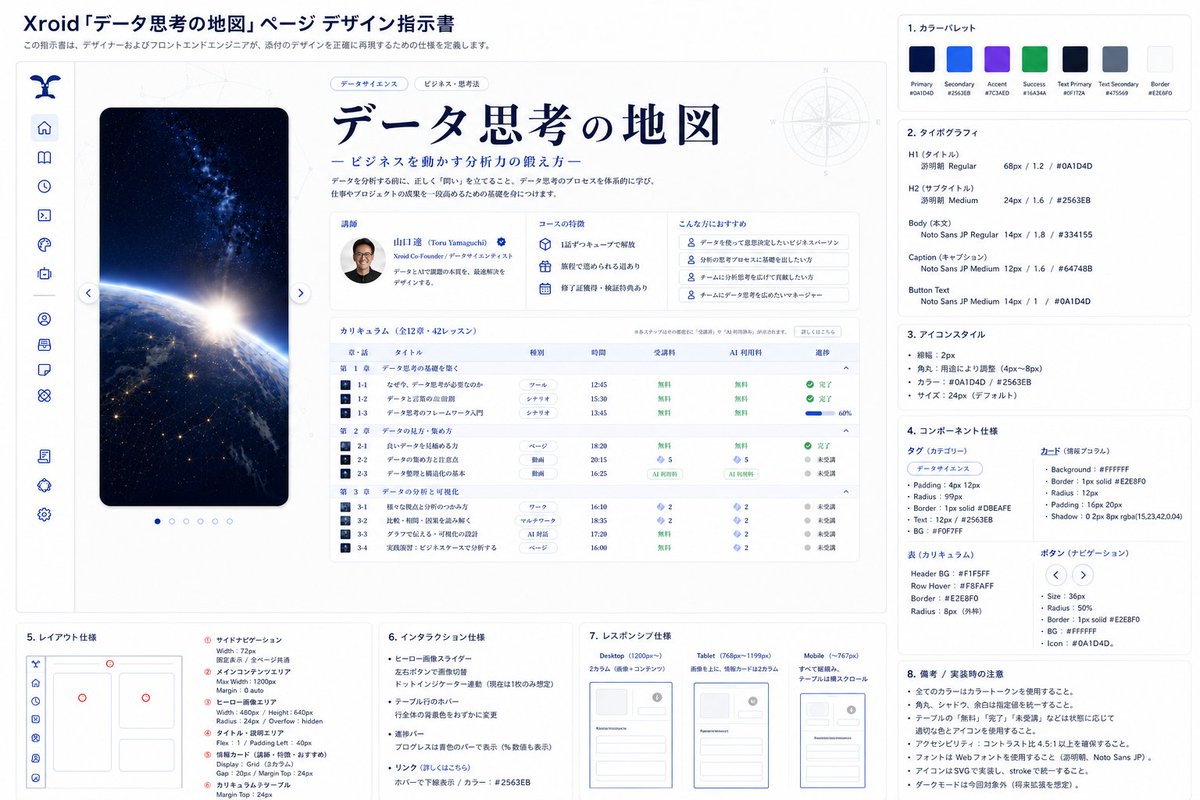
WEBデザインは、以下のやり方で爆速化します。
❶GPT Image2で、デザインと設計書を作る。
❷CPT 5.5pro(拡張)で、FigimaMakeへ渡すプロンプトを作る。
↓
❸Figma Makeへ「デザイン画像+設計書画像+プロンプト」を渡して、そこからFigmaAIとデザインする。
❹Figma Designへコピーしてエンジニアに渡す。
これで、マジで100~200万レベルのデザイン&UI設計ができる。
6
441

WEBデザインはAI1本で作るものではない。
構成:
ChatGPT 40%、
画像AI 20%、
FigmaAI 20%、
最後の設計判断 20%。
この配分が実用ライン。
1
19
370

おはようございます
今日はできて本当にちょっとだけだけど
-本日の目標-
・ポートフォリオ制作
✓各セクションごとのテキスト考える
✓FIgmaAIの良い使い方について調べる
5
151

Mar 7
なんかUnityの画面デザインはもうFigmaAI and Figma mcp × uLoopMCP × UITKでいいかもしれん
2
7
454

Feb 21
How do you create landing pages and websites today?
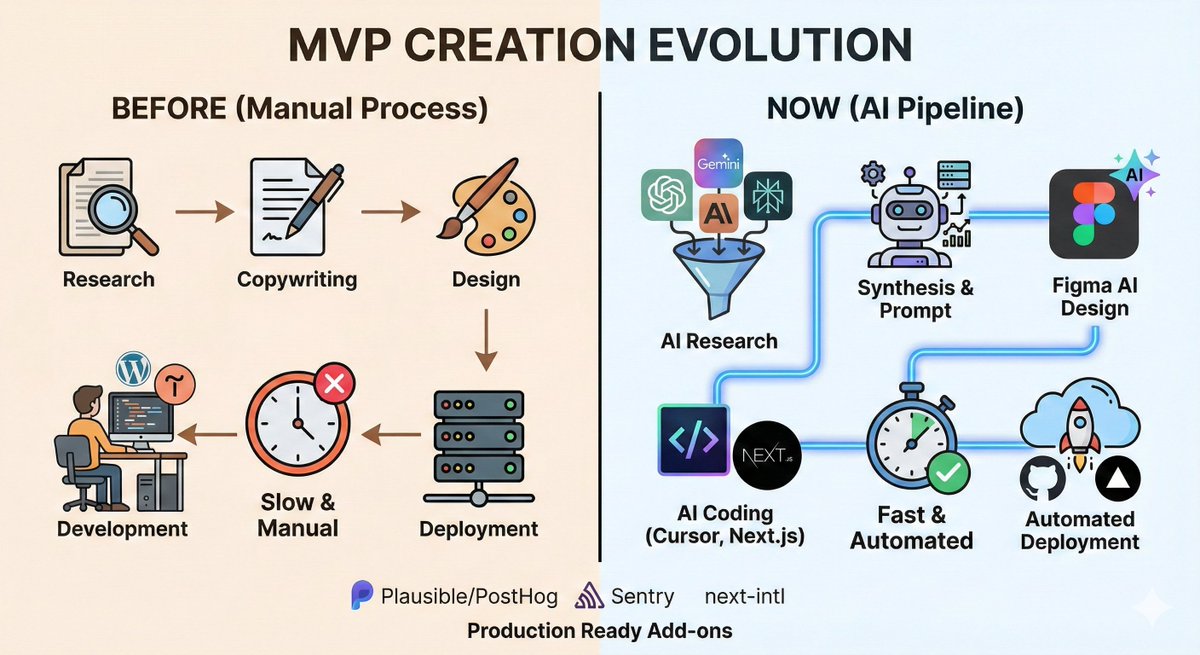
I've been refining my process for building an MVP, and the shift from traditional methods to an AI-driven pipeline is massive. Here is how it has evolved:
The Old Way (Manual MVP)
To build a marketing landing page:
Research: I manually studied competitor websites, defined the value proposition, and identified customer pain points.
Production Chain: I sent the copy to a designer, the design went to a developer, and the developer integrated it into a CMS (WordPress, Tilda, etc.) using visual editors.
Validation: We launched ads, conducted Customer Development (CustDev) interviews to understand why clients were buying, and then manually updated the text in visual editors based on feedback.
The New Way (The AI Stack)
Now, the workflow is almost entirely automated and far more data-driven:
Multi-Model Research: Deep research across all major AI models (ChatGPT, Gemini, Claude, Perplexity, Grok, Manus) because each has access to different data sources and websites.
Data Consolidation: Export the research results using a browser plugin into Markdown files.
Synthesis: Feed these files into a single model to merge the results (alternatively, use Perplexity Max/Council of Models, though it is more expensive).
AI Design: Ask the model to write a prompt for Figma AI and feed it into Figma AI Make (previously you could choose specific models like Gemini 3 or Opus 4.6 inside, but now the choice is simplified).
Design-to-Code: Transfer the design via Figma MCP (Figma Remote MCP) into Cursor.
Development: Cursor generates the code using Next.js Tailwind CSS.
Deployment: Cursor saves everything to GitHub, which then automatically deploys to Vercel (hosting).
Iteration: Any future edits are done simply by giving a prompt to Cursor.
Level Up
Once you master this flow, you can scale the quality even further:
Add Zencoder/Zenflow for advanced workflows.
Configure RAG (Retrieval-Augmented Generation) in Cursor to significantly increase output quality.
Integrate Relume before the Figma AI stage for better structural wireframing.
Essential Production Add-ons:
Analytics: Plausible or PostHog ( UTM tracking).
Monitoring: Sentry (error tracking).
Localization: next-intl (multi-language support).
The Alternative
If you want a more unified approach: Framer AI. It can replace the GitHub Cursor MCP stack. Think of it as Tilda on steroids, where you program and build entirely through AI.
How are you building your websites in 2026? Let's discuss in the comments!
#AI #WebDevelopment #Startup #MVP #Cursor #FigmaAI #NextJS #Vercel #TechStack #ProductManagement #Automation
1
80

Feb 5
🔥FigmaAI矢量转换!
1.内置Vectorize,一键位图转可编辑矢量
2.支持JPG/PNG/草图,放大不失真
3.操作:选图→点Vectorize→编辑缩放着色
4.无需插件,半天100万阅读,设计师必备
5.适用:logo优化、草图数字化、图标翻新
🔗官网地址:figma.com/blog/introducing-v…
#Figma #AI设计 #矢量转换 #设计工具
1
3
5
64

3 mistakes beginners make in Figma make
1.Hardcoding API Keys
2.Messy Design Structure
No Auto Layout & Frame842834
3. Zero Navigation Logic
Garbage in, Garbage out. 🧹
#Figma #vibecoding #figmamake #figmatips #figmaai
1
4
207

Jan 20
Figma AI とstitchずっと比較して使ってきていたんだけど。
指示に忠実でワイヤーフレームも含めて作るならFigmaAI
たまに指示守らないけどビジュアル重視ならで案出しがしたいなら Stitchみたいな感じで落ち着いていたから
使い分けってだいじだなぁ。
3
7
230

Lot of people think, that folks tweeting relentlessly throughout the day are not working/ are free/ ain't got jobs;
But in reality, there are just waiting for their AI agents to finish the task they gave them.
Aka, this is me between ChatGPT, Gemini, FigmaAI and Cursor prompts & replies. 🤣
Okk Bye, just heard the beep, one of them have replied 😜
1
4
519

11 Dec 2025
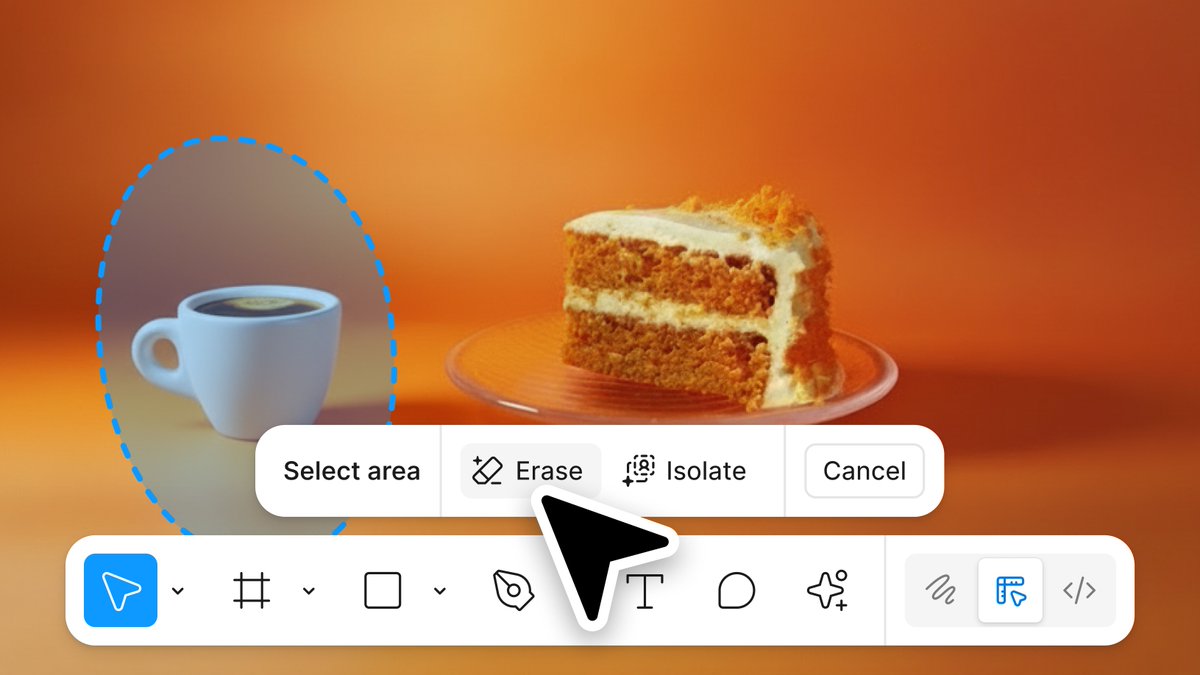
Figma, yeni AI destekli görüntü düzenleme araçlarını duyurdu.
Bu güncellemeyle birlikte artık:
Erase Object: Lasso ile seçtiğiniz nesneyi tek tıkla silebiliyor; arka plan otomatik olarak dolduruluyor.
Isolate Object: Görseldeki bir nesneyi arka plandan ayırıp istediğiniz gibi taşıyabiliyor veya düzenleyebiliyorsunuz.
Expand Image: Görüntüyü farklı bir aspect ratio’ya genişletme özelliği de eklenmiş; AI bozulma olmadan alanı tamamlıyor.
Yeni bir görüntü düzenleme araç çubuğu da geliyor ve mevcut Remove Background gibi özelliklerle birlikte çalışıyor.
Şu an sadece Full Seat kullanıcılarına açık ama önümüzdeki yıl daha geniş bir kitleye sunulacak gibi görünüyor.
Tasarım sürecini hızlandıracak güzel bir adım olmuş.
#Figma #FigmaAI #YapayZeka #DesignTools #UIUX #Sherrone_Moore
2
84

11 Dec 2025
【ブログ更新🎉】
『Figma AIとは?6つの便利機能と使い方がすぐわかるガイド【2025最新】』
リライトやデザイン案の自動生成など、Figma AIの主な機能を紹介します!
Figmaを使用している方は要チェックです👀
coosy.co.jp/blog/whats-figma…
#FigmaAI #figma
6
317