

10 Nov 2025
とりあえず仮でできたかも。
{
"name": "Amazon API直接連携 - 日次売上集計",
"nodes": [
{
"parameters": {
"rule": {
"interval": [
{
"field": "cronExpression",
"expression": "0 6 * * *"
}
]
}
},
"id": "schedule-trigger",
"name": "毎朝6時実行",
"type": "n8n-nodes-base.scheduleTrigger",
"typeVersion": 1.2,
"position": [250, 400]
},
{
"parameters": {
"jsCode": "// 前日の日付を計算\nconst yesterday = new Date();\nyesterday.setDate(yesterday.getDate() - 1);\n\n// YYYY-MM-DD形式にフォーマット\nconst year = yesterday.getFullYear();\nconst month = String(yesterday.getMonth() 1).padStart(2, '0');\nconst day = String(yesterday.getDate()).padStart(2, '0');\nconst dateStr = `${year}-${month}-${day}`;\n\n// ISO 8601形式(Amazon API用)\nconst startOfDay = new Date(yesterday.setHours(0, 0, 0, 0));\nconst endOfDay = new Date(yesterday.setHours(23, 59, 59, 999));\n\nreturn {\n json: {\n date: dateStr,\n startDate: dateStr,\n endDate: dateStr,\n startDateTime: startOfDay.toISOString(),\n endDateTime: endOfDay.toISOString()\n }\n};"
},
"id": "code-date",
"name": "前日の日付を計算",
"type": "n8n-nodes-base.code",
"typeVersion": 2,
"position": [450, 400]
},
{
"parameters": {
"url": "sellingpartnerapi-fe.amazon.…",
"authentication": "predefinedCredentialType",
"nodeCredentialType": "amazonSpApi",
"sendQuery": true,
"queryParameters": {
"parameters": [
{
"name": "MarketplaceIds",
"value": "A1VC38T7YXB528"
},
{
"name": "CreatedAfter",
"value": "={{ $json.startDateTime }}"
},
{
"name": "CreatedBefore",
"value": "={{ $json.endDateTime }}"
},
{
"name": "OrderStatuses",
"value": "Shipped,Unshipped"
}
]
},
"options": {}
},
"id": "http-orders",
"name": "注文データ取得",
"type": "n8n-nodes-base.httpRequest",
"typeVersion": 4.3,
"position": [650, 300],
"notes": "Amazon SP-APIから注文情報を取得"
},
{
"parameters": {
"url": "advertising-api.amazon.com/v…",
"authentication": "predefinedCredentialType",
"nodeCredentialType": "amazonAdvertisingApi",
"method": "POST",
"sendHeaders": true,
"headerParameters": {
"parameters": [
{
"name": "Amazon-Advertising-API-Scope",
"value": "YOUR_PROFILE_ID"
}
]
},
"sendBody": true,
"contentType": "json",
"jsonBody": "={\n \"reportDate\": \"{{ $json.startDate }}\",\n \"metrics\": \"cost,impressions,clicks,sales\"\n}",
"options": {}
},
"id": "http-ad-report-request",
"name": "広告レポート要求",
"type": "n8n-nodes-base.httpRequest",
"typeVersion": 4.3,
"position": [650, 500],
"notes": "Amazon Advertising APIにレポート生成を要求"
},
{
"parameters": {
"amount": 30,
"unit": "seconds"
},
"id": "wait",
"name": "レポート生成待機",
"type": "n8n-nodes-base.wait",
"typeVersion": 1.1,
"position": [850, 500],
"webhookId": "wait-webhook-id"
},
{
"parameters": {
"url": "=advertising-api.amazon.com/v…{{ $json.reportId }}",
"authentication": "predefinedCredentialType",
"nodeCredentialType": "amazonAdvertisingApi",
"sendHeaders": true,
"headerParameters": {
"parameters": [
{
"name": "Amazon-Advertising-API-Scope",
"value": "YOUR_PROFILE_ID"
}
]
},
"options": {}
},
"id": "http-ad-report-download",
"name": "広告レポート取得",
"type": "n8n-nodes-base.httpRequest",
"typeVersion": 4.3,
"position": [1050, 500],
"notes": "生成された広告レポートをダウンロード"
},
{
"parameters": {
"jsCode": "// 注文データから売上と注文商品を集計\nconst ordersData = $input.first().json;\nconst adData = $input.last().json;\n\n// 売上合計と商品別集計の初期化\nlet totalSales = 0;\nconst productSales = {};\n\nif (ordersData.payload && ordersData.payload.Orders) {\n for (const order of ordersData.payload.Orders) {\n // 各注文の合計金額を加算\n if (order.OrderTotal && order.OrderTotal.Amount) {\n totalSales = parseFloat(order.OrderTotal.Amount);\n }\n \n // 注文商品の詳細を取得する必要がある(次のステップで実装)\n // ここでは注文IDをリストに保存\n if (!$node[\"Order IDs\"].json.orderIds) {\n $node[\"Order IDs\"].json.orderIds = [];\n }\n $node[\"Order IDs\"].json.orderIds.push(order.AmazonOrderId);\n }\n}\n\n// 広告費の集計\nlet totalAdCost = 0;\nif (adData && Array.isArray(adData)) {\n for (const campaign of adData) {\n if (campaign.cost) {\n totalAdCost = parseFloat(campaign.cost);\n }\n }\n}\n\nreturn {\n json: {\n totalSales: totalSales,\n totalAdCost: totalAdCost,\n orderCount: ordersData.payload?.Orders?.length || 0\n }\n};"
},
"id": "code-aggregate-initial",
"name": "初期集計",
"type": "n8n-nodes-base.code",
"typeVersion": 2,
"position": [1250, 400]
},
{
"parameters": {
"batchSize": 50,
"options": {}
},
"id": "split-in-batches",
"name": "注文IDをバッチ分割",
"type": "n8n-nodes-base.splitInBatches",
"typeVersion": 3,
"position": [1450, 300]
},
{
"parameters": {
"url": "=sellingpartnerapi-fe.amazon.…{{ $json.orderId }}/orderItems",
"authentication": "predefinedCredentialType",
"nodeCredentialType": "amazonSpApi",
"options": {}
},
"id": "http-order-items",
"name": "注文商品詳細取得",
"type": "n8n-nodes-base.httpRequest",
"typeVersion": 4.3,
"position": [1650, 300],
"notes": "各注文の商品明細を取得"
},
{
"parameters": {
"jsCode": "// 商品別の売上を集計\nconst items = [];\n\nfor (const input of $input.all()) {\n if (input.json.payload && input.json.payload.OrderItems) {\n for (const item of input.json.payload.OrderItems) {\n items.push({\n json: {\n asin: item.ASIN,\n sku: item.SellerSKU,\n title: item.Title,\n quantity: item.QuantityOrdered,\n itemPrice: parseFloat(item.ItemPrice?.Amount || 0),\n itemTax: parseFloat(item.ItemTax?.Amount || 0)\n }\n });\n }\n }\n}\n\nreturn items;"
},
"id": "code-parse-items",
"name": "商品データ解析",
"type": "n8n-nodes-base.code",
"typeVersion": 2,
"position": [1850, 300]
},
{
"parameters": {
"operation": "aggregateItems",
"fieldsToAggregate": {
"fieldToAggregate": [
{
"fieldToAggregate": "quantity",
"aggregation": "sum"
},
{
"fieldToAggregate": "itemPrice",
"aggregation": "sum"
}
]
},
"options": {
"groupByFields": "asin"
}
},
"id": "aggregate",
"name": "ASIN別に集計",
"type": "n8n-nodes-base.aggregate",
"typeVersion": 1,
"position": [2050, 300]
},
{
"parameters": {
"operation": "read",
"documentId": {
"mode": "id",
"value": "YOUR_COST_SPREADSHEET_ID"
},
"sheetName": {
"mode": "name",
"value": "原価マスタ"
},
"options": {
"range": "A:D"
}
},
"id": "google-sheets-cost",
"name": "原価データ取得",
"type": "n8n-nodes-base.googleSheets",
"typeVersion": 4.7,
"position": [2050, 500],
"credentials": {
"googleSheetsOAuth2Api": {
"id": "YOUR_GOOGLE_CREDENTIALS_ID",
"name": "Google Sheets account"
}
},
"notes": "ASIN, 仕入れ価格, 物流価格のマスタデータ"
},
{
"parameters": {
"jsCode": "// 売上データと原価データを結合して粗利益を計算\nconst salesData = $input.first().json;\nconst costData = $input.last().json;\nconst adCost = $('初期集計').first().json.totalAdCost;\nconst date = $('前日の日付を計算').first().json.date;\n\n// 原価マスタをASINでマッピング\nconst costMap = {};\nif (Array.isArray(costData)) {\n for (const row of costData) {\n if (row.ASIN) {\n costMap[row.ASIN] = {\n purchasePrice: parseFloat(row['仕入れ価格'] || 0),\n logisticsPrice: parseFloat(row['物流価格'] || 0)\n };\n }\n }\n}\n\n// 全体サマリーの計算\nlet totalSales = 0;\nlet totalCost = 0;\nlet totalLogistics = 0;\nconst productResults = [];\n\n// 商品別の計算\nfor (const input of $input.all()) {\n const asin = input.json.asin;\n const quantity = input.json.quantity || 0;\n const sales = input.json.itemPrice || 0;\n \n const cost = costMap[asin] || { purchasePrice: 0, logisticsPrice: 0 };\n const productCost = cost.purchasePrice * quantity;\n const productLogistics = cost.logisticsPrice * quantity;\n const productTotal = productCost productLogistics;\n const grossProfit = sales - productTotal;\n const profitMargin = sales > 0 ? (grossProfit / sales * 100) : 0;\n \n totalSales = sales;\n totalCost = productCost;\n totalLogistics = productLogistics;\n \n productResults.push({\n date: date,\n type: '親ASIN',\n asin: asin,\n productName: input.json.title || '-',\n quantity: quantity,\n sales: sales,\n purchaseCost: productCost,\n logisticsCost: productLogistics,\n totalCost: productTotal,\n grossProfit: grossProfit,\n adCost: 0, // ASINごとの広告費は別途配分が必要\n profitMargin: profitMargin.toFixed(2)\n });\n}\n\n// 全体サマリー\nconst totalCosts = totalCost totalLogistics;\nconst totalGrossProfit = totalSales - totalCosts;\nconst netProfit = totalGrossProfit - adCost;\nconst profitMargin = totalSales > 0 ? (netProfit / totalSales * 100) : 0;\n\nconst overallResult = {\n date: date,\n type: '全体',\n asin: '-',\n productName: '-',\n quantity: productResults.reduce((sum, p) => sum p.quantity, 0),\n sales: totalSales,\n purchaseCost: totalCost,\n logisticsCost: totalLogistics,\n totalCost: totalCosts,\n grossProfit: totalGrossProfit,\n adCost: adCost,\n netProfit: netProfit,\n profitMargin: profitMargin.toFixed(2)\n};\n\n// 全体と商品別を結合\nconst allResults = [overallResult, ...productResults];\n\nreturn allResults.map(row => ({ json: row }));"
},
"id": "code-calculate-profit",
"name": "粗利益計算",
"type": "n8n-nodes-base.code",
"typeVersion": 2,
"position": [2250, 400]
},
{
"parameters": {
"operation": "append",
"documentId": {
"mode": "id",
"value": "YOUR_RESULT_SPREADSHEET_ID"
},
"sheetName": {
"mode": "name",
"value": "売上データ"
},
"columns": {
"mappingMode": "defineBelow",
"value": {
"date": "={{ $json.date }}",
"type": "={{ $json.type }}",
"asin": "={{ $json.asin }}",
"productName": "={{ $json.productName }}",
"quantity": "={{ $json.quantity }}",
"sales": "={{ $json.sales }}",
"purchaseCost": "={{ $json.purchaseCost }}",
"logisticsCost": "={{ $json.logisticsCost }}",
"totalCost": "={{ $json.totalCost }}",
"grossProfit": "={{ $json.grossProfit }}",
"adCost": "={{ $json.adCost }}",
"profitMargin": "={{ $json.profitMargin }}"
}
},
"options": {}
},
"id": "google-sheets-output",
"name": "結果をSheetsに追加",
"type": "n8n-nodes-base.googleSheets",
"typeVersion": 4.7,
"position": [2450, 400],
"credentials": {
"googleSheetsOAuth2Api": {
"id": "YOUR_GOOGLE_CREDENTIALS_ID",
"name": "Google Sheets account"
}
}
}
],
"connections": {
"毎朝6時実行": {
"main": [
[
{
"node": "前日の日付を計算",
"type": "main",
"index": 0
}
]
]
},
"前日の日付を計算": {
"main": [
[
{
"node": "注文データ取得",
"type": "main",
"index": 0
},
{
"node": "広告レポート要求",
"type": "main",
"index": 0
}
]
]
},
"注文データ取得": {
"main": [
[
{
"node": "初期集計",
"type": "main",
"index": 0
}
]
]
},
"広告レポート要求": {
"main": [
[
{
"node": "レポート生成待機",
"type": "main",
"index": 0
}
]
]
},
"レポート生成待機": {
"main": [
[
{
"node": "広告レポート取得",
"type": "main",
"index": 0
}
]
]
},
"広告レポート取得": {
"main": [
[
{
"node": "初期集計",
"type": "main",
"index": 0
}
]
]
},
"初期集計": {
"main": [
[
{
"node": "注文IDをバッチ分割",
"type": "main",
"index": 0
}
]
]
},
"注文IDをバッチ分割": {
"main": [
[
{
"node": "注文商品詳細取得",
"type": "main",
"index": 0
}
]
]
},
"注文商品詳細取得": {
"main": [
[
{
"node": "商品データ解析",
"type": "main",
"index": 0
}
]
]
},
"商品データ解析": {
"main": [
[
{
"node": "ASIN別に集計",
"type": "main",
"index": 0
}
]
]
},
"ASIN別に集計": {
"main": [
[
{
"node": "粗利益計算",
"type": "main",
"index": 0
}
]
]
},
"原価データ取得": {
"main": [
[
{
"node": "粗利益計算",
"type": "main",
"index": 0
}
]
]
},
"粗利益計算": {
"main": [
[
{
"node": "結果をSheetsに追加",
"type": "main",
"index": 0
}
]
]
}
},
"pinData": {},
"settings": {
"executionOrder": "v1"
},
"staticData": null,
"tags": [],
"triggerCount": 1,
"updatedAt": "2025-11-10T00:00:00.000Z",
"versionId": "1"
}
2
369

11 Aug 2025
The following domains use the onload SVG's event to open a WebSocket that loads #magecart JS
Found live on more than 50 #ecommerce websites, mostly in Europe.
elementatorprof.\info
orristhekyone.\site
jscode.\cloud
wsocket.\store
ghanamusthi.\xyz
#WebSkimming #FormJacking #PCIDSS

3
15
3,445

3 Aug 2025
Can the clip method secure my paper, or just my dreams?
Source: devhubby.com/thread/how-to-u…
#DevTips #JSCode #TechCommunity #WebDev #clip #method

2
8
33

23 May 2025
独学でElasticsearchを勉強すると多様の活用方法があり、何から勉強すればいいか分からなくなりますよね..🤔
実務で応用できるスキルを中心的に学ぶには’Jscode’のElasticsearch 入門講座!
大事なポイントだけを集めた講座なので、Elasticsearchの応用力が身につきます✨
短期間でElasticsearchの勉強はJscodeの講座から始めましょう🌱
👉 u.inf.run/43x5N63
#インフラン #オンライン講座
#elasticsearch #docker #springboot #springdata
3
47

19 Apr 2025
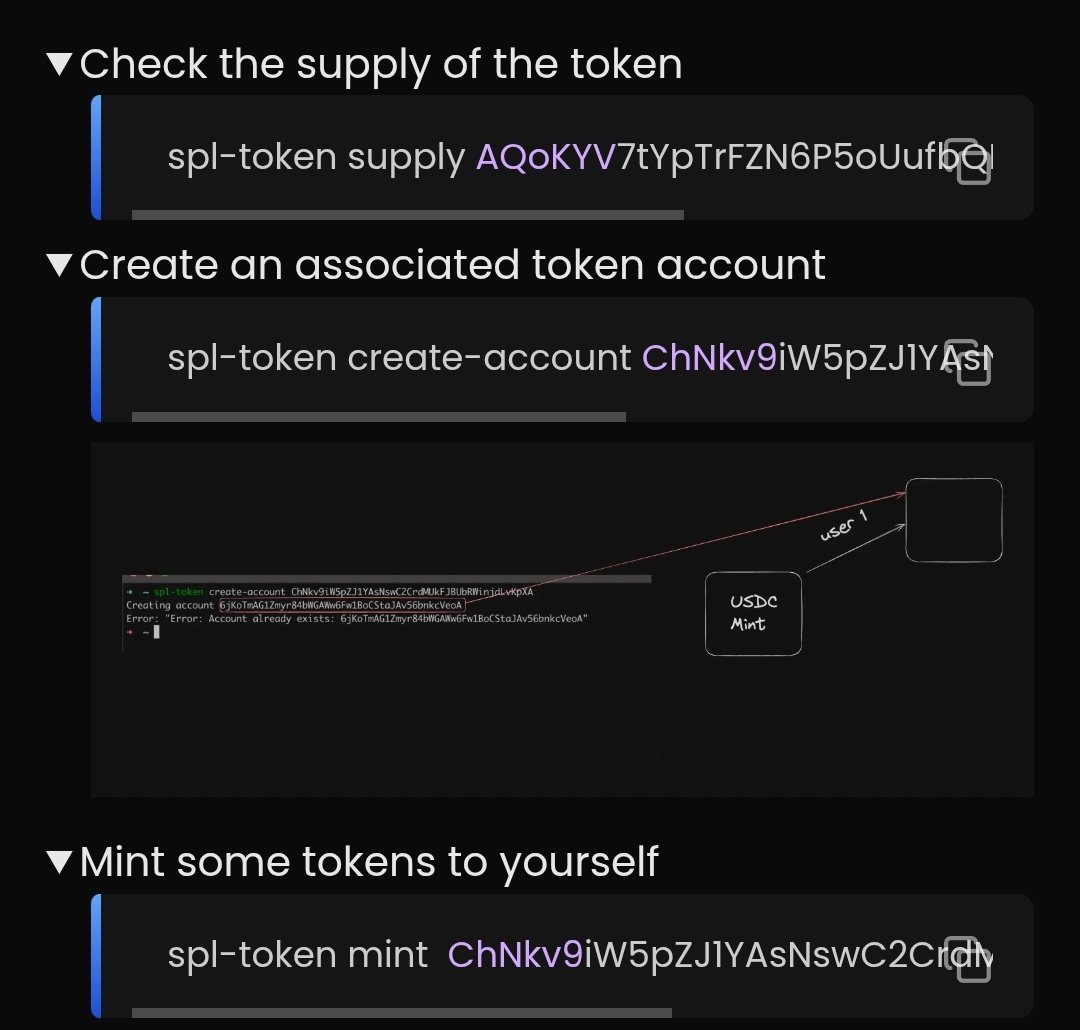
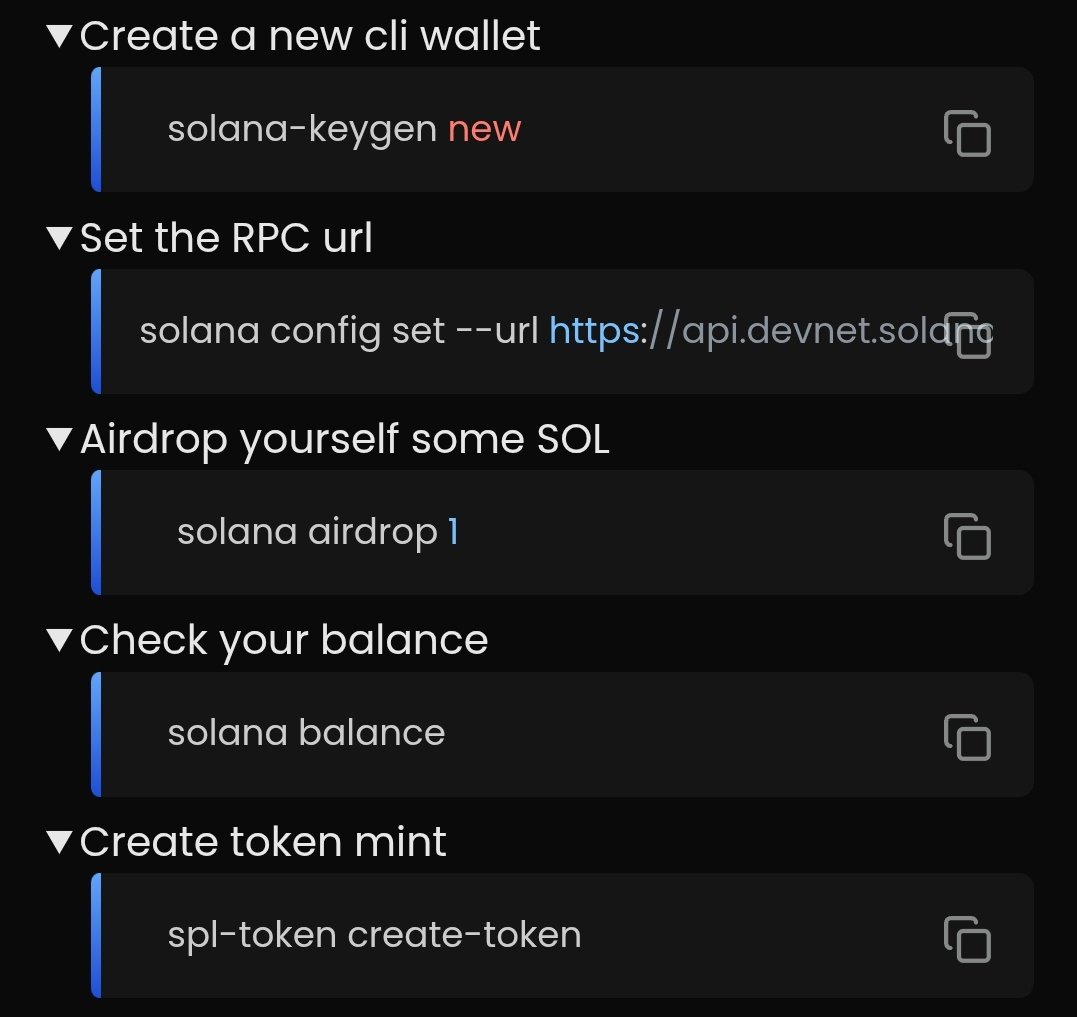
Day 97/108 : Web3 stuff learned - solana program - create token mint - using solana CLI -wrote JsCode to use JRPC
Solved & revised Backtracking ques .
Tmrw - Devops lecture !
Src - @100xDevs week4 cohort3 ( Web3 )
Amazing video by @kirat_tw
#web3 #development
References -
2
190

31 Jan 2025
It still creates a mess and can't recognize when the same class can be used multiple times in a complex json (think an address object that exists multiple times).
I haven't tried the JSCode add-ons but maybe there are better ones
1
1
84

28 Aug 2024
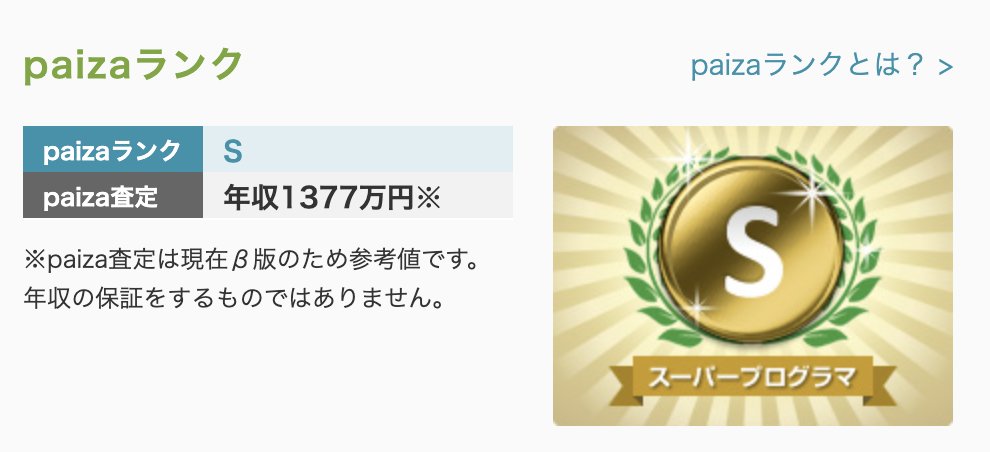
英語だったら、書くと読むとで技量の差はあまりない。(読めるなら書ける。)
一方、プログラミングの場合は、IntelliJやJScodeとかの開発環境が整備されていると言え、書くのは至難。読むのは基本ルールを理解していれば出来る。
「プログラマーは読めれば良い!」との驚愕の新世界が出現している。
27 Aug 2024

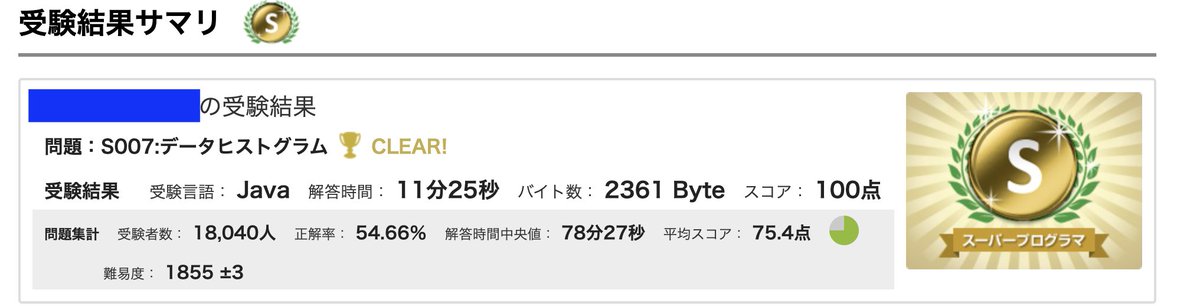
進化するChatgptが、恐ろしすぎる。
プログラミングサイトの最難問題を、日本語のまま、Chatgptに突っ込んで、「JavaでCodeを書け!」と指示すると瞬殺。
一年前は、英語で聞く必要があったし、せいぜい初級レベルまでだったので、大いなる進歩。
今や、Codeは読める必要はあるが、書ける必要はない。
6
3,382


26 Jan 2024
Nou sonje m t di nou JScode la pat vle mache?
Ebyen m jwenn solution an.
M pat lie fichier JS la ak fichier HTML la🤦♂️
M vin songe sa bien tard lem vin monte kabann mw pou m domi 🥲
Eske sa konn rive w pou ou jwenn solution yon bug ou gnyn lew nan kabann ou ?
26 Jan 2024

Jou #6 nan challenge #100JouApKode
Jodia m retranscrit yon design @figma ak Html, Css, JS.
Se yon process ki fun anpil men ki mande concentration.
PS: Code JS mw an pa vle mache🤦♂️. Map eseye gade demen sDv pks epi m partagel aven.
#100DaysOfCode
2
74

12 Oct 2023
Daily: JS 🧑💻
🫡 Async Function always return a Promise.
If a function is returning some other data types then the Async keyword or that async function will wrap that data type into Promise and return it.
#javascript #webdev #JScode #100DaysOfCode
2
838

4 Sep 2023
🎯Completed the Day 27 of #javascript30 challenge. Created a fun draggable slider. 👨💻
Join us if you're also doing JavaScript challenge.
@navdiya_nikunj @alpesh_baria677 @KhushiiVora @suereact
👇JSCode explanation in the comments
1
4
142

24 May 2023
#今日の積み上げ メモ
JScodeの関数を学習 Udemyの講座も学習
Webページのポートフォリオ作成のためHTMLCSSを復習した
#駆け出しエンジニア
#駆け出しエンジニアと繋がりたい
#ウェブデザイン
#Ruby
#RubyonRails
#侍エンジニア
#侍テラコヤ
#侍エンジニア
1
5
130

11 Mar 2023
Optimizing JS code for better SEO #javascript #JScode #singlepageapplications #angularJS #reactJS #meteorJS #SEO #searchengineoptimization
crawlity.com/how-to-optimize…
2
3
139

25 Feb 2023
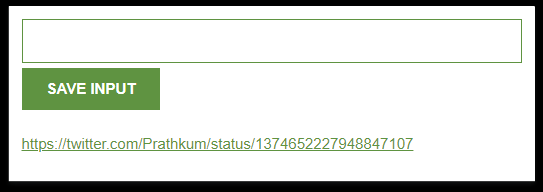
✔ THEN learned about TEMplate Strings (saved a lot of headaches)
its like just writing the html element in jscode like the way u would have written in html and then separating
javascript codes with a dollar sign
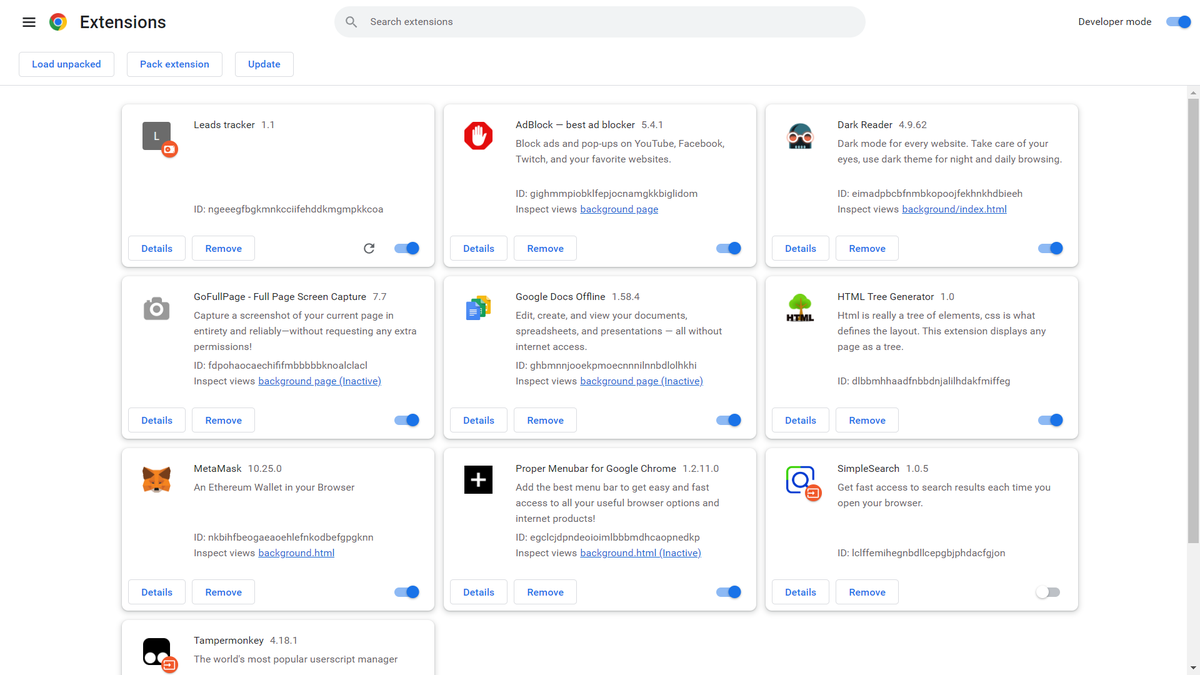
✔ and deployed in chrome extension ITS not completed though.
3
56




5 Sep 2022
【教えてください】
cv時のutmパラメータをプロスペクトに付与したくpageごとにヘルプを参照したjscodeを埋め込んでおり(gtm経由)、utmを記録する非表示項目もiframeで埋め込まれたpardot formにもうけているのですがトラッキングできません、、
有識者の方教えていただけると幸いです、、!
2
14

23 Aug 2022
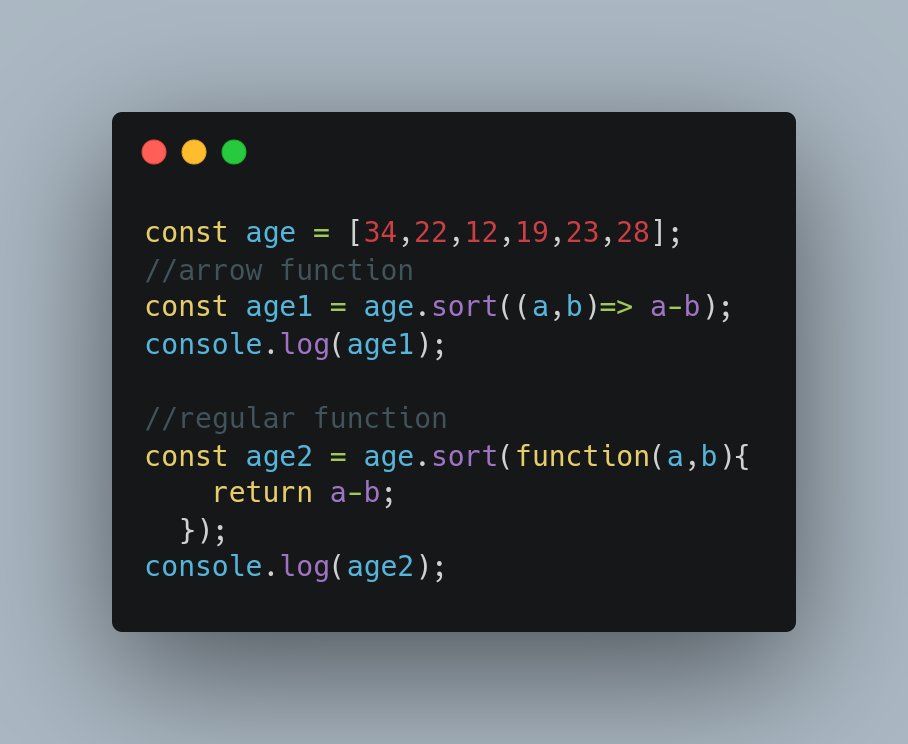
This is why I love arrow functions. Lesser codes and faster development. Same result but arrow function will be preferred.
#es6 #javascript #reactjs #angularjs #vuejs #codebase #programmers #python3 #jscode
2
3

14 Aug 2022
Data Fetching Brief NEXTJS
Follow @he.ismoody
#computer #codinglife #codingismylife #nextjsdeveloper #jscode #webdeveloper #code #tutorial #code #programming #codingbootcamp #coding instagram.com/p/ChOv8C5tZcy/…
1
5