
Jun 11
Learn the differences between static, transient, and temporary hostnames in Linux. Understand when to use each type and how to manage them.
Step-by-Step Guide: ostechnix.com/linux-hostname…
#Hostname #LinuxNetworking #Linuxcommands #Linuxhowto #Linuxadmin #Linuxbasics #Linux
1
2
31

Mar 3
If your homelab gets unstable the moment networking gets involved, this will help.
In this video, we break down Houston networking clearly and practically:
• WireGuard (VPN)
• Bonds vs Teams
• Bridges
• VLANs
• How Linux networking layers actually fit together
• When to use each in a NAS or serious homelab environment
The demo system is an HL15 2.0 with an ASRock ROMED8-2T, multiple 10G NICs, LSI 9400-16i, and GPU. Once you’re running ZFS, SMB/NFS, containers, and VMs, networking design matters.
If you’re building or scaling a 45Homelab system, this walkthrough connects the dots.
Watch the full video now: youtube.com/watch?v=uVbUGWgJ…
#45Homelab #Homelab #LinuxNetworking #WireGuard #ZFS #10Gig #NAS #SelfHosted

2
95

Jan 6
🧰 P-OPS Team | Tech Signal
Connection State Saturation 📡🧠
A validator can be:
• online
• synced
• reachable
…and still struggle to form new connections.
Not due to bandwidth.
Not due to peers.
But because kernel connection state is under pressure.
Every TCP connection consumes kernel state — SYN queues, accept backlogs, TIME_WAIT recycling, and (if enabled) conntrack entries. Under sustained churn from gossip bursts, RPC concurrency, or epoch boundaries, these fill up long before CPU or bandwidth shows stress.
🔍 What to check
Socket state: 𝚜𝚜 -𝚜 watch for TIME_WAIT growth, orphan sockets, or established counts flattening under load.
Listener queues: 𝚜𝚜 -𝚕𝚗𝚝 non-zero Recv-Q or accept queues that never drain.
Conntrack (if enabled): 𝚌𝚘𝚗𝚗𝚝𝚛𝚊𝚌𝚔 -𝙲 𝚌𝚘𝚗𝚗𝚝𝚛𝚊𝚌𝚔 -𝚂 sustained utilisation above ~70% leads to subtle, hard-to-trace degradation.
🧩 Easy-to-misread symptoms
• Peers connect late or inconsistently
• RPC slows only under concurrency
• Restarts “fix” it — briefly
• Metrics look clean, behaviour feels wrong
Nothing is broken.
The kernel is just busy keeping score.
🔧 Operator response
Increase backlog headroom, shorten lingering state, and size conntrack deliberately. Defaults are tuned for web servers — not validators under constant peer churn.
💡 Insight
When a node feels socially capable but slow to connect, check connection state pressure before blaming peers or bandwidth.
Quiet limits fail first.
☎️ Stay Connected with P-OPS Team:
🌎 Website: pops.one
🌳 Linktree: linktr.ee/p_opsteam
🐥 Twitter: twitter.com/POpsTeam1
↗️ Telegram: t.me/POPS_Team_Validator
👾 Discord: discord.gg/jJ8aaMwPwa
#ValidatorOps #LinuxNetworking #Kernel #InfraMatters #TechSignal #POPSTeam

8
21
205
23 Dec 2025
🧰 P-OPS Team Tech Tips: Ephemeral Port Exhaustion Probe 🔁📡
Validators can lose peers without dropping packets.
RPC can feel sluggish without latency spikes.
Gossip can thin out while CPU and bandwidth look fine.
One quiet cause: ephemeral port exhaustion on outbound connections.
No kernel panic.
No service crash.
Just a node that slowly loses its reach.
🔍 Check ephemeral port pressure:
𝚜𝚜 -𝚜 | 𝚐𝚛𝚎𝚙 -𝙴 ‘𝚃𝙲𝙿:|𝚝𝚒𝚖𝚎𝚠𝚊𝚒𝚝|𝚘𝚛𝚙𝚑𝚊𝚗’
Then inspect the port range and utilisation:
𝚌𝚊𝚝 /𝚙𝚛𝚘𝚌/𝚜𝚢𝚜/𝚗𝚎𝚝/𝚒𝚙𝚟𝟺/𝚒𝚙_𝚕𝚘𝚌𝚊𝚕_𝚙𝚘𝚛𝚝_𝚛𝚊𝚗𝚐𝚎
𝚜𝚜 -𝚜 | 𝚐𝚛𝚎𝚙 𝚃𝙸𝙼𝙴-𝚆𝙰𝙸𝚃
Focus on:
• TIME_WAIT counts climbing rapidly
• Orphaned sockets accumulating
• Outbound dials stalling despite free bandwidth
👉 If outbound connects slow while inbound looks normal, ports—not peers—are your bottleneck.
🧠 Easy-to-miss symptoms:
• Validators reconnect fine after restarts, then degrade again
• RPC clients time out only under sustained load
• Gossip peers churn without obvious cause
• Network graphs stay clean while connectivity decays
🔧 Give the kernel more room to breathe:
𝚜𝚞𝚍𝚘 𝚜𝚢𝚜𝚌𝚝𝚕 -𝚠 𝚗𝚎𝚝.𝚒𝚙𝚟𝟺.𝚒𝚙_𝚕𝚘𝚌𝚊𝚕_𝚙𝚘𝚛𝚝_𝚛𝚊𝚗𝚐𝚎=“𝟷𝟶𝟸𝟺 𝟼𝟻𝟻𝟹𝟻”
𝚜𝚞𝚍𝚘 𝚜𝚢𝚜𝚌𝚝𝚕 -𝚠 𝚗𝚎𝚝.𝚒𝚙𝚟𝟺.𝚝𝚌𝚙_𝚏𝚒𝚗_𝚝𝚒𝚖𝚎𝚘𝚞𝚝=𝟷𝟻
𝚜𝚞𝚍𝚘 𝚜𝚢𝚜𝚌𝚝𝚕 -𝚠 𝚗𝚎𝚝.𝚒𝚙𝚟𝟺.𝚝𝚌𝚙_𝚝𝚠_𝚛𝚎𝚞𝚜𝚎=𝟷
👉 Wider ranges and faster cleanup prevent slow connectivity bleed during peak churn.
💡 Pro Tip:
If your validator feels socially distant under load—still online, still responsive, but struggling to form new relationships—check ephemeral ports before blaming peers, threads, or bandwidth.
☎️ Stay Synced with P-OPS Team:
🌍 pops.one
🌲 linktr.ee/p_opsteam
🐦 x.com/POpsTeam1
💬 t.me/POPS_Team_Validator
👾 discord.gg/jJ8aaMwPwa
#ValidatorOps #LinuxNetworking #KernelTuning #P2P #InfraMatters #TechTips #NodeLife #POPSteam

5
15
210
16 Dec 2025
🧰 P-OPS Team Tech Tips: Socket Backlog Saturation Check 📡⚙️
Validators can appear perfectly healthy while quietly choking on inbound connections.
One of the most common culprits: socket accept queues filling faster than the kernel can drain them.
No crashes.
No alerts.
Just subtle hesitation at the network edge.
🔍 Check for listen backlog pressure:
𝚜𝚜 -𝚜
Focus on:
• 𝚃𝙲𝙿: 𝚕𝚒𝚜𝚝𝚎𝚗𝚘𝚟𝚎𝚛𝚏𝚕𝚘𝚠
• 𝚂𝚢𝚗𝚁𝚎𝚌𝚟 queue growth
• retransmission counters rising without packet loss
👉 If listen overflows increment during peak gossip or epoch boundaries, your node is dropping connection attempts before userspace ever sees them.
🧠 Easy-to-miss symptoms:
• Peers retry handshakes more often than expected
• Gossip propagation feels “lumpy” instead of smooth
• RPC clients reconnect despite clean latency graphs
• CPU idle time remains high while network feels sluggish
🔧 Give the kernel more breathing room:
𝚜𝚞𝚍𝚘 𝚜𝚢𝚜𝚌𝚝𝚕 -𝚠 𝚗𝚎𝚝.𝚌𝚘𝚛𝚎.𝚜𝚘𝚖𝚊𝚡𝚌𝚘𝚗𝚗=𝟺𝟶𝟿𝟼
𝚜𝚞𝚍𝚘 𝚜𝚢𝚜𝚌𝚝𝚕 -𝚠 𝚗𝚎𝚝.𝚒𝚙𝚟𝟺.𝚝𝚌𝚙_𝚖𝚊𝚡_𝚜𝚢𝚗_𝚋𝚊𝚌𝚔𝚕𝚘𝚐=𝟺𝟶𝟿𝟼
👉 A deeper accept queue keeps gossip and RPC flowing during bursty peer activity.
💡 Pro Tip:
If your validator feels “polite but slow” under load — accepting peers late rather than failing outright — suspect backlog saturation before tuning threads or CPU.
☎️ Stay Synced with P-OPS Team:
🌍 pops.one
🌲 linktr.ee/p_opsteam
🐦 x.com/POpsTeam1
💬 t.me/POPS_Team_Validator
👾 discord.gg/jJ8aaMwPwa
#ValidatorOps #InfraMatters #LinuxNetworking #KernelTuning #P2P #POPSteam #TechTips #NodeLife #OpsEngineering

3
20
147

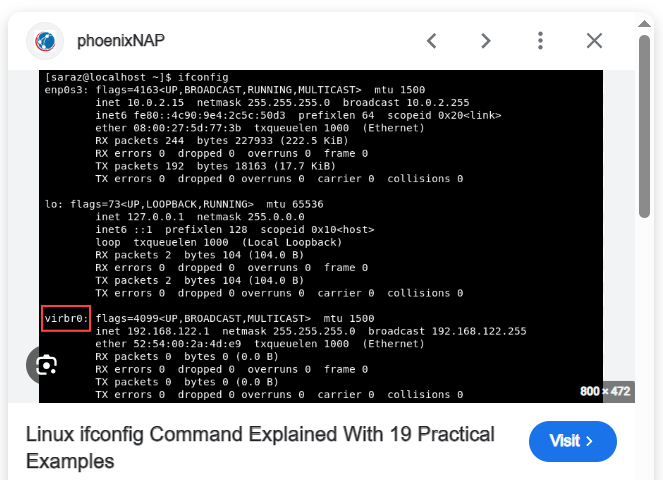
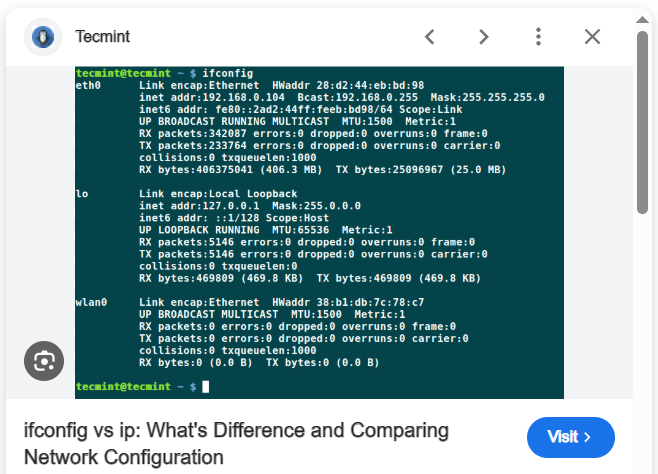
میخوای شبکهت رو بیاری بالا؟ فقط یه ifconfig eth0 up بزن.
قدیمیا اینو با افتخار میگن، جوونا ip a میزنن 😏
مهم اینه که لینوکس بهت میگه: شبکه رو خودت تنظیم کن، نه یه ویندوز ویزارد! 🧙♂️
#ifconfig #iproute2 #LinuxNetworking

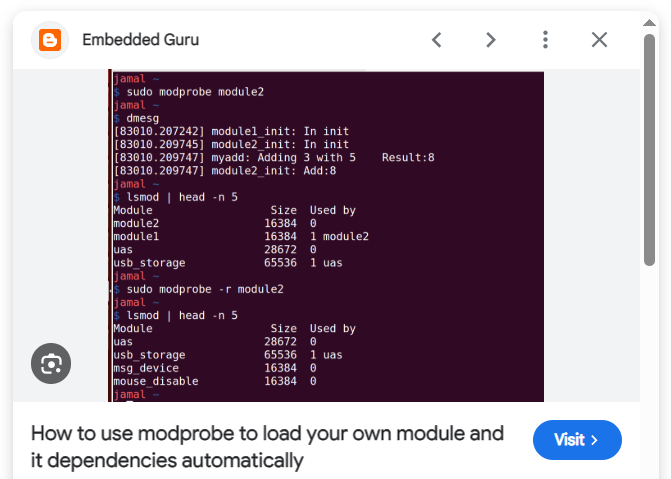
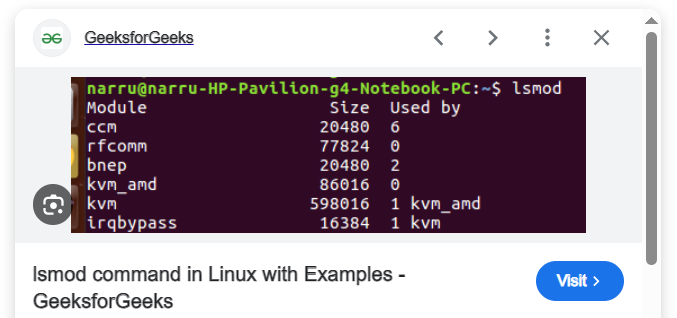
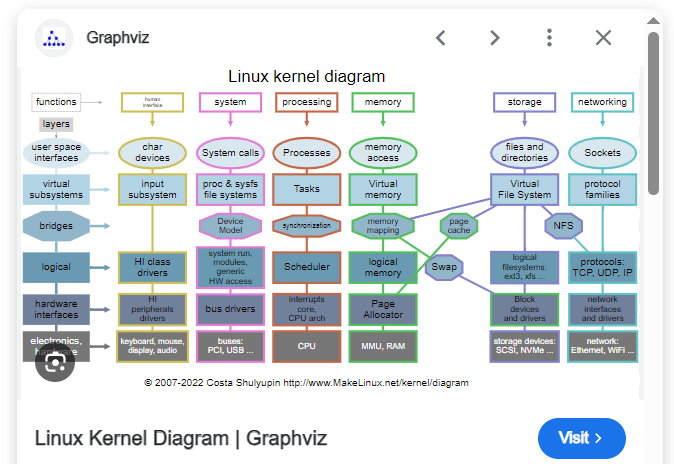
تو ویندوز باید با پنجره و درایور سروکله بزنی، ولی تو لینوکس؟
میگی: modprobe wifi یعنی «ماژول وایفای رو بیار تو هسته».
میخوای ببینی چی لود شده؟ فقط lsmod بزن.
سادگی، کنترل، و حال خوبِ مهندس بودن 😌
#modprobe #lsmod #LinuxMagic

1
3
213

📢 Today’s the day!
Join us for the live webinar: "How to Use Linux for Wireless Learning, Analysis, and More"
Presented by Tom Carpenter, this session will explore:
✔️ Top Linux tools for WLAN analysis
✔️ Evaluation strategies for wireless hardware
✔️ How to turn Linux into a Wi-Fi learning powerhouse
🕐 Starts at 1:00 PM ET – Don’t miss it!
🔗 Join here: zurl.co/S7yfS
#CWNP #WirelessWebinar #LinuxNetworking #WiFiPros #WLANAnalysis

3
229
22 Aug 2025
Essential nmcli Command Examples To Manage Network Connections On Linux #nmcli #NetworkManager #LinuxNetworking #Linuxadmin #linuxhowto #linuxbasics #linuxcommands #commandline
ostechnix.com/linux-nmcli-co…
1
4
55

9 Jul 2025
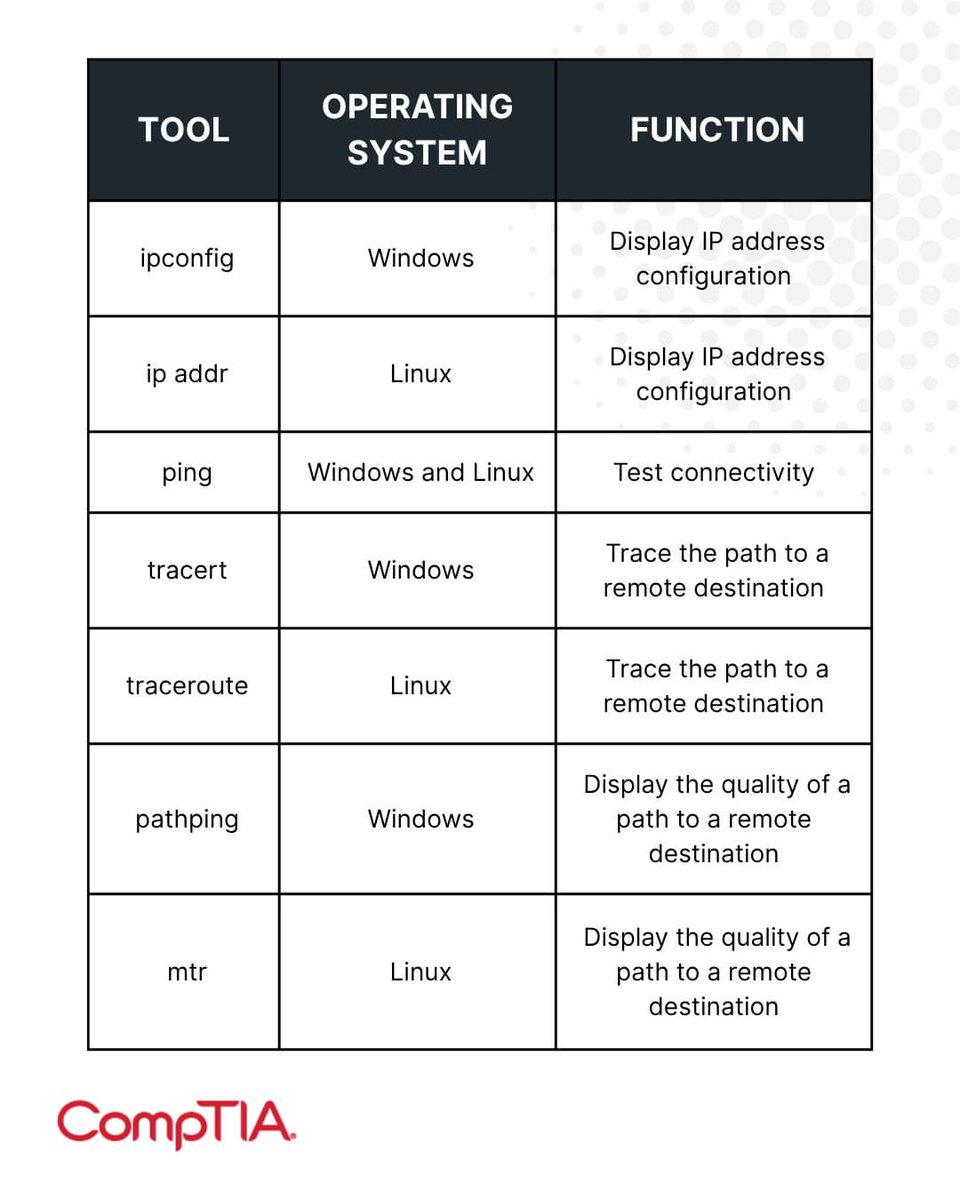
🌐 7 Linux Commands to Check Network Connectivity 🐧🔍
#LinuxNetworking #NetworkTools #CyberSecurity #SysAdmin #LinuxTips #EthicalHacking #InfoSec #Ping #Traceroute #TerminalTools #ConnectivityCheck #EducationOnly
1
2
246

7 May 2025
🚨 New Writeup Alert! 🚨
"A Penetration Tester’s Journey" by Yamini Yadav is now live on IW!
Check it out here: infosecwriteups.com/ad6f5291…
#cybersecurity #linuxnetworking #linuxcommands #linuxtutorial #netowrking
3
6
824
17 Apr 2025
How to Measure and Monitor Network Latency in Linux Using ping, mtr, and smokeping #network #ping #mtr #smokeping #linux #linuxnetworking #troubleshooting #commandline
ostechnix.com/monitor-networ…
1
2
50

11 Mar 2025
4/20 Q: How can you check which process is using a specific port in Linux?
A: The 'netstat' or 'ss' command can display a list of network connections, including the processes associated with specific ports. #LinuxNetworking #SysAdmin
1
1
238
1 Mar 2025
How To Check And Secure Open Ports In Linux #Linuxnetworking #Linuxsecurity #Linuxadmin #Linuxhowto #Linux #netstat #ss #firewalld #iptables #nmap #lsof
ostechnix.com/check-and-secu…
4
62
6 Dec 2024
These commands are essentials for troubleshooting & managing networks! 🚀
👉 Which command do you use the most?
💡 Save this thread for your next troubleshooting session!
#LinuxNetworking #DevOps #SysAdmin
1
4
827
6 Dec 2024
8/ nslookup & dig
Query DNS records.
nslookup google[dot]com # Quick lookup
dig google[dot]com short # Concise DNS info
Diagnose DNS issues like a pro!
#LinuxNetworking
1
1
5
746
6 Dec 2024
5/ netstat (Replaced by ss):
View network connections.
netstat -tuln # Active listening ports
Switch to ss:
ss -tuln
#LinuxNetworking
1
1
10
895
6 Dec 2024
1/ ifconfig (Deprecated: Use ip):
Check & configure network interfaces.
ifconfig eth0 up # Enable interface
ifconfig eth0 down # Disable interface
Use ip instead:
ip addr show eth0
ip link set eth0 up
#LinuxNetworking #SysAdmin
1
1
10
1,154
23 Aug 2024
How To Check WiFi Signal Strength From Commandline In Linux #Linux #Linuxnetworking #Wifi #Wireless ostechnix.com/check-wifi-sig…
2
23
6 Jun 2024
How To Kill A Process Running On A Specific Port In Linux #Linux #Linuxcommands #Linuxhowto #Linuxnetworking #Troubleshooting #Commandline ostechnix.com/kill-a-process…
1
2
35

7 May 2024
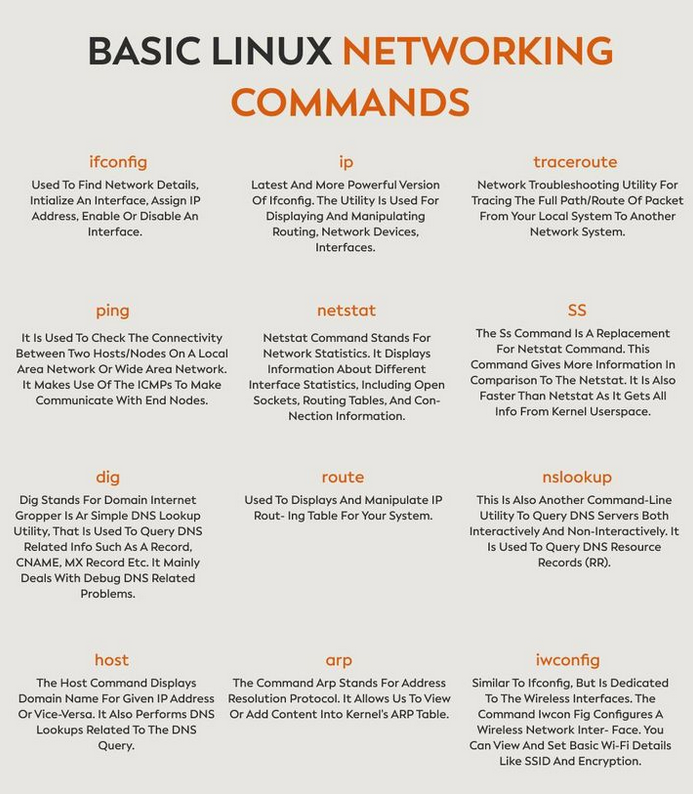
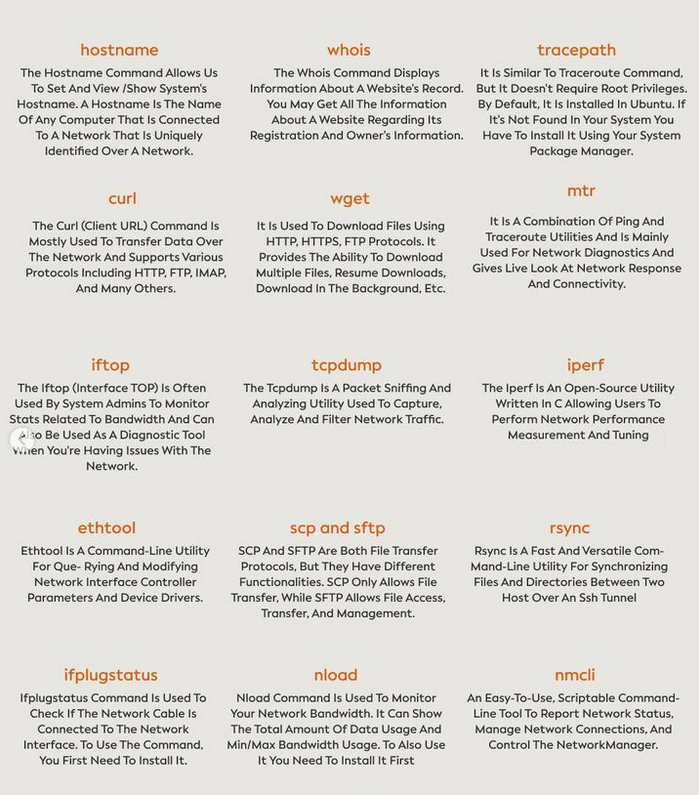
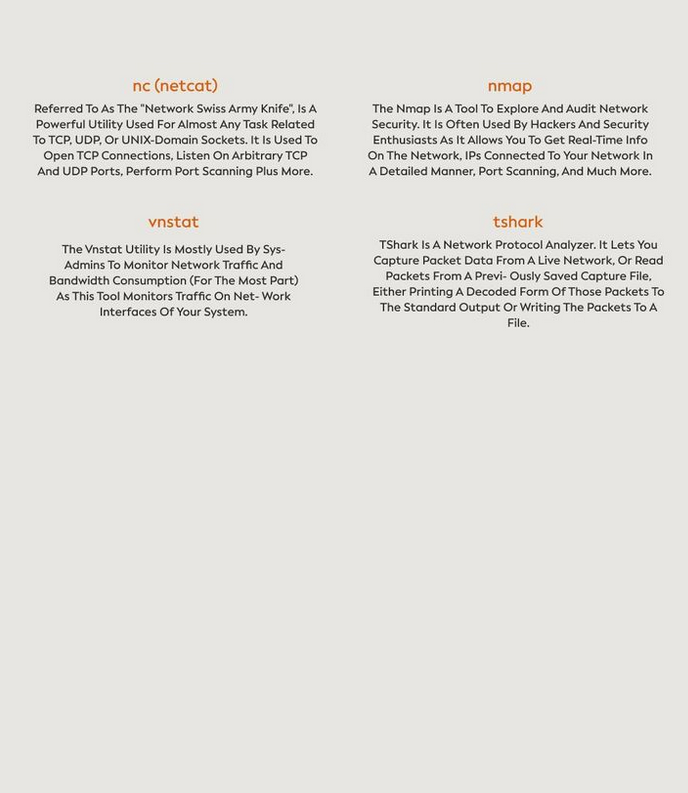
Basic Linux networking commands morioh.com/a/f923048f7894/to…
#linux #unix #linuxnetworking #commands #python #programming #developer #programmer #coding #coder #computerscience #webdev #webdeveloper #webdevelopment #pythonprogramming #ai #ml #machinelearning #datascience
14
84
4,671