
📝 ListTile
Widget جاهزة لإنشاء عنصر قائمة بشكل مرتب يحتوي على عنوان وأيقونة ووصف بسهولة.
🎯 Icon
لعرض الأيقونات داخل التطبيق واستخدامها لتحسين تجربة المستخدم.
👆 IconButton
لإنشاء أيقونات قابلة للضغط وتنفيذ أوامر عند التفاعل معها.
1
12

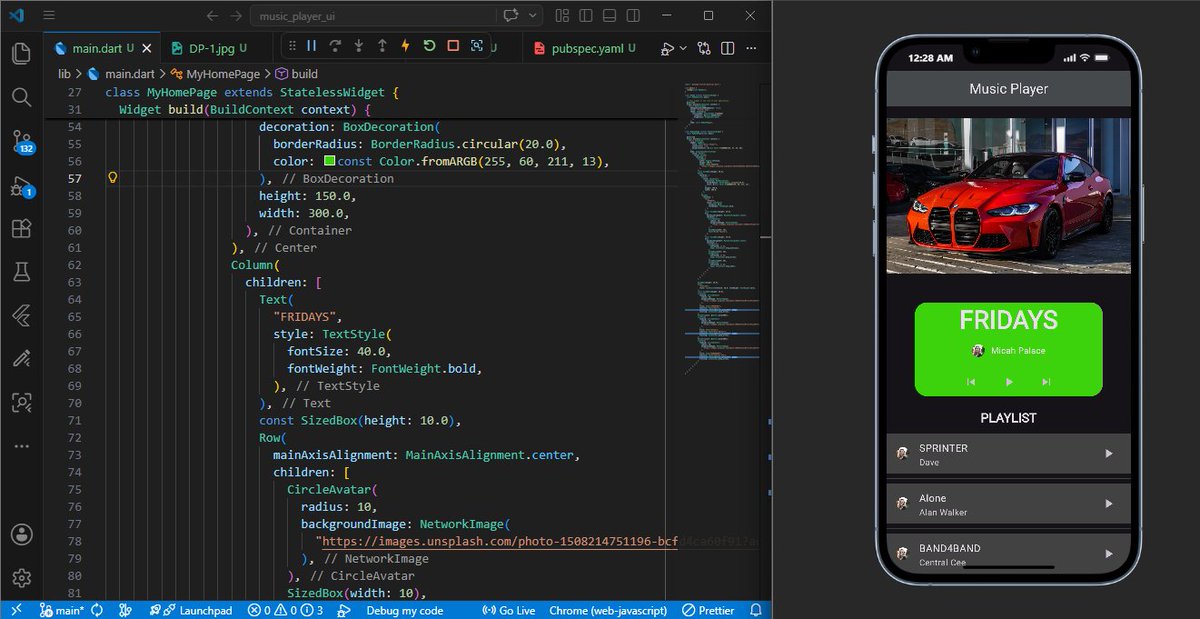
Day 8 of my Flutter/Dart journey 🚀
Practiced:
• Stack
• ListTile
• Padding & Spacing
• IconButton
• Scaffold
• Layout composition
Starting to understand how Flutter UIs are structured through nested widgets.
Day 9 loading 🔥
#buildinpublic #flutterdev #flutter
1
1
2
50

Mar 23
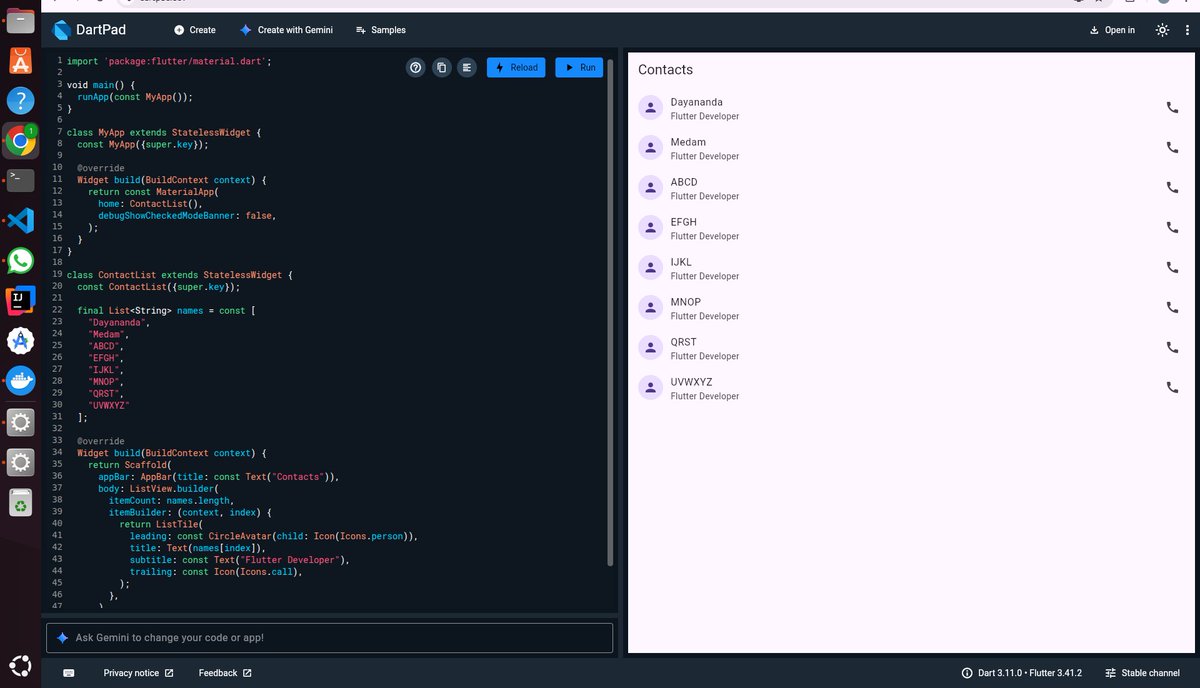
Flutter Learning Journey – Day 12
Today I learned how to build dynamic lists using ListView and ListView.builder.
Also explored ListTile to design clean and structured list items.
Now I can create scrollable UI like real apps.
#Flutter #BuildInPublic #AppDevelopment
1
1
7
87

17 Dec 2025
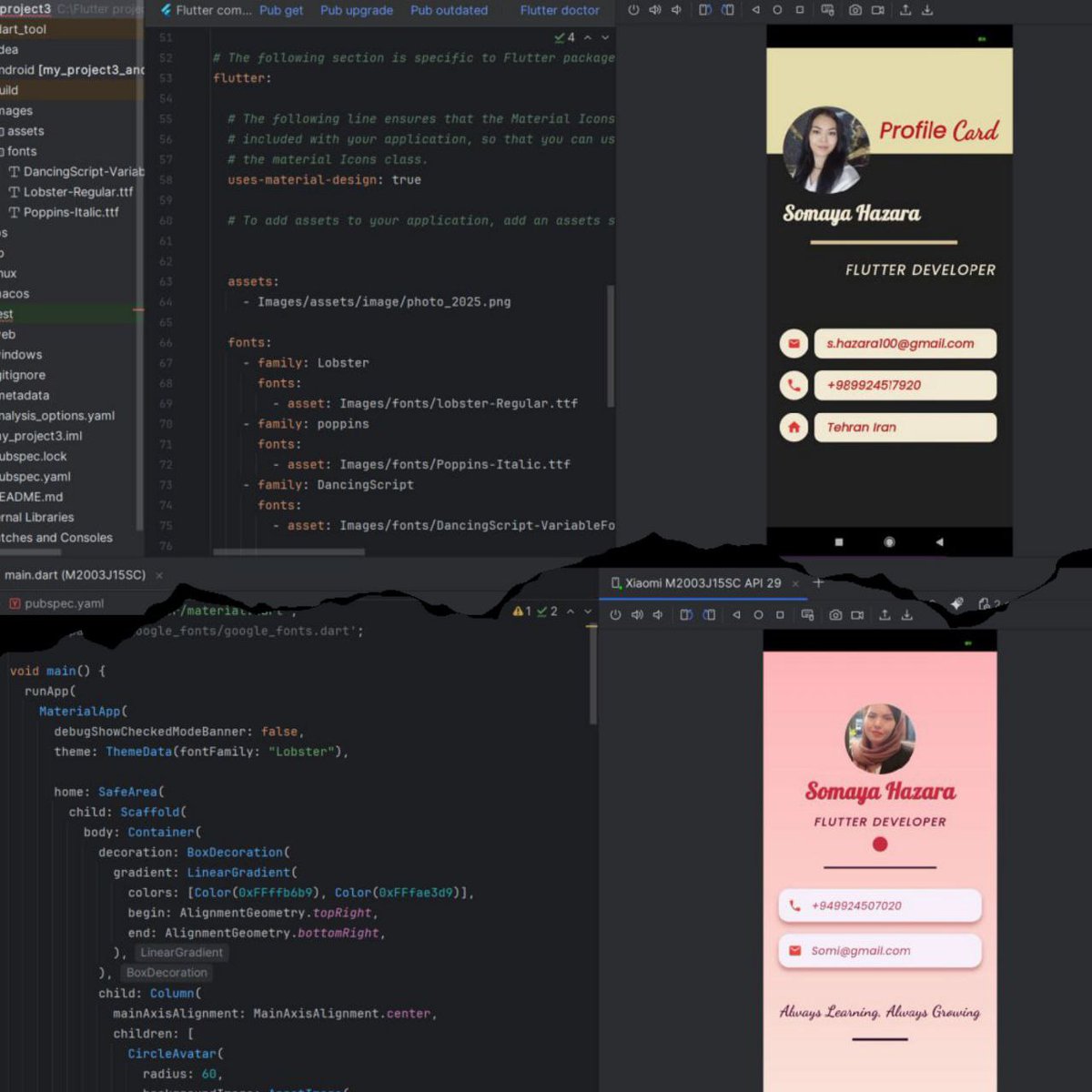
Two mini projects built with Circle Avatar, Card and ListTile. @f_forough @mansouri_a17984 @CodeToInspire
2
1
22
2,018

6 Dec 2025
My second project and, as usual, tested everything on a real emulator for accurate performance.✨
#circle #avatar #container #card #listTile #GoogleFonts #Elevation #divider #borderRadius
1
1
10
136

29 Nov 2025
last version of my profile project 😊
using Cards, colors, ListTile,elevation, shape . . .
Thank you My dears 🙏{
@CodeToInspire
@f_forough
@mansouri_a17984
@E_Ehrari
@aliasharif9989
}
2
15
68

27 Nov 2025
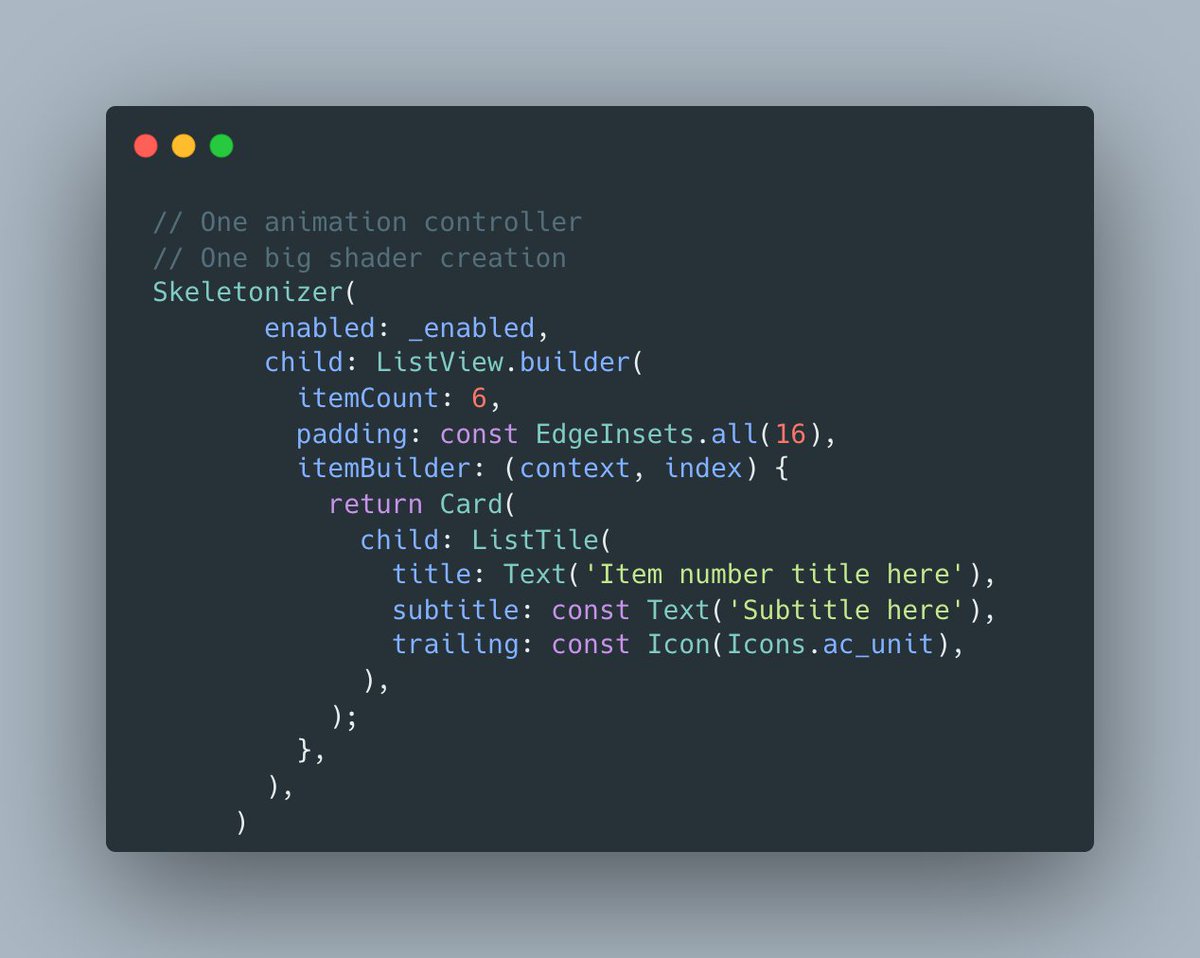
Tech perks of Skeletonizer vs Shimmer:
1- it auto-detects container widgets like cards, so they aren’t fully shaded. With Shimmer, each ListTile needs its own animation controller and shader layer. (1/?)
3
9
332

26 Nov 2025
My profile project
@CodeToInspire
@f_forough
@mansouri_a17984
#profile #project #circle #avatar #container #card #listTile #Google #fonts #Elevation #divider #borderRadius
3
4
19
345

25 Nov 2025
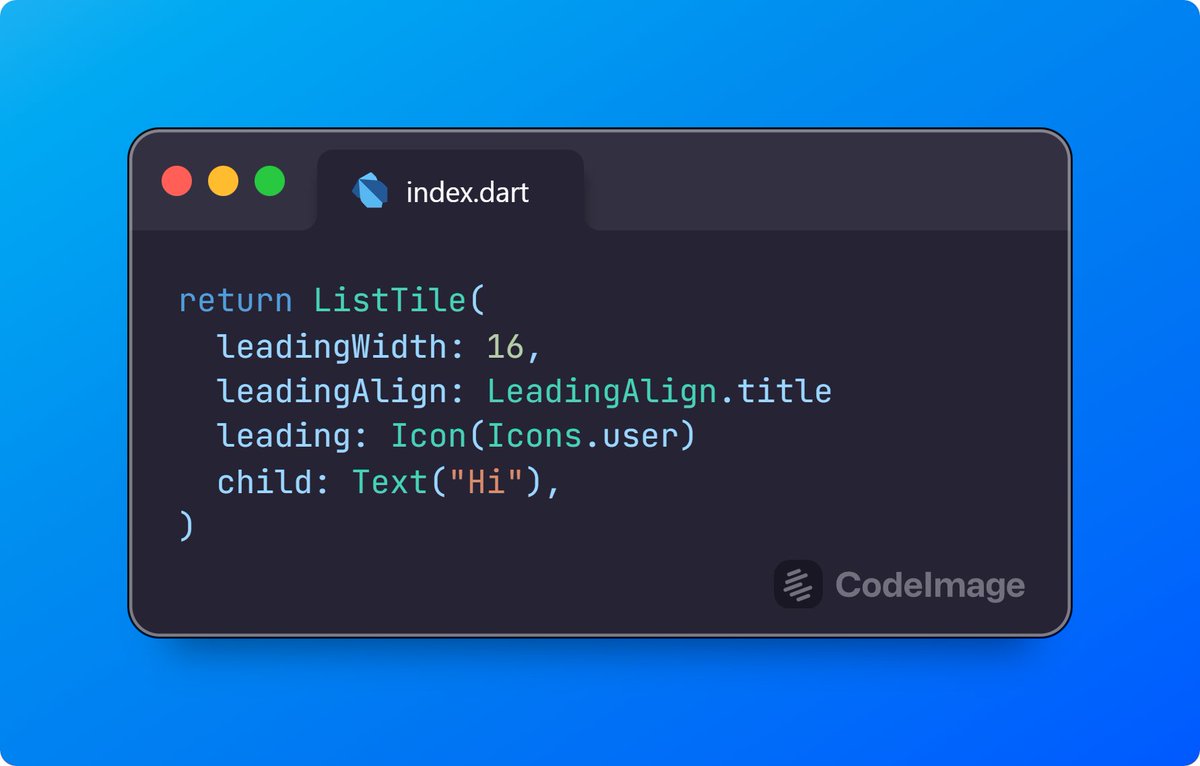
The BoxStyle is so powerful, you can require widgets be of a certain type.
For instance, currently `ListTile` takes a `Widget` as the leading.
1
2
72

24 Nov 2025
Excited to share the updated version of my Flutter profile app!
-Added a Divider for separation
- Redesigned contact info with Card ListTile
-Enhanced shadows, spacing, and layout for a cleaner look
@mansouri_a17984, @f_forough, @CodeToInspire
10
46

23 Nov 2025
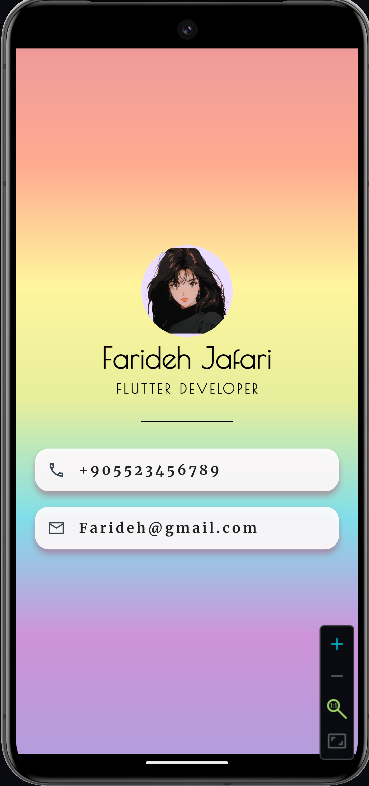
Excited to share my latest Flutter profile project!
I used CircleAvatar for the profile picture, ListTile for layout items, and Google Fonts to style the text.
Big thanks to @mansouri_a17984 , @f_forough ,
@CodeToInspire ❤️
#CodeToInspire #AfghanGirlsCode #Flutter #MobileDev
10
108

11 Nov 2025
ومن أهم مزايا الـ ListTile اللي تعلمناها أمس هي :
. onTap الـ
وباختصار، الـ onTap تُستخدم لتنفيذ أمر معين عند الضغط على العنصر 👍🏼.
10 Nov 2025

اليوم 104 من رحلتي في تعلم البرمجه:
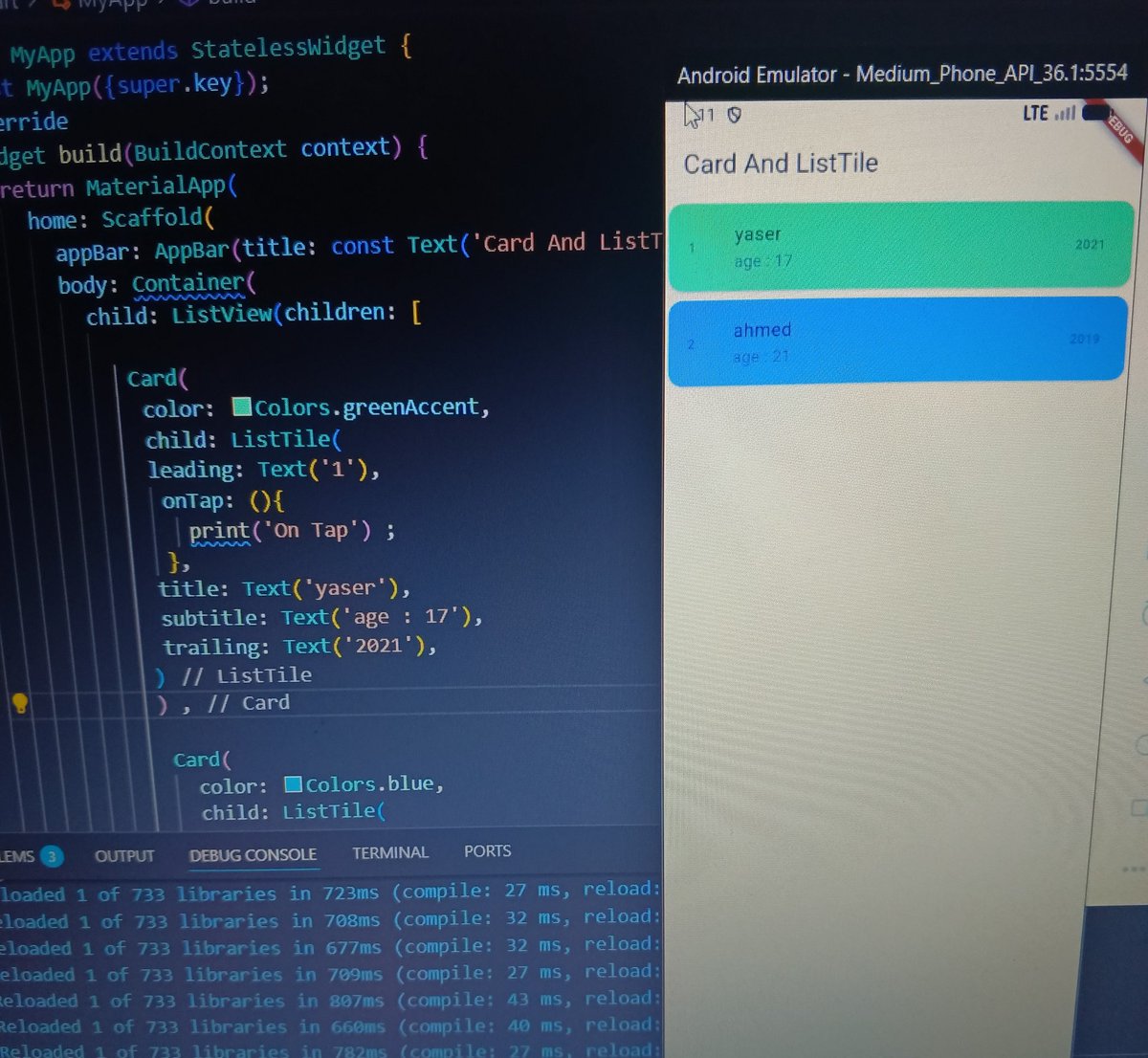
تعرفنا على الـ Card والـ ListTile.
الـ Card تشبه الـ Container لكنها تعطي تصميم جاهز يشبه البطاقة.
أما الـ ListTile فهي عنصر جاهز يعرض عنوان ونص وأيقونة بتنسيق بسيط ومنظم.
ومن أهم خواصها: title و subtitle و trailing.
تطبيق عملي للأفكار👇🏼.
1
13
1,103
10 Nov 2025
اليوم 104 من رحلتي في تعلم البرمجه:
تعرفنا على الـ Card والـ ListTile.
الـ Card تشبه الـ Container لكنها تعطي تصميم جاهز يشبه البطاقة.
أما الـ ListTile فهي عنصر جاهز يعرض عنوان ونص وأيقونة بتنسيق بسيط ومنظم.
ومن أهم خواصها: title و subtitle و trailing.
تطبيق عملي للأفكار👇🏼.
5
2
48
3,946

4 Nov 2025
Coding with Flutter keeps getting better by the day!
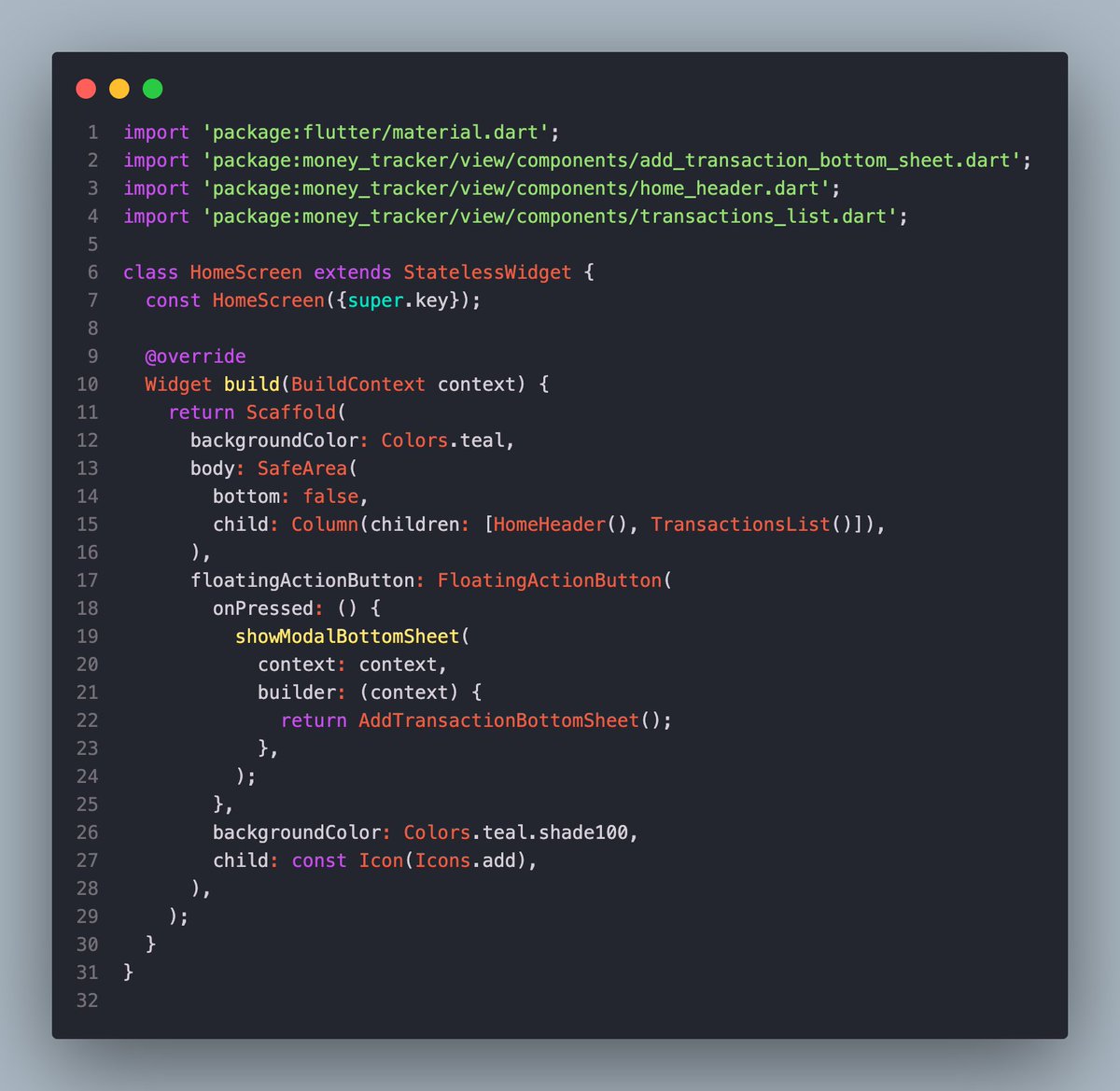
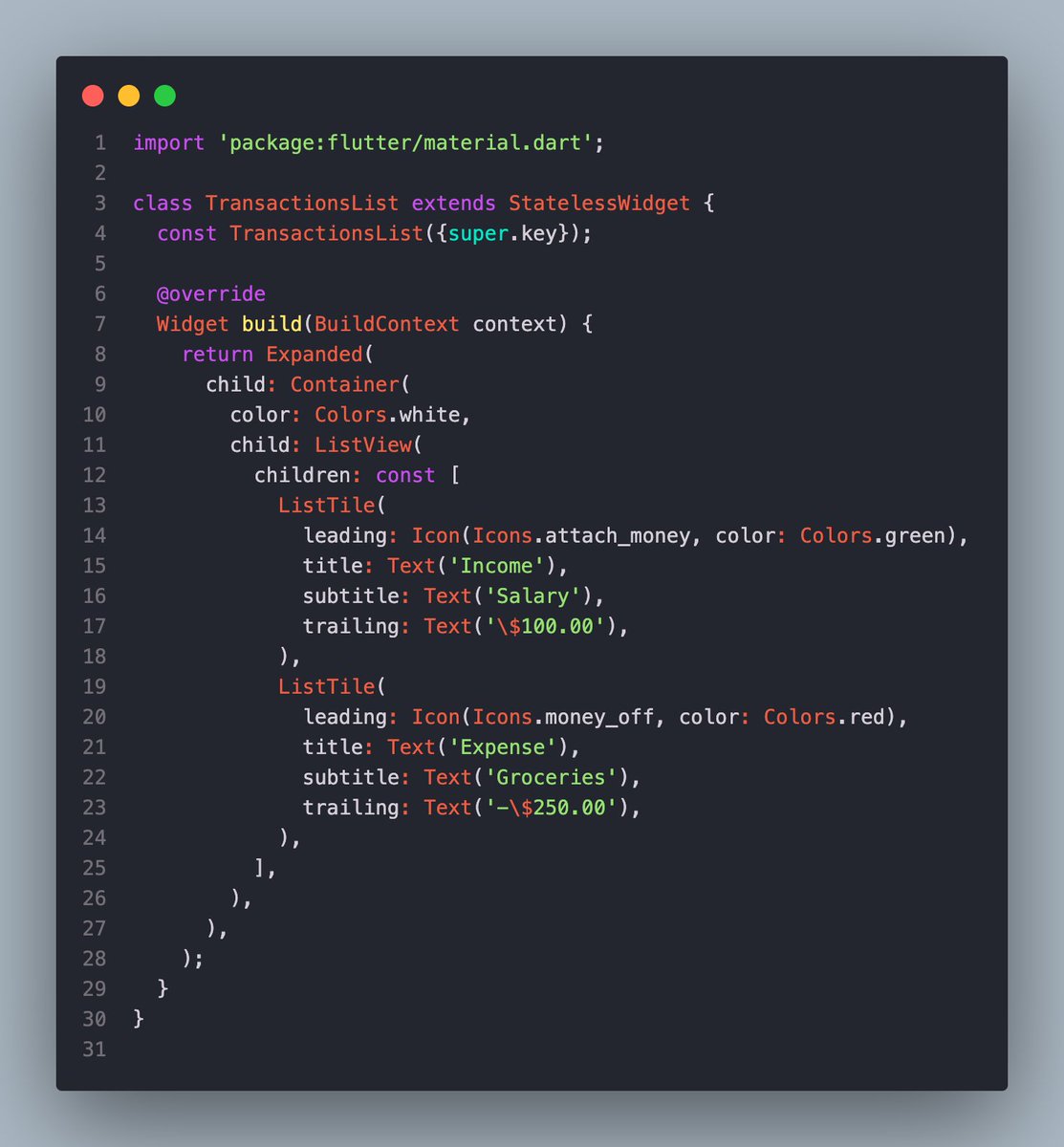
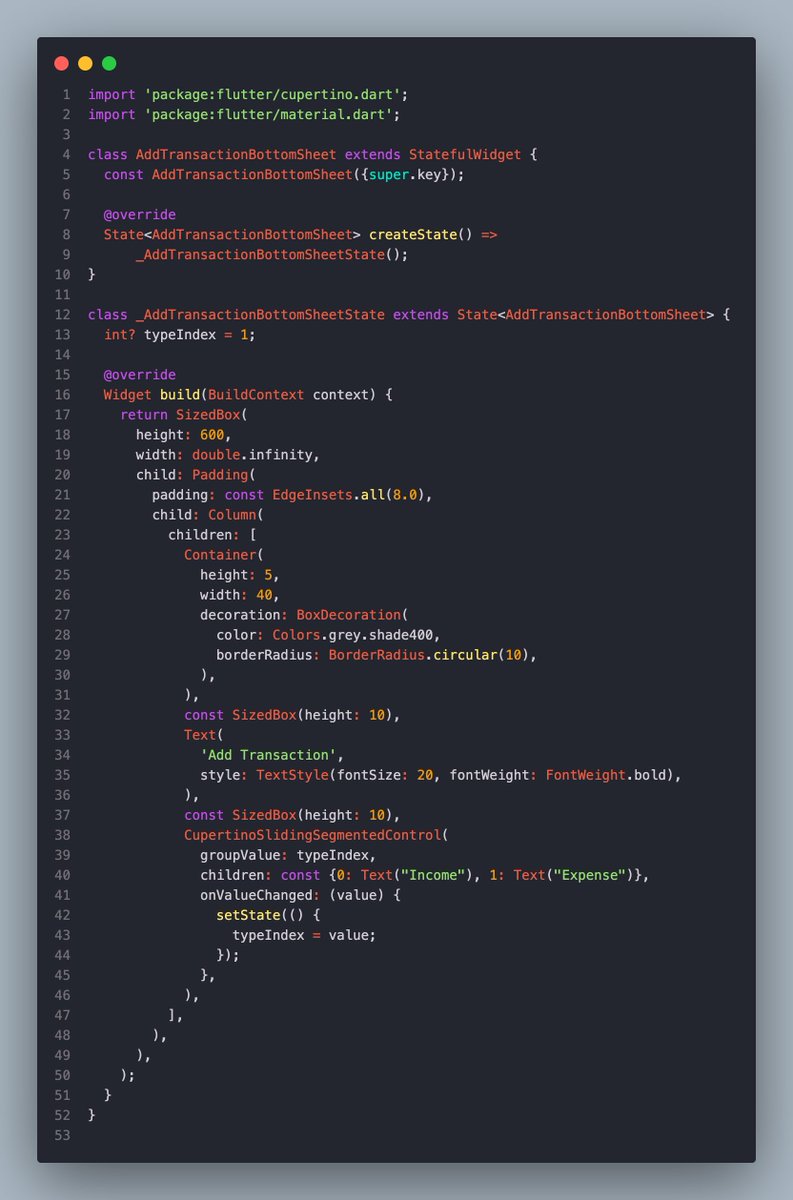
Today I learned about the ListTile widget, showModalBottomSheet (essentially a drawer) that will be used for the transaction form, and CupertinoSlidingSegmentedControl for selecting the type of transaction.
Coded less today but satisfied with the progress!
3
2
98

30 Sep 2025
Sounds reasonable!
Using widgets definitely sounds like what I would do when building a public system. In our case we technically had correctly styled material for things like ListTile but still the flexibility created inconsistencies so we wanted to avoid this from the get go
2
50

30 Jun 2025
I love the idea of decoupling our apps from Material, but it’s not really possible.
I see that you’ve mentioned in the article reimplementing simple widgets like ListTile, but the problem starts when you have to add something more complex like a TextField - you usually don’t want to reimplement it with EditableText because you would miss 90% of the features, but if you want to keep using the Material one, and since you opted-out from using MaterialApp, you now have to manually include stuff like Material/Cupertino localizations, Theme, CupertinoTheme, Material, override styles for each of them manually, etc.
So while I agree that going with WidgetsApp sounds good, in real app it may be harder than it seems
2
1
9
910

5 Jun 2025
Flutter in 2 min
🔹 Flutter Basics
➡ Flutter is Google’s UI toolkit for building natively compiled apps for mobile, web, and desktop from a single codebase
➡ Uses Dart programming language
➡ Everything in Flutter is a widget
➡ Fast development with hot reload and a rich set of customizable widgets
🔹 Dart Language Essentials
➡ Object-oriented, class-based language
➡ Supports null safety (? for nullable types)
➡ Main function starts execution: void main() => runApp(MyApp());
➡ Strong typing with optional dynamic typing
🔹 Flutter Project Structure
➡ main.dart — entry point
➡ lib/ — core app code
➡ pubspec.yaml — manages dependencies and assets
➡ android/, ios/ — platform-specific configurations
🔹 Widgets
➡ Everything is a widget (layout, styling, controls)
➡ Two types:
➡ StatelessWidget — static UI
➡ StatefulWidget — dynamic UI
➡ Common widgets:
➡ Text, Container, Row, Column, Stack, ListView, Scaffold, AppBar
🔹 Layouts
➡ Use Row for horizontal layout
➡ Use Column for vertical layout
➡ Use Expanded and Flexible for responsive designs
➡ Container allows padding, margin, border, color, and alignment
➡ SizedBox for spacing and fixed size elements
🔹 State Management
➡ Local State: setState(() {}) for simple updates
➡ Global State:
➡ Provider — lightweight and simple
➡ Riverpod — improved Provider
➡ Bloc — for complex apps
➡ GetX — minimal boilerplate
➡ Use StatefulWidget when state needs to change dynamically
🔹 Navigation
➡ Navigator.push() and Navigator.pop() for screen navigation
➡ Use MaterialPageRoute for transitions
➡ Named routes defined in MaterialApp(routes: {...})
➡ onGenerateRoute for dynamic routing
🔹 Forms & Input
➡ TextField and TextFormField for user input
➡ Form widget to group and validate inputs
➡ Use GlobalKey<FormState> for validation
➡ Controllers manage text input (TextEditingController)
🔹 Buttons
➡ ElevatedButton, TextButton, OutlinedButton
➡ Attach logic with onPressed:
➡ Customize style using style: ButtonStyle(...)
🔹 Lists & Grids
➡ ListView for scrolling lists
➡ ListView.builder() for dynamic lists
➡ GridView.count() or GridView.builder() for grids
➡ ListTile simplifies list item design
🔹 Styling & Themes
➡ Use ThemeData in MaterialApp for global styling
➡ Colors: Colors.red, Colors.blue[100], Color(0xFF...)
➡ Fonts, elevation, padding, borders via BoxDecoration and widget properties
🔹 Images & Assets
➡ Declare in pubspec.yaml
➡ Load images using Image.asset('assets/image.png')
➡ Image.network() for web images
🔹 Animations
➡ Implicit: AnimatedContainer, AnimatedOpacity
➡ Explicit: AnimationController, Tween, AnimationBuilder
➡ Use Hero for screen transition animations
🔹 Networking
➡ Use http package for API calls
➡ Async/await to handle network responses
➡ JSON parsing with dart:convert
➡ Best practices include error handling and loading indicators
🔹 Packages
➡ Add dependencies in pubspec.yaml
➡ Run flutter pub get to install
➡ Use packages like http, shared_preferences, provider, path_provider
🔹 Persistence
➡ Shared Preferences for simple key-value storage
➡ SQLite with sqflite package for structured data
➡ File storage via path_provider dart:io
🔹 Platform-Specific Features
➡ Use MethodChannel to call native code (Kotlin/Swift)
➡ Conditional imports for platform targeting
➡ Access sensors, camera, geolocation via plugins
🔹 Testing
➡ Unit tests: test logic functions
➡ Widget tests: verify widget rendering
➡ Integration tests: full app behavior
➡ Use flutter_test and integration_test packages
🔹 Deployment
➡ Build APK: flutter build apk
➡ Build for iOS: flutter build ios
➡ Publish to Play Store or App Store with proper configuration
➡ For web: flutter build web
📘 For a complete Flutter ebook with real-world examples, full widget breakdowns, and project tutorials, grab it here:
➡ codewithdhanian.gumroad.com/…
2
9
91
3,874

1 Apr 2025
If you're looking for sample code to implement the Flutter TypeAhead widget, here's a basic example to get you started:
import 'package:flutter/material.dart';
import 'package:flutter_typeahead/flutter_typeahead.dart';
void main() {
runApp(MyApp());
}
class MyApp extends StatelessWidget {
@override
Widget build(BuildContext context) {
return MaterialApp(
home: Scaffold(
appBar: AppBar(title: Text('Flutter TypeAhead Example')),
body: Padding(
padding: const EdgeInsets.all(16.0),
child: TypeAheadField(
textFieldConfiguration: TextFieldConfiguration(
decoration: InputDecoration(
labelText: 'Search',
border: OutlineInputBorder(),
),
),
suggestionsCallback: (pattern) async {
// Replace this with your data source logic
return ['Apple', 'Banana', 'Cherry', 'Date', 'Elderberry']
.where((item) => item.toLowerCase().contains(pattern.toLowerCase()));
},
itemBuilder: (context, suggestion) {
return ListTile(
title: Text(suggestion),
);
},
onSuggestionSelected: (suggestion) {
print('Selected: $suggestion');
},
),
),
),
);
}
}
This example uses the flutter_typeahead package to display suggestions as the user types. You can customize the suggestionsCallback to fetch data from an API or any other source. For more advanced features, check out the documentation on Pub.dev.
51
1 Apr 2025
To implement automatic word suggestions in Flutter for Android, you can use the flutter_typeahead package. Here's a quick guide:
1. Install the Package: Add flutter_typeahead to your pubspec.yaml file and run flutter pub get.
2. Set Up the Widget: Use the TypeAheadFormField or TypeAheadField widget in your app. Provide a list of suggestions through a callback function like suggestionsCallback, which filters suggestions based on user input.
3. Customize the UI: Use the itemBuilder parameter to define how each suggestion appears and the onSuggestionSelected callback to handle user selection.
For example:
TypeAheadField(
textFieldConfiguration: TextFieldConfiguration(
decoration: InputDecoration(labelText: 'Search'),
),
suggestionsCallback: (pattern) {
return mySuggestionsList.where((item) =>
item.toLowerCase().contains(pattern.toLowerCase()));
},
itemBuilder: (context, suggestion) {
return ListTile(title: Text(suggestion));
},
onSuggestionSelected: (suggestion) {
print('Selected: $suggestion');
},
);
This approach is flexible and works well for adding autocomplete functionality in Flutter apps. Let me know if you need help with specific parts of the implementation!
1
178

Used this package in one of my projects to switch between a ListTile type and a Grid form
19 Mar 2025

Anyone help me make a great demo of my animated_to package? All I can do is just move balls and cubes, but animated_to doesn't care what widget to move! I want to demonstrate that nicely. pub.dev/packages/animated_to #FlutterDev
2
9
796