
25 Oct 2024
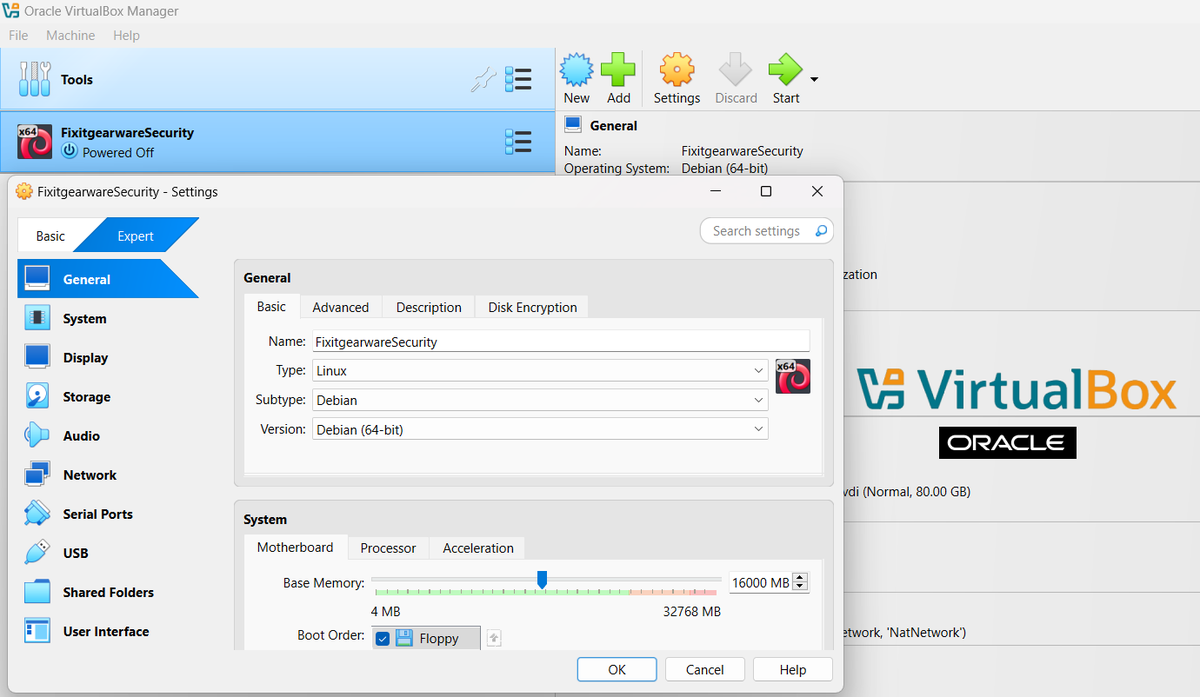
VirtualBox in its new update has integrated a new cool UI (User Interface) features giving you the user of this instance the flexibility to "search" any information you probably find difficult to locate, when looking for some cool settings.
In addition to this new update, users can switch between Basic (lesser information displayed), to Expert (broader information displayed) mode, to access information on various settings.
Catch us on this week's "Tools Friday Series" as we are going to walk you through the following:
1. Show you the legitimate link in downloading the necessary files (e.g. VirtualBox appliance, Extension-pack etc).
2. Show you a simple explanation of importing your (*.OVF) file ( This is not difficult so we wouldn't demonstrate this).
3. Show an already kali-OS-installation imported from an obsolete version of the VirtualBox Appliance, which has been uninstalled.
4. The imported Kali-OS-installation will still have all your tools, files and folders, browser and histories.
5. Troubleshooting login issues, gnome issues and turning your third-party applications (non-kali official tools) back to Executables.
6. Running your new kali-update and upgrade in the new VirtualBox Appliance without the need to experience "dpkg-errors" again.
All these you will do, without the need in doing the following:
1. Install a new kali-Os after installing the new version of the VirtualBox.
2. The need to backup your files in your Kali OS running on the older version of the VirtualBox Appliance.
3. The need to take snapshots of your virtualbox and restoring it into a new Kali-Os installation.
4. Without the need to install guest addition from official Oracle website, and worried if it will be compatible with your Kali-Os running on the new VirtualBox Installation.
5. Without experiencing any Glitch or problems with your Kali-OS, after the entire installation, and troubleshooting is completed.
This week’s Episode is one you do not want to miss out.
#VirtualBox #Virtualization #VMwareAlternative #VirtualMachine #LinuxOnVirtualBox #WindowsOnVirtualBox #OpenSourceSoftware #CrossPlatformSupport #VirtualBoxTips #VirtualizationSoftware #VirtualBoxTutorial #OSVirtualization
2
110

15 Oct 2019
Learn Operating Systems with Virtualization in Bangalore. Get trained with the industry experts at #TheFinalSEM. Register Today!
For more info visit buff.ly/2QbMa0G
#OSvirtualization #Operatingsystems #linux #microsoft #software #OSwithVirtualization.
1
1

.@ArubaNetworks is sponsoring #DasherUTF18 on March 8 in #SanJose. Come chat about #OSvirtualization & #infosec bit.ly/2mshYxk

2

5 Apr 2016
Docker and Containers (Part 2) - Understanding Docker bit.ly/1qnuGgx #amazonwebservices #Containers #docker #osvirtualization
1

1
2