
30 Jul 2025
One is optimized. The other is... Windows. 😅
#RAMManagement #LinuxGang #WindowsStruggles #Windows11 #Linux

1
3
318

Maximize Your PC's Performance: How to Limit Microsoft Edge's RAM Usage
Microsoft Edge introduces a feature that allows users to set limits on the browser's RAM usage, optimizing system performance during resource-intensive activities like gaming.
By Rodger Mansfield, Technology Editor
March 1, 2025
onecooltip.com/2023/03/why-a…
Is your web browsing slowing down your gaming sessions?
Here's a Cool Tip: Set RAM usage in Microsoft Edge.
Microsoft Edge now offers a solution to control its memory consumption, ensuring a smoother experience across all your applications.
In today's multitasking world, it's common to have multiple applications running simultaneously—from web browsers and design software to immersive PC games.
However, browsers like Microsoft Edge can consume significant memory, potentially impacting the performance of other applications.
Recognizing this challenge, Microsoft has introduced a feature in Edge that empowers users to manage and limit the browser's RAM usage.
This feature is particularly beneficial during high-resource activities, such as gaming, where it's crucial to allocate system memory efficiently.
Users can set specific memory caps for Edge, starting from as low as 1 GB, adjustable in 1 GB increments.
This customization ensures that the browser doesn't overshadow other critical applications.
Here's how to do it.
1. Ensure you're running the latest version of Microsoft Edge.
2. Click on the three dots (...) in the upper-right corner.
3. Navigate to Help and feedback > About Microsoft Edge.
4. The browser automatically checks for updates and prompts a restart if needed.
Set How Much RAM Edge Can Use
1. Click on the three dots (...) again.
2. Select "Settings".
3. Go to "System and performance".
4. In the "Manage your performance" section, toggle on the "Resource controls" option.
5. Select "Always" to enforce the limit at all times.
6. Select "When you're PC gaming" to apply the limit only during gaming sessions.
7. Set the desired RAM limit using the slider.
By capping Edge's RAM usage, more memory is available for other applications, reducing potential slowdowns.
But setting the RAM limit too low may lead to increased page reloads, more frequent tab sleeping, or slower browser responsiveness.
It's essential to find a balance that suits your usage patterns.
Managing system resources effectively is crucial in today's multitasking environments.
Microsoft Edge's Resource Controls offer a practical solution to balance browser performance with other demanding applications.
Have you tried adjusting Edge's RAM settings?
Share your experiences in the comments below!
For more insightful tips and the latest tech updates, subscribe to our newsletter and follow us on social media.
Don't forget to share this article with friends who might benefit from optimizing their browser performance.
Please LIKE and SHARE OneCoolTip.com!
Subscribe to the FREE OneCoolTip Newsletter.
Visit the OneCoolTip YouTube Channel: youtube.com/@onecooltip
X: x.com/OneCoolTip Threads: threads.net/@onecooltip
Do you have a Cool Tip or question? Email us at onecooltip.com@gmail.com
Rodger Mansfield, a seasoned tech expert, is the mastermind behind OneCoolTip.com where he serves as both writer and editor. With a keen eye for simplifying complex tech, Rodger delivers practical advice that empowers readers to navigate the digital world with confidence. Dive into OneCoolTip.com for a treasure trove of savvy tips and tricks that keep you one step ahead in tech.
One Cool Tip
onecooltip.com
Cool Tech Tips for a Cooler Life!
#MicrosoftEdge @MicrosoftEdge #BrowserPerformance #RAMManagement #OptimizeYourPC #GamingPerformance
#TechTips #TechGuide #OneCoolTip @OneCoolTip
Copyright © 2008- 2025 | OneCoolTip.com | All Rights Reserved
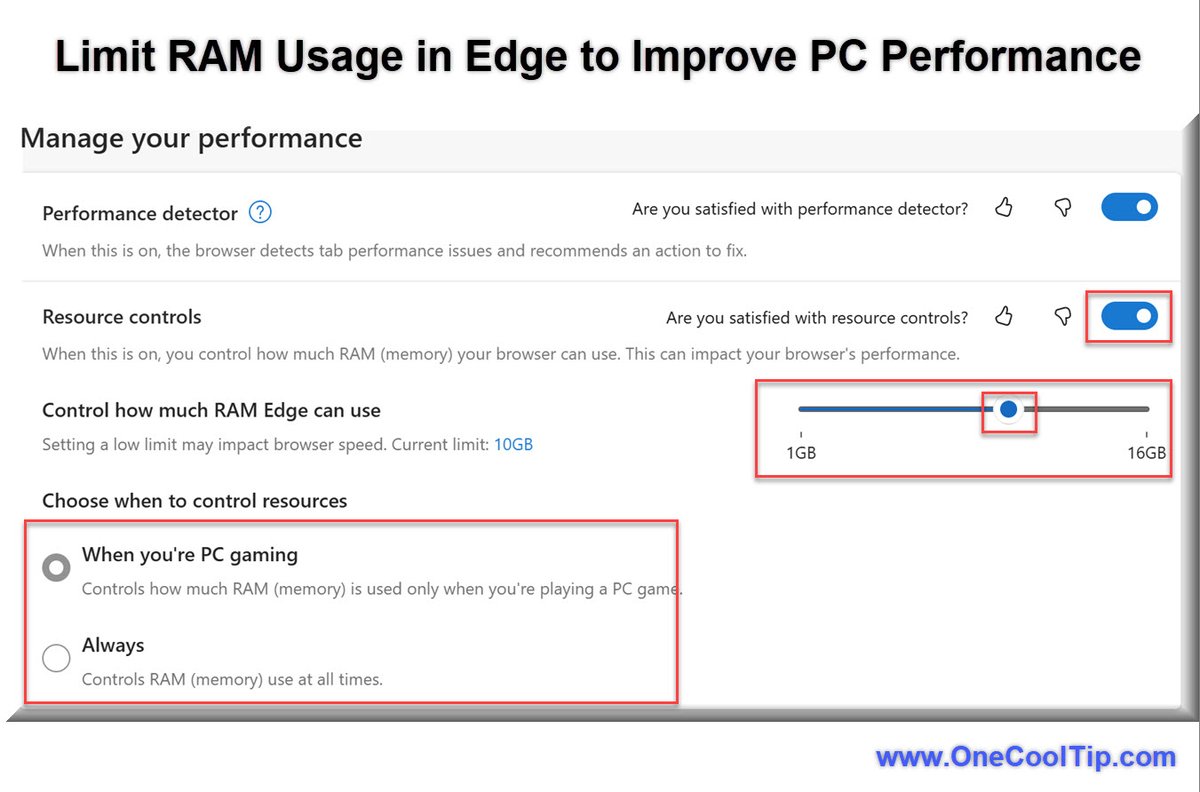
ALT Limit RAM Usage in Microsoft Edge
2
2
53

26 Nov 2024
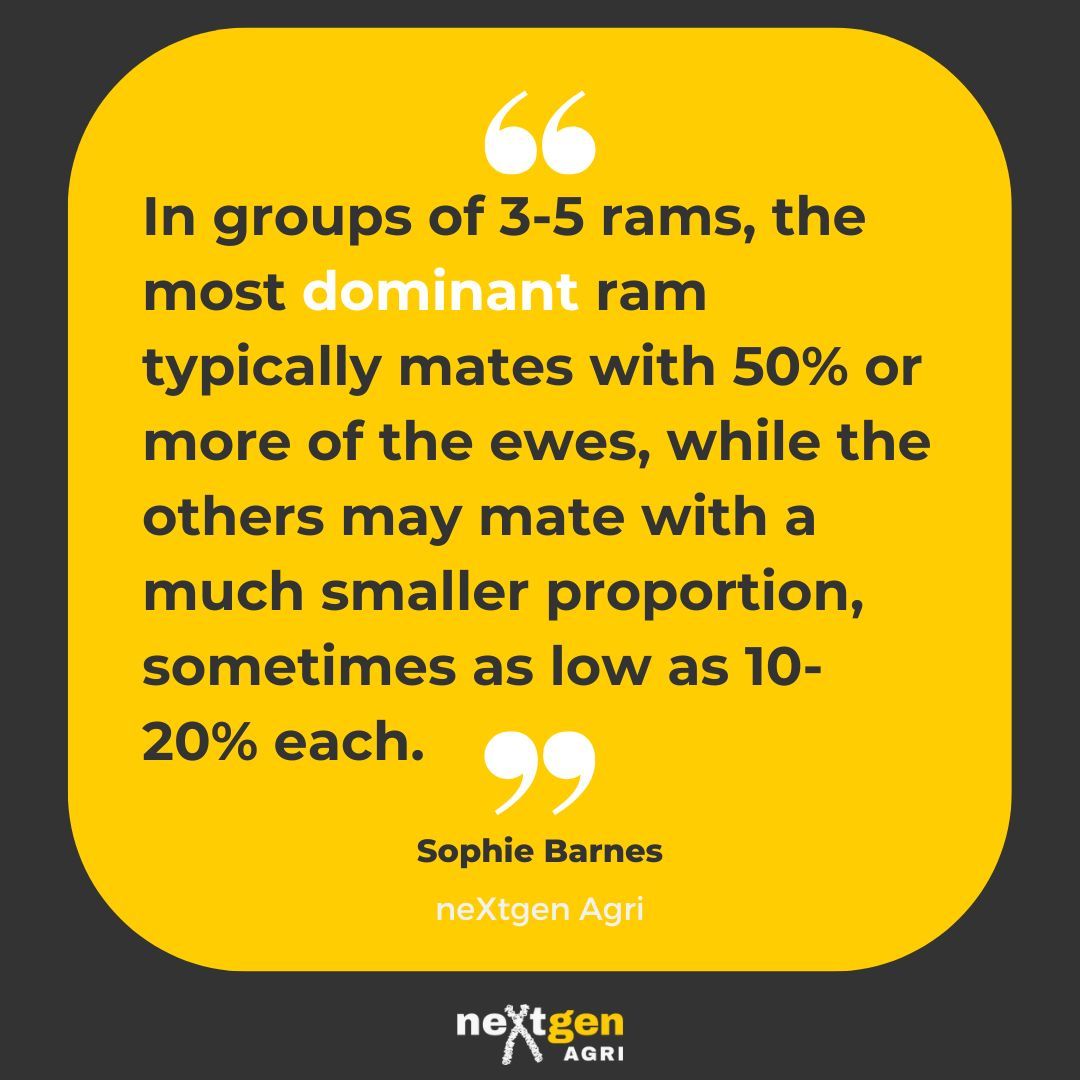
Did you catch last week's article on optimising ram performance? Too many rams might hurt more than help. Discover how the right ewe-to-ram ratio and pre-mating care can boost your mating results. Check it out now! buff.ly/3ZnPBmN #SheepFarming #RamManagement
1
4
490

4 Nov 2019
Ever wondered why your #Android phone is aggressively killing your active apps?
#RAM #MemoryManagement #Memory #RAMManagement #AndroidPhones
bit.ly/AndroidMemoryManageme…
1

23 Oct 2019
Vidisha youth Conclave 2019
Vidisha (land of Chandrgupt and #samratashok )
It’s a mesmerising experience for me ...#loved
#Rammanagement
#bhopal
#Vidisha
#madhyapradesh instagram.com/p/B38nBP_g7V9/…
3

11 Dec 2018
.Whether it's 6GB, 8GB or 10GB Just goes to show poor #RAMmanagement on @Android OS part --> versus @Apple #iOS which can run smoothly and stably with just 3GB of RAM!
@SnazzyQ @AndroidAuth @GaryExplains @SamsungMobileUS @MotorolaUS @LGUSAMobile @HTC @AsusUSA @Oppo @Vivo_Phil
2
2

2 Dec 2017
Oneplus 5T Gaming Review & Rammanagement test ll in telugu ll: youtu.be/IM_SRnkA9wA?a via @YouTube
2
3
76

6 Oct 2016
OnePlus responds to criticism surrounding RAM management on the OnePlus 3 klou.tt/14g2ufw49lqgi #OnePlus #OnePlus3 #RAMmanagement #CarlPei

30 Aug 2016
#Note7 #RamManagement ok you guys, I'm getting 13 apps open on tmobile Note 7 without issue. No memory issues here... You?
14
1
45

28 Jun 2016
Program #SenandungIslami
#Puasa 24 #Ramadhan 1437H
Putar @yolandaregina92 ~ Sepertiga Malam
Cc: @RAMmanagement
w/@JengLinaRDB
MD: @QiaQiut
1
1
22 Jun 2016
#SenandungIslami
Mainlkan
@yolandaregina92 "Sepertiga Malam"
Cc: @RAMmanagement
@HediYunus "SHALAT"
Dikawal @JengLinaRDB
MD @QiaQiut
1
1
11 Jun 2016
#REDAKSI40
DeredtanTembangPOPKreasiIndonesia40
#DaftarTunggu Nominasi 10
@yolandaregina92 - Sepertiga Malam
Cc: @RAMmanagement
MD @QiaQiut
1
10 Jun 2016
#SenandungIslami
#Puasa 5 #Ramadhan 1437 H
PLAY @yolandaregina92 - Sepertiga Malam
Cc: @RAMmanagement
MD: @QiaQiut

3
2

10 Dec 2015
My Grandmother at age of 89 has a Better Memory(Ram) Management than the 3 month old Note 5. #note5 #RamManagement
2
5
16

8 Nov 2015
Here's how you can fix one of the Galaxy S6's biggest problems #RAMmanagement @muthurajk @meumangarora ow.ly/UnwVK
2
1