
9 Dec 2025
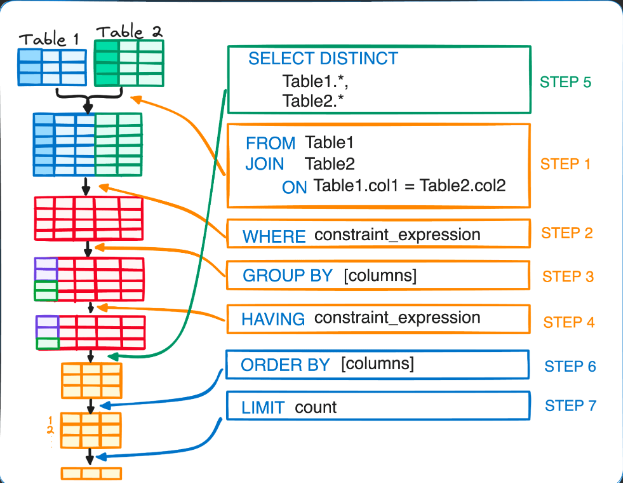
SQL doesn’t run in the order you write it:
SQL Execution Order:-
1. FROM
2. JOIN
3. WHERE
4. GROUP BY
5. HAVING
6. SELECT
7. ORDER BY
8. LIMIT
Master the order → master SQL. 📊
#sql #sqlknowledge #DataEngineering #data #database
23
9 Dec 2025
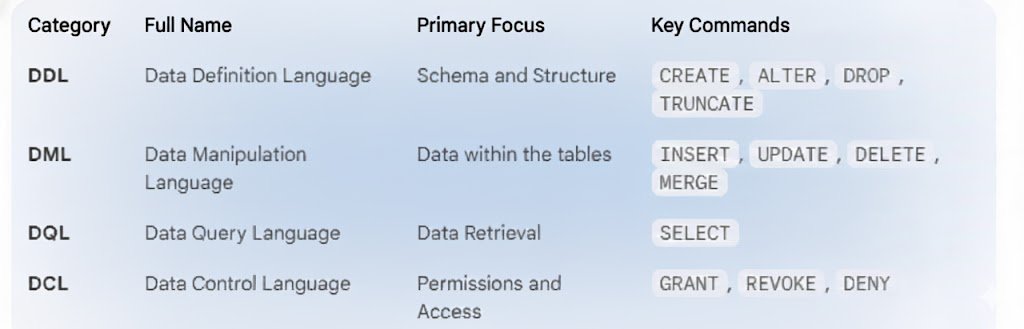
SQL Essentials Explained :
You want to manage and Interact with databases.
Learn this four key categories in SQL.
Let’s break them down 👇 🧵
#sql #sqlknowledge #data #database #DataAnalysis
1
27

5 Dec 2025
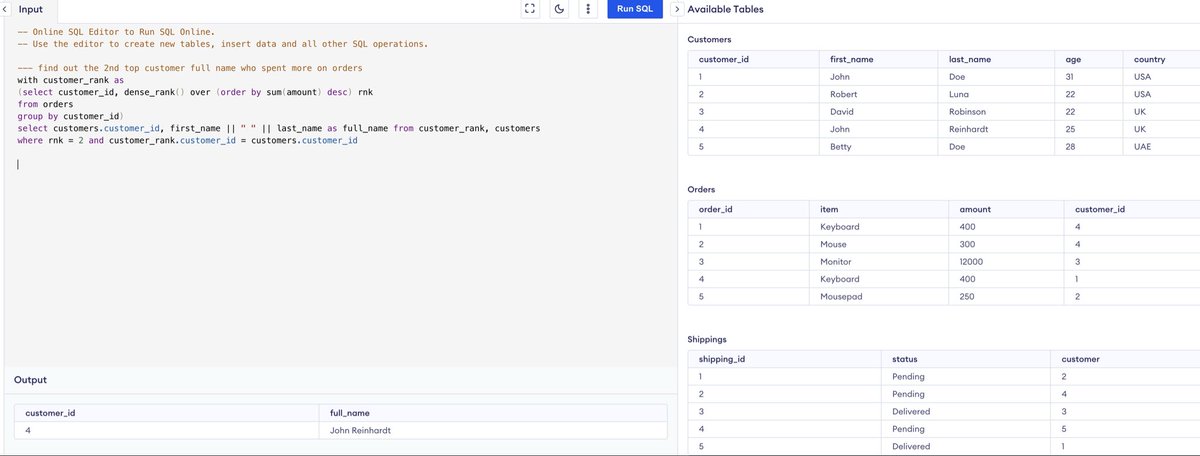
ROW_NUMBER(), RANK(), and DENSE_RANK() are SQL window functions used for assigning a rank or a sequential number to rows within a result set, often based on a specific ordering. They differ in how they handle tied values.
•ROW_NUMBER():
◦Assigns a unique, sequential integer to each row within a partition, starting from 1.
◦It does not consider ties; if two rows have the same value in the ordering column, they will still receive different, consecutive ROW_NUMBER() values.
•RANK():
◦Assigns the same rank to rows with identical values in the ordering column (ties).
◦It leaves gaps in the ranking sequence after ties. For example, if two rows are ranked 2nd, the next distinct rank will be 4th (skipping 3rd).
•DENSE_RANK():
◦Assigns the same rank to rows with identical values in the ordering column (ties), similar to RANK().
◦Unlike RANK(), it does not leave gaps in the ranking sequence after ties. If two rows are ranked 2nd, the next distinct rank will be 3rd.
#sqltips #sqlknowledge #sql #sqltutorial Q1 find out the 2nd customer who spent more - provide the full name
52

25 Nov 2025
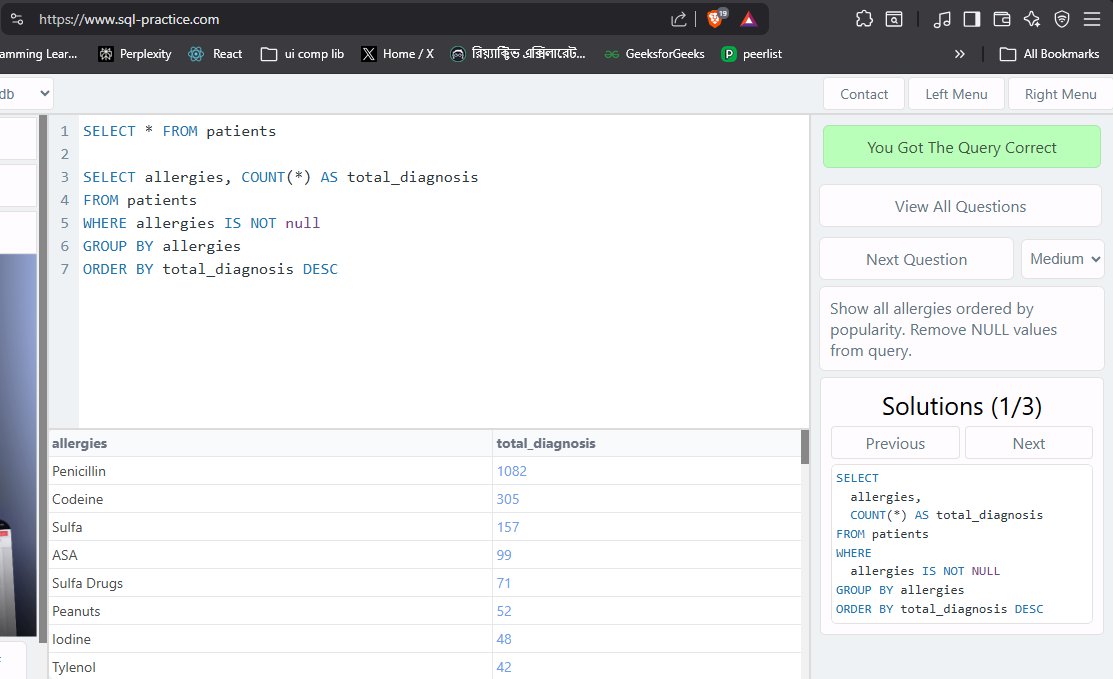
practicing SQL on SQL -practice website. I like the format of questions!
it has also segregated to easy, medium and hard questions!
#SQL #sqlknowledge #database #Coding
24

24 Nov 2025
SQL is the backbone of analytics → Master these, and your data skillset levels up.
#dataanalytics #dataanalysis #SQL #sqlknowledge #Report #automation #dashboard
14

23 Nov 2025
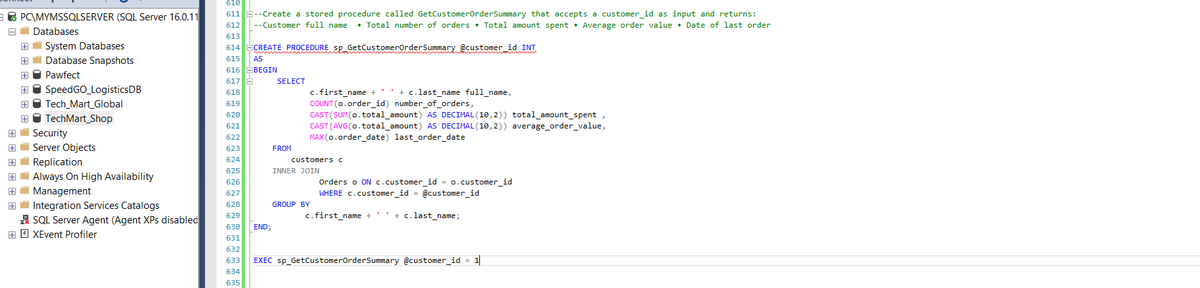
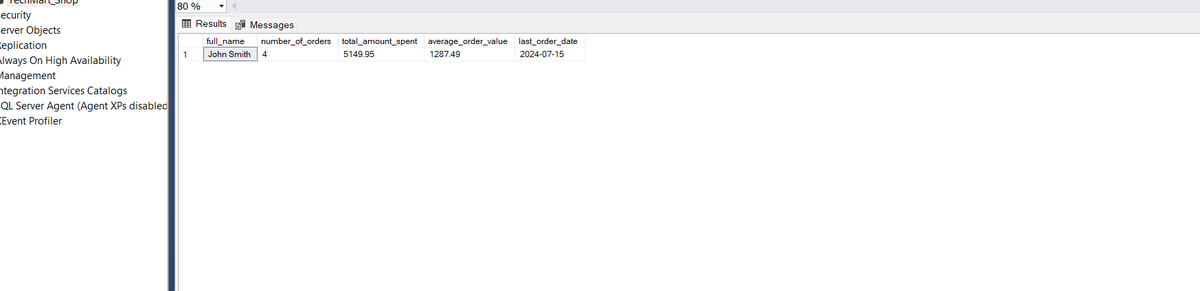
Query 3 & Result 3
Purpose: The purpose of this procedure is to summarize a specific customer’s order history, showing their full name, total orders, total amount spent, average order value, and the date of their last purchase.
Business Case: This is useful for customer success teams, account managers, and marketing staff who want to understand individual customer value. It can guide personalized offers, loyalty programs, and retention strategies.
Result: From the result, we can see that customer 1: John Smith has placed 4 orders with a total spend of $5149.95 and an average order value of $1287.49. Lesson for the sales team: identify high-value customers and focus on maintaining engagement!
So Yh!! I enjoyed every bit of this. I feel like I committed myself and I did not falter. If I can do 8 days, I can do 80 days. That is what I intend to do. See you on the other side, Chads!
Keep cooking! 🔥🔥🔥
#DataScience #SQL #sqlknowledge #Analytics #dataengineering #Coding
1
2
87

23 Nov 2025
These tables were given:
Orders 2023
Orders 2024
Orders 2025
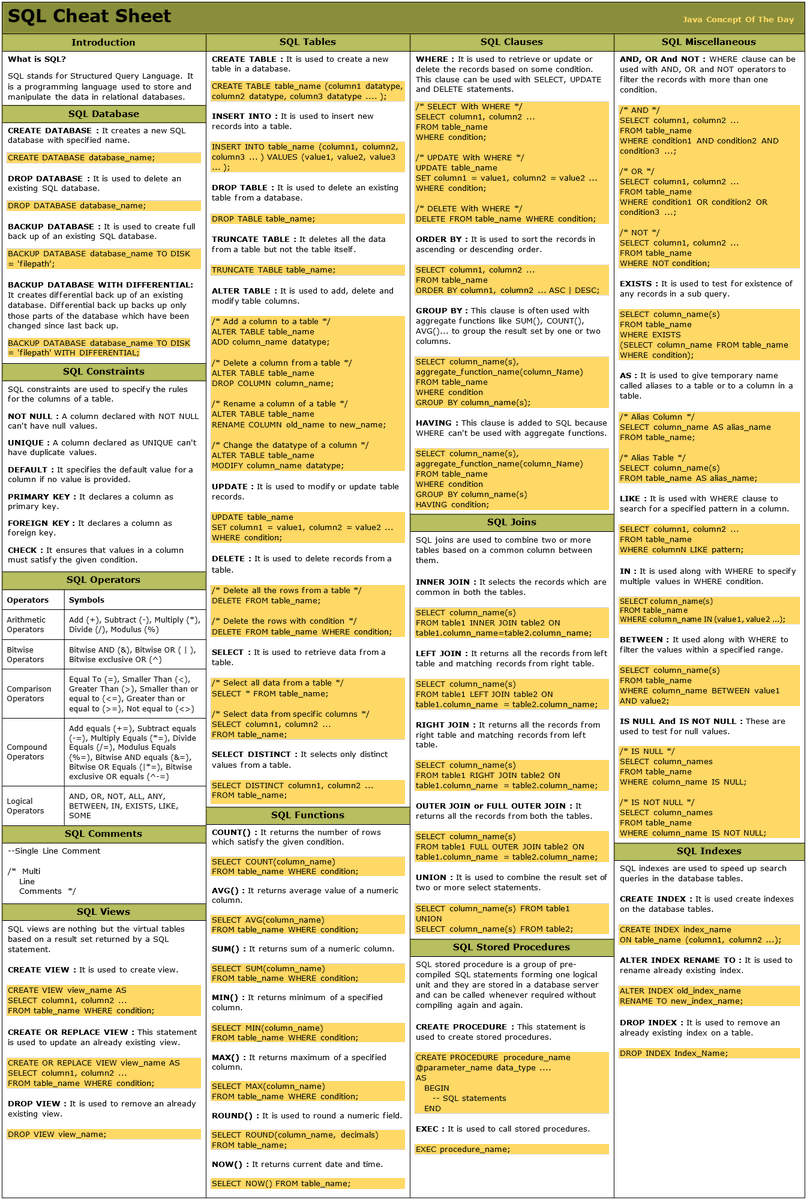
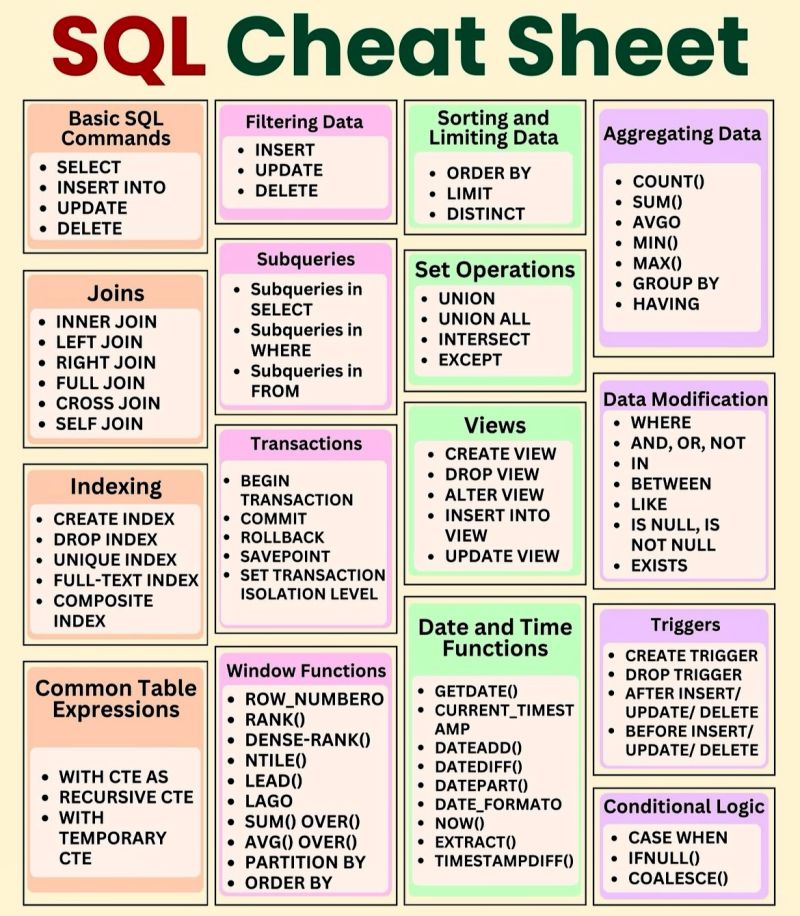
The efficient way to combine all the tables is to use Set operator (UNION) before analysis.
Since the tables have the same data type.
#sqlknowledge
27



21 Nov 2025
SQL Highest Salary Rank Function | Most asked SQL interview question
You’ll learn how to write SQL queries using:
✔ GROUP BY & Aggregations
✔ AVG, MAX, COUNT
✔ Window Functions
✔ RANK / DENSE_RANK
#sql #sqltutorial #sqlinterview #sqlknowledge #sqlbasics #sqlbeginner
12

21 Nov 2025
20 Nov 2025

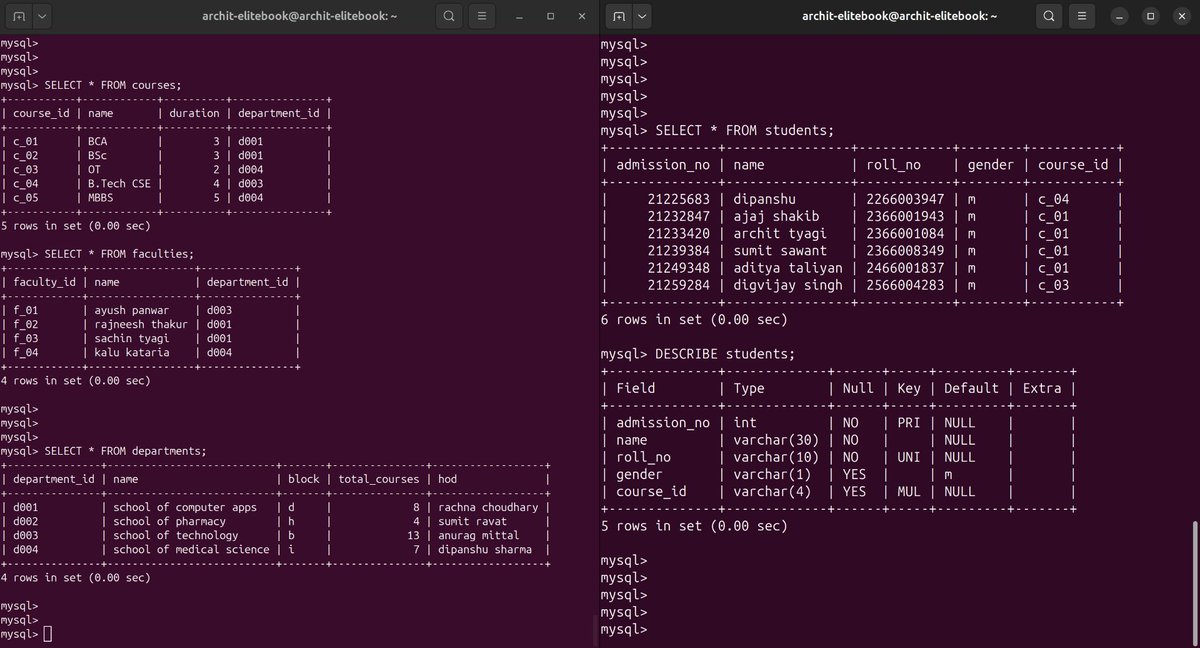
Today I build a Database:
- which have 4 tables
- using #linux terminal
- spend only 3 hours for practice
- many operation will perform on tomorrow
It looks attractive ❤️
1
7
57

20 Nov 2025
14 day SQL streak locked in ✔️ #21DaysSQLChallenge
Staying consistent and leveling up my query skills with @indiandataclub and @dpdzero.
#SQLWithIDC #LearnSQL #DataAnalytics #sqlknowledge #sqldeveloper #SQL

1
13

19 Nov 2025
2
2
3
142
19 Nov 2025
DAY 4: DOCUMENTING MY SQL PROGRESS
Another day at the office, Chads.
Worked on Subqueries today. Getting better at thinking on the structure of queries before actually writing them. This allows me to consider the necessary results expected.
--FRAME 1--
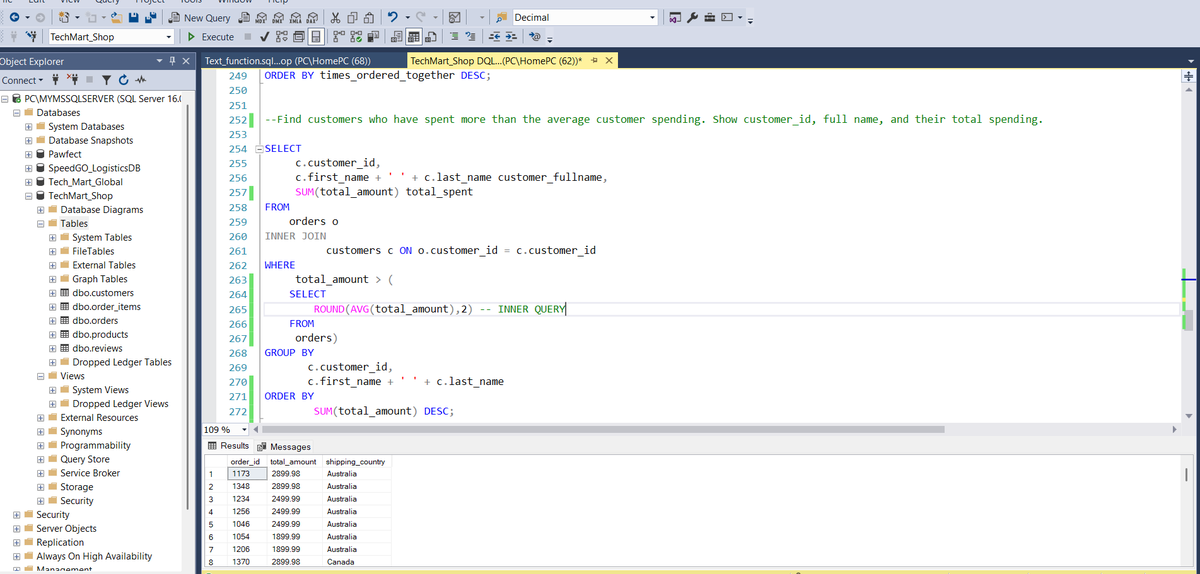
Query 1: This query returns customers who spent more than the average customer spending. So there is a subquery here (INNER QUERY), that does the job of computing the average spent by all customers. This average is then passed on to the outer query. Both are then compared to know if that customer spent more than the average. If they did, their details are returned. Pretty cool stuff for managers trying to get a quick snapshot of high, medium and low value customers. Cool stuff.
--FRAME 2--
Query 2: This query returns products that have never been ordered. A bussiness might want to know the products that are performing poorly in order to take action towards improving the situation.
There is a simple subquery here that takes the product_id in the outer query and compares it to the product_id in the inner query. It is important to notice that the outer query references the products table while the inner query references the order_items table.
The idea that the query returns products that have not been ordered makes sense in this context, since the product_id of an unordered product will not be in the order_items table,
--FRAME 3--
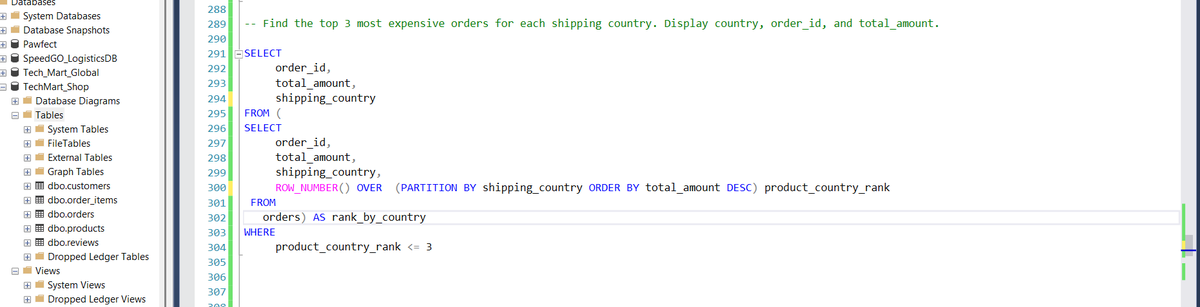
Query 3: The purpose of this query is to return the most expensive orders. It took me too long to figure this one out. I had doubts about adding the columns in the outer query into the subquery too. That was the right thing to do apparently (CHATGPT supported me lmao).
So the subquery here returns the order_id, total_amount and shipping country. It also returns the rank of a particular order , via a ROW_NUMBER window function. This partitions the total_amounts by country. The row number of each 'total_amount' shows its ranking compared to other 'total_amounts' per country.
This is then passed into the outer query and filtered down to the top 3 by the WHERE Clause in the outer query.
Mehn....If you read this and it does not make sense please tag me and call me olodo. I will explain again. 😂😂 This thing must enter my big head.
See you tomorrow lads. Keep cooking!
#SQL #sqlknowledge #sqlbeginner #DataScience #dataengineer #tech

18 Nov 2025

DAY 3: DOCUMENTING MY SQL PROGRESS
Just another day in the Studio, Chads.
Two queries today. Spent more time wrapping up joins. Subqueries begin tomorrow.
--FRAME 1--
Query 1: As stated in the comments above, this query returns a report showing order details with all item in each order. The mix of columns from different 3 tables necessitates the use of 2 INNER JOINS.
The 'STRING_AGG' function is an interesting addition to this query. This function takes product names, and adds their quantity and price. This collapses items that should be in two separate columns into one single cell. This presents the data in a more readable format. Certain dashes were necessary within the function parameters to provide space for better result readability.
--FRAME 2--
Query 2: This query was particularly confusing. I am not very efficient with 'SELF-JOINs', yet. This type of JOINS connect records in the same table and sets them up for filtering and/or comparisons with other records in the table. In this instance, the query picks each order_item and checks if the order_id for that particular item is the same as the order_id for another order_item that has 101 as its product_id.
The result therefore is that all products that have been ordered in the same order_id as product_id 101 is returned, and the number of times they were ordered together is also returned.
This was particularly difficult and I would like feedback on simpler ways of doing this, or better still more efficient ways. I personally need more practice with the SELF JOINS.
Feedback, corrections and suggestions would all be appreciated, My Idolos🤲🏾🤲🏾
See you tomorrow with Subqueries, Lads!!
#DataScience #Analytics #SQL #sqlknowledge #sqlbeginner #code
1
2
3
255

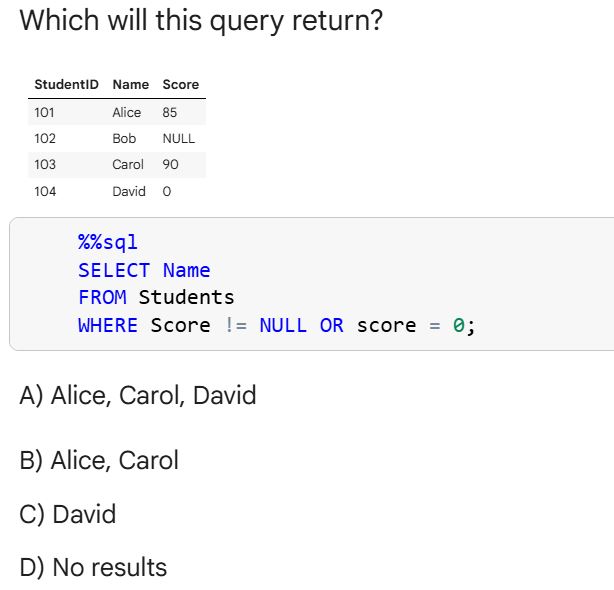
Mine is C. David because ‘Score != NULL’ never evaluates to true in SQL, the condition that actually works here is the one matching score = 0.
Drop yours and why 👇
#SQL #sqlknowledge
17 Nov 2025

SQL Question
What will this query output?
Be careful with this one.
33
18 Nov 2025
DAY 3: DOCUMENTING MY SQL PROGRESS
Just another day in the Studio, Chads.
Two queries today. Spent more time wrapping up joins. Subqueries begin tomorrow.
--FRAME 1--
Query 1: As stated in the comments above, this query returns a report showing order details with all item in each order. The mix of columns from different 3 tables necessitates the use of 2 INNER JOINS.
The 'STRING_AGG' function is an interesting addition to this query. This function takes product names, and adds their quantity and price. This collapses items that should be in two separate columns into one single cell. This presents the data in a more readable format. Certain dashes were necessary within the function parameters to provide space for better result readability.
--FRAME 2--
Query 2: This query was particularly confusing. I am not very efficient with 'SELF-JOINs', yet. This type of JOINS connect records in the same table and sets them up for filtering and/or comparisons with other records in the table. In this instance, the query picks each order_item and checks if the order_id for that particular item is the same as the order_id for another order_item that has 101 as its product_id.
The result therefore is that all products that have been ordered in the same order_id as product_id 101 is returned, and the number of times they were ordered together is also returned.
This was particularly difficult and I would like feedback on simpler ways of doing this, or better still more efficient ways. I personally need more practice with the SELF JOINS.
Feedback, corrections and suggestions would all be appreciated, My Idolos🤲🏾🤲🏾
See you tomorrow with Subqueries, Lads!!
#DataScience #Analytics #SQL #sqlknowledge #sqlbeginner #code
16 Nov 2025
Day 2: DOCUMENTING MY SQL PROGRESS
Just another day in the trenches, Chads.
Couple of queries today. Each query is separated by comments.
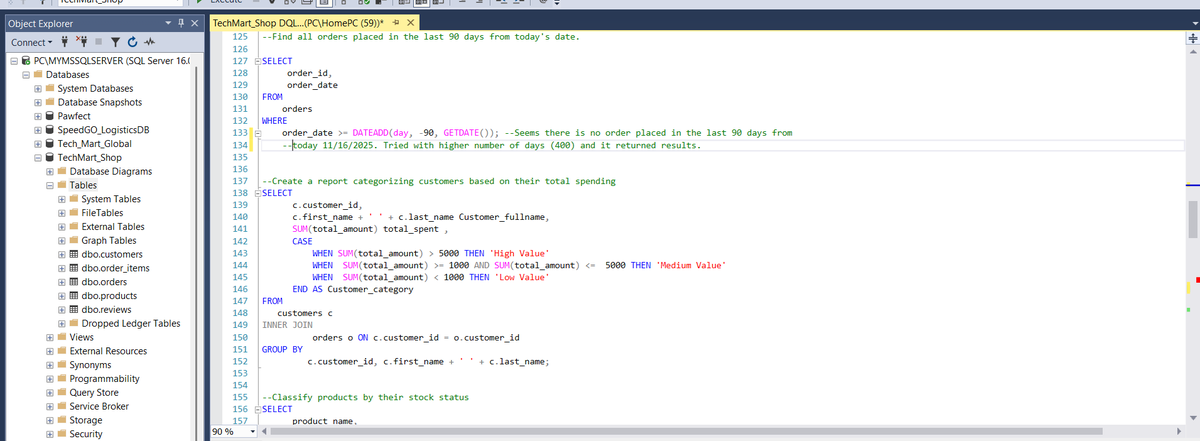
Query 1: All orders placed in the last 90 days from today's date. The idea here is to use the DATEADD function to add 90 days to the current date (GETDATE() function). The WHERE clause is then checks if a particular order date falls between today and 90 days ago (90th day inclusive due to the >= operand), it's record is returned.
Query 2: Customer details are returned based on their spending level. Poor people like @Dolypizo can be found in the 'Low Value' category. While rich men like @uptown_analyst0 are in the High value category. All figures in dollars of dollars. The INNER JOIN is used here to connect the customers and orders table and of course the CASE statement is used to define conditions
-- FRAME TWO --
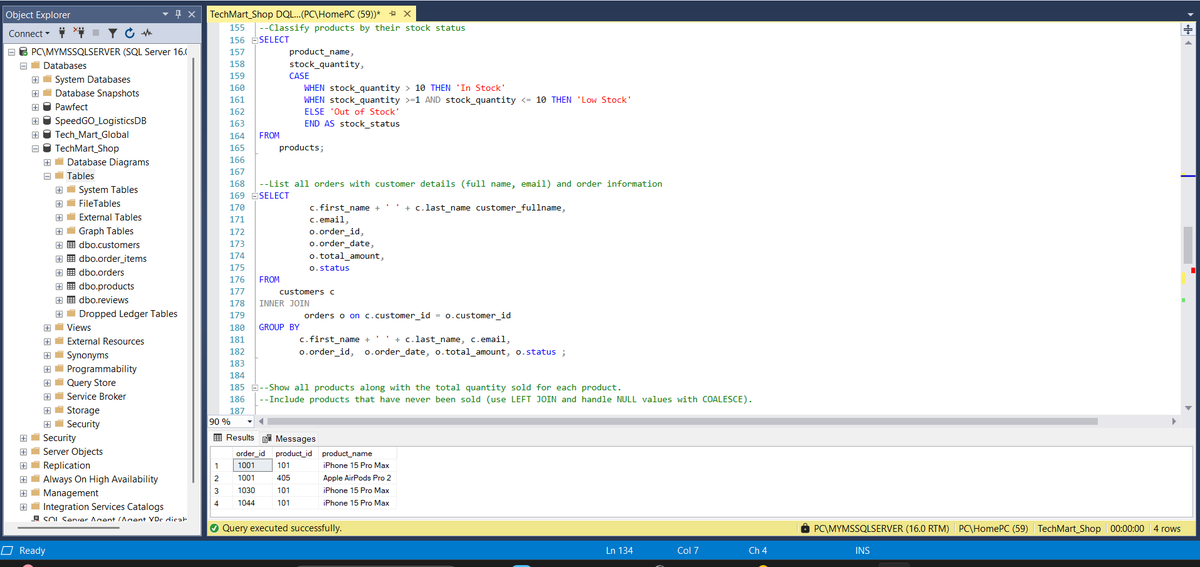
Query 3: This query classifies products by the number/amount left in stock. The CASE statement is used for categorization.
Query 4: This query returns all orders alongside the details of the customer that placed these orders. Classic use of the INNER JOIN. TBH, I instinctively want to use the INNER JOIN before I use any other JOIN type. Is this way of thinking flawed? Please let me know, so I stop fooling.
--FRAME 3--
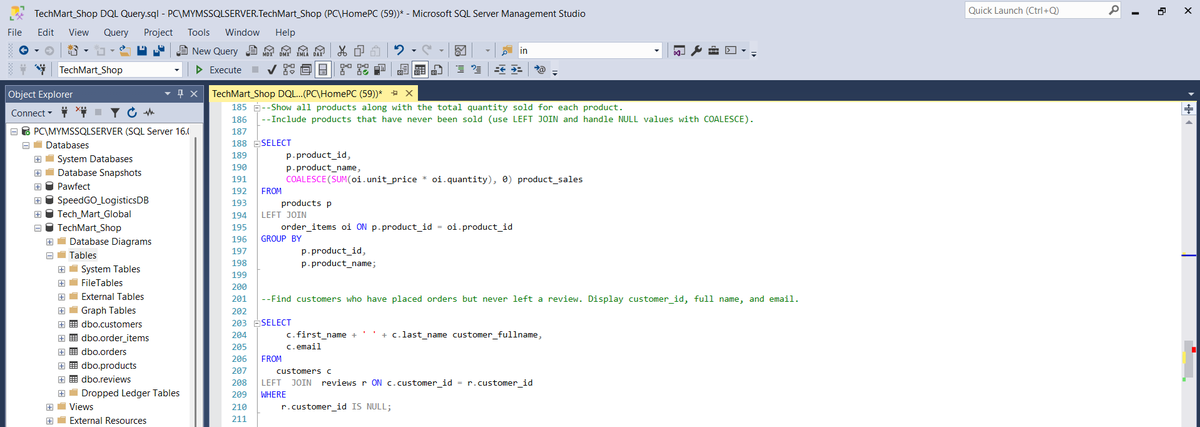
Query 5: This query provides a clear report of each product along with the the quantity sold. From the result observed, Iphone 15 is the top product sold. I used the COALESCE function to add up for products that have not been sold yet. I reckon these products will be left out without the COALESCE function?? Need to confirm that!!
Query 6: This query returns results for all the customers who have placed orders but have not left any review. Based on results, such customers are not really many in this dataset. These kind of customers could prove problematic for a business, if it cannot determine customer satisfaction for business improvement. I guess such businesses have to focus on received reviews.
I actually need feedback. Let me know If I am caping with these queries or they are not optimized for efficiency. I will engage your posts too, Abeg. 😂
So that's it for DAY 2. See you tomorrow!
#DataScience #dataengineering #datanalysis #SQL #sqlknowledge #sqlbeginner
1
1
5
224
16 Nov 2025
Day 2: DOCUMENTING MY SQL PROGRESS
Just another day in the trenches, Chads.
Couple of queries today. Each query is separated by comments.
Query 1: All orders placed in the last 90 days from today's date. The idea here is to use the DATEADD function to add 90 days to the current date (GETDATE() function). The WHERE clause is then checks if a particular order date falls between today and 90 days ago (90th day inclusive due to the >= operand), it's record is returned.
Query 2: Customer details are returned based on their spending level. Poor people like @Dolypizo can be found in the 'Low Value' category. While rich men like @uptown_analyst0 are in the High value category. All figures in dollars of dollars. The INNER JOIN is used here to connect the customers and orders table and of course the CASE statement is used to define conditions
-- FRAME TWO --
Query 3: This query classifies products by the number/amount left in stock. The CASE statement is used for categorization.
Query 4: This query returns all orders alongside the details of the customer that placed these orders. Classic use of the INNER JOIN. TBH, I instinctively want to use the INNER JOIN before I use any other JOIN type. Is this way of thinking flawed? Please let me know, so I stop fooling.
--FRAME 3--
Query 5: This query provides a clear report of each product along with the the quantity sold. From the result observed, Iphone 15 is the top product sold. I used the COALESCE function to add up for products that have not been sold yet. I reckon these products will be left out without the COALESCE function?? Need to confirm that!!
Query 6: This query returns results for all the customers who have placed orders but have not left any review. Based on results, such customers are not really many in this dataset. These kind of customers could prove problematic for a business, if it cannot determine customer satisfaction for business improvement. I guess such businesses have to focus on received reviews.
I actually need feedback. Let me know If I am caping with these queries or they are not optimized for efficiency. I will engage your posts too, Abeg. 😂
So that's it for DAY 2. See you tomorrow!
#DataScience #dataengineering #datanalysis #SQL #sqlknowledge #sqlbeginner
16 Nov 2025
𝗗𝗮𝘆 1: DOCUMENTING MY SQL PROGRESS.
Today, I continued my second SQL assignment from @iam_daniiell's training. Balancing work and upskilling has been so difficult, but we keep showing up and putting in the reps.
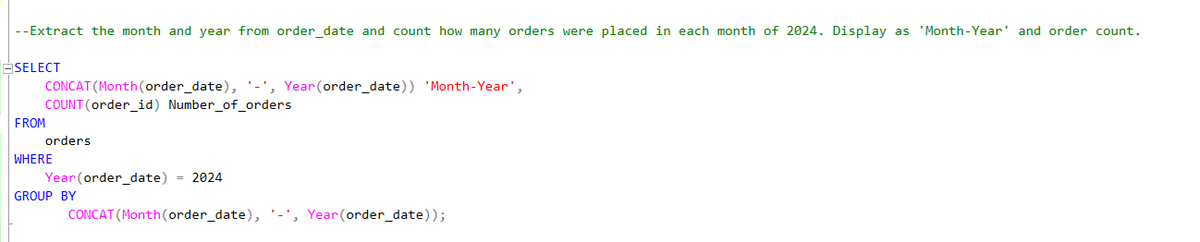
I wrote a query that extracts the month and year from the order_date column and count how many orders were placed in each month of 2024. The query returned the 'order_date' as 'Month-Year' and the number of orders per month.
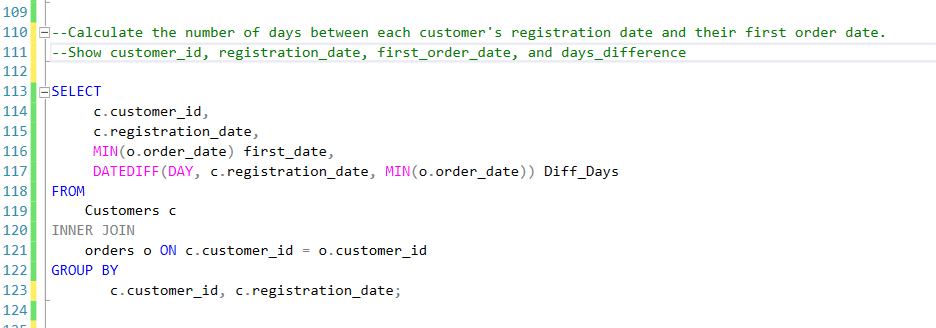
I also wrote a query that calculates the number of days between each customer's registration date and their first order date. This query returns the customer_id, registration_date, first_order_date, and days_difference.
Open to feedback, corrections and suggestions from my Idolos. 🤲🏾🤲🏾
#DataAnalysis #DataEngineering #SQL #Datafam #BuildingInPublic
2
3
7
406

And that will be a topic for tomorrow. Thank you ☺️.
#SQLStudyGroup
#sqlbasics
#sqlknowledge
#Day2
@smartbizcrux
1
2
45
13 Nov 2025
Hey #SQLCommunity! Curious to know — how many SQL queries do you write daily on average?
#SQL #sqlknowledge #SQLServer #sqlbasics
0%
1-2
0%
2-5
0%
5-10
0%
>10
0 votes • Final results
15

13 Nov 2025
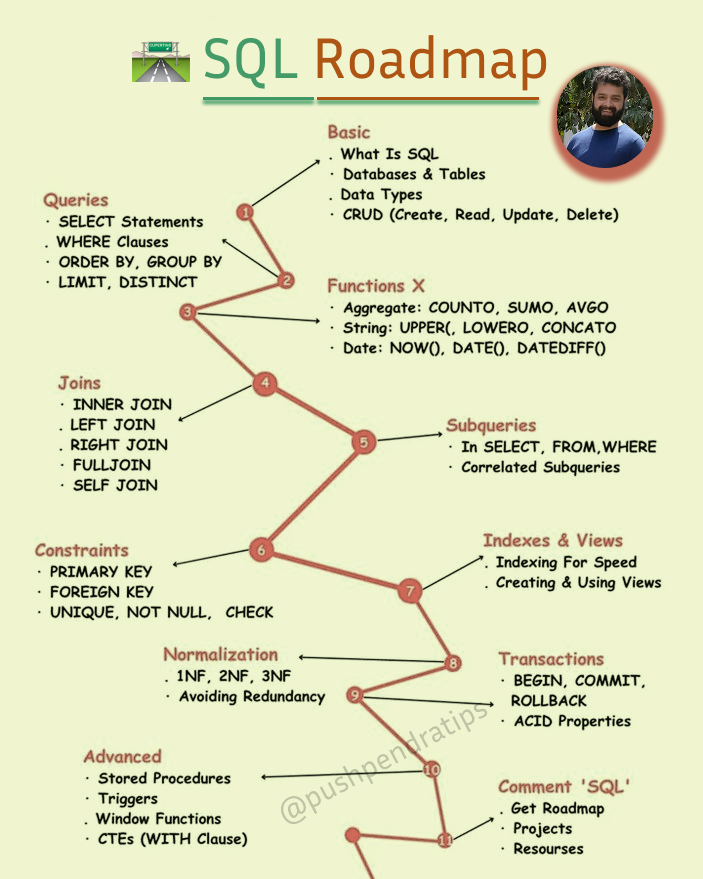
Complete SQL Learning Roadmap (Beginner to Advanced)
🔥 𝐆𝐞𝐭 𝐚𝐥𝐥 𝐭𝐡𝐞 𝐩𝐫𝐨𝐠𝐫𝐚𝐦𝐦𝐢𝐧𝐠 𝐟𝐫𝐞𝐞 𝐧𝐨𝐭𝐞𝐬 𝐡𝐞𝐫𝐞 :
t.me/ujjwalCoding
➡️ Follow
@pushpendratips
for more Valuable Stuff
♻️ Repost to your Job seekers' friends, it is useful for others
#SQL #sqlknowledge #SQLServer
1
3
35
514