

Arkloop v26.5.15 release!
changelog 很长哦!!
Get in:arkloop.io/zh
github.com/qqqqqf-q/Arkloop
下面是巨长的 changelog:
新功能
桌面端内置安装 ark CLI。
Worker 新增 compact 上下文压缩工具。
Web 增加快捷键提示;支持 Cmd/Ctrl , 切换设置面板。
对话模型归属统一到线程:feat(models) 迁移并运行时解析;前端移除各渠道「默认模型」,改为账户级「默认对话模型」,保存时清理遗留 default_model。
群组心跳触发按线程维度对齐(历史数据回填 thread_id,调度读取与 burst 冷却按线程)。
IM 渠道统一斜杠指令分发:多通道共用 /help、/bind、/status、/models、/persona、/reset、/start 等;补齐 Discord/Feishu/微信/QQBot 等对 /model、/think、/heartbeat、/stop 的支持;全角 / 按 / 归一。
发送用户消息乐观更新 client_message_id 幂等创建与投递状态。
默认网页搜索改为 Exa;接入 Exa Hosted MCP 与 provider 契约。
MCP OAuth 授权流程。
插件:桌面插件管理、详情设置、贡献体系;支持 CUA 运行时检查。
LLM:StreamLlmRequest 载荷扩展;默认重试次数提高并引入抖动退避。
Web COP:运行结束后折叠中间步骤(Worked 区块);编辑/写入 diff 计数聚合与着色标题;将 exec_command 并入 COP 卡片式子段;强化 Plan Mode 与 Skills 列表/卡片/详情。
右侧预览:统一预览、浏览器预览、多文件预览 Tab、状态持久化。
Persona 目录菜单支持动态定位与滚动。
聊天输入斜杠命令。
Runs 展示缓存 token 用量指标。
修复
Worker:图片提示载荷边界、无效图片拒绝、附件读取与工具结果加固;pending 图像批次/结果在多轮修正中保持一致;compact 压力与上下文压缩链路稳定性;上下文窗口预检;桌面 compact 文件锁与大 atom 阻塞;读取图像 runtime/schema/投递门禁对齐。
IM/Telegram:媒体组群聊身份与 heartbeat/status 等命令解析对齐 stage A;burst 投递补齐 ChannelID/ChannelType;/persona 群组需管理员且已绑定;/stop 传递请求用户 ID;/status 无线程时展示默认值;列表与键盘展示规范 credential^model;统一分发后恢复 pg_notify 取消、BYOK 与 /stop 回复文案。
QQ:群聊补全 /model、/think 分支。
心跳:setModel 同步 resolve_model_at_runtime;persona fallback SQL 去掉错误 deleted_at 条件;down migration 清理线程配置中的 heartbeat 字段并重置触发模型。
模型迁移:PostgreSQL/SQLite 合并冲突与 backfill;QQBot 线程创建后补齐 inbound chat model;新线程模型解析保留渠道过渡期 fallback。
Web:Virtuoso 长列表滚动直达末尾,避免中途挂载风暴;滚动 pin/spacer 逻辑简化后的交互与测试对齐;快捷键路由、tooltip 动画、键帽布局修复。
Web:Impression 重建超时后改为轮询直至完成;模型下拉使用 fitContent 完整展示长标签;provider 摘要卡与 HeadersEditor 对齐;portal/provider/tool model 错误提示;MCP 设置多轮 UI 与 Tab 持久挂载;桌面端防护误触 impression 重建。
Web:timeline 语义、本地化与 COP 卡片滚动/高度;插件详情与 provider 布局对齐;diff 计数写入 FileOpRef 并在标题/卡片展示;修复图片 artifact 误开侧栏;若干欢迎页、侧边栏动画、预览 dotfiles、桌面会话刷新等问题。
Personas:印象生成要求事实性约束。
插件:运行时权限目标展示;安装进度状态保留;允许运行时安装完整结束。
LLM:在不支持的工具选择模式下自动降级重试。
认证:桌面本地模式下使用本地会话端点刷新 token。
其他:.gitignore 忽略 .codegraph;桌面 about 元数据清理;移除误导性 heartbeat 文案。
注:fix(search): keep provider on missing key 已被后续 revert,未记入有效变更。
改进
Channels:抽取 Telegram 命令公共逻辑;IM 入站架构统一;出站投递与分段/reply 工具链合并复用。
Web:渠道图标改用各平台官方 App Icon;桌面渠道设置布局简化;聊天列表批量更新、requestAnimationFrame 节流与 memo 降低渲染;右侧栏上下文拆分 memo、稳定回调降低切换成本;设置分区缓存减少重复挂载重渲染;线程列表与实时状态上下文拆分;思考计时状态机合并简化。
Worker:拆分运行空闲超时;桌面 MCP 工具暴露与缓存作用域收紧;降低桌面运行延迟;调试事件存储减量。
Web(体验/重构):统一设置卡片 hover;简化桌面 Skills/MCP 与内存、工具设置页排版;右侧面板代码整理(持久化防抖、目录缓存 LRU 等);COP 巨型函数拆分与符号/常量收敛重构。
Search:默认提供方为 Exa(与上文新功能呼应时此处侧重「默认策略」行为层面的提升)。
文档
以桌面用户为中心重建文档站(中英分区与大量新页面;框架升级为 Next.js 16、Fumadocs 16、Tailwind 4;修正顶部导航与落地页链接)。
移除前后端代理工作流程相关文档。
Developers:补充 LLM 请求载荷事件说明。
更新 LLM 重试默认值文档。
README、安装说明与配置/schema 文档随发行同步更新(依据变更文件列表中的 docs 路径,不展开未在 commit 摘要中明示的细节)。
构建与 CI
Release:通过 Cursor CLI 自动生成 changelog;桌面构建去除旧版 release 标签元数据。
CI:修复类型检查与 lint(含测试 setup、defer Body.Close 等)。
数据库迁移:解决合并后的版本冲突标记
4
11
785

7 Nov 2025
An “episode” is one complete attempt from reset to terminal condition for an Agent; you call EndEpisode() (or hit MaxStep) to finish it, and OnEpisodeBegin() is where you reset the Agent and environment for the next attempt.
“Observations” are the data the Agent sees each decision step (e.g., floats, raycasts, or images), provided via CollectObservations(VectorSensor), SensorComponents (like RayPerceptionSensor), or [Observable] fields, and the vector observation size must match Behavior Parameters.
To link a neural net, assign a model to the Agent’s Behavior Parameters (either drag a .onnx into the Behavior Parameters in the Editor or call SetModel(behaviorName, nnModel) at runtime); there’s no “AgentBrain” anymore—Brains were removed and replaced by Behavior Parameters plus policies.
1
15
7 Nov 2025
For ML-Agents, Agent’s key overrides are: Initialize (one-time setup), OnEpisodeBegin (reset at episode start), CollectObservations(VectorSensor) (pack observations), OnActionReceived(ActionBuffers) (apply actions rewards), Heuristic(in ActionBuffers) (manual/heuristic control), and optionally WriteDiscreteActionMask(IDiscreteActionMask) (mask invalid discrete actions).
You can see the source at Unity-Technologies/ml-agents → com.unity.ml-agents/Runtime/Agent.cs, and notable properties/fields include StepCount (current step), CompletedEpisodes (episodes finished), MaxStep (episode step limit), plus methods like RequestDecision(), RequestAction(), SetModel(...), AddReward(...), SetReward(...), EndEpisode(), EpisodeInterrupted(), GetCumulativeReward(), and GetStoredActionBuffers().
1
17
7 Nov 2025
Do you mean Unity ML-Agents’ Agent class or the NavMeshAgent component?
ML-Agents: Agent is Unity.MLAgents.Agent (inherits MonoBehaviour) — you subclass it and override methods like Initialize, CollectObservations, OnActionReceived, Heuristic, OnEpisodeBegin, and use SetModel(...) to assign a policy.
Navigation: NavMeshAgent is UnityEngine.AI.NavMeshAgent — a component for pathfinding on a NavMesh with properties like destination, speed, angularSpeed, remainingDistance, and methods like SetDestination(...).
1
23

22 Mar 2025
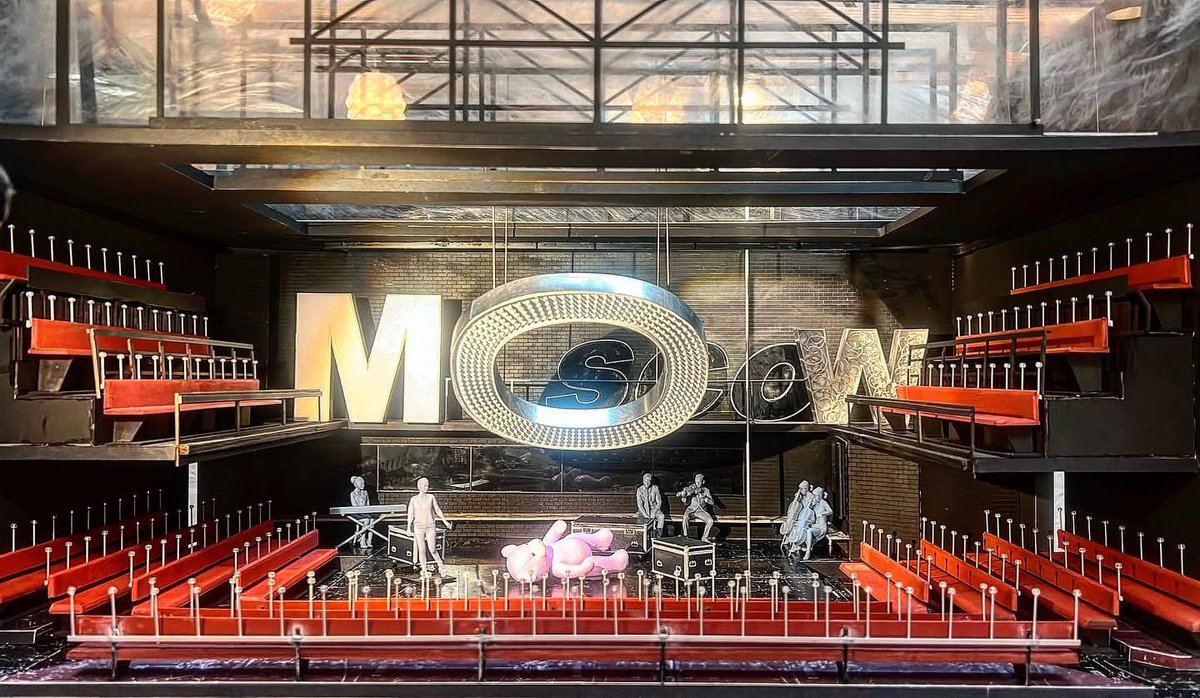
My set design model for the Olivier nominated ‘Natasha, Pierre And The Great Comet of 1812’ @donmarwarehouse #Setmodel #design #theatre #musicaltheatre #donmarwarehouse #westend #OlivierAwards
7
5
83
4,280

1 Feb 2025
Rebound #creativecoding
Well, #genuary was fun, but back to our regularly-scheduled mucking about...
TO rebound
reset : setbackgroundcolor white
setfillcolor black
setmodel [setfillcolor black : fiso 5 10]
mechanical
penup : beginblockmap : bk 30
fiso 10 20 : bk 50 : sl 75 : fiso 10 20 : sr 150
fiso 10 20 : fd 45 : fiso 10 24 : sl 150
fiso 10 24 : endblockmap
home : fd 110 : rt 180
pausephysics
norender
setaspect 1
forever [
every loopcount random [10] [
setx item loopcount [-0.25 0.1]
newmissile [ball elastic] {{"setfc iff xpos > 0 pick [2 6 7 14] pick [1 8 9 11] "spot 1}} 0 100 [8000]]
advancephysics 2 * physicsinterval
render
nextframe
norender
]
END
1
5
93

1 Feb 2025
プログラマの事を「ソフト」、仕掛けとか罠とかの事を「SetModel(Sm)」と言うチームで働いてた時に、僕がその辺の情報共有の定例会議を《ソフトSM定例》で予約しちゃった時は少しピリッとした。
23 Jan 2025

みんな鉄板のすべらない話ある?
私は居酒屋のデザートに出てきたパイナップルに一味がかかってたのを新しいな〜と気にせず食べたが、友達が辛いの苦手だから洗ってもらえますか?て聞いたら友達には「洗うの?!」と驚かれ、店には「辛い…?一味だこれ!!!!」と驚かれ、後にシナモンで出てきた話
1
3
16
3,101

15 Jan 2025
‼️SAP Analytics Cloud Fast Track Release Notes - 2024.24
Mobile
You can now consume stories in present mode in the iOS mobile app.
Stories containing geo maps can now be consumed in the Lite Viewer for the iOS mobile app.
Data Acquisition, Live Data Connections, and Integration
At present, to use direct live data connections in SAP Analytics Cloud, you must use a web browser that is configured to allow third-party cookies. SAP is working toward supporting an alternate configuration that will allow direct live data connections to work even when web browsers are blocking third-party cookies. This alternate configuration relies on web browsers supporting the Sec-Fetch-Storage-Access and Activate-Storage-Access HTTP headers, and certain actions you can take on your SAP on-premise data source system.For more information, see Configure Browser Storage Access Permissions for Live Data Connections.
Modeling
You can now display the query builder in read-only mode to view the query of a import job that has been created based on a SAP BW datasource.
Data Analyzer
As a user of data analyzer with the required scheduling authorization, you can now schedule the publication of an insight as a PDF, Microsoft Excel or CSV file. To schedule the publication you open the Schedule Publication dialog in the Share menu.
Besides, you can also schedule the publication of an insight from the file repository, the favorites menu and the featured files.
When you work in data analyzer with a SAP BW model that has two structures, the second structure name is now displayed with Structure in the Available Objects list. This change is also valid in the Set Variables dialog, the Set Filter dialog, the Create Threshold dialog and the Create Calculation dialog.
Stories
Geo maps in the optimized experience now use ESRI ArcGIS 4.X. With this upgrade, a few key improvements include:
-Improved and Smoother Rendering with Pan & Zoom
-Improved Datapoint Interaction for Overlapping Datapoints
-Consistent Tooltip with Charts (includes Sticky Tooltip, Threshold Tooltip Bar, and Interactions such as Filter, Exclude, Drill)
-Dynamic Text Support in Title / Subtitle
-Number Format and Currency Support from Theme Preferences
In the optimized story experience, openSelectModelDialog and setModel APIs are now supported for charts, which means the charts’ data models can be changed in view mode via scripting.
You can now use flow layout panels, sliders, and range sliders in composites.
When creating a composite in advanced mode, you can disable Manage Models for story designers via Global Settings so that they can’t replace its models or objects in use.
Calendar
You can now use Add-in workbooks as work files in calendar events.
2
85
8 Jan 2025
One Million Billion Kilograms #genuary8
#genuary #GENUARY2025 #creativecoding
#stemeducation #codenewbies #physics
Draw one million of something
TO onemillionbillion
reset : penup
setxy -50, 50
make "pre 0
setmodel [
setfillcolor mediumblue
setpencolor green
up 90
amigaball 30, 10, 20
]
setmass 1000000000000000
;one million billion kilograms
physical : gravity
repeat 13 [
hatch [
penup
slideright 80 : left 35
setmodel [
setfillcolor repcount
icosphere 5
]
showturtle
physical : gravity
thrust 30 : linger
]
repeat 14 [
wait 4 : increment "pre
setpremodel {"rollright :pre}
render : norender
]
]
forever [
wait 4 : increment "pre
setpremodel {"rr :pre}
render : norender
]
END
3
50
4 Jan 2025
Black on Black II #genuary4 #creativecoding
A second thought...
TO blackonblack2
reset : penup
setbounds [-150 -180 150 180]
setmodel [setfillcolor black : square [100]]
lockmodel : randomheading : wrap
forever [
setbackgroundshade 15 * sin loopcount
setpremodel [down loopcount : rollright loopcount / 2]
setz -100 100 * sin loopcount / 2
forward 1 : left sin loopcount
]
3
39
25 Dec 2024
Gifts, wrapped #christmas #creativecoding
TO gifts
reset : hideturtle
setbackgroundcolor red
setbackgroundshade 5
repeat 5 [newscene repcount]
repeat 30 [
hatch [
penup
setmodel [
make "cols pick [
[3 11 1] [2 7 6]
[11 9 8] [14 12 4]
[5 10 15]
]
setfillcolor item 1 :cols
square [100] : raise 1
setpenstyle "mark
setpencolor item 2 :cols
setpenwidth [30 20]
repeat 4 [line 50 : right 90]
raise 1 : setpencolor item 3 :cols
setpenwidth [20 40] : right 45
repeat 4 [line 55 : right 90]
]
penup : showturtle
setmodelscale (random [10 40]) / 100
selectscene random [5]
setz scene
setbounds [-119 -119 119 119]
randomposition
randomheading
bounce
thrust random [100]
torque : linger
]
]
END
2
36
23 Dec 2024
Twirling Bells #creativecoding #Christmas
#stemeducation #codenewbies #dailycoding
TO bells
reset : hideturtle
;create bell turtle model:
setmodel [
twosided
setfillcolor yellow
setpencolor red
setpenwidth 4
beginfill
left 90
repeat 36 [forward 2 : right 10]
right 180
repeat 24 [forward 3 : right 5]
repeat 18 [forward 3 : left 6.666]
right 90 : forward 10
right 90 : forward 54 : left 180
repeat 36 [forward 1.5 : right 10]
right 180 : forward 54
right 90 : forward 10 : right 90
repeat 18 [forward 3 : left 6.666]
repeat 24 [forward 3 : right 5]
endfill
;fill in area with fill color
]
forever [
norender : clearscreen
;don't show updates until
;we call render
left loopcount : penup
;loopcount = forever loop counter
dropanchor : pullout 50
;set orbit anchor point
;move back from anchor point
setmodelscale 0.5
;half-sized models
repeat 8 [
;repcount = repeat loop counter
;loopabove 1 = loop counter 1 level above
;(forever loop counter)
rollright repcount * loopabove 1
stamp model
;create model impression
rollleft repcount * loopabove 1
orbitright 45 0.1 * loopabove 1
;orbit to the right around anchor
] ;repeat above 7 more times
render
;show finished frame to user
] ;repeat above forever
END
3
30
6 Dec 2024
Pixel Plane #creativecoding #stemeducation
#retro #dailycoding #codeart #animation #stem
TO pixelplane
reset : cam:run [pullin 100 : slideright 160]
shader : setshaderresolution [249 180]
setshaderpalette [
[20 20 20] [100 100 100] [100 0 0]
[75 0 0] [50 0 0] [25 0 0] [50 50 0]
[100 50 0]
]
shaderdither : setscanlineintensity 40
setmodel "plane : setmodelscale 3
twosided : penup
forever [
norender : clearscreen
down 90 : right loopcount * 3
repeat 36 [
setfillcolor item repcount [1 10]
tubearc 50, 150, 36, 36, 1
right 10
]
setheading 0 : slideright 150
raise 15 * sin 5 * loopcount
rollright 20 * sin 2 * loopcount
slideleft 15 * sin loopcount
right 10 * sin loopcount
render
]
END
1
3
80
10 Nov 2024
Octagons #creativecoding #stemeducation #math
#codeart #dailycoding #logocoding
Inspired by @junkiyoshi (Thank you!)
x.com/junkiyoshi/status/1855…
(this is the cheap Logo version lol ;)
TO octagons
reset : hideturtle : penup
setpenstyle "mark
make "color 1
;create :color container and put in the number 1
forever [
if zerop remainder loopcount, 57 [increment "color]
;every 57 loops increment the number in the color container
rerandom : clearscreen
;reset random number generator and clear graphics
setmodel [ ;create turtle model:
setpencolor :color
setpenshade 10 - (1 remainder 1 loopcount, 57) / 2.5
;shade range -15 (white) to 15 (black)
penup : back 9 : left 68
;position turtle
repeat 57 [
if (58 - repcount) = remainder 1 loopabove 1, 57 [pendown]
forward 1
if zerop remainder repcount, 7 [right 45]
;every 7 movements, turn right 45 degrees
]
]
;create array of stamped models:
repeat 11 [ ;eleven rows:
sety 120 - 20 * repcount
;position turtle vertically (y)
repeat 11 [ ;eleven columns:
setx (-125 iff oddp repabove 1, 10, 0) 20 * repcount
;position turtle horizontally
;iff... creates offset effect
pushturtle ;save turtle state
left (random 360) 4 * loopabove 2 ;rotate turtle
stamp model ;place impression of turtle model
popturtle ;restore turtle state
] ;do above ten more times
] ;do above ten more times
render : norender ;show frame to user
] ;do above forever
END
10 Nov 2024

Lay out hexagons. Source code -> junkiyoshi.com/openframework… #openframeworks #programming #creativecoding #プログラミング
1
3
672
7 Nov 2024
Spots In Boxes #creativecoding #stemeducation #turtleart #artcoding #codeart #computerart
Inspired by Yuta Aoki @yuta_0_p5 (Thank you!)
x.com/yuta_0_p5/status/18545…
TO spotsinboxes
reset : hideturtle : penup
setbackgroundcolor brown
setpenstyle "mark
make "i 0 ;define :i container and put 0 in it
repeat 15 [ ;15 levels of spots and boxes:
;repcount = REPeat COUNTer (current loop)
;repabove X = REPeat counter ABOVE X levels
make "i :i repcount
;add current REPeat loop COUNTer to :i
;the successive values of :i will be 1, 3, 6, 10, 15...
raise 1 ;raise turtle towards camera
;define the pen:
setpencolor item 1 remainder repcount 5 [9 6 11 14 13]
setpenwidth repcount : setpenshade 17 - 2 * repcount
;create the box
box {2 * :i} ;{around the turtle}
repeat 5 [ ;five hatchlings on each level:
hatch [ ;create hatchling, running this code:
setbounds {-:i -:i :i :i} ;set bounds for bounce
bounce ;enable bounce
setmodel [ ;create hatchling model:
;define pen:
setpencolor item 1 remainder repcount 5 [2 3 4 8 1]
setpenwidth :i / 40
setpenstyle "mark
setpenshade 17 - 2 * repabove 1
;define fill:
setfillcolor item repcount [9 6 11 14 13]
setfillopacity 70
setfillshade penshade
spot :i / 8 ;filled circle
circle 1.1 * (:i / 8) ;pen circle
]
penup : showturtle
randomheading ;set a random direction
forever [
forward :i / (120 - 10 * repcount)
sync ;wait for all others to sync
]
] ;end of hatch
] ;end of repeat 5
] ;end of repeat 11
forever [
;loopcount = forever LOOP COUNTer
cam:run [ ;direct camera turtle:
;the camera turtle points at what
;it is looking at. So by default
;it is pointing at Myrtle (the
;default drawing turtle)
pullout sin loopcount ;pull back away
rollright 0.25 ;roll to the right
]
sync ;sync all hatchlings
]
END

2
200
6 Nov 2024
Ring Toss #creativecoding #dailyart #artcoding
#codeart #stemeducation #cs #CodeNewbies
Inspired by @art_ogi (thank you!)
x.com/art_ogi/status/1854056…
TO ringtoss
reset : hideturtle : penup
sethatchlimit 121
;maximum number of hatchlings
randombackgroundcolor
setbackgroundshade 8
;shade range -15 (light) to 15 (dark)
repeat 11 [
;position turtle in Y axis (vertical)
sety 120 - 20 * repcount
;repcount = REPeat loop COUNTer
repeat 11 [
;position turtle in X axis (horizontal)
setx -120 20 * repcount
hatch [ ;create new hatchling:
setmodel [ ;create hatchling model:
setfillcolor repcount
;fill color used by shapes (range 0 - 15)
setfillshade -14 2 * repabove 1
;repabove X = REPeat counter ABOVE 1 (parent)
twosided ;light both sides of shape
ring 2, repcount / 1.5, 8
;ring width, inner-radius, sides
]
penup : wrap : showturtle
setbounds [-110 -110 110 110]
;set bounds used by wrap (square)
sync ;wait for other hatchlings to settle
forever [
make "d random [10]
;pick number from 1 to 10 and put in in :d container
setheading 90 * random 4
;set heading (direction) to 0, 90, 180 or 270 degrees
setanchor extrapolate position, forwarddir, 20
;extrapolate anchor point 20 turtle-units in front
;of hatchling (next grid position in front of it)
repeat 15 [
;based on contents of :d, orbit around anchor
;(or do nothing if :d > 4):
switch "d
case 1 [orbitright 6]
case 2 [orbitleft 6]
case 3 [orbitup 12]
case 4 [orbitdown 12]
sync ;wait for other hatchlings / parent
;turtle to sync
] ;do the above 14 more times
] ;do the above forever
] ;end of hatch
;parent turtle code resumes:
] ;do the above 10 more times
] ;do the above 10 more times
wait 180 ;wait 3 seconds for hatchlings to settle
forever [sync : wait 5]
;forever sync and wait 5/60ths of a second
END
6 Nov 2024

3
227
31 Oct 2024
Halloween Jack-O-Lanterns #creativecoding #stemeducation #Halloween #CodeNewbies
TO pumpkins
reset
settypefont "Creepster
;you can use any Google Web Font!
settypesize 28 ;size in turtle-units
penup : setxy -100 -100
setfillcolor red
raise 10 ;we use raise and lower...
typeset |Happy Halloween!|
;print text in view window
lower 10 ;...to order layers of
;elements from front to back.
home
setmodel [pumpkin]
setmodelscale 1.5
repeat 100 [
wait 10
hatch [
;hatch new turtle
penup : raise 2
setmodel [pumpkin]
setmodelscale 0.2
penup : showturtle
elastic : torque
randomheading : bounce
thrust 100 : linger
;linger waits forever
]
right 2
]
forever [right 1 : wait 1]
END
TO pumpkin
penup : setfillcolor orange
randomfillshade
quad [10], 50 ;stem
oval 50, 45 ;pumpkin body
raise 1 : setfillcolor black
setfillshade 0
;eyes:
forward 5 : slideleft 20
right 10 : fiso 15, 25 ;left eye
left 10 : slideright 40
left 10 : fiso 15, 25 ;right eye
;nose:
right 10 : slideleft 20
back 9 : spot 6 : back 32
;smile:
setanchor [0 9 0] : orbitleft 72
repeat 13 [
fiso 5, 10 13 * sin repcount * 13
orbitright 12
]
END
2
3
143
27 Oct 2024
Falling Leaves #creativecoding #computerart #stemeducation
TO falling
reset : penup
setbackgroundcolor mediumblue
sety 150 ;positiom myrtle above top of view
forever [
setx -100 random 200
;set random horizontal position
hatch [ ;create hatchling:
penup : setz random 20
;z-axis = depth
randomorientation
make "col pick {lightgreen brown orange yellow}
make "scale (30 random [50]) / 150
setmodel [
randompenshade : pendown
repeat 90 [
setpenwidth (30 * sin 2 * repcount) * :scale
setpencolor :col setpenstyle "mark
line :scale
setpenwidth 2 * :scale : setpencolor green
setpenstyle "tube : forward :scale
up 1 ;tilt turtle up 1 degree
;(this is how we get curvy leaves)
]
]
showturtle : physical
;make turtle subject to the physics engine
setmyforces {{180, 50 random 200}}
;{{heading (absolute), speed}}
;180 is down from the viewer's perspective
dountil ypos < -200 [wait 1 : right 1]
;when the hatchling is below -200y, it
;runs out of things to do and ceases
] ;end of hatch
wait 5 random 10
];do the above forever
END
2
117
12 Oct 2024
Spotted Pebbles #creativecoding #stemeducation #computerart #codeart #generativeart
This simple-ish procedure uses the physics blockmaps in different scenes to place a series of ovals, then reads the blockmaps of various scenes to place spots over them:
TO spottedpebbles
reset : setbackgroundcolor white : hideturtle
repeat 8 [newscene repcount] ;create scenes
repeat 24 [ ;create 24 pebbles:
;we use hatchlings and the physics engine
;to spread out the pebbles and make sure
;they (mostly) don't overlap:
hatch [
penup : randomposition
setmodel [ ;create turtle model
randomheading
oval 10 random 30, 10 random 30
] ;of pebble
showturtle : bounce : elastic : wait 180
;wait for hatchling to spread out
selectscene 1 remainder repcount 8
;select a random scene
appendblockmap : stamp {model 0.6}
;add the turtle model to the blockmap
]
]
wait 300 : penup
;wait for hatchlings to 'settle'
repeat 100000 [ ;create spots:
randomposition : selectscene random [8]
if blockp [ ;if we're on the blockmap:
setfillcolor scene : randomfillshade
spot (random [5]) / 2
]
]
END
2
2
80