
Jun 15
Bölüm 3: GPU Kütüphane Desteği - Finetuning
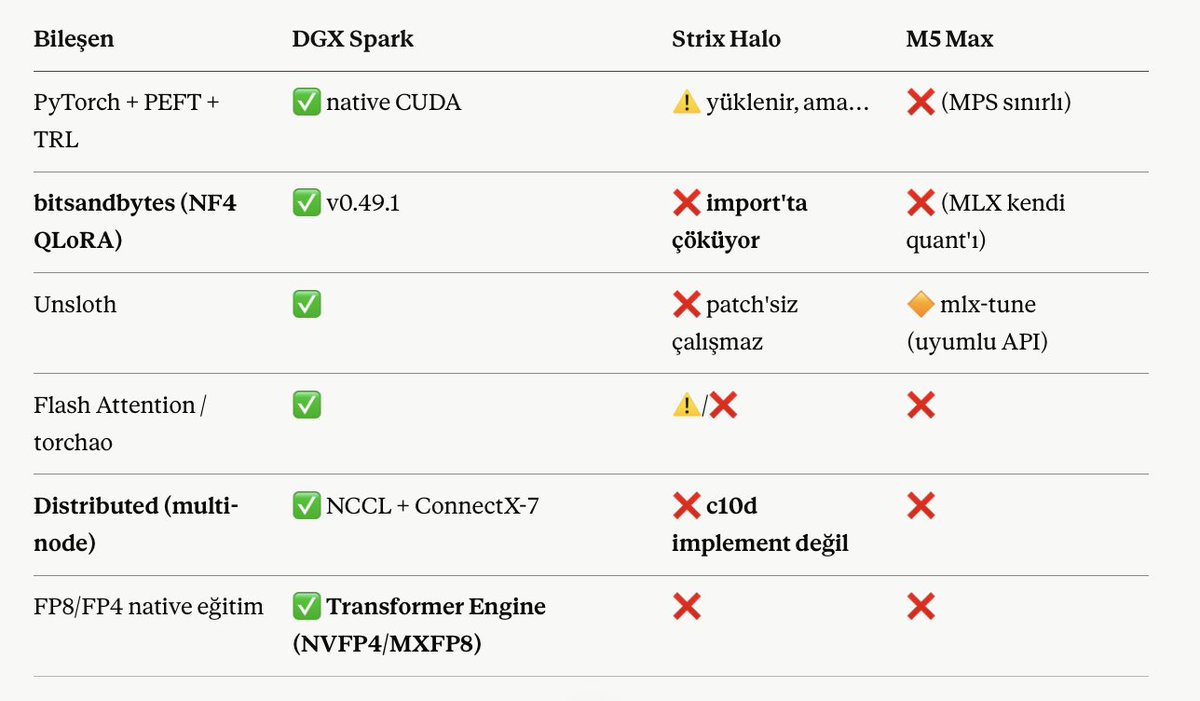
İşte hepimizin ilgili olduğu ve rakamlardan kopuan nokta burası... Burada kısaca ne yapıp yapamayacağınızı bahsedeceğim. Çünkü aşağıdaki metrik zaten herşeyi özetliyor.
Finetuning'de bir modeli LoRA ile finetune ederken modelin yüzde 0.5 - 1 arasında bir parametresini finetune etmek ve bunu 4096 context length ile yapmak istediğinizde batch size gibi değerleri en düşüğe aldığınızda BF16 ile Model'in parametresi x 2.5-3.5 katı kadar GB olarak Vram'de yer kaplıyor.
Örneğin:
- Qwen3.5-14B neredeyse BF16 finetuning'de Vram'de 50-60gb civarında yer alıyor, buna checkpoint'ler eklerseniz 55-70 arası sıklığa göre değişiyor. İşte burada devreye quantizasyon ile finetuning giriyor; bitsandbytes... O nedenle şunu diyebiliriz ki 35B gibi bir modeli efektif olarak AMD ve MLX'de sağlıklı eğitmeniz çok çok zor.
- Aynı zamanda oldu ki transformers ile eğitim vermek isterseniz PyTorch, PEFT, TRL vb yok. Uyarlasanız bile oldu ki çok zor.
- Finetune başlarsanız FlashAttention gib hızlandırıcılar AMD ve MLX'de yine sağlıklı değil...
Multi-node, ki en önemlisi! Zaten Vram'i önemsemeseniz bu cihazların almazsınız. Ki oldu ki aldınız mutlaka daha fazlasına ihtiyacınız olacak. O anda devreye artık ethernet yada RDMA chain etmek değil tensor paralellizm ve DDP gib dağıtık ram kullanımı isteceksiniz.
İşte burda ipler kopuyor... Çünkü 600 GB bandwidth'e sahip M chipler 80GBs thunderbolt'a takılıyor, AMD 10GBs ethernete takılıyor...
Nvidia burda benimde en çok tercih etmemde etkili olan QSFP56 ile 200Gbs kullanıyor ve bu çok değerli. Çünkü bandwidth'e çok yakın olduğundan darboğaz olmadan DDP ile inference ve sağlık finetuning yapma imkanı veriyor.
5
3
58
5,832
s3nh retweeted

Jun 14
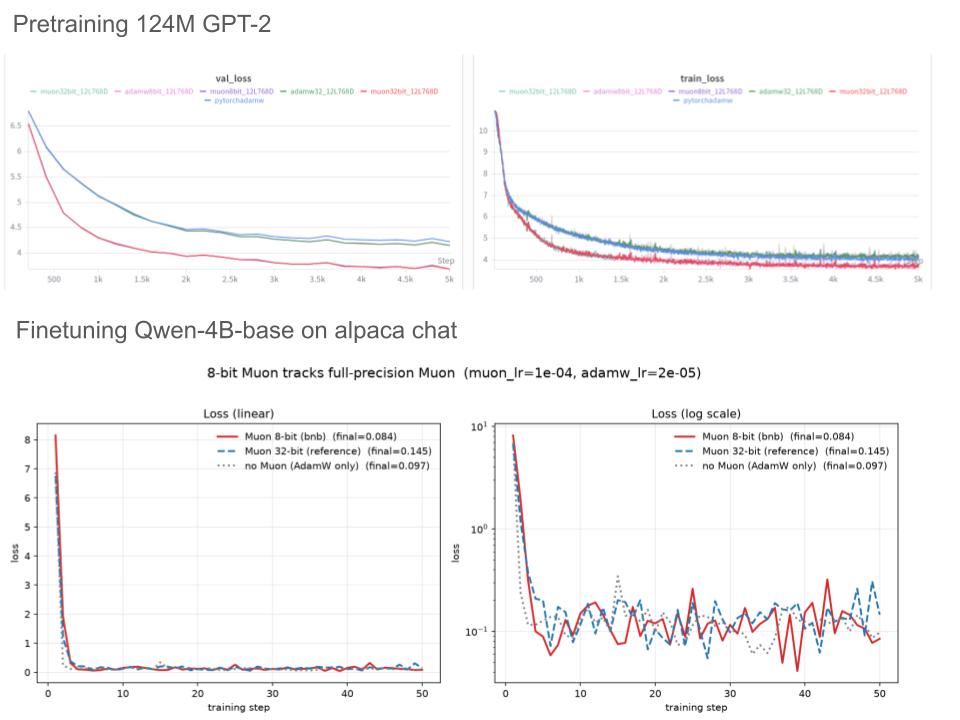
Day 2 of continuing working on what Fable 5 coded Muon for bitsandbytes:
- It finished Muon-32bit, 8bit using Tri Dao's Gram Newton-Schulz with just 2 shot
However after it got yanked in the middle of writing, I also want to add FSDP-2 support. Which is a bit harder than expected. Unlike AdamW which is elementwise (so DP is easy), Muon's needs the full 2D weight matrix. Took several prompts with Opus 4.8 co-work with GPT-5.5 xhigh to make it work ( I think )
Bonus: 8bit momentum tracks 32bit basically perfectly over my sweep, and nf4/fp4/nvfp4 are indistinguishable
1
1
3
445

🟢 LIVE NOW 🟢
PRAGMATA — Protocol: Leveling Up continues.
Wrapping up the Lunum Mines and pushing into the next level.
⚡ twitch.tv/DV8FromTheCode
#Pragmata #Capcom #TwitchStreamer #LiveNow #BitsAndBytes
1
1
44

Jun 13
⚡ Quantization, Distillation & Model Compression — the final practical layer that makes powerful LLMs viable for real-world industrial deployment.
Just read this excellent technical white paper from @aasaitech on turning massive models into efficient, edge-ready systems without sacrificing too much intelligence.
Key highlights: • 4-bit quantization (GPTQ, AWQ, GGUF, bitsandbytes) as the sweet spot for production • Knowledge distillation: teacher → student for smaller, faster specialized models • Complementary techniques: pruning, LoRA/QLoRA, sparsity • Industrial wins: lower latency/memory on factory hardware, cost reduction, energy-efficient edge orchestration, faster inference on industrial PCs
Essential for scaling AI across manufacturing floors, maintenance copilots, robotics, and resource-constrained environments.
Full white paper infographic: x.com/aasaitech/status/20653…
How are you approaching model compression in your deployments — 4-bit quantization, distillation pipelines, or full QLoRA workflows?
#Quantization #ModelCompression #KnowledgeDistillation #LLMOptimization #IndustrialAI #EdgeAI #AgenticAI

18


Jun 12
Modelos abiertos: instalación, optimización y personalización
Aquí es donde realmente tienes el control:
Inferencia local eficiente con Ollama, vLLM, LM Studio y Open WebUI.
Cuantización con GGUF, AWQ, GPTQ y bitsandbytes. Aprende sus diferencias y cuándo utilizar cada opción.
Fine-tuning eficiente:
QLoRA Unsloth, una de las mejores combinaciones actuales por su velocidad y bajo consumo de VRAM.
Adaptadores LoRA.
Preparación de datasets de calidad.
Técnicas más avanzadas:
SFT → DPO/GRPO, según el caso.
Deployment y serving optimizado.
Con esto puedes tener modelos personalizados que funcionen localmente, sean privados y estén adaptados exactamente a tu dominio.
1
1
101

4. Modelos abiertos: instalación, optimización y personalización
Aquí es donde realmente tienes control:
- Inferencia local eficiente: Ollama, vLLM, LM Studio, Open WebUI.
- Cuantización: GGUF, AWQ, GPTQ, bitsandbytes. Aprende las diferencias y cuándo usar cada una.
- Fine-tuning eficiente:
- QLoRA Unsloth (actualmente una de las mejores combinaciones por velocidad y bajo consumo de VRAM).
- LoRA adapters.
- Preparación de datasets de calidad.
- Técnicas más avanzadas: SFT → DPO/GRPO según el caso.
- Deployment y serving optimizado.
Con esto puedes tener modelos personalizados que funcionan localmente, son privados y están adaptados exactamente a tu dominio.
1
15
1,155

i just found out bitsandbytes works on rocm now. No more nvidia monopoly on easy quantized finetuning!!
2
48

Tim Dettmers wrote bitsandbytes and QLoRA, the reason you can run and fine-tune a serious AI model on one consumer GPU instead of a server farm.
2.2 million installs a month. Almost every open-source model you've run locally passed through his code.
His trick: squeeze a model to 4-bit and lose almost nothing. He fine-tuned a 65B model on a single GPU and matched full precision.
Everyone rents compute from a lab. He's the reason you don't have to.

17
12
65
6,196
🟢 LIVE NOW 🟢
For Karl! ⛏️💀
Deep Rock Galactic — diving in and not coming up until every dwarf makes it home.
⚡ twitch.tv/DV8FromTheCode
#DeepRockGalactic #DRG #TwitchStreamer #LiveNow #BitsAndBytes
46


Jun 7
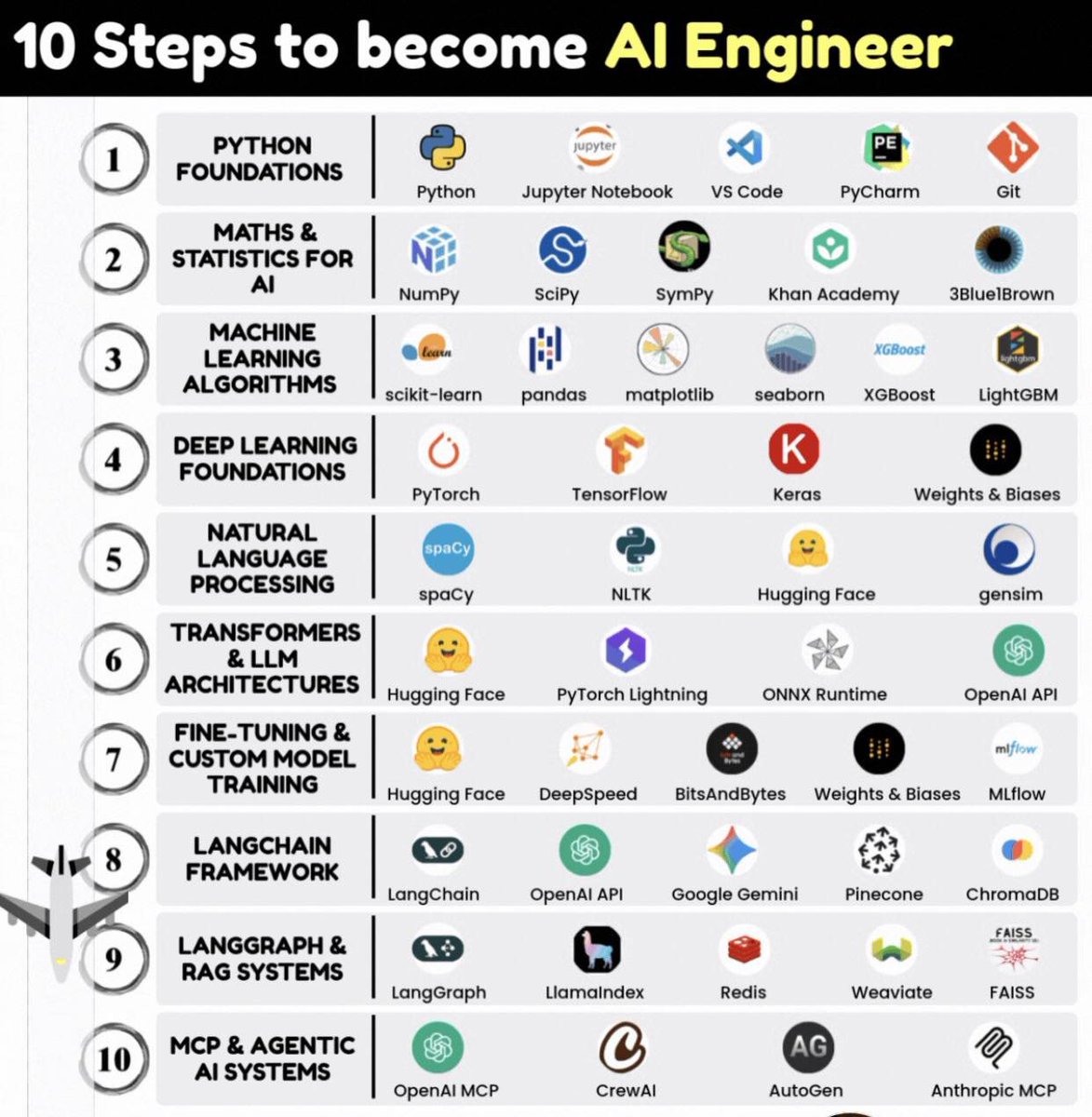
𝐓𝐡𝐞 𝐀𝐈 𝐣𝐨𝐛 𝐦𝐚𝐫𝐤𝐞𝐭 𝐞𝐱𝐩𝐥𝐨𝐝𝐞𝐝 300% 𝐥𝐚𝐬𝐭 𝐲𝐞𝐚𝐫. 𝐁𝐮𝐭 90% 𝐨𝐟 "𝐀𝐈 𝐞𝐧𝐠𝐢𝐧𝐞𝐞𝐫𝐬" 𝐰𝐚𝐬𝐡 𝐨𝐮𝐭. 𝐖𝐡𝐲? 𝐍𝐨 𝐫𝐨𝐚𝐝𝐦𝐚𝐩.
𝐈 𝐛𝐮𝐢𝐥𝐭 𝐦𝐲 𝐜𝐚𝐫𝐞𝐞𝐫 𝐟𝐫𝐨𝐦 𝐳𝐞𝐫𝐨. 𝐇𝐢𝐫𝐞𝐝 𝐚𝐭 𝐅𝐀𝐀𝐍𝐆 𝐢𝐧 18 𝐦𝐨𝐧𝐭𝐡𝐬. 𝐇𝐞𝐫𝐞'𝐬 𝐭𝐡𝐞 𝐞𝐱𝐚𝐜𝐭 10-𝐬𝐭𝐞𝐩 𝐩𝐚𝐭𝐡. 𝐅𝐨𝐥𝐥𝐨𝐰 𝐢𝐭. 𝐎𝐰𝐧 𝐢𝐭.
→ Step 1: Python Foundations
Master Python, Jupyter Notebook, VS Code or PyCharm, Git. Code daily.
→ Step 2: Maths & Statistics for AI
Use NumPy, SciPy, SymPy. Learn via Khan Academy, 3Blue1Brown videos.
→ Step 3: Machine Learning Algorithms
Dive into scikit-learn, pandas, matplotlib/seaborn, XGBoost/LightGBM. Build predictors.
→ Step 4: Deep Learning Foundations
Grasp PyTorch, TensorFlow, Keras. Track with Weights & Biases.
→ Step 5: Natural Language Processing
Work with spaCy, NLTK, Hugging Face, gensim. Process text like a pro.
→ Step 6: Transformers & LLM Architectures
Leverage Hugging Face Transformers, PyTorch Lightning, ONNX Runtime, OpenAI API.
→ Step 7: Fine-Tuning & Custom Model Training
Fine-tune via Hugging Face, DeepSpeed, BitsAndBytes. Log with Weights & Biases,
MLflow.
→ Step 8: LangChain Framework
Build chains using LangChain, OpenAI API, Google Gemini, Pinecone, ChromaDB.
→ Step 9: LangGraph & RAG Systems
Create graphs with LangGraph, LlamaIndex, Redis, Weaviate, FAISS.
→ Step 10: MCP & Agentic AI Systems
Deploy agents: OpenAI MCP, CrewAI, AutoGen, Anthropic MCP.
11
36
168
9,004

Jun 4
I am trying to make ideogram usable on my spark;
Problem 1. github.com/ideogram-oss/ideo…
Problem 2. Bitsandbytes is unbelievable slow
3
2
5
1,926