
Apr 27
I'd been lying to myself about containers for years.
I could docker run anything. Could not have told you what actually happens between that command and a process existing on my machine.
A fly io take-home ~6 months back forced me to find out. Forgot to share the write-up till now.
A container image is a tar of tars. A "running container" is an ext4 on a thin volume on a devicemapper thinpool. "Activating" is one dmsetup create_snap — zero bytes copied.
The orchestrator isn't magic. It's an FSM walking a state diff, with SQLite as the source of truth so a reboot mid-unpack resumes instead of restarts.
Full walkthrough — ubuntu:24.04 into a thinpool by hand, then the Go/FSMv2 version that survives crashes:
dipankar-das.com/blog/flyio-…
2
7
153

Apr 13
Docker Layers - Copy On Write(COW) strategy
------------------------------------------------------
COW(Copy On Write) Strategy --> Enables efficient storage and management of image and container layers.
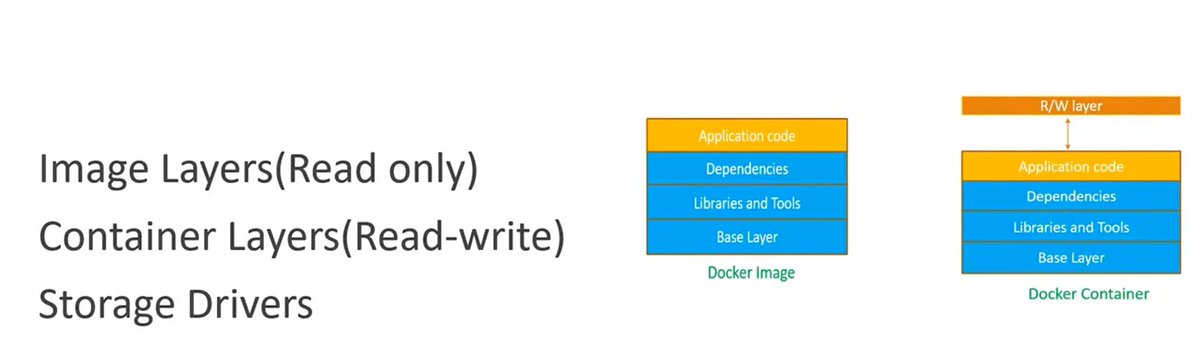
Image Layers --> Docker Image consist of multiple read-only layers.
Example: Python application Docker image contains below layers.
Base Image (Ubuntu) --> Layer 1 (Install Python) --> Layer 2 (Add App Code)
Container Layers --> When Containers are created, they add a single read-write layer on top of read only layer for temporary modifications.
COW(Copy On Write) Strategy -->
When a container needs to modify a file, it searches for it from the top layer downwards. If found in a lower read-only layer, the file is copied to the top read write layer to be edited, preventing changes to the base image. This is the reason, it is called as Copy On Write strategy.
Example: let's say, we have a file /app/config.txt exists in image.
For read operation on this file:
Container reads → directly from image layer (no copy).
For Write operation or modification of this file
Docker copies file from image layer to container layer and modifies it there. This is Copy On Write process.
Implementation --> To implement this COW, Docker uses storage drivers.
Examples of storage drivers : overlay2,devicemapper,autofs,btrfs,zfs etc.
Advantages of COW -->
1. Efficient Disk Usage and Layer reusability
Multiple containers share the same image layers. No duplicate storage for unchanged files.
2. Optimized for Read Operations
Reads happen directly from lower (image) layers. Very fast for read-heavy workloads.
3. Lightweight Containers
Containers only store changes (diffs).
Disadvantages -->
Slower Write Performance:
Since for write operations, it needs to Copy from lower layer to writable layer, this adds latency for write heavy apps.
Databases do frequent writes and it is not Ideal for Databases.
So for write heavy apps, we use volumes instead of container layer.
So we use combination of COW(great for saving space and fast startup) and volumes for write heavy workloads.
For more info on this, you may watch video youtu.be/hZvFXU6-qlc?si=BEsp…
2
3
24
655

16 Nov 2025
Docker Storage Drivers
→ Docker uses storage drivers to manage how image layers and container filesystems are stored on disk.
→ Storage drivers determine performance, efficiency, and how read/write operations behave inside containers.
→ Understanding them helps you choose the right driver for your host system and workload.
What Storage Drivers Do
→ Docker images are made of read-only layers.
→ When a container starts, Docker adds a thin writable layer on top of these layers.
→ Storage drivers manage all interactions between these layers, including copying, writing, and merging data.
Common Docker Storage Drivers
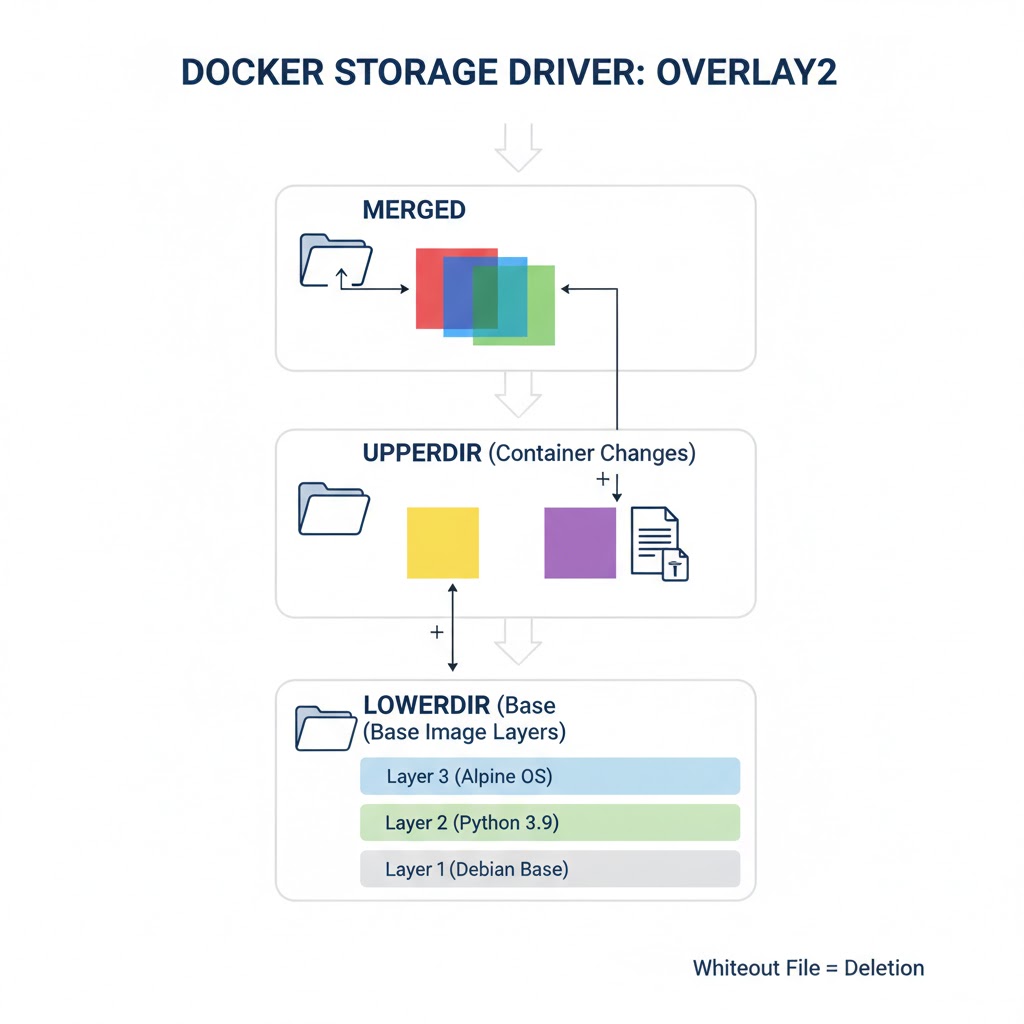
1. overlay2
→ The default and recommended storage driver for most modern Linux distributions.
→ Uses a copy-on-write (CoW) mechanism for efficient performance.
→ Faster than older drivers and uses fewer inodes.
→ Well-suited for production workloads.
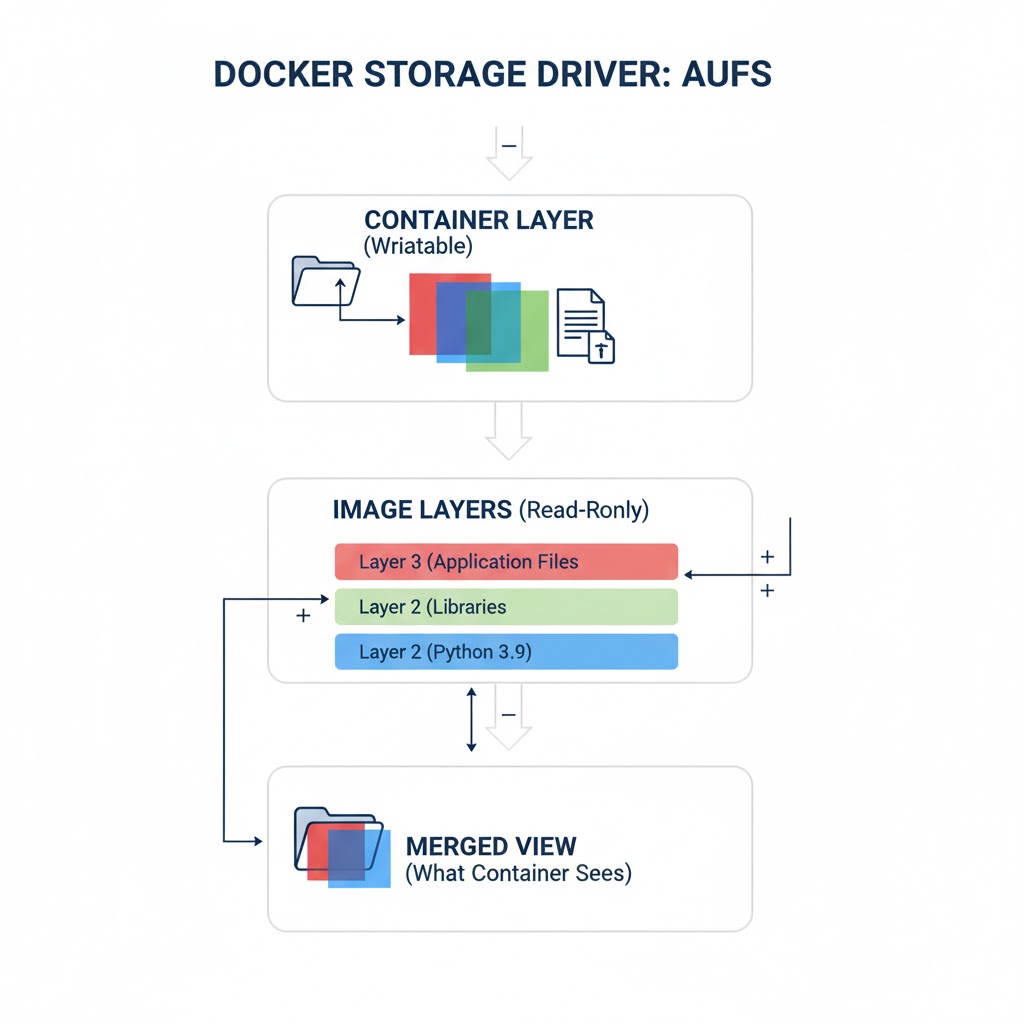
2. aufs
→ One of Docker’s earlier storage drivers.
→ Uses a layered filesystem but is less efficient and not widely supported anymore.
→ Replaced by overlay2 in most environments.
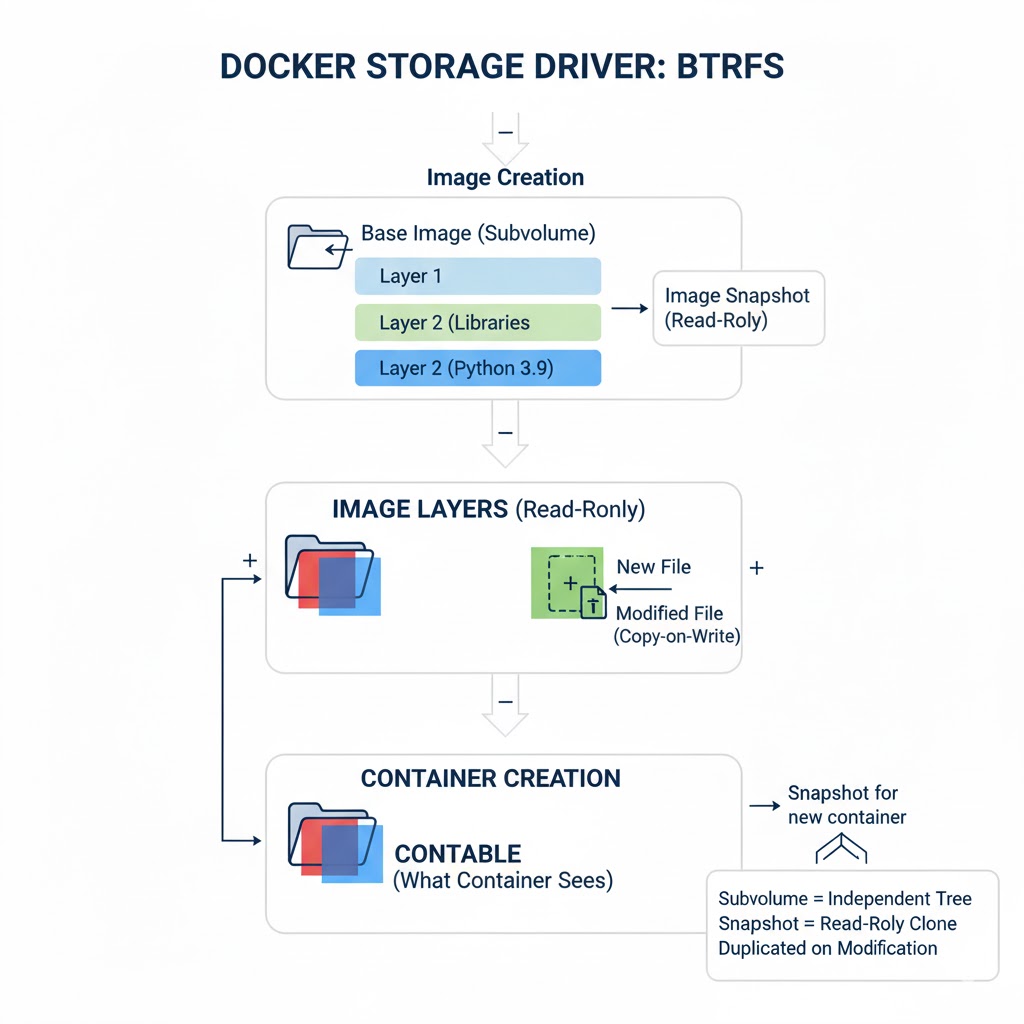
3. btrfs
→ A modern filesystem with built-in snapshotting and CoW support.
→ Allows advanced features like subvolumes and instant snapshots.
→ Best for systems already using btrfs as their native filesystem.
4. zfs
→ A highly advanced filesystem with features like compression, snapshots, and checksums.
→ Useful for large-scale environments requiring data integrity and advanced storage capabilities.
→ Requires significant resources and administrative knowledge.
5. devicemapper
→ Uses block-level storage instead of file-level storage.
→ Supports thin provisioning and snapshots.
→ Considered legacy and replaced by overlay2 in most setups.
6. vfs
→ The simplest driver, using plain copying without copy-on-write.
→ Extremely slow and inefficient.
→ Used mainly for debugging and testing, not production.
How Docker Chooses a Storage Driver
→ Docker automatically selects the optimal storage driver based on the host OS.
→ You can check the active driver using:
docker info | grep Storage
→ You can configure the driver in Docker’s daemon settings when needed.
Copy-on-Write (CoW) Behavior
→ Most drivers use copy-on-write:
→ When a container modifies a file from a read-only image layer, a copy of that file is moved into the writable layer.
→ This reduces disk usage and improves performance by avoiding duplication until needed.
Choosing the Right Storage Driver
→ overlay2: Best for almost all modern Linux systems.
→ btrfs / zfs: Best when advanced filesystem features are required.
→ devicemapper: Only for backward compatibility.
→ vfs: Only for testing or special cases.
Quick tip
→ Docker storage drivers manage how image layers and container filesystems interact.
→ Drivers like overlay2 provide performance, efficiency, and stability for production workloads.
→ Knowing how drivers work helps optimize builds, runtime performance, and storage usage.
Grab Docker Playbook:
codewithdhanian.gumroad.com/…
12
33
176
9,206

DM-PCACHE Merged For Linux 6.18 Along With Other DeviceMapper Changes
phoronix.com/news/Linux-6.18…
1
3
16
2,348

6 Sep 2024
ps: and like the other legend @thaJeztah hinted in the issue you referenced: what is the FS and mount device behind your /var/lib/docker? (if any)
It might be that some device sync (if using devicemapper) might be a cause for it
1
2
135

6 Aug 2023
"docker exec <CONTAINER ID> ps -eaf"
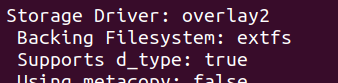
📍Docker Storage Drivers
Have you ever wondered when you build and run all these images and containers, where and how they are stored on your Docker Host?
Some examples of drivers are - overlay2, btrfs,zfs,vfs,devicemapper and fuse-overlayfs.
1
3
99

29 Jul 2023
The Linux Process Journey — “dmcrypt_write”
medium.com/@boutnaru/the-lin…
#Linux #Kernel #Crypto #DeviceMapper #dm #Learning #DevOps #DevSecOps #TheLinuxProcessJorueny #dmcrypt #dmcrypt_write #security #infosec #dfir #forensics
5
519


10 Feb 2023
docker engine 20系から23系にアップデートすると、devicemapper使えなくてoverlay2かfuse-overlayfsにしないとトラブるのって結構ダメージでかいと思うけどあんま話題になってない?
yum でそのままupdateするとハマるよね?
2
4
1,729

4 Jan 2023
ARMもRISC-Vもそうだけど
Boot処理がチップによって違うのと、PCIバスが無くDeviceMapperで静的にデバイスのアドレスを指定するので、デバイス毎にカーネルをビルドし直さないといけない所が、趣味で工作する輩には難儀です。大量生産するメーカーにとっては些細な事でしょうけど。
3
3
936


1 Jun 2022
👩🏻💻百合子さん地味に #Docker 詳しいので、勉強会で発言しまくって顰蹙🙍🏻♀️🙍🏻♂️を買っているなう(ぉ
🙋🏻♀️ストレージドライバがDeviceMapperな時代の古代のDockerからずっと使ってる百合子さんは、向かうところ敵なし♪ IPv6対応、SElinux対応も経験者なのさ!
1
1
2

14 Apr 2022
把 docker storage driver 從 devicemapper 換成 overlay2 了。更換之前有上網找資料,發現自己再次後知後覺,原來四、五年前就有文章在講。我是因為最近啟動 docker daemon 看到警告才知道該換了。
1
1
3

2 Feb 2022
Alles ist devicemapper heutzutage ...
Das führt zu der lustigen SItuation, daß du dein Raid auch komplett mit LVM konfigurieren kannst, und am Ende der selbe effektive Code läuft, aber zB /proc/mdstat nicht mehr genutzt wird, sondern alles mit lvm tools gemanaged wird.
1


28 Nov 2021
Finally sorted out some server maintenance that I've been dreading.
Debian 9 ➡️ Debian 10 ➡️ Debian 11
Double CPU & RAM
Switch Docker from devicemapper to overlay2 storage driver 😬
Postgres 9.6 ➡️ 11 ➡️ 13
1
2

10 Jan 2021
We also had a major devicemapper bug with 5.10 (and some would argue devicemapper is the standard). It happens. The important thing is that a fix was developed quickly.
1
3

23 Aug 2020
あー、無責任なことも言うけどいきたいですね。devicemapperで不揮発キャッシュ組んで趣味で論文投稿したいと思ってはいますがなかなかコードリーディングが難しいです。
1
2

5 Aug 2020
I wrote a new tool:
zcow - Manages temporary zram backed COW (Copy On Write) devices. Combines #linux #devicemapper snapshots with #zram. Useful for creating throw-away VM disk devices.
github.com/postmodern/zcow#r…
1
2
2