
LitElementにalien-signalsでModelっぽいものを作って組み合わせてみた。こういうのでいいんだよ感。
gist.github.com/wtnabe/a1fff…
1
1
2
574

Jan 26
#工具 #GUI 一款基于 Wails v2 和 LitElement (TypeScript) 开发的跨平台桌面视频下载工具。它集成了 yt-dlp,旨在为用户提供直观的GUI
github.com/legiorange/YTD-GO…
6
567

11 Aug 2025
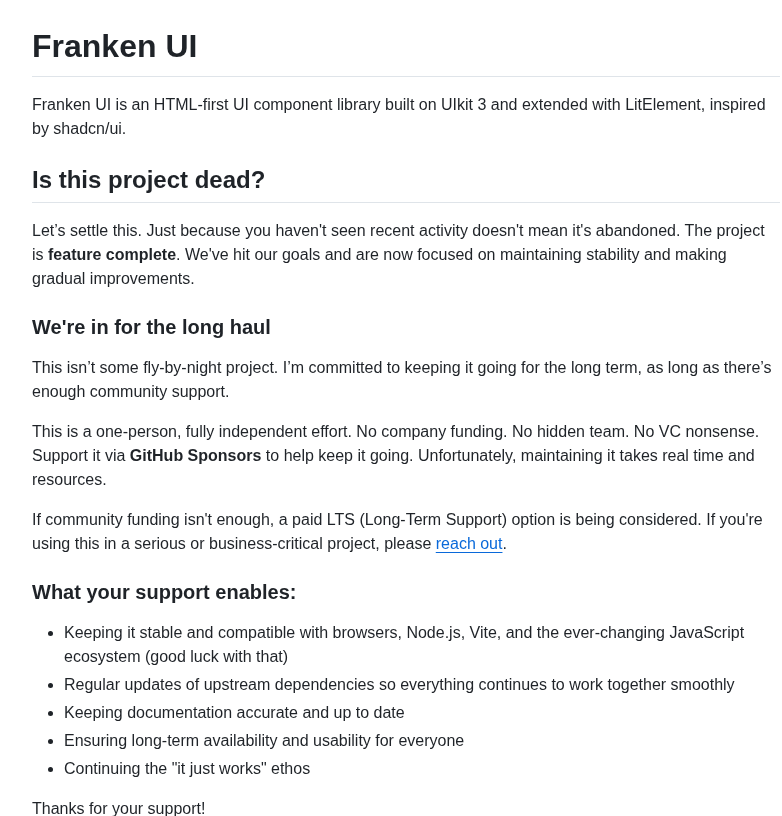
HTML-first UI components, framework-agnostic, built on UIkit and LitElement
1
7
2,542

24 Jul 2025
Yup I was asking him - but happy to hear your thoughts too! And I agree the "no LitElement or UIkit" thing is quite appealing.
1
1
75

#DevLog: #Anklang #SolidJS Influx
🧬 Fixed some of my #LitElement bugs by migrating to solid
🧩 Refactored & simplified modal dialog creation
🎯 Goal: Robust UI with modern reactivity patterns!
#WebDev #100DaysOfCode
1
2
118


9 May 2025
2 main differences off the top of my head:
- It's based off of the upcoming Tailwind v4 shadcn/ui (lots of changes to the styles): ui.shadcn.com/docs/tailwind-…
- I don't use any framework or library beyond a tiny bit of Alpine.js for some of the more complex elements (e.g. combobox). So no UIkit 3 or LitElement. You can also implement your own JS or not use any of it at all.
1
12
687

18 Nov 2024
These are all the JavaScript frontend frameworks in the history of JS
Which one are you using for your project:
AngularJS (2010)
Angular (2 ) (2016)
Vue.js (2014)
Svelte (2016)
SolidJS (2020)
Preact (2015)
Alpine.js (2019)
Lit (formerly LitElement) (2019)
React (2013)
Next.js (for React) (2016)
Nuxt.js (for Vue) (2016)
Gatsby (for React) (2015)
Remix (for React) (2021)
Sapper (for Svelte) (2019)
Astro (framework-agnostic) (2021)
Backbone.js (2010)
Knockout.js (2010)
Alpine.js (2019)
Did I miss out some please add
13
4
70
16,056

26 Oct 2024
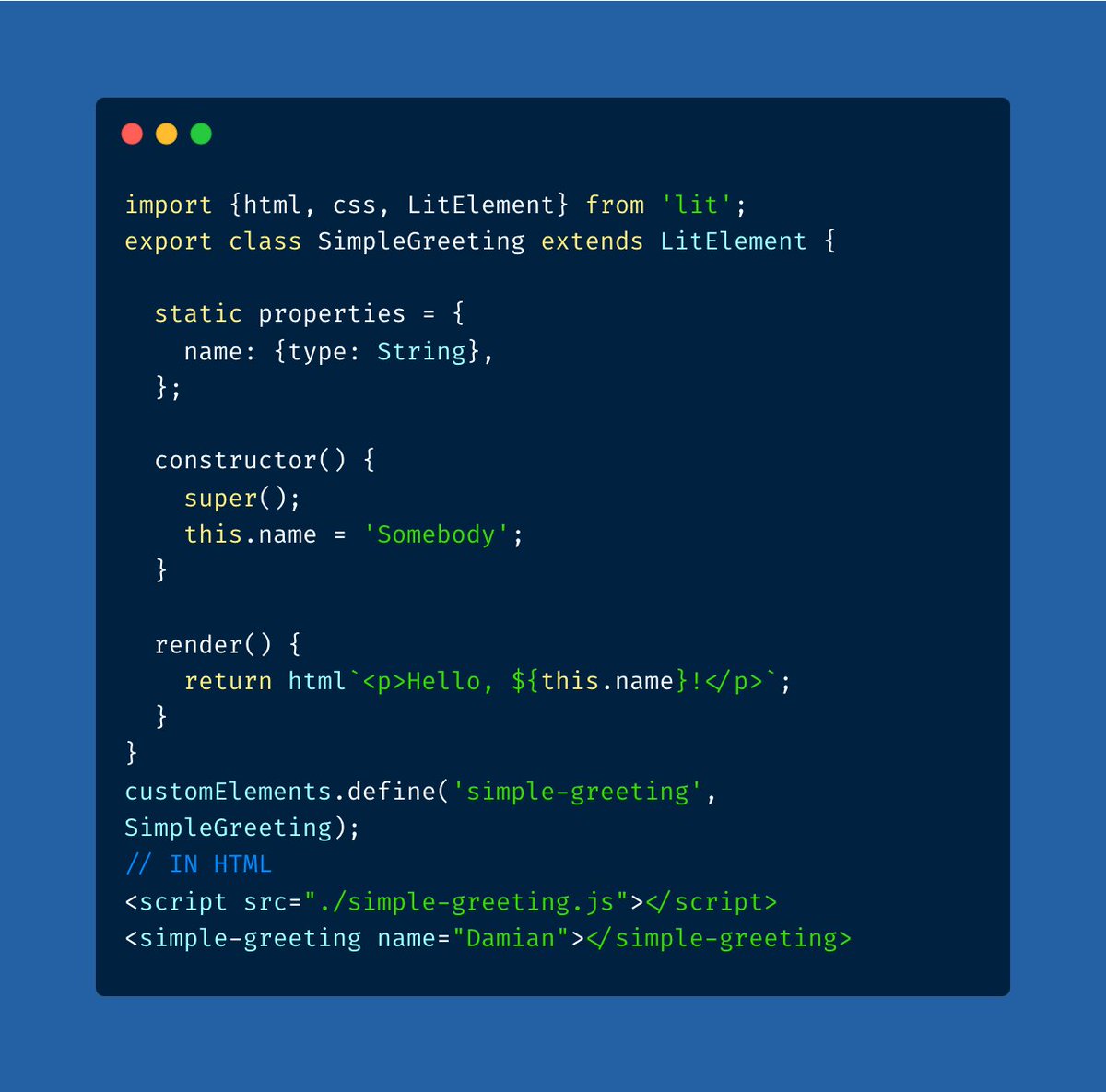
Have you ever heard of LitElement?
I am working on a new project and need some interactive components, but I didn't feel like setting up React or doing the FE in Next.JS.
I remember the tech I used in one of the enterprise projects I worked on a few years back.
LitElement is a simple library that follows the web component specification and creates custom elements that can be used anywhere.
If you are working on a project that needs a bit of interactivity and don't feel like adding react / vue.
Lit Element is a great choice.
2
2
201

11 Oct 2024
The decorators are optional niceties. I suspect a miniscule fraction of devs are using the (also optional) compiler. In the few years I worked with lit I don't think I used a single directive. So you're left with a tagged template literal (lit-html) plus a base class (LitElement)
1
1
146

29 Sep 2024
It isn’t. LitElement uses Lit HTML but you can absolutely use the latter solo (including on a server in your set it up right).
People should use what makes them productive. In my experience I’m able to be more productive with custom elements using Lit than anything else.
2
2
180

28 Jul 2024
Trying to figure out how ’LitElement’ works without having to call ’super()’. 🤔
@justinfagnani and @aomarks, how does it work? I've looked into the code, still not getting it.
1
2
131

4 Jun 2024
Curiosity is an amazing way to learn! Most of our users are on low end hardware, slow CPU, slow ssd disk, etc. The more you use React or any JS UI Library, the larger the bundle size becomes. The larger the bundle the slower it takes to download, js construction, js instantiation, and js evaluation.
One of the major design flaws in React and other UI libraries is JSX. Rendering HTML in JS brings in so much bloat to the bundle making the entire boot up process slower.
A better way doing this would be:
- HTML parser for rendering the UIs (blink)
- CSS parser for styling the UIs (blink)
- JS for the application logic (v8)
That is how the web works today, each module is responsible, and highly optimized to do that work. Instead of letting JS do all that for you, which was never the intent. Let JS just add the interactivity (event handlers) like how island’s architecture is done through Web Component, and you will get a speed boost.
UI Frameworks like LitElement and FastElement which are based on Web Components is a great way getting that perf startup boost since it ships less JS. Using those with Declarative Shadow DOM makes your UI more resuamable and super fast since UI code doesn’t have to exist in JS at all.
6
96

26 May 2024
oh nice thanks for the references. and you didn't want to use litelement or something for reactivity within the web components?
1
88
26 May 2024
nice - I took a look at the barstool one - what's the main reason for using web components here?
Reusability? Can't you easily use snippets for that? Wouldn't that perform better with less js weight?
Did you consider litelement for reactivity?
Why aren't you going the shadow dom route?
33

29 Mar 2024
Been using LitElement for Kanaloa's dApp and I gotta say the lack of constructors and the whole shadow root thingie are getting me on my nerves.
1
2
47

18 Jan 2024
… that and:
“you need to insert your behavior into various places in the framework either by subclassing or by plugging in your own classes. The framework's code then calls your code at these points.”
i.e. `extend LitElement`
…
2
2
97

13 Jan 2024
🌟 Web Development 2024:
Programming Languages:
🔧 JavaScript
🔧 TypeScript
🔧 Python
🔧 Java
🔧 Kotlin
🔧 Dart
🔧 Ruby
Frontend Frameworks:
🌐 React
🌐 Angular
🌐 Vue.js
🌐 Svelte
🌐 Next.js (React)
🌐 Nuxt.js (Vue.js)
🌐 Gatsby (React)
🌐 Blazor (WebAssembly)
🌐 Ember.js
CSS Frameworks:
🎨 Tailwind CSS
🎨 Bootstrap
🎨 Material UI
🎨 Ant Design
🎨 Bulma
🎨 Foundation
🎨 Semantic UI
State Management:
🔨 Redux
🔨 MobX
🔨 Vuex (Vue.js)
🔨 NgRx (Angular)
Web Components Libraries:
📦 Stencil
📦 LitElement
📦 Polymer
📦 Svelte Custom Elements
Performance Optimization:
🚀 Lazy Loading
🚀 Server-Side Rendering (SSR)
🚀 Progressive Web Apps (PWAs)
🚀 Code Splitting
🚀 Web Workers and Service Workers
Accessibility & UX:
👁️ ARIA
👁️ WCAG
👁️ Mobile-First Design
👁️ Responsive Design
UI/UX Design:
🎨 User Interface (UI) Design Principles
🎨 User Experience (UX) Design Strategies
🎨 Interaction Design
🎨 Usability Testing
🎨 Design Systems and Style Guides
🎨 Prototyping Tools and Techniques
🎨 Accessibility in Design
🎨 Design Thinking Approach
SEO Best Practices:
🔍 Structured Data
🔍 Core Web Vitals
🔍 Content Optimization
🔍 AMP
Web APIs:
🔗 WebRTC
🔗 WebSockets
🔗 Service Worker API
🔗 Fetch API
🔗 Web Push Notifications
Development Tools:
🛠️ VS Code
🛠️ Chrome DevTools
🛠️ ESLint
🛠️ Prettier
🛠️ Webpack
🛠️ Babel
🛠️ Figma
🛠️ Sketch
What are your thoughts and additions? 👇
7
16
73
6,061