
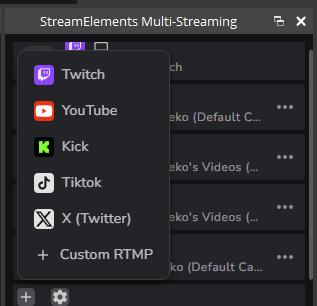
You can use it with any streaming platform that support rtmp streams I think
1
13

1 email address.
That's all a researcher needed to access every FIFA World Cup 2026 match's live stream controls.
He could've rickrolled the entire tournament.
The vulnerability: client-side authorization with no server-side enforcement. Any authenticated user in FIFA's internal tenant could access everything -- RTMP stream keys, live broadcast controls, match data.
He called CISA and the FBI because FIFA wouldn't respond to 10 emails.
9

FIFA Agent Platformの登録だけで同一Microsoft Entraテナント上のFIFA Football Data Platformに入り、クライアント側のNO_ROLES判定を迂回するとバックエンドAPIが権限確認なしで応答していたらしい。 World Cup 2026のMediaKind RTMP ingest URL、stream key、HLS preview、試合データ編集、Azure Function経由のBlob URLまで露出しており、認可の問題 / I Could've Rickrolled the Entire FIFA World Cup. All I Needed Was My ID. | bobdahacker bobdahacker.com/blog/fifa-ha…
1
418


GTAO [Enhanced] - Special Cargo Sell Missions Week: Monday
Live stream begins at 8:20pm ET/ 5:20pm PT powered by Rumble Studio's Direct RTMP to @rumblevideo, @Twitch and here to @X w/ uncensored @OnLocals live chat, @discord and @Steam voice chat, @RumbleRumBot Hub, @StreamBotApp and @blerp enabled.
You can also watch on @pickaxsocial and Truth Social.
@MasteringRumble @GamingOnRumble #RumbleTakeover
rumble.com/v7bb7j4-gtao-enha…
1
49
GTAO [Enhanced] - Special Cargo Sell Missions Week: Monday
Live stream begins at 8:20pm ET/ 5:20pm PT powered by Rumble Studio's Direct RTMP to @rumblevideo, @Twitch and here to @X w/ uncensored @OnLocals live chat, @discord and @Steam voice chat, @RumbleRumBot Hub, @StreamBotApp and @blerp enabled.
You can also watch on @pickaxsocial and Truth Social.
@MasteringRumble @GamingOnRumble #RumbleTakeover
rumble.com/v7bb7j4-gtao-enha…
37
GTAO [Enhanced] - Special Cargo Sell Missions Week: Monday
Live stream begins at 8:20pm ET/ 5:20pm PT powered by Rumble Studio's Direct RTMP to @rumblevideo, @Twitch and here to @X w/ uncensored @OnLocals live chat, @discord and @Steam voice chat, @RumbleRumBot Hub, @StreamBotApp and @blerp enabled.
You can also watch on @pickaxsocial and Truth Social.
@MasteringRumble @GamingOnRumble #RumbleTakeover
rumble.com/v7bb7j4-gtao-enha…
1
1
62


Jun 15
It's HORRENDOUS! Their RTMP is trash! Luckily, their Legacy Canvas option started magically working again!
Jun 15

@NiceGuyMersh uhhhh…classic, uhhh, Rumble…uhh…gimmick am I right?
11
957

yea aitum multistream, Sorayukis multiple RTMP plugin, Meld studio, and more are options, but they use your own resources to stream, like bandwidth
12

Please, for the love of God, do not use ReStream. It constantly crashes and creates multiple scheduled streams on YouTube. Use sorayuki's Multiple RTMP plugin for OBS. github.com/sorayuki/obs-mult…
No bloat, lightweight, no crashes, easy to use.
1
1
52

Jun 14
Not all platforms unfortunately. Any platform you use the custom RTMP does not automatically add that platforms chat to it. Something Rumble Studio is behind on.
1
5


Jun 14
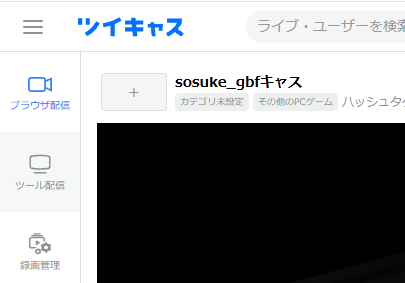
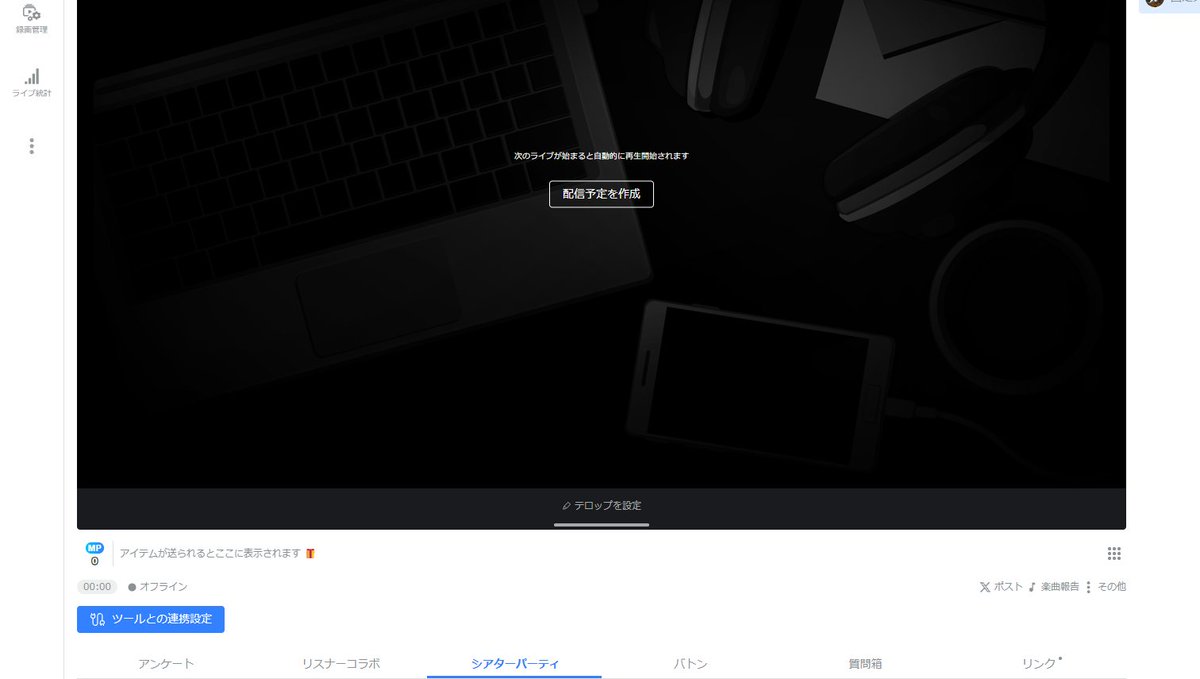
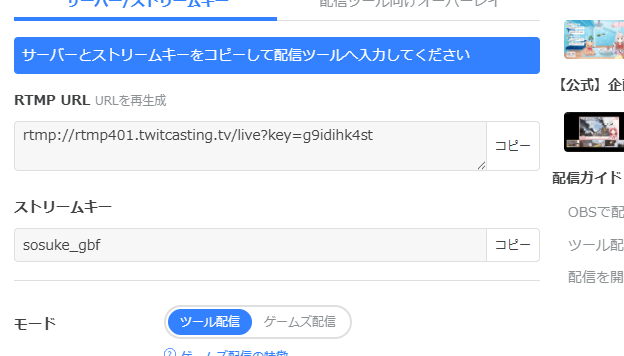
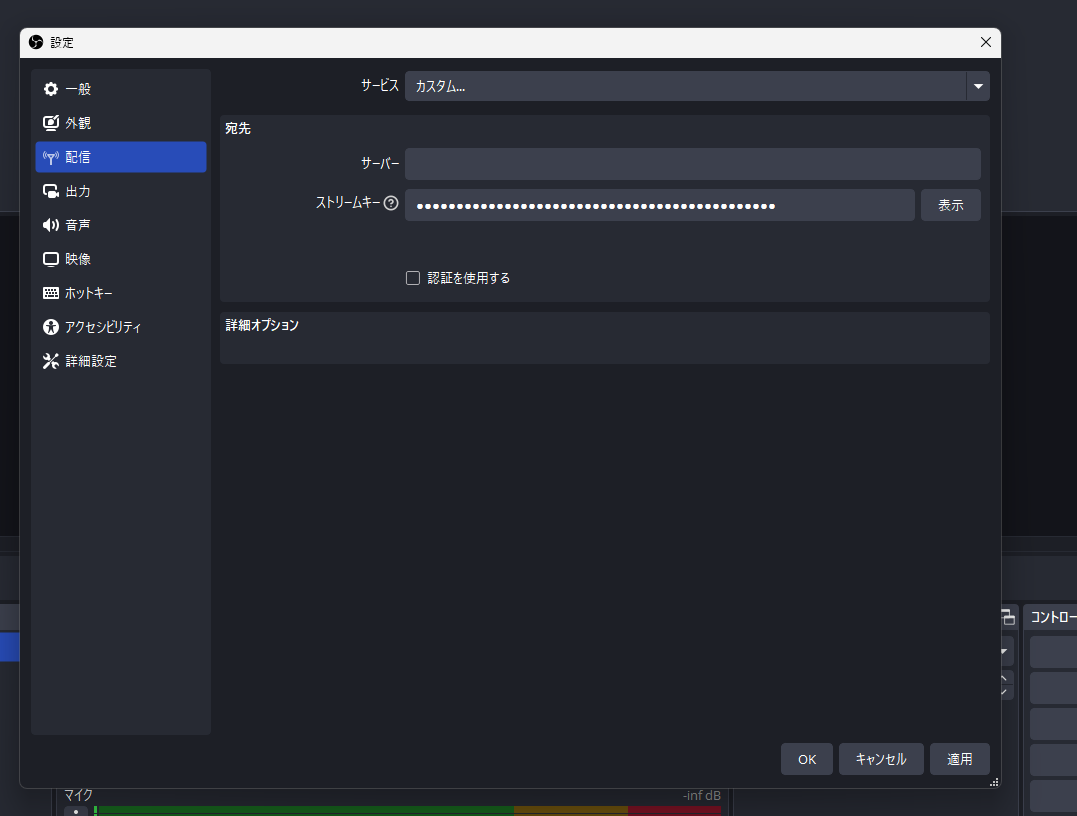
ツイキャス→ツール配信→ツールとの連携設定→RTMP URLとストリームキーをコピー→OBSの設定→配信→サービスをカスタムにする→RTMP URLとストリームキーを貼り付けらしい…
やっぱりOBSは必要ぽい
1
29

basically you can log in, or with a stream key and rtmp thingy i believe it all comes from you so you need to have a good upload speed
1
1
16

Jun 13
I learned today the they will retroactively remove disclosure from live recorded videos. 👌 live stuff, and even ad alternative content. The video you see could be entirely different from what I upload, or entire accounts made in millisecond...
That'll be fun
#riggedmarket
#Deepfake #SyntheticMedia #DiminishedReality #VideoForensics #SportsBetting #OddsManipulation #WeatherDeepfakes #ClimateOSINT #WorldEvents #CrisisActors #CrimeForensics #EvidenceTampering #OSINT
#Comprehensive Analysis of Real-Time Video Manipulation, Synthetic Media Diffusion, and Cognitive Anchoring Methodologie
Section 1: Introduction and Foundational Architectural Frameworks
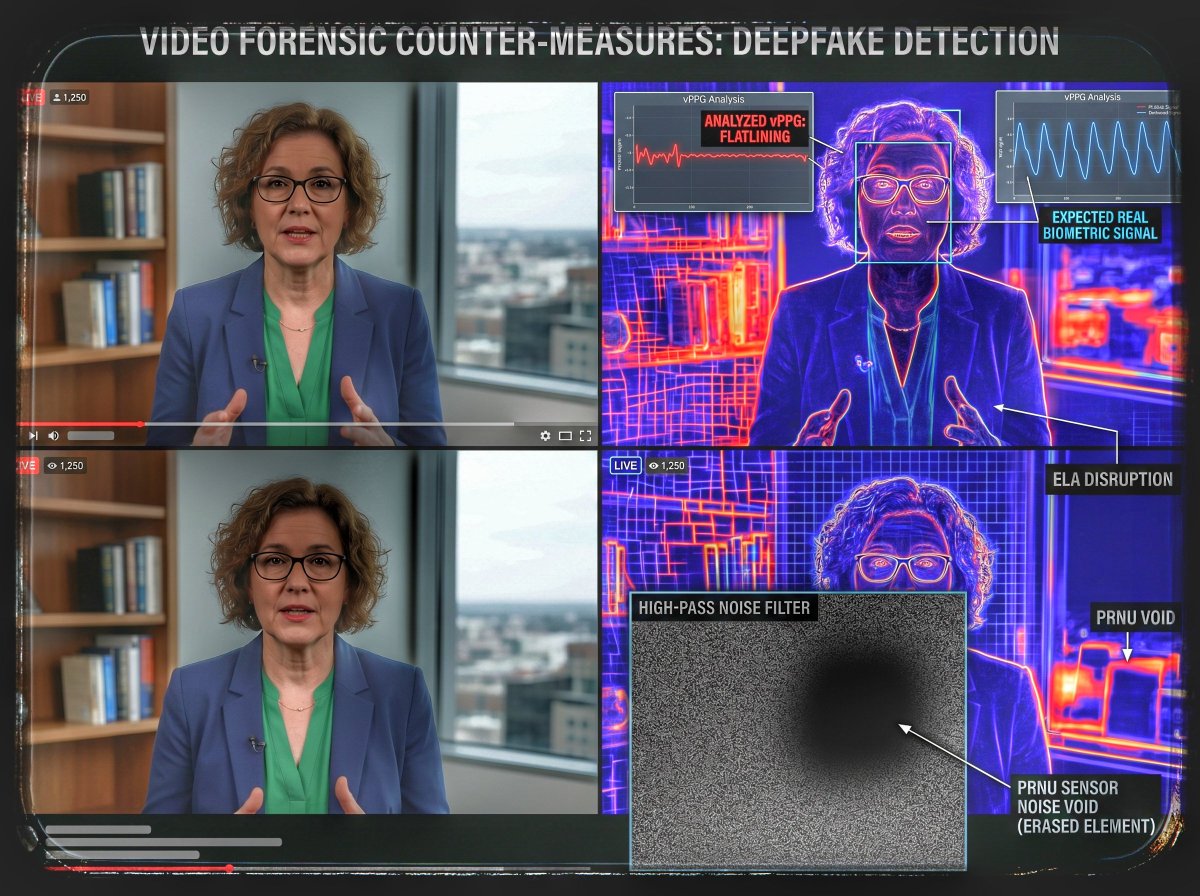
The structural integrity of live digital evidence has been fundamentally altered by the convergence of high-throughput computing architectures and real-time generative artificial intelligence. Historically, video verification processes relied on the implicit assumption that live-streamed data possessed structural fidelity due to the computational impossibility of performing frame-by-frame contextual modifications on the fly. This structural guarantee no longer exists.
Modern ingestion and streaming pipelines can execute arbitrary frame modification, ambient lighting reconfiguration, and object elimination in real time. These alterations occur within the transient space between raw sensor capture and network distribution. The systemic implementation of these technologies allows for the seamless modification of broadcast environments, the retroactive extraction or insertion of critical physical evidence, and the deliberate exploitation of human memory vulnerabilities.
The Live Streaming Data Pipeline
To understand how video manipulation occurs without introducing perceptible latency, one must examine the baseline mechanics of modern video distribution networks. A standard live stream operates via a sequential pipeline:
1. Sensor Ingestion: The camera sensor captures raw visual data, converting photons into electronic signals organized as distinct pixel matrices.
2. Hardware Encoding: The raw matrices are compressed using specialized hardware codecs (e.g., H.264, H.265, AV1) to minimize bandwidth requirements.
3. Protocol Packetization: The encoded bitstream is segmented into network packets via transmission protocols such as Real-Time Messaging Protocol (RTMP), Web Real-Time Communication (WebRTC), or Secure Reliable Transport (SRT).
4. Content Delivery Network (CDN) Edge Distribution: Packets are routed through localized edge servers to minimize geographic latency before reaching the end-user rendering engine.
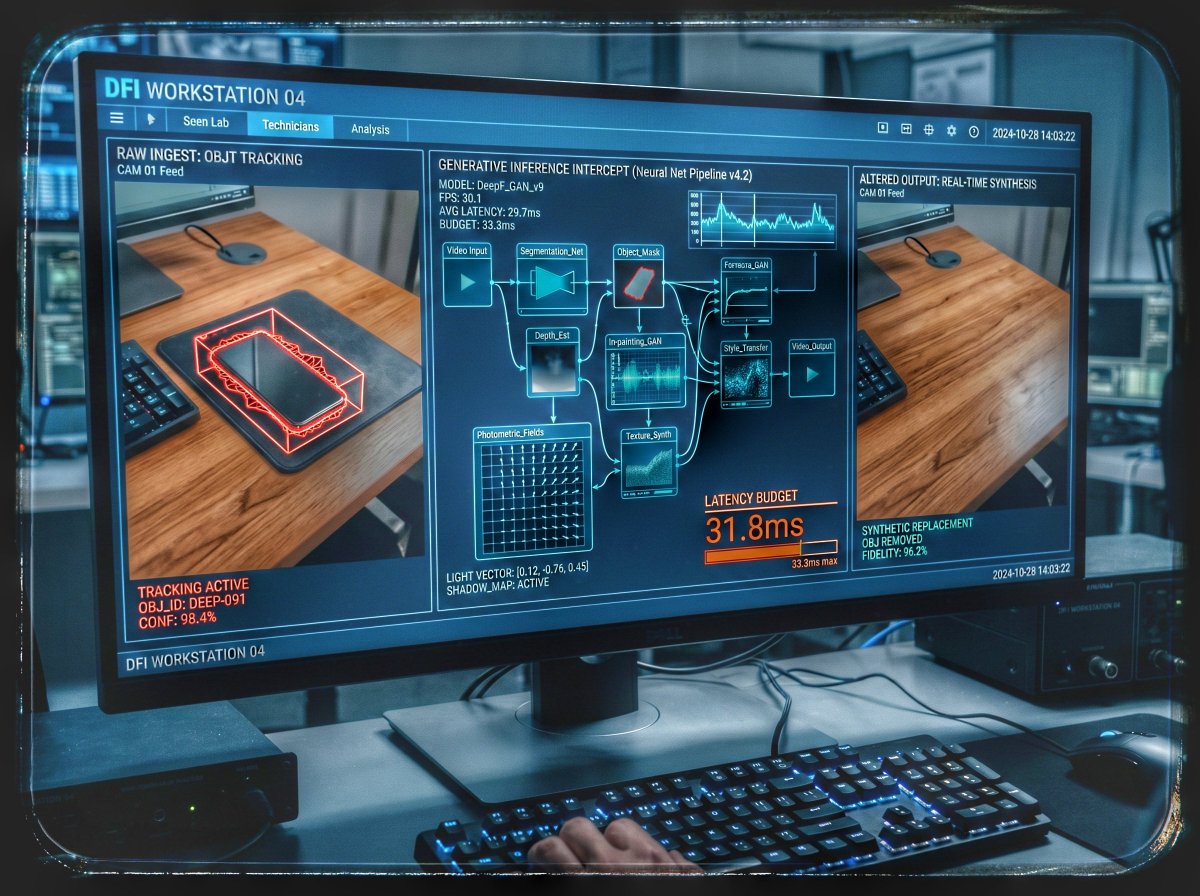
Real-time tampering systems insert an intermediate computation layer between Sensor Ingestion and Hardware Encoding. This layer is designated as the Generative Inference Intercept (GII). By processing the uncompressed or shallowly encoded frames directly within high-bandwidth video memory (VRAM), deep learning models can evaluate, mask, and reconstruct the pixel landscape of a live broadcast prior to protocol packetization. Consequently, the viewer receives a compromised stream that appears structurally sound, devoid of typical post-production artifacts, and accompanied by authentic network timestamps that falsely validate its integrity.
[Camera Sensor] ──> [Generative Inference Intercept] ──> [Hardware Encoder] ──> [CDN Distribution] ──> [Viewer]
│ (AI Frame Re-Synthesis)
└──> Latency Budget: < 33.3ms (for 30 FPS)
------------------------------
64

How to do 24/7 livestreams like a PRO and print free money - the BEST method for non-gurus and serious operators
Nobody talks about this, but a 24/7 YouTube live stream is the laziest money on the platform. One looping video, running around the clock, pulling in ad rev & memberships while you sleep.
Once you're monetized it costs ~$5/month to run - so with any traction, you're basically guaranteed to profit. Not monetized? It farms watch hours toward your 4,000.
The setup:
→ Compile your best videos into one long file. 10 hours is fine. Sleep niches stack endlessly, but this works almost anywhere - ignore the "only works for X niche" gurus. Only profit matters.
→ Rent a cheap VPS (~$5/mo, I use Hetzner). Firewall it so only your home IP connects
→ Loop the video into your stream key with FFmpeg, run it in tmux so the session lives forever
→ Turn on memberships and plug them in the description. Stream memberships feed each other - that's where the money hides. And don't forget the YT setting that maximizes ads ;)
You don't need to understand any of it. If you can chat with AI and copy/paste, you can do this.
Here's the exact command to use on the VPS👇
ffmpeg -re -stream_loop -1 -i live.mp4 -c copy -f flv "rtmp://a.rtmp.youtube.com/live2/YOUR-STREAM-KEY"
Back when my biggest channel sleepy time history was blowing up, this was exactly what I did. I'll be running the same playbook on my latest monetized sleep channel
If none of this makes any sense, watch the full breakdown below where I demonstrate this live
4
2
39
2,082
朝乃めざめ。 平成レトロVtuber retweeted

Jun 12
📢昨日はXで配信してみたので感想を!
・Xでの配信方法
☑︎Xプレミアムに入る
☑︎OBSに同時配信ツールobs-multi-rtmpを導入
☑︎XでXプレミアムまたはMediaStudio→producerタブ→ライブ放送を作成→RTMP URLとストリームキーをOBSに設定
☑︎OBSで配信開始&Xでも配信開始
めっちゃ省いたけど調べたらでできます!聞きたいことあれば誰でも聞いて!忘れるまでは答えられるかも!
・感想
これ、視聴者数はほんまなん?
Twitchで約75人の視聴者数でしたがXでは120人前後でした。
(YouTubeはたぶん2人くらい)
これが本当だったら、リスナーさんがプラットフォームで分散されていないのでやる価値がかなりある気がします🌷
しかもX配信はやってる人少ない🏃♀️➡️
これが実際は多すぎるカウントをされているとしても、Xのフォロワーさんには私が配信していることをリアルタイムで表示できるので良いかも…🍥ˊ˗
実際XのフォロワーさんがTwitchとYouTubeに来てくれた!
今回の手触りとしてはとても良い!です!
コメント管理できないのでXはコメントできない設定にしましたが逆にコメントもなければ誰が来てくれてるのかも分からないのでリスナーさん側は気楽でいいかな❔
みてくれた方がおられればぜひ感想お待ちしてます!
1
6
31
1,371