
Jun 10
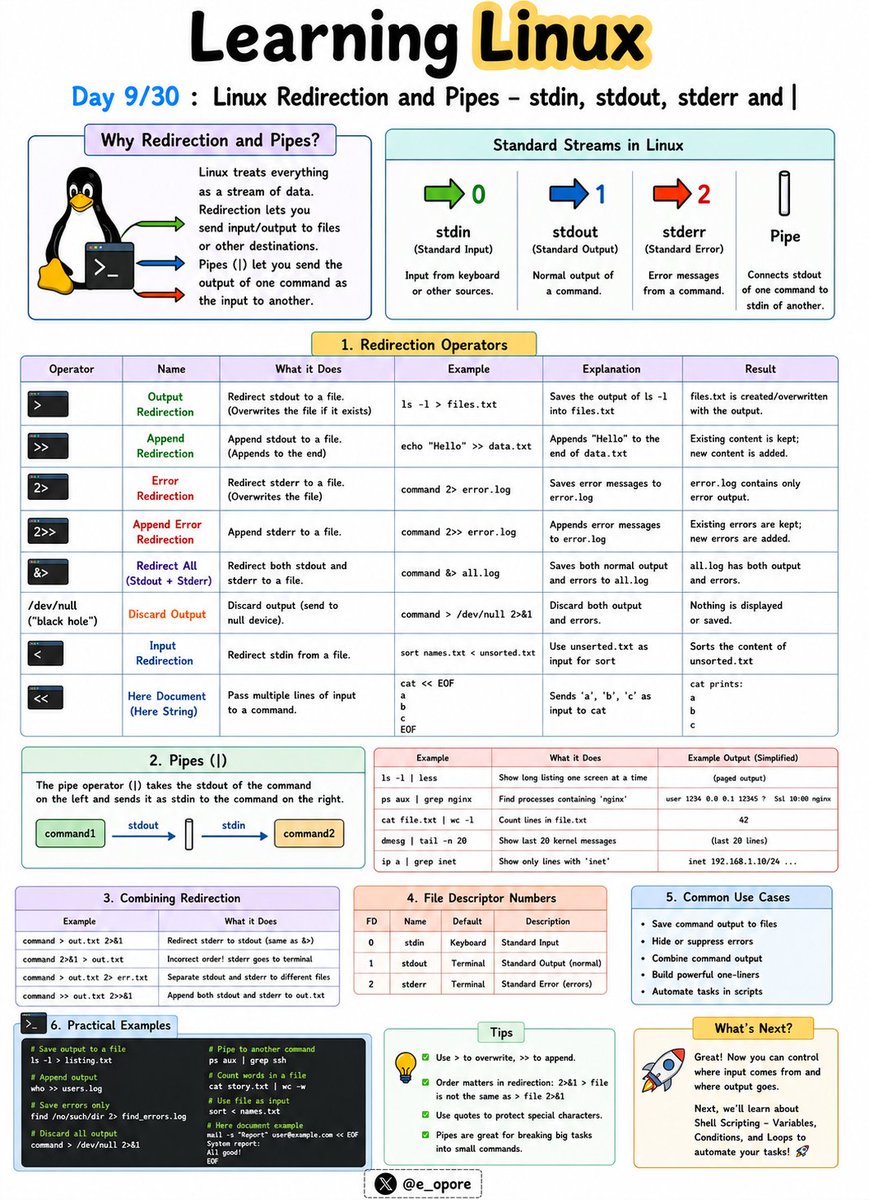
🐧 Day 9/30 — #Linux
One of Linux's greatest strengths is the ability to connect commands together and control where data flows.
Instead of manually copying output between programs, Linux allows commands to communicate seamlessly.
Linux Redirection and Pipes – stdin, stdout, stderr and |
Every Linux command works with three standard data streams:
→ stdin (Standard Input)
→ stdout (Standard Output)
→ stderr (Standard Error)
Understanding these streams is essential for automation, scripting, and system administration.
stdin (Standard Input)
stdin is the input a command receives.
Example:
→ sort < names.txt
The contents of names.txt are provided as input to the sort command.
stdout (Standard Output)
stdout is the normal output generated by a command.
Example:
→ ls > files.txt
Saves the output of ls into files.txt instead of displaying it on the screen.
stderr (Standard Error)
stderr contains error messages generated by commands.
Example:
→ ls missingfile 2> errors.txt
Saves error messages to errors.txt.
Redirection Operators
→ > = Overwrite output to a file
→ >> = Append output to a file
→ < = Read input from a file
→ 2> = Redirect error output
Examples:
→ echo "Hello Linux" > message.txt
Creates a file and writes text into it.
→ echo "More text" >> message.txt
Appends text to an existing file.
Pipes (|)
The pipe operator (|) sends the output of one command directly as input to another command.
Example:
→ ls | grep ".txt"
Lists only text files.
→ ps aux | grep nginx
Finds running nginx processes.
→ cat users.txt | sort
Sorts the contents of a file.
Why Redirection and Pipes Matter:
→ Automate repetitive tasks
→ Combine multiple commands efficiently
→ Filter and process large amounts of data
→ Build powerful shell scripts
→ Troubleshoot systems more effectively
Mastering redirection and pipes is a major step toward becoming productive in the Linux command line environment.
🐧 Grab Linux Ebook: codewithdhanian.gumroad.com/…
#Linux #LinuxTutorial #LinuxCommands #ShellScripting #Terminal #DevOps #SystemAdministration #OpenSource #Programming #100DaysOfCode
Jun 9

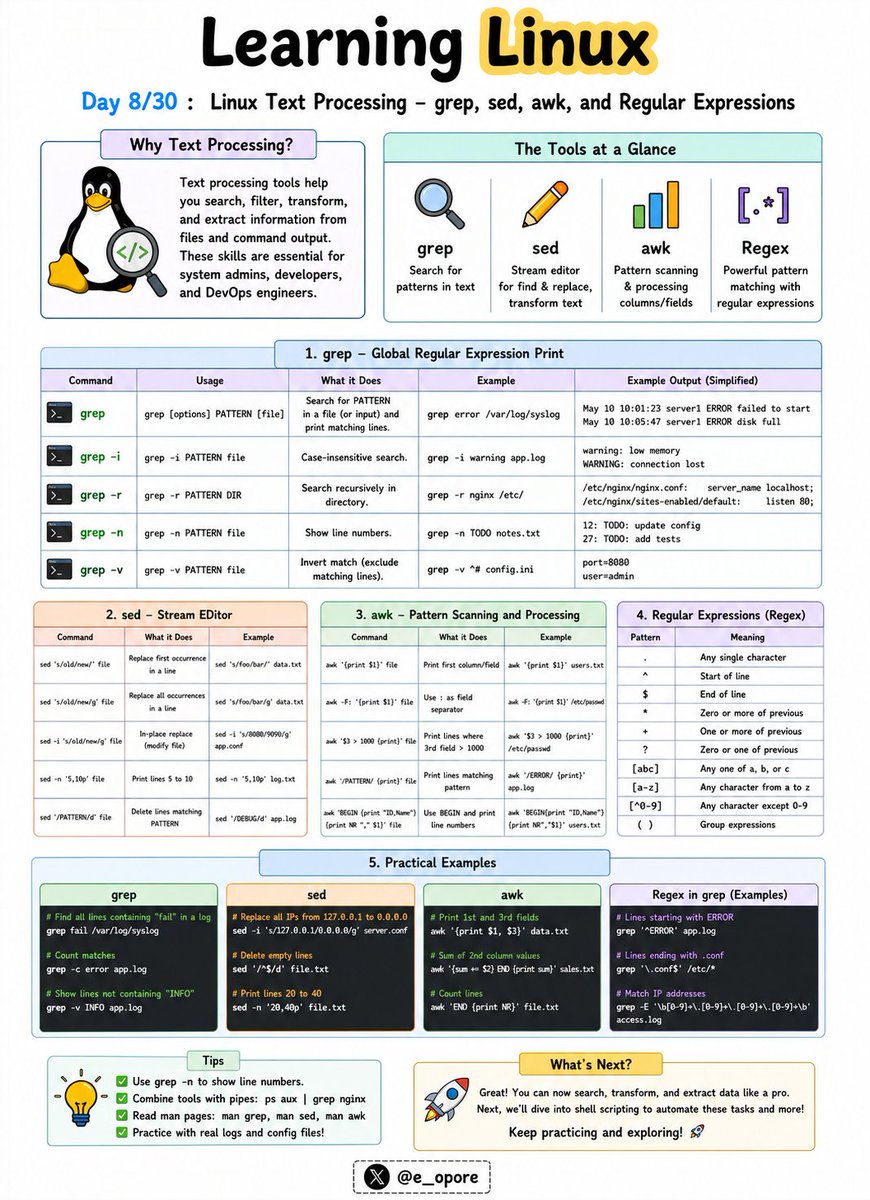
🐧 Day 8/30 — #Linux
Linux truly becomes powerful when you can process, search, and manipulate text directly from the command line.
System logs, configuration files, source code, and data files can all be analyzed using built-in text-processing tools.
Linux Text Processing – grep, sed, awk, and Regular Expressions
These tools are essential for developers, system administrators, cybersecurity professionals, and DevOps engineers.
grep – Search for Text
The grep command searches files for specific words or patterns.
Examples:
→ grep "error" logs.txt
Finds all lines containing the word "error".
→ grep -i "linux" file.txt
Performs a case-insensitive search.
sed – Stream Editor
The sed command is used to modify text without opening a file manually.
Examples:
→ sed 's/Linux/Ubuntu/' file.txt
Replaces the first occurrence of Linux with Ubuntu.
→ sed 's/Linux/Ubuntu/g' file.txt
Replaces all occurrences in each line.
awk – Data Extraction and Reporting
The awk command processes structured text and extracts specific fields.
Example:
→ awk '{print $1}' users.txt
Displays the first column from a file.
→ awk '{print $1, $3}' users.txt
Displays selected columns.
Regular Expressions (Regex)
Regular expressions are patterns used to match text.
Common Regex Patterns:
→ . = Any character
→ * = Zero or more occurrences
→ ^ = Start of line
→ $ = End of line
→ [0-9] = Any digit
→ [a-z] = Any lowercase letter
Example:
→ grep "^[0-9]" file.txt
Finds lines that start with a number.
Why These Tools Matter:
→ Search large log files quickly
→ Automate text manipulation
→ Extract valuable data from files
→ Analyze server activity
→ Build powerful shell scripts
Mastering grep, sed, awk, and regular expressions can save hours of manual work and is one of the defining skills of advanced Linux users.
🐧 Grab the Linux Ebook: codewithdhanian.gumroad.com/…
#Linux #LinuxTutorial #LinuxCommands #grep #sed #awk #Regex #DevOps #SystemAdministration #100DaysOfCode
3
19
98
6,055

Jun 10
🐧 Advanced Bash Shell Scripting By Real-Time Experts
📲 Register Now: tr.ee/Pdp23d
.
👨🏫 Trainer: Real-Time Experts
📅 Starting on: 15th June @ 08:00 PM IST
🖥️ Mode : Online Training
.
For More Details:
🌐Visit:ashokitech.com/linux-online-…
#BashScripting #ShellScripting

8

Mastering Linux: From Zero to Advanced Expertise - freecomputerbooks.com/Master…
Look for "Read and Download Links" section to download. Follow me if you like this.
#Linux #Unix #LinuxKernel #LinuxProgramming #ShellScripting #GenAI #GenerativeAI #LLMs #Gemini #ChatGPT #MachineLearning
49

Leonxlnx/taste-skill
💻 Shell
#AIFramework #OpenSource #ImageGeneration #ShellScripting
🔗 github.com/Leonxlnx/taste-sk…

10

May 19
In Python, plain joining can accidentally turn argument text into shell syntax. shlex.join() keeps each argument as an argument when building a command string.
#Python #ShellScripting #CodeTips #DevTools #PuzzlMedia
2
12



Apr 20
🐧 awk — The Swiss Army knife of Linux text processing
Most people use grep to find text.
Most people use cut to slice columns.
Most people do not know awk can do both plus math plus conditions plus formatting in a single line.
Here is everything you need to know.
----------------
🤔 WHAT IS awk?
----------------
awk is a pattern scanning and text processing language built into every Linux system.
It reads a file line by line, splits each line into fields, and lets you filter, transform, calculate, and format the output however you want.
One tool. Infinite use cases.
----------------
🧱 BASIC SYNTAX
----------------
awk 'pattern { action }' filename
• pattern — which lines to process. Leave empty to process all lines.
• action — what to do with those lines.
• $0 — the entire line.
• $1, $2, $3 — individual fields split by whitespace by default.
• NR — current line number.
• NF — total number of fields in the current line.
----------------
⚙️ EVERYDAY EXAMPLES
----------------
• Print the second column of every line
→ awk '{ print $2 }' file.txt
• Print line numbers alongside content
→ awk '{ print NR, $0 }' file.txt
• Print only lines where third column is greater than 100
→ awk '$3 > 100' file.txt
• Print the last field of every line
→ awk '{ print $NF }' file.txt
• Print lines containing the word error
→ awk '/error/ { print }' file.txt
• Count total number of lines
→ awk 'END { print NR }' file.txt
• Sum all values in the first column
→ awk '{ sum = $1 } END { print sum }' file.txt
• Print lines between two patterns
→ awk '/START/,/END/' file.txt
----------------
🔧 FIELD SEPARATOR
----------------
By default awk splits on whitespace. Change this with -F.
• Parse a CSV file
→ awk -F',' '{ print $1, $3 }' file.csv
• Parse /etc/passwd and print usernames and shells
→ awk -F':' '{ print $1, $NF }' /etc/passwd
• Print the third field from a colon separated file
→ awk -F':' '{ print $3 }' file.txt
----------------
💡 REAL WORLD ANALOGY
----------------
Think of awk like a spreadsheet formula engine for your terminal.
Excel lets you pick columns, filter rows, and calculate totals through a GUI.
awk does the exact same thing on any text file directly from the command line.
No GUI. No import. Just one line and you have your answer.
----------------
🔥 REAL WORLD USE CASES
----------------
• Top 5 processes consuming the most memory
→ ps aux | awk '{ print $4, $11 }' | sort -rn | head -5
• Calculate total disk usage from du output
→ du -sh * | awk '{ sum = $1 } END { print sum }'
• Extract failed SSH login IPs from auth log
→ awk '/Failed password/ { print $11 }' /var/log/auth.log | sort | uniq -c | sort -rn
• Print lines where response time exceeds 500ms
→ awk '$7 > 500 { print $0 }' access.log
• Remove duplicate lines while preserving order
→ awk '!seen[$0] ' file.txt
• Print header line plus any line matching a pattern
→ awk 'NR==1 || /error/' file.txt
----------------
⚡ awk vs grep vs cut vs sed
----------------
• grep — find lines matching a pattern. That is all it does well.
• cut — extract fixed columns by delimiter. No logic, no math, no conditions.
• sed — stream editor for substitution and deletion. Great for find and replace.
• awk — does everything above plus arithmetic, conditionals, variables, loops, and formatted output.
When one tool can replace three, use that tool.
----------------
💬 Golden rule:
If you are piping grep into cut into another grep, stop. You probably just need one awk command.
🔖 Save this for the next time you are staring at a log file wondering how to extract exactly what you need.
What is your most used awk one-liner? Drop it below 👇
#Linux #awk #CommandLine #DevOps #SysAdmin #ShellScripting #LinuxTips #Terminal #LearnLinux #SRE
2
103

Apr 18
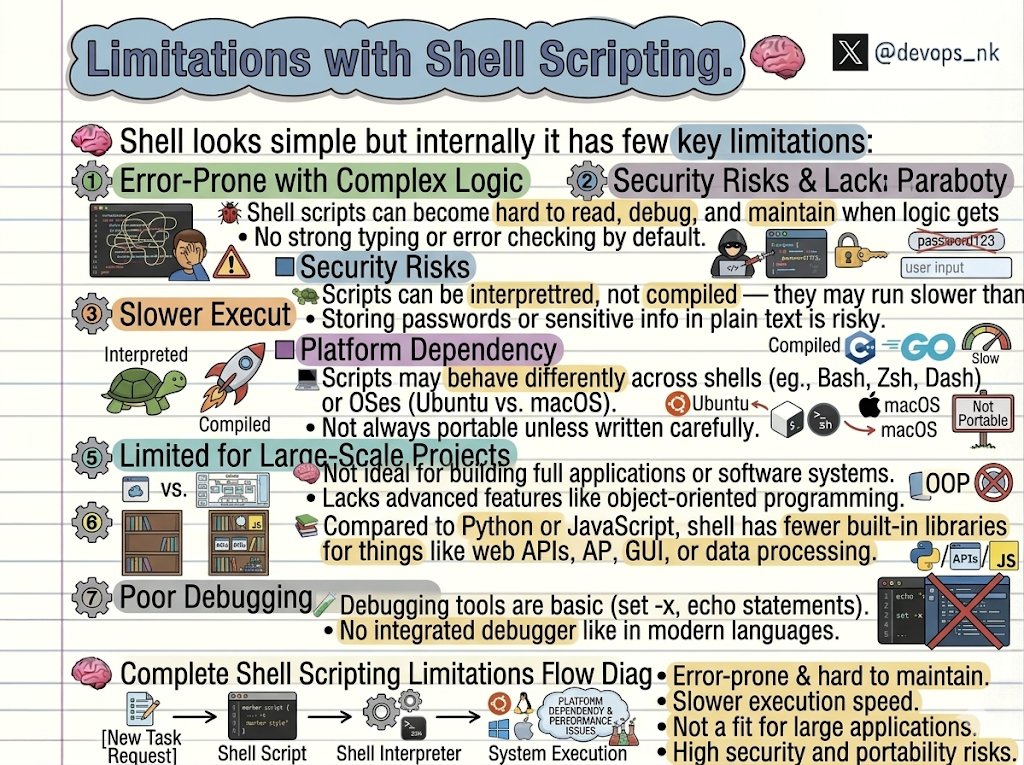
Shell Scripting is powerful but not always the right choice ⚠️
Before you rely on it for everything, know its limitations:
🐞 Error-Prone with Complex Logic:
• Becomes hard to read, debug, and maintain as logic grows
• No strong typing or proper error handling by default
🔐 Security Risks:
• Vulnerable to code injection if inputs aren’t handled carefully
• Storing passwords/secrets in plain text is risky
🐢 Slower Execution:
• Interpreted, not compiled
• Slower than languages like C or Go
💻 Platform Dependency:
• Behavior differs across shells (Bash, Zsh, Dash)
• Can break across OS (Ubuntu vs macOS)
• Not fully portable unless written carefully
🧠 Not for Large-Scale Projects:
• Not suitable for full applications
• No support for advanced concepts like OOP
📚 Limited Libraries:
• Fewer built-in libraries compared to Python/JavaScript
• Not ideal for APIs, GUI, or heavy data processing
🧪 Weak Debugging Support:
• Basic tools (set -x, echo)
• No proper debugger like modern languages
Use Shell for automation, not for building systems.
Right tool matters.
#DevOps #Linux #ShellScripting #Programming
4
5
42
1,911

Mar 3
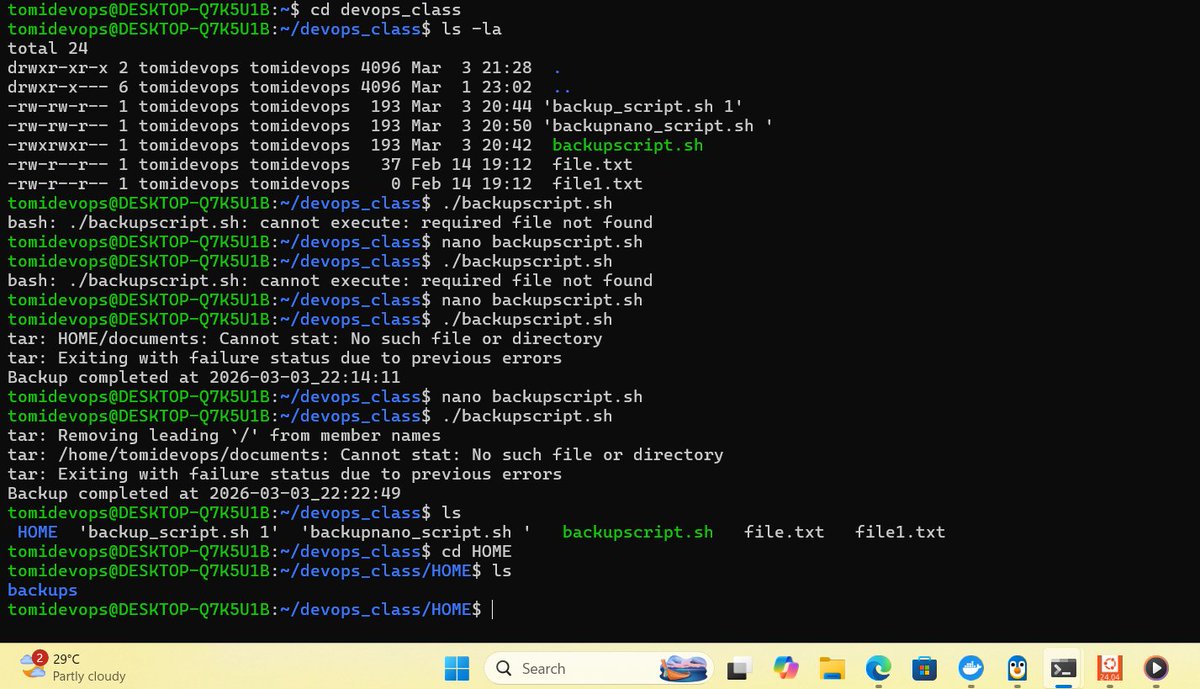
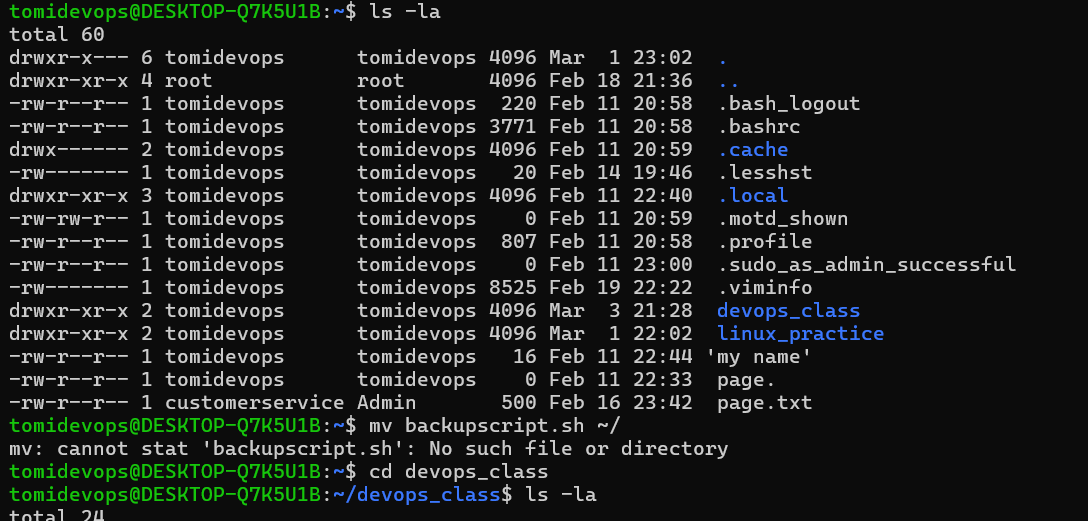
Created my first backupscript.sh using nano, set permissions, execute and successfully ran it to back up files.
Shell scripting was challenging, but knowing file permissions really helped! ✅
#Linux #ShellScripting #DevOps @conclaseacademy
1
1
3
108

Feb 23
Bash expansion explained for beginners. Learn brace, tilde, parameter, command, arithmetic, process, globbing, word splitting, and quote removal with practical examples.
Full guide here: ostechnix.com/bash-expansion…
#BashExpansion #Bash #ShellScripting #Linux #Linuxhowto
1
2
80

Feb 19
If you’re writing shell scripts, start adding this:
set -euo pipefail
It forces your script to:
•Exit on errors
•Fail on unset variables
•Catch broken pipes
Small line. Big reliability boost.
#TechTipThursday #Linux #ShellScripting #SysAdmin

2
9

Feb 17
Day 44 - #100DaysOfCybersecurity
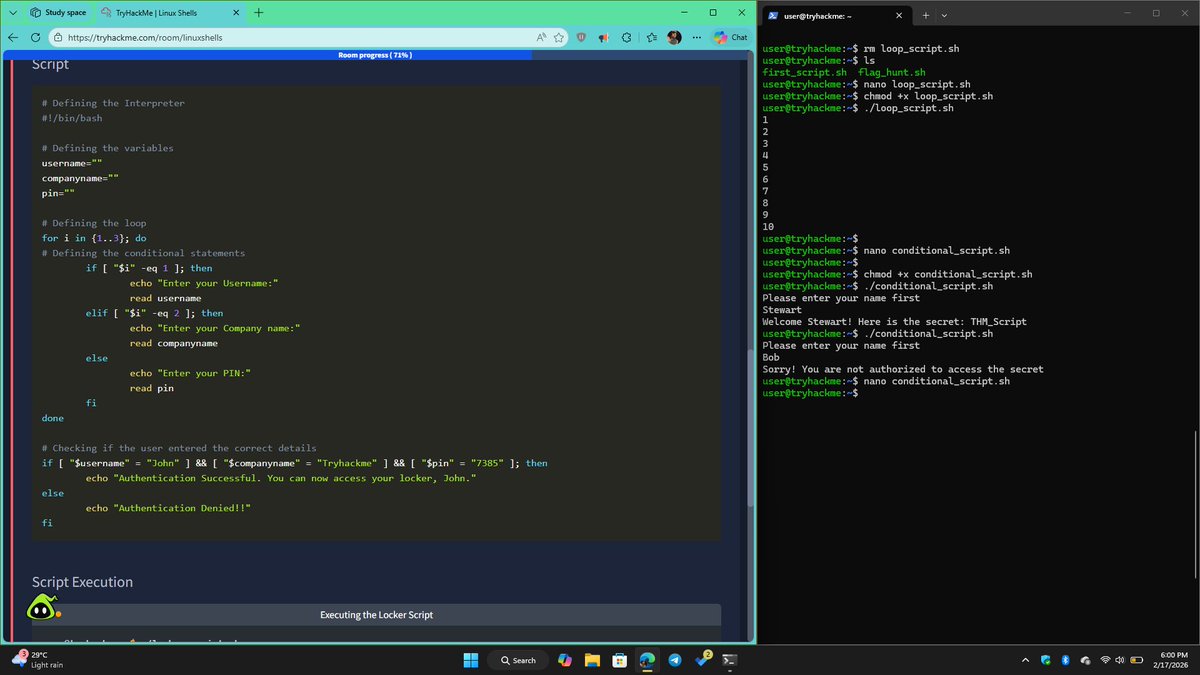
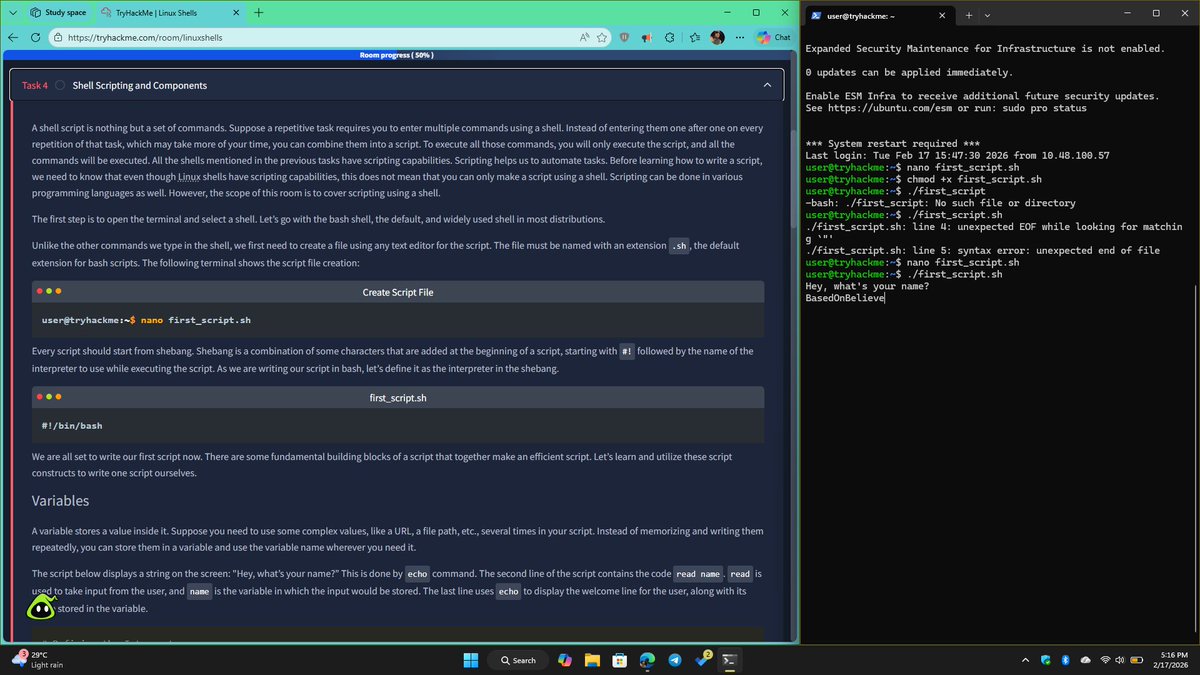
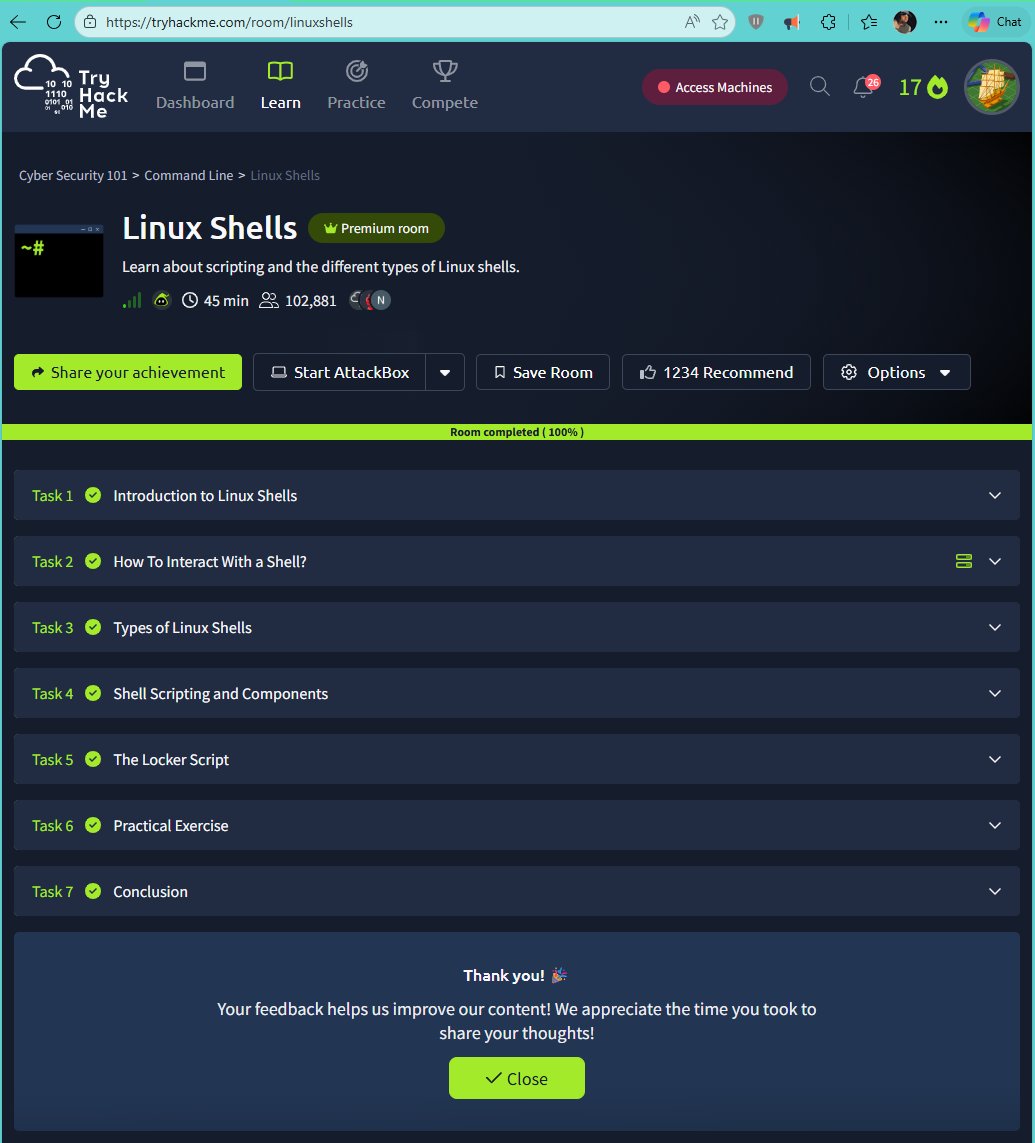
Today, I completed the Linux Shell room on TryHackMe.
What I learned:
- Introduction to Linux shells
- How to interact with a shell
- Types of Linux shells (bash, sh, zsh, etc.)
- Shell scripting and components
Hands-on practice:
I worked through practical exercises where I used core scripting components such as:
- Variables
- Loops
- Conditional statements
- Comment
I now have a stronger understanding of the different types of Linux shells and their unique features, as well as how scripting can be used for automation, system administration, and security-related tasks in Linux environments.
Step by step, I’m getting more comfortable working in Linux environments. 🚀
On to Day 45. 🔐
@jay_hunts @ireteeh @segoslavia
#RedTeamer #Linux #ShellScripting #TryHackMe #CyberSecurity #BlueTeam #100DaysOfCybersecurity
4
5
14
303

Feb 8
Shell Scripting Tips for Beginners:
- Always start scripts with `#!/bin/bash`
- Use `echo` to debug and understand flow
- Make scripts executable: `chmod x script.sh`
- Quote variables: `"$var"` to avoid errors
- Use comments (`#`) to explain logic
- Test commands in terminal before scripting
- Handle errors with `set -e`
Simple habits → fewer bugs → better scripts 🚀
#Linux #ShellScripting #DevOps #Beginners #LearnLinux
1
7
411

Jan 31
Day 6 of learning DevOps 🚀
Learned production-style backup rotation using Bash — timestamped zip backups, argument validation, and dependency handling. Debugged real shell issues.
#DevOps #ShellScripting #LearningInPublic #Docker
7
60

Jan 31
So January is about to complete, what have I accomplished?
1. I did improve in Linux and completed the theory part of Shell Scripting.
2. In AWS, I completed IAM, EC2, VPC and S3. Also made 2 small projects.
3. I have built docker image, pushed it to Docker Hub, and also performed multi stage build.
- I have gone through the basics of Jenkins.
4. Didn't do anything in Python and GitHub Actions
I would say I could have done better, at least building 2 or 3 projects.
Will bounce back next month.
#linux #git #shellscripting #AWS #DevOps #Docker #Jenkins #githubaction #LearnInPublic
Jan 16

📌 What I'll be doing in the next 15 days:
1. Get better at Shell Scripting and Linux.
2. Study the most important AWS services and build a project around that.
3. Study Docker, CICD(Jenkins, GitHub Actions, GitLab CICD) and build a project around that.
4. If time permits, then refresh the basics of Python.
3
8
356
Jan 27
Day 3 of my DevOps journey 🚀
Learned debugging in live projects, fixed Docker errors & wrote a Django deployment script 🐳🐧
#DevOps #ShellScripting #Docker #Linux #LearningInPublic
3
4
42
Jan 26
Day 2 of my DevOps & Shell Scripting journey 🐧
Today I learned:
Day 2: Bash loops, functions & file permissions ✔
Pushed code from EC2 to GitHub 🚀
#DevOps #Linux #ShellScripting #LearningInPublic
3
31
Jan 25
Day 1 of learning Shell Scripting & DevOps 🐧
Today I started with:
✔ Basic Linux commands
✔ Git Bash setup
✔ File navigation & nano editor
I also began learning Linux a few days ago. 🚀
Excited to stay consistent and grow!
#DevOps #Linux #ShellScripting #LearningInPublic
6
47

Shell Scripting Full Course in Tamil (3 Hours) | Learn Shell Scripting for Linux Automation
youtu.be/nF5mgnV5rHM
#Linux #shellscripting #shellscript #BashScriptingTamil #ShellScriptingTamil #LinuxTamil
#DevOpsTamil #SelvaTechITops #BashFullCourse #ShellAutomation
2
92
Jan 10
Bash turns 38 today! Celebrate Bash's 38th birthday with 38 built-in features and essential tips. Learn keyboard shortcuts, parameter expansion, conditionals & more.
Full guide here: ostechnix.com/38-bash-tips-s…
#Bash #Shell #Bash38 #Linux #Bashtips #Shelltips #Shellscripting
3
119