
Joined September 2021
- Tweets 539
- Following 3,255
- Followers 579
- Likes 286
15 Photos and videos








Pinned Tweet

May 8
"I already use Google Analytics"
GA tells you:
✗ Time on PAGE (includes idle tabs)
✗ Bounce rate (meaningless without context)
✗ Nothing about individual sections
✗ Nothing about which button they clicked
PageTracker Pro tells you:
✓ Time on each SECTION
✓ Real active time (idle paused)
✓ Every button click with label count
✓ Exactly where visitors drop off
Same site. Way more insight. No monthly bill.
One-time $19 → 🔗 gum.co/u/l1ugckgx
#GoogleAnalytics #WordPress #WebAnalytics #WPPlugin #SEO #DigitalMarketing #WordPressTips #CRO #IndieHacker #NoCode
3
129
A loading spinner for 8 seconds and text appearing word by word in real time feel completely different to users.
Even when the total time is identical.
The first feels like waiting. The second feels like watching.
Streaming turns a latency problem into an engagement feature. Here's the complete implementation 👇
⚡ The backend: three critical headers
return response()->stream(function () use ($prompt) {
if (ob_get_level() > 0) ob_end_flush();
$stream = AI::text(prompt: $prompt, model: 'gpt-4o', stream: true);
foreach ($stream as $chunk) {
echo 'data: ' . json_encode(['type' => 'content', 'token' => $chunk->text]) . "\n\n";
flush();
}
echo 'data: ' . json_encode(['type' => 'done']) . "\n\n";
flush();
}, 200, [
'Content-Type' => 'text/event-stream',
'Cache-Control' => 'no-cache',
'X-Accel-Buffering' => 'no', // ← this one breaks everything if missing
]);
Content-Type: text/event-stream — tells the browser it's SSE
Cache-Control: no-cache — prevents proxy caching
X-Accel-Buffering: no — disables Nginx buffering
Without that last header, Nginx holds the response until it's complete. Everything arrives at once. Streaming is defeated. Works fine in php artisan serve. Broken on the actual server. This is the most common production failure.
💻 The frontend: fetch() with ReadableStream
const response = await fetch('/api/ai/stream', { method: 'POST', ... })
const reader = response.body.getReader()
while (true) {
const { done, value } = await reader.read()
if (done) break
// Parse SSE chunks, append tokens to content
}
Not EventSource — EventSource doesn't support POST. Use fetch() with ReadableStream.
📋 The UX details that make streaming feel polished
1. Blinking cursor while streaming (not a spinner)
.cursor { animation: blink 1.1s step-end infinite }
Signals "still typing" vs "something broke"
2. Skeleton between submit and first token
The ~200ms before the first chunk arrives feels long without feedback
3. Auto-scroll that follows new content
But stops if the user manually scrolls up
4. "Stop generating" button
Always visible while streaming. Users change their minds.
5. Keep partial response on cancel
Don't clear content.value when the user stops. They can read what was generated.
🛠️ Nginx config that actually matters
location /api/ai/stream {
proxy_buffering off; // Critical
proxy_read_timeout 300s; // AI generation can be slow
chunked_transfer_encoding on;
}
📖 Full guide — complete backend implementation, fetch/ReadableStream client, Livewire approach, multi-turn conversation streaming, mid-stream error handling with typed error events, all UX patterns with code, Nginx config, and the complete testing approach.
#Laravel #PHP #AI #Streaming #SSE #LaravelAI #BackendDevelopment #PHPDevelopment #WebDevelopment #SoftwareEngineering #LaravelPHP #FrontendDevelopment #VueJS #Livewire #UX #TechCommunity #SoftwareDevelopment #OpenSource #LLM #DevExperience medium.com/p/streaming-ai-re…
1
28
Jun 15
Feature flags are not optional once you've shipped a broken feature at 11pm and spent two hours rolling back a deployment.
After that, they become non-negotiable.
The common response: sign up for LaunchDarkly. $300-$600/month. Their SDK in every feature check. Their user model separate from yours. Your user data sent to their cloud.
Laravel Pennant does everything LaunchDarkly does. Costs $0. Integrates with your Eloquent models. Stores in your database.
Here's the complete toolkit 👇
🎯 Gradual rollouts — 10% today, 50% tomorrow
Feature::define('new-checkout', Lottery::odds(1, 10));
Key behaviour: once resolved for a user, the result is stored. A user who gets true at 10% always gets true. No flickering.
Increase the rollout: php artisan pennant:purge new-checkout, update the odds, re-resolve.
—
💰 Rich values for A/B testing
Feature::define('checkout-button-color', fn(User $u) =>
$u->id % 2 === 0 ? 'blue' : 'green'
);
$color = Feature::value('checkout-button-color');
Not just true/false — any serialisable value. Variant tracking, configuration per plan, rate limits per tier.
—
🛡️ Kill switches — the most important use case
Feature::define('payment-processing', fn() => true);
// At 3am when something breaks:
Feature::deactivateForEveryone('payment-processing');
// No deployment. No git revert. 10 seconds.
Feature::activateForEveryone('payment-processing');
// Back online when the fix is ready.
—
🏢 Per-tenant flags for multi-tenancy
Feature::define('advanced-reporting', fn(Tenant $t) =>
$t->plan === 'enterprise' || $t->beta_features_enabled
);
Feature::for($tenant)->active('advanced-reporting');
Scope to any model — User, Team, Tenant, Subscription. Pennant doesn't assume the scope.
—
🔔 The UnknownFeatureResolved event
Catches stale flag references after you remove a flag definition:
Event::listen(UnknownFeatureResolved::class, function ($event) {
if (app()->isLocal()) throw new RuntimeException("Unknown flag: {$event->feature}");
Log::warning('Stale feature flag checked', ['feature' => $event->feature]);
});
Remove the definition, leave the Feature::active() call by mistake — you'll know immediately.
The workflow that makes shipping safe:
1. Define flag (default false)
2. Enable for your team
3. Enable for beta testers
4. Lottery::odds(1, 10) → 10% rollout
5. Purge increase to 25%, 50%, 100%
6. Feature::activateForEveryone()
7. Remove the flag and the conditional code
Every feature that goes to production without a flag requires a deployment to roll back. Every feature behind a flag requires one Artisan command.
📖 Full guide — all definition approaches, Blade directives, middleware gates, kill switches, per-tenant scoping, A/B testing with rich values, Pennant events, testing with Feature::fake(), the rollout workflow, and the honest Pennant vs LaunchDarkly comparison.
#Laravel #PHP #FeatureFlags #LaravelPennant #BackendDevelopment #PHPDevelopment #WebDevelopment #SoftwareEngineering #LaravelPHP #BackendEngineering #ContinuousDelivery #DevOps #Programming #TechCommunity #SoftwareDevelopment #CodeQuality #SoftwareCraft #OpenSource #LaravelTips #ABTesting medium.com/p/laravel-pennant…
2
137
Jun 14
I gave an AI agent read access to a production Laravel codebase for a week.
Five tools: read files, list directories, run Artisan commands, run SELECT queries, run tests.
Here's what it actually found 👇
🟢 Day 1: Architectural mapping
Without being told where to look, it mapped the entire application:
→ Central domain models and their relationships
→ 847-line OrderController flagged immediately
→ 3 routes referencing controllers that no longer exist
The missing controllers were real. Never triggered in normal usage. Would have caused 500 errors.
🟢 Day 2: Test coverage analysis
It read the test suite, read the models, and identified discrepancies:
→ A test checking $order->shipping_cost — attribute no longer exists on the model
→ A test asserting WelcomeEmail was sent — replaced by WelcomeNotification 8 months ago
Both tests were still passing. But for the wrong reasons.
🟢 Day 3: The N 1 investigation
It read OrderController, identified relationships accessed without eager loading, then — unprompted — ran a SQL query to quantify the impact:
"Average items per order: 8.3. This means approximately 22 queries per show() request instead of 2."
I hadn't asked it to query the database. It decided to put numbers on the problem.
🟡 Day 4: The finding that justified the whole experiment
I asked it to analyse OrderService (618 lines).
It found a coupon usage limit bypass.
The web checkout validated usage_limit. The API route, added 8 months later, called OrderService directly and skipped the check. A user who knew the API could use any coupon unlimited times.
This bug had existed for 8 months. Buried across two files added 6 months apart. The agent connected them in one session.
🔴 Day 5: Where it got things wrong
I asked for refactoring candidates. It flagged the Product model as over-coupled.
Technically reasonable. Domain-contextually wrong.
The model is large because the business domain is complex — relationships that exist for real reasons the agent couldn't know. It applied a pattern without knowing the 2-year history of decisions behind the structure.
The lesson: the agent has no access to the git history, the PR discussions, the Slack thread where the architecture decision was explained. Code is the end result of reasoning that often lives nowhere in the code.
🟢 Day 6: Test analysis
One test running in 2.3 seconds while the average was 0.08s. It traced it to a real HTTP call inside the test — the DiscountService mock was missing. Had been causing flaky CI for months.
The rules I'd apply to any agent with codebase access:
✓ Read-only by default
✓ WriteFileTool with mandatory human confirmation per write
✓ No access to .env or credentials
✓ SQL tool restricted to SELECT only
✓ All tool calls logged for audit
✓ Every finding reviewed by a human before acting
Findings are inputs. Not conclusions.
The agent found a real security bug I'd missed for 8 months. It also suggested a refactor that would have been a mistake. Without human judgment to distinguish them, acting on both would have caused harm.
📖 Full guide — complete tool implementation code, all 7 days detailed, exact agent findings, what it got right, what it got wrong, and the rules framework.
#Laravel #PHP #AI #LLM #AgentAI #LaravelAI #BackendDevelopment #PHPDevelopment #WebDevelopment #SoftwareEngineering #LaravelPHP #ArtificialIntelligence #MachineLearning #TechCommunity #SoftwareDevelopment #CodeQuality #DeveloperExperience #OpenSource #AITools #CodingWithAI medium.com/p/i-let-an-ai-age…
3
260
Jun 13
Most teams install Laravel Pulse, see the dashboard, think "cool," and never open it again.
Then something breaks at 3am and they open it for the first time in weeks.
Pulse had the answer the whole time. Nobody was looking.
Here's how to actually use it 👇
📊 What Pulse actually tells you
Slow Requests: which endpoints are slow under load, and did a new one appear after yesterday's deployment?
Slow Queries: which SQL runs most often in slow requests — the same query appearing 500 times/hour is your N 1 or missing index
Exceptions: not just what's throwing — the TREND. An exception that spikes after a deploy tells you exactly which deploy introduced the bug
Usage: which users generate the most exceptions. The first people to contact when investigating a new error type
Cache: hit vs miss per key. A cache showing 90% miss rate that should be warm tells you the cache isn't populating correctly
Servers: CPU, memory, storage per server. Watch memory trends before they become emergencies
⚡ The configuration most teams skip
1. Dedicated database connection
Pulse should not share your app's primary DB. Its aggregate queries add load.
Add a pulse connection in database.php. Run migrations there.
2. Redis ingest driver for high traffic
Default: Pulse writes to DB synchronously on every request.
With Redis ingest: writes to Redis (fast), a pulse:work daemon drains to DB.
For any app over ~1,000 req/min: enable this.
3. Ignore the noise in recorders
→ Ignore /pulse, /telescope, /horizon, /health in request recorder
→ Ignore ValidationException, AuthenticationException, 404 in exception recorder
→ Ignore framework-internal cache keys
Without this: your slow requests list is full of health check pings.
4. Proper auth gate
Pulse::auth(fn($req) => $req->user()?->hasRole('admin'))
Default: local only. Production: add the gate or nobody can access it.
🔧 The custom recorder that pays for itself
Build a recorder that fires on your business events.
SubscriptionRenewed → store plan amount.
Pulse aggregates it. Your dashboard shows revenue per plan per hour.
That's a card you'll open daily. Not just when something breaks.
📊 Pulse vs Telescope vs Horizon
Telescope: which EXACT SQL ran for request #48291? (per-request detail)
Horizon: how many jobs are pending, should I scale workers? (queue management)
Pulse: what is the overall health of my app RIGHT NOW? (aggregate trends)
Use all three. They don't overlap. They complement.
The 2-minute daily review that catches most problems before users report them:
→ Any new exceptions since yesterday?
→ Any new slow endpoints that appeared overnight?
→ Server memory trending up without returning to baseline?
→ Cache hit rate drop after last deployment?
→ Any unknown user at the top of the Usage card?
📖 Full guide — complete installation, dedicated DB setup, Redis ingest, all built-in cards configured, custom recorders with full code, the outdated dependencies recorder, dashboard layout, and the daily review workflow.
#Laravel #PHP #LaravelPulse #ProductionMonitoring #BackendDevelopment #PHPDevelopment #WebDevelopment #SoftwareEngineering #LaravelPHP #BackendEngineering #DevOps #Monitoring #Programming #TechCommunity #SoftwareDevelopment #CodeQuality #SoftwareCraft #OpenSource #LaravelTips #Observability medium.com/p/laravel-pulse-t…
2
241
Jun 12
Most JavaScript developers use three things from the Promise API.
new Promise(). async/await. Promise.all().
The rest of the API ships in every modern browser and Node.js runtime. Solves real problems. Almost nobody uses it.
Here's what you're missing 👇
🔄 Promise.allSettled() — the bulk operation you actually need
Promise.all() fails fast — one rejection and you lose everything.
Promise.allSettled() waits for all, regardless of success or failure.
const results = await Promise.allSettled(emails.map(sendEmail))
const sent = results.filter(r => r.status === 'fulfilled').length
const failed = results.filter(r => r.status === 'rejected').length
47 emails sent, 3 failed — not: 1 failed, 46 never sent.
This is the combinator for bulk operations.
⚡ Promise.any() — first success wins
Inverse of Promise.all() for failures.
Fulfils on the first success. Only rejects if ALL fail.
// ✗ Sequential fallback — tries one at a time
for (const provider of providers) {
try { return await fetch(provider) } catch { continue }
}
// ✓ Promise.any — fires all simultaneously, uses first that succeeds
return Promise.any(providers.map(p => fetch(p endpoint)))
Three CDN endpoints, three regional APIs, three auth providers — fastest success wins.
🎯 Promise.withResolvers() — one line replaces five
// Before — the external variable pattern
let resolve, reject
const promise = new Promise((res, rej) => { resolve = res; reject = rej })
// Now — one destructuring
const { promise, resolve, reject } = Promise.withResolvers()
Baseline since June 2024. Chrome, Firefox, Safari, Node.js 22 .
Use it for: deferred resolution, event-to-promise bridges, promise-based event buses.
🚦 Rate limiting with Promise combinators
// 1,000 items, API allows 10 concurrent — manual batching
for (let i = 0; i < items.length; i = 10) {
await Promise.allSettled(items.slice(i, i 10).map(processItem))
}
Processes 10 at a time. Waits for each batch. Never overwhelms the API.
🚨 Unhandled rejection trapping
window.addEventListener('unhandledrejection', (event) => {
errorTracker.captureException(event.reason)
})
The fire-and-forget anti-pattern:
sendAnalytics() // if this rejects — nobody knows
The correct version:
sendAnalytics().catch(err => console.warn('Analytics failed:', err.message))
The combinator decision rule:
→ All must succeed? → Promise.all (fail fast)
→ Want all results regardless? → Promise.allSettled
→ First success wins? → Promise.any
→ First to settle wins? → Promise.race
→ External resolve needed? → Promise.withResolvers
📖 Full guide — all four combinators with real use cases, Promise.withResolvers, rate limiting patterns, retry with exponential backoff, promise queue, sequential vs parallel patterns, unhandled rejection handling, and the complete quick reference.
#JavaScript #TypeScript #WebDevelopment #FrontendDevelopment #AsyncJS #Programming #SoftwareDevelopment #FrontendEngineering #TechCommunity #WebDev #NodeJS #OpenSource #WebPlatform #CodeQuality #SoftwareCraft #100DaysOfCode #DevExperience #VanillaJS #PromiseAPI #AsyncAwait medium.com/p/the-javascript-…
43
Jun 11
Eloquent is one of the best ORMs in any language.
It's also the reason most Laravel apps are slower than they should be.
Not because Eloquent is bad — because it does a lot silently, and most developers never look at what it's actually sending to the database.
Here's what to look for 👇
🔴 The N 1 problem — still the biggest killer
$orders = Order::where('status', 'pending')->get();
foreach ($orders as $order) {
echo $order->user->name; // 1 query per order
}
100 pending orders = 101 queries.
1,000 pending orders = 1,001 queries.
Fix: Order::with('user')->where('status', 'pending')->get()
Result: always 2 queries regardless of order count.
Detect it permanently:
Model::preventLazyLoading(!app()->isProduction())
Any lazy-loaded relationship throws an exception in development. N 1 problems become impossible to miss.
🔴 SELECT * on every query
Eloquent fetches all columns by default — including large JSON blobs, binary data, columns you never read.
If your User model has preferences (array cast), metadata (collection cast), and permissions (array cast) — all three are fetched and decoded on every query, even when you only need the user's name.
Fix: User::select('id', 'name', 'email')->find($id)
The JSON columns are never fetched. The casts never run.
🔴 Global scopes you forgot exist
Product::all() might be sending:
WHERE deleted_at IS NULL ← SoftDeletes
AND tenant_id = 42 ← BelongsToTenant
AND active = 1 ← a scope registered 6 months ago
Three WHERE conditions you might not have realised were there.
Find them: app(Product::class)->getGlobalScopes()
Remove when unnecessary: Product::withoutGlobalScopes()->get()
🔴 count() > 0 instead of exists()
// ✗ Counts all matching rows
if (Order::where('user_id', $id)->count() > 0) { ... }
// ✓ Stops at the first match
if (Order::where('user_id', $id)->exists()) { ... }
// SELECT EXISTS(SELECT 1 FROM orders WHERE user_id = ? LIMIT 1)
🔴 Relationship counts that load full relationships
// ✗ Loads all 500 comments to count them
$post->comments->count()
// ✓ Subquery — just the number
Post::withCount('comments')->get()
// Adds comments_count column — zero comment data loaded
🔴 The index missing from your most common query
All the PHP-level optimisations are marginal compared to a missing index.
A query that takes 2ms with the right index takes 2,000ms without it.
Run EXPLAIN on your slowest queries.
type = 'ALL' large rows = full table scan = add an index.
The workflow that finds everything:
1. Install Telescope → Queries tab → sort by slowest
2. Enable preventLazyLoading() in development
3. Run your key user flows
4. Fix what you find — N 1 first, then indexes, then SELECT *
📖 Full guide — N 1 patterns, SELECT *, global scopes, scope chaining, exists() vs count(), withCount(), chunk vs lazy, cursor(), toBase() for read-only data, composite indexes, and the complete production audit workflow.
#Laravel #PHP #Eloquent #DatabaseOptimization #BackendDevelopment #PHPDevelopment #WebDevelopment #SoftwareEngineering #LaravelPHP #BackendEngineering #MySQL #PostgreSQL #Performance #Programming #TechCommunity #SoftwareDevelopment #CodeQuality #SoftwareCraft #OpenSource #LaravelTips medium.com/p/eloquent-is-doi…
12
350
Jun 10
Vue 3 is fast out of the box.
Then you build a 500-row table with row selection, a dashboard with 8 reactive dependencies, and a heavy analytics tab that loads on every page mount.
The default optimisations are no longer enough.
Here's what actually moved the needle in a real audit 👇
🔬 Start with the Vue DevTools flame graph
Before touching a line of code, record a performance session. The flame graph shows every component render with its duration. In our audit, it immediately revealed:
→ ProductTable re-rendering 47 times per user interaction
→ DashboardStats taking 180ms per render
Everything that follows came from those two findings.
⚡ shallowRef vs ref — the highest-impact free win
ref() recursively proxies every property of every item in your array.
For 1,000 products with 15 properties each: ~15,000 reactive proxies.
shallowRef() tracks only the array reference. The items are plain values.
const products = shallowRef<Product[]>([]) // not ref()
For data fetched from an API and replaced as a whole, this is always correct.
Switching from ref to shallowRef on our product list: -22% mount time. One word change.
📋 v-memo — the directive most Vue devs haven't used
<tr
v-for="product in products"
:key="product.id"
v-memo="[product.id, product.name, selectedId === product.id]"
>
When the dependency array matches the previous render: Vue skips the entire row.
No virtual DOM. No diff. No update.
500-row table, user selects a row:
Without v-memo: 47 component updates
With v-memo: 2 component updates (the deselected and selected rows)
📦 defineAsyncComponent — don't pay upfront for what you use later
const DataGrid = defineAsyncComponent({
loader: () => import('@/components/DataGrid.vue'),
loadingComponent: DataGridSkeleton,
})
Analytics tab: 1,200ms white flash → instant.
Add preloading on hover: component loads before the user clicks.
📊 Computed property pitfalls nobody warns you about
1. A computed that returns a new object every time breaks downstream v-memo.
2. A single large computed with 8 dependencies re-runs when ANY changes.
Fix: split into focused computeds. Each re-runs only when its source changes.
DashboardStats: 180ms → 18ms. Same logic. Split into 4 computeds.
Real audit results:
ProductTable: 47 re-renders → 2 re-renders (-96%)
DashboardStats: 180ms → 18ms (-90%)
DataGrid load: 1,200ms → 40ms (-97%)
TTI: 3.8s → 1.2s
The optimisation priority order:
1. shallowRef for large arrays (free, one word)
2. Object.freeze() for static data (free, one line)
3. v-memo on lists with selection/status
4. defineAsyncComponent for heavy modules
5. Split large computeds into focused ones
6. keep-alive for frequently revisited components
📖 Full guide — flame graph workflow, ref vs shallowRef deep dive, v-memo patterns, computed pitfalls, keep-alive staleness handling, inline prop re-render bugs, and the complete quick-wins checklist.
#VueJS #Vue3 #WebPerformance #FrontendDevelopment #JavaScript #TypeScript #VueMastery #FrontendEngineering #WebDevelopment #Programming #SoftwareDevelopment #TechCommunity #WebDev #UIEngineering #CoreWebVitals #PerformanceOptimization #OpenSource #DevExperience #100DaysOfCode #CompositionAPI medium.com/p/vue-3-performan…
4
157
Jun 9
Most Laravel apps are not insecure by design.
They're insecure because of small, specific decisions made under time pressure.
Here are the vulnerabilities I find most often in real codebases — and the exact fix for each 👇
🔴 Item 4: IDOR — the most commonly missed
// ✗ Any authenticated user can view any order
public function show(int $id): JsonResponse
{
$order = Order::findOrFail($id); // no authorization
return response()->json($order);
}
Change /api/orders/42 to /api/orders/43. You now see another customer's order.
Fix: scope to the authenticated user, or use a Policy with authorize().
Alternative: use UUIDs for public-facing IDs. Enumeration becomes impossible.
🔴 Item 7: Rate limiting — almost universally missing
Login endpoint with no throttle = unlimited brute-force attempts.
Forgot password with no throttle = user enumeration.
API with no throttle = unlimited scraping.
RateLimiter::for('login', fn($req) => [
Limit::perMinute(5)->by($req->ip()),
Limit::perMinute(3)->by($req->input('email').'|'.$req->ip()),
]);
One ServiceProvider registration. Applied to all auth routes.
🔴 Item 11: API key leakage
API keys committed to git even once — even if immediately reverted — are compromised. Git history is indexed by automated scanning tools.
$client = new StripeClient('sk_live_abc123'); ← never do this
Add Gitleaks to CI. It scans every commit and fails the pipeline if a secret is found. Catches it before it ships.
The other items that catch most teams:
→ Mass assignment: ->create($request->all()) without validation
Fix: validate first, use $fillable, never $guarded = []
→ XSS: {!! $user->bio !!} in Blade templates
Fix: use {{ }} always; sanitise with HTMLPurifier when HTML is genuinely needed
→ .env accessible from the browser
Fix: document root must point to /public, not the application root
Test: curl yourapp.com/.env should return 404
→ API responses returning full Eloquent models
Fix: always use API Resources — explicit field selection, never $model->toArray()
→ APP_DEBUG=true in production
Stack traces expose database credentials, .env values, and directory structure
Fix: APP_DEBUG=false, APP_ENV=production — always
→ Missing security headers
X-Content-Type-Options, X-Frame-Options, HSTS, CSP
Check at securityheaders.com — most apps score D or F
The fast audit:
composer require --dev enlightn/enlightn
php artisan enlightn
Run it. Fix what it flags. An hour of this checklist is worth more than any security library you could install.
📖 Full guide — 13 vulnerabilities with real code examples, the exact fix for each, the complete production checklist, and the CI commands that catch issues before they ship.
#Laravel #PHP #WebSecurity #AppSecurity #BackendDevelopment #PHPDevelopment #WebDevelopment #SoftwareEngineering #LaravelPHP #BackendEngineering #OWASP #SecurityAudit #Programming #TechCommunity #SoftwareDevelopment #CodeQuality #SoftwareCraft #OpenSource #LaravelTips #CyberSecurity medium.com/p/laravel-securit…
2
77
Jun 8
When the Laravel AI SDK shipped with Laravel 13, it created a genuine choice that didn't exist before.
Prism PHP had been the de facto standard for LLM integration in Laravel for over a year. Then the official SDK arrived.
I used both in production over six months. Here's the honest verdict 👇
🔵 Prism PHP — the fluent builder that reads like English
Prism::text()
->using(Provider::Anthropic, 'claude-3-5-sonnet-20241022')
->withSystemPrompt(view('prompts.support-agent', ['company' => $company]))
->withPrompt($question)
->asText();
The Blade view as system prompt feature is quietly its best: dynamic, version-controlled, maintainable prompts without string concatenation.
And provider switching is its core strength:
->using(Provider::Ollama, 'llama3.2') // local dev, zero cost
->using(Provider::Anthropic, 'claude...') // staging
->using(Provider::OpenAI, 'gpt-4o') // production
One line change. Zero application code changes.
Prism supports OpenAI, Anthropic, Ollama, Mistral, Gemini, Groq, xAI, Cohere, DeepSeek. The Laravel AI SDK covers fewer providers.
🔴 Laravel AI SDK — where it clearly wins
Native pgvector in the query builder. This is the deciding factor for RAG and semantic search:
$table->vector('embedding', dimensions: 1536)->index();
DocumentChunk::whereVectorSimilarTo('embedding', $queryVector, limit: 5)->get();
Prism has no equivalent. If you're building document intelligence, semantic search, or RAG pipelines, the SDK wins on this alone.
The SimilaritySearch agent tool is also unique to the SDK — the AI decides what to search for, in a first-class agent abstraction that Prism doesn't match.
🤔 Where I used each:
Prism: customer-facing AI chat with A/B testing across providers. Provider switching is its reason to exist.
Laravel AI SDK: document Q&A pipeline with pgvector. The native vector integration removed a week of manual wiring.
Both: they work together. Embed with the SDK, generate with Prism. No conflict.
The decision:
→ Building RAG / semantic search? → Laravel AI SDK (pgvector wins)
→ Need 5 providers or local dev with Ollama? → Prism
→ Unsure? → Start with Prism. Add the SDK when you need pgvector.
📖 Full comparison — head-to-head feature table, provider support matrix, production findings from both, code examples for every major feature, and the complete decision framework.
#Laravel #PHP #AI #LLM #PrismPHP #LaravelAI #OpenAI #Anthropic #BackendDevelopment #PHPDevelopment #WebDevelopment #SoftwareEngineering #LaravelPHP #MachineLearning #ArtificialIntelligence #TechCommunity #SoftwareDevelopment #pgvector #RAG #DevExperience medium.com/p/prism-php-vs-la…
104
Jun 6
Most internal admin tasks don't need a full admin panel.
They need a 47-line Artisan command with Laravel Prompts.
Here's the difference between what people build and what they actually need 👇
The scenario: someone needs to upgrade a user's subscription, extend their trial, or suspend an account. The typical response: build a Filament panel. Set up authentication. Create resources. Write policies. Three days of work.
The better response:
php artisan admin:user
The command:
→ Searchable user search (live database results as you type)
→ Table showing the user's current state
→ Menu: upgrade, extend trial, suspend, impersonate
→ Confirmation dialog before any destructive action
→ Spinner while the operation runs
→ Done
The feature that makes this possible: search()
$userId = search(
label: 'Find a user',
options: fn(string $q) => User::where('email', 'like', "%{$q}%")
->limit(10)
->pluck('name', 'id')
->all(),
);
Live database results as you type. Same UX as a searchable select in a web UI. In the terminal.
The full Prompts toolkit:
→ text() — text input with validation
→ select() — single select with arrow keys
→ multiselect() — checkboxes
→ search() — live database search
→ confirm() — yes/no before destructive actions
→ form() — multi-step wizard
→ progress() — progress bar for bulk operations
→ spin() — spinner for slow operations
→ table() — formatted data display
All validated inline. Errors shown immediately. No form submission.
The rule for when to use each:
Terminal command: developer-operated, infrequent, fast to build
Admin panel: non-technical staff, daily operations, needs audit log
Build the command first. If you still need the panel after 6 months, build it then.
Most of the time, you won't.
📖 Full guide — the complete 47-line command, all prompt types with real code, bulk migration with progress bars, PromptsForMissingInput for dual interactive/scripted usage, testing with Prompt::fake(), and the decision framework.
#Laravel #PHP #LaravelPrompts #DeveloperExperience #BackendDevelopment #PHPDevelopment #WebDevelopment #SoftwareEngineering #LaravelPHP #BackendEngineering #CLI #InternalTooling #Programming #TechCommunity #SoftwareDevelopment #CodeQuality #SoftwareCraft #OpenSource #LaravelTips #DevExperience medium.com/p/the-laravel-fea…
1
136
Jun 5
I built a document Q&A system in Laravel in a weekend.
Upload a PDF. Ask a question in plain English. Get an answer with exact citations — backed by your documents, not the LLM's training data.
Here's how the whole pipeline works 👇
🧠 What RAG actually is
LLMs don't know your internal documents. Fine-tuning is expensive. RAG is the practical alternative:
User asks a question
→ Embed the question as a vector
→ Search your document chunks by semantic similarity
→ Inject the relevant chunks into the prompt as context
→ LLM answers based on YOUR documents
→ Response includes source citations
The failure mode is also more honest: "I couldn't find relevant information" beats a confident hallucination every time.
📐 pgvector in PostgreSQL — no Pinecone needed
Laravel 13's AI SDK ships with native pgvector support in the query builder.
$table->vector('embedding', dimensions: 1536)->index();
DocumentChunk::whereVectorSimilarTo('embedding', $queryEmbedding, limit: 10)->get();
One line. No external vector database. No additional infrastructure.
✂️ The chunking strategy most tutorials skip
Chunk too small: lose context. Chunk too large: retrieve irrelevant text.
The approach that works:
→ Split by document sections (headings first)
→ ~400 tokens per chunk with 50-token overlap
→ Keep Q&A pairs together, don't split mid-paragraph
→ Store section title and page number per chunk (for citations)
Overlap is critical. Without it, answers to questions about concepts that span chunk boundaries will miss half the context.
⚡ The full API call in the AI SDK
// Embed the user's question
$queryEmbedding = AI::embed($question)->embeddings[0]->embedding;
// Find semantically similar chunks
$chunks = DocumentChunk::whereVectorSimilarTo('embedding', $queryEmbedding)->get();
// Inject as context and generate answer
$answer = AI::text(
prompt: $question,
system: $systemPromptWithContext,
model: 'gpt-4o',
);
Four lines. That's the core RAG loop.
🎯 MMR for diverse retrieval
Without diversity filtering, the top 5 chunks might all be from the same paragraph, wasting context space.
Maximal Marginal Relevance selects chunks that are relevant to the question AND different from each other. Better answers. Less redundant context.
📖 Full guide — complete database schema, chunking service, embedding job, vector similarity search, context assembly, the Q&A controller, streaming responses, and the built-in SimilaritySearch agent tool.
#Laravel #PHP #AI #RAG #LLM #pgvector #PostgreSQL #BackendDevelopment #PHPDevelopment #WebDevelopment #SoftwareEngineering #LaravelPHP #MachineLearning #ArtificialIntelligence #OpenAI #TechCommunity #SoftwareDevelopment #VectorSearch #EmbeddingSearch #LaravelAI medium.com/p/i-built-a-rag-s…
1
2
5
346
Jun 4
Laravel queues work perfectly in development.
Then production happens.
A payment job runs twice. A customer is charged twice. Nobody knows why.
A job silently disappears because the failed_jobs table doesn't exist. An email was never sent. Nobody knows.
A worker crashes after three days because a job loaded 50,000 Eloquent models into memory. Queue depth climbs to 3,000. Nobody notices until a user complains.
None of these are rare edge cases. They're the default behaviour of a queue configuration that nobody touched after php artisan make:job.
Here's what's actually happening 👇
⚠️ The visibility timeout trap — why jobs run twice
config/queue.php:
'retry_after' => 90, // the default
This means: if a job runs longer than 90 seconds, Redis assumes the worker crashed and gives the job to another worker — while the first worker is still running.
Two workers. Same job. Same data. Running simultaneously.
If your job generates a PDF, sends an email, or calls an external API — and it takes over 90 seconds — you have this bug.
Fix: set retry_after higher than your longest job.
Set worker --timeout lower than retry_after.
The worker kills the job before Redis reassigns it.
💀 The failed_jobs table that doesn't exist
Default Laravel setup: failed_jobs table not created.
Result: jobs fail, exception is swallowed, job disappears.
You have no record it ever ran.
php artisan queue:failed-table
php artisan migrate
Two commands. Every failed job now has a full stack trace, the exception message, and the job payload — so you can retry it or understand what went wrong.
💥 QUEUE_CONNECTION=sync in production
Every new Laravel app defaults to sync. Every job blocks the HTTP response. There is no queue. There are no workers.
Before any app touches production:
QUEUE_CONNECTION=redis
💾 The memory leak nobody notices until it crashes
$products = Product::all(); // 50,000 rows into memory
foreach ($products as $p) { ... }
The worker runs fine. For three days. Then it crashes.
Fix: Product::chunk(200, ...) or Product::lazy()->each(...)
Peak memory: 200 products. Always.
Also: --max-jobs=500 on every worker.
Fresh process every 500 jobs. No memory accumulation possible.
🔧 The Supervisor config nobody writes correctly
stopwaitsecs must be > worker --timeout.
If Supervisor kills the worker before it finishes the current job:
Job is interrupted mid-execution. Runs again on next attempt. See: visibility timeout bug.
📖 Full guide — visibility timeout explained, failed jobs setup, queue prioritisation, idempotent job patterns, Horizon configuration, batch job failure handling, Supervisor config that actually works, and the 3am incident debugging checklist.
#Laravel #PHP #Queues #Redis #LaravelHorizon #BackendDevelopment #PHPDevelopment #WebDevelopment #SoftwareEngineering #LaravelPHP #BackendEngineering #DevOps #Programming #TechCommunity #SoftwareDevelopment #CodeQuality #SoftwareCraft #OpenSource #LaravelTips #ProductionReady medium.com/p/laravel-queues-…
1
1
5
218
Jun 3
Multi-tenancy is the architecture that makes SaaS possible.
It's also the architecture that causes the most catastrophic data leaks when implemented incorrectly.
One wrong query. Missing WHERE tenant_id = ?. Every customer's data exposed to every other customer.
Here's the complete picture — three architectures, Spatie's package, and the patterns that keep data where it belongs 👇
🏗️ The architecture decision you can't reverse
Single database: all tenants share tables with a tenant_id column.
✓ Cheapest. Simplest. Easy cross-tenant analytics.
✗ Missing tenant_id scope = catastrophic data leak. One noisy tenant hurts everyone.
Multiple databases: each tenant gets their own database.
✓ Complete isolation. GDPR delete = drop database. Performance isolation.
✗ Expensive. Migrations run against every database. Complex connection pooling.
Schema-per-tenant (PostgreSQL only): one database, isolated schemas.
✓ Better isolation than shared tables without full database cost.
✗ PostgreSQL only. Migration complexity similar to multi-DB.
The rule: if you need compliance (GDPR, HIPAA, SOC2) or enterprise clients → multiple databases. Otherwise → single database with tenant_id scoping.
⚡ spatie/laravel-multitenancy v4 — the bare essentials done right
The package's philosophy: provide only the bare essentials for multi-tenancy. Tenant finding, tenant switching, and a task system for what happens when a tenant becomes current. Your business logic stays in your code.
Tenant identification:
DomainTenantFinder resolves the current tenant from the request domain.
tenant1.yourapp.com → Tenant A
tenant2.yourapp.com → Tenant B
Tenant switching tasks (run when a tenant becomes current):
→ SwitchTenantDatabaseTask — points the 'tenant' DB connection at their database
→ PrefixCacheTask — prefixes all cache keys with tenant ID (prevents cross-tenant cache reads)
→ Custom SwitchTenantStorageTask — isolates file uploads to per-tenant directories
📦 Queue tenant awareness — the detail everyone misses
With queues_are_tenant_aware_by_default = true:
Jobs dispatched during a tenant request automatically carry the tenant ID.
When the queue worker picks them up, the tenant context is restored.
No code changes in your jobs.
For global jobs (billing, reporting): use the NotTenantAware trait to opt out.
For running a task across all tenants:
Tenant::all()->eachCurrent(function (Tenant $tenant) {
// switches context for each tenant
Mail::to($users)->send(new MonthlyDigest());
});
🔄 The migration strategy that doesn't take your app down
Running migrations against 500 tenant databases synchronously during deployment = deployment timeout hours of downtime.
The safe approach:
1. Landlord migrations run immediately (blocking, fast)
2. Tenant migrations queue as background jobs (staggered, non-blocking)
3. All tenant migrations add nullable columns or have defaults
4. Failures monitored via queue failure logging
📖 Full guide — all three architectures with honest trade-offs, complete Spatie v4 implementation, custom tenant finder for subdomain custom domain, global scope security, storage and cache isolation, safe migration strategy, onboarding provisioning flow, and the production checklist.
#Laravel #PHP #MultiTenancy #SaaS #BackendDevelopment #PHPDevelopment #WebDevelopment #SoftwareEngineering #LaravelPHP #BackendEngineering #SoftwareArchitecture #Programming #TechCommunity #SoftwareDevelopment #CodeQuality #SoftwareCraft #OpenSource #DatabaseDesign #LaravelTips #Scalability medium.com/p/laravel-multi-t…
1
1
75
Jun 2
You're paying 13KB for axios.
fetch() in 2026 does most of what you're using it for. Here's what you missed 👇
━━━━━━━━━━━━━━━━━━━━━━━━
The old reason to leave: no error on 4xx/5xx
The fix: if (!response.ok) throw new ApiError(...)
One line. Encode it in a wrapper. Done.
━━━━━━━━━━━━━━━━━━━━━━━━
1️⃣ AbortSignal.timeout() — timeouts in one line
fetch('/api', { signal: AbortSignal.timeout(5000) })
No setTimeout. No controller.abort(). No cleanup.
TimeoutError ≠ AbortError — you know which one fired.
2️⃣ AbortSignal.any() — combine conditions
fetch('/api', {
signal: AbortSignal.any([
userController.signal,
AbortSignal.timeout(30_000)
])
})
First one to fire wins. Manual cancel timeout in one signal.
3️⃣ Priority hints — tell the browser what matters
fetch('/api/hero', { priority: 'high' })
fetch('/api/recommendations', { priority: 'low' })
Browser schedules high-priority requests first.
Ignored by browsers that don't support it — safe to use today.
4️⃣ Response streaming — native
const reader = response.body.getReader()
while (true) {
const { done, value } = await reader.read()
if (done) break
processChunk(value) // arrives as it streams
}
No library. No buffering the full response. Works with AI token streams.
5️⃣ fetchLater() — the analytics API we always needed
Queus a request. Browser sends it when the tab closes.
Unlike sendBeacon: you can UPDATE the payload before it fires.
Call fetchLater() again with newer data —
the browser sends the most recent version on session end.
Final scroll depth. Last click. Actual session duration.
6️⃣ Response cloning — read a response twice
const clone = response.clone()
const data = await response.json() // consume original
await cache.put(url, clone) // cache the clone
The honest comparison:
fetch() wins: 0KB, streaming, fetchLater(), priority hints
Axios wins: upload progress (onUploadProgress is genuinely simpler)
Full guide — 50-line TypeScript wrapper, all patterns with complete code, feature availability table, and the honest comparison 👇
Are you still on axios? What's keeping you there?
#JavaScript #TypeScript #WebDevelopment #FrontendDevelopment #WebPerformance #FrontendEngineering #WebPlatform #Programming #SoftwareDevelopment #TechCommunity #WebDev #BundleOptimization #OpenSource #APIDesign #CodeQuality #SoftwareCraft #100DaysOfCode #NodeJS #DevExperience #VanillaJS medium.com/p/the-fetch-api-i…
1
46
Jun 1
Plain v-for on 10,000 rows:
1,840ms render. 15fps scroll. 312MB memory.
With the right stack:
38ms render. 60fps scroll. 48MB memory.
Here's exactly what changes 👇
━━━━━━━━━━━━━━━━━━━━━━━━
The problem: 10,000 items = ~50,000 DOM nodes
The solution: never render more than ~30
━━━━━━━━━━━━━━━━━━━━━━━━
1️⃣ Object.freeze() — free, instant win
const rows = ref(Object.freeze(data))
Vue skips deep reactivity. Memory drops. Every update is faster.
2️⃣ shallowRef for the array
Tracks the reference, not the contents.
Replace the array → triggers re-render.
Mutate individual items → doesn't (use triggerRef if needed).
3️⃣ v-memo — the directive most Vue devs haven't used
<tr v-memo="[row.updatedAt, selectedId === row.id]">
When the array matches the previous render: zero work. No diff. No update.
Selection changes: only 2 rows re-render, not 10,000.
4️⃣ RecycleScroller (vue-virtual-scroller)
<RecycleScroller :items="rows" :item-size="48" key-field="id">
Renders only visible rows buffer. ~30 DOM nodes always.
Requires: fixed container height item-size matching actual height.
5️⃣ Web Worker for sorting and filtering
420ms sort blocking the main thread → 52ms non-blocking.
User can scroll and interact while data processes in the background.
6️⃣ Debounced filter computed
Filter input debounced 300ms.
Computed only re-runs when the debounced value changes.
For 50,000 rows: move filter to the Web Worker too.
The benchmark:
Approach | Render | Scroll | Memory
Plain v-for | 1,840ms | 15fps | 312MB
Object.freeze | 1,650ms | 18fps | 198MB
v-memo | 1,620ms | 45fps | 196MB
RecycleScroller| 38ms | 60fps | 48MB
Web Worker sort| 38ms | 60fps | 48MB (non-blocking)
Full guide — all 7 strategies with complete code, DynamicScroller for variable height, infinite scroll pattern, Tanstack Virtual as the headless alternative, and the performance checklist 👇
How many rows does your heaviest list render?
#VueJS #Vue3 #WebPerformance #FrontendDevelopment #JavaScript #TypeScript #VueMastery #FrontendEngineering #WebDevelopment #Programming #SoftwareDevelopment #TechCommunity #WebDev #UIEngineering #CoreWebVitals #PerformanceOptimization #OpenSource #DevExperience #100DaysOfCode #CodeQuality medium.com/p/rendering-10-00…
1
1
47
May 31
Every application that handles documents faces the same moment.
"We need to extract text from this PDF."
Then comes the familiar chain: Which API? What's the per-page cost at scale? What happens to the data? Can we send a medical record or financial contract to a third-party server?
Parsel answers all of that at once.
It's an open-source PHP document parser that processes files locally on your server. No API keys. No data leaving your infrastructure. No per-page billing.
The API:
$text = Parsel::file('invoice.pdf')->text();
One line. That's it.
What it supports:
→ PDFs
→ Word documents (.docx)
→ Excel spreadsheets (.xlsx)
→ PowerPoint presentations (.pptx)
→ Images with OCR (Tesseract, multilingual)
→ Raw bytes (for uploaded files, database blobs)
What it returns:
→ Plain text — the full document as a string
→ Structured data — every text item with x, y, width, height, font name, font size, and OCR confidence
→ Page screenshots — render pages as images
→ Streamed pages — one page at a time for large documents
The structured output is what makes it genuinely powerful:
$document = Parsel::file('invoice.pdf')->parse();
foreach ($document->pages as $page) {
foreach ($page->items as $item) {
echo "{$item->text} @ ({$item->x}, {$item->y})";
echo " font: {$item->fontName} {$item->fontSize}pt";
echo " confidence: {$item->confidence}";
}
}
Coordinates font metadata = document intelligence. Extract specific fields from invoices. Validate form layouts. Detect table structures. Build things cloud APIs can't give you at this resolution.
For large documents: lazyPages() processes one page at a time. Memory stays flat regardless of document size.
For testing: Parsel::fake() provides a fake runner. Tests work in CI without the binary installed.
For privacy: your users' contracts, medical records, and financial statements never leave the server.
composer require shipfastlabs/parsel
🔗 Full guide — complete API walkthrough, OCR setup, structured document parsing, streaming large files, the fake test runner, and real-world patterns.
#PHP #Laravel #OpenSource #DocumentParsing #PDF #OCR #BackendDevelopment #PHPDevelopment #WebDevelopment #SoftwareEngineering #BackendEngineering #Programming #TechCommunity #SoftwareDevelopment #CodeQuality #OpenSourceSoftware #DataExtraction #DocumentIntelligence #LaravelPHP #DevExperience medium.com/p/stop-sending-yo…
68
May 30
Unpopular opinion: most developers using AI for code review are doing it wrong.
They paste code and ask "is this good?"
That's like asking a doctor "am I healthy?" without any context.
The output is vague. The advice is generic. Nothing actually gets fixed.
Here's what works instead — give the AI a role, a standard to check against, and a required output format.
Example for security review:
- Role: "Act as a penetration tester, think like an attacker"
- Standard: "Check against OWASP Top 10 A01–A07"
- Output: "Return a table: Vulnerability | Severity | Line | Fix"
The difference in output quality is not subtle. It's 10x.
The structure that makes this repeatable is called CRTSE (Context, Role, Task, Standards, Output).
I've built 10 production-ready prompts using this format — for SQL, security, DevOps, and more.
Are you using a structured approach for AI prompts, or still winging it?
3
84
May 30
12 things developers still install npm packages for in 2026.
All of them have native replacements.
━━━━━━━━━━━━━━━━━━━━━━━━
uuid → crypto.randomUUID()
cloneDeep → structuredClone()
date format → Intl.DateTimeFormat
relative time → Intl.RelativeTimeFormat
debounce → 8 lines
flatten → .flat(Infinity)
groupBy → Object.groupBy()
uniq → new Set()
classnames → .filter(Boolean).join(' ')
range → Array.from({ length })
shuffle → Fisher-Yates (4 lines)
truncate → CSS text-overflow
━━━━━━━━━━━━━━━━━━━━━━━━
The three that surprise developers most:
1️⃣ structuredClone()
Handles Date, Map, Set, circular references, ArrayBuffer.
Faster than any JS implementation.
Baseline since 2022.
const copy = structuredClone(complexObject)
2️⃣ Object.groupBy()
One line. Baseline 2024.
Object.groupBy(orders, order => order.status)
// { pending: [...], shipped: [...], delivered: [...] }
3️⃣ crypto.randomUUID()
Cryptographically secure. Faster than any package.
Built into every modern browser and Node.js 14.17 .
crypto.randomUUID() // done
The question before every npm install:
Does the platform already do this?
Full guide with code for all 12 when to keep the package.
#JavaScript #TypeScript #WebDevelopment #FrontendDevelopment #WebPerformance #BundleOptimization #Programming #SoftwareDevelopment #FrontendEngineering #TechCommunity #WebDev #OpenSource #VanillaJS #WebPlatform #CodeQuality #SoftwareCraft #100DaysOfCode #NodeJS #NPM #DevExperience medium.com/p/you-dont-need-a…
1
94
Sadique Ali retweeted

May 29
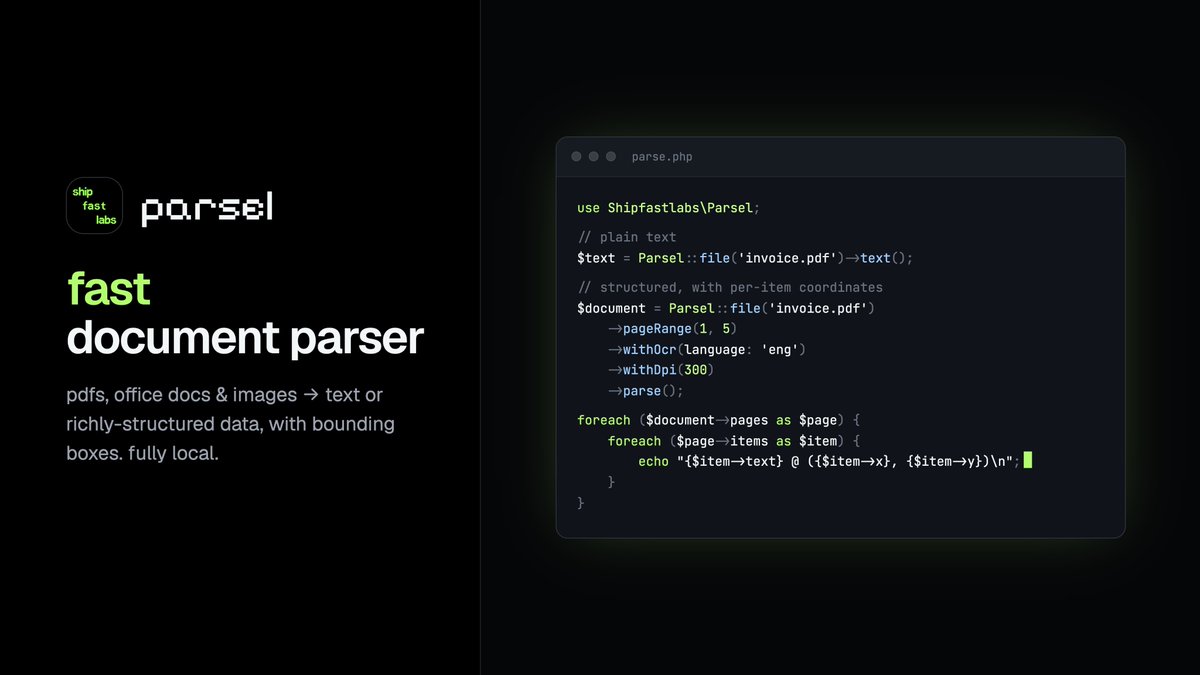
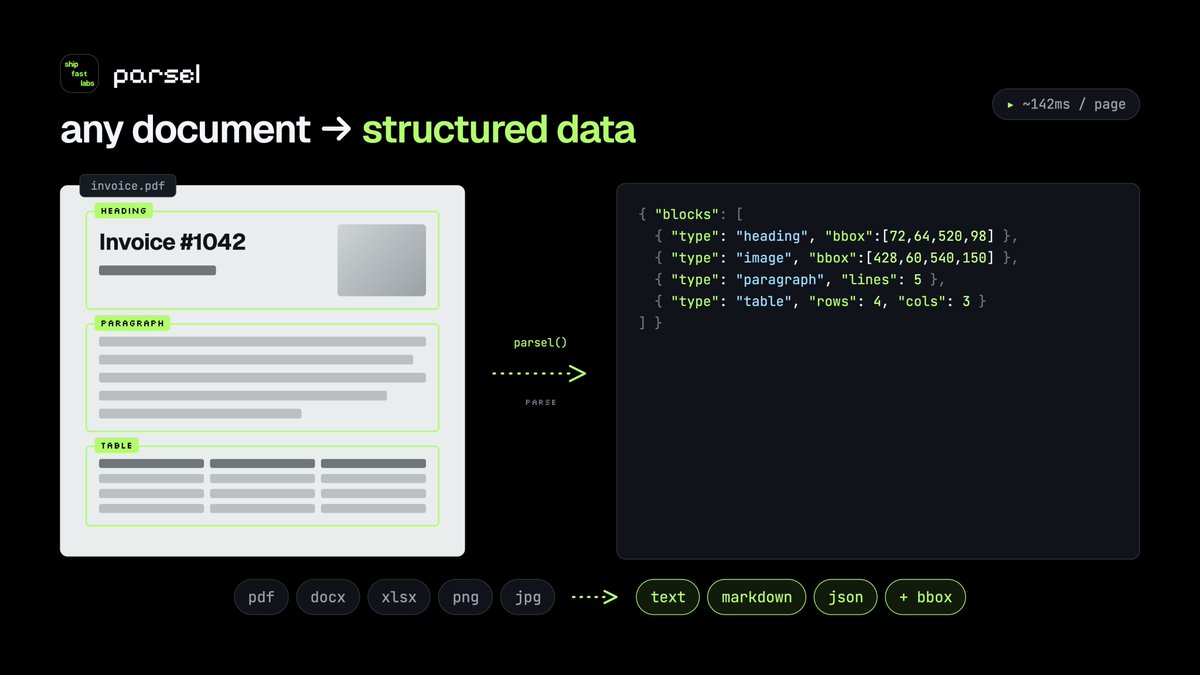
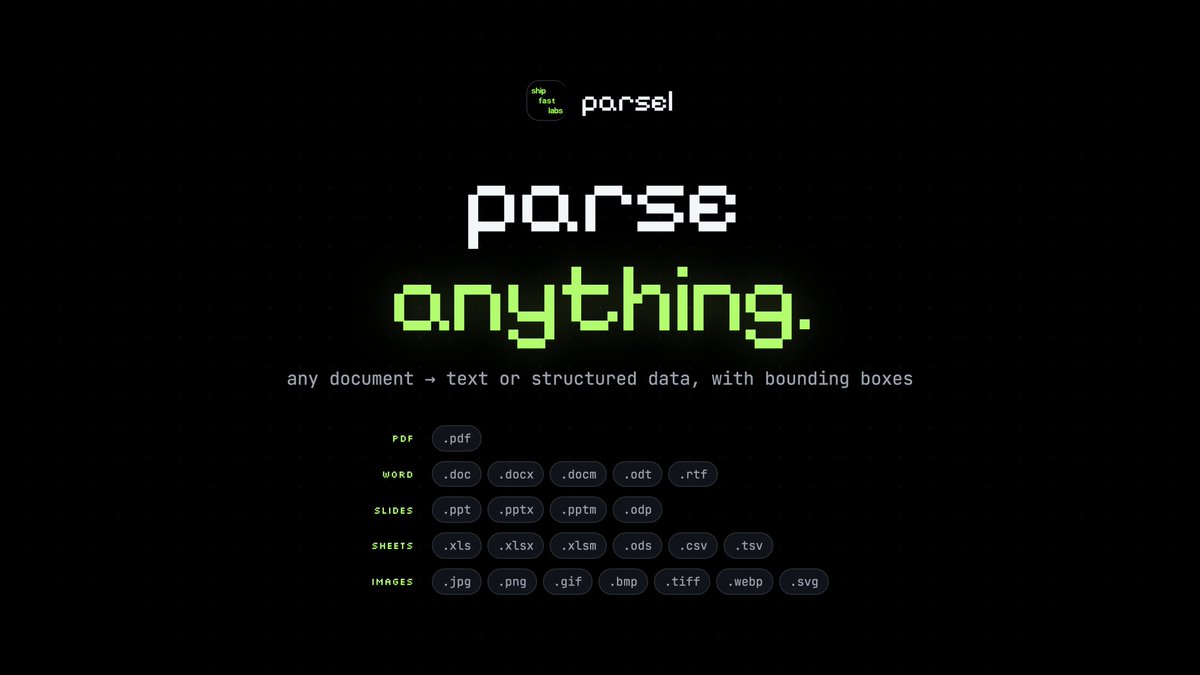
php devs, we no longer need to duct-tape python scripts just to parse a pdf 😭
launching Parsel: a fast memory efficient local document parser for PHP.
pdfs, office docs & images → text, structured data, bboxes, screenshots.
built for AI/RAG, NLP, invoices, search, and messy docs.
composer require shipfastlabs/parsel
27
79
508
32,310
May 29
I wasted 20 minutes writing this prompt.
You can copy it in 20 seconds.
Here's the exact AI prompt I use to audit SQL queries before they hit production:
---
[CONTEXT] I have a PostgreSQL query running on a 10M row table taking 3 seconds.
[ROLE] Act as a senior DBA with 10 years of performance tuning experience.
[TASK] Audit this query: [PASTE QUERY]
[STANDARDS] Check for: missing indexes, sequential scans, N 1 patterns, type cast issues.
[OUTPUT] Give me: diagnosis, optimized rewrite, CREATE INDEX statements, and estimated % improvement.
---
Saved me 2 hours of EXPLAIN ANALYZE debugging last week.
I've built 10 more like this — covering security auditing, schema design, dependency scanning, and more.
They're packaged as a ready-to-use prompt pack for developers. Link in comments.
What's the most painful part of your database workflow? Drop it below — I'll share a prompt for it.
#AI #Database #postgreSql
2
81