
7 Dec 2025
SPELLBORNE GUIDE: HOW TO EARN ABSTRACT SHARDS/XP EFFICIENTLY (AFTER THE UPDATE)
It’s been a while since I wrote a guide on any ecosystem app, so let’s do this properly. @spellborne has been one of the most reliable XP sources on Abstract.
Week after week, people on the leaderboard have been able to stack serious XP just from this game alone.
In this guide, I’m breaking down exactly how to earn @AbstractChain Shards in the most efficient way possible after the recent update, so you’re not just running around the map wasting time.
Step 1 - Set Up Your Spellborne Account Correctly
Before anything, make sure your account is linked properly:
· Go to spellborne.gg and connect your AGW (Abstract Global Wallet).
· Join the Spellborne Discord → go to #botcommands → type /connect.
· Go back to the game → Settings → Profile → Socials → Connect Discord → Request Code.
· Copy that code → paste it in Discord.
Once that’s done, your Discord and game are fully linked.This part matters because some tasks and rewards won’t sync if you skip it.
What Are Abstract Shards and Why Do They Matter?
Abstract Shards are basically XP accelerators.
They’re items you collect in-game, and when the XP calculation happens, the number of shards you’ve gathered plays a massive role in boosting your total XP.
So if your goal is to climb the leaderboard or hit personal ATH XP numbers, shards are non-negotiable.
And there are only two main ways to earn them:
1. Taskboards
2. Freeing minted or purchased monsters
Let’s go deeper into each one.
1. TASKBOARDS - Your Primary XP Machine
There are four Taskboards in Spellborne:
· Beside the Bank
· Beside the Clothing Store
· Beside the Greater Market
·Beside the Library in Heiwa Village
Walk up to any Taskboard and interact with E or open it through your phone.
You’ll see two types of tasks:
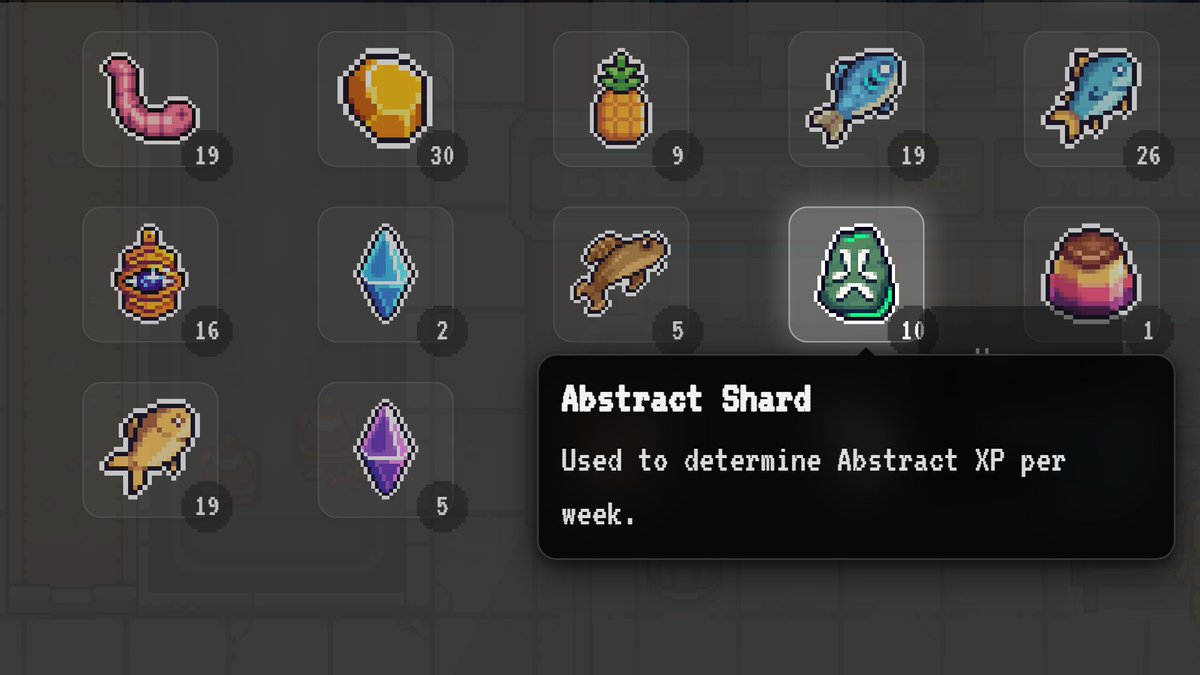
· Tasks that reward Abstract Shards
· Tasks that reward Gold Nuggets
Ignore the Gold Nugget tasks.
Focus purely on the Abstract Shard tasks, that’s where your XP is.
Materials You’ll Need for Tasks
Shard tasks usually require items like:
· Anklets
· Crystals
· Fish
· Pineapples
· Pudding
And other crafted materials
Now, you have two choices to get these items:
Option 1 - Craft Them Yourself
Go to the Shop in Heiwa Village.
You can check exactly what each crafting recipe needs either directly in the shop or by reading spellborne.wiki.
Craft whatever the tasks require → return to the Taskboard → complete it.
Crafting is cheaper but takes more time.
Option 2 - Buy the Materials
For this, you need $BORNE.
Swap for it via the Abstract Portal.
Then:
· Head to the Greater Market
· Talk to the Bazaar NPC
· Press 2 to open the Trade Market
· Search for the items you need
· Buy them → complete your tasks
This method is faster but costs more.
IMPORTANT NOTE About Storage
Sometimes you’ll buy materials and they won’t show in your storage.
This isn’t a bug your storage is simply full.
Go to the Bank → deposit items you don’t need → free up space → continue.
Taskboards alone can easily earn you a large chunk of shards if you rotate all four locations properly.
2. FREEING MINTED OR PURCHASED MONSTERS
There are two pet stores:
· One in the Main City
· One in Heiwa Village
Inside each is the Incubator.
Interact with it to see all your monsters.
From here, you can:
Option 1 - Mint Your Monsters
·Choose a monster
· Click Mint → confirm (requires $BORNE)
· After minting, click Free Into Wild
· You earn 1 Abstract Shard Souls
This is one of the cleanest shard methods.
Option 2 - Buy Monsters and Free Them
· Talk to the pet store NPC
· Click View Monsters
· Buy any listed monster within your budget
· Go back to the Incubator
· Free it into the wild
→ You get shards souls the same way.
IMPORTANT NOTE
You only earn shards for freeing:
· Minted monsters
· Purchased monsters
Regular caught monsters do NOT give shards, no matter how rare they are.
OTHER THINGS THAT CONTRIBUTE TO XP
Besides shards, several actions also give XP over time:
· Buying items from stores
· Purchasing the Seasonal Pass
· Purchasing Treasure of Celestial ticket
· Upvoting in the Abstract Portal
· Do all of these consistently and you’ll notice your XP climb every single day.
FINAL WORD
If you follow everything in this guide, you will hit a new ATH XP without struggle.
Consistency is really the only requirement.
If you read to this point, you’re serious about Spellborne already.
Gmabs.
14
2
46
1,785

9 Aug 2025
5/📆 **Campaign Duration:**
Starts **every Monday**
Ends **4 weeks later on Sunday at 11:59 PM UTC**
## 📈 **Track Your Rank:**
Use `/leaderboard` in botcommands ... to view your current standing.
Engage - Win $AXONE - Repeat!
End of thread🧵 THANK YOU!
31
89

@ethos_network
👇👇👇
1. Introducing the Ethos Network Telegram Bot!
Hey everyone! I’m @sefiyed, and today I want to share an exciting project: a Telegram bot that checks Ethos Network profiles. Ethos is a decentralized reputation platform in the Web3 space. This bot lets you view detailed info like scores, reviews, vouches, and more by entering an Ethereum wallet address.
I wrote the code myself, and it’s open-source. Let’s break it down step by step! #EthosNetwork #Web3 #TelegramBot
2.First, what is Ethos Network?
Ethos is a decentralized network where users can build and manage their reputation in the crypto ecosystem. Through reviews, vouches, and slashes, it acts like a LinkedIn for Web3. This bot pulls profile data from the Ethos API and displays it beautifully.
If you have an Ethereum wallet, you can check your profile!
3. Now, onto the code. This bot is built with Node.js, using node-telegram-bot-api and node-fetch libraries. It starts by loading dotenv to get the bot token from a .env file (for security).
Code:
require('dotenv').config();
const TelegramBot = require('node-telegram-bot-api');
const fetch = require('node-fetch');
Store your token in .env: BOT_TOKEN=your_token_here. #NodeJS #Coding
4. Setting up the bot:
const token = process.env.BOT_TOKEN;
const bot = new TelegramBot(token, { polling: true });
It uses polling to check for messages (instead of webhooks). There’s also a userStates object to manage user states (like waiting for a wallet
5.The main function: fetchEthosProfile
This function takes a wallet address and fetches data from the Ethos API. It first hits the activities API:
const url = \api.ethos.network/api/v1/act…:${address}\`;`
With specific headers (like X-Ethos-Client: ‘web’) to mimic the Ethos web app. If successful, it grabs the profileId and calls a second API for stats.
Handles errors gracefully. #API #Fetch
6.The formatEthosData function:
This formats the data nicely. For example:
🎯 *Ethos Network Profile*
👤 *Name:* ${profile.name || 'Not set'}
It displays review stats, vouches, and slashes with emojis. Uses Telegram Markdown for bold, organized text. If there’s an avatar, it sends a photo! #UI
#Formatting
7./start: Sends a welcome message and shows the menu.
bot.onText(/\/start/, (msg) => { ... });
Buttons like 🔍 Get Ethos Profile” are included. When clicked, it sets the user state to ‘waiting_for_address’ and prompts for an address.
Also has help, support, and cancel options. #BotCommands
8. In on(‘message’) it checks if the user is waiting for an address, validates it with regex (/^0x[a-fA-F0-9]{40}$/). If valid, fetches data, shows a loading message, and sends the results. Handles errors with a friendly message.
Then returns to the main menu. Very user-friendly! #Validation #ErrorHandling
9. Security: Token hidden in .env.
Efficiency: Uses async/await for fetches.
Scalability: Easy to add features like multi-address search.
To run: npm install node-telegram-bot-api node-fetch dotenv, then node bot.js.
If you’re a developer, fork and improve it! Full code on my GitHub (add link if available). #OpenSource
#DevTips
10.This bot is a simple yet powerful tool for the Web3 community. If you use Ethos, give it a try! Search for the bot on Telegram (add bot name if available) or run the code yourself.
Questions? Comment or DM @sefiyed . Don’t forget to like and RT! 😊 #EthosBot #Web3Tools
Access and sharing:
t.me/Ehtosrankbot
github.com/kamiwho/ethos-ran…
app.ethos.network/profile/x/…
1
2
6
349

27 May 2025
InfoFi赛道卷起来了!满屏的都是@cookiedotfun和@sparkdotfi
🟥开个教程 互助贴,一条龙服务破0
🔸大家可以在本文评论发布晒出自己的Spark推文。
🔸留言的我都会去点赞 评论
如果是第一次开撸,看下面速通教程(只有干货):
🟩一共分为两步:
1、COOKIE Spark推特发文
2、Spark的DC互动
🟥COOKIE Spark流程:
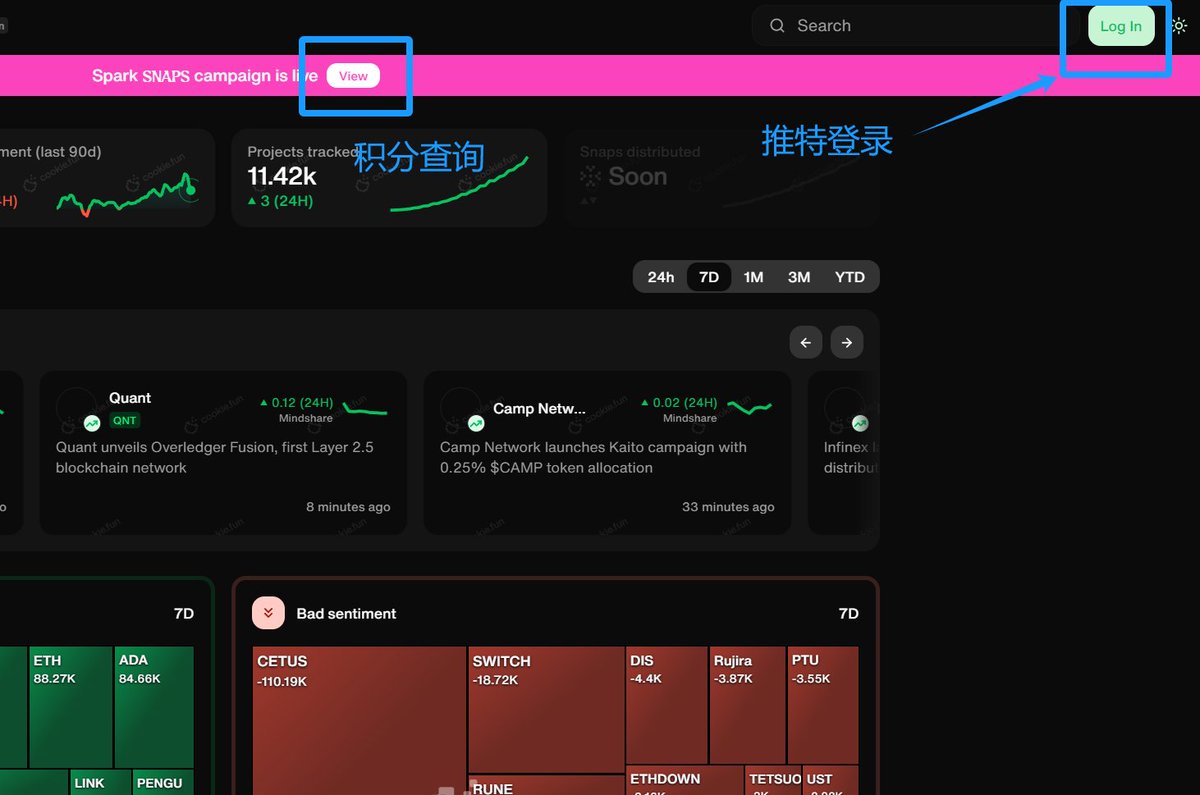
🔸1、绑定推特
访问 cookie.fun
右上角推特账号登录
🔸2、发布推文
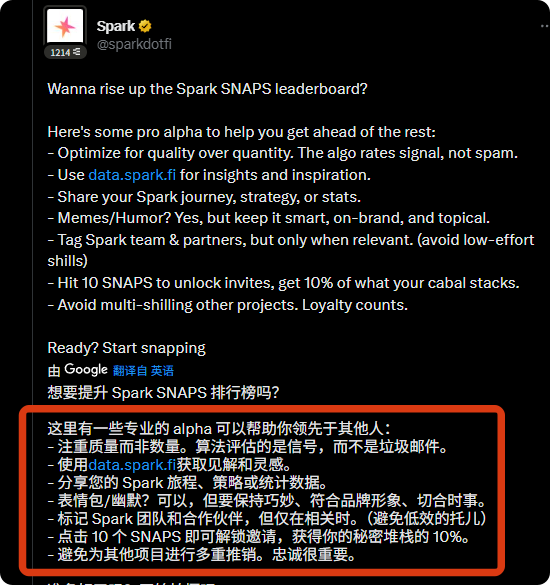
创建相关 Spark 的推文,尽量发布高质量的推文,可以多发表自己的观点和实际交互体验。无从下手可以让用AI辅助创作。
🔸发文时记得带上标签并艾特官推:
@sparkdotfi @cookiedotfun
#SparkDeFi #SparkFi
🟥DC互动流程:
🔸1、打开Spark官方Discord
discord.com/invite/sparkdotf…
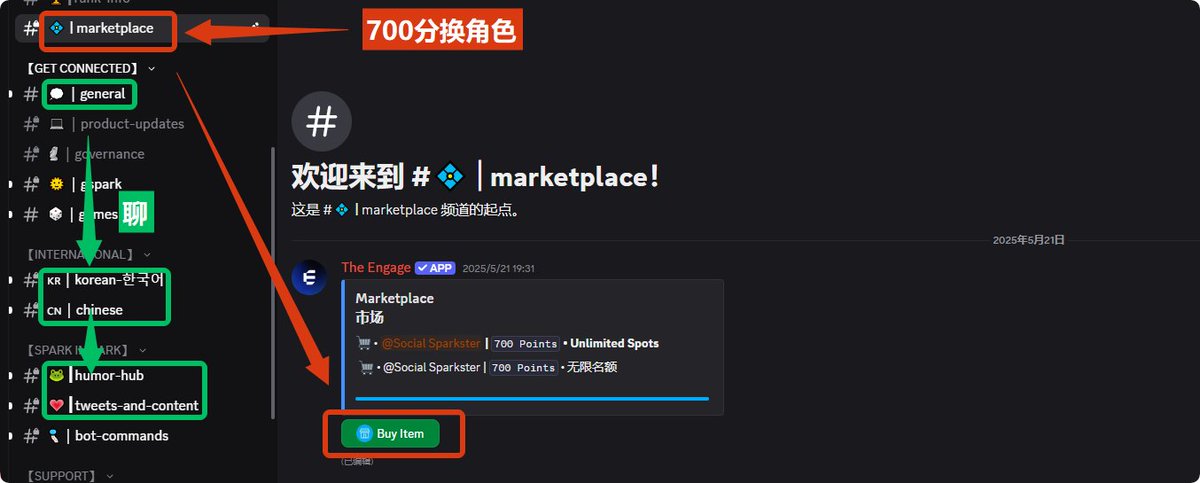
🔸2、直奔以下频道开聊:
general(内容包含Spark,目前发言间隔120S)
chinese 中文频道(同上)
tweets-and-content(发推以后链接扔这里)
humorhub(创作meme图片)
进行互动每条内容自动 10经验。
botcommands(积分和等级查询)
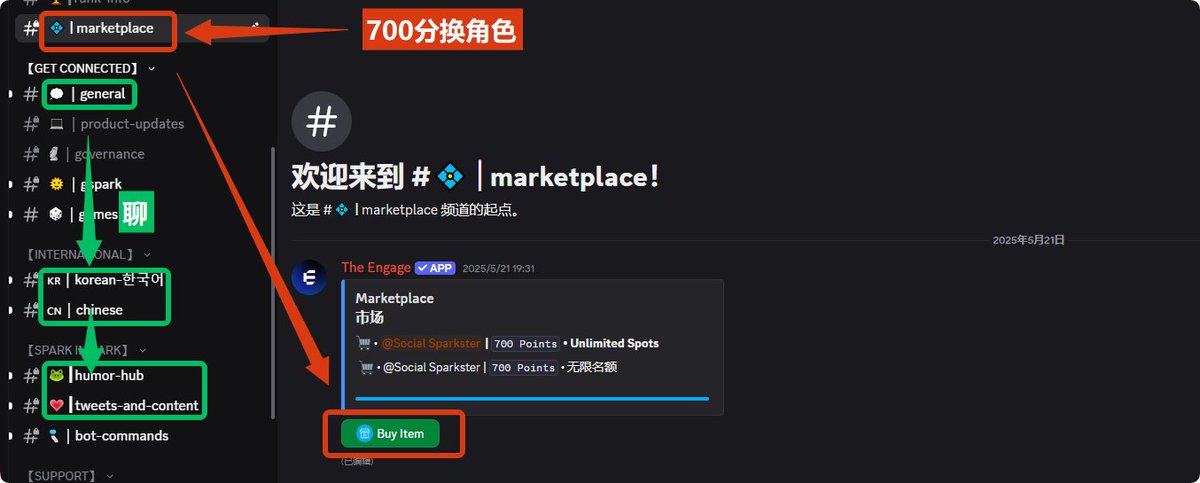
🔸3、积分换角色 : 700积分去 marketplace频道兑换角色
15
2
12
3,705
26 May 2025
默默卷成彩虹屁制造机🌈嘴撸时代势不可挡
🟥Spark嘴撸全攻略:DC社交 Cookie打榜
🟥Spark什么来头?
🔸1. MakerDAO亲儿子
Spark Protocol 是 MakerDAO 推出的去中心化借贷平台。
🔸2. 零撸机会在哪?
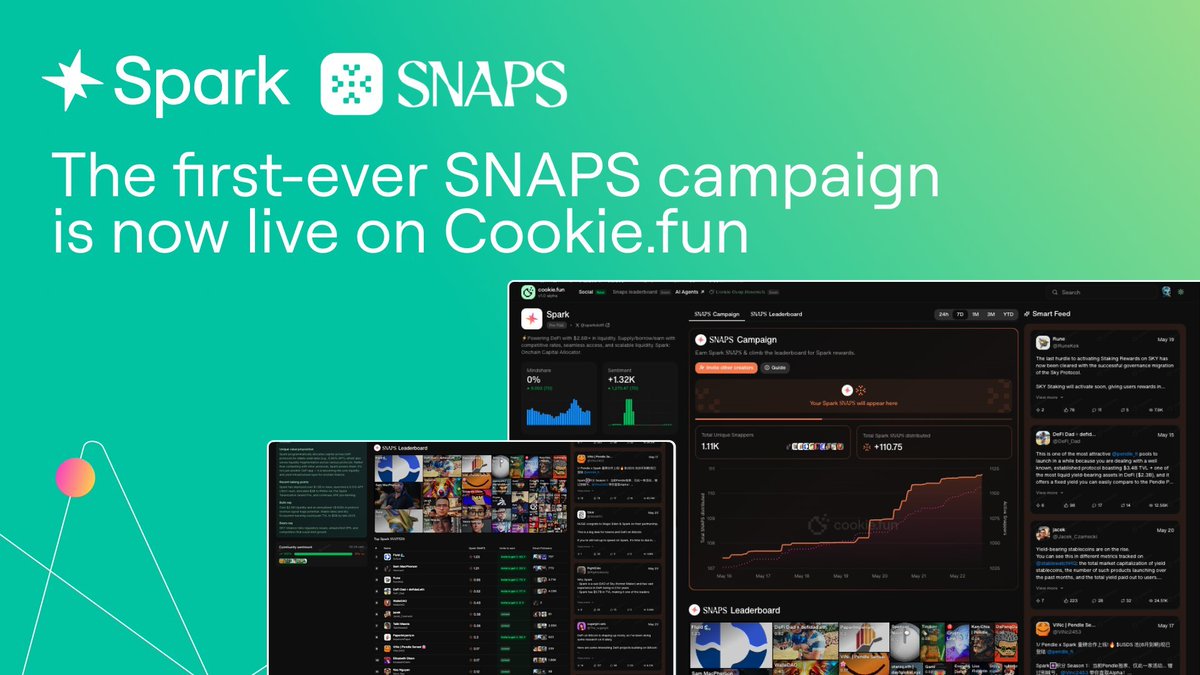
嘴撸最近大火的Cookiefun的首个联名活动@cookiedotfun
刚推出的Spark SNAPS积分系统,发币预期拉满。
🔸重点: 不花钱!全靠嘴!
🟥如何开始?
嘴撸两部曲:DC社交互动 推特发文
1⃣DC社交互动,积分换role角色
流程:
🔸1、打开Spark官方Discord
discord.com/invite/sparkdotf…
🔸2、直奔以下频道开聊:
#general(内容尽可能贴近 Spark,目前发言间隔30S)
#chinese 中文频道(同上)
#tweetsandcontent(发推以后链接扔这里)
#humorhub(创作meme图片)
开启复读机模式,进行互动每条内容自动 10经验。
#botcommands(积分和等级查询)
🔸3、积分兑换角色 : 700积分去 #marketplace频道兑换角色
🔸切记内容不要同质化,不要刷屏,尽量避免自动化,小心被ban
2⃣Cookie——Spark SNAPS
认识一下新爸爸Cookiefun @cookiedotfun
号称 @KaitoAI 平替,、有没有实力平替有待观察,但是热度的确起来了,Cookie专攻AI 加密数据分析,融资580万刀,已上币安。
流程:
🔸1、绑定推特开撸
访问 cookie.fun
用推特账号登录
🔸2、发布推文
创建相关 Spark 的推文,尽量发布高质量的推文,可以多发表自己的观点和实际交互体验
发文时记得带上标签并艾特官推:
@sparkdotfi #SparkDeFi #SparkFi
也可以与Spark相关的推文进行互动。
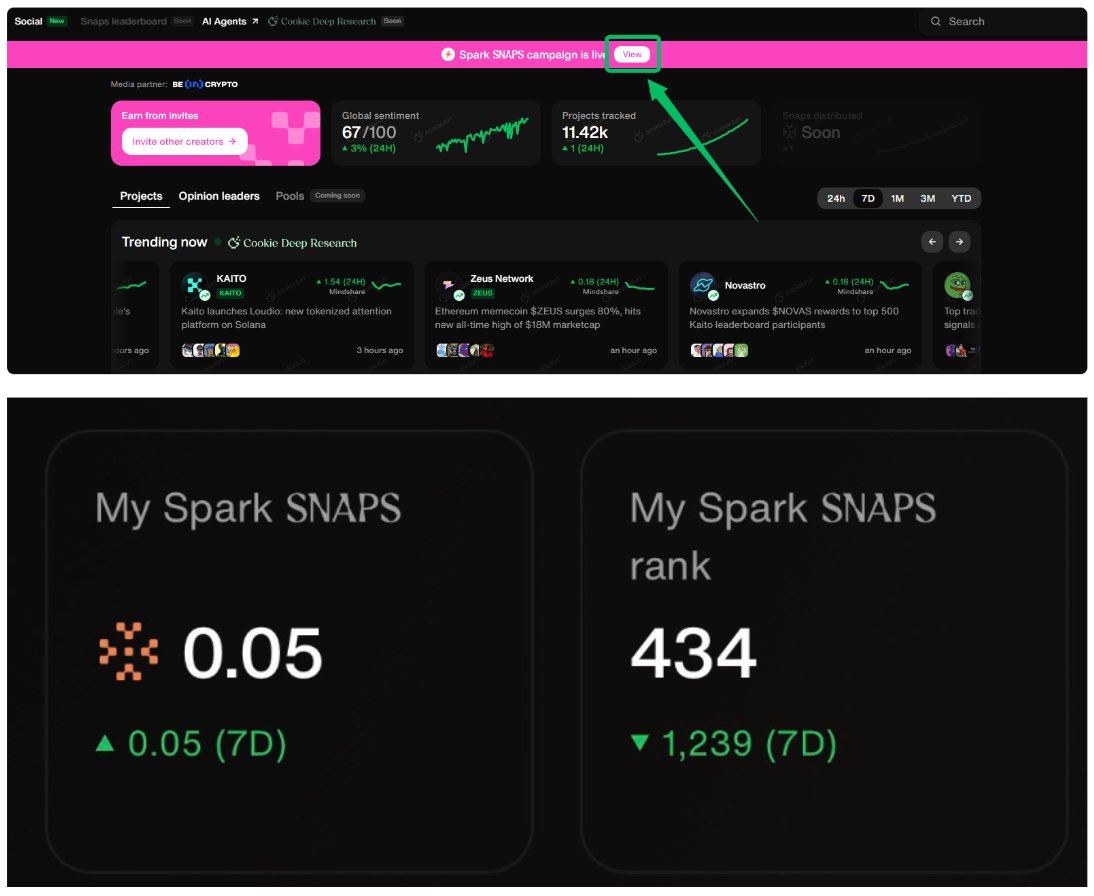
🔸Spark SNAPS分数查询:
3⃣参与Spark 官网积分活动
(非零撸根据自己情况选做)
流程:
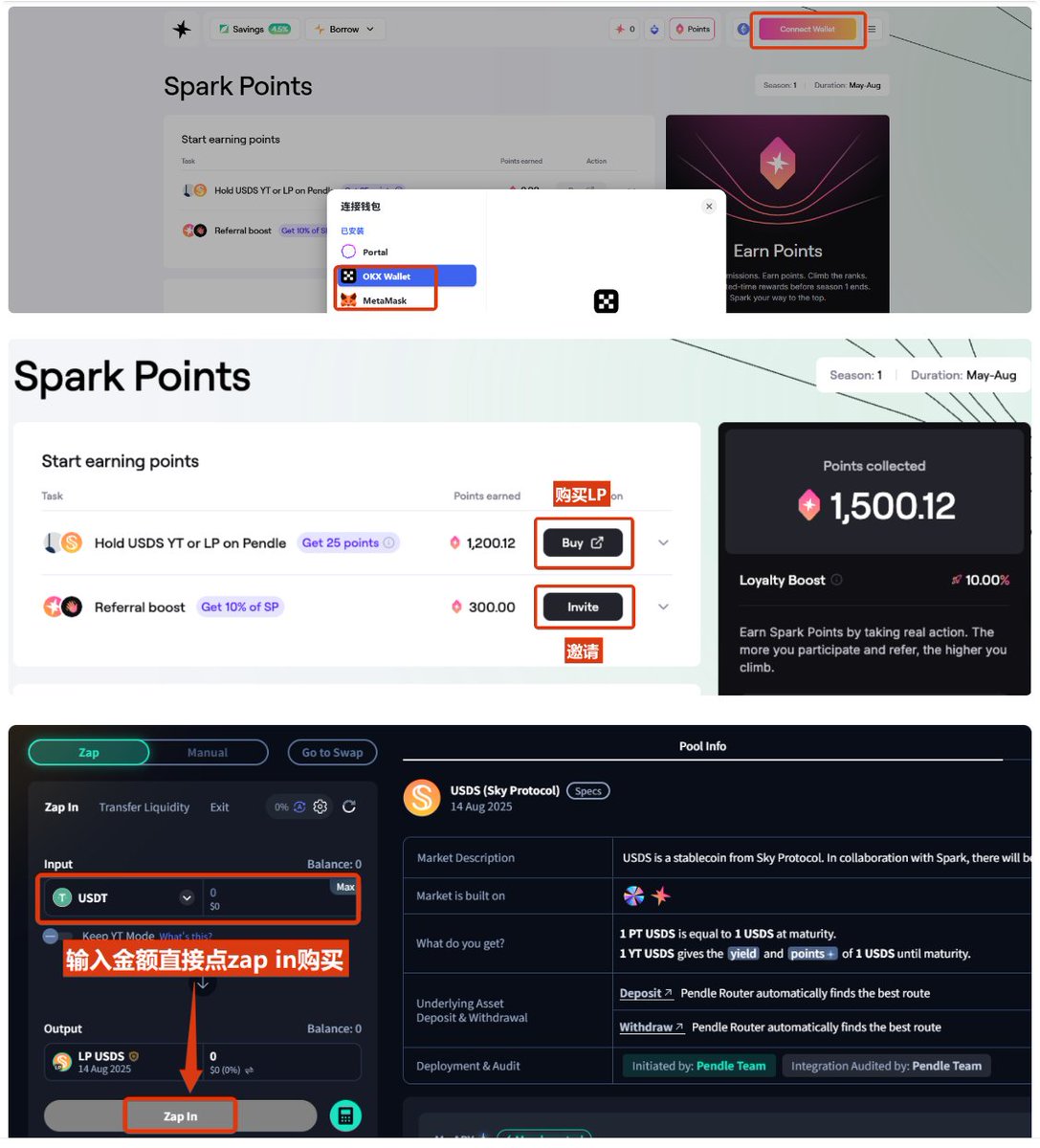
🔸打开:app.spark.fi/points/UEC4KX
🔸链接钱包——买入LP
1LP每天25分, 8 月 14 日截止
🔸活动详情,查看官方文档:
docs.spark.fi/rewards/
最后记得
@GiveRep
@River4fun
一下
是时候好好磨练一下自己的口活
嘴撸百花齐放,时代势不可挡🫡
14
5
10
1,603

discord.gg/dub
①botcommandsで /login
②botcommandsで /free-skin
1
43
discord.gg/dub
①botcommandsで /login
②botcommandsで /free-skin
1
574
100payで教えますとか言ってる人いるけど自分が教えます
discord.gg/dub
①botcommands で /login
②botcommands で /free-skin
2
3
808
discord.gg/dub
①botcommands /login
②botcommands /free-skin
4
977

17 Apr 2025
🚨 DISCORD NITRO GIVEAWAY EVENT — JOIN THE ULTIMATE SERVER EXPERIENCE 🚨
Are you tired of boring Discord servers that promise features they never deliver?
Welcome to Kenzo Community — a high-powered, beautifully crafted world where two ultra-advanced custom bots run the show:
🥔 KENZO ECONOMY BOT — Built for Grinders & Gamers
This is NOT your average economy bot. It’s a full-scale simulation packed with divine lore, PvP, farming, pets, prestige, gambling, crafting, housing, quests, and so much more.
Prestige system with power scaling
Slash command powered, no lag, no limits
Jobs, skills, loot, magic, and blessings from the Potato God
Pet evolution & PvP arenas
Mining, fishing, exploring, & more
A lore-rich universe where you rise under Kenzo’s rule
All custom. All beautiful. All grindable.
🎁 THE GIVEAWAY: NITRO FOR BRINGING REAL PEOPLE IN
To celebrate the launch of Kenzo’s divine world, we’re rewarding grinders with real Discord Nitro — not raffles, not "maybe," but earn it directly.
🏆 HOW TO WIN:
Join the server → discord.gg/kenzoofficialr
Use /invites to get your personal invite link
Invite real users — no alts, no bots (we check)
Hit the invite milestones and get paid
💰 REWARDS:
• 15 invites → Nitro Basic
• 20 invites → Nitro Boosted
• Top 3 Inviters → Custom Role, Shoutout, Exclusive Badge
• #1 Inviter → $50 bonus OR 3 Months of Boosted Nitro
🕐 Deadline: [Set date or say “Limited Time — Ends Soon!”]
✨ WHY YOU SHOULD JOIN NOW:
✅ Insane Bots, Real Features
✅ Fast-paced gameplay built for real grinders
✅ Pet battles, Magic Scrolls, PvP Duels, Leaderboards
✅ Divine aesthetics (custom emojis, UI, slash menus)
✅ A full world economy run by the lore of a Potato God
✅ Massive future roadmap (mobile UI, factions, world events)
🌍 SERVER HIGHLIGHTS:
• Premium UI, slash menu support
• Farming, fishing, woodcutting, smelting, blacksmithing
• Custom gear with enchantments
• Time-limited lootboxes & Kenzo-blessed crates
• Pet trainers, NPC duels, cross-server leaderboards
• Family & marriage systems, clan warfare, and real lore
👑 JOIN THE WORLD OF KENZO — BECOME A LEGEND.
This isn’t just another server. This is a divine domain where you rise in rank, earn power, and claim glory.
🌟 Whether you're a creator, grinder, strategist, or just love customizing your profile — you’ll find a home here.
#Giveaway #NitroGiveaway #DiscordNitro #DiscordGiveaway #FreeNitro #DiscordEvent #DiscordDrop #NitroDrop #JoinNow #LimitedTime #FreeStuff #InviteToEarn #JoinForNitro #ClaimYourReward #InviteChallenge #DiscordBot #CustomBot #EconomyBot #ModBot #AdvancedBot #BotFeatures #DiscordAutomation #BotCommands #SlashCommands #DiscordCoding #BotLaunch #AIinDiscord #BuiltWithPython
316
5
2,221

Szenenwechsel, mute/inmute verschiedener Audioquellen.
Streamstart/Ende Botcommands Shoutout. RAID Vtube Studio Trigger und Modelwechsel. Colorpicker Internet Speedtest / CPU Auslastung und einen PC-shutdown. So grob zusammengefasst
2
25

19 Dec 2024
@YeoCrypto is about to do some $BANANA airdrops in the #botcommands channel - come quickly! @cyberkongz @Ronin_Network
3
50

12 Sep 2024
📜Quest 3: Grind the Leaderboard
Link: app.galxe.com/quest/Renevers…
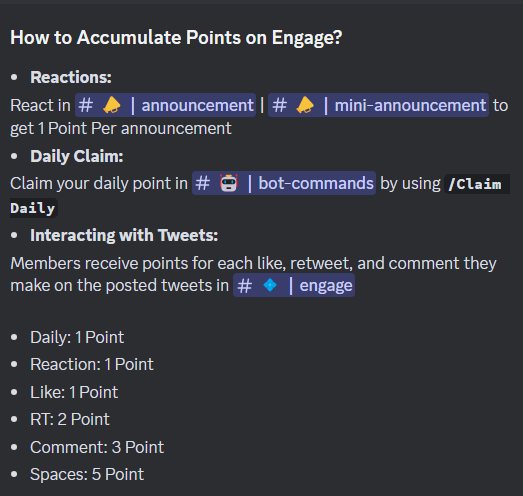
You can get engage points by following these steps:
✅React in #announcement channels
✅Use /Claim in #botcommands channel
✅Engage with tweets via #engage channel
✅Participate in community events
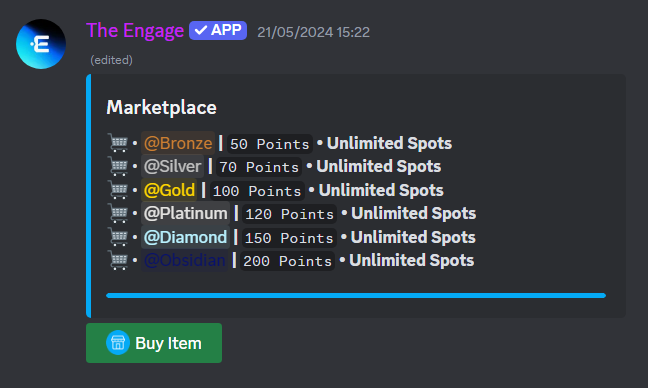
Once you have accumulated enough points, head to the #marketplace channel to purchase roles with the amount of points you have:
Good luck to everyone in winning exciting rewards from Reneverse Airdrop Season 2, see you in the next content 👍

1
6
1,387

3 Sep 2024
The first Goofy Giraffes INVITE contest 🦒
The invite contest will be held starting from today until Monday, September 9th
Rules:
-To participate you will need to generate your own discord invite link & track your invites (only real invites for active users will be counted, inviting bots will mean automatic disqualification)
-Like/RT this post -follow us
-tag 3 friends in the comments
You can track your invites in #botcommands channel
Prizes 🏆
1st place - 75$ in SOL OG role
2nd place - 40$ in SOL WL role
3rd place - 20$ in SOL WL role
Discord link: discord.gg/2FGj6u9jYV
Good luck 🍀 $Solana #ContestAlert
14
11
23
1,555
Wenn man seine eigenen Botcommands testet der Test nicht klappt und man ihn erst in 5min wiederholen kann weil global Cooldown 🔥
1
35

26 Mar 2024
✨Disclaimer!✨ I don't have !botcommands because im still havent ventured into it TwT im really just in the shore of streaming than in the deep seas . I apologize if it would seem as incomplete but i just wanna chill with everyone :33! i hope everyone feels the same 🐣
3
1
13
628

16 Dec 2023
期待のBCG【sky gate】🔥のリファリンクです!
毎日タスクをこなすと$SAC と交換ができるポイントが付与されます👍
skygate.skyarkchronicles.com…
まずディスコードに入り#BotCommandsで/set twitter &/set walletで連携したからじゃないと連携できないので注意⚠️
discord.com/channels/9080034…
81

Wir suchen Mitarbeiter für @Huebcraft
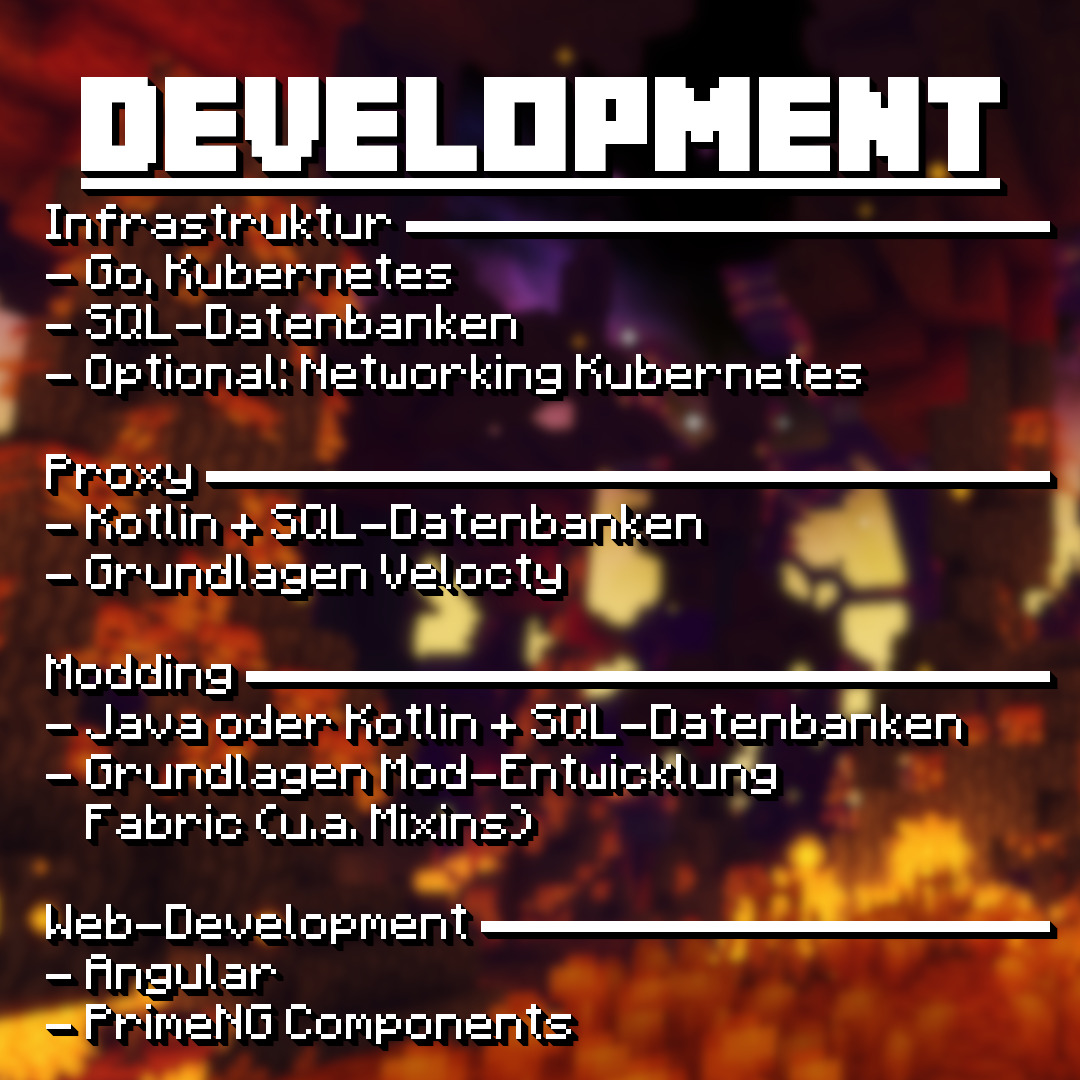
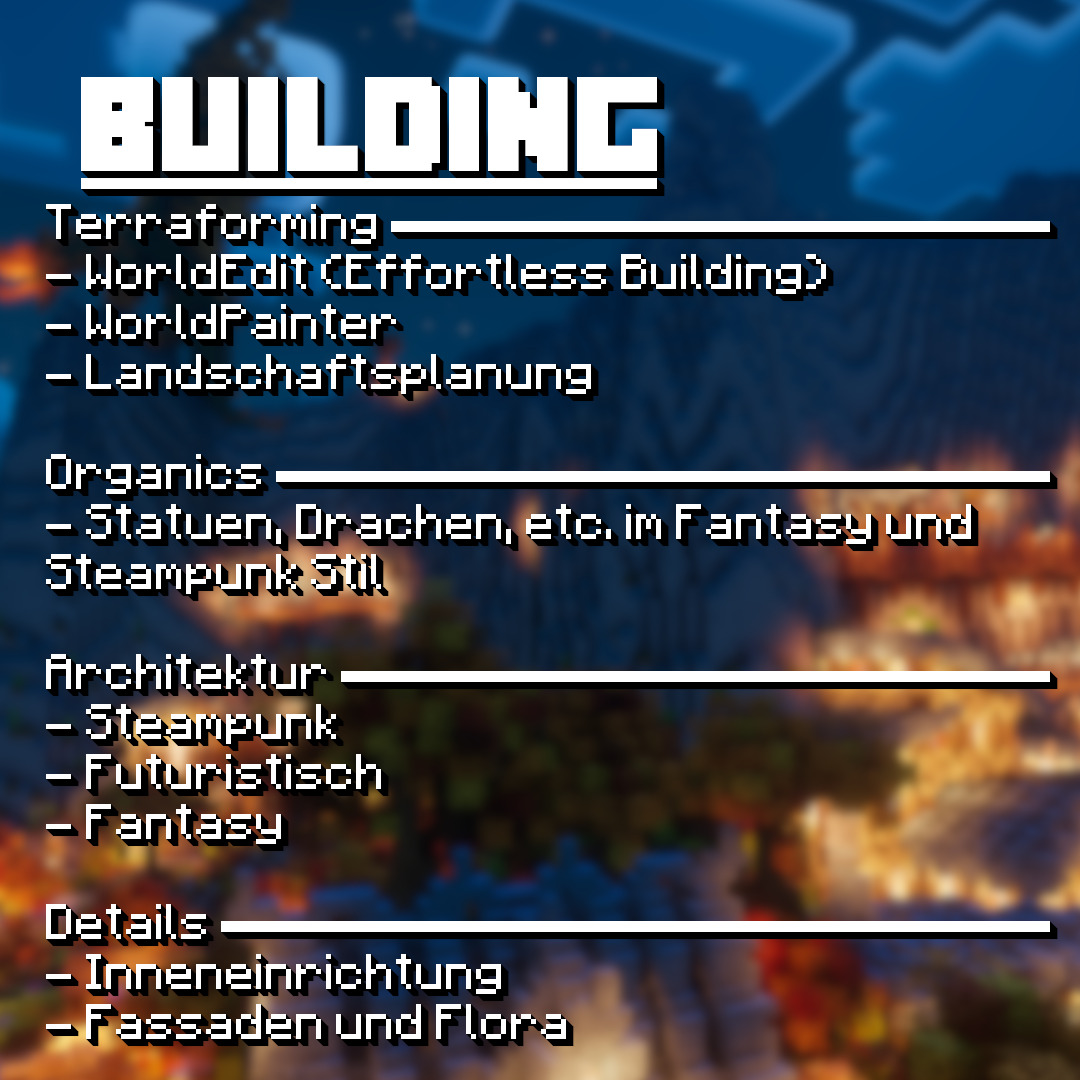
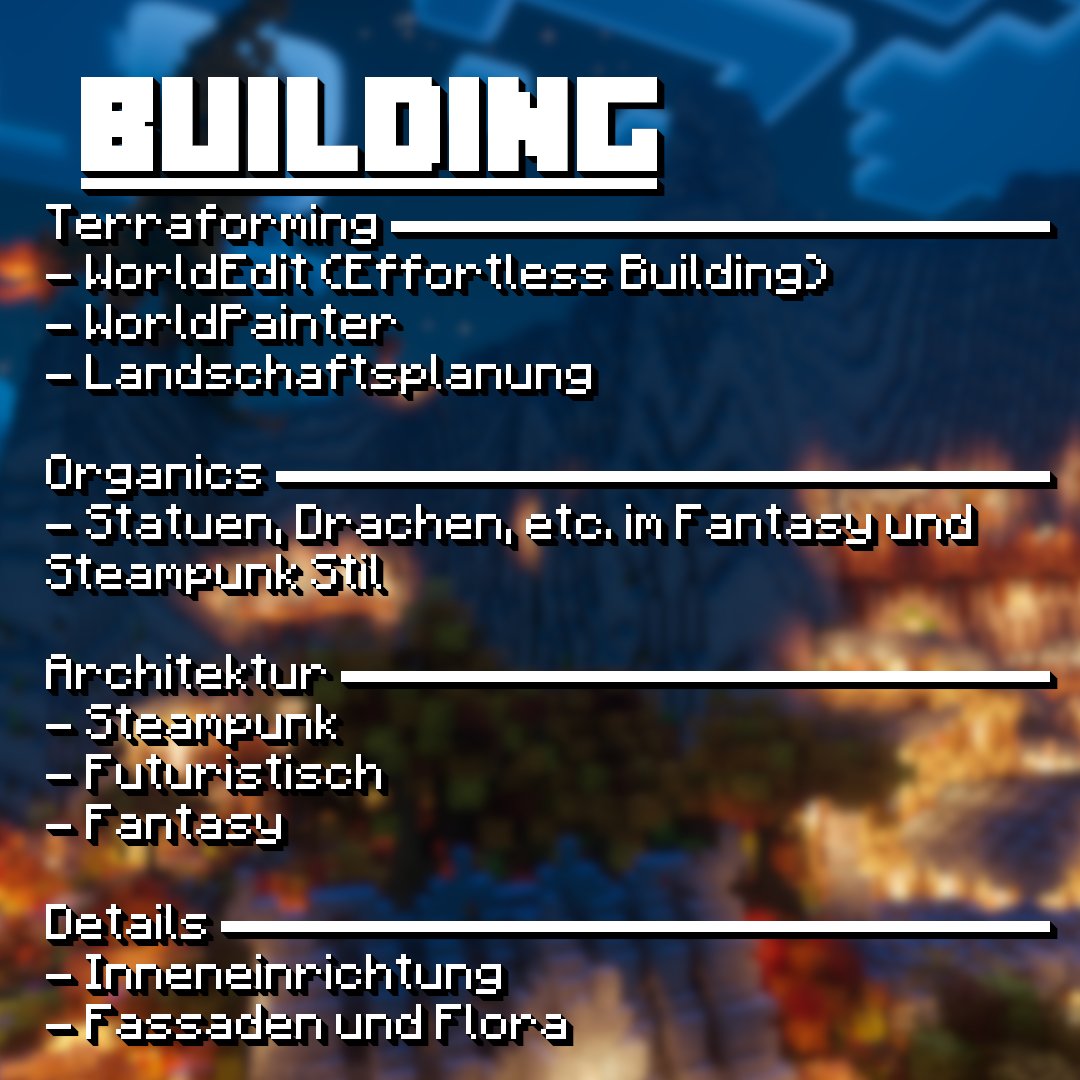
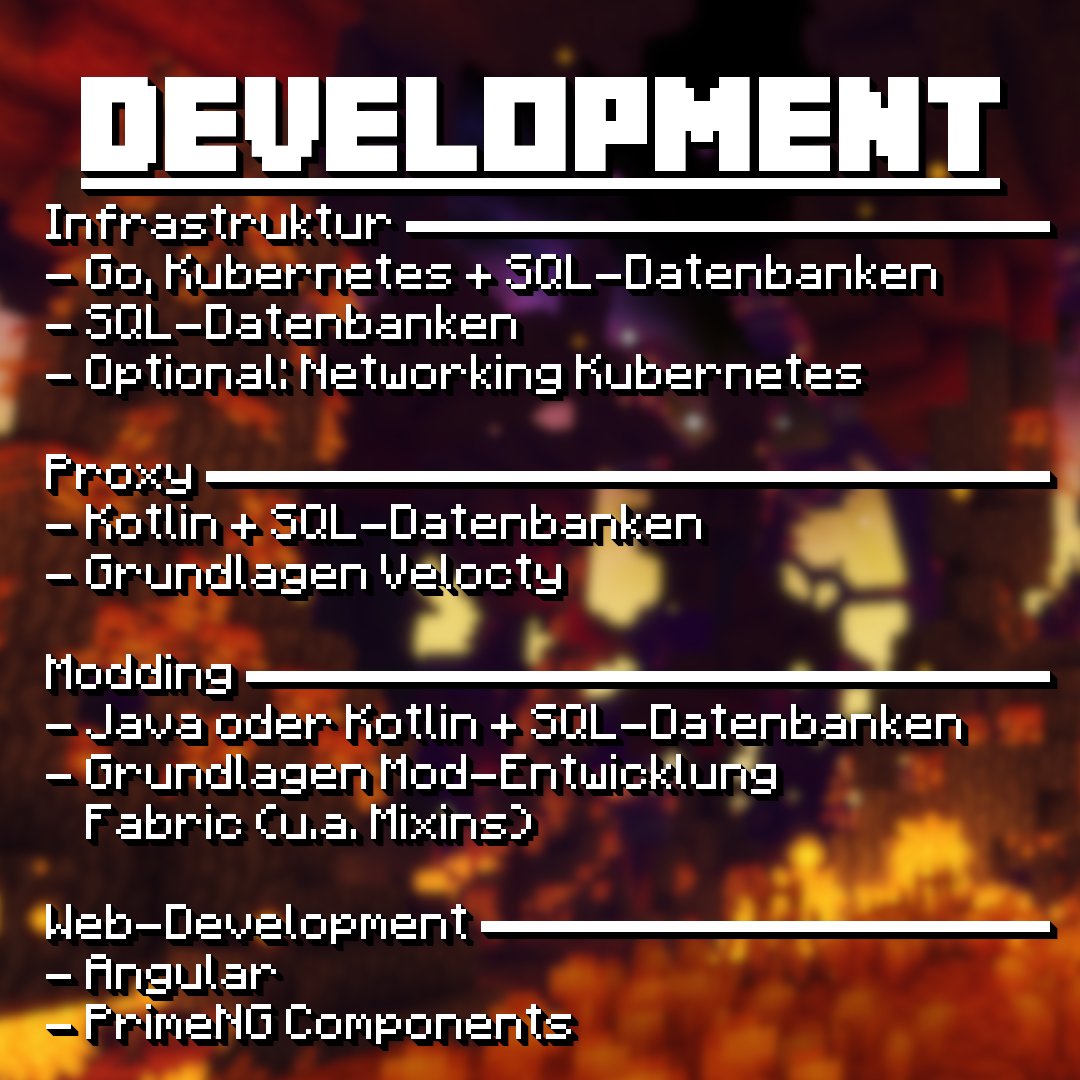
▶ Speziell suchen wir BUILDER und PROGRAMMIERER.
▶ Alle Infos findet ihr auf den Bildern!
Bewerbungen auf unserem Discord Server: discord.gg/h37S8U563q Mit dem Befehl "/bewerbung-erstellen" in "#botcommands"

8
68
4,787

22 Jul 2023
Wir suchen neue Mitarbeitende!
Bewerbungen auf unserem Discord Server:
discord.gg/h37S8U563q
Mit dem Befehl "/bewerbung-erstellen" in "#botcommands"

2
8
476

13 Dec 2022
This is a great time to start playing! You will learn a lot about #NFTs #blockchain #trueownership #digitalproperty #BlockchainGames #mobilegaming #mobilegames #gaming #crypto and #Python
#telegramgroup #Bots #botcommands #smartcontracts #coding #inventorymanagment #Strategy 🔥
12 Dec 2022

PixelTycoons Christmas is Insane. If you are not a user, you may want to become one or be a witness.
Either way... join t.me/pixeltycoons
News About Christmas events popping real soon!!
You don't want to miss out!
#nft #pixeltycoons #NFTGaming #Christmas #gamedev #wax
1
5
3