Filter
Exclude
Time range
-
Near
The "Grammar of Graphics" is a powerful concept that ggplot2 in R is built on. It breaks down the process of data visualization into layers, making it easier to customize and understand how to build effective charts. The visualization illustrates the essential layers used to create a plot: 1️⃣ Data: The foundation, where you start by defining the dataset. 2️⃣ Aesthetics: Map variables to visual aspects like color, size, and position. 3️⃣ Geometries: Specify the type of plot you want, such as bar, line, or scatter. 4️⃣ Facets: Create subplots for different subsets of your data. 5️⃣ Statistics: Add statistical transformations, like mean lines or trend lines. 6️⃣ Coordinates: Control the plot’s coordinate system, such as flipping axes. 7️⃣ Theme: Adjust the overall appearance, like grid lines, font styles, and background. In the code example shown, each of these layers is combined to produce the boxplot visualization. The process starts with defining the data and aesthetics, then moves through geometries, adding facets to split the data by groups, and even applying statistical transformations to highlight the mean value of each group. Finally, it configures the coordinates and finishes with a clean theme. Want to dive deeper into creating beautiful and informative visuals with ggplot2? Check out my online course on "Data Visualization in R Using ggplot2 & Friends!" Learn more by visiting this link: statisticsglobe.com/online-c… #DataScience #RStats #VisualAnalytics #Rpackage #tidyverse #database #Data #programming #datavis
4
66
1,521
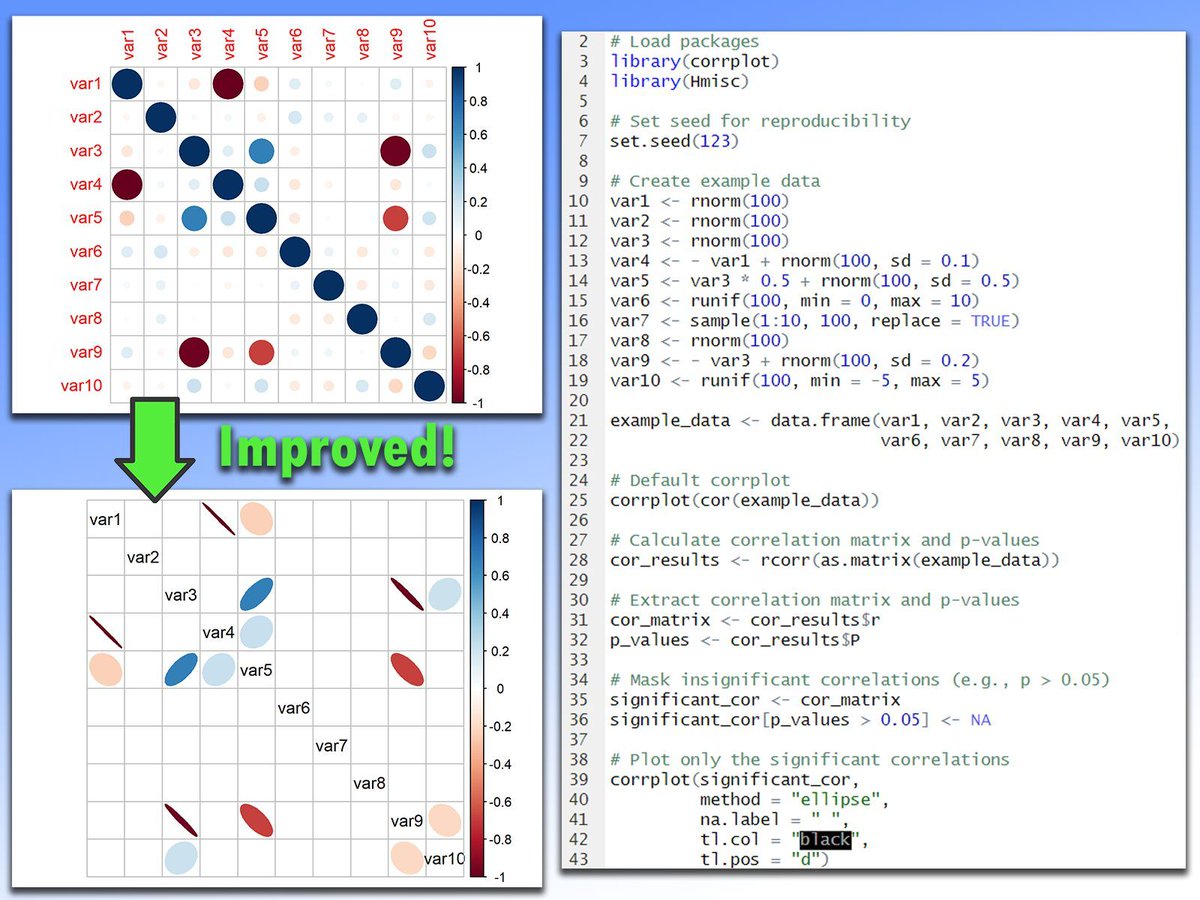
Correlation matrix plots are a powerful tool for understanding relationships between variables, but they can become overwhelming with larger data sets. Here’s an example of how to make these plots easier to interpret by displaying only the most relevant parts, created using the corrplot package in R. ❌ In the first image, all correlations are displayed, regardless of significance. This can lead to a cluttered and confusing visualization, where non-significant correlations crowd the space, making it harder to identify meaningful patterns. ✅ In the second image, only the significant correlations are shown, resulting in a much cleaner and more readable plot. By removing the non-significant values, the important relationships stand out clearly. This approach is especially useful for larger data sets, where showing all correlations can make the plot difficult to interpret. Want to learn more about statistical techniques such as correlation matrix plots? My Statistical Methods in R course covers such topics in more detail! See this link for additional information: statisticsglobe.com/online-c… #RStudio #Data #RStats #database #datavis #DataVisualization #Statistics #programmer #Rpackage
6
54
1,229
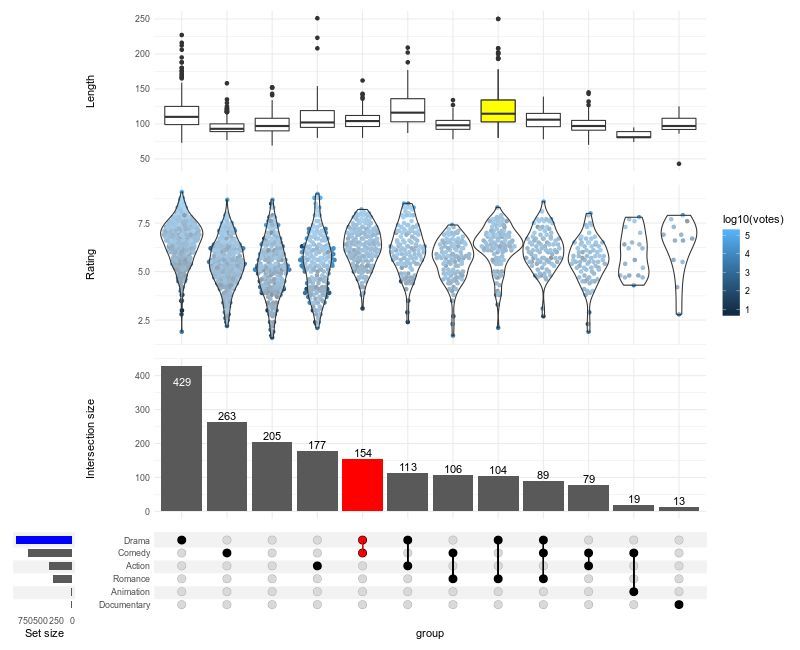
Struggling to visualize complex intersections in your data? ComplexUpset, an extension of ggplot2, makes it easy to create advanced UpSet plots, offering a clear way to display overlapping sets and their relationships. ✔️ Visualize complex set intersections with clarity. ✔️ Customize plot layouts, colors, and annotations for better readability. ✔️ Integrate additional data layers for deeper insights. ✔️ Handle large and intricate data sets effortlessly. Whether you're analyzing gene sets, customer segments, or survey responses, ComplexUpset helps you uncover meaningful patterns in intersecting groups. The visualization shown here is taken from the package website: github.com/krassowski/comple… Explore how to create impactful visualizations with ggplot2 and its extensions in my online course "Data Visualization in R Using ggplot2 & Friends." See this link for additional information: statisticsglobe.com/online-c… #DataScientist #tidyverse #RStats #rstudioglobal #datavis #programming #VisualAnalytics #DataAnalytics #ggplot2
1
12
72
1,927
This is a status update, what’s important: the video. Name found? For now, temporary. But we run with this philosophy: wabisabee.app I was recently working on this PoC, built on opensource, human enhanced, and focused on privacy. We achieve this by running a serverless, zero data retention architecture. One full generation: 2min From PoC to MvP: Almost there… Planning this as a research project. Will launch anyway, testing in production 🙂 Meanwhile, I present to you: the first sketch of this app video showcase What do you think, am I getting there? #design #genai #build #vibecoding #datavis
15
Replying to @uixmat @bklitai
that's super cool! btw, it would be nice to disable the animations on the studio, sometimes I just need the datavis and nothing else! love your work here!
1
2
47
Replying to @hiiinternet
cool datavis
1
135
New dashboard unlocks species extinction risk data for all jncc.gov.uk/news/new-dashboa… post from @JNCC_UK Dashboard jncc.gov.uk/our-work/gb-red-… GB Red List dataset jncc.gov.uk/resources/b07147… #biodiversity #datavis #opendata
67
Complex Domain Coloring. Visualizing a function in the complex plane where hue represents the phase angle and brightness represents the magnitude. A map of mathematical singularities. #ComplexAnalysis #Mathematics #DataVis
4
119
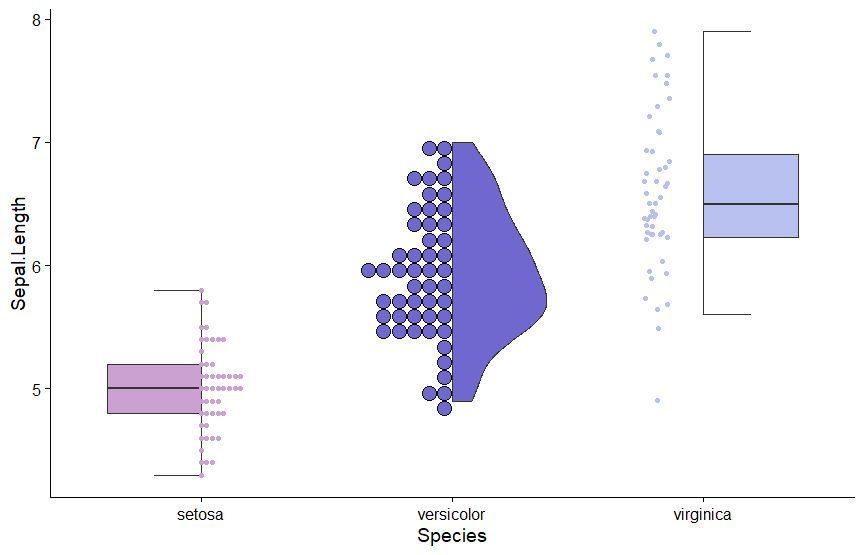
The gghalves package is a handy extension for ggplot2 that enables you to create half-geometries, such as half-violin plots, half-dot plots, and more. It allows you to compare two data sets side-by-side, using one plot instead of two, for clearer and more compact visualizations. ✔️ Efficient Data Comparison: gghalves makes it easy to compare two groups by displaying their data in a single, merged plot, saving space and reducing clutter. ✔️ Flexible Plotting Options: Supports various geometries, including half-violin and half-box plots, making it versatile for different kinds of visual comparisons. ✔️ Smooth Integration: Works seamlessly with ggplot2, allowing you to enhance your existing visualizations without major code changes. Whether you’re analyzing experimental results, survey responses, or any other type of grouped data, gghalves helps to keep your visualizations clean and insightful. The example visualization shown here is taken from the package website: cran.r-project.org/web/packa… If you’re eager to improve your data visualization skills, consider joining my online course, Data Visualization in R Using ggplot2 & Friends. We’ll cover ggplot2 and its extensions, helping you create clearer, more effective visuals. See this link for additional information: statisticsglobe.com/online-c… #ggplot2 #RStudio #VisualAnalytics #tidyverse #database #coding #RStats #DataAnalytics #datascienceenthusiast #Rpackage #datavis
10
55
1,791
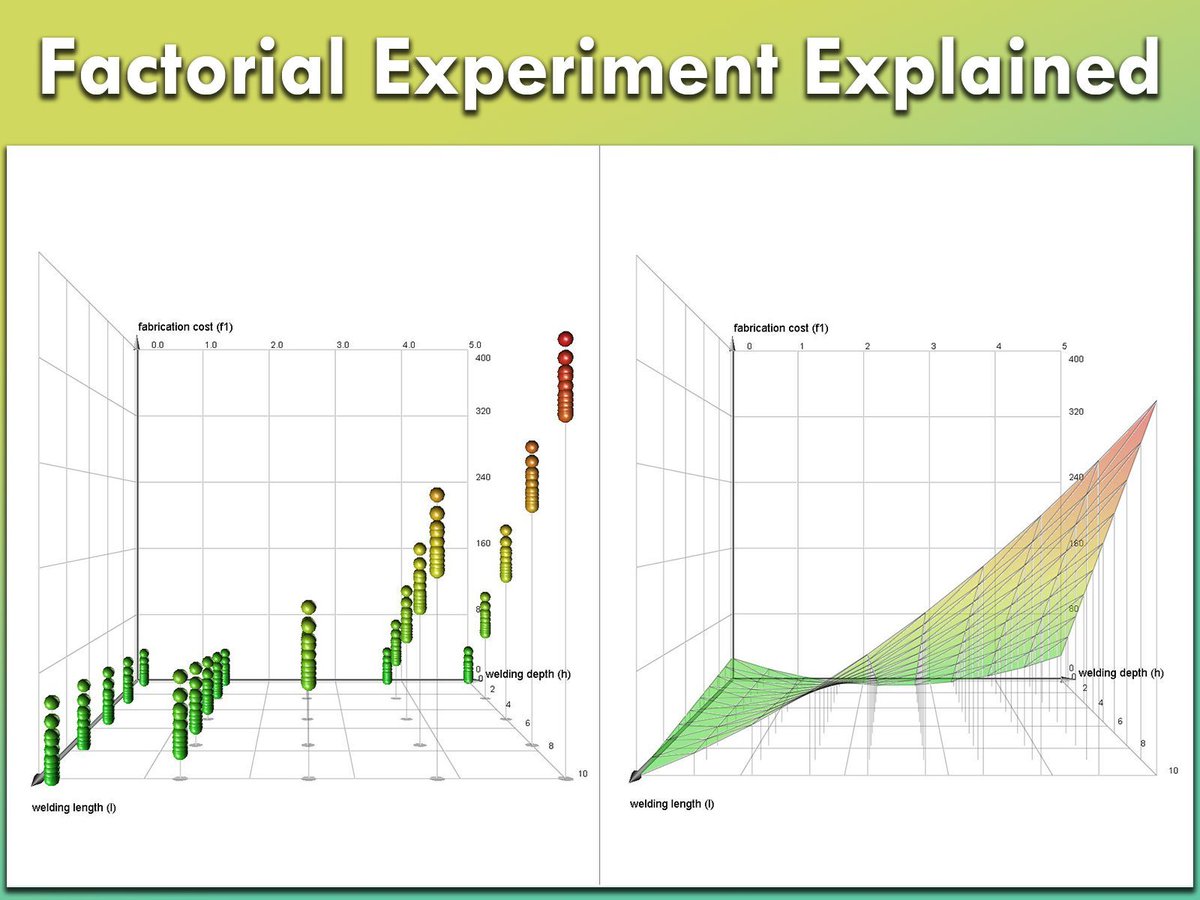
Factorial experiments are a powerful statistical method used to study the effects of multiple factors simultaneously. They help uncover not only how individual factors influence outcomes but also how these factors interact with each other. This approach is widely applied in fields like manufacturing, agriculture, pharmaceuticals, and engineering for process optimization and quality improvement. ✔️ Efficiently test multiple factors with fewer experiments. ✔️ Reveal interactions between variables that single-factor tests might miss. ✔️ Optimize processes by identifying the most influential factors. ✔️ Provide a comprehensive understanding of both main effects and interaction effects. ❌ Designs can become overly complex as the number of factors increases. ❌ Risk of misinterpretation without proper statistical validation and model diagnostics. ❌ Higher-order interactions may overfit the model if data is insufficient. ❌ Requires careful planning to ensure factor levels are appropriately chosen and results are reproducible. When a full factorial design is too resource-intensive, fractional factorial designs offer a practical alternative. These designs reduce the number of experimental runs while still capturing the most critical main and interaction effects, though at the cost of potential aliasing (confounding effects). The image shows two key visualizations from a factorial experiment (Source: en.wikipedia.org/wiki/Factor…): 1️⃣ On the left, a scatter plot represents a full factorial design, displaying combinations of welding length (l), welding depth (h), and their effect on fabrication cost (f1). Each point represents an experimental run, showing how these factors interact. 2️⃣ On the right, a response surface plot models the relationship between welding length, welding depth, and fabrication cost. The smooth surface helps visualize optimal conditions and understand how the response variable changes across different factor levels. Stay informed with insights on Statistics, Data Science, R, and Python in my newsletter! Learn more by visiting this link: statisticsglobe.com/newslett… #Data #programming #datavis #VisualAnalytics #RStats #database
5
46
1,368
What happens when you take more and more random draws from a distribution? You start to see the true shape behind the randomness! This principle is central to the law of large numbers, which shows how sample averages converge to expected values as the number of observations grows. Here are some points to keep in mind: ✔️ Helps explain how larger samples stabilize statistical estimates ✔️ Supports reliable modeling when working with random processes ✔️ Builds intuition for simulation, inference, and Monte Carlo methods ❌ Small samples can lead to noisy patterns that misrepresent the distribution This animation below shows how random draws from a normal distribution behave as n increases. The black curve is the estimated density from the sample, while the red curve represents the true normal distribution. As the number of draws increases, the black curve aligns more closely with the red. 🔹 In R, simulate with rnorm() and visualize with ggplot2. Use set.seed() for reproducibility. 🔹 In Python, generate draws with numpy.random.normal(), apply scipy.stats.gaussian_kde for density estimation, and plot with matplotlib. Adjust bandwidth for accuracy, and use numpy.random.seed() for reproducibility. Want to dive deeper into topics like this? Check out my online course on Statistical Methods in R. Click this link for detailed information: statisticsglobe.com/online-c… #RStudio #RStats #programmer #Statistical #datavis
1
19
81
3,696
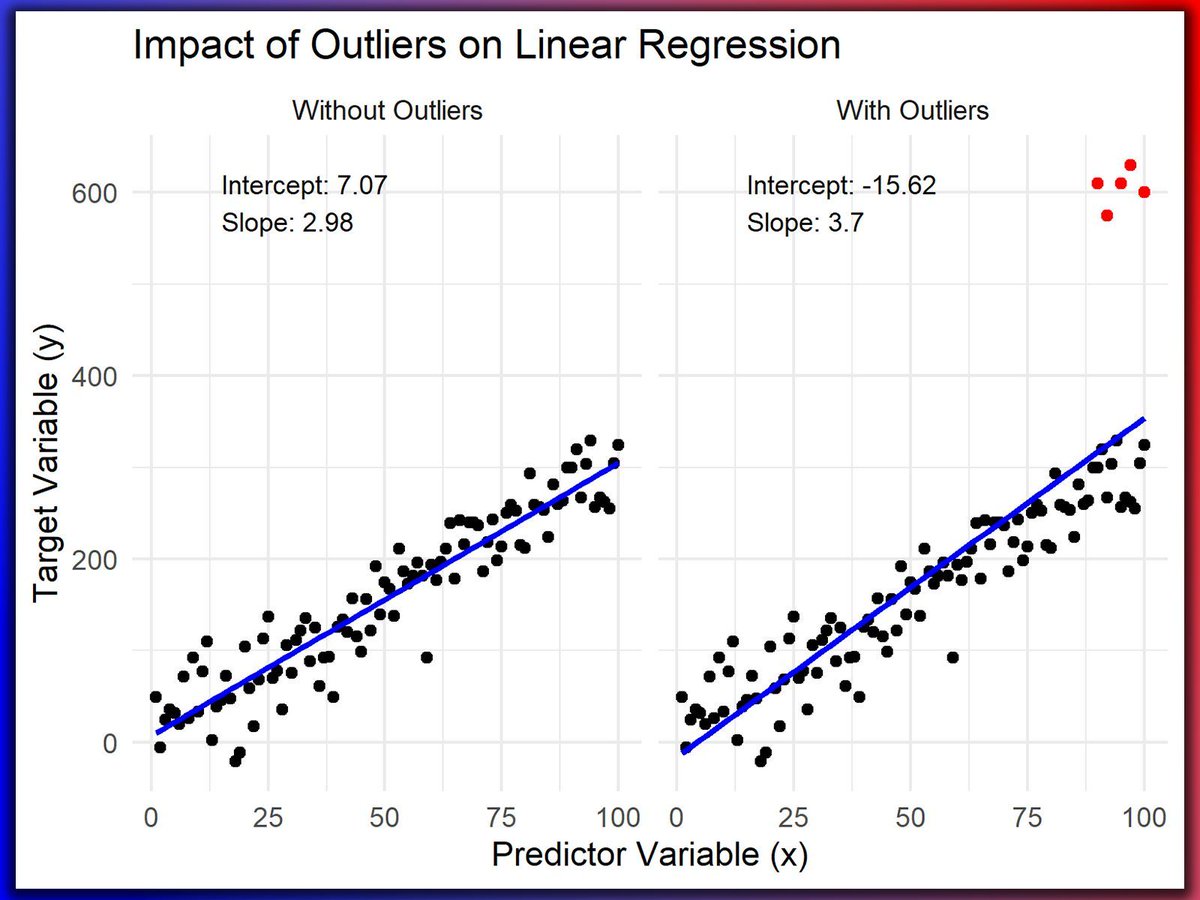
Outliers can have a significant impact on regression analysis, often skewing the results and leading to misleading insights. Understanding how outliers affect regression models is essential for accurate data analysis and informed decision-making. Challenges of Ignoring Outliers: ❌ Skewed Results: Outliers can significantly skew the regression line, leading to incorrect conclusions about the relationship between variables. ❌ Reduced Model Performance: A model that fails to account for outliers may have reduced predictive power and accuracy. ❌ Misleading Interpretations: Outliers can create false impressions of trends and correlations that don't genuinely exist in the data. The visualization of this post demonstrates how outliers can significantly affect a regression model. On the left, the plot shows a linear regression without outliers, where the regression line accurately represents the relationship between the predictor and target variables. On the right, the plot includes several outliers at the top right, clearly illustrating how these extreme values can distort the regression line, making it less representative of the overall data trend and leading to potential misinterpretations. Note: Extreme values should not be removed without careful evaluation. This example uses a synthetic data set for illustration purposes. However, in practice, it is crucial to thoroughly assess whether removing extreme data points is appropriate. Often, alternative methods, such as data transformation and robust regression can address outliers effectively while preserving data integrity. Handling Outliers in Practice: 🔹 R: Use the dplyr package for data manipulation and ggplot2 for visualizing the impact of outliers on regression. 🔹 Python: Leverage pandas for handling data and matplotlib or seaborn for creating visual representations to analyze the effect of outliers. To dive deeper into concepts like this, join my online course on Statistical Methods in R. Learn more: statisticsglobe.com/online-c… #DataAnalytics #datastructure #Rpackage #RStats #datavis
8
74
2,479
Excited to share my first datavis project!! Please like share comment subscribee 🌟 devanshippatel.framer.websit…
4
3
32
1,714
Understanding how to set colors by groups in your plots can enhance your data visualization game! Here's why and when you should do it: ⭐️ Why? Clarity: Helps distinguish between categories. Interpretation: Easier to identify patterns. Appeal: Engaging visuals. ⏰ When? Categorical Data: Use for categorical variables. Multiple Variables: Differentiate data sets. Comparisons: Highlight differences. 🔍 Tips: Consistency: Use consistent colors. Accessibility: Choose colors accessible to all. Simplicity: Avoid overcrowding. This post's visualization showcases the effects of adjusting colors by groups in Python plots using Matplotlib and seaborn. I've partnered with Ifeanyi Idiaye to produce a tutorial outlining the process for this. More info: statisticsglobe.com/set-colo… #RStudio #RStats #Data #datavis
6
28
1,170
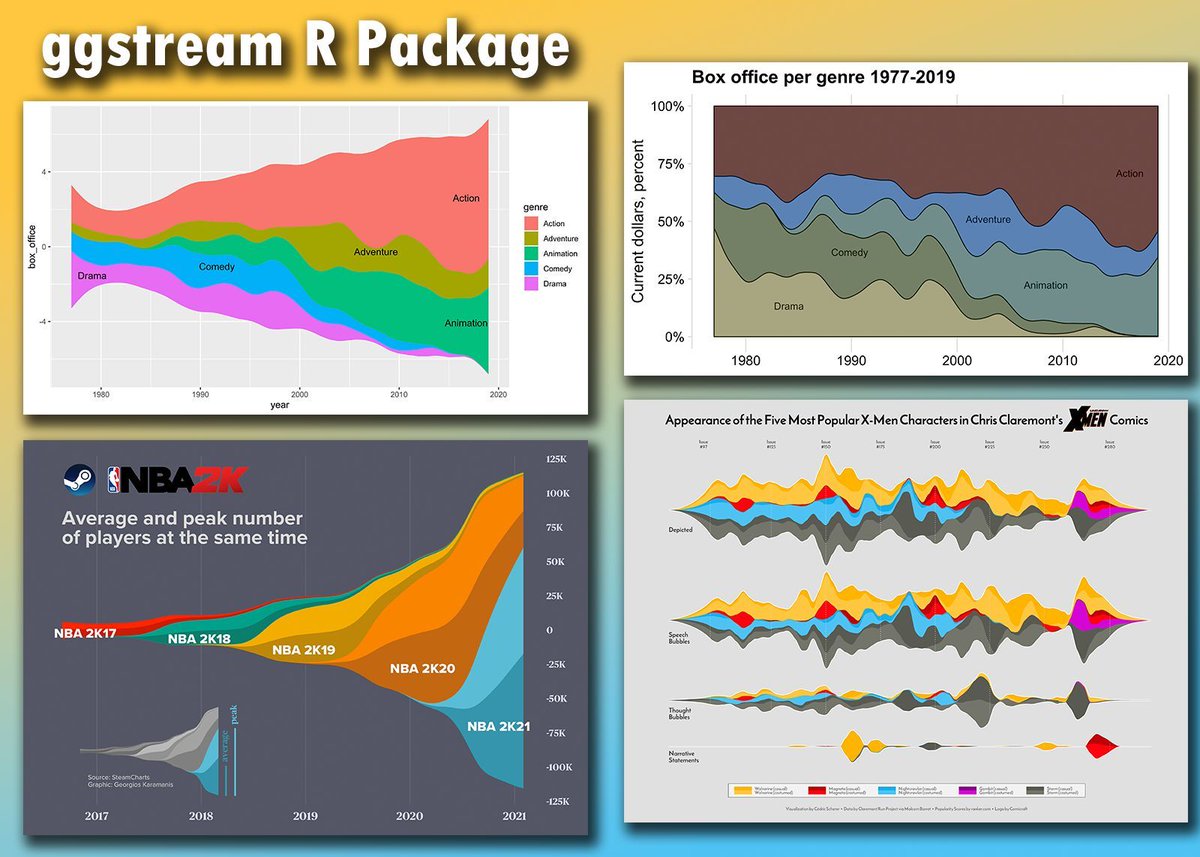
Want to make your data visualizations more dynamic and engaging? The ggstream package extends ggplot2 by providing a simple way to create streamgraphs, which are ideal for displaying changes in data composition over time. ✔️ Intuitive Visualizations: ggstream makes it easy to create streamgraphs, which are perfect for showing trends, patterns, and shifts in data composition, all in a visually appealing, flowing style. ✔️ Flexible Design: Offers customization options for colors, labels, and themes, helping you create clean and informative visualizations that suit your needs. ✔️ Clear Communication: Streamgraphs help convey information effectively, making complex data easier to understand at a glance. ✔️ Seamless Integration: Works directly with ggplot2, so you can use the same syntax and methods you’re already familiar with. The visualizations shown here are taken from the package website and demonstrate how ggstream can turn data into beautiful, flowing visuals: github.com/davidsjoberg/ggst… If you’d like to learn more about ggplot2 and how to create stunning visualizations, check out my online course on “Data Visualization in R Using ggplot2 & Friends!” Learn more: statisticsglobe.com/online-c… #DataAnalytics #datastructure #Rpackage #RStats #datavis
1
10
60
1,837
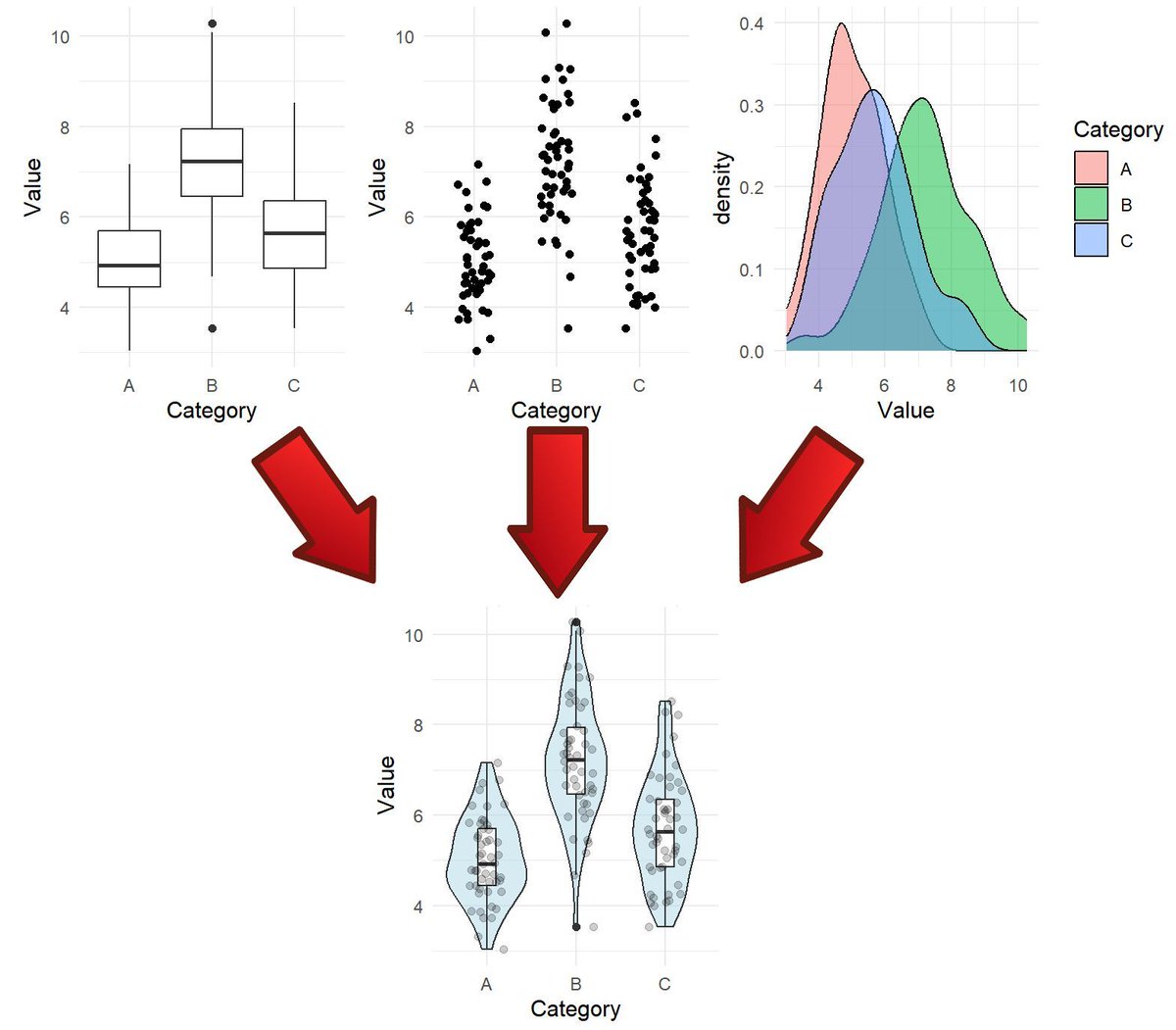
Effective data visualization is essential for statistical analysis and informed decision-making. That’s why my online course, Data Visualization in R Using ggplot2 & Friends, includes a dedicated section with 9 modules on specific plot types. The violin plot is one of the plot types covered in this section. It serves as a powerful alternative to boxplots by combining summary statistics with kernel density estimates, offering a detailed view of data distributions. Violin plots are particularly useful for comparing groups and revealing patterns that simpler plots might overlook. To give you a preview of the course, I’ve made the violin plot module available for free. This module includes a video lecture, a reproducible R script, several exercises with solutions, and many additional resources. You can access the free module on violin plots here: statisticsglobe.com/online-c… Interested in exploring more advanced data visualization techniques with ggplot2 and its extensions in R? Check out my comprehensive online course! Learn more by visiting this link: statisticsglobe.com/online-c… #DataScience #RStats #VisualAnalytics #Rpackage #tidyverse #database #Data #programming #datavis
16
75
2,354
Semiotic 3.6.0 now has intent and audience tuned chart suggestions so that you can provide the right charts for the data scientists, executives and analysts in your life. #datavisualization #dataviz #datavis semiotic.nteract.io/blog/cha…
1
5
853
Adjusting the font size of plots can significantly enhance the clarity and readability of your visualizations. Here’s why it matters: 🔹 Clarity: Changing font size ensures that text elements such as axis labels, titles, and annotations are easily readable, even when the plot is viewed on different devices or projected onto a screen. 🔹 Accessibility: Font size adjustment makes your plots more accessible to a wider audience, including those with visual impairments. It ensures that everyone can interpret the data effectively. 🔹 Professionalism: Properly sized fonts lend a polished and professional look to your plots, enhancing the overall presentation of your work. It reflects attention to detail and professionalism in data visualization. 🔹 Highlighting Key Information: By adjusting font sizes, you can emphasize important insights or key findings within your plots, making them stand out to your audience. Remember, effective data visualization goes beyond just creating plots! It’s about ensuring that your audience can easily understand and interpret the information you’re presenting. So, don’t overlook the importance of font size adjustments in your plots! This post's visualization illustrates the impact of altering the font size in plots created with Matplotlib and seaborn in Python. Together with Ifeanyi Idiaye, I've developed a tutorial illustrating how to accomplish this. More info: statisticsglobe.com/change-f… #datavis #R #datasciencetraining #VisualAnalytics #programmer #DataAnalytics #RStats #datastructure
8
50
1,791
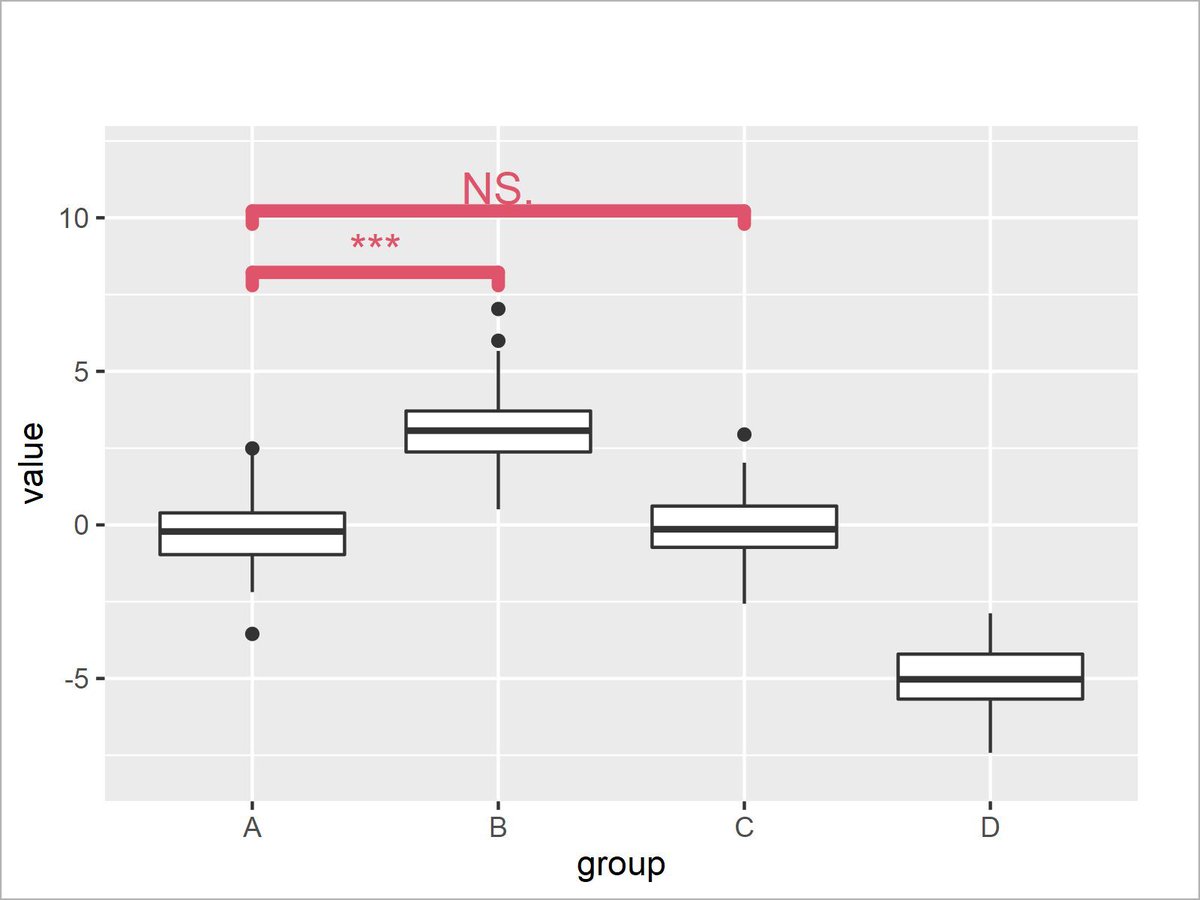
Highlighting significant differences in your ggplot2 visualizations in R? ggsignif makes it easy to add statistical significance annotations directly to your plots, ensuring clarity and precision in your results. ✔️ Add significance brackets effortlessly to highlight group differences. ✔️ Customize p-values, bracket style, and placement for polished visuals. ✔️ Enhance interpretability in comparisons across groups or conditions. Whether you're analyzing experimental results, survey data, or comparing multiple groups, ggsignif simplifies the task of marking significant differences, saving time and improving the clarity of your plots. I’ve put together a tutorial that walks you through how to use ggsignif effectively in practice: statisticsglobe.com/ggsignif… If you're interested in learning more about effective data visualization techniques, check out my online course "Data Visualization in R Using ggplot2 & Friends," where we cover ggplot2 and its extensions in detail! Learn more: statisticsglobe.com/online-c… #Rpackage #ggplot2 #DataAnalytics #datavis
12
64
2,773
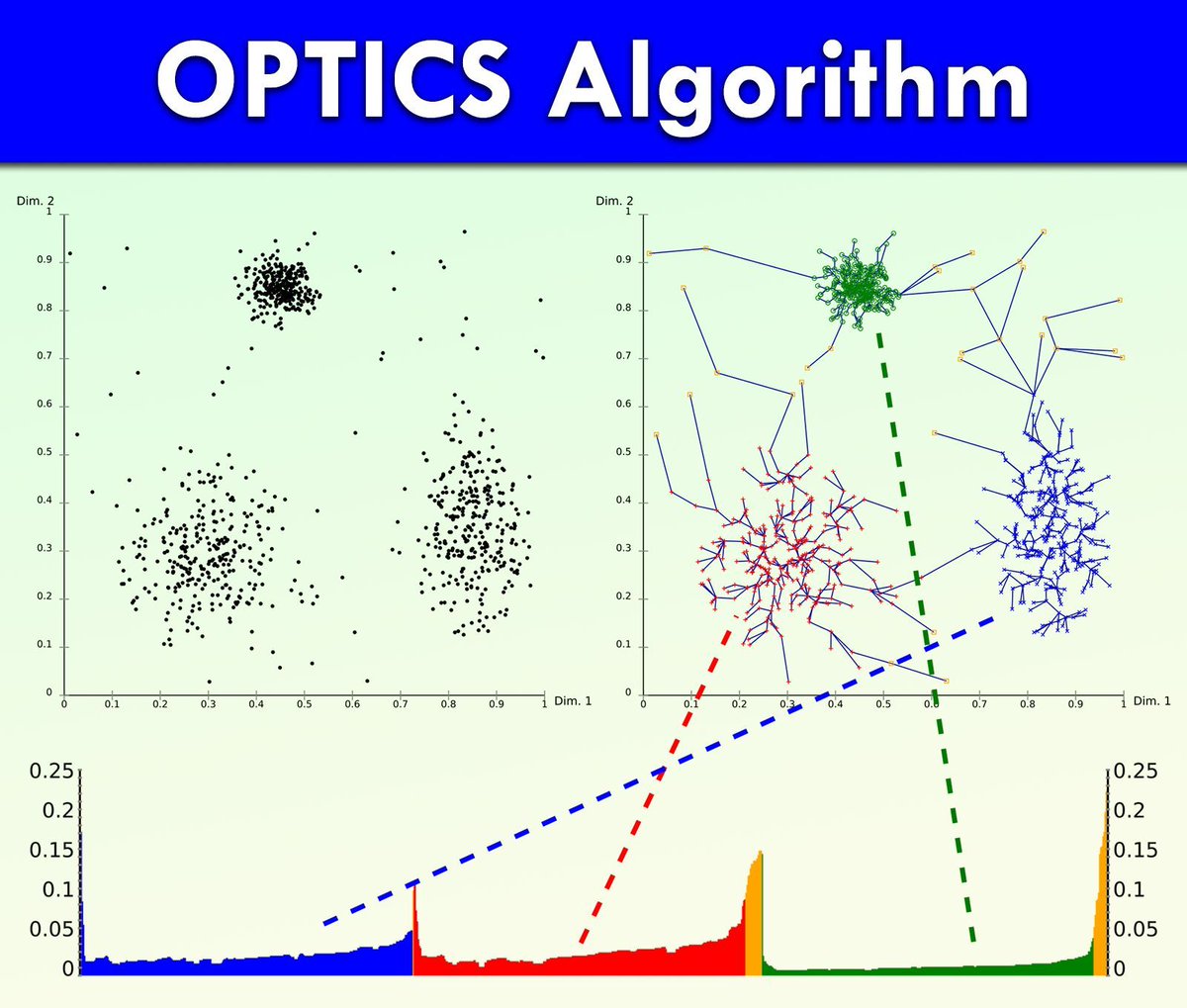
Clustering data with uneven density or complex structure can be difficult. The OPTICS algorithm (Ordering Points To Identify the Clustering Structure) is designed for these situations. It builds a reachability graph that reveals the underlying cluster structure across a range of density levels, avoiding the need to set a single global distance threshold like in DBSCAN. ✔️ Detects clusters of different densities without requiring a fixed eps value ✔️ Reveals clustering structure at multiple scales using a reachability plot ❌ Interpretation can be less intuitive and may require visual analysis ❌ Requires tuning of minPts, and cluster extraction is not automatic OPTICS is especially useful when clusters vary in size or density, or when no clear distance threshold separates groups. It offers more flexibility than DBSCAN, but requires more effort to interpret. For users who want both flexibility and automation, HDBSCAN is a strong alternative that extends OPTICS principles and extracts clusters hierarchically. The image shows OPTICS applied to a sample data set (top left). The reachability plot at the bottom highlights valleys that correspond to potential clusters, while the top right displays how each point is connected to its predecessor in processing order, helping visualize the structure and density changes. Credit for the visualization: en.wikipedia.org/wiki/OPTICS… 🔹 In R, use the dbscan package, which includes OPTICS and tools for reachability plots and manual or semi-automated cluster extraction. 🔹 In Python, use sklearn.cluster.OPTICS, and extract clusters using the reachability output or the cluster_optics_dbscan function. Sign up for my newsletter to get practical tips on statistics, data analysis, and using R and Python effectively. Further details: statisticsglobe.com/newslett… #database #RStats #datavis #Statistical #VisualAnalytics
3
28
1,530