
Mastering Bash Shell Scripting Developers and Linux users
⏱️ 1.8 hours
⭐ 4.18
👥 5,579
🔄 Feb 2026
💰 $14.99 → 100% OFF
comidoc.com/udemy/bash-funda…
#BashScripting #Linux #Automation #udemy
30

Jun 10
🐧 Advanced Bash Shell Scripting By Real-Time Experts
📲 Register Now: tr.ee/Pdp23d
.
👨🏫 Trainer: Real-Time Experts
📅 Starting on: 15th June @ 08:00 PM IST
🖥️ Mode : Online Training
.
For More Details:
🌐Visit:ashokitech.com/linux-online-…
#BashScripting #ShellScripting

8

A few days ago, Linux commands felt new. Today, I'm writing scripts with them.
📸 Images from today's hands on exercises are attached below.
Day 27 loading... 👨🏽💻
#VACyberMentorship #CyberSecurity #Linux #BashScripting #VictorAkinode
5

I learnt about Arrays which handle multiple values under one variable, useful for lists of files or repeated data.
My biggest takeaway: Bash is about removing repetition. The more you write, the more you think, “I shouldn’t be doing this manually again.”
#BashScripting #18of30
1
4
61

Jun 1
🎉 Happy New Month!
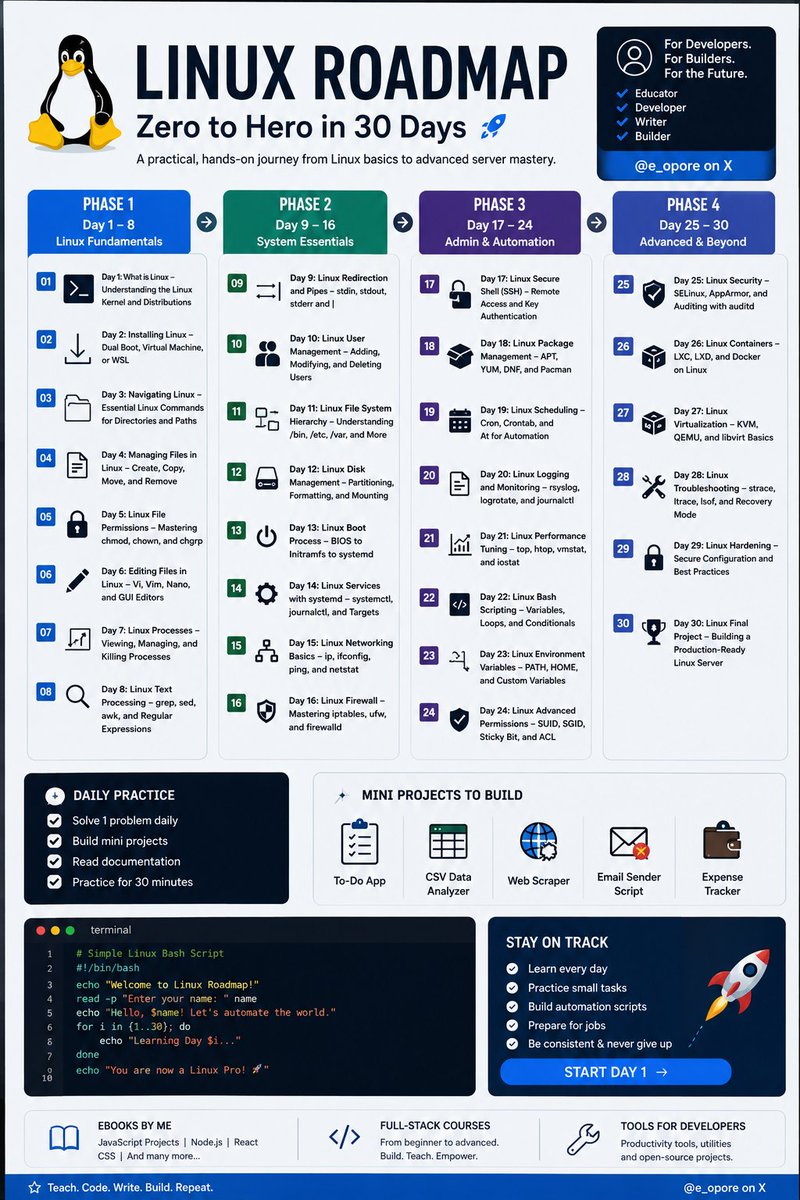
Linux tutorial series, structured as Day 1 through Day 30:
1. Day 1: What is Linux – Understanding the Linux Kernel and Distributions
2. Day 2: Installing Linux – Dual Boot, Virtual Machine, or WSL
3. Day 3: Navigating Linux – Essential Linux Commands for Directories and Paths
4. Day 4: Managing Files in Linux – Create, Copy, Move, and Remove
5. Day 5: Linux File Permissions – Mastering chmod, chown, and chgrp
6. Day 6: Editing Files in Linux – Vi, Vim, Nano, and GUI Editors
7. Day 7: Linux Processes – Viewing, Managing, and Killing Processes
8. Day 8: Linux Text Processing – grep, sed, awk, and Regular Expressions
9. Day 9: Linux Redirection and Pipes – stdin, stdout, stderr and |
10. Day 10: Linux User Management – Adding, Modifying, and Deleting Users
11. Day 11: Linux File System Hierarchy – Understanding /bin, /etc, /var, and More
12. Day 12: Linux Disk Management – Partitioning, Formatting, and Mounting
13. Day 13: Linux Boot Process – BIOS to Initramfs to systemd
14. Day 14: Linux Services with systemd – systemctl, journalctl, and Targets
15. Day 15: Linux Networking Basics – ip, ifconfig, ping, and netstat
16. Day 16: Linux Firewall – Mastering iptables, ufw, and firewalld
17. Day 17: Linux Secure Shell (SSH) – Remote Access and Key Authentication
18. Day 18: Linux Package Management – APT, YUM, DNF, and Pacman
19. Day 19: Linux Scheduling – Cron, Crontab, and At for Automation
20. Day 20: Linux Logging and Monitoring – rsyslog, logrotate, and journalctl
21. Day 21: Linux Performance Tuning – top, htop, vmstat, and iostat
22. Day 22: Linux Bash Scripting – Variables, Loops, and Conditionals
23. Day 23: Linux Environment Variables – PATH, HOME, and Custom Variables
24. Day 24: Linux Advanced Permissions – SUID, SGID, Sticky Bit, and ACL
25. Day 25: Linux Security – SELinux, AppArmor, and Auditing with auditd
26. Day 26: Linux Containers – LXC, LXD, and Docker on Linux
27. Day 27: Linux Virtualization – KVM, QEMU, and libvirt Basics
28. Day 28: Linux Troubleshooting – strace, ltrace, lsof, and Recovery Mode
29. Day 29: Linux Hardening – Secure Configuration and Best Practices
30. Day 30: Linux Final Project – Building a Production-Ready Linux Server
Grab the Linux Ebook: codewithdhanian.gumroad.com/…
#Linux #LinuxTutorial #DevOps #SystemAdministration #OpenSource #Programming #Developer #CodeNewbie #100DaysOfCode #LinuxLearning #TechEducation #SoftwareEngineering #CloudComputing #CyberSecurity #BashScripting
Follow @e_opore on X to learn more.
29
70
398
20,232

1/5
🐧 Ruta Linux para pentesters: del `ls` al exploit.
10 pasos que separan al que aprueba el OSCP del que llora a las 3 AM en una caja de HackTheBox.
Hilo ↓
#linux #ciberseguridad #pentesting #oscp #hackingetico #cybersecurity #bashscripting #hacker #infosec #aprendelinux

1
10
57
1,716

May 19
Level Up from #Linux to #BashScripting in 1 Week
If you know the terminal,so you already know the commands. Bash scripting is just putting those commands into a single file to execute them all at once
🧵👇.#DevOps #100DaysOfCode
1
1
10
898

May 10
في BashScripting الرموز الصغيرة تصنع فرق كبير 👨💻
() لتشغيل أوامر في subshell
{} لتجميع الأوامر
[] لاختبارات الشرط
$() لتنفيذ أمر وإرجاع ناتجه
$(( )) للعمليات الحسابية
${} للتعامل مع المتغيرات باحتراف
[[ ]] شروط متقدمة وأكثر أمانًا
فهمها = كتابة سكربتات أقوى وأنظف
3
127

🔥 Bash para Ciberseguridad: Guía Completa desde CERO
📅 Domingo 12 abril (HOY) | 19:00h España
📺 DIRECTO en YouTube: youtube.com/live/HXscdf5j9Ho
🔁 Comparte este post para que todos puedan aprender gratis.
Nos vemos luego! 😎
#ciberseguridad #linux #bashscripting

4
16
355


Mar 12
Day 47 of My Cloud Computing Journey
Today, I continued learning about Loop in bash scripting, with focus on
Until Loop
Select Loop.
What I learned (Key Lessons)
Until Loop
- This executes a block of code until a specified condition becomes true.
- The loop runs when condition is false and stops when the condition evaluates to true.
syntax:
until [ condition ]
do
command
done
Select Loop
- The select loop is used to create interactive menu-based interfaces in bash scripting.
- It displays a numbered list of options to the user who select an option by entering its number.
- The select loop automatically stores the user's choice in a variable known as REPLY, which contains the number entered.
- It is often combined with "case statement."
syntax:
select variable in list
do
command
done
PRACTICAL VIDEO
The video below demonstrates how loop, until loop and select loop are used in bash scripting.
#CloudComputing #Cloudengineer #BashScripting #loop #SelectLoop #UntilLoop #TechUpdate
1
3
5
164
Mar 6
Day 46 of My Cloud Computing Journey Today, I continued exploring Bash Scripting, with my focus on Loop.
What I learned (Key lessons).
Loops
- They are control structures that allow repetitive execution of a block of code based on a condition.
- They are essential for automating repetitive task in a script.
- Loops help reduce redundant code and make script more efficient.
The For Loop
- The for loop iterates over a list of items such as strings, numbers, or files.
- Commonly used when the number of iterations is known.
syntax:
for variable in list
do
command
done
While Loop
- The while loop executes a block of code as long as a specified condition is true.
- It is useful when the number of iterations is unknown
- The loop continues until the condition evaluates to false.
syntax:
while condition
do
command
done
PRACTICAL VIDEO
The video below demonstrates how loop, for loop and while loop are used in bash scripting.
#CloudComputing #Cloudengineer #BashScripting #loop #ForLoop #TechUpdate
3
5
91

The Ubuntu Handbook series is now complete! 🎉
Chapter 23 just published: Basic Bash Scripting for System Automation
Learn how to write your first Bash script, use variables, loops, and functions — plus 3 ready-to-use sysadmin scripts and cron scheduling.
Read the final chapter 👇
pro.tecmint.com/bash-script-…
#Linux #Ubuntu #BashScripting #DevOps #TecMint
8
88
3,548
Mar 2
Day 45 of My Cloud Computing Journey
Today, I continued exploring Bash Scripting, with my focus on Case Statement.
What I learned (Key lessons)
The Case Statement
- It is used to match a variable against multiple patterns, executing the corresponding blocks of code for the first match.
- It is cleaner to use when checking one variable against many possibilities.
syntax:
case $variable in
pattern 1 )
code ;;
pattern 2 )
code ;;
* )
code ;;
esac
PRACTICAL VIDEO
The video below demonstrates how case statement is used in bash scripting.
#CloudComputing #Cloudengineer #BashScripting #Case #Statement #TechUpdate
3
5
96

Feb 28
Day 1 Of My Devops Journey
I'm Officially Committing To Learning And Building In Public. Starting Things Off Today By Diving Into Linux & Bash Scripting 💻
Any Advice, Roadmaps, Or Tips For An Aspiring DevOps Engineer? Let's Connect And Grow
#DevOps #LearnInPublic #BashScripting
1
3
4
63
Feb 27
Day 44 of My Cloud Computing Journey
Today, I continued Bash Scripting, exploring conditional statements with focus on:
- The elif statement (elif ladder)
- Nested if statement
What I learned (Key lessons):
The elif Ladder
- The if-elif-else construct allow testing of multiple conditions sequentially.
- Enables the execution of block of code with a true condition while moving to the if condition is false.
- The elif stands for "else-if"
syntax:
if [ condition ]; then
code to execute
elif
code to execute
elif
code to execute
else
code to execute
fi
The Nested if
- This involves placing one if statement into another statement.
- It allows complex decision making by evaluating multiple conditions hierarchically.
- The execution of script exit once the condition of code to execute is met
syntax:
if [ condition 1 ]; then
code to execute
if [ condition 2 ]; then
code to execute
else
code to execute
fi
else
code to execute
fi
PRACTICAL VIDEO
The video below demonstrates how conditional statements, elif statement and nested if statements are used in bash scripting.
#CloudComputing #Cloudengineer #BashScripting #Conditions #Statements #TechUpdate
3
4
62
Feb 24
Day 43 of My Cloud Computing Journey
Today, I continued exploring Bash Scripting with main focus on Conditional Statements.
What I learned (Key lessons)
Conditional Statements
- Conditional statements allow scripts to make decisions based on specific conditions.
- They are fundamental in scripting because they enable the execution of specific blocks of code only when defined criteria are met.
- They are commonly used in automation, system checks, and deployment scripts.
The if Statement
- This evaluates a condition and executes a block of code if the condition is true.
syntax:
if [ condition ]; then
code
fi
The if-else Statement
- The if-else extends the if construct by providing an alternative block of code to execute if the first condition is not met.
syntax:
if [ condition ]; then
code
else
code
fi
PRACTICAL VIDEO
The video below demonstrates how conditional statements, if statement and if-else statements are used in bash scripting.
#CloudComputing #Cloudengineer #BashScripting #Conditions #Statements #TechUpdate
4
7
77
Feb 23
Day 42 of My Cloud Computing Journey
Today, I continued exploring Bash Scripting with focus on File Test Operators.
What I learned (Key lessons)
- The file test operators checks for properties of files and directories.
- They are mainly use with conditional statements, the if-else statement.
- These operators help scripts determine whether a file exists, whether it is accessible, or what type of file it is.
syntax:
if [ -operator $filename ]
these operators are:
-e: checks if a file exist
-f: checks if file is a regular file
-d: checks if file is a directory
-r: checks if file is a readable file
-w: checks if file is a writable file
-x: checks if file is an executable file
PRACTICAL VIDEO
The video below demonstrates how file operators are used to check the availability and usability of files and directories in bash scripting.
#CloudComputing #Cloudengineer #BashScripting #FileOperators #TechUpdate
4
5
71
Feb 22
Day 41 of My Cloud Computing Journey
Today's learning continued with operators on Bash Scripting with a focus on:
- Boolean operators
- String operators
These operators help combine conditions and compare text values when writing scripts.
What I learned (Key lessons)
Boolean Operations
- They combine conditions of logical expressions.
- They are commonly used with conditional statements such if statements.
These operators include:
-a (AND)
-0 (OR)
! (NOT)
syntax:
if [ expression -a expression ]
String Operation
- The string operator manipulate and compare strings.
- They are used within [] [[]]
common strings comparison operators include:
= (equal to
!= (not equal to)
-z (checks if string is empty
-n (checks if string is not empty
syntax:
if [ "str1" = "str2" ]
PRACTICAL VIDEO
The video below demonstrates how boolean operators and string operators are used in bash scripting.
#CloudComputing #Cloudengineer #BashScripting #Operators #TechUpdate
3
4
62
Feb 20
Day 40 of My Cloud Computing Journey
Today's lesson was on operators in bash scripting with a focus on:
- Arithmetic Operators
- Relational Operators
These operators are important in scripting because they help perform calculations and make decisions within scripts.
What I learned (Key Lessons)
Arithmetic Operators
- Performs mathematical operations on numerical values
- They are typically used with arithmetic expansion $((expression)).
They include:
(addition)
- (subtraction)
*(multiplication)
/(division),
%(modulus)
Relational Operators
- Compares two numerical values.
- They are commonly used with conditional statements such if statements
They include:
-eq (equal to)
-ne (not equal to)
-gt(greater than)
-lt(less than)
-ge(greater than or equal to)
-le(less than or equal to).
PRACTICAL VIDEO
The video below demonstrates how operators, arithmetic and relational are used in bash scripting. #CloudComputing #Cloudengineer #BashScripting #Operators #TechUpdate
3
4
67