


May 27
【Anthropic自社調査公開】Claudeの承認画面、93%が機械的にOKしてた
Anthropic公式ブログでサンドボックス戦略を公開。自社調査で「承認ダイアログ連発するとユーザーの93%が機械的にOKする」と認めた上で、claude.ai / Claude Code / Claude Cowork で別々の隔離戦略採用してることを明かしてる。
実装は:
・Claude Code:macOS Seatbelt / Linux Bubblewrap でローカル隔離
・claude.ai:gVisor のephemeralコンテナ
・Claude Cowork:sealed VM
自分の Claude Code 設定(~/.claude/settings.json)見直したら defaultMode が "bypassPermissions" やった。承認画面を全スキップする最緩設定。Anthropicが「ユーザーが押し慣れて事実上スキップしてる」と公開したのを受けて、自分も該当範囲やったと自覚した。
副業でAI使う人へのテイクアウト:
便利さで bypassPermissions に振り切ってる人は1回 defaultMode を確認するタイミング。承認なしで write / bash / network が通る設定。
ソース: anthropic.com/engineering/ho…
10
1,292

May 22
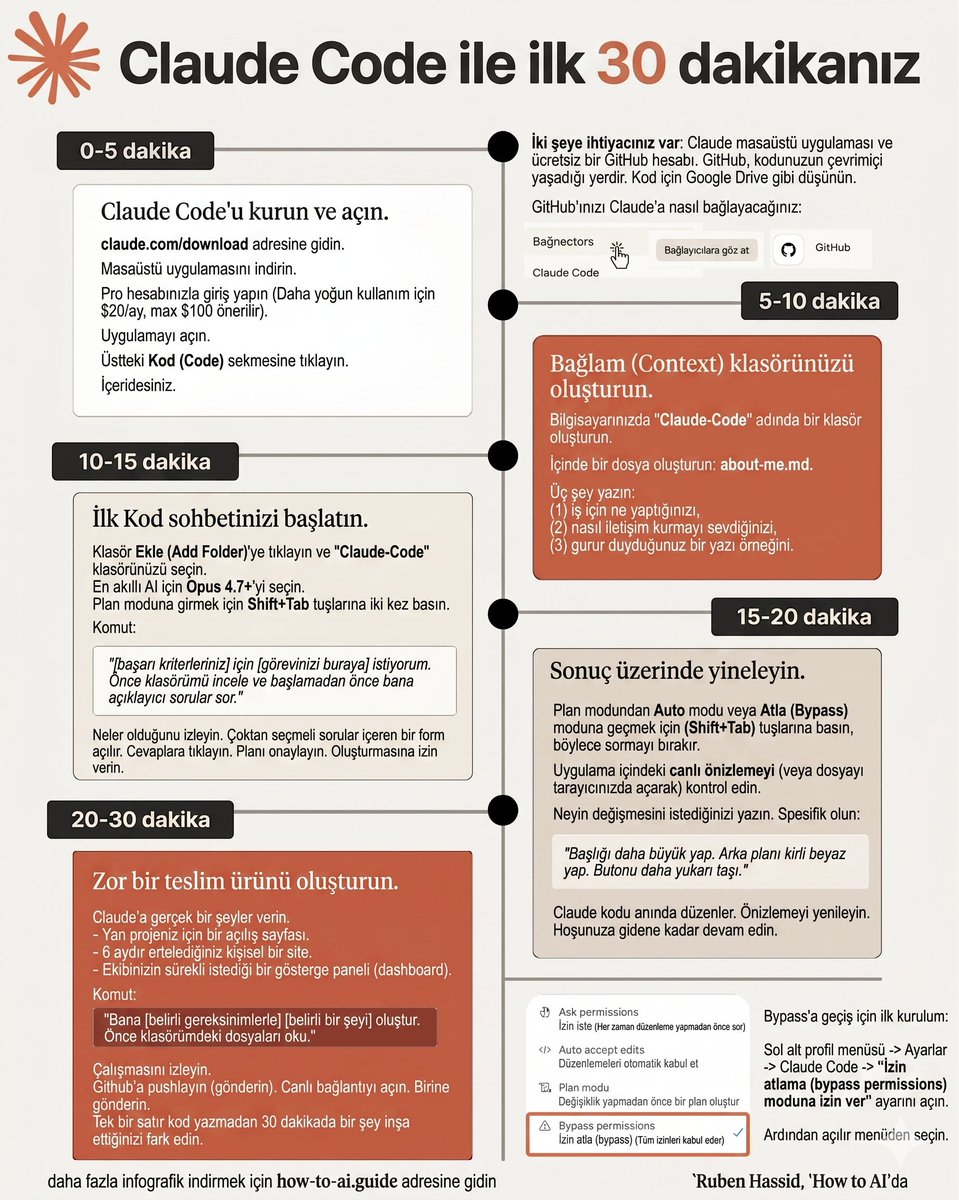
Kod yazmayı hiç öğrenmene gerek yok. Artık gerçekten değil. İşte sıfır kodlamayla Claude Code nasıl kullanılır:
1. Claude masaüstü uygulamasını aç.
2. "Code" sekmesine tıkla. Chat değil, Cowork değil. Code.
3. Bilgisayarından bir klasör seç.
4. O klasörün içine bir CLAUDE.md dosyası at. Ne koyacağını bilmiyorsan /init yaz, Claude mevcut klasörü okuyup dosyayı kendisi oluşturur.
Kurulum rehberi için: claudecode(.)free
Bu kadar. Artık İngilizce olarak ne istediğini tarif ediyorsun, Claude inşa ediyor.
Ama asıl güç Visual Studio Code'a Claude yükledikten sonra başlıyor kanka. Prompt atmadan önce şu ayarları değiştir:
1. Opus 4.7 modelini seç. Karmaşık projeler için şu an piyasadaki en güçlü genel amaçlı model.
2. Shift Tab'a iki kez bas, Plan moduna gir. İlk basış otomatik düzenleme moduna geçer, ikinci basış Plan moduna alır. Tek bir satır yazmadan önce Claude sana tam bir eylem planı sunuyor. Sen onaylamadan hiçbir şeye dokunmuyor.
3. Bypass permissions'ı aç. Basit bir toggle değil. ~/.claude/settings.json dosyasına şunu ekle: "permissions": {"defaultMode": "bypassPermissions"} böylece Claude her adımda durup izin istemekten çıkıyor, akış kesintisiz ilerliyor. AMA DİKKATLİ OL!
Bir de bunu bil: Prompt yazarken (dosyaadi) yazarsan Claude o dosyayı doğrudan görüyor. "Şu componenti düzelt" demek yerine (Header.jsx) diyorsun, direkt oraya gidiyor.
Sonra şunu yapıştır:
"[İSİM] adında bir GitHub repo oluştur. Ben kod bilmiyorum. Her şeyi sen yaz. [HEDEF] için [BAŞARI KRİTERİ] istiyorum. İşte bir örnek [ekran görüntüsü ekle]."
Claude ekran görüntünü okuyor. Siteyi kuruyor. Sen uygulama içinde canlı önizlemenin güncellendiğini izliyorsun.
Sır artık kod bilmek değil, nasıl prompt atacağını bilmek.
5
124
824
37,025

May 21
If you're still clicking "Accept permissions" every 30 seconds in Claude Code, you're paying for a Ferrari and driving it in first gear.
Anthropic shipped Auto mode for exactly this. 10-second install.
Here's how:
In the Claude Code CLI, press Shift Tab to cycle through permission modes.
Default, then accept edits, then plan, then auto.
The first time you land on auto, you'll get an opt-in prompt.
Accept it.
The status bar now shows "auto" and you're done.
Want it on by default?
Add this to ~/.claude/settings.json:
{
"permissions": {
"defaultMode": "auto"
}
}
Or start any session in auto directly: claude --permission-mode auto
Here's what it actually does.
A separate classifier model reviews every action Claude wants to take before it runs.
Routine stuff flies through.
Anything risky still gets blocked.
What gets auto-approved:
- File edits in your working directory
- Installing dependencies from your lockfile
- Reading .env and using those credentials with their matching API
- Read-only HTTP requests
- Pushing to the branch you started on
What still gets blocked:
- curl | bash and other download-and-execute patterns
- Production deploys and migrations
- Mass deletion on cloud storage
- Granting IAM or repo permissions
- Force push, or pushing directly to main
- Sending sensitive data to external endpoints
You can also state boundaries in chat.
"Don't push until I review" works.
The classifier reads it from the transcript on every check.
The catch.
Auto mode requires the Max, Team, Enterprise, or API plan.
Pro doesn't get it.
If you're on Pro and using Claude Code daily, this is a real reason to upgrade.
Once auto is on, Claude works for minutes at a stretch without stopping.
You stop being the bottleneck.
The workflow finally feels the way the demos look.
Turn it on for SPEED!
1
1
9
753

What makes an artwork beautiful, and can your brain's response decode such hidden dimensions of aesthetic appeal? We built a framework to find out 🎨 🧠
First author: Dr. Xinyu Liang @betory9178
@NatureComms #COGNIZELab
nature.com/articles/s41467-0…
#Neuroaesthetics #DefaultMode

1
12
32
2,702

The #BrainHiddenHub for #CreativeThought Identified as the: "#RostralPreFrontalCortex.
A “dynamic cooperation” between two opposing systems:
- #DefaultMode-Network (DMN); #SpontaneousAssociations.
&
- #ExecutiveControl-Network (ECN); #GoalOrientedThinking.
A “bridge” between these two worlds is identified as:
"#RostralPreFrontalCortex.
The more distinct and well-connected these two “islands” are, the more creative the individual.
neurosciencenews.com/rostral… via @neurosciencenew

2
157


Apr 19
いったんこれで運用してみる. AutoModeでかなり強力に前進しようとする意志が注入されてそうなので、これでマシになってくれるといいんだけど。。。
{
"disableAutoMode": "disable",
"useAutoModeDuringPlan": false,
"viewMode": "focus",
"includeGitInstructions": false,
"permissions": {
"defaultMode": "acceptEdits",
"disableBypassPermissionsMode": "disable"
}
}
2
354

Apr 19
Agent Kitにパーミッション機能を追加しました!
agent.mdのfrontmatterにpermissions:を書くだけで、
ツールの実行権限を細かくコントロールできるようになりました。
• 自動で許可(allow)
• 毎回ユーザー確認(ask)
• 完全に禁止(deny)
defaultMode(default / acceptEdits / plan など)も選べて、
write_fileやedit_file、bash実行時も安心して使えます。
Claude Codeと同じ感覚でファイルを作りながら、安全性がかなり上がったと思います。
好みのエージェントを、もっと安心して作れるようになりました。
最新版はこちらからどうぞ👇
x.com/shinzizm2/status/20454…
試してみた感想や、どんなagentを作りたいか教えてくれると嬉しいです!
Apr 18

agent kitを公開しておきます。
claude codeのようなchat 画面 , agentだけskillsやツールなどを入れて動かしたい。
色々なLLMで長時間動くagent を動かしたい
(openrouter, openai, google gemini,moonshot)
claude codeのように様々なことができるagentを動かしたい。
MCPサーバー、skills、自作tool、なども入れてagentを動かしたい。(設定ファイルは1つのシンプルなagentファイルのみ)
など、非常に柔軟に設定ができるようにしてあります。
長時間会話しても、トークンが溢れないように設計してあるので、色々な仕組みで役に立つと思います。
CLIになってるので、フォルダを作って、agentsフォルダの下に、agent定義.mdと、tool用のpyファイル、skillsなどを用件通りに設置すれば、あなたの思い通りのagentが作れます。
github.com/ShinjiKimuradasca…
2
13
2,710

Apr 18
Opus 4.7が一昨日(4/16)出た。使ってみて正直驚いてる。副業で月50万やってる自分の作業時間が、マジで別物になった。
発表を見たときは「またマイナーアップデートか」と思ってた。SWE-bench 87.6%とか数字を見ても「ふーん」くらい。でも触って3時間で考え変わった。
決定的に違うのは「任せて放っておける」こと。
例えば競合分析レポート。これまで自分が3時間かけてた作業を、4.7に投げて別のことやって、2時間半後に戻ったら「ほぼ仕上がった状態」で置いてあった。チェックに30分。合計1時間切った。最初にこれ体験したときは素直に「あ、時代変わったわ」と独り言言ってた。副業で月に何本もこれ回すから、単純に月の可処分時間が数十時間増える計算。
ただ、4.7は「任せる」が成立する分、設定を雑にすると事故の振れ幅もデカい。自分が初期設定で特に意識してるのは3つ。
ひとつめは task budget(ベータ機能)。1タスクあたりの上限を $0.50 とかに設定しておくやつ。これ未設定で深夜に長時間タスク走らせて「朝起きたら数十ドル飛んでた」って話、副業界隈でチラホラ聞く。自分は怖くて即日設定した。設定一行で防げるものを後悔するのは普通に悔しいから。
ふたつめは permission mode。デフォルトの毎回確認モードって、最初はありがたいけど副業スピードで回すと辛い。settings.jsonに"defaultMode": "acceptEdits"と書いて、ファイル編集だけ自動承認にしてる。Bashは都度確認のまま。このバランスが今のところベスト。
みっつめは CLAUDE.md の deny ルール。プロジェクト直下のCLAUDE.mdに「.envを読ませない」「APIキーをコミットさせない」を書くやつ。これ書き忘れてAPIキー漏洩した話、Xでも度々流れてくる。自分は「絶対に読ませたくないファイル」リストをテンプレ化して、新プロジェクト作るたびに最初にコピーしてる。
あと新機能で個人的に感動したのは、名前付きサブエージェントの並列実行。
朝9時に「リサーチ担当」に競合分析を投げて、同時に「執筆担当」にブログ記事を書かせる。昼休みに両方見て、午後は仕上げだけ。これで従来まる1日の仕事が半日で終わる。Focus viewで何してるか見えるから、長時間タスクの監視もストレスなくなった。これ体感したら戻れない。
もう一つ警告を書くと、bypassPermissionsモード。これ切ると毎回確認がなくなって作業は爆速になるけど、AIが勝手にgit pushして本番に不完全コードが混入するタイプの事故報告、ちょくちょく流れてくる。
「毎回確認がウザい」程度の理由でbypassに切り替えるのは、リスクが見合わない。自分は絶対に切らない派。副業は1回の大事故で信頼も時間も吹き飛ぶから、安全側に倒しておくのが結局一番早い。
結局4.7で何が変わったかというと、AIに「任せる」が成立するようになった、ただそれだけ。でもこれがデカい。
自分は正直、3.5の頃からずっと「AIは相棒」って言葉に違和感があった。だって結局、指示出して結果チェックして、また指示出してって、上司ポジションでずっと張り付いてたから。4.7でやっと「任せる」が成立した感覚がある。
ただし設定を雑にすると、コストが跳ねる・勝手にコミットする・ファイル事故を起こす。この3つを潰すだけで、副業での戦力は一気に変わる。
自分が一番言いたいのは、今日のうちに設定だけ整えておくこと。明日からの体感が全然違うから。
2
142

Apr 16
わたしはこれまで、Claude CodeのCLI版がアプリ版より「あまり質問してこない」のは、単にターミナルだからテンポを優先しているだけだと思っていました。
でも、実際に調べてみて違いました。
大事なのは「ハーネス(Agent Harness)」という仕組みで、特にプロジェクト内の設定ファイルが挙動を大きく決めているんですよね。
Claude CodeのCLIは、モデル本体(SonnetやOpus)だけでなく、その周囲のハーネスで「どれだけ慎重に動くか」「どれだけ自律的に動くか」が決まります。アプリ版はGUI向けに安全確認を多めに挟む優しい設計。一方、CLIは開発者向けに生産性を高めた設計ですが、`.claude`フォルダで自分好みにかなり細かくカスタマイズできるのが強みです。
### .claudeフォルダの全体像
プロジェクトのルートディレクトリに `.claude/` フォルダを作成すると、ここがハーネスの「脳と神経系」になります。主なファイルは以下の通りです。
・**CLAUDE.md**(これが最重要)
毎セッションの最初に自動で読み込まれる「常時指示書」です。
ここにプロジェクトのコーディング規約、自分の好みの進め方、注意事項をしっかり書きます。
特に「不明点は必ず確認して」「タスク前に計画を提案してから実行」「ファイル編集やコマンド実行の前には必ず『これで良いですか?』と聞いて」など、自分の委任ルールを明記すると、CLI版でもアプリ版のように丁寧に質問してくるようになります。
・**settings.json**(権限と動作モードの制御)
ハーネスの「ルールエンジン」部分です。
"defaultMode" で基本の挙動を指定できます。
- "acceptEdits":ファイル編集は自動承認(実用的でおすすめ)
- "plan":計画だけ提案して実行はしない
- "ask":基本的に確認を取る
permissionsで特定のコマンドを自動許可したり、危険な操作をdenyしたりも細かく設定可能です。
・**settings.local.json**(個人専用・gitignore推奨)
チームと共有したくない自分の上書き設定をここに入れます。
他にも `rules/`(パスごとに適用する指示)、`skills/`(再利用可能なワークフロー)、`agents/`(サブエージェント定義)、`commands/`(自作スラッシュコマンド)などでさらに高度にカスタムできます。
### グローバル設定
ホームディレクトリの `~/.claude/` フォルダに同じ構成を置くと、全プロジェクト共通で適用されます。
`~/.claude/CLAUDE.md` に自分の基本スタイルを書いておくと便利です。
### なぜアプリ版とCLI版で「聞いてくる度合い」が違うのか
アプリ版は会話の自然さと安全を重視したハーネスで、クラウド統合もあって確認を挟みやすい設計です。
一方、CLI版はターミナル内で長くツールループを回すことを想定しているため、デフォルトでは「任せて動け」寄りになっています。
でも `.claude`フォルダでCLAUDE.mdとsettings.jsonを整えれば、CLIを「慎重で質問好きなモード」に近づけられます。逆に「かなり自動的にガンガン動かす」設定にもできます。
### 実践的なおすすめ設定例
聞くモードを強くしたい場合(アプリ寄りにしたいとき)のCLAUDE.md冒頭例:
Apr 16

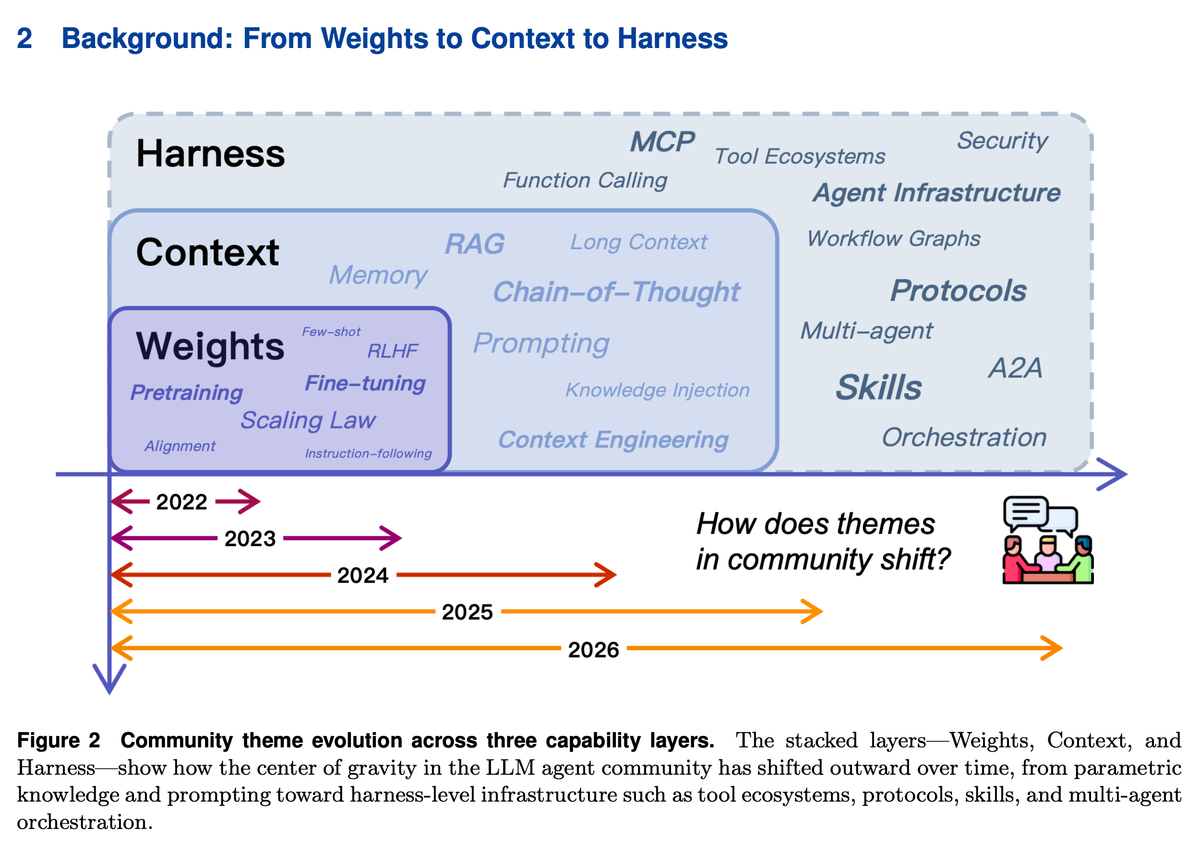
from weights → context → harness engineering
(evolution of agent landscape from 2022-26)
the biggest shift in AI agents had nothing to do with making models smarter.
it was about making the environment around them smarter.
here's how agent engineering evolved in just 4 years, across three distinct phases:
𝗽𝗵𝗮𝘀𝗲 𝟭: 𝘄𝗲𝗶𝗴𝗵𝘁𝘀 (𝟮𝟬𝟮𝟮)
everything was about the model itself. bigger models, more data, better training. scaling laws told us that progress = more parameters.
RLHF and fine-tuning shaped behavior. if you wanted a better agent, you trained a better model.
this worked great for single-turn tasks. ask a question, get an answer.
but it hit a wall fast. updating one fact meant retraining. auditing behavior was nearly impossible. and personalization across millions of users from one frozen set of weights? not happening.
𝗽𝗵𝗮𝘀𝗲 𝟮: 𝗰𝗼𝗻𝘁𝗲𝘅𝘁 (𝟮𝟬𝟮𝟯-𝟮𝟬𝟮𝟰)
the realization: you don't always need to change the model. you can change what the model sees.
prompt engineering, few-shot examples, chain-of-thought, RAG. suddenly the same frozen model could behave completely differently based on what you put in front of it.
developers stopped fine-tuning and started iterating on prompts and retrieval pipelines instead. it was cheaper, faster, and surprisingly effective.
but context windows are finite. long prompts get noisy. models attend unevenly (the "lost in the middle" problem is real). and every new session starts fresh with zero memory of what happened before.
context made agents flexible. it didn't make them reliable.
𝗽𝗵𝗮𝘀𝗲 𝟯: 𝗵𝗮𝗿𝗻𝗲𝘀𝘀 𝗲𝗻𝗴𝗶𝗻𝗲𝗲𝗿𝗶𝗻𝗴 (𝟮𝟬𝟮𝟱-𝟮𝟬𝟮𝟲)
this is where we are now, and the shift is fundamental.
the question changed from "what should we tell the model?" to "what environment should the model operate in?"
the model is no longer the sole location of intelligence. it sits inside a harness that includes persistent memory, reusable skills, standardized protocols (like MCP and A2A), execution sandboxes, approval gates, and observability layers.
the model stays the same. what changes is the task it's being asked to solve.
a concrete example: a coding agent asked to implement a feature, run tests, and open a PR.
without a harness, the model must keep repo structure, project conventions, workflow state, and tool interactions all inside a fragile prompt.
with a harness, persistent memory supplies context, skill files encode conventions, protocolized interfaces enforce correct schemas, and the runtime sequences steps and handles failures.
same model. completely different reliability.
𝘁𝗵𝗲 𝗽𝗮𝘁𝘁𝗲𝗿𝗻 𝗮𝗰𝗿𝗼𝘀𝘀 𝗮𝗹𝗹 𝘁𝗵𝗿𝗲𝗲 𝗽𝗵𝗮𝘀𝗲𝘀 𝗶𝘀 𝘀𝗶𝗺𝗽𝗹𝗲:
- weights encoded knowledge in parameters (fast but rigid)
- context staged knowledge in prompts (flexible but ephemeral)
- harnesses externalized knowledge into persistent infrastructure (reliable and governable)
each phase didn't replace the previous one. it layered on top. weights still matter. context engineering still matters. but the center of gravity has moved outward.
the most consequential improvements in agent reliability today rarely come from changing the base model.
they come from better memory retrieval, sharper skill loading, tighter execution governance, and smarter context budget management.
building better agents increasingly means building better environments for models to operate in.
there's a great paper on this:
Externalization in LLM Agents: A Unified Review of Memory, Skills, Protocols and Harness Engineering
paper: arxiv.org/abs/2604.08224
i also published this deep dive (article) on agent harness engineering, covering the orchestration loop, tools, memory, context management, and everything else that transforms a stateless LLM into a capable agent.
2
272

Apr 10
@bryan_johnson here vividly describes his recent #highdose 5-MeO-#DMT experience at @theallinpod to @friedberg:
The experience of raw #consciousness
and raw access to one’s stream of consciousness, intense exposure to one’s own existence, release one’s self and turning one’s ego off, even #hyperawareness, leading to dramatic shift in perspective; “the most majestic experience” a human could have.
However, in the brain, this may not be ascribed to “completely dissolving the #defaultmode”, as stated by Bryan. Our large-scale #metaanalysis published this week deemphasizes this brain network as mechanistic explanation of the #psychedelic state. Instead, other transmodal, abstract brain networks showed much stronger and more certain effects in our Bayesian analysis. As attractive as it may be, but we may need to abandon the #defaultmode
network narrative in psychedelics.

1
1
7
1,444

Apr 6
If you like running claude with --dangerously-skip-permissions, dontAsk mode might be what you're actually looking for.
Add this to your .claude/settings.json:
{
"permissions": {
"defaultMode": "dontAsk",
"allow": ["*"],
"deny": ["Bash(rm -rf *)", "Bash(sudo *)"]
}
}
1
4
799

Most people configure Claude Code like a text editor.
I configured it like an operating system.
Here's my actual settings.json, annotated.
// ENV VARIABLES
"MAX_THINKING_TOKENS": "31999"
"CLAUDE_CODE_DISABLE_ADAPTIVE_THINKING": "1"
"CLAUDE_AUTOCOMPACT_PCT_OVERRIDE": "60"
"CLAUDE_CODE_SUBAGENT_MODEL": "opus"
Four lines. Fixed thinking budget at max. Adaptive thinking off — I want consistent depth, not the model deciding when to think hard. Autocompact threshold at 60% so a hook can force a session handoff before context gets compressed. All subagents run on Opus/Codex/GPT5.4.
//DENY LIST
"deny": [
"Read(/.ssh/**)",
"Read(/.aws/credentials)",
"Read(/.aws/config)",
"Read(/.gnupg/**)",
"Read(/.env)",
"Read(/.netrc)"
]
Claude Code can read any file on your machine. This blocks it from reading SSH keys, AWS creds, GPG secrets, and local env files. Non-negotiable when an AI has shell access.
//HOOKS
This is where it gets interesting. Every hook routes through a single gate script before executing. The gate checks your active profile — minimal, standard, or strict — and a disabled-hooks list. Switch profiles with an env var. No config edits.
11 hooks across 4 lifecycle events:
PreToolUse (before the AI acts):
Blocks unscoped file searches. Warns on cross-company credential reads. Detects secrets in shell commands. Protects locked core files.
PostToolUse (after the AI acts):
Triggers auto-checkpoints on git commits, deploys, test runs, and file edits. Git operations always fire. Everything else debounces on 5-minute windows.
PreCompact (context about to compress):
Forces immediate session handoff at 60% capacity. Claude Code's autocompact can't be disabled — this hook saves your state before compression destroys it.
Stop (session ends):
Analyzes git log for reusable patterns. Detects retry loops, tool failures, workflow improvements. Feeds the learning system.
//PERMISSION MODEL
"defaultMode": "plan"
Every session starts in plan mode. Claude reads and researches before it can edit. I approve the plan, then it executes. This single setting changed how I work with Claude Code more than anything else.
Claude Code's hook system is undersold. It's not a convenience feature — it's a governance primitive. Pre and post hooks on every tool call means you can enforce any policy, at any scope, without modifying the AI itself.

2
343

Apr 2
You are probably not following Kubernetes best practices, and you do not even know it. Fix that today.
1. Mount secrets as volumes, not envFrom
>> If you use envFrom then you will have to restart the pod every time secrets are changed.
But if you mount secrets as a volume then there is no need to restart the pod. Kubernetes updates the file automatically.
2. When you mount a secret as a volume, it mounts as root by default
>>If your container is not running as root then it will not be able to read those mounted files.
You need to set defaultMode: 0440 on the volume, otherwise your app silently fails to read the secret and you spend hours debugging the wrong thing.
3. Set up a PodDisruptionBudget before your first cluster upgrade
>>If you do not have a PDB then a node drain during an upgrade can terminate all your pods at the same time.
If you set minAvailable then Kubernetes will never take down more pods than your service can afford to lose at once.
4. Always set resource requests AND limits
>> If you do not set requests then the scheduler places your pod on an already overloaded node.
If you do not set limits then one misbehaving pod eats all the resources on that node and takes down every other pod running alongside it.
5. Set terminationGracePeriodSeconds to match your actual shutdown time
>> If your app takes 60 seconds to drain in-flight requests but your grace period is at the default 30 seconds then Kubernetes will SIGKILL your pod halfway through shutdown.
Every request that was being processed at that moment is dropped.
6. Configure readiness probes or you will route traffic to broken pods
>> If you do not have a readiness probe then Kubernetes sends live traffic to a pod the moment it starts, even if the app is still connecting to the database or loading config.
That pod will return errors to real users until it finishes warming up.
7. Never use :latest as your image tag
>> If you use :latest then two pods in the same Deployment can end up running completely different versions of your image because each node pulls whatever was last pushed at the time of scheduling.
Pin to an explicit version and every pod in your cluster runs exactly the same thing.
8. Never store state inside pods
>> If your app writes data to local disk inside a pod then you will lose that data every time the pod is rescheduled. A node goes down, a deployment rolls out, a pod gets evicted, and all data is gone.
Push state to RDS, S3, or Redis and the pod becomes disposable.
1
12
74
8,178


Mar 28
#Stress Shift:
From #AlarmMode to #Reflection in 60 Minutes;
True psychological resilience isn’t about how “tough” you are in the heat of the moment;
it’s about how your brain reorganizes itself once the danger has passed.
A groundbreaking study has identified a specific “#ResilienceWindow” that peaks approximately 60 minutes after a stressful event.
#PsychologicalResilience is often misunderstood as simple “toughness” or an insensitivity to stress. However, true resilience is the brain’s-#CapacityToAdapt and recover after a stressful event.
The One-Hour Mark:
Researchers found that individual differences in resilience were best predicted by brain activity 60 minutes post-stress, rather than the immediate reaction to the stressor itself.
Network Handover:
Resilient individuals showed a distinct shift: a decrease in the #SalienceNetwork (#ThreatDetection) and an increase in the #DefaultMode Network(#InternalReflection/#Processing).
EEG “Cool Down”:
A significant drop in high-beta EEG power—a marker of neural arousal—was observed in resilient participants at the one-hour mark, signaling a successful “settling” of the nervous system.
Clinical Timing:
This “window” provides a specific timeframe for interventions.
Scientists suggest that therapy or brain stimulation delivered exactly #OneHourAfterTrauma could “nudge” the brain toward a #MoreResilientState.
neurosciencenews.com/one-hou… via @neurosciencenew

5
6
640

Mar 27
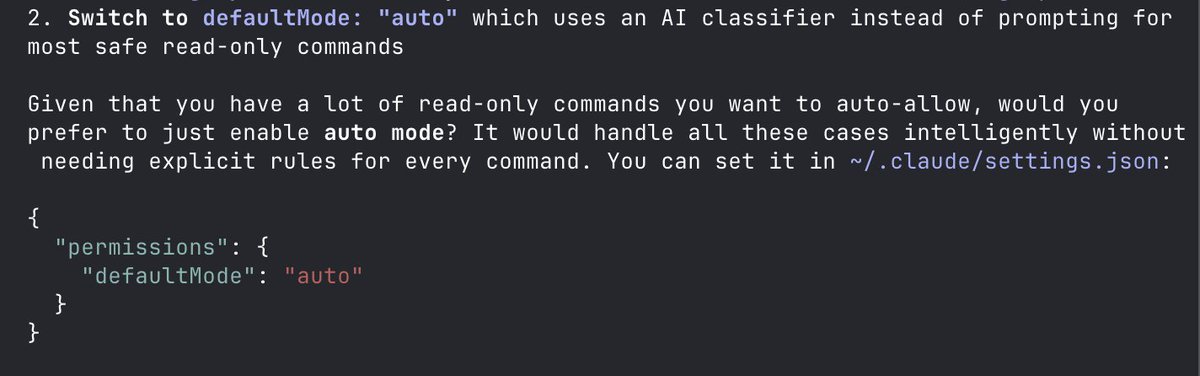
Where have you been all this time, defaultMode: "auto"?
I'd been setting up permissions in Claude Code like a madman when all this time, there's been this setting...
1
1
81