
Jun 13
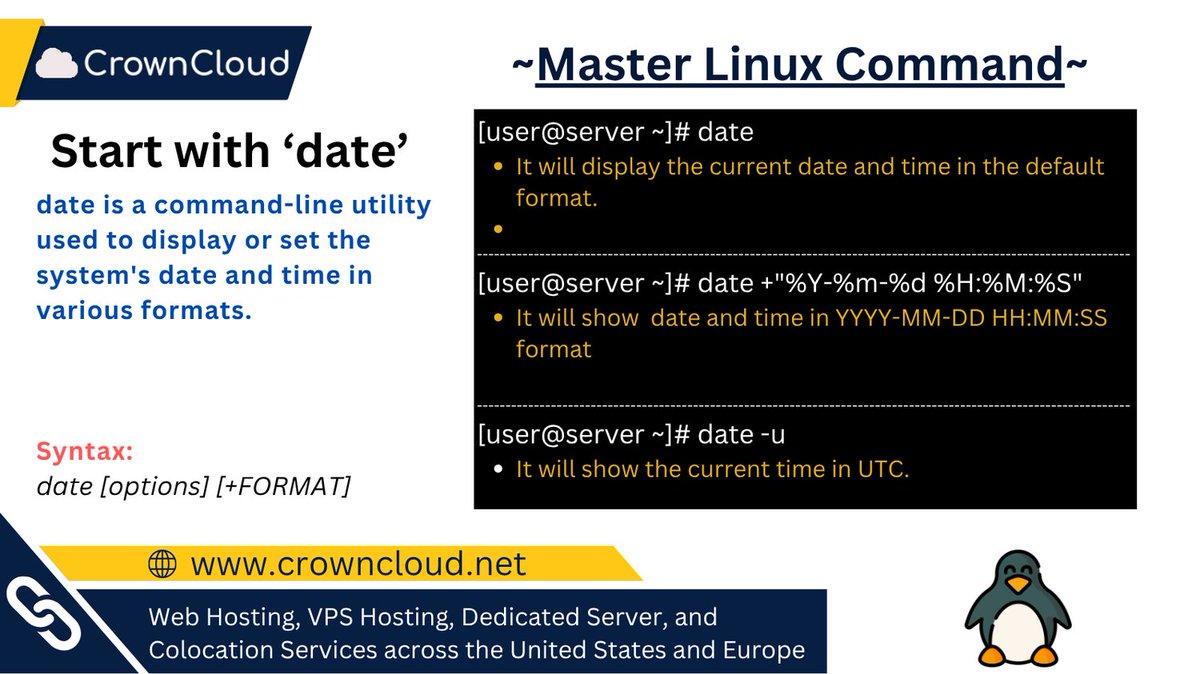
Linux Command: date
Use it to:
• Display current date and time
• Format date output
• Check system time settings
#Linux #SysAdmin #LinuxCommands #DevOps #LearnLinux
1
Jun 13
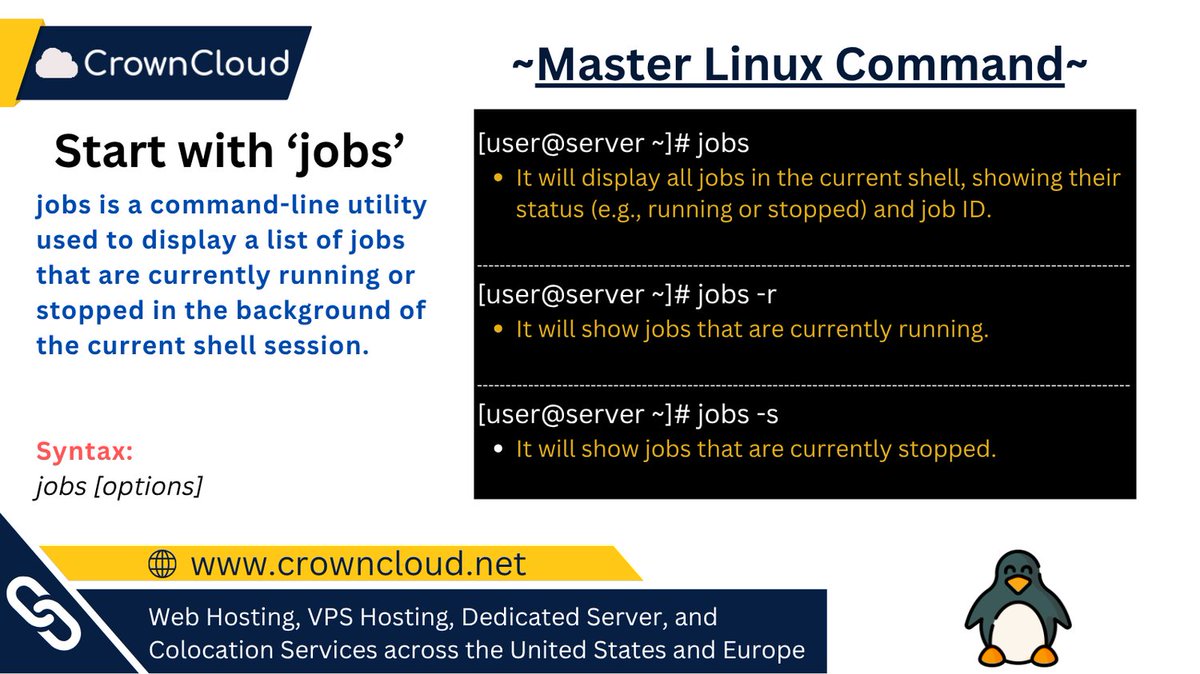
Linux Command: jobs
View and control background and stopped processes directly from your terminal, making multitasking in Linux easier and more efficient.
#Linux #SysAdmin #LinuxCommands #DevOps #LearnLinux
11

Jun 12
🐧 Day 11/30 — #Linux
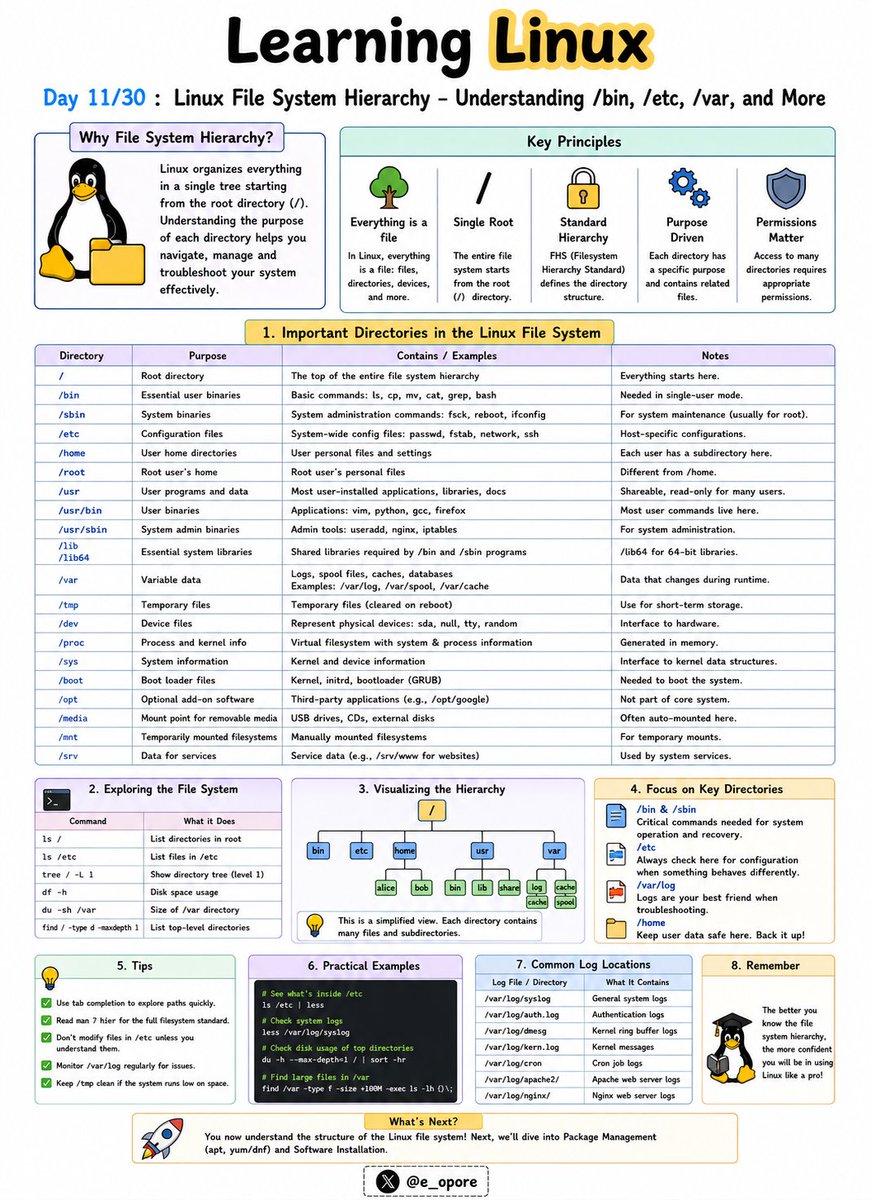
Everything in Linux is organized within a single directory tree that starts at the root directory (/).
Understanding the Linux file system hierarchy is essential for navigating, configuring, and troubleshooting Linux systems.
Linux File System Hierarchy – Understanding /bin, /etc, /var, and More
Unlike Windows, Linux does not use drive letters like C: or D:.
Instead, all files and directories exist under a unified hierarchy.
Important Linux Directories:
→ /
The root directory.
Everything on the system starts from here.
→ /bin
Contains essential command-line utilities such as:
→ ls
→ cp
→ mv
→ cat
These commands are required for basic system operation.
→ /etc
Stores system-wide configuration files.
Examples:
→ /etc/passwd
→ /etc/hosts
→ /etc/ssh/
Administrators frequently work in this directory.
→ /home
Contains personal directories for users.
Examples:
→ /home/john
→ /home/admin
This is where user files, documents, and settings are stored.
→ /var
Stores variable data that changes frequently.
Examples:
→ Logs
→ Cache files
→ Mail queues
→ Databases
Important log files are commonly found in:
→ /var/log/
→ /tmp
Stores temporary files created by applications and users.
Files here may be automatically removed by the system.
→ /usr
Contains installed software, libraries, and user applications.
Many programs are stored under:
→ /usr/bin
→ /usr/lib
→ /dev
Contains device files representing hardware components.
Examples:
→ Hard drives
→ USB devices
→ Printers
→ /proc
A virtual filesystem that provides information about running processes and system resources.
Why Understanding the File System Matters:
→ Navigate Linux efficiently
→ Locate configuration files quickly
→ Troubleshoot system issues
→ Manage servers effectively
→ Understand how Linux organizes data
Mastering the Linux file system hierarchy makes it much easier to administer servers, manage applications, and work confidently from the command line.
🐧 Grab Linux Ebook: codewithdhanian.gumroad.com/…
#Linux #LinuxTutorial #LinuxCommands #FileSystem #SystemAdministration #DevOps #CloudComputing #OpenSource #Programming #100DaysOfCode
Jun 11

🐧 Day 10/30 — #Linux
Linux is a multi-user operating system designed to allow multiple people and services to work securely on the same machine.
Managing users properly is one of the most important responsibilities of a Linux administrator.
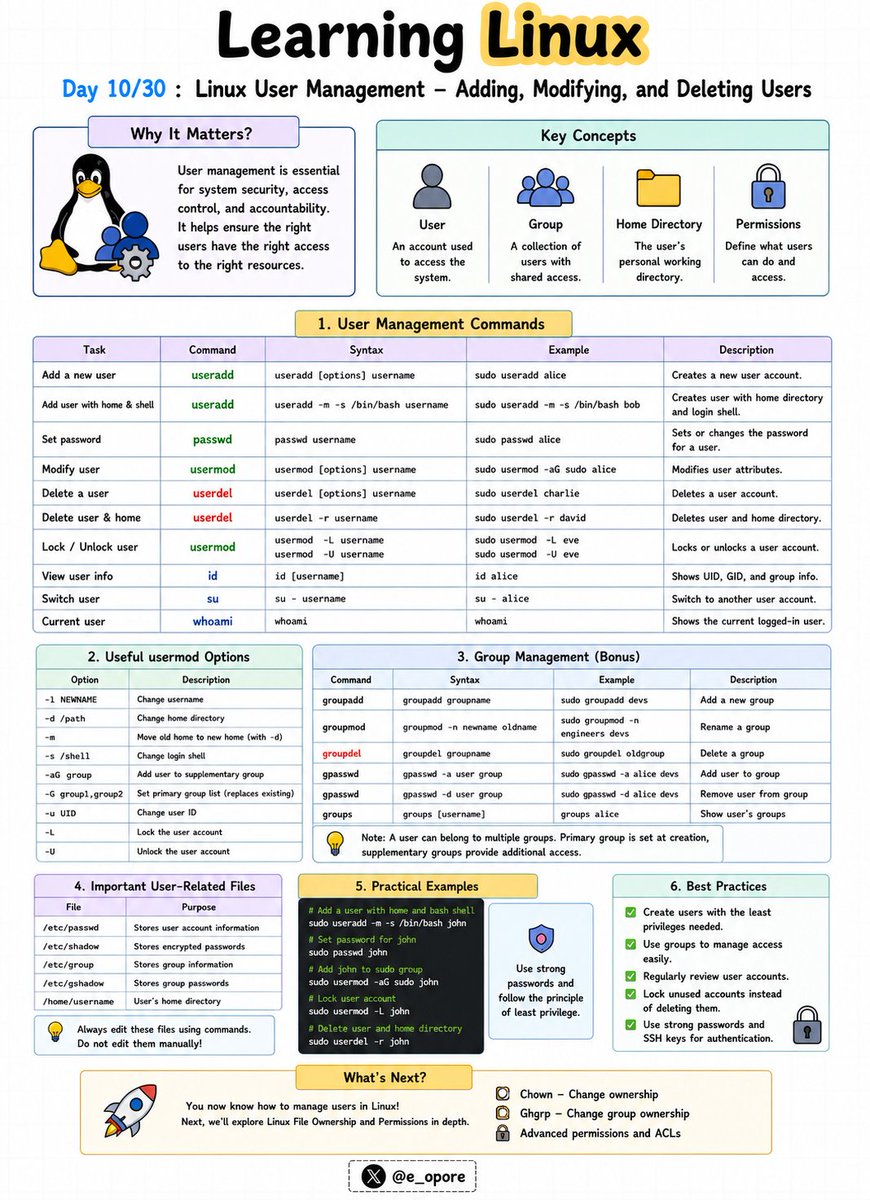
Linux User Management – Adding, Modifying, and Deleting Users
Every user in Linux has a unique username, user ID (UID), home directory, and set of permissions.
Essential User Management Commands:
→ useradd
→ passwd
→ usermod
→ userdel
→ id
→ whoami
Adding a User
→ sudo useradd john
Creates a new user named john.
To set a password:
→ sudo passwd john
Linux will prompt you to create and confirm a password.
Viewing User Information
→ id john
Displays the user's UID, GID, and group memberships.
→ whoami
Displays the currently logged-in user.
Modifying a User
→ sudo usermod -l johnny john
Changes the username from john to johnny.
→ sudo usermod -aG developers john
Adds the user john to the developers group.
Deleting a User
→ sudo userdel john
Removes the user account.
→ sudo userdel -r john
Removes the user account and deletes the user's home directory.
Understanding User Groups
Groups simplify permission management by allowing multiple users to share access to files and resources.
Examples:
→ developers
→ admins
→ docker
Instead of assigning permissions individually, administrators can manage access through groups.
Why User Management Matters:
→ Improve system security
→ Control resource access
→ Manage team environments
→ Protect sensitive files
→ Administer Linux servers effectively
Mastering user management is a foundational skill for Linux administrators, DevOps engineers, cloud engineers, and cybersecurity professionals.
🐧 Grab Linux Ebook: codewithdhanian.gumroad.com/…
#Linux #LinuxTutorial #LinuxCommands #UserManagement #SystemAdministration #DevOps #CloudComputing #CyberSecurity #OpenSource #100DaysOfCode
14
74
1,940

Jun 12
A server with 800 days of uptime can still be quietly failing. Run these 25 Linux server health checks before the next incident reveals what you missed.
Full guide here: ostechnix.com/linux-server-h…
#Linux #Linuxadmin #Linuxhowto #Linuxcommands
1
2
26
Jun 11
🐧 Day 10/30 — #Linux
Linux is a multi-user operating system designed to allow multiple people and services to work securely on the same machine.
Managing users properly is one of the most important responsibilities of a Linux administrator.
Linux User Management – Adding, Modifying, and Deleting Users
Every user in Linux has a unique username, user ID (UID), home directory, and set of permissions.
Essential User Management Commands:
→ useradd
→ passwd
→ usermod
→ userdel
→ id
→ whoami
Adding a User
→ sudo useradd john
Creates a new user named john.
To set a password:
→ sudo passwd john
Linux will prompt you to create and confirm a password.
Viewing User Information
→ id john
Displays the user's UID, GID, and group memberships.
→ whoami
Displays the currently logged-in user.
Modifying a User
→ sudo usermod -l johnny john
Changes the username from john to johnny.
→ sudo usermod -aG developers john
Adds the user john to the developers group.
Deleting a User
→ sudo userdel john
Removes the user account.
→ sudo userdel -r john
Removes the user account and deletes the user's home directory.
Understanding User Groups
Groups simplify permission management by allowing multiple users to share access to files and resources.
Examples:
→ developers
→ admins
→ docker
Instead of assigning permissions individually, administrators can manage access through groups.
Why User Management Matters:
→ Improve system security
→ Control resource access
→ Manage team environments
→ Protect sensitive files
→ Administer Linux servers effectively
Mastering user management is a foundational skill for Linux administrators, DevOps engineers, cloud engineers, and cybersecurity professionals.
🐧 Grab Linux Ebook: codewithdhanian.gumroad.com/…
#Linux #LinuxTutorial #LinuxCommands #UserManagement #SystemAdministration #DevOps #CloudComputing #CyberSecurity #OpenSource #100DaysOfCode
Jun 10
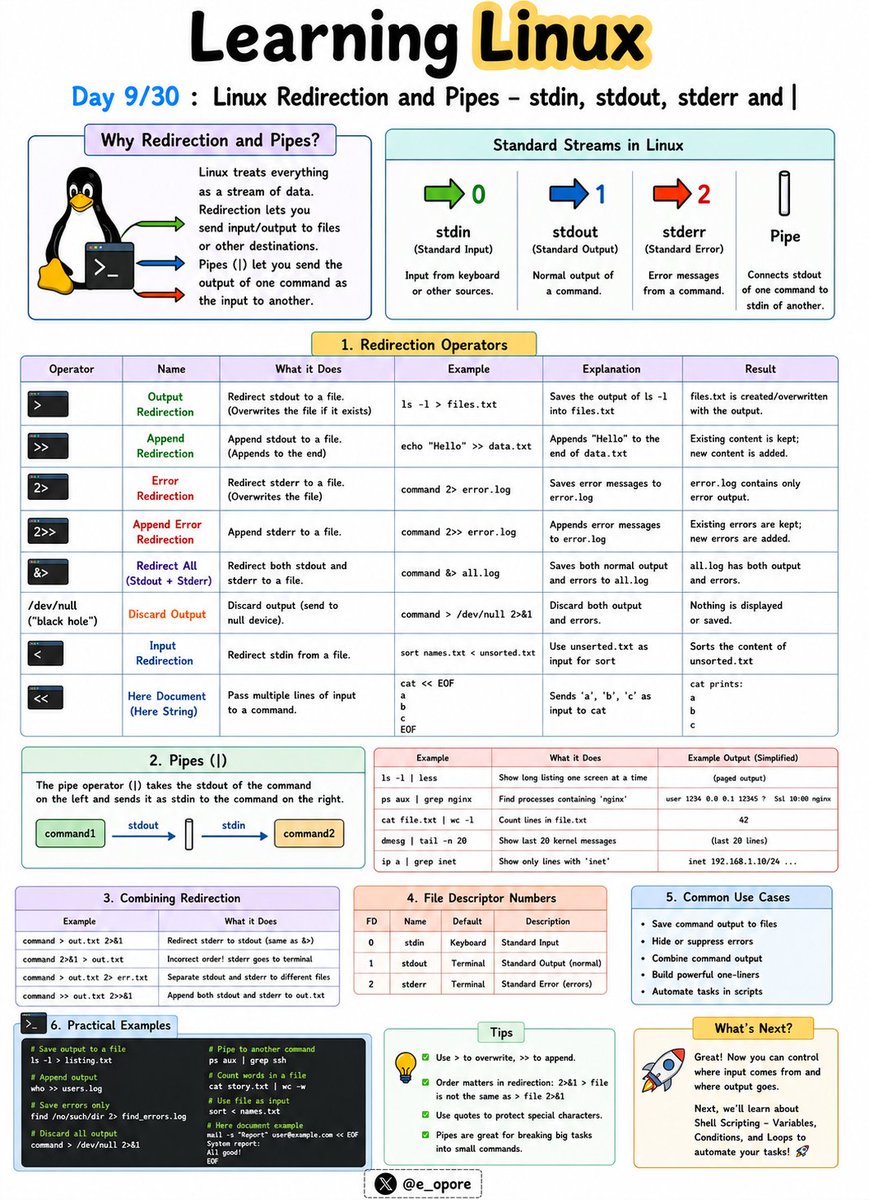
🐧 Day 9/30 — #Linux
One of Linux's greatest strengths is the ability to connect commands together and control where data flows.
Instead of manually copying output between programs, Linux allows commands to communicate seamlessly.
Linux Redirection and Pipes – stdin, stdout, stderr and |
Every Linux command works with three standard data streams:
→ stdin (Standard Input)
→ stdout (Standard Output)
→ stderr (Standard Error)
Understanding these streams is essential for automation, scripting, and system administration.
stdin (Standard Input)
stdin is the input a command receives.
Example:
→ sort < names.txt
The contents of names.txt are provided as input to the sort command.
stdout (Standard Output)
stdout is the normal output generated by a command.
Example:
→ ls > files.txt
Saves the output of ls into files.txt instead of displaying it on the screen.
stderr (Standard Error)
stderr contains error messages generated by commands.
Example:
→ ls missingfile 2> errors.txt
Saves error messages to errors.txt.
Redirection Operators
→ > = Overwrite output to a file
→ >> = Append output to a file
→ < = Read input from a file
→ 2> = Redirect error output
Examples:
→ echo "Hello Linux" > message.txt
Creates a file and writes text into it.
→ echo "More text" >> message.txt
Appends text to an existing file.
Pipes (|)
The pipe operator (|) sends the output of one command directly as input to another command.
Example:
→ ls | grep ".txt"
Lists only text files.
→ ps aux | grep nginx
Finds running nginx processes.
→ cat users.txt | sort
Sorts the contents of a file.
Why Redirection and Pipes Matter:
→ Automate repetitive tasks
→ Combine multiple commands efficiently
→ Filter and process large amounts of data
→ Build powerful shell scripts
→ Troubleshoot systems more effectively
Mastering redirection and pipes is a major step toward becoming productive in the Linux command line environment.
🐧 Grab Linux Ebook: codewithdhanian.gumroad.com/…
#Linux #LinuxTutorial #LinuxCommands #ShellScripting #Terminal #DevOps #SystemAdministration #OpenSource #Programming #100DaysOfCode
1
13
84
4,801
Jun 11
Learn the differences between static, transient, and temporary hostnames in Linux. Understand when to use each type and how to manage them.
Step-by-Step Guide: ostechnix.com/linux-hostname…
#Hostname #LinuxNetworking #Linuxcommands #Linuxhowto #Linuxadmin #Linuxbasics #Linux
1
2
31
Jun 10
🐧 Day 9/30 — #Linux
One of Linux's greatest strengths is the ability to connect commands together and control where data flows.
Instead of manually copying output between programs, Linux allows commands to communicate seamlessly.
Linux Redirection and Pipes – stdin, stdout, stderr and |
Every Linux command works with three standard data streams:
→ stdin (Standard Input)
→ stdout (Standard Output)
→ stderr (Standard Error)
Understanding these streams is essential for automation, scripting, and system administration.
stdin (Standard Input)
stdin is the input a command receives.
Example:
→ sort < names.txt
The contents of names.txt are provided as input to the sort command.
stdout (Standard Output)
stdout is the normal output generated by a command.
Example:
→ ls > files.txt
Saves the output of ls into files.txt instead of displaying it on the screen.
stderr (Standard Error)
stderr contains error messages generated by commands.
Example:
→ ls missingfile 2> errors.txt
Saves error messages to errors.txt.
Redirection Operators
→ > = Overwrite output to a file
→ >> = Append output to a file
→ < = Read input from a file
→ 2> = Redirect error output
Examples:
→ echo "Hello Linux" > message.txt
Creates a file and writes text into it.
→ echo "More text" >> message.txt
Appends text to an existing file.
Pipes (|)
The pipe operator (|) sends the output of one command directly as input to another command.
Example:
→ ls | grep ".txt"
Lists only text files.
→ ps aux | grep nginx
Finds running nginx processes.
→ cat users.txt | sort
Sorts the contents of a file.
Why Redirection and Pipes Matter:
→ Automate repetitive tasks
→ Combine multiple commands efficiently
→ Filter and process large amounts of data
→ Build powerful shell scripts
→ Troubleshoot systems more effectively
Mastering redirection and pipes is a major step toward becoming productive in the Linux command line environment.
🐧 Grab Linux Ebook: codewithdhanian.gumroad.com/…
#Linux #LinuxTutorial #LinuxCommands #ShellScripting #Terminal #DevOps #SystemAdministration #OpenSource #Programming #100DaysOfCode
Jun 9
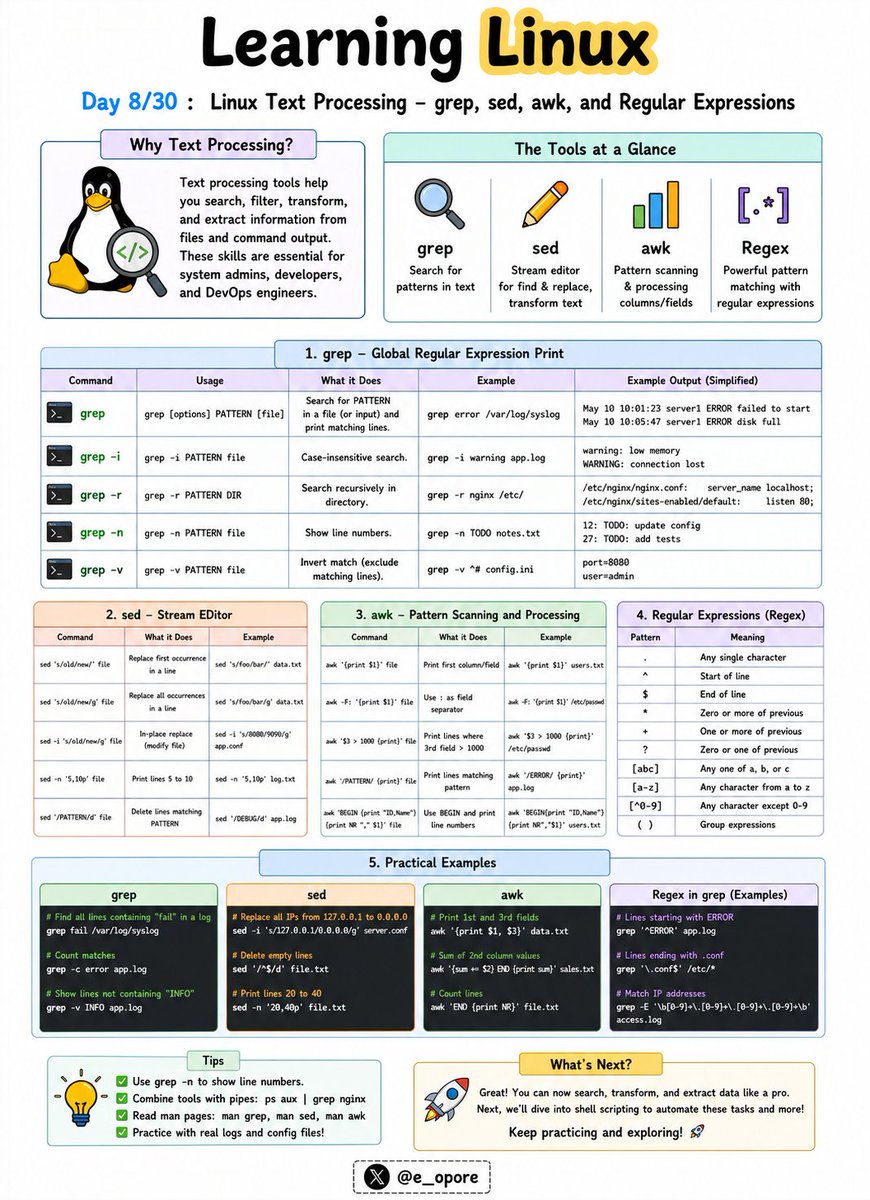
🐧 Day 8/30 — #Linux
Linux truly becomes powerful when you can process, search, and manipulate text directly from the command line.
System logs, configuration files, source code, and data files can all be analyzed using built-in text-processing tools.
Linux Text Processing – grep, sed, awk, and Regular Expressions
These tools are essential for developers, system administrators, cybersecurity professionals, and DevOps engineers.
grep – Search for Text
The grep command searches files for specific words or patterns.
Examples:
→ grep "error" logs.txt
Finds all lines containing the word "error".
→ grep -i "linux" file.txt
Performs a case-insensitive search.
sed – Stream Editor
The sed command is used to modify text without opening a file manually.
Examples:
→ sed 's/Linux/Ubuntu/' file.txt
Replaces the first occurrence of Linux with Ubuntu.
→ sed 's/Linux/Ubuntu/g' file.txt
Replaces all occurrences in each line.
awk – Data Extraction and Reporting
The awk command processes structured text and extracts specific fields.
Example:
→ awk '{print $1}' users.txt
Displays the first column from a file.
→ awk '{print $1, $3}' users.txt
Displays selected columns.
Regular Expressions (Regex)
Regular expressions are patterns used to match text.
Common Regex Patterns:
→ . = Any character
→ * = Zero or more occurrences
→ ^ = Start of line
→ $ = End of line
→ [0-9] = Any digit
→ [a-z] = Any lowercase letter
Example:
→ grep "^[0-9]" file.txt
Finds lines that start with a number.
Why These Tools Matter:
→ Search large log files quickly
→ Automate text manipulation
→ Extract valuable data from files
→ Analyze server activity
→ Build powerful shell scripts
Mastering grep, sed, awk, and regular expressions can save hours of manual work and is one of the defining skills of advanced Linux users.
🐧 Grab the Linux Ebook: codewithdhanian.gumroad.com/…
#Linux #LinuxTutorial #LinuxCommands #grep #sed #awk #Regex #DevOps #SystemAdministration #100DaysOfCode
3
19
98
6,043
Jun 10
Just installed Fedora 44? This complete post-install guide covers 20 essential things to do after installing a fresh Fedora 44 Linux.
Full guide here: ostechnix.com/things-to-do-a…
#Fedora44 #FedoraPostInstall #Linux #Linuxhowto #Linuxcommands #Linuxtips
1
2
39

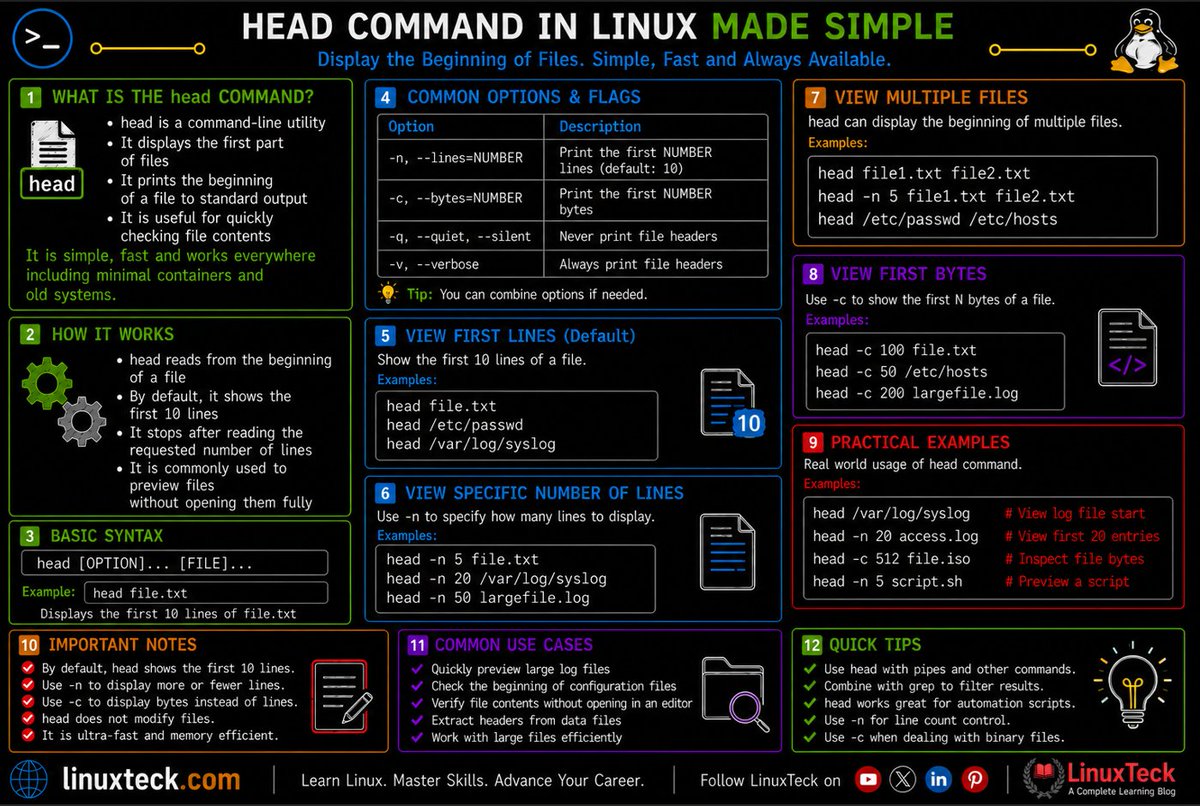
The Linux head command is one of the fastest ways to inspect files without opening them.
linuxteck.com/head-command-i…
View first lines of files
Check logs quickly
Preview large files efficiently
Learn useful options & examples
#Linux #DevOps #SysAdmin #LinuxCommands #LinuxTeck
16
Eweremchi retweeted

Jun 9
cat - Displays the content of a file. Example: cat file.txt
#Linux #LinuxCommands #Terminal #CommandLine #Cybersecurity
2
1
11
Jun 9
🐧 Day 8/30 — #Linux
Linux truly becomes powerful when you can process, search, and manipulate text directly from the command line.
System logs, configuration files, source code, and data files can all be analyzed using built-in text-processing tools.
Linux Text Processing – grep, sed, awk, and Regular Expressions
These tools are essential for developers, system administrators, cybersecurity professionals, and DevOps engineers.
grep – Search for Text
The grep command searches files for specific words or patterns.
Examples:
→ grep "error" logs.txt
Finds all lines containing the word "error".
→ grep -i "linux" file.txt
Performs a case-insensitive search.
sed – Stream Editor
The sed command is used to modify text without opening a file manually.
Examples:
→ sed 's/Linux/Ubuntu/' file.txt
Replaces the first occurrence of Linux with Ubuntu.
→ sed 's/Linux/Ubuntu/g' file.txt
Replaces all occurrences in each line.
awk – Data Extraction and Reporting
The awk command processes structured text and extracts specific fields.
Example:
→ awk '{print $1}' users.txt
Displays the first column from a file.
→ awk '{print $1, $3}' users.txt
Displays selected columns.
Regular Expressions (Regex)
Regular expressions are patterns used to match text.
Common Regex Patterns:
→ . = Any character
→ * = Zero or more occurrences
→ ^ = Start of line
→ $ = End of line
→ [0-9] = Any digit
→ [a-z] = Any lowercase letter
Example:
→ grep "^[0-9]" file.txt
Finds lines that start with a number.
Why These Tools Matter:
→ Search large log files quickly
→ Automate text manipulation
→ Extract valuable data from files
→ Analyze server activity
→ Build powerful shell scripts
Mastering grep, sed, awk, and regular expressions can save hours of manual work and is one of the defining skills of advanced Linux users.
🐧 Grab the Linux Ebook: codewithdhanian.gumroad.com/…
#Linux #LinuxTutorial #LinuxCommands #grep #sed #awk #Regex #DevOps #SystemAdministration #100DaysOfCode
Jun 8
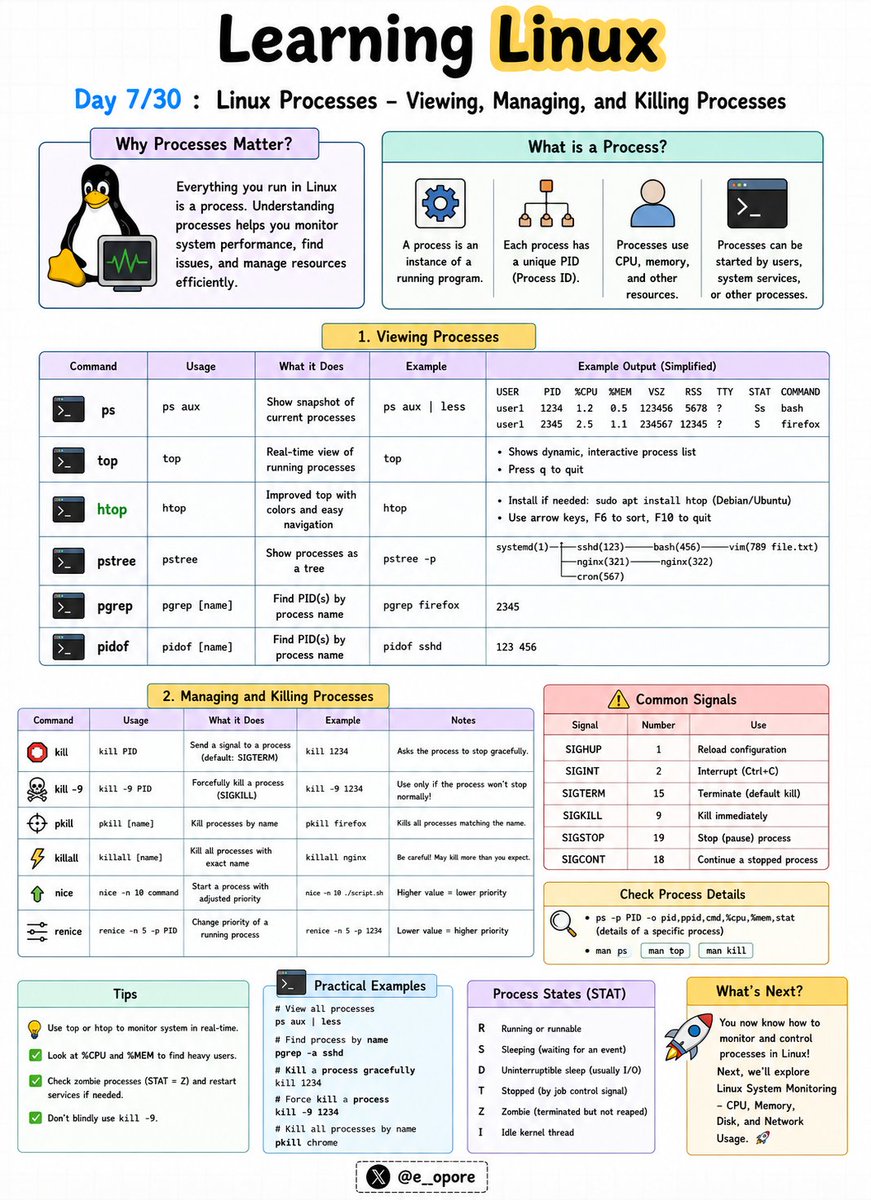
🐧 Day 7/30 — #Linux
Every application running on Linux is a process.
Understanding how to view, manage, and stop processes is a critical skill for developers, system administrators, and DevOps engineers.
Linux Processes – Viewing, Managing, and Killing Processes
A process is simply a program that is currently running on your system.
Each process is assigned a unique Process ID (PID) that Linux uses to track and manage it.
Essential Process Commands:
→ ps
→ top
→ htop
→ pidof
→ kill
→ killall
Viewing Processes
→ ps
Displays currently running processes.
→ ps aux
Shows detailed information about all running processes.
→ top
Provides a real-time view of CPU usage, memory usage, and active processes.
→ htop
An interactive and user-friendly alternative to top.
Finding Process IDs
→ pidof nginx
Returns the PID of a running process.
Stopping Processes
→ kill PID
Sends a termination signal to a specific process.
Example:
→ kill 1234
Stops the process with PID 1234.
Force Killing a Process
→ kill -9 PID
Immediately terminates a process that refuses to stop.
Example:
→ kill -9 1234
Killing Processes by Name
→ killall firefox
Terminates all Firefox processes.
Why Process Management Matters:
→ Monitor system performance
→ Troubleshoot application issues
→ Free system resources
→ Manage server workloads
→ Control background services effectively
Mastering process management is essential because Linux systems constantly run hundreds of processes behind the scenes.
🐧 Grab the Linux Ebook: codewithdhanian.gumroad.com/…
#Linux #LinuxTutorial #LinuxCommands #SystemAdministration #DevOps #OpenSource #Terminal #CloudComputing #Programming #100DaysOfCode
11
22
112
6,533
Jun 8
🐧 Day 7/30 — #Linux
Every application running on Linux is a process.
Understanding how to view, manage, and stop processes is a critical skill for developers, system administrators, and DevOps engineers.
Linux Processes – Viewing, Managing, and Killing Processes
A process is simply a program that is currently running on your system.
Each process is assigned a unique Process ID (PID) that Linux uses to track and manage it.
Essential Process Commands:
→ ps
→ top
→ htop
→ pidof
→ kill
→ killall
Viewing Processes
→ ps
Displays currently running processes.
→ ps aux
Shows detailed information about all running processes.
→ top
Provides a real-time view of CPU usage, memory usage, and active processes.
→ htop
An interactive and user-friendly alternative to top.
Finding Process IDs
→ pidof nginx
Returns the PID of a running process.
Stopping Processes
→ kill PID
Sends a termination signal to a specific process.
Example:
→ kill 1234
Stops the process with PID 1234.
Force Killing a Process
→ kill -9 PID
Immediately terminates a process that refuses to stop.
Example:
→ kill -9 1234
Killing Processes by Name
→ killall firefox
Terminates all Firefox processes.
Why Process Management Matters:
→ Monitor system performance
→ Troubleshoot application issues
→ Free system resources
→ Manage server workloads
→ Control background services effectively
Mastering process management is essential because Linux systems constantly run hundreds of processes behind the scenes.
🐧 Grab the Linux Ebook: codewithdhanian.gumroad.com/…
#Linux #LinuxTutorial #LinuxCommands #SystemAdministration #DevOps #OpenSource #Terminal #CloudComputing #Programming #100DaysOfCode
Jun 7
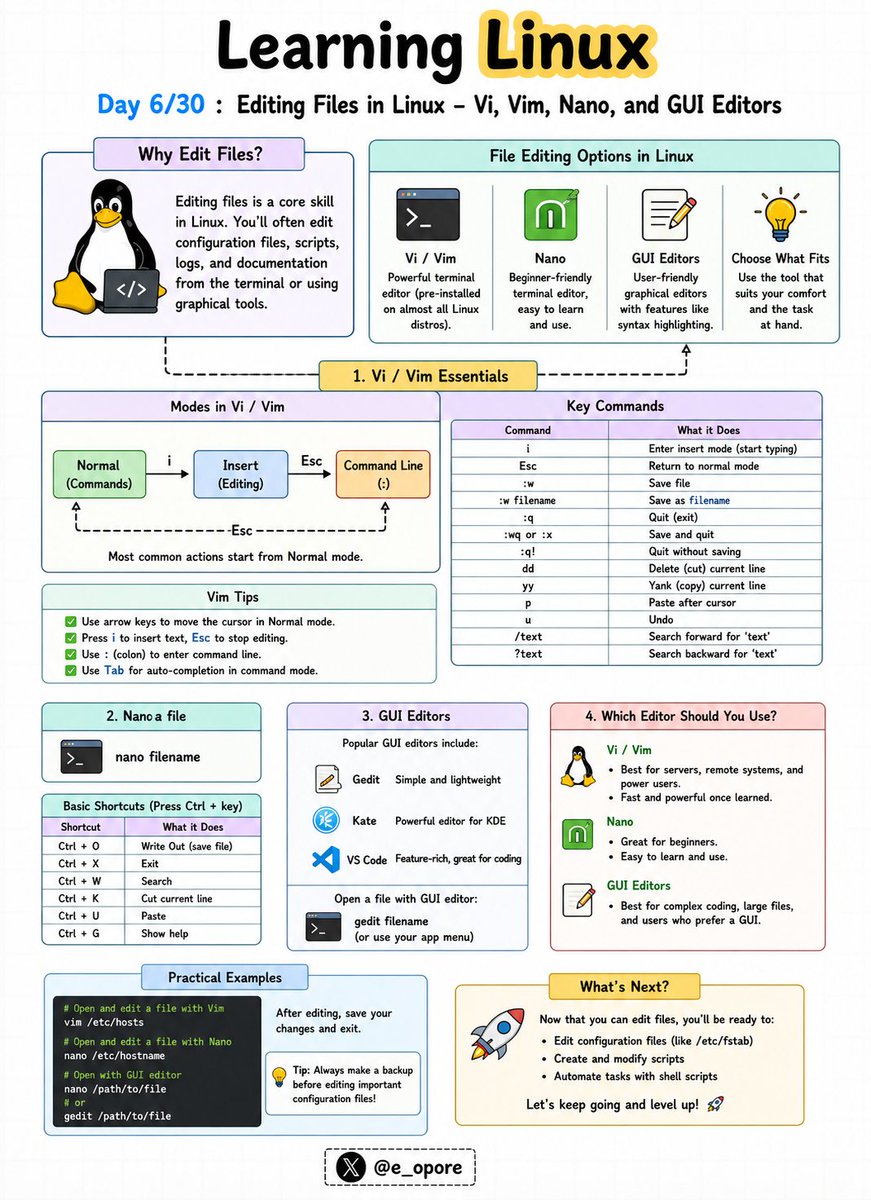
🐧 Day 6/30 — #Linux
Every Linux user eventually needs to edit configuration files, scripts, logs, and application settings.
Knowing how to use a text editor is a fundamental Linux skill.
Editing Files in Linux – Vi, Vim, Nano, and GUI Editors
Linux offers both terminal-based and graphical text editors, each designed for different workflows and experience levels.
Popular Linux Editors:
→ Vi
→ Vim
→ Nano
→ GUI Editors
Vi Editor
Vi is the classic text editor found on almost every Linux system.
Benefits:
→ Lightweight
→ Available by default on most distributions
→ Useful for server administration
Basic Commands:
→ i = Enter insert mode
→ Esc = Exit insert mode
→ :w = Save file
→ :q = Quit editor
→ :wq = Save and quit
Vim Editor
Vim (Vi Improved) extends Vi with advanced features.
Benefits:
→ Syntax highlighting
→ Auto-completion
→ Powerful navigation shortcuts
→ Plugin ecosystem
Many developers and system administrators prefer Vim for daily work.
Nano Editor
Nano is one of the easiest Linux text editors for beginners.
Basic Commands:
→ Ctrl O = Save file
→ Ctrl X = Exit editor
→ Ctrl K = Cut line
→ Ctrl U = Paste line
Nano is ideal if you're new to Linux and want a simple editing experience.
GUI Editors
Desktop Linux distributions also provide graphical editors such as:
→ Gedit
→ Kate
→ Mousepad
These editors work similarly to Notepad or other desktop text editors.
Why This Matters:
→ Edit configuration files
→ Write shell scripts
→ Manage server settings
→ Update application files
→ Become comfortable working entirely from the terminal
Learning at least one terminal editor is essential because many Linux servers operate without a graphical interface.
🐧 Grab Linux Ebook: codewithdhanian.gumroad.com/…
#Linux #LinuxTutorial #Vim #Vi #Nano #Terminal #OpenSource #DevOps #SystemAdministration #100DaysOfCode
9
44
203
10,097

1
2
30
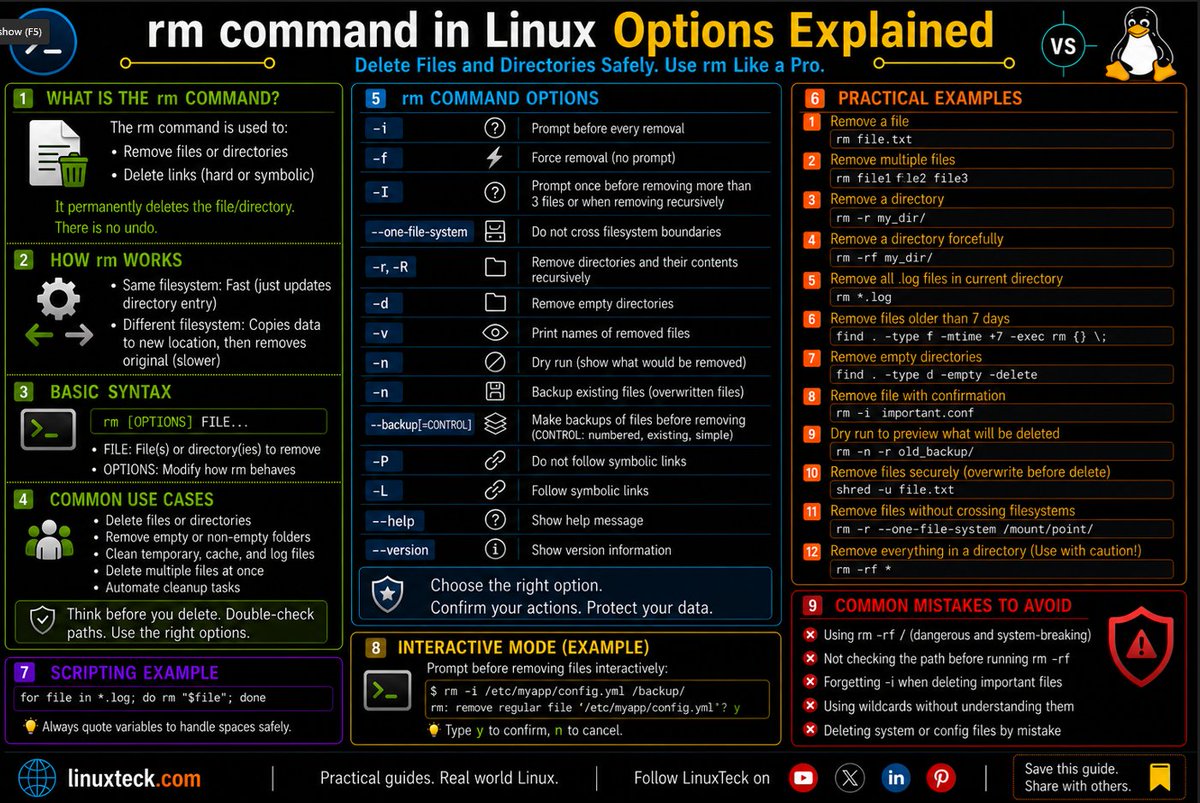
rm Command in Linux
Read the full tutorial: linuxteck.com/rm-command-in-…
Learn:
✔ rm -rf safely
✔ recursive deletion
✔ interactive removal
✔ wildcard risks
✔ secure file cleanup
✔ real-world examples
#Linux #Bash #LinuxCommands #LinuxTeck
3
19

May 19
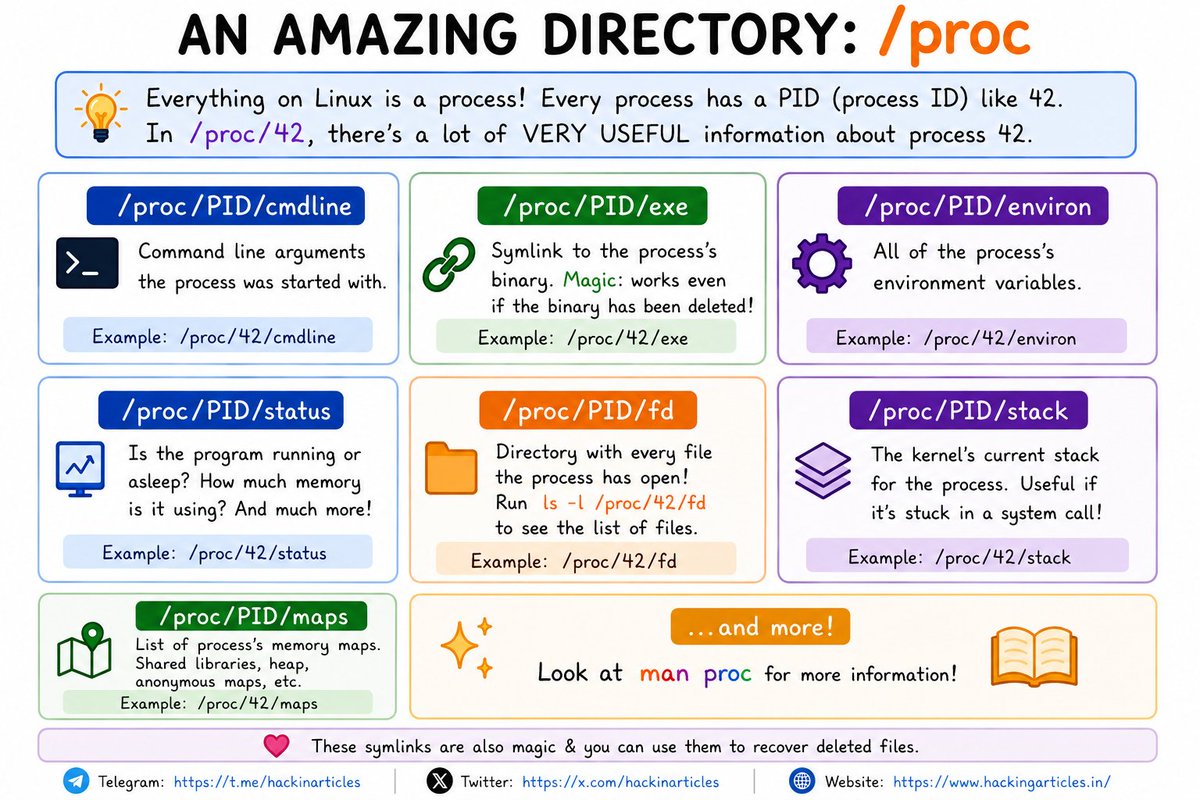
🐧 Linux /proc Directory Explained
🔥 Telegram: t.me/hackinarticles
✴ Twitter: x.com/hackinarticles
Everything in Linux is a process… and /proc exposes powerful internal details ⚠️
⚡ Useful /proc Paths
📌 /proc/PID/cmdline → Command-line arguments
🔗 /proc/PID/exe → Symlink to running binary
⚙️ /proc/PID/environ → Environment variables
📊 /proc/PID/status → Process status & memory usage
📂 /proc/PID/fd → Open file descriptors
🧠 /proc/PID/maps → Memory mappings & shared libraries
📚 /proc/PID/stack → Kernel stack information
💡 Red Teamers, DFIR analysts & Linux admins use /proc for process analysis, malware investigation & debugging
⚠️ /proc can also leak sensitive information like credentials, tokens & deleted binaries
#Linux #CyberSecurity #DFIR #RedTeam #BlueTeam #LinuxCommands #InfoSec
9
56
3,243
May 10
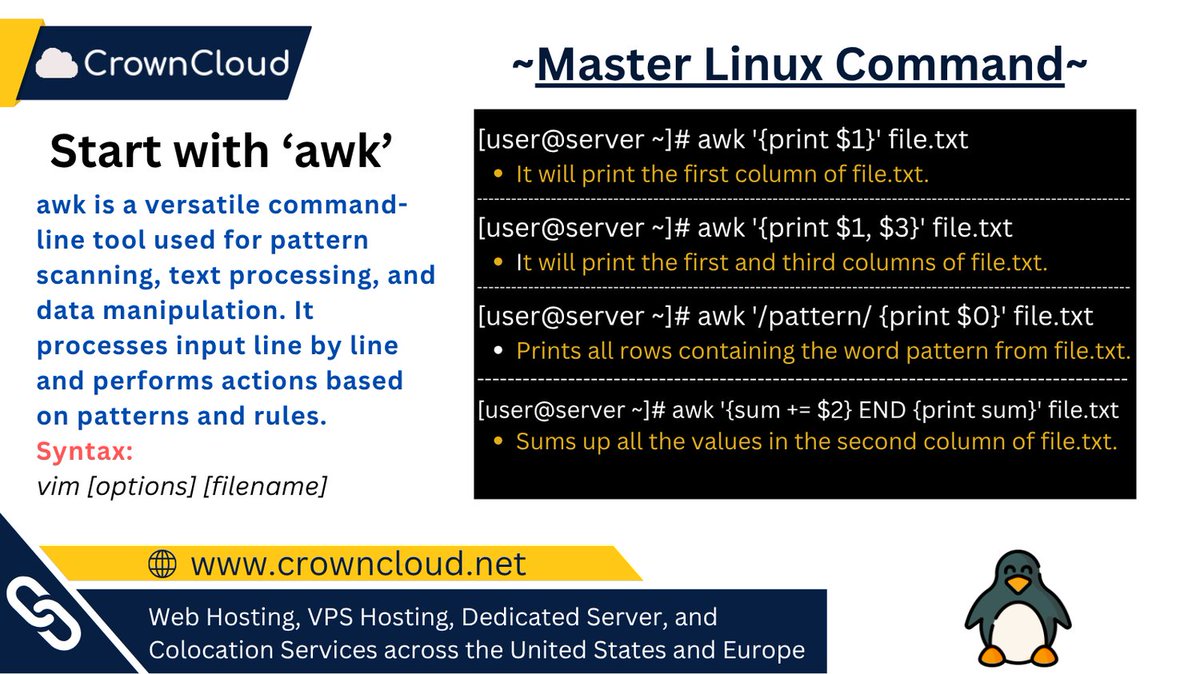
Master Linux one command at a time.
Process and analyze with: awk
A powerful text processing tool used for searching, filtering, formatting, and analyzing data directly from the command line.
#Linux #SysAdmin #LinuxCommands #DevOps #LearnLinux
2
181

200 Linux Repair Commands Every Hacker Must Know 🐧🛠️
A practical Linux repair cheat sheet for admins, cybersecurity learners, troubleshooters, and terminal users who want fast commands for real system problems.
#Linux #LinuxCommands #CyberSecurity #EthicalHacking #KaliLinux
1
11
202

May 1
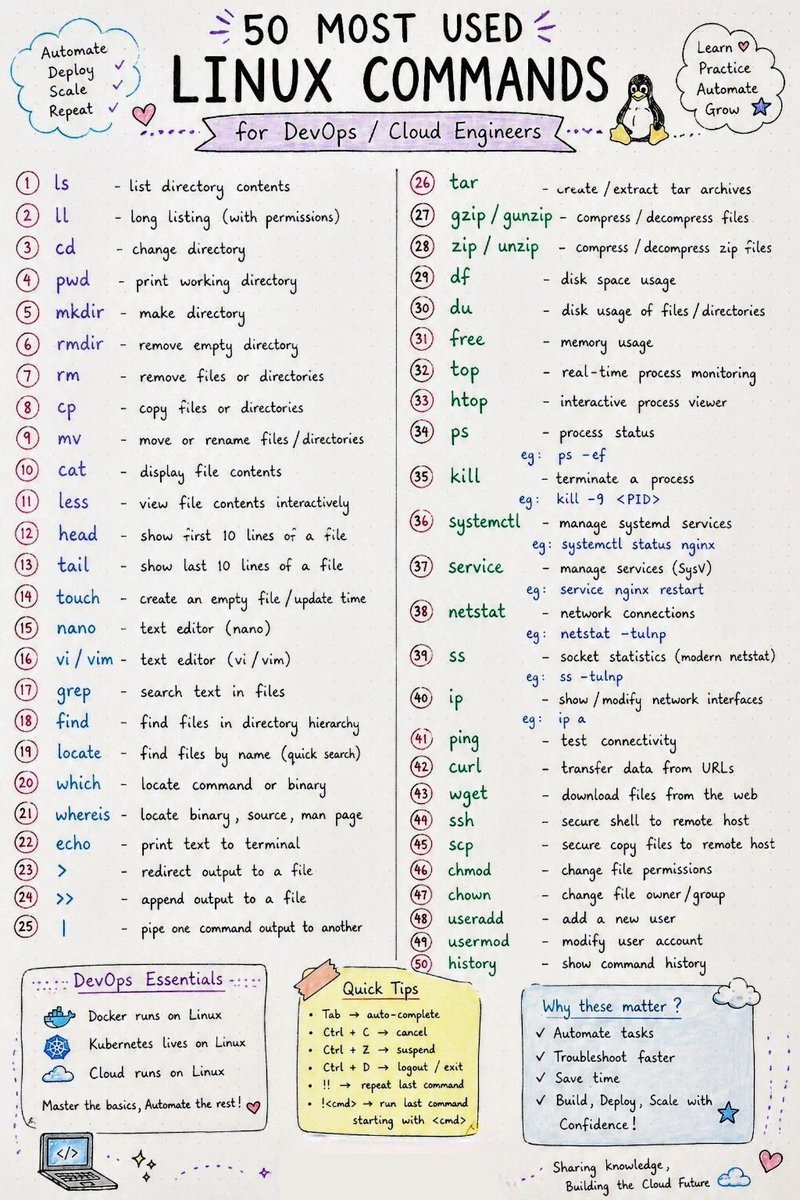
If you are a DevOps or Cloud Engineer, Linux is not just a skill it’s your daily companion.
From troubleshooting servers at 2 AM to deploying applications, automating workflows, managing containers, and scaling infrastructure… Linux commands are everywhere. ☁️⚡
So I created these handwritten-style notes on the 50 Most Used Linux Commands that every DevOps & Cloud Engineer should know.
Simple. Beginner-friendly. Easy to revise anytime.
Whether you are:
🔹 Starting your cloud journey
🔹 Preparing for interviews
🔹 Working with Docker/Kubernetes
🔹 Managing Linux servers
🔹 Learning DevOps fundamentals
…this cheat sheet will save you hours.
Which Linux command do you use the most every day?
#Linux #DevOps #CloudComputing #AWS #Azure #GCP #Kubernetes #Docker #SRE #CloudEngineer #LinuxCommands #TechCommunity #LearningInPublic #DevSecOps
3
49
231
5,043