
Building Software Directory Ecosystem. ctodiscovery.com/ - Dev Tools | cmodiscovery.com/ - Marketing and Sales Software
Joined August 2021
- Tweets 1,186
- Following 2,469
- Followers 164
- Likes 6,736
56 Photos and videos








Pinned Tweet

Featured Unlayer on CTODiscovery 🚀
ctodiscovery.com/unlayer
Most SaaS products eventually need users to create content inside the product. Use @unlayerapp
Emails. Pages. Documents. Templates. PDFs.
#Unlayer #DeveloperTools #SaaS #EmailBuilder #NoCode #Marketing #devtools
Jun 9

Most products eventually need users to create content.
Emails. Pages. Documents. Templates. PDFs.
What starts as "just add an editor" quickly becomes a full content creation stack.
Today we’re launching Unlayer on @ycombinator: AI-powered content creation infrastructure for apps.
Watch the video and upvote us here 👇
ycombinator.com/launches/QkK…
83
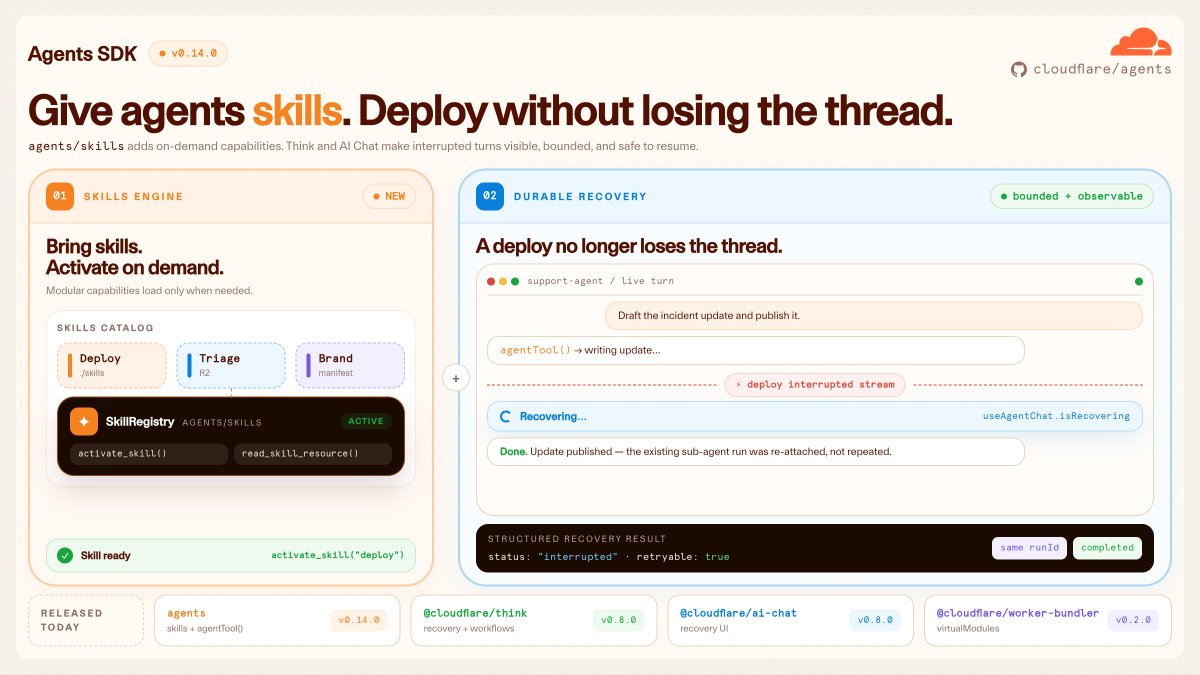
🚀 Cloudflare Agents SDK - Featured here 👉 ctodiscovery.com/cloudflare-…
Build agents with skills, messengers, scheduled tasks & durable workflows and deploy without losing the thread.
@Cloudflare @CloudflareDev
#AIAgents #AgentSDK #Cloudflare #DeveloperTools #AgenticAI #ai
Jun 2

🎈 we've just shipped agents sdk v0.14.0
you can now build agents with skills, messengers, schedules, and durable workflows on cloudflare
out of the box support for recurring tasks, think workflows, chat recovery, mcp transport improvements, and better client-tool continuations
go make cool stuff with it!
56
Venkat Software Directory retweeted

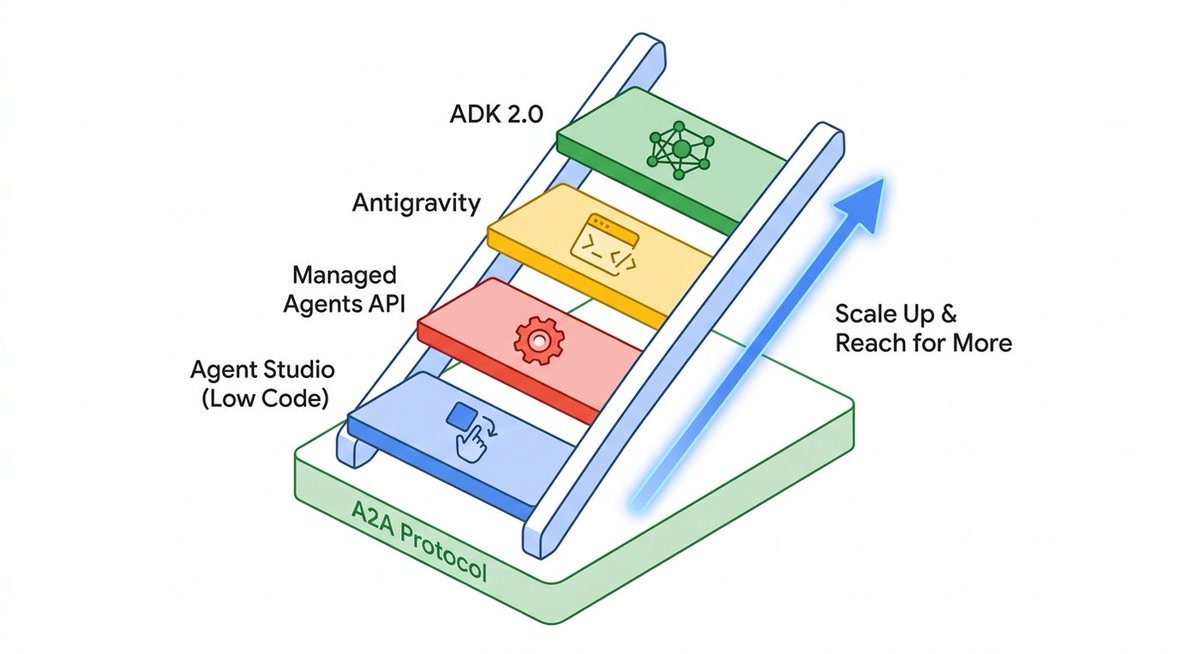
Build locally and deploy securely to the cloud with Gemini Enterprise Agent Platform and our new developer tools shared at I/O.
Unpack the spectrum of choice for building, and see what we’d try first → goo.gle/4uUVC7y
2
14
84
8,208
Venkat Software Directory retweeted

Jun 1
Today @MeckaAI is announcing $60M in funding to become the data and deployment layer for physical AI
This raise will allow us to scale our data infrastructure, invest into new verticals, and deploy robots into the real world
126
101
922
305,484
Venkat Software Directory retweeted

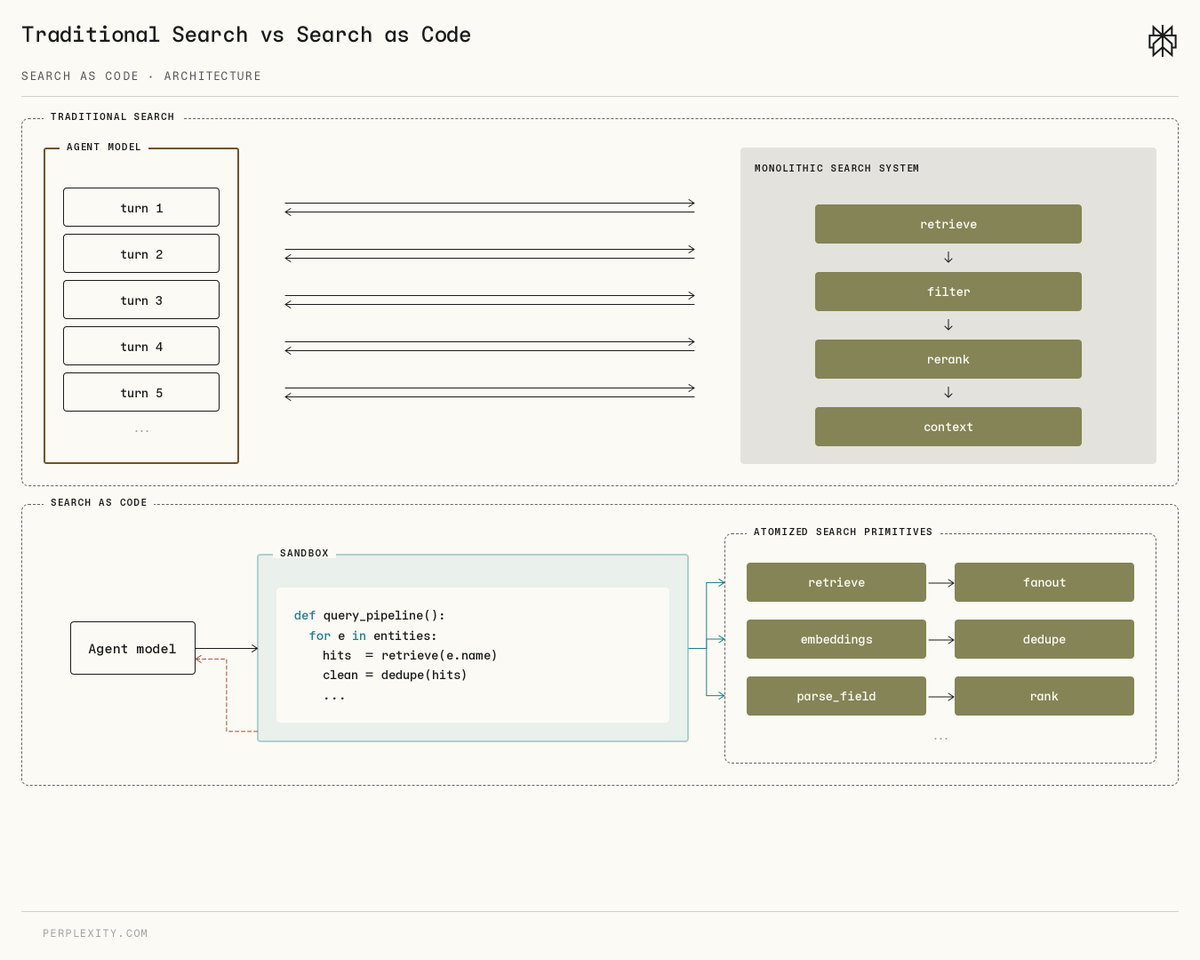
We’re moving away from search as a web fetch tool call to search as codegen to be future proof in a world where code execution inside agent harnesses is the way to do almost all of our knowledge work.
Doing this lets you compose multi-step primitives far more naturally and be much more adaptable to changes made to the agent harness, as well as benefit from improvements in coding capabilities that are guaranteed to come from the next generation of frontier models.
Jun 1

Introducing Search as Code, our new search architecture for AI agents.
It writes Python that calls our search stack directly, instead of looping through function calls one at a time.
Available in the Perplexity Agent API, and now default in Computer.
research.perplexity.ai/artic…
88
79
993
277,432
Venkat Software Directory retweeted

Unlock the power of autonomous workflows with Startup School: Agentic AI.
Join @GoogleCloud experts to discover how to build, deploy, and scale sophisticated #AIagents that drive real business impact. Ready to innovate? Register here ➡️ goo.gle/startup-school-agent…

22
166
920
374,816
Venkat Software Directory retweeted

May 7
We’ve raised 25M to build the world’s first Personal Intelligence.
Introducing Vellum: AI that belongs to you.
My assistant @ash_vellum has his own X (like grok), tag him and he'll answer.
481
100
1,783
1,446,794
Venkat Software Directory retweeted

May 6
REQUEST FOR STARTUPS: There has never been a better time to build at the intersection of health and AI.
Every corner of medicine is being reimagined, and dermatology is one of the most compelling places to start.
Hear it from @evajsteinman 👇
57
32
413
75,932
Venkat Software Directory retweeted

Apr 30
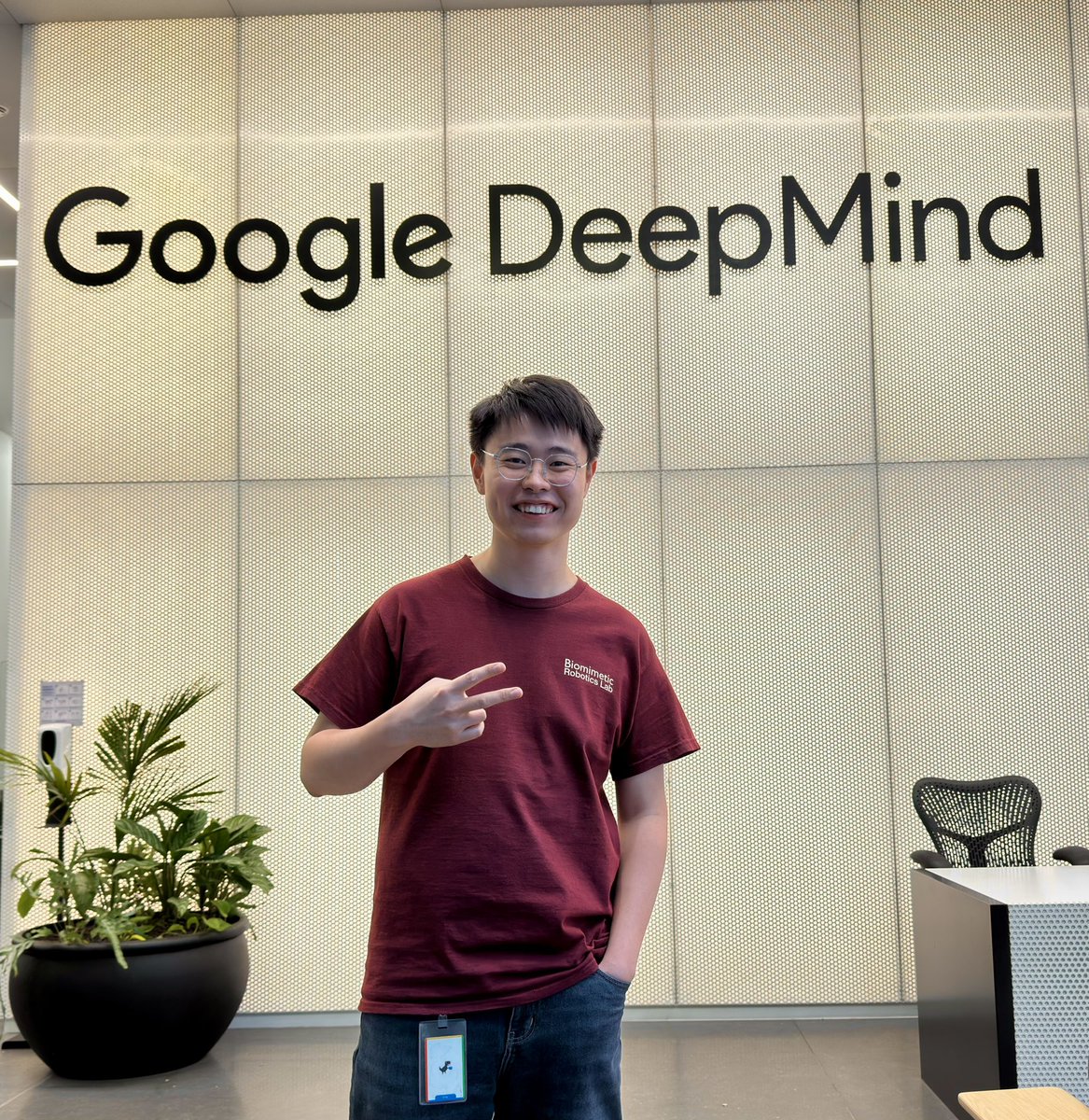
🎉 Life update: I joined @GoogleDeepMind as a Student Researcher.
Last week I started my internship at the Gemini Robotics team in London, building the new generation of physical AI with the group of talents I had been only hearing from papers 🧠
Excited about this new journey!
79
50
1,690
64,916
super cool!

Introducing the mint mcp
Your coding agent can now generate fully immersive 3D worlds and 3D models
No Blender required :)
6
646

Apr 27

I've joined @fun as Chief Strategy Officer
Fun has the highest talent density per square foot I've ever seen at a startup
We have a real shot at removing the technological barriers to value exchange and building a truly modern payments company
15
Venkat Software Directory retweeted

Apr 21
If you had told me 12 months ago that @thomasdesfrancs who has no software engineering background would be able to build this as code, I would not have believed it
15
7
277
35,895
Venkat Software Directory retweeted

Apr 11
So happy to see Gemma 4’s OCR capabilities being used for assistive tech! This is exactly the kind of impact I dreamed of when I started working on vision and language back during phd 🥹

gemma 4 running on-device in the @LetsEnvision app. samsung s26 , CPU-only.
had early access for the past week and the ocr is easily the best i've seen on oss models, including strong visual reasoning.
this matters for blind and low-vision folks more than most people realize!
5
8
69
5,614
Venkat Software Directory retweeted

Apr 10
Introducing LPM 1.0 — a video-based character performance model that speaks, sings, listens, reacts, and emotes in real time.
- Generating full-duplex conversation, identity-consistent infinite-length generation, and nuanced human-like performance.
- Building across a co-designed data pipeline, Base model, Online model, and streaming inference optimization.
- Key advantages over other video generation models: performance quality, emotional conversation, precise lip-sync, identity preservation, and lifelike naturalness.
Turning an image into a performance video, LPM 1.0 serves as a visual engine for conversational agents, live streaming characters, and game NPCs.
Page: large-performance-model.gith…
Arxiv: huggingface.co/papers/2604.0…
12
50
288
25,268
Venkat Software Directory retweeted

Apr 7
Tasklet (@taskletai) is the cloud agent OS for knowledge work. It connects to all your tools, uses computers in the cloud, and runs 24/7 to get real work done.
Started by Firebase founder @startupandrew and @jonnydimond, it’s grown >1,200% this year to $5M ARR and just raised $20M.
Congrats to the team!
ycombinator.com/launches/PsX…
14
27
207
50,490
Venkat Software Directory retweeted

Apr 7
introducing momo, the CRM for AI agents.
it gives agents its own CRM, like Salseforce/Hubspot for humans.
every AI native company will need dev agents, sales agents, customer support agents, HR, legal, finance, design agents.
we're starting from customer relationships.
we hypothesize that every important decision ever made in a company all derives from understanding customer data.
even if dev agents are good at building things out in a day, if they don't have any customer signals on which features are working or where people are churning, it's no use.
@getyourmomo does the following:
1) sets up your CRM with posthog gmail data (or other web analytics tool)
2) analyzes the features your dev agents push
3) detects power users and churning users, aggregates CS tickets
4) sets up auto outreach email workflows & collects reponses
5) builds out list of issues to fix & next steps for your dev agent
setting up custom onboarding for a few teams right now, please dm if interested :)
125
71
1,274
188,021
Dench is open source AI CRM - Featured them here - venkatsoftware.com/dench
#Denchclaw #openclaw #crm #ai #aicrm #SaaS #Software #tech #sales #salesautomation
Mar 31

Introducing Dench.com: Open Source AI CRM, that runs on your OpenClaw.
A few weeks ago, we launched Ironclaw (An Open Source OpenClaw CRM Framework) which now has around 1.4k stars. A lot of people confused us with NearAI’s Ironclaw, so we changed our name to DenchClaw.
OpenClaw today feels a lot like early React: the primitive is incredibly powerful, but the patterns are still forming, and everyone is piecing together their own way to actually use it. What made React explode wasn’t just React itself, but the emergence of frameworks like Gatsby and Next.js that turned raw capability into something opinionated, repeatable, and easy to adopt. That is how I think about DenchClaw. We are not just building on top of OpenClaw; we are trying to make it one of the clearest, most practical, and most complete ways to use OpenClaw in the real world. We are an OpenClaw Framework, we are aiming to be the most correct way to use OpenClaw.
We entered @ycombinator with Merse (AI Audio Comic), it was an app that I personally never used. @mwseibel confronted us on it, and said, “if you aren’t the best user of your consumer app, then who is?”.
I now use DenchClaw daily for everything I do, it also works as a coding agent like Cursor, DenchClaw built DenchClaw. I am addicted to DenchClaw now that I can ask it, “hey in the companies table only show me the ones who have more than 5 employees” and it updates it live than me having to manually add a filter.
On Dench, everything sits in a file system, the table filters, views, column toggles, calendar/gantt views, etc, so OpenClaw can directly work with it using Dench’s CRM skill.
The CRM is built on top of @duckdb, the smallest, most performant and at the same time also feature rich database we could find.
It creates a new @openclaw profile called “dench”, and opens a new OpenClaw Gateway… that means you can run all your usual openclaw commands by just prefixing every command with `openclaw --profile dench` . It will start your gateway on port 19001 range. You will be able to access the DenchClaw frontend at localhost:3100. Once you open it on Safari, just add it to your Dock to use it as a PWA.
Think of it as Cursor for your Mac which is based on OpenClaw. DenchClaw has a file tree view for you to use it as an elevated finder tool to do anything on your mac. I use it to create slides, do LinkedIn outreach using MY browser.
DenchClaw sees what you see, does what you do. It’s the everything app, that sits locally on your mac. All yours.
Just ask it “hey import my notion”, “hey import everything from my hubspot”, and it will literally go into your browser, export all objects and documents and put it in its own workspace that you can use.
P.S. It comes with @garrytan's GStack built in.
1
46
Venkat Software Directory retweeted

Today is the biggest day in @softr_io's history.
We're introducing @softr_io as the first AI platform for building real business software. Software that works. Every single time.
Five years ago, Artur Mkrtchyan and I founded Softr with one goal: make software building accessible to business people who can't code.
A million builders later, it's time to do the same for the next billion.
Here's what I watched happen from the front row.
No-code gave people reliability and guardrails, but adoption was slow.
Then AI came along and for the first time, everyone believed building was possible. But it stopped at the demo stage.
The gap between "look what I built in 10 minutes" and "software my team can actually use" stayed wide open.
So we combined the two. The speed and personalization of AI with the reliability of no-code.
Here's what that means in practice:
- When you describe what you need, Softr's AI Co-Builder generates the interface, database, business logic, roles, permissions, and security together. Not a prototype. Software you can run a business on.
- You are not left with generated code you can't maintain. You build it, own it, and iterate on it - with AI or through a visual interface where your database, workflows, and permissions are visible and editable. Not a black box. No developer required. Ever.
- Logins, roles, permissions, and security are built in by default. So you can actually launch it - to your team or clients - without it falling apart.
2025 was the era of shiny demos. 2026 is the era of useful business software.
We won't reach the next billion builders because we abstracted code. We'll reach them because we abstracted the complexity of software itself - and made the creation of hard things easy.
#softr #aiplatform #businessapps
7
7
35
5,986
Venkat Software Directory retweeted

Mar 30
Exciting work already happening at the newly created OpenClaw Foundation. Lots more to come from @steipete and @davemorin 🦞
4
6
49
2,316