
Your trusted resource for applied AI with Microsoft technologies. 🤖💻 Insights on C#, CoPilot, SharePoint, SQL Server, and more. Empowering businesses with AI!
Joined May 2024
- Tweets 674
- Following 325
- Followers 249
- Likes 538
365 Photos and videos










18h
A useful AI prototype should not prove that AI is interesting. Everyone already knows AI is interesting.
The prototype should prove whether one defined business capability is feasible, useful, and worth expanding. That means the scope has to be bounded. Do not prototype “an HR assistant.” Prototype policy question answering from approved handbook sections, with source references and escalation guidance. Do not prototype “a finance chatbot.” Prototype invoice discrepancy review using invoice data, purchase orders, vendor terms, and business rules.
A good prototype should test the real shape of the work: inputs, outputs, documents, permissions, human review, workflow usefulness, logging, and failure detection.
For Microsoft-based organizations, the prototype should also test the implementation path: dot net, Azure OpenAI, SQL Server, SharePoint, Microsoft 365, internal A P Is, ASP.NET Core, OpenAPI, logging, review, and feedback.
The production workflow behind this video was built using the same methodology I apply for enterprise clients — I identified a real production bottleneck, evaluated AI options, and built a .NET-integrated workflow using AI tools to deliver it faster, better, and at lower cost. The thinking that improved my own workflow is the same thinking I bring to yours.
Explore more practical, applied enterprise AI insights at AInDotNet.com.
#EnterpriseAI
#AIPrototype
#AIImplementation
#AIAssistants
#MicrosoftAI
#DotNet
#AzureOpenAI
#BusinessAutomation
#WorkflowAutomation
#AIGovernance
#AIArchitecture
#SQLServer
#SharePoint
#Microsoft365
#APIs
#OpenAPI
#SemanticKernel
#ProductionAI
#AInDotNet
2
1
2
36
18h
A prototype should answer one practical question: does this specific capability work well enough, in a bounded business context, to justify the next investment? If it cannot answer that, it is probably still just a demo.
5
Jun 12
A generic AI assistant can summarize a support ticket, but that is not enough for production IT work.
IT teams need structured support: ticket category, affected system, severity, missing information, likely issue type, recommended next action, confidence, and escalation recommendation. That structure matters because real IT work happens inside queues, S L As, audit trails, user communication, defect tracking, and security review.
The practical starting point is not automatic action. It is decision support. Let the AI summarize, classify, recommend, and draft. Let the human review and decide. That approach builds trust, captures feedback, and helps the organization learn which parts of the workflow are stable enough for deeper automation.
This is where domain-specific AI assistant capabilities become more useful than generic chatbots. The model may be the same, but the surrounding workflow, rules, structure, and ownership create the business value.
The production workflow behind this video was built using the same methodology I apply for enterprise clients — I identified a real production bottleneck, evaluated AI options, and built a .NET-integrated workflow using AI tools to deliver it faster, better, and at lower cost. The thinking that improved my own workflow is the same thinking I bring to yours.
Explore more practical, applied enterprise AI insights at AInDotNet.com.
#EnterpriseAI
#ITSupport
#AIAssistants
#DomainSpecificAI
#MicrosoftAI
#DotNet
#AzureOpenAI
#AIArchitecture
#ProductionAI
#AIGovernance
#WorkflowAutomation
#BusinessAutomation
#HelpDesk
#IncidentManagement
#KnowledgeBase
#SLA
#ITOperations
#Microsoft365
#PowerPlatform
#AInDotNet
1
1
21
Jun 12
The useful IT assistant is not the one that writes the prettiest summary. It is the one that fits the support workflow: triage, severity, missing information, escalation, audit trail, and human review.
9
Jun 12
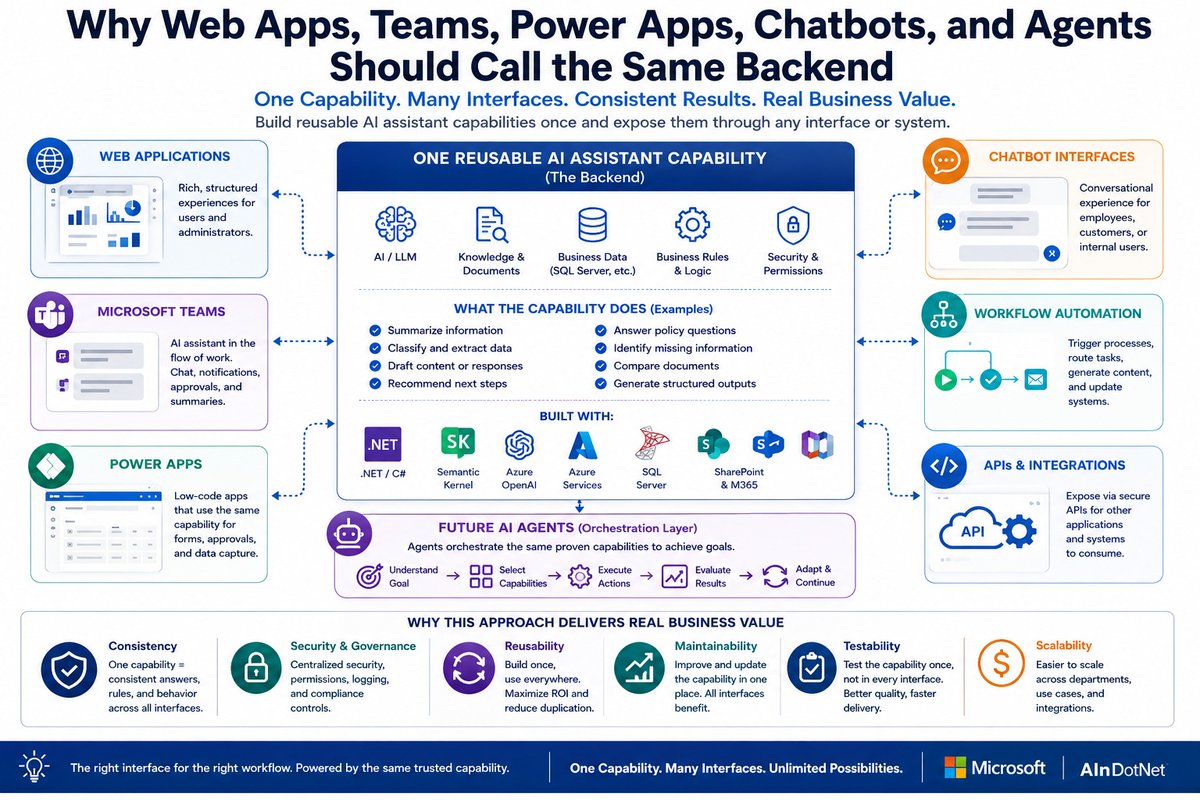
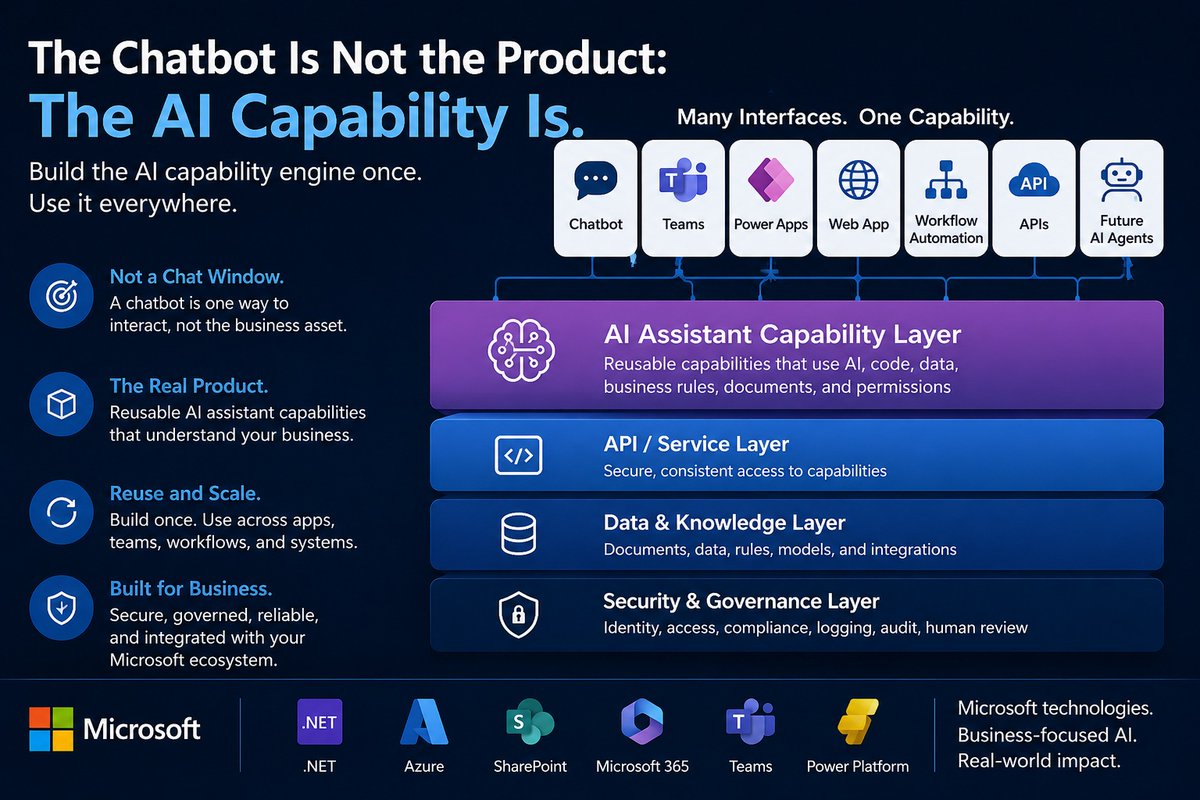
One of the biggest mistakes businesses make with AI is building a different AI solution for every interface.
One chatbot.
One Power App.
One Teams assistant.
One workflow automation.
One web app.
One API.
One future agent.
That creates duplication, inconsistent answers, scattered security, weaker governance, harder testing, and higher maintenance costs.
My new article explains a better architecture:
Why Web Apps, Teams, Power Apps, Chatbots, and Agents Should Call the Same Backend
The principle is simple:
One capability. Many interfaces.
A reusable AI assistant capability should live in the backend, where it can be secured, tested, logged, governed, monitored, reused, and improved.
Then the right interface can call it:
Web apps for structured workflows.
Teams for collaboration and notifications.
Power Apps for forms and approvals.
Chatbots for conversational interaction.
Workflow automation for event-triggered processes.
APIs for system integration.
Future agents for orchestration, once the capabilities are proven.
For Microsoft-based organizations, this fits naturally with .NET, Azure OpenAI, Semantic Kernel, SQL Server, SharePoint, Microsoft 365, Teams, Power Platform, and Microsoft Entra ID.
The interface may change.
The capability should endure.
Read the full article here:
aindotnet.com/2026/06/why-we…
#ArtificialIntelligence #AI #GenerativeAI #AIAssistants #EnterpriseAI #AIArchitecture #SoftwareArchitecture #BusinessAI #MicrosoftAI #DotNet #AzureOpenAI #SemanticKernel #SQLServer #SharePoint #Microsoft365 #MicrosoftTeams #PowerPlatform #Chatbots #AIAgents #DigitalTransformation #AInDotNet
1
1
53
Jun 12
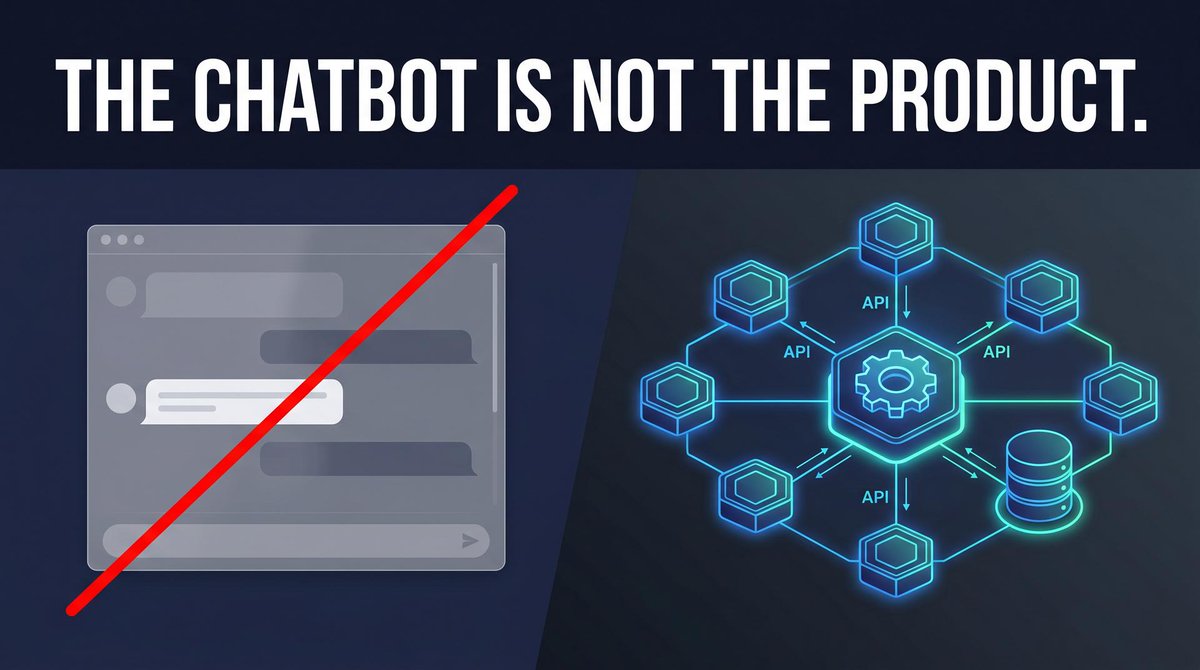
The key idea:
Do not put reusable business capability logic inside the interface.
Build the backend AI assistant capability once.
Then expose it through the right interface: web app, Teams, Power Apps, chatbot, workflow automation, API, mobile app, or future agent.
That gives you consistency, security, governance, testability, reuse, maintainability, and scalability.
The chat window is not the architecture.
The backend capability is the asset.
1
20
Jun 11
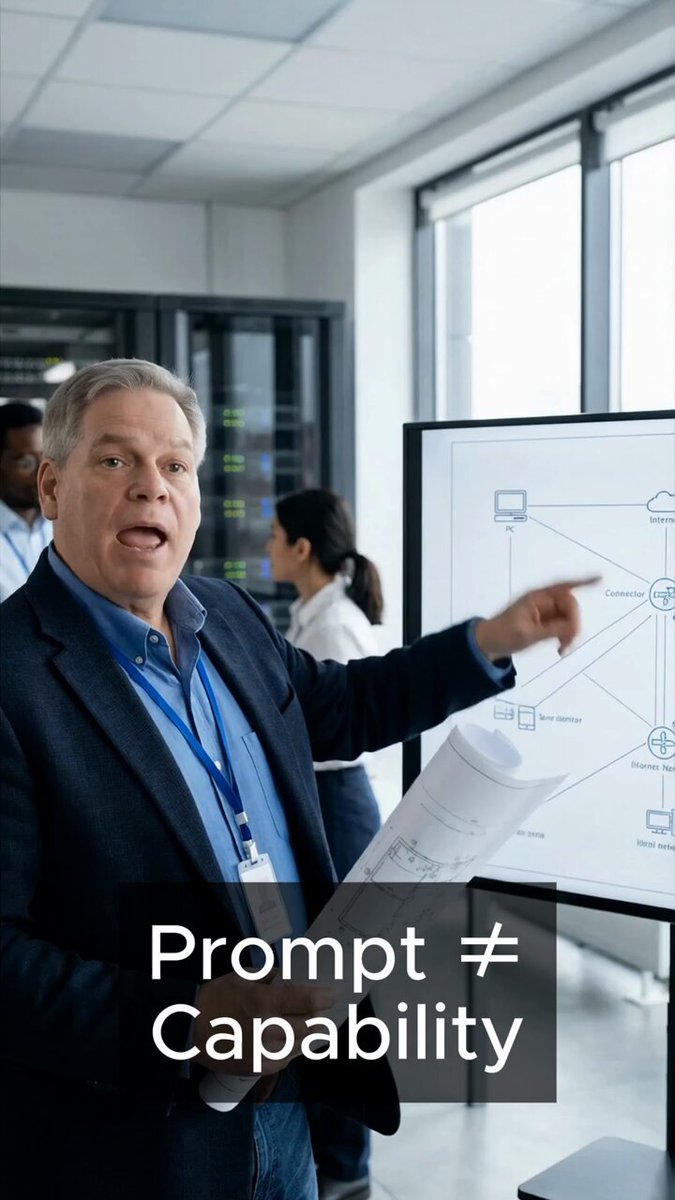
A working prompt is not the same thing as a production AI capability.
That distinction matters for enterprise AI. A prompt may solve one narrow task, but a real AI capability has a defined business job, explicit inputs, structured outputs, constraints, permissions, validation, logging, and rules that are enforced by code.
For example, “summarize this document” is too vague for production. A better capability would summarize a vendor contract for renewal risk, a support ticket for escalation, or an HR policy section for an employee-facing answer.
Those are different capabilities because the inputs, risks, business rules, and expected outputs are different.
For Microsoft-based organizations, this fits naturally with C#, .NET, ASP.NET Core, Azure OpenAI, SQL Server, SharePoint, Microsoft identity, Power Apps, Teams, workflows, and internal business systems.
The model call is only one part of the solution. The production-ready business function around the model is what turns AI into something reusable and governable.
The production workflow behind this video was built using the same methodology I apply for enterprise clients — I identified a real production bottleneck, evaluated AI options, and built a .NET-integrated workflow using AI tools to deliver it faster, better, and at lower cost. The thinking that improved my own workflow is the same thinking I bring to yours.
Explore more practical, applied enterprise AI insights at AInDotNet.com.
#EnterpriseAI
#AIArchitecture
#AICapabilities
#ProductionAI
#AIGovernance
#MicrosoftAI
#DotNet
#CSharp
#AzureOpenAI
#ASPNetCore
#SQLServer
#SharePoint
#PowerPlatform
#AIAssistants
#BusinessAutomation
#WorkflowAutomation
#SoftwareArchitecture
#AInDotNet
1
1
27
Jun 11
A prompt can demonstrate an idea. A capability turns that idea into something the business can reuse, test, govern, and support in production.
10
Jun 10
A working AI demo can create false confidence.
The data is clean. The examples are selected. The workflow is simple. The audience is forgiving. That can make a weak system look stronger than it really is.
Production is different. Real users bring messy inputs, missing information, unclear permissions, outdated documents, support expectations, logging requirements, and business risk. That is where many AI projects slow down or fail.
The practical takeaway is simple: do not confuse a demo with a production-ready AI system. A demo should create interest. A prototype should create evidence. Before moving toward MVP or production, prove that one reusable AI capability can survive real workflow conditions.
For Microsoft-based organizations, that means thinking about .NET integration, Azure OpenAI, security, SharePoint or Microsoft 365 data, SQL Server, logging, review, and support early enough to avoid expensive rework.
The production workflow behind this video was built using the same methodology I apply for enterprise clients — I identified a real production bottleneck, evaluated AI options, and built a .NET-integrated workflow using AI tools to deliver it faster, better, and at lower cost. The thinking that improved my own workflow is the same thinking I bring to yours.
Explore more practical, applied enterprise AI insights at AInDotNet.com.
#EnterpriseAI
#AIImplementation
#AIPrototype
#ProductionAI
#AIGovernance
#AIArchitecture
#MicrosoftAI
#DotNet
#AzureOpenAI
#AIAssistants
#BusinessAutomation
#WorkflowAutomation
#SharePoint
#SQLServer
#Microsoft365
#SemanticKernel
#MVP
#AIAdoption
#AInDotNet
2
2
66
Jun 10
A good demo proves interest. A good prototype proves evidence. The mistake is treating early excitement like production readiness.
11
Jun 9
Generic AI assistants can summarize, classify, extract, and draft. Those are useful building blocks, but they are not enough for real enterprise AI value.
The business value appears when AI capabilities are shaped around the department, workflow, rules, documents, permissions, and decisions involved. IT, HR, finance, and operations do not need the same kind of AI output. They have different vocabulary, risks, approval boundaries, authoritative documents, and success criteria.
That is why domain context matters. A Microsoft-centric organization should not think only in terms of one giant generic chatbot. A better architecture uses shared capability libraries for common functions and domain-specific libraries for specialized business work.
The blunt takeaway: generic AI gives generic value. Domain-specific AI creates business value.
The production workflow behind this video was built using the same methodology I apply for enterprise clients — I identified a real production bottleneck, evaluated AI options, and built a .NET-integrated workflow using AI tools to deliver it faster, better, and at lower cost. The thinking that improved my own workflow is the same thinking I bring to yours.
Explore more practical, applied enterprise AI insights at AInDotNet.com.
#EnterpriseAI
#AIAssistants
#DomainSpecificAI
#MicrosoftAI
#DotNet
#AzureOpenAI
#AIArchitecture
#ProductionAI
#AIGovernance
#BusinessAutomation
#WorkflowAutomation
#ITSupport
#HumanResources
#FinanceAutomation
#OperationsManagement
#PowerPlatform
#SQLServer
#SharePoint
#Microsoft365
#AInDotNet
1
1
16
Jun 9
The model is only one part of the system. The business value comes from the domain context around it: workflows, rules, permissions, source documents, ownership, and human approval boundaries.
3
Jun 9
Most businesses should not start their AI strategy by asking:
“Should we build a chatbot?”
That question starts in the wrong place.
A better question is:
What reusable AI assistant capabilities should we build, govern, and expose through the right interfaces?
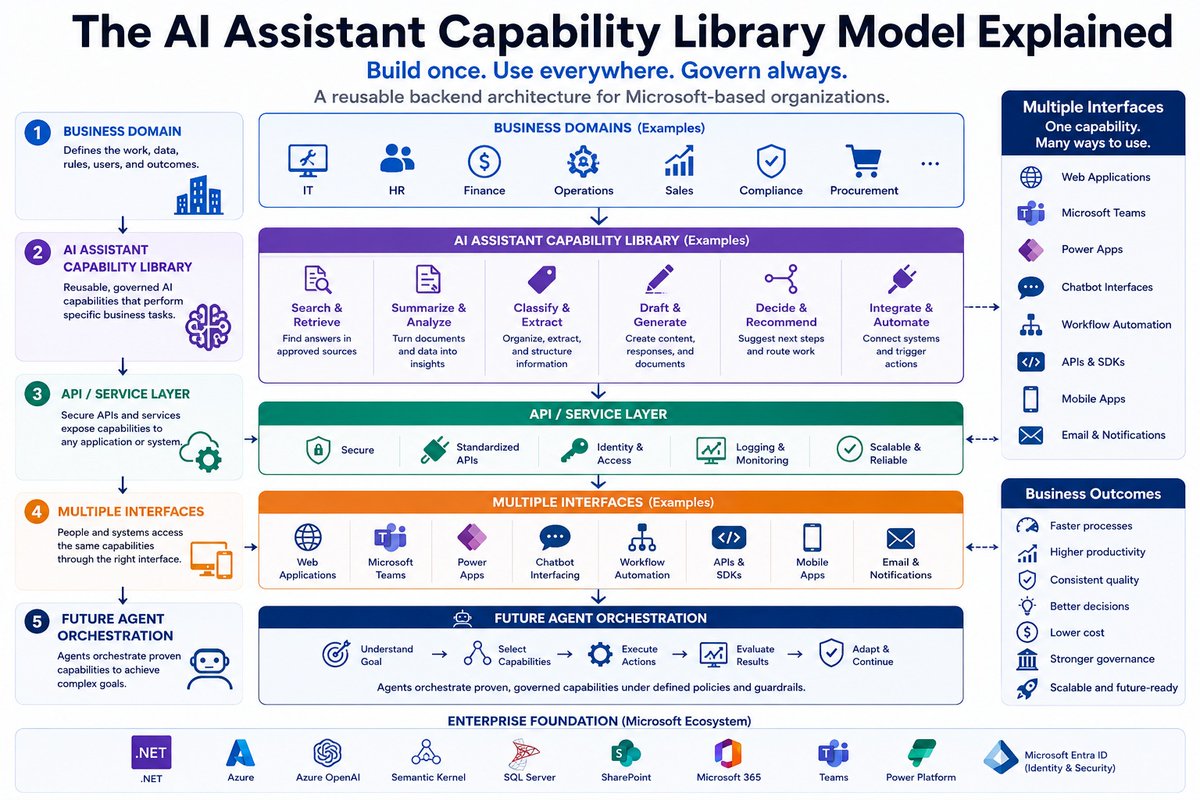
My new article explains the AI Assistant Capability Library Model — a reusable backend architecture for building practical AI capabilities that can support web apps, Microsoft Teams, Power Apps, chatbot interfaces, workflow automation, APIs, mobile apps, and future AI agents.
The core model is simple:
Business Domain → AI Assistant Capability Library → API / Service Layer → Multiple Interfaces → Future Agent Orchestration
For Microsoft-based organizations, this approach fits naturally with .NET, Azure OpenAI, Semantic Kernel, SQL Server, SharePoint, Microsoft 365, Teams, Power Platform, and Microsoft Entra ID.
The point is not to build another isolated AI demo.
The point is to build reusable AI capabilities that become real business assets.
Build once. Use everywhere. Govern always.
Read the full article here:
aindotnet.com/2026/06/the-ai…
#ArtificialIntelligence #AI #GenerativeAI #AIAssistants #EnterpriseAI #BusinessAI #AIArchitecture #SoftwareArchitecture #MicrosoftAI #DotNet #AzureOpenAI #SemanticKernel #SQLServer #SharePoint #Microsoft365 #MicrosoftTeams #PowerPlatform #AIAgents #DigitalTransformation #AInDotNet
1
1
40
Jun 9
The key idea:
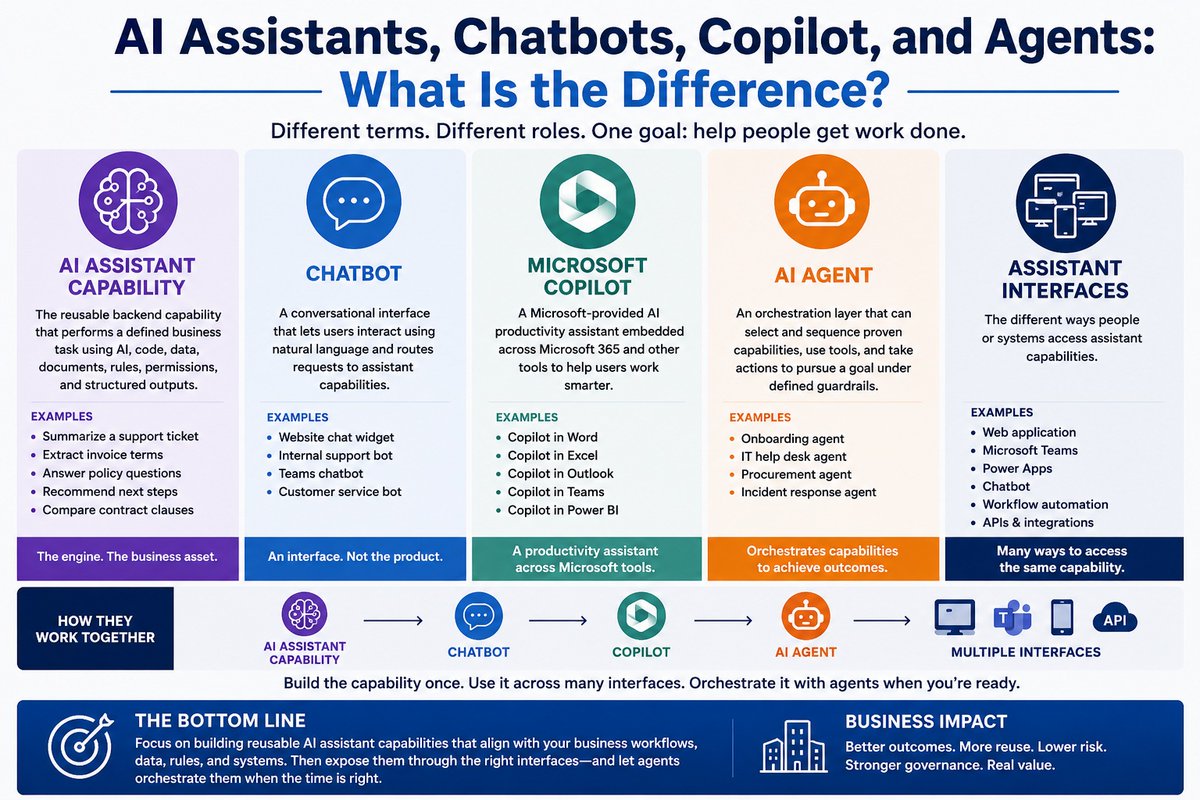
A chatbot is only one interface.
The reusable AI assistant capability is the asset.
A well-designed capability can be exposed through a web app, Teams, Power Apps, workflow automation, APIs, chatbot interfaces, mobile apps, email notifications, or future agents.
That is why the backend architecture matters more than the visible chat window.
16
Jun 8
One-off AI tools feel productive at first. A department builds a chatbot, prompt workflow, Power Automate flow, or small assistant. The demo works. Users like it. Leadership sees progress.
But when every department builds independently, the business gets duplicated logic, inconsistent answers, weak governance, unclear ownership, and expensive rework.
That is where enterprise AI starts to break down.
The issue is not experimentation. Experimentation is necessary. The issue is allowing useful experiments to become disconnected production systems with separate prompts, rules, logging, security assumptions, and support patterns.
The better approach is to identify reusable AI capabilities early. If the business will need the same capability in multiple places, it should not be trapped inside one chatbot, one workflow, one Power App, or one department-specific tool.
Build the capability once. Expose it safely. Reuse it across interfaces.
The production workflow behind this video was built using the same methodology I apply for enterprise clients — I identified a real production bottleneck, evaluated AI options, and built a .NET-integrated workflow using AI tools to deliver it faster, better, and at lower cost. The thinking that improved my own workflow is the same thinking I bring to yours.
Explore more practical, applied enterprise AI insights at AInDotNet.com.
#EnterpriseAI
#AIArchitecture
#AIGovernance
#ProductionAI
#MicrosoftAI
#DotNet
#AzureOpenAI
#PowerPlatform
#PowerAutomate
#Chatbots
#AIAssistants
#BusinessAutomation
#WorkflowAutomation
#AIImplementation
#SoftwareArchitecture
#AInDotNet
1
1
44
Jun 8
A useful AI experiment should not automatically become a disconnected production system. If the same logic may be needed in multiple places, treat it as a reusable capability early.
7
Jun 6
A prototype Intelligent Document Processing demo can get away with simple output: a spreadsheet, a console log, or a success metric.
A production IDP system cannot.
In real enterprise environments, the extracted data usually has to update a business system, trigger a workflow, notify another service, support a reviewer, or satisfy downstream reporting requirements. That means the output has to be shaped intentionally, traced clearly, and integrated safely.
Auditability matters because the organization may need to answer hard questions later. What document was processed? What fields were extracted? Which values were corrected? Who reviewed the case? What business rule failed? What was sent downstream?
Compliance and security add more constraints: retention rules, access controls, region restrictions, encryption expectations, and legal review requirements.
The practical takeaway is simple: integration, auditability, and compliance are not later concerns. They are production architecture requirements.
The production workflow behind this video was built using the same methodology I apply for enterprise clients — I identified a real production bottleneck, evaluated AI options, and built a .NET-integrated workflow using AI tools to deliver it faster, better, and at lower cost. The thinking that improved my own workflow is the same thinking I bring to yours.
Explore more practical, applied enterprise AI insights at AInDotNet.com.
#IntelligentDocumentProcessing #IDP #DocumentAI #EnterpriseAI #ProductionAI #Auditability #Compliance #Integration #WorkflowAutomation #DocumentAutomation #MicrosoftAI #DotNet #AzureAI #SQLServer #EnterpriseArchitecture #AIImplementation #GovTech #DevOps #BusinessAutomation #AInDotNet
2
1
53
Jun 6
Production IDP is not just about extracting values. It is about proving what happened, who touched it, what changed, and what the business system received.
10
Jun 5
The worst way to start an enterprise AI project is to announce that the company is going to build an AI assistant platform.
That sounds strategic, but it usually creates too much scope too early.
A better starting point is one business domain, one workflow, and one reusable AI capability.
Do not start with “build an HR assistant.” Start with “answer employee policy questions from approved handbook sections, with source references and escalation guidance.”
Do not start with “build a finance assistant.” Start with “summarize invoice discrepancies using invoice data, purchase order data, vendor history, and payment terms.”
Do not start with “build an IT chatbot.” Start with “classify support tickets, suggest severity, summarize likely cause, and draft an initial response.”
A good first capability is frequent, painful, bounded, valuable, reviewable, and owned by real stakeholders.
The production workflow behind this video was built using the same methodology I apply for enterprise clients — I identified a real production bottleneck, evaluated AI options, and built a .NET-integrated workflow using AI tools to deliver it faster, better, and at lower cost. The thinking that improved my own workflow is the same thinking I bring to yours.
Explore more practical, applied enterprise AI insights at AInDotNet.com.
#EnterpriseAI
#AIAssistants
#AIArchitecture
#MicrosoftAI
#DotNet
#AzureOpenAI
#SemanticKernel
#PowerPlatform
#Microsoft365
#SharePoint
#SQLServer
#WorkflowAutomation
#ProductionAI
#AIGovernance
#AIPrototyping
#CustomSoftware
#BusinessAutomation
#AInDotNet
2
1
23
Jun 5
A prototype should prove whether the organization understands the workflow well enough to build a repeatable capability. It should not just prove that a model can generate a plausible answer.
8