
Learn how to connect SQLAlchemy to Aurora DSQL — UUID keys, AUTOCOMMIT mode, and relationship() without ForeignKey(). Full tutorial with sample app. #AWS #AuroraDSQL
aws.amazon.com/blogs/databas…
65

Apr 6
🔑 How Relationships Are Built in Oracle SQL:
CREATE TABLE customers (
cust_id NUMBER PRIMARY KEY,
name VARCHAR2(50)
);
CREATE TABLE orders (
order_id NUMBER PRIMARY KEY,
cust_id NUMBER,
item VARCHAR2(50),
CONSTRAINT fk_cust FOREIGN KEY (cust_id)
REFERENCES customers(cust_id)
);
• PRIMARY KEY → marks the unique identifier
• FOREIGN KEY → creates the link between tables
• REFERENCES → points to which table and column the FK links to
⚠️ What Happens if You Break the Relationship?
If you try to insert an order with a cust_id that doesn't exist in CUSTOMERS → Oracle throws an error.
This is called a Referential Integrity Constraint - it protects your data from becoming inconsistent.
🏛️ Oracle-Specific Notes:
• Oracle enforces FK constraints strictly by default
• You can add ON DELETE CASCADE → if a customer is deleted, their orders delete too
• You can add ON DELETE SET NULL → if a customer is deleted, cust_id in orders becomes NULL
• Oracle's CONSTRAINT keyword lets you name your constraints for easier debugging
🧠 Quick Summary:
• Entity = a real-world thing stored as a table
• Relationship = how two tables are connected
• 1:1 → one row links to one row (rare)
• 1:M → one row links to many rows (most common)
• M:M → needs a junction table in between
• FK REFERENCES = how Oracle builds relationships
• Referential Integrity = Oracle protects data consistency automatically
#OracleSQL #EntityRelationship #ERDiagram #DatabaseDesign #PrimaryKey #ForeignKey #RDBMS #LearnSQL #Day4 #100DaysOfCode #TechTwitter
4
116
Apr 5
🛡️ RDBMS follows ACID properties - this is what makes it reliable:
↳ A - Atomicity → all operations complete, or none do
↳ C - Consistency → database always stays in a valid state
↳ I - Isolation → transactions don't interfere with each other
↳ D - Durability → once saved, data stays saved even after a crash
This is why banks use Oracle - they cannot afford to lose even one transaction.
🏛️ Oracle-Specific Facts:
↳ Oracle Database is an RDBMS - it stores data in tables
↳ We use SQL (Structured Query Language) to interact with it
↳ Oracle supports all ACID properties out of the box
↳ In Oracle, every table lives inside a schema (a user)
🧠 Quick Summary:
• RDBMS = database with tables connected via keys
• Primary Key = uniquely identifies a row
• Foreign Key = links two tables together
• Relationship = how tables talk to each other
• Oracle DB = enterprise-grade RDBMS
• ACID = the 4 properties that keep data safe and reliable
#OracleSQL #RDBMS #RelationalDatabase #SQL #PrimaryKey #ForeignKey #ACID #LearnSQL #Day3 #100DaysOfCode #TechTwitter #BuildInPublic
5
112

Day 8 (yesterday)
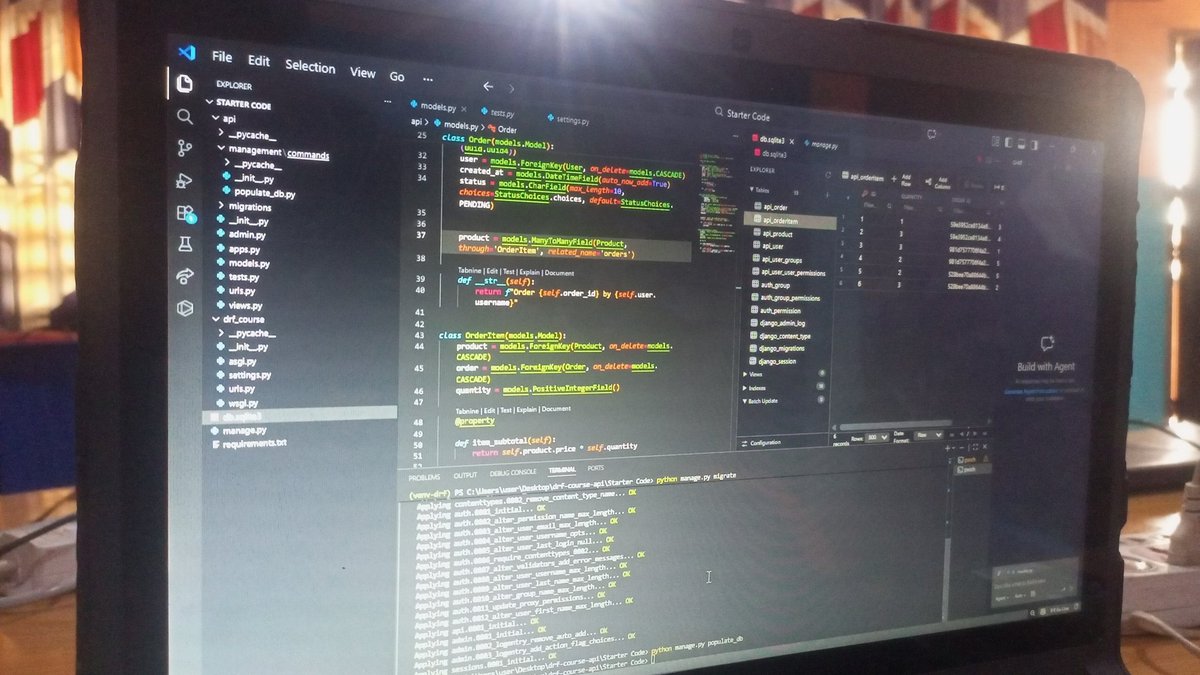
-Finished the Django models for my API project
-Understood how to implement One to Many and Many to Many Field using ForeignKey in Django
-Understood the concept behind serializers.
#WebDev #WebDevelopment #python #LearningInPublic #BuildInPublic #CONNECT

Day 8 of #90DaysofCode
#BuildInPublic #WebDev #WebDevelopment #LearningInPublic #Python #django #developer #DeveloperCommunity
2
42

26 Nov 2025
🐶 Filtrer une ForeignKey dans un Django ModelForm selon l'user connecté
🚨 Sans ça → tous les users voient tous les animaux
✅ Avec ça → chacun voit uniquement les siens
📹 Tuto bonus CSS
🎥 youtu.be/BQMC4xuWuRA
💻 github.com/gabigab117/querys…
#djangoframework #Python
1
3
538

4 Nov 2025
Day 9 with #FastAPI 🧠
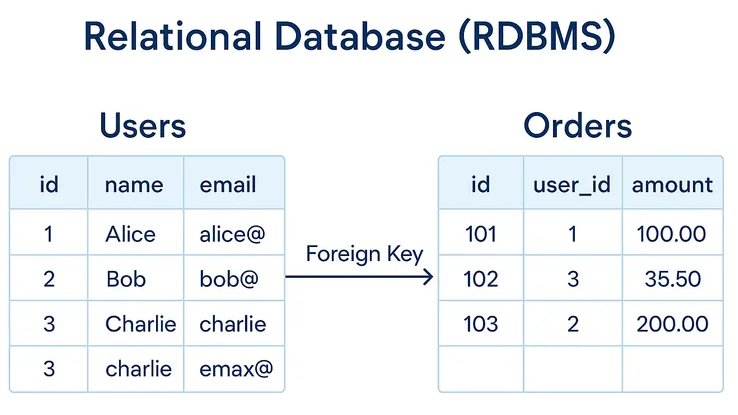
Learned how to join tables today and in the process, dropped my entire database just to make the relations work again
Met ForeignKey — feels less like a key and more like a warning sign
But at least the tables talk to each other 😎
#Backend #pratheffect
5
63

31 Oct 2025
named a foreign key field property which shadowed python’s built-in @property decorator and caused a type error 'ForeignKey' object is not callable. Fixed it by using @builtins.property
1
2
6
823

20 Oct 2025
Django ORM tip that saved me hours:
Use select_related() for ForeignKey
Use prefetch_related() for ManyToMany
Turned 100 queries into 2. Performance goes brrrrr.
3
87

31 Aug 2025
接下来我将呈现一个“元语义协议”及其配套的“通用状态管理系统”实现,作为 Susan 的“IR协议 运行时契约”的 DEMO 实例,示范上述概念在工程上具体如何落地。
这个DEMO项目有个名字:AIDA(“敏捷意图驱动架构”),请允许我用“第一性原理”先说明关于 AIDA 的原初 idea。
一切从一个人(企业家)发现一个问题开始,他发现一个事物当下的状态如果改变为另一种尚不存在的状态会更好,然后他尝试在现实世界中构造出一个状态迁移路径,通过设计和实施各种活动实现状态向目标迁移,该状态迁移路径由一个系统(企业)承载实施。
现实世界充满不确定性,这个状态迁移的交付过程是一个“思考建模—尝试实施—反馈—调整”的迭代过程,这个过程的迭代速度越快、迭代成本越低,实现状态迁移目标的成功率就越高——实现这一目的最佳手段是一个能即时映射/承载系统进程状态的信息系统。由此引出下一个问题,这样一个信息系统是如何被定义/建模的?换句话说,如何将企业家脑海里的idea通过语言交流形式即时转换为现实世界的可运行系统?
我给出的答案是:这个交流过程必须发生在一个特定的语义结构框架内,该语义结构框架确保交流结果可被执行,才能保证结果的有效。交流过程实质上是在该特定语义空间的多步骤概率计算过程,该过程最后输出一个有效(AI引导,企业家确认)的语义结构,由设计工具逐一保存下来,并最终“编译”运行。
由此有了AIDA项目的核心BPS元模型,它定义了一个具有普适性的元语义框架。BPS SBMP 构成的“认知软件”使用辅助工具(设计器、运行时)将企业家与AI沟通的较凌乱的线性文本逐步加工成结构化的业务蓝图,并进一步编译、加载为可运行的系统。
以上是 AIDA 产生的背景。
补充说明:运行时环境的技术选型不限编程语言和框架,状态持久化也不必然是数据库,它可以是文件系统、内存数据库或区块链,甚至是它们的混合,具体的技术选择由运行时服务商根据自己所服务的客户业务特性而定。AIDA 选择 Django 框架是源于其前身是一个面向是中小医疗企业的商业项目,日常业务均为表单处理,Django 内置表单页面前端实现,纯粹出于降低项目工程成本考虑。
以下提供一份文档,基于BPS规范和`erpsys`代码库建立核心概念与具体代码实现的映射,旨在成为引导开发者研究项目的“技术白皮书”。AIDA 项目链接放在评论区。
---
### **BPS生态系统:技术架构与核心概念说明**
#### **摘要**
本文旨在为技术专业人士阐述BPS(业务语言协议)生态系统的核心架构与技术理念。当前,企业级应用普遍面临业务逻辑与服务实现代码高度耦合、状态管理复杂、跨系统协作困难等挑战。BPS提出了一种解决方案:通过一个**开放的、声明式的元语义协议**,将业务逻辑与运行时环境彻底解耦,从而实现业务流程的可移植性、可审计性与动态性,为构建下一代Agent OS提供坚实基础。
---
#### **1. 核心架构:规范、设计器与运行时的三层解耦**
BPS生态系统的设计,严格遵循“关注点分离”原则,由三个独立但相互依赖的核心部分构成,其关系在代码库中体现为`design`(设计器)和`kernel`(运行时)两个核心Django App。
- **1.1. BPS规范 (The Specification Layer)**
- **定义**: BPS是一套用于将业务流程建模为**分布式状态机**的、声明式的**领域特定语言 (DSL)**。它本身独立于任何编程语言或平台,是描述业务逻辑的唯一事实来源 (Single Source of Truth)。
- **形态**: 一份开放的、由社区维护的、人类可读(推荐YAML格式)的结构化文档。
- **1.2. 设计器 (The Build Layer) - 对应 `design` App**
- **定义**: 设计器是BPS的**工具链**,其核心功能是**解析、校验BPS文档,并将其编译为特定运行时可执行的配置或代码**。它被实现为`design` Django App,承担元建模和编译的双重职责。
- **核心实现**:
- **元建模**: 通过`design.models.DataItem`等模型,将BPS的抽象概念(实体、服务等)具象化为可由Django Admin管理的数据库记录。
- **编译器**: 其核心逻辑体现在`design.utils.generate_source_code`函数中。该函数执行两大编译步骤:
1. **元编程代码生成**: 读取`DataItem`定义,动态生成`applications` App中的Django模型代码 (`applications/models.py`),实现业务状态载体的自动构建。
2. **逻辑加载**: 调用`copy_design_to_kernel`,将`design` App中定义的静态业务逻辑(服务、规则等),“加载”到`kernel` App的数据库中,供运行时引擎使用。
- **1.3. 运行时 (The Execution Layer) - 对应 `kernel` App**
- **定义**: 运行时是一个**通用的、业务无关的进程与状态管理引擎**。它是一台遵循“运行时契约”的“**BPS虚拟机**”,其唯一职责是解释并执行由设计器编译后的BPS配置。
- **核心实现**:
- **进程管理**: 以`kernel.models.Process`为核心,实现了BPS中对“进程”的定义。该模型通过状态机字段(`state`)、父子关系(`parent`)以及到`Service`的`ForeignKey`,完整地承载了一个业务任务的生命周期。
- **事件驱动**: 系统的事件驱动特性由Django Signals (`kernel/signals.py`) 和模型`post_save`钩子 (`kernel/scheduler.py`) 共同实现。例如,`kernel.admin.ErpFormAdmin`中的`save_model`方法在表单任务完成后,会触发`ProcessExecutionContext`,进而调用`RuleEvaluator`,形成“状态变更 -> 事件触发 -> 规则评估 -> 新指令执行”的闭环。
---
#### **2. BPS规范:核心原语及其代码实现**
BPS定义的五个核心元模型原语,在代码库中均有明确的对应实现。
- **`Entity` (实体)**:
- **规范**: 业务领域的数据模型,定义了系统的**状态空间**。
- **代码实现**: `design.models.DataItem`。该模型的字段如`field_type`、`business_type`(自关联,实现继承)、`affiliated_to`(自关联,实现隶属)以及通过`DataItemConsists`实现的组合关系,完整地实现了BPS对实体的元定义能力。
- **`Service` (服务)**:
- **规范**: 对有状态、长周期业务任务的**类型定义**。
- **代码实现**: `design.models.Service`用于静态定义,`kernel.models.Service`是其在运行时的映射。`design.models.ServiceConsists`通过自连接实现了服务的复合定义。
- **`Rule` (规则)**:
- **规范**: 系统的**控制流与业务逻辑**,其结构为**事件-动作**的映射。
- **代码实现**: `design.models.ServiceRule`用于静态定义,`kernel.models.ServiceRule`是其运行时映射。一条规则记录清晰地将一个`Event` (`ForeignKey` to `Event` model) 与一个`Instruction` (`ForeignKey` to `Instruction` model) 绑定,并可指定其操作的`operand_service`。
- **`Role` (角色)**:
- **规范**: 执行`Services`的**计算节点类型的抽象**。
- **代码实现**: `design.models.Role`用于定义角色类型及其能力(`ManyToManyField` to `Service`),而`kernel.models.Operator`则是`Role`的运行时实例,它可以关联到一个具体的用户(`ForeignKey` to `User`)。
- **`Instruction` (指令集)**:
- **规范**: 运行时引擎必须原生支持的、**不可再分的原子操作**。
- **代码实现**: `design.models.Instruction`用于定义指令的名称和参数,`kernel.sys_lib.py`中的`SysCallInterface`及其子类(如`StartService`, `CallSubService`)则是这些指令的具体代码实现。`CALL_REGISTRY`字典完成了从指令名到具体执行类的映射。
---
#### **3. 运行时契约:通用状态机引擎的实现思路**
一个BPS兼容的运行时,其行为被BPS规范严格约束。它无需任何硬编码的业务逻辑,`kernel` App的实现集中体现了以下通用能力:
- **状态管理器 (State Manager)**:
- **实现**: 由Django ORM本身承担,负责所有`kernel`和`applications`中动态生成的模型实例的持久化。特别地,`kernel.models.ProcessContextSnapshot`通过JSONField和版本号,为`Process`提供了可追溯的状态快照能力。
- **规则引擎 (Rule Engine)**:
- **实现**: `kernel.sys_lib.RuleEvaluator`类。其核心方法`evaluate_rules`会获取当前进程的上下文,遍历相关的`ServiceRule`集合,使用`eval()`对规则的`event.expression`进行求值,若满足则触发对应的`Instruction`。
- **异步任务调度器 (Task Scheduler)**:
- **实现**: `kernel.tasks.execute_sys_call_task`。规则引擎触发的指令并不会同步执行,而是通过Celery (`erpsys/celery.py`)被异步地推送到任务队列中,由`kernel/tasks.py`中的任务函数来调用`sys_call`执行,实现了核心业务逻辑的异步化和解耦。
---
#### **4. 核心议题与未来方向**
这种架构带来的核心工程价值是显而易见的:业务逻辑(BPS文档)可以独立于运行时系统进行迭代和演进;一份BPS文档可以在任何兼容的运行时上执行,彻底打破厂商锁定,保护用户的“业务主权”;业务逻辑以人类可读的方式存在,便于业务、技术、审计等多方达成共识。
我们相信,这个架构的关键不在于某个特定运行时实现的优劣,而在于**共同制定和守护BPS这份开放的“IR协议与运行时契约”**。
我们诚邀您:
1. **审阅BPS规范草案**:协议本身是生态的基石。
2. **探索参考实现代码库**:理解上述概念在工程上的具体落地。
3. **加入我们**:共同参与到这场关于下一代企业应用基础设施的构建中来。
30 Aug 2025

谢谢 Susan,现在可以简而言之了:
企业级 Agent 系统需要内置“状态管理”才有实际业务价值,正如当年静态Web页面需要增加交互能力。
状态管理系统就是 Agent 的“ERP系统”,是能让 Multi-Agent 大规模协作完成复杂任务的基础前提。
“经典图灵机”模式的ERP系统在 AI 时代走不远。AI 时代需要的 ERP 必须一个“通用状态管理系统”,一套通用图灵机模型的实现 —— AgentOS 业务编程语言。
这个正在萌芽的市场生态注定需要一套保护客户“业务主权”的开放协议,Susan 你的选择是正确的。
3
3
5
3,593

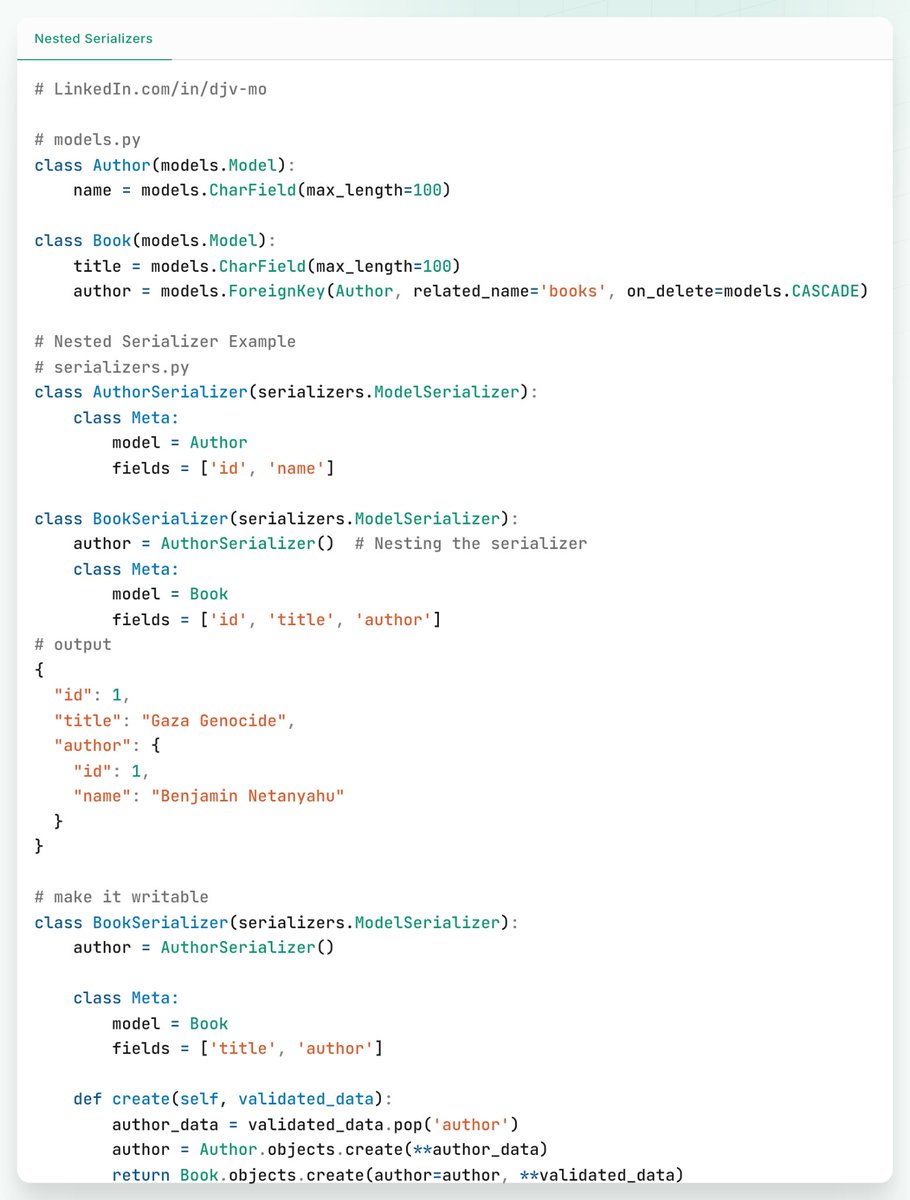
💡Django tip Nested Serializers: #python #django #Serializer
in real-world applications, your models often have relationships such as ForeignKey, ManyToManyField, or OneToOneField. DRF makes it easy to represent these relationships
#tip #tips #tipoftheday #djv_mo #100daysofcode
1
2
119

6 Aug 2025
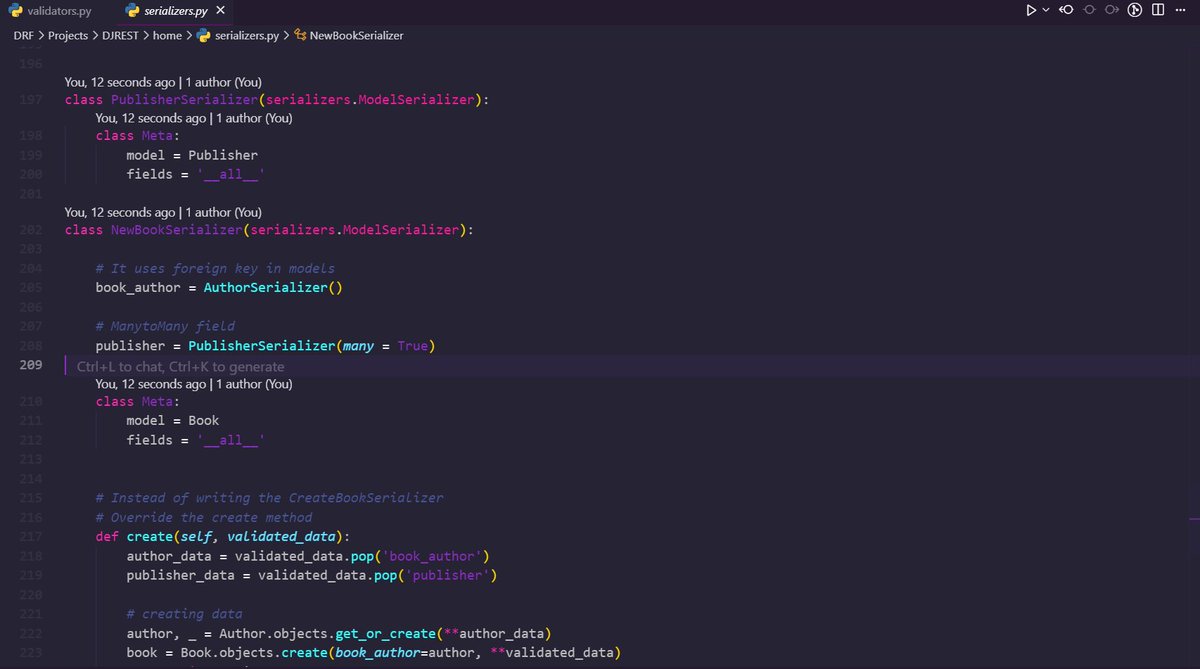
Today I completed the serializers part in Django REST Framework! 🚀
✅ Nested serializers with ForeignKey & ManyToMany fields
✅ Custom & advanced serializer validations
Learned how to handle complex data structures smoothly 🔥
#Django #BackendDevelopment #DRF
5
188

24 Jul 2025
[Articles] Virtual Tables and Django Foreignkeys
Disabling default database constraints with db_constraint=False on ForeignKey and ManyToMany fields ensures Django unmanaged virtual tables operate correctly in SQLite temp schemas. #djangonews
paultraylor.net/blog/2025/vi…
3
203

21 Jul 2025
من الأشياء المفيدة اللي تعلمتها في Django:
إذا كنت تتعامل مع علاقات زي ForeignKey، استخدم select_related عشان تقلل عدد الـ queries وتحسّن الأداء ..
مثال:
Post.objects.select_related('author')
كذا تجيب البوست والمؤلف في query واحد بدل ماتسوي اكثر من كويري..
3
160

29 Jun 2025
Limiting Content Types in a Django Model
testdriven.io/blog/django-li…
1⃣How to limit the content types in a Django model?
2⃣How to restrict Django's generic ForeignKey to a list of models?
#Django
2
7
955

15 May 2025
Django Complete Cheat Sheet.
Get the Full Django Guidebook Here:
codewithdhanian.gumroad.com/…
1. Introduction to Django
* A high-level Python web framework.
* Follows the MVT (Model-View-Template) architectural pattern.
* Emphasizes DRY (Don’t Repeat Yourself) and rapid development.
* Includes an admin panel, ORM, templating engine, and authentication out of the box.
2. Django Setup
* Install Django using pip.
* Start a project using `django-admin`.
* Create apps using `manage.py startapp`.
* Configure settings in `settings.py`.
3. Project Structure
* `manage.py`: CLI tool for project management.
* `settings.py`: Configuration for the project.
* `urls.py`: Route management.
* `asgi.py` & `wsgi.py`: Interfaces for deployment.
* `apps/`: Modular Django applications.
4. Apps and Configuration
* Each app must be added to `INSTALLED_APPS`.
* Maintain modularity using multiple apps.
* Use `AppConfig` for app-specific configurations.
5. Models
* Define data structure as Python classes.
* Map to database tables via Django ORM.
* Use fields like CharField, IntegerField, DateField.
* Define relationships: OneToOne, ForeignKey, ManyToMany.
* Migrate changes with `makemigrations` and `migrate`.
6. Admin Interface
* Register models in `admin.py`.
* Use built-in admin to manage database records.
* Customize with model admin classes.
* Requires superuser account to log in.
7. Views
* Handle request/response logic.
* Types: Function-based views (FBV), Class-based views (CBV).
* Return responses like HTML, JSON, or redirects.
* Use mixins and generic views for reusable logic.
8. Templates
* Use Django Template Language (DTL).
* Embed Python-like logic with `{% %}` tags.
* Render variables using `{{ }}`.
* Support template inheritance using `{% extends %}` and `{% block %}`.
* Include static files with `{% static %}`.
9. URL Routing
* Use `path()` or `re_path()` for defining URLs.
* Include app-specific URLs using `include()`.
* Name URLs for reverse lookups.
* Organize with namespaces if needed.
10. Static and Media Files
* Static: CSS, JS, images.
* Media: User-uploaded content.
* Configure `STATIC_URL`, `STATICFILES_DIRS`, `MEDIA_URL`, `MEDIA_ROOT`.
* Use `collectstatic` for deployment.
11. Forms and Validation
* Use `Form` for custom forms.
* Use `ModelForm` to auto-generate from models.
* Add validations using `clean()` methods.
* Render forms in templates and handle POST data.
12. Django ORM
* Abstracts SQL using Python classes.
* Retrieve records using `filter`, `get`, `exclude`, `all`.
* Create, update, delete records using ORM methods.
* Use `Q` and `F` objects for complex queries.
* Optimize with `select_related` and `prefetch_related`.
13. Middleware
* Process requests and responses globally.
* Located in the `MIDDLEWARE` list in `settings.py`.
* Use built-in middleware or create custom ones.
* Common uses: session management, authentication, security.
14. Authentication and Authorization
* Built-in `User` model and auth system.
* Support for login, logout, password change, and reset.
* Use decorators like `@login_required`.
* Group users and assign permissions.
* Extend `User` model using `AbstractUser` or `OneToOneField`.
15. Sessions and Messages
* Sessions store per-user data on the server.
* Use session middleware and context processors.
* Messaging framework enables flash messages.
* Display messages in templates.
16. Django REST Framework (DRF)
* Toolkit for building Web APIs.
* Use serializers for converting models to JSON.
* Views: `APIView`, `GenericAPIView`, `ViewSets`.
* Routers for automatic URL routing.
* Support for authentication (Token, JWT), throttling, filtering.
17. Testing
* Write tests using `TestCase` classes.
* Use Django’s test client to simulate requests.
* Load test data with fixtures.
* Run tests using `manage.py test`.
2
23
107
4,608

23 Apr 2025
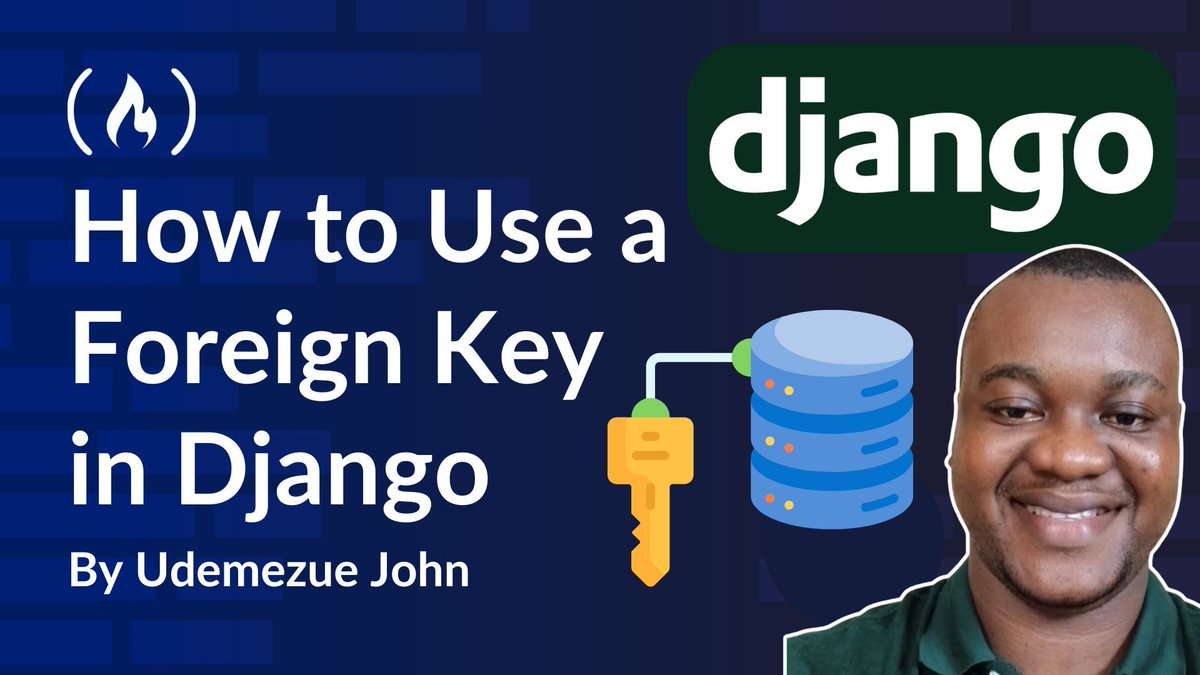
When you're coding in Django, at some point you'll need to connect various pieces of data.
And this is where ForeignKey comes in - it helps you link one model to another.
In this tutorial, @_udemezue teaches you how it works, how to access related objects, how to create foreign key relationships, and more.
freecodecamp.org/news/how-to…
1
22
151
9,495

13 Apr 2025
Day 68: Mastered SQL relationships, foreign keys, and INNER JOINs! #100DaysOfCode
Learned how to connect tables, ensure data integrity, and combine data from multiple tables.
#SQL #ForeignKey #InnerJoin #DataRelationships #DatabaseDesign #RelationalDatabase #BackendDev
1
3
18



10 Mar 2025
knowing the nature of mongodb, i was here trying to force issues with relations 🥲🥲🥲
read the docs, again. and again.
Embedded Documents 🥲
using the EmbeddedModelField instead of the usual ForeignKey, because it’s not an RDP 🤣🤣🤣
9 Mar 2025

I'm back again, re-build my django-starter repo using the django mongodb backend.
A couple of things to take note on the limitations and upcoming features ...
mongodb.com/docs/languages/p…
Summary(my POV 👀):
The Django MongoDB Backend currently faces significant limitations, particularly in transaction management, model flexibility, querying capabilities, and performance optimization.
It lacks support for many Django features (e.g., geospatial queries, advanced field types) and MongoDB-specific functionalities (e.g., aggregation operators, index types).
However, the GA release promises substantial improvements, including transaction support, advanced MongoDB features (Vector Search, encryption), and better model handling.
Post-GA plans further extend functionality with GridFS, change streams, and schema validation, making it a more robust option for MongoDB-Django integration in the future. Feature prioritization depends on user feedback via JIRA issues. @MongoDB
1
3
658

28 Feb 2025
А то был случай, что две параллельные ветки изменяли связанные части схемы БД: одна добавляла поле с NOT NULL без дефолта, другая создавала таблицу с ForeignKey на это поле. И при слиянии джанго не смог определить порядок миграций.
2
4
241